
What to Automate First: A Practical Way to Choose Your First Business Process Automation (2026)
 Jignesh Vagadiya
21/10/2026
8 min read
Jignesh Vagadiya
21/10/2026
8 min read
The usual way a business picks its first automation is by whoever complains loudest. The person who rekeys invoices every Friday afternoon gets the tool, and the process that quietly leaks a lead a day goes unnoticed. Sometimes the loudest complaint is also the right answer. More often it isn’t, and the first project ends up either too clever to finish or too small to matter.
Choosing well is worth an hour of structured thinking, because the first automation sets the tone for every one after it. A win builds trust and budget. A messy failure makes the next proposal much harder to sell. This guide gives you a simple matrix, a five-question scorecard, and an honest list of processes to leave alone. If you’d like help applying it to your own business, our business process automation service starts with exactly this kind of audit.
Start With Volume and Rule Clarity
Two properties decide most of whether a process is a good candidate. Volume is how often it happens: a task done fifty times a week is worth far more attention than one done twice a quarter. Rule clarity is whether a new staff member could do it correctly from a written checklist, or whether it relies on judgement, history and “you just know”. Plot your candidates on those two axes and the picture usually sorts itself.
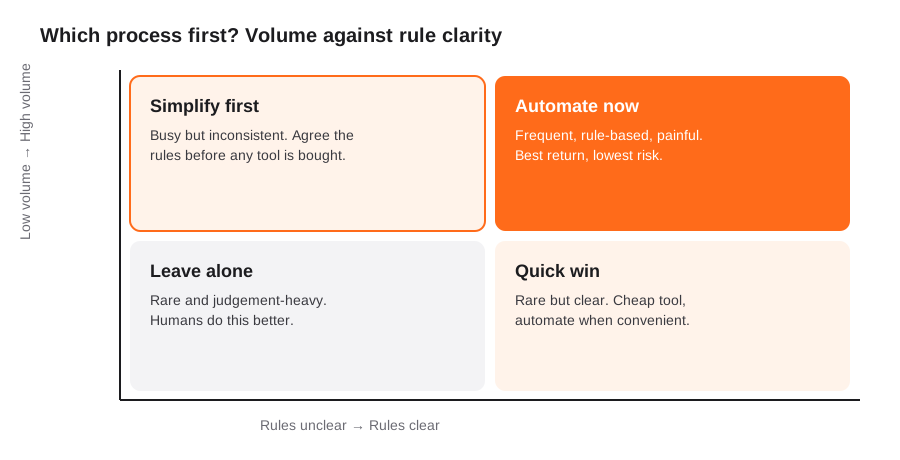
- Automate now (high volume, clear rules). Invoice entry, lead routing, order confirmations, onboarding checklists, report assembly. This is where almost every successful first project lives.
- Simplify first (high volume, unclear rules). Everyone does it a little differently. Automating it just bakes the inconsistency into software. Agree the rules, then build.
- Quick win (low volume, clear rules). Cheap to automate with a lightweight tool, but not worth big effort. Do these when you have spare capacity.
- Leave alone (low volume, unclear rules). Judgement-heavy, rare work such as handling a sensitive complaint or negotiating a contract. People do this better than software.
A Five-Question Scorecard
The matrix gets you to a shortlist. To pick between three or four decent candidates, score each from 1 to 5 on these questions and compare totals.
- How much time does it take, in total? Multiply minutes per instance by instances per month. Be honest, and ask the person who does it rather than guessing.
- How often does it go wrong? Errors cost more than time: a mistyped bank detail, a missed follow-up, a duplicate order. Frequent small errors are a strong signal.
- How clear are the rules and the exceptions? If you can list the exceptions, you can design for them. If nobody can, score it low.
- How good is the data it relies on? Automation depends on clean, consistent inputs. A process fed by free-text emails and handwritten notes is harder than one fed by form fields.
- What happens if it breaks? A failed internal report is an annoyance. A failed customer payment is a problem. Prefer a first project where a failure is cheap and visible.
Add the first three, lean towards the process with good data and a low cost of failure, and you have a defensible choice you can explain to the team. If two candidates tie, pick the one whose results will be most visible to the people who control the next budget.
Where Good First Candidates Usually Hide
Across Australian small and mid-sized businesses, the same areas tend to turn up. They are worth checking before you go looking for anything exotic.
- Money in and out. Chasing overdue invoices, matching supplier bills and coding them. See our guides on accounts receivable automation and accounts payable automation.
- Leads and enquiries. Capturing form submissions, routing to the right person, sending the first reply, and reminding people to follow up. The CRM and sales automation page covers the common builds.
- Onboarding. New customers, new suppliers and new staff all trigger the same checklist of accounts, documents and welcome messages. Our employee onboarding workflow is a worked example.
- Reporting. Pulling numbers from three systems into a weekly pack by hand is a classic, and low risk to automate. See reporting and data automation.
- Handoffs. Anywhere work moves from one person or system to another, such as a sale becoming a job or an order becoming a shipment. Handoffs are where things get dropped.
Processes to Be Careful With
Some work looks automatable but deserves caution, or at least a person in the loop.
- Decisions that affect individuals. Credit terms, applicant screening, pricing exceptions. These need human review and, increasingly, disclosure. Read our note on automated decision-making and the Privacy Act before building anything that decides things about people.
- Anything nobody can describe. If the process lives in one person’s head, document it first. Automating a mystery rarely ends well.
- Processes about to change. If a new system or a restructure is six months away, wait, or automate the stable part only.
- Sensitive communications. Complaints, bereavement, bad news. Templates can help, but sending them automatically is a risk.
Before You Build: Map It and Measure It
Two small jobs separate the projects that deliver from the ones that disappoint.
Map the process as it really runs. Not the version in the procedure manual, but what actually happens, including the workarounds. Sit with the person who does it. Write down each step, each decision, and each exception. Half the value of an automation project is what this exercise reveals; you will often find steps that can simply be deleted, which is better than automating them.
Take a baseline. Count how long the process takes and how often it errs today. Without a before number, you can’t say what the automation achieved, and you can’t tell if it is working. Our ROI framework for AI and automation goes into how to measure it properly.
Picking the Right Tool for the Job
Once you know what to automate, tool choice gets easier, and often smaller than expected. Many first projects fit comfortably inside a workflow platform such as Zapier, Make or n8n (see our comparison of workflow automation tools). Others are better handled by features already inside the systems you own, such as CRM workflows or ecommerce platform flows. Custom integration makes sense when volumes are high, the logic is complex, or you need guarantees a no-code tool can’t give, and robotic screen-scraping is a last resort when no API exists (see RPA vs API integration).
Whatever you choose, build in monitoring from day one. An automation nobody is watching eventually fails silently. Our guide to automation monitoring and alerting covers what to set up, and automation sprawl explains what happens when you don’t keep track of what you’ve built.
Frequently Asked Questions
What is the best business process to automate first?
The best first process is one that happens often, follows clear rules, relies on reasonably clean data, and is cheap to get wrong. For many Australian businesses that means invoice follow-up, lead routing, onboarding checklists or weekly reporting. Avoid starting with anything judgement-heavy, anything affecting individuals’ credit or employment, or anything nobody can fully describe.
How do I know if a process is worth automating?
Multiply the time per instance by the number of instances per month, add the cost of the errors it causes, and compare that with the build and running cost. If a process takes two hours a week and rarely goes wrong, a modest tool may still pay back; if it takes ten minutes a month, leave it. Take a baseline before you build so you can verify the saving afterwards.
Should I fix the process before I automate it?
Usually yes, at least lightly. Automating a messy process makes the mess faster and harder to change. Mapping it first often reveals steps you can remove entirely, and removing a step is cheaper and more reliable than automating it. Fix the rules, then automate the stable version.
Do I need developers to automate a business process?
Not always. Many first automations run on no-code workflow platforms or on features built into your CRM, accounting or ecommerce tools. You need developers when volumes are high, logic is complex, several systems must stay in sync, or reliability matters enough to warrant custom error handling and monitoring.
How long does a first automation project take?
A straightforward workflow between two systems can be live in a week or two once the process is mapped. A multi-step process with approvals and several integrations more commonly takes a month or two, including testing with real cases and a period of running alongside the manual process. The mapping and decision-making on your side is often the slowest part.
Where to Start
Write down five processes that eat time in your business. Score each on the five questions above. Pick the winner, map it with the person who does it, and take a baseline. That hour of work will tell you more than a month of tool demos. When you’re ready for a second opinion or a build, see how we approach business process automation, or browse our workflow automation page for common builds.
Keep reading
Related posts

Changing Live Automations Safely: Staging, Version Control and Rollback for Zapier, Make and n8n (2026)
How to draft, test, release and roll back changes to live Zapier, Make and n8n automations without breaking invoices, orders or customer…

Peppol E-Invoicing for Australian Businesses: Automating Accounts Payable From Structured Invoices (2026)
Peppol e-invoicing in Australia: what is and isn't mandatory, how to pick an access point, and how to automate accounts payable once…

Clean Your Data Before You Automate: A Practical Guide to CRM Data Cleanup for Australian Businesses (2026)
Connecting systems on messy data copies the mess everywhere. Here's how to clean, match and merge records before you automate or integrate.
Got a project you'd like to talk through?
Tell us what you're working on — we'll come back with a plan.
