
Programmatic SEO in 2026: How to Scale Pages Without Triggering Google’s Scaled Content Abuse Policy
 Jignesh Vagadiya
19/11/2026
21 min read
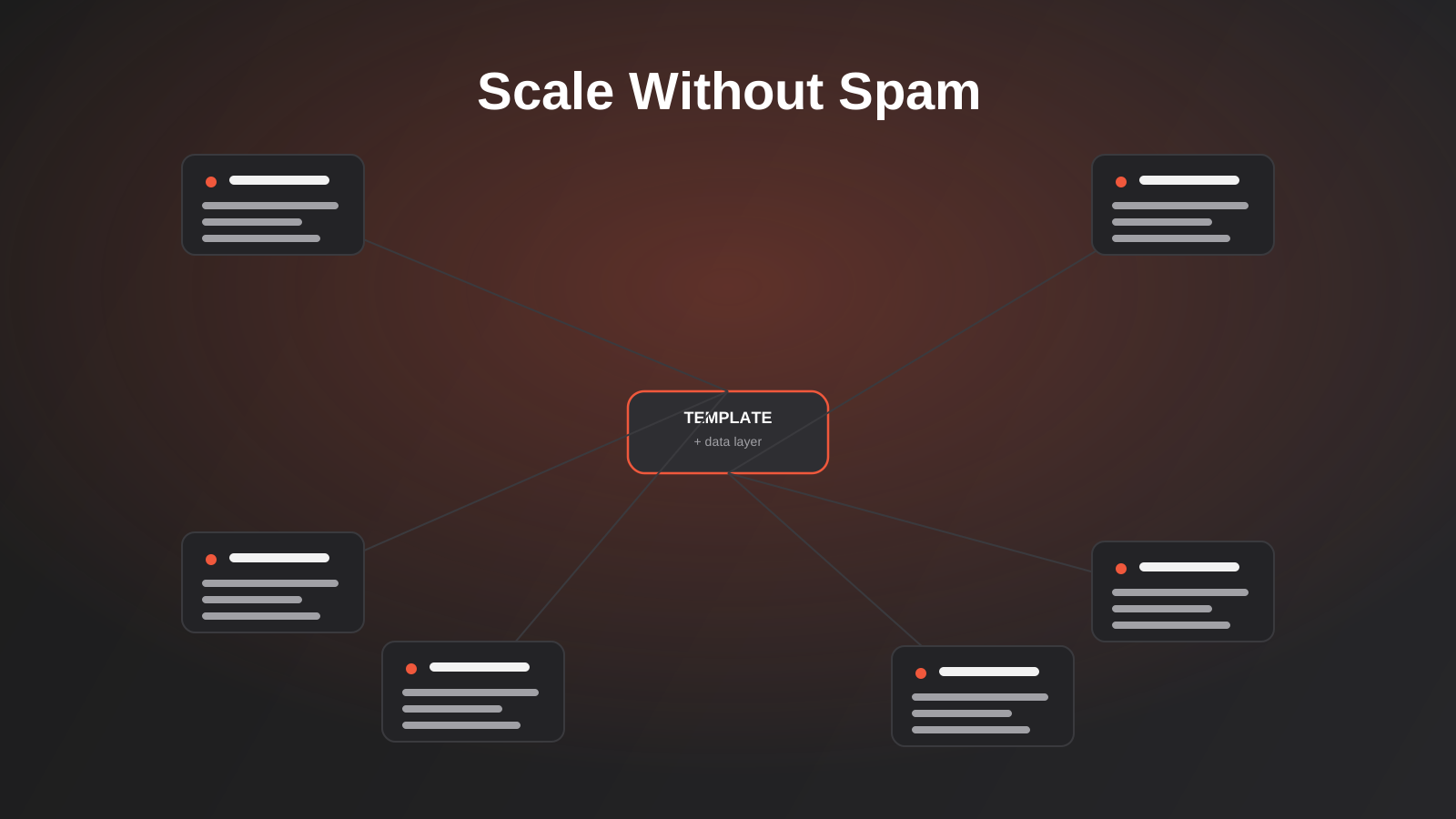
We built the hundred-odd industry and location pages on this very site using a template. Plumbers, electricians, physios, architects, Adelaide, Brisbane, Hobart — same skeleton, different variables dropped in. If you’ve ever wondered how a site ends up with pages for every suburb, every service, every “X vs Y” combination you can think of, that’s programmatic SEO, and you’ve probably built some version of it without ever calling it that.
The problem is that programmatic SEO has a reputation it only half deserves. Search a few forums and you’ll find two camps shouting past each other: one insisting it’s a growth hack that prints traffic, the other convinced Google will nuke your whole domain the moment it smells a template. Neither is quite right. Google’s spam policies have targeted mass-produced, low-value pages since March 2024 under what it calls scaled content abuse, and that policy has kept being enforced through 2026 — but the policy was never aimed at templates themselves. It’s aimed at what a lot of people use templates for.
This guide is about the difference, and about how to actually build pages at scale — location pages, comparison pages, integration pages, “best X for Y” roundups — without ending up in the pile of sites that got quietly reassessed out of the index. We’ll cover what the policy actually tests for, what a template needs to survive it, and a practical framework for deciding how far to push the pattern before you’re better off writing pages by hand.
What programmatic SEO actually is (and isn’t)
Programmatic SEO is the practice of generating a set of pages from a single template and a dataset, rather than briefing and writing each page from scratch. One layout, one content structure, one set of design decisions — and then a spreadsheet or database that fills in the variables. A locksmith directory with a page per suburb. A SaaS tool with a page for every integration it connects to. A currency converter with a page for every currency pair. An agency — like us — with a page for every industry it serves.
None of that is new. It’s how large sites have always handled combinatorial content: there’s no reasonable way to hand-write 400 suburb pages or 12,000 currency-pair pages one at a time, and nobody’s claiming you should. What changed is that AI content tools made it trivially easy to generate the words for those pages too, which meant a lot of low-effort operators started shipping thousands of near-identical pages with a handful of swapped nouns and nothing else. That’s the behaviour Google’s policy is actually responding to.
The pattern behind every pSEO page
Strip away the marketing language and every programmatic SEO page is built from three layers. A data layer — the facts specific to that one page, whether that’s a suburb’s population and nearby landmarks, a currency pair’s live exchange rate, or an integration’s supported fields. A template layer — the layout, heading structure and design that every page in the set shares. And a differentiation layer — whatever stops the page from reading as a copy-paste job with one word changed.
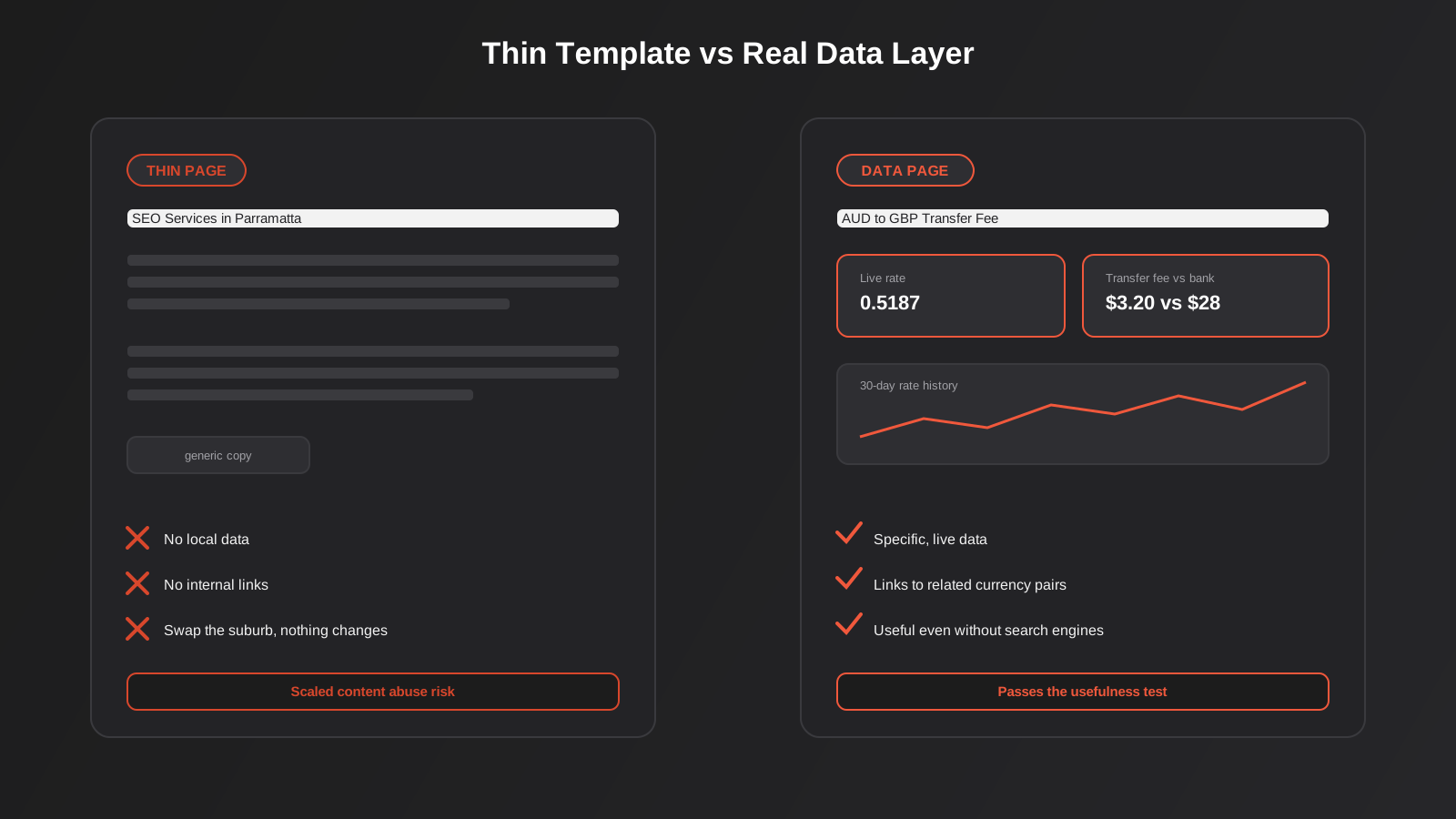
Most of the pages that get flagged as thin have a strong template layer and almost nothing in the other two. The heading says “SEO Services in [Suburb]” and the paragraph underneath is generic SEO copy that would be true of any suburb in the country. There’s no actual suburb-specific data anywhere on the page. That’s the tell, and it’s the thing a search engine (and a human reader) spots in about four seconds.
Why Australian businesses end up doing this without naming it
Most Australian SMBs who build programmatic pages don’t set out to run a “programmatic SEO strategy” — they’re a trade business wanting a page for every suburb they service, an ecommerce store wanting a page for every brand and category combination, or a B2B supplier wanting a page for every ERP system they integrate with. The intent is usually reasonable. The execution is where it goes wrong, because nobody budgeted time for the data layer — the part that actually takes effort — and the template got shipped on its own.
Where it genuinely works
The examples that keep coming up in programmatic SEO write-ups aren’t cited because they’re clever marketing. They’re cited because each one solved the data-layer problem properly, and it’s worth being specific about how.
Wise’s currency conversion pages are the most commonly referenced case. Each page covers one currency pair and carries the live exchange rate, a historical rate chart, Wise’s actual transfer fee for that corridor, and a comparison against what a bank would charge for the same transfer. That’s not filler text wrapped around a currency name — it’s a small, genuinely useful financial tool that happens to be generated from a template. Someone searching “AUD to GBP transfer fee” gets an answer a generic article can’t give them, because the numbers are live and specific to that exact pair.
Nomad List’s city pages follow the same logic for remote workers comparing places to live: cost of living, internet speed, safety indicators and climate data, one page per city, pulled from a maintained dataset rather than written fresh each time. Zapier’s integration pages — one page per app-to-app combination — work because each page states plainly what triggers and actions are actually available between those two specific tools, which is information a generic “how to automate your business” article simply doesn’t have room for.
Notice what all three have in common: the page would still be useful if search engines didn’t exist. That’s the test worth holding onto, because it’s close to the language Google itself uses when it talks about scaled content abuse — pages built primarily to manipulate rankings rather than to help the person who lands on them. A currency pair page that shows a real, current fee passes that test easily. A suburb page that repeats the same four sentences about “quality tradespeople” with the suburb name swapped in does not.
Google’s scaled content abuse policy, explained properly
Google folded scaled content abuse into its spam policies in March 2024, alongside expired domain abuse and site reputation abuse, as part of a broader push on what it calls spammy, low-value content showing up in search results. The policy was later clarified to apply regardless of how the content is produced — by a script, by a person following a template, by an AI model, or by some mix of all three. That last point matters, because it kills the idea that hiring a human writer to fill in your template gets you off the hook. It doesn’t. The test isn’t about authorship. It’s about whether the page exists to serve a searcher or to occupy a search result.
The test that actually matters
Google’s own guidance frames it as a question worth asking honestly about every page type you’re about to scale: if search engines didn’t exist, would you still build this page? Would it still carry information specific enough to be useful on its own? A currency pair page with a live rate passes. A “Best Plumbers in [Suburb]” page that’s identical to forty other suburb pages except for the suburb name does not, because nothing on it required that specific suburb to exist.
There’s a second, more practical test that’s easier to run on your own site before you publish anything: could you delete the variable from the headline and the page would still make sense? If “SEO Services in Parramatta” could just as easily read “SEO Services in Penrith” with zero other changes, you’ve built a template with no differentiation layer, and that’s the exact shape of page the policy was written to catch.
What the louder 2026 claims actually mean for you
You’ll find plenty of SEO blogs this year claiming a specific core update “targeted” programmatic pages and stripped a precise percentage of traffic from low-value sites. Treat those figures carefully — most of them come from individual agency analyses of their own client portfolios, not from anything Google has published with methodology attached. What’s actually confirmed is simpler and less dramatic: Google runs regular spam and core updates throughout the year, scaled content abuse is one of the standing policies those updates can act on, and sites built on thin templates have kept getting caught in them. You don’t need the exact percentage to know the direction. If your pages fail the “would this exist without search engines” test, they’re exposed every time Google reassesses the index — not just during one headline update.
It’s also worth knowing that a ranking drop after a broad update isn’t the same as a manual action. Search Console will tell you plainly if you’ve been hit with a manual penalty for scaled content abuse. Most of the time, what actually happens to thin programmatic pages is quieter: they just stop being considered useful enough to rank, and traffic fades rather than falling off a cliff with a label attached.
The framework that keeps a template out of trouble
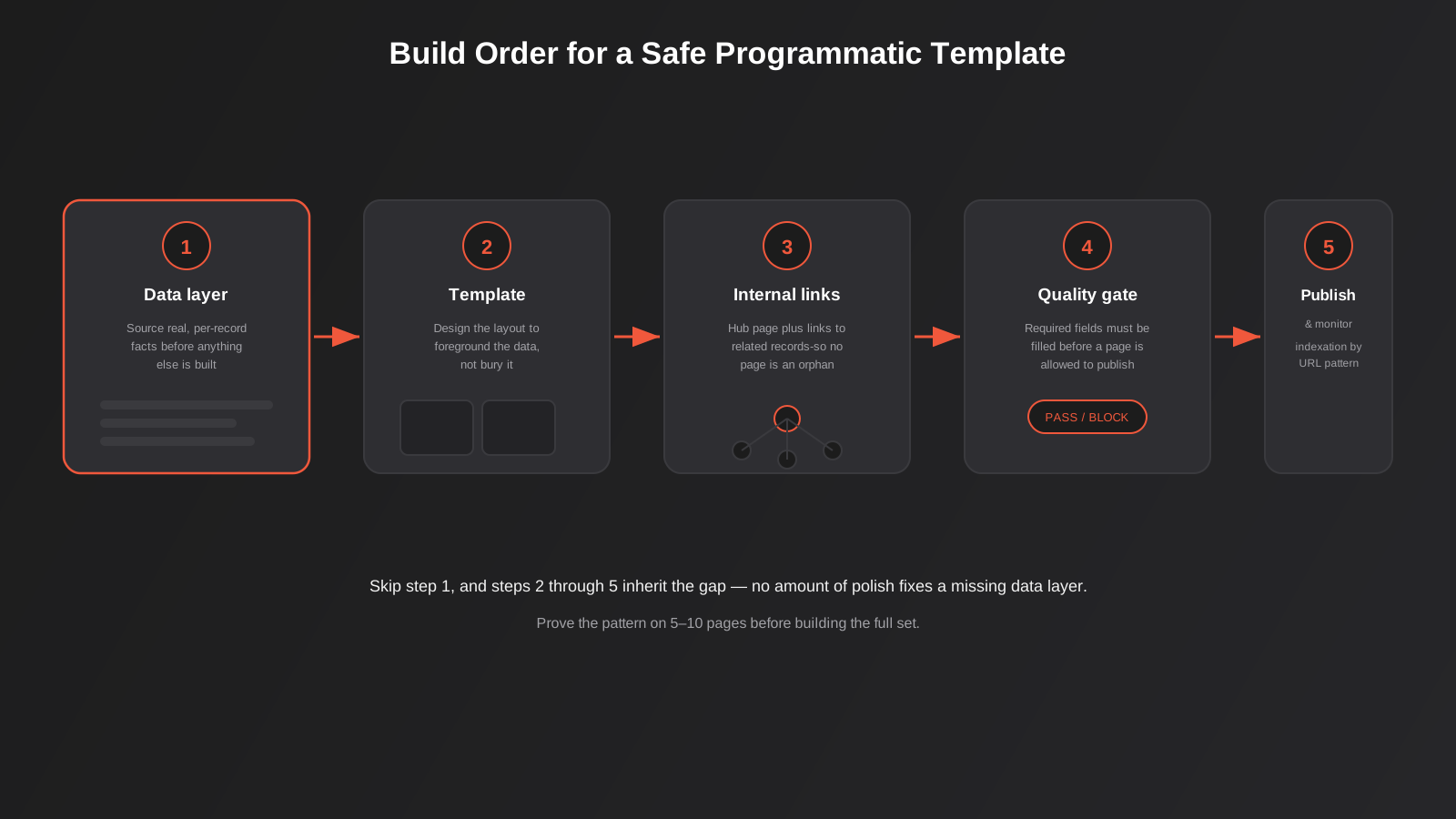
If you’re set on building a page type at scale — and for a lot of businesses, the economics genuinely justify it — the order you build things in matters more than any individual decision about word count or page design.
1. Build the data layer first, not last
Work out what’s genuinely different about each page before you touch the template. For a suburb page, that might be the actual service area boundary, the nearest landmark you work from, recent job photos from that area, or a locally relevant price range. For a comparison page, it’s the real spec differences between the two things being compared, not a rewritten version of the same five sentences for every pairing. If you can’t name at least three or four facts that are genuinely unique to each page in the set, you don’t have a programmatic SEO opportunity yet — you have a template waiting for data that doesn’t exist.
This is the step most businesses skip, because it’s the slow, unglamorous one. A content brief for forty suburb pages sounds like a day’s work if you’re just varying the suburb name in a paragraph. It sounds like a month’s work once you’re sourcing forty sets of genuinely local detail. The second number is the honest one.
2. Design the template around the data you actually have
Once you know what data exists for every record, design the template to foreground it — a comparison table, a stat block, a local detail callout — rather than burying it under generic paragraphs that could apply to any page in the set. This is where having an actual design system pays off: a consistent set of components (stat cards, comparison tables, local proof blocks) that you can drop real data into page after page, rather than re-deciding the layout every time. If you’re scaling a page type without one, it’s worth reading our guide to design systems before you commit to a template you’ll be stuck maintaining across hundreds of pages.
3. Build the internal linking structure deliberately
Programmatic pages need a hub. A directory of forty suburb pages with no parent page listing all forty, and no cross-links between nearby suburbs, leaves each page an orphan that Google has to discover on its own and has little reason to trust. Build a hub page that lists every record in the set, link outward from each page to a handful of genuinely related ones (nearby suburbs, similar integrations, comparable products), and make sure your sitemap actually reflects the structure. This is also, practically speaking, landing page work — each record in a programmatic set functions as its own landing page, which is why it’s worth treating the build the same way you’d treat any other landing page development project rather than as an SEO afterthought bolted onto an existing template.
4. Write the differentiation layer last, and make it mandatory
The copy that’s unique to each page — not the headline, the actual sentences — should be the last thing you lock in, and it should be a required field in whatever system generates the pages, not an optional one someone was supposed to fill in later. If your workflow lets a page go live with that field empty, it will go live with that field empty, and that’s how thin pages happen even on teams that know better.
5. Decide where the data actually lives before you build anything
Most programmatic sets live in one of three places: a spreadsheet someone updates by hand, a tool like Airtable with custom fields per record, or a proper database behind a custom field type in the CMS. The spreadsheet approach works fine for twenty records and falls apart at two hundred, because nobody notices when a field goes stale across a hundred rows nobody’s looking at. If you’re past the point where a person can realistically eyeball every record each month, it’s worth connecting the data source to the CMS with an actual sync rather than a manual export — a job that sits squarely in workflow automation territory, not content production. That sync is also where you catch broken records automatically, by flagging anything missing a required field before it ever reaches a live page, instead of finding out from a Search Console report three months later.
How many pages is too many?
There’s no fixed number where a template tips from “legitimate at scale” to “scaled content abuse” — a 12,000-page currency converter can be entirely legitimate and a 40-page suburb directory can be entirely thin. What actually predicts trouble is the ratio of effort to page count, not the page count itself.
Prove the pattern on a small batch first
Build five to ten pages properly before you commit to the full set. Get the data layer right, get the internal linking right, and let those pages sit for a few weeks to see how they’re indexed and whether they pick up any impressions in Search Console. This catches a bad template early, before you’ve sunk the time into populating two hundred pages with the same flaw. It’s a cheap insurance policy against the expensive version of this mistake.
Set a quality gate before anything publishes
Decide, in advance, what every page in the set must have before it’s allowed to go live — a minimum number of genuinely unique data points, at least one piece of real local or specific detail, a working set of internal links. Then actually enforce it, whether that’s a manual checklist for a batch of forty or an automated check for a batch of four thousand. The sites that get into trouble almost always skipped this step, not because nobody thought of it, but because deadline pressure made “ship now, fix later” look reasonable at the time.
Prune or consolidate what isn’t earning its place
Once a set of pages has been live for a few months, check which ones are actually getting impressions and clicks and which are sitting at zero. Pages with no data layer worth the name and no traffic to show for it are better merged into a broader page or removed entirely than left live, because a large tail of zero-performing templated pages is exactly the pattern that makes a domain look like a scaled content abuse case on the next broad reassessment — even if your best pages in the set are genuinely good.
Programmatic SEO versus two things it gets confused with
It’s not the same problem as multi-location SEO for franchises
If you’re specifically a multi-location business worried about branches cannibalising each other’s rankings, that’s a related but distinct problem with its own fixes — unique local proof per branch, correctly scoped service-area targeting, and a structure that stops Google collapsing near-duplicate branch pages into one result. We’ve covered that ground in detail in our guide to multi-location SEO for Australian franchises. This guide is about the broader methodology that applies whether your “records” are branches, integrations, comparisons or suburbs — franchise cannibalisation is one specific failure mode inside that bigger picture.
It’s not the same problem as ecommerce faceted navigation
Ecommerce category and filter pages create a related but mechanically different version of the thin-and-duplicate problem — thousands of near-identical URLs generated by filter combinations rather than a deliberate content template. The fixes overlap (canonical structure, pruning low-value combinations) but the starting point is different, since nobody designed those pages on purpose the way you’d design a programmatic SEO template. If that’s your situation, our guide to fixing faceted navigation and duplicate content goes deeper on that specific case.
The technical setup that holds a programmatic set together
Schema markup at scale
Structured data earns its keep on programmatic pages precisely because the data is already structured — you’re not writing bespoke schema for each page, you’re mapping the same schema template to the same data fields you’re already using to populate the page. A suburb service page maps cleanly to LocalBusiness or Service schema with the suburb as a served area; a comparison page maps to a comparison or FAQ schema pulling the same facts shown on the page. If you haven’t set this up yet, our guide to schema markup that actually earns rich results covers the mechanics in more depth than we can here.
Finding the actual pattern worth scaling
Before building any template, you need to confirm there’s real search demand for the pattern in the first place — not just for one or two flagship pages, but across enough of the set to justify building it. That’s standard keyword research with an extra step: clustering by the variable (suburb, integration, comparison pair) rather than by topic alone, to see which values in the set actually get searched and which would be dead weight from day one. Our keyword research guide covers the clustering process this depends on.
Monitoring indexation, not just rankings
Programmatic sets need a different monitoring habit than a normal content calendar. Check Search Console’s page indexing report by URL pattern, not just by individual URL, so you can spot when a whole slice of the set — say, every page under a particular category — starts getting excluded as “crawled, not indexed.” That’s usually the earliest warning sign that a template has quality problems, and it shows up weeks before rankings or traffic would tell you the same thing.
Keep a human in the loop on the template, even if the data is automated
Automating the data feed is fine. Automating the decision to publish without anyone looking at a sample of the output is where things go wrong quietly. Spot-check a rotating sample of live pages every month the same way you’d spot-check any other automated process — it’s a few minutes of work that catches template drift (a data field silently going blank, a comparison table breaking on edge-case values) long before it becomes a pattern across hundreds of pages.
Common mistakes we see
- Writing the template copy before the data layer exists, so the “unique” paragraph ends up generic by necessity — there was nothing specific to write about yet.
- Launching the full set at once instead of proving the pattern on five or ten pages first, then discovering the flaw only after hundreds are live.
- Leaving pages as orphans with no hub page and no cross-links, so search engines have no reliable path to discover or trust them.
- Treating “more pages” as automatically better, when a smaller set of genuinely useful pages consistently outperforms a larger set padded with near-duplicates.
- Never pruning the pages that get zero traffic after a few months, letting a dead tail drag down how the whole set gets assessed.
- Assuming a human-written template is automatically safe — Google’s policy applies to the output regardless of who or what produced it.
- Skipping schema entirely because “it’s just a template,” when the structured data is actually easier to implement at scale than on one-off pages.
Frequently Asked Questions
Is programmatic SEO banned by Google?
No. Google has been explicit that it doesn’t penalise a method of production — templates, automation and AI assistance are all fine in principle. What its scaled content abuse policy targets is pages built mainly to manipulate rankings rather than to help the person reading them, whether those pages were templated or written one at a time. A well-built programmatic set with real per-page data is no more at risk than a well-written manual page; a thin templated page and a thin hand-written page are both exposed.
How do I know if my existing pages are at risk?
Pick ten pages from the set at random and ask, for each one, what information on it is genuinely specific to that page and couldn’t be true of any other page in the set. If you’re struggling to name anything beyond the swapped-in name in the headline, that page is exposed. It’s also worth checking Search Console’s page indexing report for that URL pattern — a high proportion sitting in “crawled, not indexed” is a practical early signal, often well before anything shows up as a ranking drop.
How many data points does a page need before it’s “safe”?
There’s no official number, and anyone quoting one is guessing. The honest test is qualitative: would this specific page still be worth building if search traffic weren’t a factor at all? A currency page with a live rate and a fee comparison clears that bar easily with just two or three real data points. A suburb page with nothing but a swapped name and generic copy doesn’t clear it no matter how many paragraphs you pad it with.
Should I use AI to write the differentiation layer?
AI can help you turn structured data into readable sentences faster, and that’s a reasonable use of it — but it can’t invent the underlying data for you. If you feed an AI tool the same generic brief for every page, you’ll get the same generic output for every page, regardless of whether a person or a model typed it. The quality of the differentiation layer depends on the quality of the data you feed in, not on who or what wrote the final sentence.
What should I do with programmatic pages I’ve already published that are thin?
Start by checking which ones actually have any search visibility at all. Pages with zero impressions after several months are usually better consolidated into a broader page or removed outright than left live as dead weight. For the pages worth keeping, go back and build the data layer you skipped the first time — add the specific detail, the real comparison, the genuine local information — rather than starting a new template from scratch.
Is this worth doing for a small Australian business, or just for big sites?
It’s worth it wherever you have a genuine, repeatable pattern and real data to put behind each page — a tradie servicing twelve suburbs with real local detail for each one, a B2B supplier integrating with a dozen named systems, a retailer comparing products across a real spec sheet. It’s not worth it as a shortcut to “more pages” when you don’t have the underlying data to make each one genuinely useful. Scale amplifies whatever you build; it’s not a substitute for building something worth amplifying.
Where to start
If you’re sitting on an idea for a page type you could scale — suburbs, integrations, comparisons, product combinations — the right first move isn’t picking a template tool. It’s auditing whether you actually have enough real, page-specific data to fill forty or four hundred pages without repeating yourself. That audit usually takes a few hours and saves months of rebuilding a template that was doomed from the data layer up.
We treat this the same way we’d treat any other SEO engagement: a technical audit first, then a scoped plan for the pages worth building, then the build itself with the quality gates built in from the start rather than bolted on after the fact. If you want a second set of eyes on a programmatic idea before you commit engineering time to it, our SEO service covers exactly this kind of technical scoping, and our SEO pricing page has the real numbers for ongoing work once the pages are live.
Worth putting a number on it: our own SEO packages run from $550 to $950 a month, excluding GST, with no lock-in contract — toward the affordable end of what Australian businesses typically pay for comparable fixed-scope SEO retainers. If you’ve already got a written quote from another agency for comparable scope, send it through and we’ll do our best to beat it.
Keep reading
Related posts
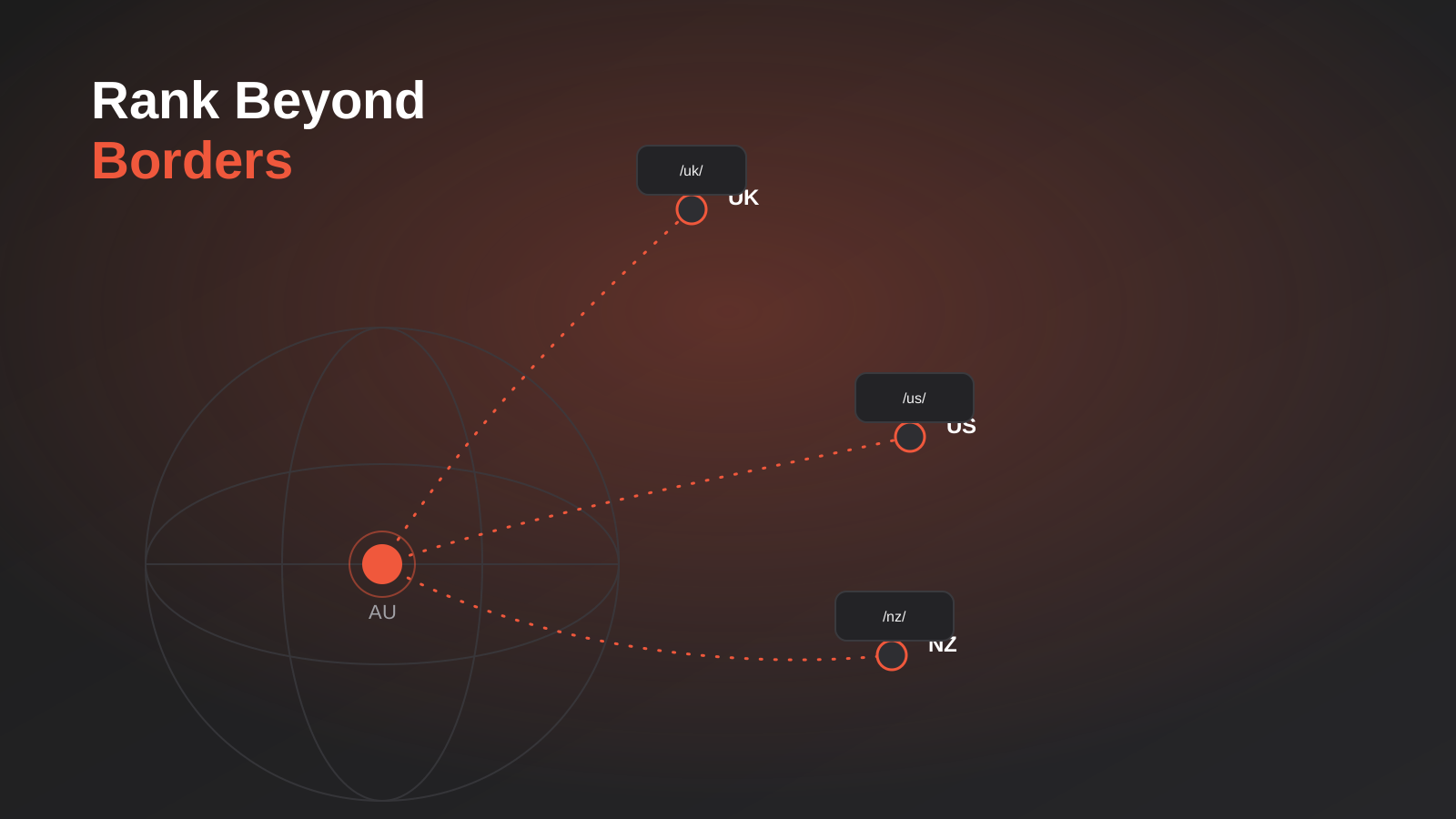
International SEO for Australian Businesses: Expanding Into NZ, UK and US Markets Without Starting From Zero (2026)
A practical guide to international SEO for Australian businesses expanding into the UK, US and NZ — site structure, hreflang and real…
Local SEO for Tradies: Plumbers, Electricians and Builders in Australia (2026)
Local SEO for plumbers, electricians and builders in Australia: GBP setup, reviews, service-area pages, citations and trust signals that win the map…

Online Review Management for Australian Businesses: A Practical 2026 Guide
A practical guide to getting more reviews, responding well, and staying ACCC-compliant — the legal line, automation, and where reviews actually convert.
Got a project you'd like to talk through?
Tell us what you're working on — we'll come back with a plan.
