
SFTP and CSV File Integrations: How Australian Businesses Connect to Suppliers, 3PLs and Banks (2026)
 Jignesh Vagadiya
19/11/2026
24 min read
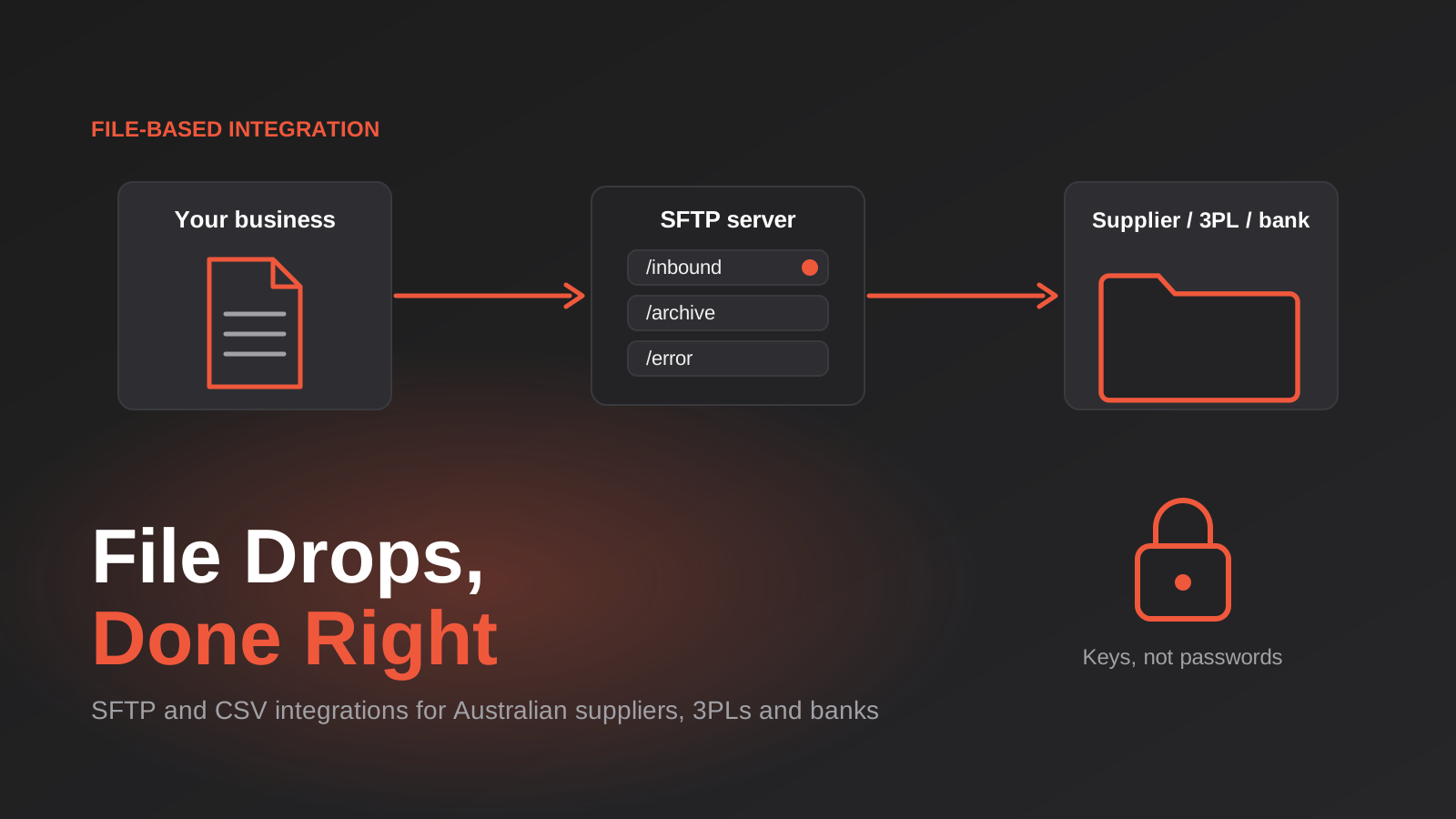
A supplier emails you a spreadsheet every Monday with new prices. A warehouse wants your orders as a CSV dropped into a folder by 2pm. Your bank accepts payment runs as a file, not an API call. Somewhere in your business, somebody downloads one of those files, opens it in Excel, tweaks it and uploads it somewhere else. It works until the week that person is on leave.
Everyone talks about APIs and real-time sync, and for good reason. But a surprising amount of Australian trade still moves as flat files over SFTP: supplier price lists, stock-on-hand extracts, despatch confirmations from third-party logistics providers, remittance files, payroll exports. The partner on the other end often has no developer, no API and no plans to get either. The file drop is the integration, and you have to meet them there.
This guide is about doing file-based integration properly. We cover how SFTP actually works, how to read and write CSVs without corrupting them, how to tell when a file is finished arriving, how to stop the same file being processed twice, and what to do when the data in it is wrong. It is the unglamorous plumbing behind a lot of our ERP integration work, and most of the expensive failures we see come from skipping a step that takes an hour to get right.
Why files are still everywhere
The partner decides the format, not you
When you integrate with a modern SaaS platform you get to choose between a webhook, a polling API or a connector. When you integrate with a wholesaler, a freight forwarder or a legacy warehouse system, you get what they have. Often that is an SFTP account and a document describing the columns. It is not a sign of a backwards partner. File exchange is simple to operate, easy to audit (the file is the evidence), and works with systems that were built long before REST existed.
It also shifts risk. A shared folder means neither side needs to be online at the same moment. If your system is down for an hour, the file is still there when you come back. That tolerance for downtime is one reason large organisations keep using it, and one reason it is worth taking seriously instead of treating it as a stopgap.
Where we see file integrations most
- Supplier price and stock feeds that update your online store or ERP on a schedule.
- Order files sent to a 3PL or warehouse, and despatch or tracking files coming back.
- Bank and payment files, including direct-entry payment batches and reconciliation extracts.
- Payroll, rostering and timesheet exports moving between a workforce system and accounting.
- Catalogue and product data sent to marketplaces or retail partners.
- Nightly extracts from an old on-premise system that has no outbound API at all.
Retail suppliers who trade with the big grocers and hardware chains will also meet EDI, which is a stricter cousin of the same idea. We cover that separately in our guide to EDI integration for Australian suppliers. Here we stay with the plainer case: a CSV or fixed-width file and a folder.
How an SFTP file integration actually works (and what it is not)
SFTP, FTP and FTPS are three different things
The names get used interchangeably, which causes real confusion when you are agreeing terms with a partner. Plain FTP sends everything, including the password, unencrypted, and should not be used for business data. FTPS is FTP wrapped in TLS, the same encryption family as HTTPS. SFTP is a different protocol altogether that runs over SSH, usually on port 22. Despite the similar name, SFTP is not FTP with security added; clients that speak one do not automatically speak the other.
When a partner says “we use FTP”, ask which one, and whether they can offer SFTP. Most modern systems can. If a partner genuinely only offers plain FTP, treat that as a risk to record rather than something to wave through, and keep the data in that channel to the minimum necessary.
Keys beat passwords
SFTP supports password login and key-based login. Key-based login uses a key pair: a private key that stays with you and a public key the partner installs on their server. It is harder to guess, harder to leak through a shared spreadsheet of credentials, and easier to rotate. Where you have the choice, use keys, give each integration its own key rather than reusing a staff member’s, and store the private key in a proper secrets store instead of a script or a shared drive.
Verify the server’s host key the first time you connect and pin it. A job that quietly accepts any host key will keep working happily if someone intercepts the connection. That check is a one-off task and it is skipped far more often than it should be.
Who hosts the server?
Sometimes you connect to the partner’s server. Sometimes you host one and they connect to you. Sometimes both sides use a managed file-transfer service in the middle. Each choice shifts who carries the operational burden. If you host, you own uptime, patching and access control, which is more work than it sounds. If you connect out, you depend on their availability and any IP allow-listing they require, which means your outbound address needs to stay stable. Ask early, because a partner that wants to allow-list a fixed IP rules out some serverless setups without a fixed outbound address.
A folder layout that earns its keep
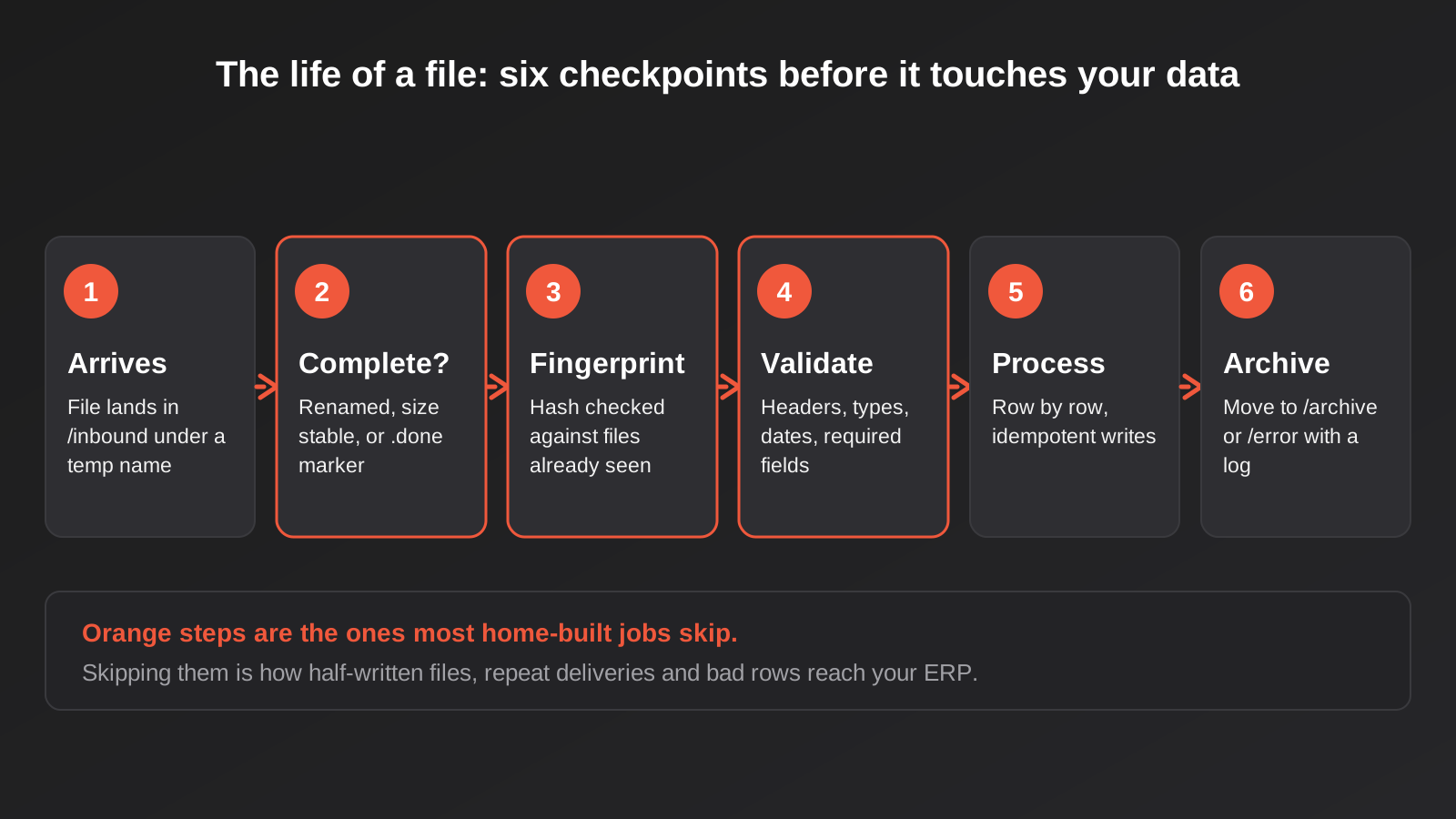
Whether you host or not, mirror the same simple structure on your side: an inbound folder where new files appear, a processing area, an archive for completed files and an error folder for files that failed. Files should never be deleted on success. They should be moved. That single habit gives you an audit trail, lets you replay a day’s processing after a bug fix, and answers the question “did the supplier actually send us that file?” without an argument.
Reading and writing CSVs without corrupting them
CSV looks like the simplest format in the world. It is also the source of most data-quality problems in file integrations, because there is no single standard that every system follows. Agree the details in writing with your partner before you write any code.
Encoding, delimiters and line endings
Decide the character encoding (UTF-8 is the sensible default), the delimiter (comma, semicolon, tab or pipe), the quote character and the line ending. Files saved from Excel using the “CSV UTF-8” option often begin with an invisible byte-order mark, which can make the first column header look different to your code and cause a mysterious “column not found” error. Strip it on read. Windows and Unix line endings differ, and a parser that expects one will sometimes choke on the other.
Commas inside values are the classic trap. A product description like “Widget, large” must be wrapped in quotes or it splits into two columns. Use a real CSV library on both ends and never build rows by joining strings with commas. Hand-rolled splitting works for months and then fails on the first product name with a comma in it.
Dates, numbers and the things Excel quietly ruins
Dates are the most common source of silent errors. In Australia 03/04/2026 means 3 April, while a system configured for US settings reads it as 4 March. Insist on an unambiguous format, ideally ISO 8601 (2026-04-03), and state the time zone if there is a time. Times shift in surprising ways across states and daylight saving, so write the zone down rather than assuming it.
Excel is the other regular offender. If anyone opens and re-saves a file in Excel before it goes anywhere, it may strip leading zeros from codes and postcodes (a postcode of 0800 becomes 800), convert long numeric IDs and barcodes into scientific notation, and rewrite dates in the local format. Where a human is in the loop, treat a file touched by Excel as untrusted and validate it like any other. Better still, remove the human: have the source system write the file directly.
Decide how money and quantities are written, too. Use a full stop as the decimal separator, no thousands separators, and be explicit about whether prices include or exclude GST. A supplier column called “price” with no GST note is a mismatch waiting to hit your margins.
Headers, column order and change
Match columns by header name, not by position. If your code assumes column four is the SKU, it will keep running after the supplier inserts a new column three, and it will start reading the wrong data without raising a single error. Check that the headers you need are present and in a form you recognise, and fail loudly if they are not. Ask the partner how much notice they give before changing the layout, and keep a copy of the specification they gave you.
Fixed-width files, where each field occupies a set number of characters, are still common in banking and older systems. The same rules apply with extra care: one stray character shifts everything after it. Write the layout down as a table and test with real samples.
Is the file actually finished?
This is the problem that catches people out in production and almost never shows in testing. When a partner uploads a large file, it appears in the folder immediately and keeps growing for seconds or minutes. If your job fires the moment the file name appears, it reads half a file, processes the rows that exist and silently ignores the rest. Next week nobody can explain why the supplier’s stock numbers are wrong.
Three ways to know a file is complete
- Rename on completion. The sender uploads to a temporary name (for example
orders.csv.tmp) and renames it once the upload finishes. Your job only picks up final names. This is the cleanest approach when the partner will do it. - A marker file. The sender uploads the data file, then a tiny second file (such as
orders.done) to say it is ready. Your job waits for the marker. - A stability check. If the partner cannot change anything, check that the file size and modified time have not changed across two polls a short interval apart, then process it. It is the weakest option but better than nothing.
Add a footer or a row count where you can. A trailer line that says “1,248 rows” lets you compare what you read against what the sender claimed to write, which catches truncation that a size check will miss.
Processing the same file twice
Files get redelivered. The partner re-sends Tuesday’s file on Wednesday because their job failed. Your own job crashes halfway through and restarts. Someone drags a file back into the inbound folder to “try it again”. If processing a file creates orders, invoices or payments, doing it twice is expensive. The general principle is covered in our guide to idempotency and retries; here is how it applies to files.
Fingerprint the file
Compute a hash of the file contents (SHA-256 is fine) and record it with the file name and arrival time. Before processing, check whether you have seen that hash. A repeated hash with a different name is a duplicate delivery; the same name with a different hash is a corrected file. Those two cases deserve different handling, and a log that records both lets you tell them apart.
Give every row a stable key
File-level checks are not enough, because a corrected file legitimately contains rows you have already processed. Every business record needs a natural key you can look up: an order number, a supplier SKU, an invoice reference. Process each row as an upsert against that key rather than a blind insert. If the order exists, update or skip it according to rules you have decided in advance. If it does not, create it. Re-running the whole file then becomes safe.
Be careful with files that carry deltas instead of full state. A stock file that says “sold 3” applied twice is wrong, while a file that says “on hand: 17” applied twice is harmless. When you have a choice, ask for the state, not the change. When you do not, track which files have been applied and refuse to apply one out of sequence.
Validating before you trust it
A file arrives with 4,000 rows. Fifteen are bad. What should happen? The answer is a policy decision, and you want to make it before the first bad file arrives, not during.
Validate in layers
- Structure: is it the right file, with the expected headers, encoding and a plausible row count?
- Types: are numbers numeric, dates real dates, required fields present?
- Business rules: does the SKU exist, is the price positive, is the quantity within a sane range, is the order already shipped?
- Sanity against history: is today’s file wildly larger or smaller than usual, or does it change every price by 40 per cent?
The last layer is the one that saves you from the worst incidents. A supplier file with every price set to zero is structurally valid. A rule that says “hold the file if more than 5 per cent of prices change by more than 20 per cent” stops it before it reaches your store.
Reject the file or reject the row?
Some data should be all-or-nothing. A payment batch should not be half-processed. Other data is better handled row by row: apply the good rows, quarantine the bad ones in a separate error file with a reason against each, and alert a person. Pricing and stock updates usually suit the second approach. Orders to a 3PL usually need a human to look at failures promptly, because every rejected row is a customer waiting. Whichever you choose, make it explicit and write it in the runbook. The pattern of pausing for review is the same one used in any well-designed approval workflow: a person sees the exception, not the whole batch.
Mapping files to the systems that use them
The file is only the delivery vehicle. The value is in what happens when it meets your ERP, store or accounting system. Four patterns cover most of what we are asked to build.
Supplier price and stock feeds
The supplier drops a file; you update products. The traps here are matching and timing. Match on a reliable identifier such as the supplier’s product code or the barcode, never on the product title. Decide what happens to products that disappear from the feed: discontinued, temporarily out of stock or just omitted this week? Treating a missing row as “stock zero” is sometimes right and sometimes catastrophic. And write price changes to a staging table first so you can review the diff before it goes live.
Orders out to a warehouse
Your store or ERP exports new orders to the 3PL’s inbound folder. Each file needs a unique name and a stable order reference. Include only orders in the state the warehouse expects (paid, not already sent) and mark them as exported in your own system once the upload is confirmed, not before. Otherwise a failed upload quietly drops orders or a retry sends them twice. Addresses matter here, since a bad one costs you a failed delivery, so validate and standardise them before they leave your system.
Despatch and tracking back in
The warehouse sends confirmation files with tracking numbers and shipped quantities. You match them to orders, update status, and notify the customer. Partial shipments are the usual surprise: a file line for 2 of 3 items means a partially fulfilled order, not a complete one. Plan the logic for split shipments and backorders, because they will arrive in week one.
Bank and payment files
Australian bulk payments commonly use the direct entry format, widely known as an ABA file, which is a fixed-width text file with strict record layouts. Banks differ in how they accept it (some through an online banking upload, some through a managed channel), so check the specifics with yours. Treat a payment file as the highest-risk file you will ever generate. Keep a human approval step, run a dry validation against the bank’s requirements, never regenerate and resend without checking the first one, and keep a tight audit record of who approved what. Our automation work routinely includes this kind of approval step between a generated file and its release.
File drop, API or EDI: choosing the lightest option that works
It is tempting to treat files as the poor relation of APIs. Sometimes they are. If both sides have good APIs and you need near real-time data, build the API integration. But insisting on an API when the partner offers a perfectly good file drop can add months and cost without improving anything. The useful question is what speed, visibility and effort the situation genuinely needs.
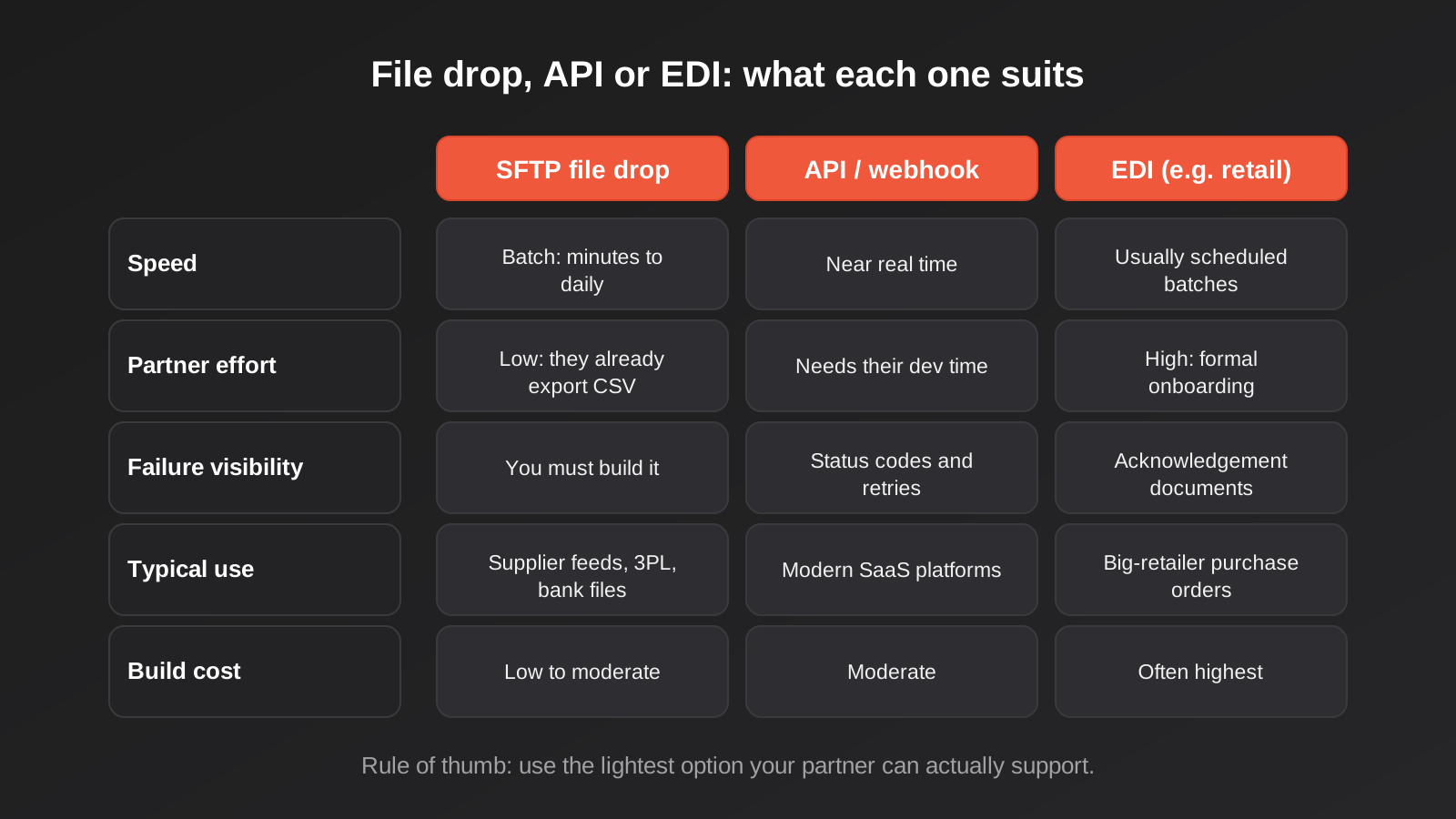
A file drop wins when the data changes in batches anyway (a daily price list does not benefit from sub-second delivery), when the partner already exports files and cannot change, or when you want a clear paper trail. An API wins when someone is waiting on the answer, such as a stock check at checkout. EDI is usually dictated by a large buyer rather than chosen. A common and sensible hybrid is a file in from the supplier, an API out to your store, with a small piece of code in between that does the checking.
If you do move to APIs later, the file-based work is not wasted. The row keys, validation rules and field mappings you built carry across almost unchanged.
Security and privacy
Files are easy to move and therefore easy to leak. Customer exports, order files and payroll data are personal information. A few controls cover most of the risk.
- Least privilege. Give each partner an account that sees only its own folder, with write access where it sends and read access where it collects. No shared logins.
- Encrypt in transit and, where sensitive, at rest. SFTP covers transit. For highly sensitive files, some partners also require the file itself to be encrypted (PGP is common), so agree who holds which keys.
- Rotate and expire. Keys and passwords change when staff or vendors change. Put a date in the calendar, and remove access the day a relationship ends.
- Limit what is in the file. If the 3PL needs a name, address and phone, do not send the customer’s full history. Fewer columns mean less to lose.
- Do not keep files forever. Archives are useful, but an archive of customer data from six years ago is a liability. Set a retention period and delete on schedule, in line with your obligations under the Australian Privacy Principles.
- Watch the logs. Failed logins, unexpected source addresses and files arriving at odd hours are worth an alert.
Be wary of personal information landing in a general-purpose automation tool’s logs or execution history. Many workflow platforms store the contents of each run for debugging. If a customer file passes through one, check how long that history is kept and who can read it.
Monitoring: the file that never arrives
Most monitoring is built to catch errors. File integrations have an extra failure that raises no error at all: nothing happens. The supplier’s job fails, no file arrives, your job runs on schedule, finds an empty folder and reports success. Three weeks later someone notices the stock numbers have not moved.
The fix is an expectation, not an exception. For every inbound feed, record when you expect a file and how late is too late. If it has not arrived by then, alert a named person. Do the same for outbound files: confirm the partner collected them, where they offer any acknowledgement. Then monitor the volume as well as the presence. A file that arrives on time with 12 rows instead of 4,000 is a problem the schedule cannot see.
Send alerts somewhere a person will read them, with enough context to act: the feed name, the expected time, the last successful file and a link to the runbook.
Schedules, time zones and public holidays
Partners send files on their own schedule, which may be set in a different time zone from yours. A “2pm cut-off” means different things in Perth and Sydney, and shifts by an hour for part of the year when daylight saving applies in some states and not others. Public holidays vary by state, and a 3PL in Victoria may not despatch on a day your Queensland store is open. Put the cut-off times, time zone and holiday rules in writing for each partner, and build your expected-arrival alerts from that table instead of from guesswork.
What a file integration costs
File-based work sits at the cheaper end of integration because the partner does little or nothing. Our broader guide to how much system integration costs in Australia sets out the published market ranges; the short version is that a simple custom integration between two platforms is commonly estimated at roughly $5,000 to $15,000, while middleware-based builds for a small number of well-defined flows typically land in the low thousands. A scheduled file import that follows the checkpoints above usually belongs in the lower half of those bands, and a straightforward supplier feed built on a workflow platform can come in lower still. Treat those as planning figures, not quotes.
What moves the price within the range:
- How many partners and distinct file formats you are handling. Each one is its own specification, its own quirks and its own test files.
- Whether the data needs matching or cleaning first. A supplier feed with inconsistent product codes costs more than one with clean identifiers.
- How much validation and exception handling you want. The happy path is cheap; the careful path is where the value is.
- Direction. One-way feeds are simpler than two-way flows with confirmations coming back.
- Hosting, monitoring and who is on call when a feed fails.
The running costs are small but real: a small amount of hosting or a managed file-transfer subscription, storage for archives and someone responsible for the alerts. Budget for the maintenance too, because partners change their files without warning more often than anyone admits.
Common mistakes
- Processing a file the moment its name appears. Half-uploaded files produce half-processed data. Use a rename, a marker or a stability check.
- Matching columns by position. A new column from the supplier shifts everything and nothing complains. Match by header and fail loudly.
- Deleting files after processing. Move them to an archive. You will need the evidence, or a replay, sooner than you expect.
- No duplicate protection. Without a file hash and stable row keys, a re-sent file creates a second batch of orders or payments.
- Treating a missing row as zero stock. Absent does not always mean out of stock. Agree the rule with the supplier.
- Trusting a file after it has been through Excel. Leading zeros, long IDs and dates are the usual casualties. Validate it anyway.
- Ambiguous dates and GST. Insist on ISO dates and a written statement of whether prices include GST.
- Alerting only on errors. The failure that hurts most is the silent one: no file at all. Alert on absence and on unusual volume.
- Shared credentials and passwords in scripts. Use a key per integration, kept in a secrets store, and rotate it.
- Marking orders as sent before the upload is confirmed. A failed transfer then loses orders without a trace.
- Keeping every file forever. Archives holding customer data need a retention period and a scheduled delete.
Frequently Asked Questions
Is SFTP still a sensible choice in 2026?
Yes, where the partner supports it and the data moves in batches. It is encrypted, widely supported and easy to audit. The weaknesses are not in the protocol but in what is built around it: completeness checks, duplicate handling, validation and monitoring. Get those right and a file drop is dependable. If you need near real-time data or a status response to every message, an API is a better fit.
What is the difference between SFTP and FTPS?
SFTP runs over SSH, typically on port 22, and is a different protocol from FTP. FTPS is regular FTP with TLS encryption added. Both encrypt the connection, but they use different ports, different client settings and different authentication models. Ask your partner exactly which one they mean, because a tool configured for one will not connect to the other.
Can Zapier, Make or n8n handle SFTP file integrations?
Many workflow tools can watch an SFTP folder, read a CSV and pass rows on to other apps, and for small volumes and simple rules that can be perfectly adequate. Limits appear with large files, strict ordering, heavy validation or tight audit requirements, where a purpose-built job is easier to control. We use these platforms where they fit and custom code where they do not.
How do I stop duplicate files creating duplicate orders?
Use two layers. First, record a hash of each file and refuse to process one you have already handled. Second, give every row a stable business key, such as an order number, and write each row as an upsert so processing the same row twice changes nothing. File-level checks catch redelivery; row-level keys catch corrected files that overlap with earlier ones.
What should happen when some rows in a file are invalid?
It depends on the data. Payment batches should usually be all-or-nothing. Price and stock updates can often apply the good rows and quarantine the bad ones in an error file with a reason for each, plus an alert to a named person. Decide the rule per feed before launch and write it in the runbook, so nobody is improvising when a bad file arrives at 6am.
How long should I keep archived files?
Long enough to investigate problems and meet any record-keeping obligations, and no longer. Files containing personal information should not sit in an archive indefinitely, so set a retention period for each feed and delete on a schedule. Check your tax, payroll and contractual requirements with your accountant or adviser before settling on a number, because they differ by data type.
Where to Start
You do not need to rebuild everything. Start by listing every place a file moves in or out of your business: who sends it, who receives it, how often, what format, and what breaks if it is a day late. That list alone usually shows two or three feeds that depend on one person’s memory or a spreadsheet saved on a desktop. Pick the one with the biggest cost of failure, write down its file specification, and add the checkpoints from this guide: completeness, fingerprint, validation, archive and an alert for the file that never arrives.
If you would like a second opinion on a particular feed, or want to talk through whether a file drop or an API suits a partner of yours, we are happy to have that conversation with no obligation. Our automation pricing page explains how we scope this kind of work.
Because we run lean as a specialist agency rather than carrying a large account-management layer, our fixed quotes typically come in below the Australian averages covered in this guide. If you’ve already got a written quote from another agency for comparable scope, send it through and we’ll do our best to beat it.
Keep reading
Related posts
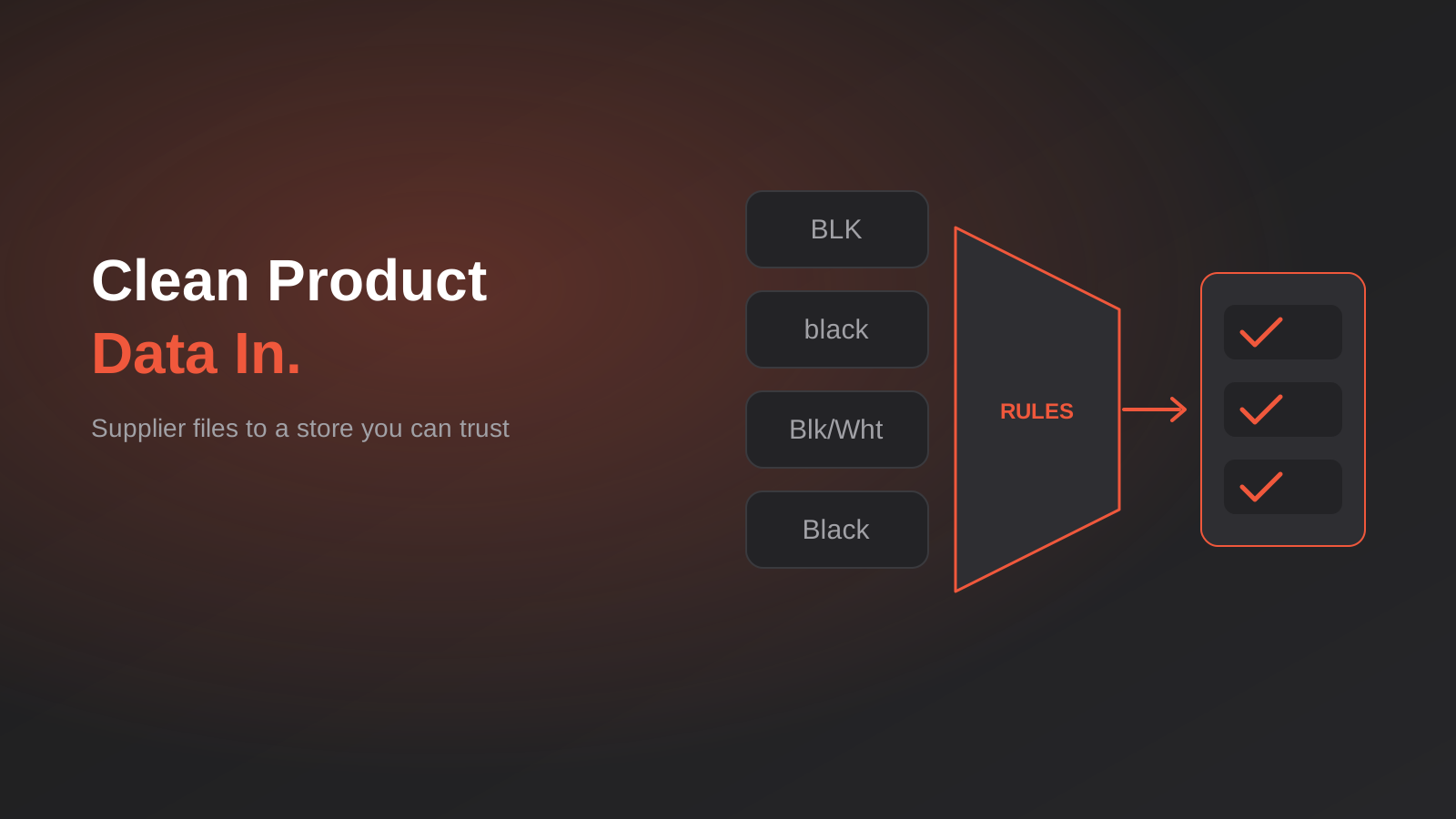
Product Data Management for Australian Ecommerce: Supplier Feeds, Staging and When You Actually Need a PIM (2026)
How to turn messy supplier files into clean product data: staging, validation, GTINs and whether you really need a PIM. A guide…
Single Customer View for Australian Businesses: Matching and Merging Records Across Shopify, Xero and Your CRM
How to build a single customer view in Australia: match and link duplicate customers across Shopify, Xero and your CRM without merging…

Australian Address Validation: PAF, G-NAF and How to Stop Bad Addresses Entering Your Systems (2026)
How to validate Australian addresses with PAF and G-NAF, where to check them in your workflow, and how to store clean data…
Got a project you'd like to talk through?
Tell us what you're working on — we'll come back with a plan.
