
Product Data Management for Australian Ecommerce: Supplier Feeds, Staging and When You Actually Need a PIM (2026)
 Jignesh Vagadiya
16/11/2026
27 min read
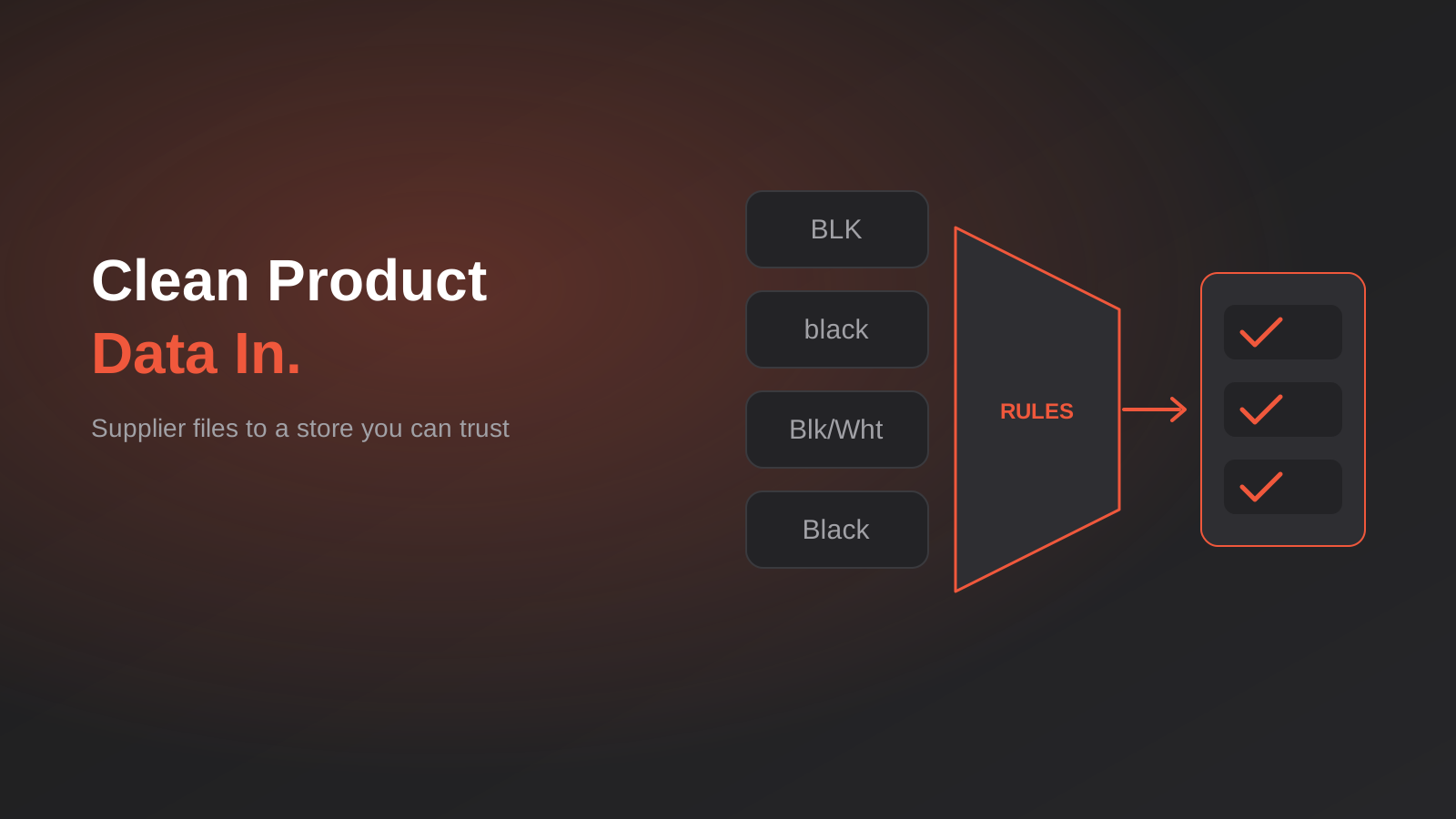
A supplier emails you a fresh product file on a Monday. It has 1,400 rows, a column called “Colour” that contains “BLK”, “Black”, “black ” and “Blk/Wht”, and a price column that nobody has told you is ex-GST. By Wednesday some of those rows are live on your store, some are sitting in a half-finished import, and your Google Merchant Centre account has started disapproving products for missing identifiers.
None of that is a Shopify problem, a WooCommerce problem or even a spreadsheet problem. It’s a product data problem, and it tends to arrive quietly. A store with 60 products doesn’t have it. A store with 1,500 products from five suppliers, two sales channels and a marketplace feed has it every single week, and usually blames the wrong thing.
This guide is about managing product data for Australian ecommerce and wholesale businesses: how to take messy supplier files, turn them into clean, consistent product records, and publish them to your store and other channels without breaking anything. It also answers the question we get asked most often in this area: do you actually need a PIM (product information management system), or will a better process and a small amount of automation do the job? We’ll be upfront that for a lot of businesses the answer is the second one.
What “product data” actually includes
Most people think of product data as the stuff on the product page: title, description, price, a few photos. That’s the visible layer. Underneath it sits a much bigger set of fields that other systems depend on, and these are the ones that cause trouble when they’re wrong.
- Identity: your SKU, the supplier’s product code, the manufacturer part number (MPN), the barcode (GTIN), and sometimes an internal ERP item number.
- Structure: which items are variants of the same product, which are bundles, which are kits made of other SKUs.
- Commercial: cost price, trade price, RRP, GST treatment, price breaks by quantity, minimum order quantities.
- Logistics: weight, dimensions, carton quantities, country of origin, dangerous goods flags, shipping class.
- Descriptive: title, short and long description, attributes such as material, size, compatibility, specifications.
- Media: images, spec sheets, installation guides, safety data sheets, videos.
- Channel-specific: category mapping, marketplace attributes, Google Shopping fields, hidden or visible flags per channel.
Every one of those fields has an owner somewhere, whether that’s the supplier, your buyer, your accounts system or your marketing person. The trouble starts when two people can change the same field and nobody has decided which one wins. We’ve written about that exact problem for customer records in our guide to two-way sync and field ownership, and product data behaves the same way. Decide who owns each field first. Tooling comes second.
Why supplier data makes product data management hard
Supplier files aren’t messy because suppliers are careless. They’re messy because each supplier built their file for their own purposes: their ERP export, their price list for dealers, their sales rep’s quoting sheet. It was never designed to be your catalogue. When you take five of those files and try to treat them as one dataset, the differences show up in predictable places.
Identifiers that aren’t stable
The single most damaging problem is a product code that changes or gets reused. A supplier discontinues an item, then recycles the code for something different two years later. Or they add a letter to the end of every code when they change warehouses. If your catalogue matches on supplier code, your next import either creates 400 duplicates or overwrites the wrong products.
The fix is to give every product a key that you control and never change, then store the supplier’s code as an attribute that maps to it. Your own SKU or an internal ID is the anchor. Supplier codes, MPNs and barcodes are lookup fields that point at it. That sounds like extra work until the first time a supplier renumbers their range and your orders, inventory and ad feeds carry on as if nothing happened.
Units, pack sizes and prices that mean different things
A price column might be per unit, per carton, per 100, or per metre. Dimensions might be in millimetres in one file and centimetres in the next. “Pack of 10” might appear in the title, in a separate column, or not at all. A cost price might include GST, exclude it, or be a trade price that excludes it while the RRP column includes it. Mixing those without noticing is how a $4.50 item ends up listed at $45, or how a margin quietly shrinks by ten percent.
Treat every numeric column as suspect until you know its unit. Write the unit into your own field name (for example “cost_ex_gst_per_unit”) so nobody downstream has to guess. We go through the supplier-price side of this in more detail in our walkthrough of bulk updating Shopify prices from a supplier price list.
Variants described three different ways
Some suppliers give you one row per variant with a parent code. Some give you one row per size with colours spread across columns. Some give you a separate row for each colour and size combination with no indication that they belong together. Your store platform expects a parent product with variants and option values, so someone or something has to work out the grouping. When that grouping is done by hand in a spreadsheet, it’s slow and it drifts the moment the supplier adds a new colour.
Values with no standard vocabulary
“BLK”, “Black”, “Jet Black” and “Matte Black” might be four colours or one. “Stainless”, “SS”, “304 Stainless Steel” and “Stainless Steel 304” might be the same finish. If these go straight into your store as option values, your filters fall apart: a shopper filtering by colour sees fourteen near-duplicates, and the Google feed ends up with attribute values it doesn’t recognise.
Images and documents that live somewhere else
Supplier images arrive as links to a shared folder, a zip file, a portal login or an FTP server. File names don’t match product codes. Some images are 400 pixels wide, some have watermarks, some belong to a different colour. Spec sheets are PDFs that change without notice. Pulling all of this together manually is usually the slowest part of adding a new range.
The idea that fixes most of it: a staging layer
Whether you use a spreadsheet, an import app, a PIM or a custom pipeline, the structure that works is the same. Supplier data never goes straight into your live store. It lands in a staging area first, gets cleaned and checked against rules you’ve written down, and only then gets published. The tool changes. The shape doesn’t.
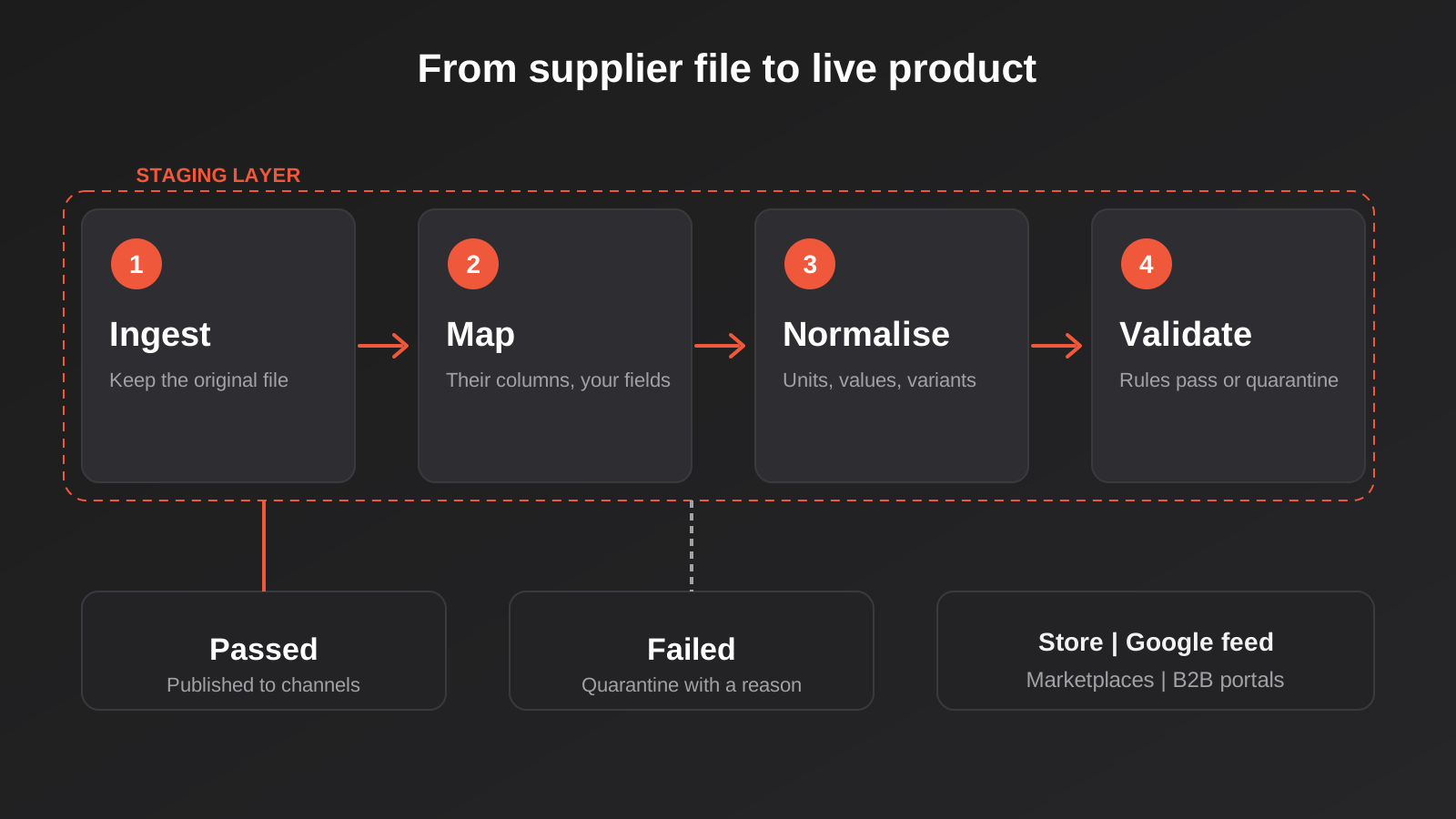
A staging layer does four jobs, in order.
- Ingest: accept a supplier file in whatever format it arrives (CSV, Excel, XML, a JSON API, a PDF price list that someone has had to key in) and keep the original untouched so you can always see what the supplier actually sent.
- Map: translate the supplier’s columns into your field names, and their codes into your product keys.
- Normalise: convert units, strip whitespace, standardise values against your own vocabulary, group rows into products and variants.
- Validate: check each record against rules, and separate the ones that pass from the ones that don’t.
Only after those four steps does anything get published. That ordering is the whole point. When something goes wrong, you find out in staging, where the cost of a mistake is a reviewer’s attention rather than a customer seeing the wrong price.
Stage one: spreadsheets, done properly
A lot of PIM content is written by PIM vendors, so it naturally starts from the assumption that you need one. Plenty of Australian businesses don’t. At 50 or 100 products from one or two suppliers, a well-run spreadsheet is a perfectly reasonable system. The failure isn’t using a spreadsheet. The failure is using one without rules.
If you’re staying in spreadsheets for now, these habits do most of the work a PIM would otherwise do for you.
- One master file. Not “Products_final”, “Products_final_v2” and “Products_JULY_use_this_one”. One file or one shared sheet, with edit history turned on.
- One column per fact. No cells that say “Black, 500mm” when colour and length are separate facts. If a human has to parse a cell, a system will get it wrong.
- A stable key column. Your own SKU, never reused, never edited after creation.
- A lookup tab per supplier. Supplier code to your SKU, plus the supplier’s own description. When a supplier changes codes, you update one tab rather than the whole catalogue.
- A value dictionary. A tab listing every allowed colour, material and finish. Use data validation drop-downs so people pick from the list rather than typing.
- Named owners. A column or a note for who’s responsible for each field, particularly price and stock.
Where this breaks down is volume and repetition, not complexity. Re-mapping the same supplier’s columns every month by hand is dull work that produces errors. That’s the point at which a small amount of automation, such as a saved import template or a script that does the mapping and normalising, pays for itself without needing a new platform.
Identifiers: SKU, supplier code, MPN and GTIN
Identifiers are worth their own section because they’re where product data meets the outside world. Your internal systems can get by on your own SKUs. Google Shopping, marketplaces and retail partners can’t.
A GTIN is the number behind a standard barcode (the 13-digit EAN is the common one in Australia). In Australia, GS1 Australia is the body that issues barcodes and manages the standard. Their guidance is that if you sell on marketplaces such as eBay, Amazon or Catch, you generally need genuine barcodes rather than numbers you’ve made up or bought from a reseller. Google has a similar expectation: for most product categories it wants a valid GTIN, and it can disapprove listings that are missing one or that supply an invalid one. Requirements vary by category and platform and change over time, so check the current rules for the channels you actually sell on rather than relying on a summary, including ours.
What this means for your data process:
- Store the GTIN as text, not as a number. Spreadsheets love to turn a barcode into scientific notation or strip a leading zero, and the damage is invisible until a feed gets rejected.
- Validate the check digit at the staging step. A GTIN has a built-in check digit, so a typo can be caught before it ever reaches Google.
- Don’t invent barcodes for products you resell. If a supplier doesn’t give you one, ask them, because the manufacturer or brand owner is the legitimate source.
- Keep MPN and brand populated. For products that genuinely have no GTIN, those two fields are what channels fall back on.
The same validate-early logic applies to other identifiers in your systems. If you handle business customers, cleaning your data before you automate covers how to catch bad identifiers before they spread, and the principle is identical for products.
Mapping and normalising: the rules you write down
This is the part that’s easy to underestimate. Mapping and normalising are just rules, but they need to be written somewhere other than a team member’s head. Here are the ones that matter most.
Column mapping per supplier
For each supplier, record which column in their file corresponds to which field in yours. It sounds trivial, and it’s the first thing that breaks when a supplier adds or reorders columns. A mapping that refers to columns by header name survives a reorder; one that refers to column position doesn’t. Whatever you use, make it fail loudly when an expected column goes missing instead of silently importing blanks.
Value dictionaries
A dictionary translates whatever the supplier typed into one of your approved values. “BLK”, “Black ” and “black” all map to “Black”. “Blk/Wht” maps to a defined combination or gets flagged for a human to decide. The important behaviour is what happens to values the dictionary hasn’t seen before: they shouldn’t be published. They land in a review queue, someone adds the new value to the dictionary once, and from then on it’s handled automatically.
Unit and pricing rules
Convert everything to one unit on the way in. If your catalogue stores weight in kilograms, every supplier file is converted to kilograms during normalisation, and the conversion rule is attached to that supplier’s mapping. For pricing, store the cost exactly as given along with whether it’s ex-GST, then calculate your sell price with a rule (cost plus margin, or RRP where supplied) that’s visible and auditable. Don’t overwrite your cost with your sell price.
Title and description templates
Supplier titles are often written for a dealer, not a shopper: “WTR TAP CHR 15MM BRS”. Building a title from attributes with a template (brand, product type, key attribute, size) gives you consistent, searchable titles across the catalogue and makes it much easier to produce channel-specific versions later. Have a person review the output for the first few ranges. Templates get you 90 percent of the way, not all of it.
Variant grouping
Decide the rule that groups rows into a parent product with variants. Often it’s “same brand, same base model code, differing only in size and colour”, and when the supplier supplies a parent code it’s just that. When they don’t, the grouping rule is the most valuable thing to automate because it’s where manual work is slowest and error rates highest.
Validation: the gate that keeps bad data out
Validation is what separates a staging layer from a fancier import. Every record gets checked against a list of rules, and the ones that fail go into a quarantine list with a reason attached. They don’t get published and they don’t block the good records.
A practical rule set for a typical Australian ecommerce catalogue looks like this.
- SKU present, unique and matching your format.
- Title present and within the length your channels accept.
- Price greater than zero, and within an expected band of the previous price for that SKU.
- Cost lower than sell price, so a unit error can’t produce a loss-making listing.
- GTIN valid by check digit where one is supplied.
- Weight and dimensions present for anything that ships, because missing weights produce wrong shipping quotes.
- At least one image that resolves and meets your minimum size.
- All attribute values found in your dictionaries.
- Category mapped to one of your categories.
The “expected band” rule deserves a moment. A price that rises or falls by more than, say, 30 percent in one update is more often a unit error or a column shift than a real price change. Pick a threshold that suits your margins, hold anything beyond it for human approval, and you’ll catch the worst class of error cheaply. This is the same idea as the approval steps we describe in our guide to human-in-the-loop approval workflows: automation handles the routine cases and people handle the exceptions.
Choosing your tooling: four stages, not two
The “spreadsheet or PIM” framing hides the options in between. In practice there are four stages, and most businesses move through them in order as complexity grows. The right one depends less on how many products you have and more on how many suppliers, channels and people touch the data.
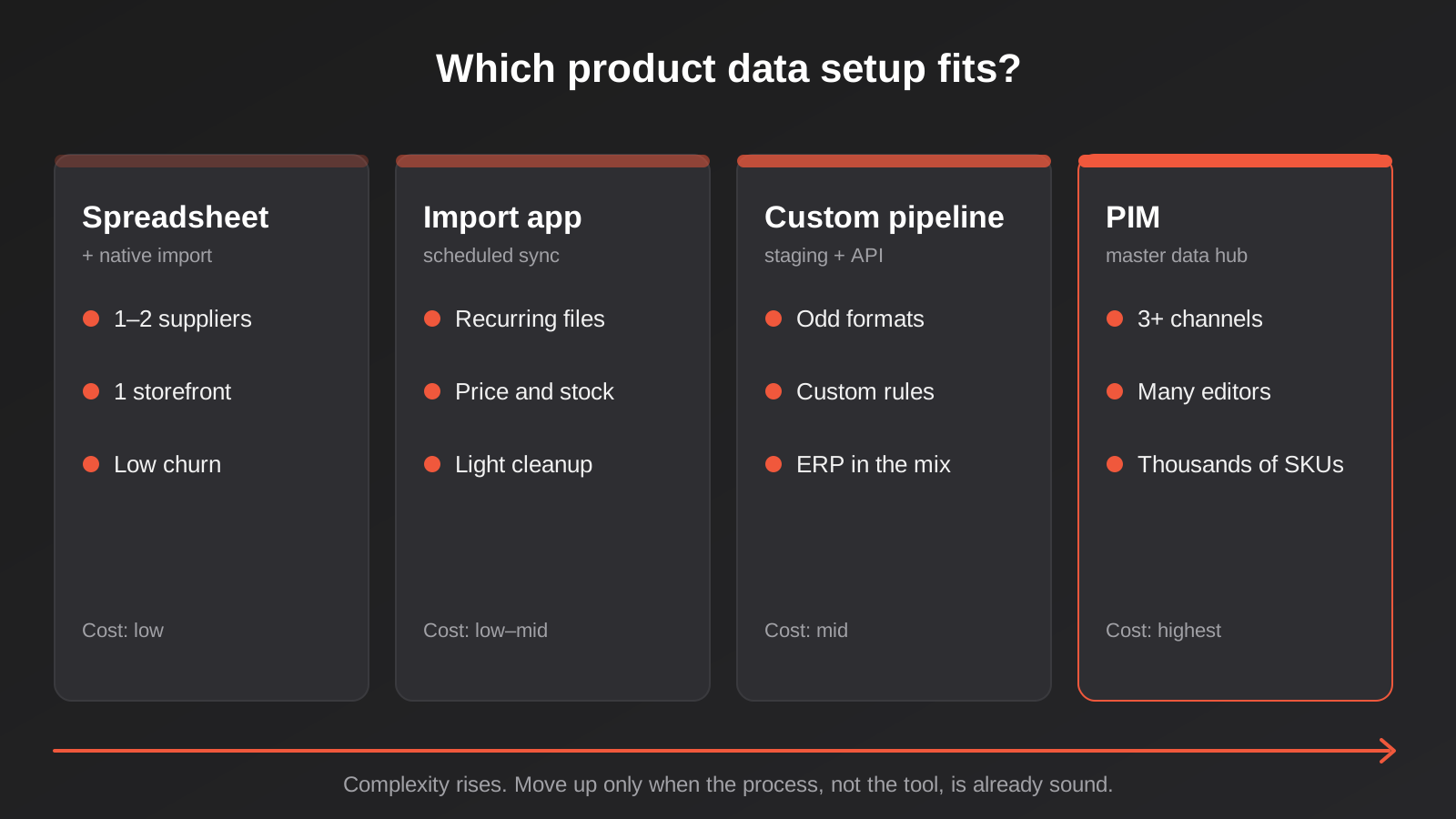
Stage 1: controlled spreadsheet plus native import
Best for one or two suppliers, a few hundred products and a single storefront. You use the rules above, export a CSV in your platform’s import format and use the built-in importer. Shopify, WooCommerce and BigCommerce all support CSV product import. Cost is close to zero. Risk is human error and the time it takes, which is fine until it isn’t.
Stage 2: import and sync apps
Once you have recurring supplier files, an app that fetches a file from a URL or FTP on a schedule and applies saved mapping rules removes most of the repetition. On Shopify there’s a range of these, from general-purpose bulk editors and importers to apps focused on inventory or pricing. We build a few of those ourselves for specific jobs: Price Updater Pro for bulk price changes is one, and the way stock updates work in practice is covered in our guide to bulk inventory updates by SKU. Apps like these suit businesses whose problem is repetitive updates to existing products. They’re less suited to heavy normalisation, where the data needs real transformation before it can be published.
Stage 3: a custom pipeline
A custom pipeline is a small piece of software, or a set of workflows in a tool like n8n or Make plus some code, that does the staging, mapping, normalising and validating we described and then publishes through the platform’s API. It makes sense when your supplier formats are unusual, when you need rules an off-the-shelf app can’t express, or when product data has to flow into other systems such as an ERP or a quoting tool. The advantage is that it’s built around your actual suppliers and rules. The disadvantage is that someone has to own and maintain it. If this sounds close to what you need, our API and integration development work covers this territory, and the ERP integration page is relevant if your master product data lives in an ERP rather than in the store.
Stage 4: a PIM
A PIM is software designed to hold master product data, enrich it, run approval workflows, manage digital assets and syndicate it to multiple channels. Vendors that sell to small and mid-sized businesses (including Pimberly, Plytix and Catsy, among others) describe the same core value: one place where product data is created and approved, with channels fed from it. A PIM earns its cost when several of these are true at once:
- You sell through three or more channels with different attribute requirements.
- Several people create or edit product content and need roles and approvals.
- You handle thousands of SKUs with rich attributes (technical specs, compatibility, compliance data).
- You need translations, regional variations or multiple storefronts.
- Your catalogue changes weekly and manual coordination keeps failing.
One caution that comes up repeatedly among practitioners, and matches our experience: a PIM without a data process is just a more expensive spreadsheet. If nobody owns the master data, nobody uses the dictionaries and nothing gets approved, the software won’t fix that. Do the process work in stage 1 or 2 first. It’s the same work you’d need to do to implement a PIM well, and you may discover you don’t need the PIM yet.
Native platform features worth using before you buy anything
Platforms have steadily improved their built-in product data tools, and it’s worth knowing what they can do before spending on more.
Shopify, for example, supports metafields and metaobjects, which let you store structured attributes (material, compatibility, certifications, care instructions) against products and variants without a PIM. These can drive filters, product page sections and feed fields. Collections can be rule-based, so products appear automatically when their attributes match. The Admin API supports bulk operations for large updates, which matters if you’re writing a custom pipeline. WooCommerce has product attributes and custom fields, and the plugin ecosystem fills in plenty of gaps. In both cases, the limit is rarely the data model. It’s getting clean data into the model consistently.
That’s the reason we usually suggest starting with the platform’s native structure and a staging process, then adding tools only where the process proves too slow or too error-prone. It also keeps your options open if you later change platforms, because well-structured attributes migrate far more easily than data crammed into descriptions. Anyone planning a replatform will recognise this from our experience on WooCommerce to Shopify migrations, where the quality of the product data decides how smooth the move is.
Images, documents and digital assets
Images and documents deserve their own rules because they’re the most hand-handled part of the process. A workable approach:
- Name files by your SKU or key, not by the supplier’s file name. A predictable naming scheme (SKU, then view number) means images can be matched automatically.
- Set a minimum resolution and aspect ratio and check them at validation. A product that fails the image check goes to quarantine rather than going live with a thumbnail.
- Store originals separately from the optimised versions you publish, so you can re-export when requirements change.
- Check licensing. Supplier images are usually provided for resale use, but terms vary, and some brands restrict how their imagery can be used. Get it in writing when it matters.
- Track which documents (spec sheets, safety data sheets, installation guides) belong to which products and when they were last updated. For regulated products, an out-of-date safety document is a compliance issue as well as an annoyance.
Once your catalogue is large enough that finding and reusing assets takes real time, that’s when a digital asset management feature, either inside a PIM or on its own, starts to justify itself.
Publishing safely
Clean data still needs a careful publishing step, because publishing is where the damage becomes visible. Four habits make a big difference.
Run a diff before you publish
Before anything goes live, produce a summary of what will change: how many products will be created, how many updated, which fields change, how many prices go up or down and by how much. A person looks at that summary for two minutes. If the summary says 1,400 products will be updated when you expected 80, you’ve caught a problem that would otherwise have been a bad afternoon.
Only change what changed
Updating every field on every product each time is slower and riskier than updating only the fields that differ. It also overwrites edits your team made by hand, such as a better title or a corrected description. Compare the incoming record with the current one, apply changes to the fields you own and leave the rest alone.
Stage new products as drafts
New products arriving from a supplier file are the riskiest records because there’s no history to compare against. Create them as drafts or hidden products, review a sample, then publish in batches. Existing products getting a price or stock update can go live automatically once the validation rules are mature.
Keep a way back
Keep the previous version of each import so you can see what changed and, if needed, restore it. For a store of any size, take a full product export before a large update. It costs minutes and has saved more than one catalogue. Our guide on change management for live automations goes into rollback planning in more detail.
Getting the data to the channels
A single clean record then has to be shaped for each destination, and each has its quirks. Google Merchant Centre wants specific attribute names and expects titles, descriptions and identifiers in a particular form. Marketplaces have their own category trees and required attributes. B2B portals and buying groups often want data in a fixed format of their own, and some large buyers require structured catalogues or EDI-style exchange, which we cover in our piece on EDI integration for Australian suppliers.
The principle is to keep one master record and generate each channel’s version from it with rules, instead of maintaining separate copies. When a channel’s requirements change, you adjust one mapping, not a thousand products. It’s the main benefit a PIM provides, and it’s perfectly achievable in a lighter-weight pipeline for two or three channels.
Ownership: who is responsible for the data
Tools get the attention, but ownership is what keeps catalogues clean. At minimum, decide these things in writing.
- Who owns the master product record, and who is allowed to change each field.
- Who approves new products and new dictionary values.
- Who deals with the quarantine list, and how fast.
- Which system is the source of truth for price, stock and descriptions, and what happens when two disagree.
- What happens when a supplier sends something unexpected: a new column, a format change, a missing file.
In a small business this might all be one person, which is fine as long as it’s a named person with time set aside, and not “whoever notices”. In a larger team it’s usually a split between a buyer or category manager (commercial fields), a content person (descriptive fields) and someone technical (feeds and integrations).
How to tell whether it’s working
Improvement in product data is measurable if you pick the right numbers. We’d track a small set and review them monthly.
- Time to live: the days between a supplier sending a file and the product being purchasable. This should fall as the process matures.
- Data completeness: the share of products with every required field filled. Aim to know this number rather than guess it.
- Quarantine volume and age: how many records are waiting for review and how long they’ve been there. A growing pile means the rules or the staffing need attention.
- Feed errors and disapprovals: how many products are rejected by Google or marketplaces for data reasons.
- Order exceptions caused by data: wrong price, wrong variant, wrong weight shipping charge. Track them by cause, because it shows where the process leaks.
- Returns for “not as described”: a quiet but useful signal that attributes or images are wrong.
If you’re already measuring other automation results, the same thinking applies. Our framework for measuring AI and automation ROI is a good companion for putting a dollar figure on hours saved and errors avoided.
Where AI helps (and where it shouldn’t be trusted)
AI tools are now being built into a lot of product data software, and they are useful for some jobs and risky for others. They’re good at drafting descriptions from attributes, suggesting a category for a product, proposing a value mapping for a new colour term and extracting structured fields from a PDF spec sheet. They’re poor at anything that must be exactly right: prices, weights, compatibility claims, compliance statements and safety information.
The workable pattern is to let AI propose and let your validation rules and a person decide. An AI-suggested attribute still passes through the dictionary check. A generated description is reviewed before it’s published, especially for products with regulatory claims, such as electrical, medical or food-adjacent items, where a wrong statement is more than a typo. If you’re considering this, the cost side matters too, and we’ve covered how to keep it predictable in our guide to AI running costs, caching and model routing.
Common mistakes
- Matching products on supplier codes. Codes change and get reused. Anchor everything to your own stable key.
- Importing straight into the live store. No staging means every supplier mistake is a customer-facing mistake.
- Overwriting your own edits. Full-record updates wipe out improved titles and descriptions. Update only the fields you own.
- Ignoring GST treatment. Mixing ex-GST and inc-GST figures in one price column is one of the most common and most expensive errors.
- Letting free text into attribute fields. Typed values multiply and your filters and feeds degrade. Use controlled vocabularies.
- Storing barcodes as numbers. Leading zeros disappear and long numbers turn into scientific notation.
- No price-change threshold. A column shift can double every price. A simple band check stops it.
- Buying a PIM to fix a process problem. Without owners and rules the software just holds the same mess in a nicer interface.
- Skipping the dry run. A two-minute summary of what will change prevents the afternoon-ruining surprise.
- Treating images as an afterthought. Missing or low-quality images are the most common reason a new range sits unpublished.
- No plan for supplier format changes. Make imports fail loudly when a column goes missing, rather than silently publishing blanks.
Frequently Asked Questions
Do I need a PIM for my Shopify store?
Probably not at first. If you have one or two suppliers, a single storefront and a catalogue in the low hundreds, a controlled spreadsheet with a documented process, plus Shopify’s native metafields, is usually enough. A PIM starts to make sense when you have several suppliers, three or more sales channels, multiple people editing product content, or thousands of SKUs with detailed attributes. Complexity of workflow matters more than raw product count.
What’s the difference between a PIM and an ERP?
An ERP manages the operational side of the business: inventory, purchasing, orders, accounting. A PIM manages the descriptive and marketing side of products: attributes, content, images, channel-specific versions. Many ERPs hold basic product records, but they’re rarely good at enrichment, approval workflows or publishing to multiple channels. In practice the two often exchange data, with the ERP owning cost and stock and the PIM or staging layer owning content.
How should I handle a supplier who only sends PDF price lists?
Convert the PDF into structured data once, put it through the same staging and validation as any other supplier, and keep the original PDF for reference. Extraction tools, including AI-assisted ones, can do the first pass, but check the output carefully against the source, because misread digits in a price list are exactly the kind of error that goes unnoticed. It’s also worth asking the supplier whether they can provide a spreadsheet or feed. Many can, if asked.
Do I need real GS1 barcodes for my products?
It depends on whether you’re the brand owner and where you sell. If you’re reselling another brand’s products, the barcodes should come from the manufacturer or supplier and you shouldn’t make your own. If you manufacture or brand your own products and sell on marketplaces such as Amazon, eBay or Catch, or through Google Shopping, GS1 Australia’s guidance is that you generally need genuine GTINs. Requirements differ by platform and product category, so confirm the current rules for each channel you use.
How long does it take to clean up an existing messy catalogue?
It depends on size and how inconsistent the data is, so we won’t give a blanket figure. The work usually splits into a one-off cleanup (merging duplicates, fixing identifiers, building dictionaries, standardising units) and a set-up of the ongoing process. The cleanup is often faster than people fear once you start from rules rather than editing row by row, because a single dictionary entry fixes hundreds of records at once.
Can I automate supplier feed updates without custom development?
Often, yes. If your supplier provides a consistent file or feed and your needs are mostly price and stock updates on existing products, import and sync apps, or workflow tools such as Make or n8n, can handle it. Custom development earns its place when the data needs heavy transformation, when supplier formats are unusual, or when product data has to flow into other systems such as an ERP. A short scoping conversation will tell you which side of that line you’re on.
Where to Start
You don’t need to buy anything or build anything this week. Pick your single messiest supplier file and do three things with it: write down which column maps to which of your fields, list the values that appear in the file but aren’t in your own vocabulary, and note which fields would need to be wrong for the file to cause a real problem on the store. That small exercise shows you where your process actually leaks, and it tells you whether the next step is a tidier spreadsheet, an import app or something more built.
If you’d like a second opinion, we’re happy to talk it through. Send us a sample supplier file and tell us where it hurts, and we’ll tell you honestly whether you need a PIM, a lighter import setup or just a better process. Our automation pricing page explains how we scope work like this, and the short version is a conversation first and a fixed quote after.
Because we run lean as a specialist agency rather than carrying a large account-management layer, our fixed quotes usually come in below what Australian agencies typically quote. If you’ve already got a written quote from another agency for comparable scope, send it through and we’ll do our best to beat it.
Keep reading
Related posts
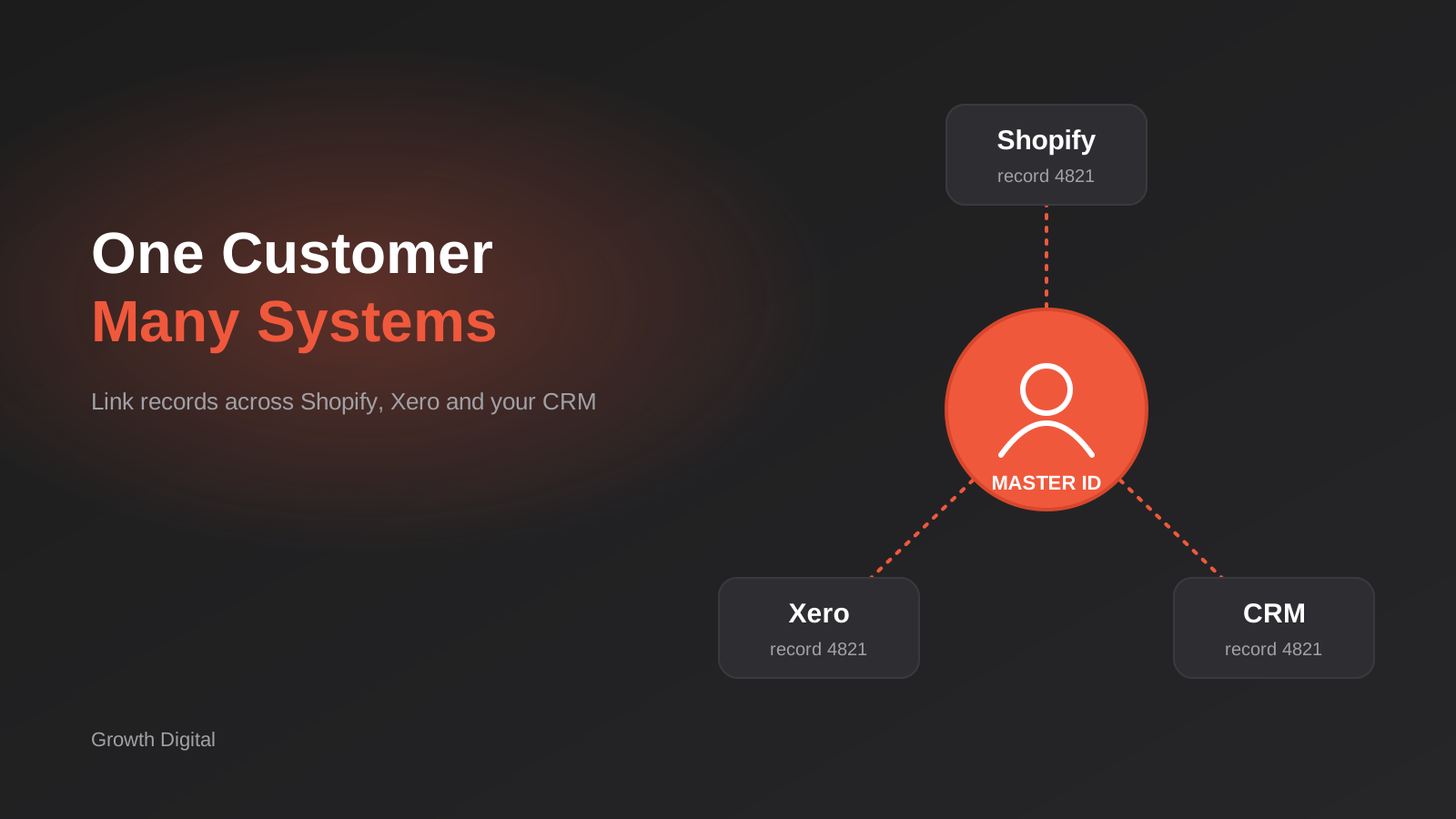
Single Customer View for Australian Businesses: Matching and Merging Records Across Shopify, Xero and Your CRM
How to build a single customer view in Australia: match and link duplicate customers across Shopify, Xero and your CRM without merging…

Australian Address Validation: PAF, G-NAF and How to Stop Bad Addresses Entering Your Systems (2026)
How to validate Australian addresses with PAF and G-NAF, where to check them in your workflow, and how to store clean data…
ABN Validation and Lookup for Australian Business Systems: A Practical Guide
How to validate and verify ABNs in forms, CRMs and supplier onboarding: checksums, the ABN Lookup service, GST status, edge cases and…
Got a project you'd like to talk through?
Tell us what you're working on — we'll come back with a plan.
