
Marketing Attribution Models: Which One Should You Actually Use?
 Jignesh Vagadiya
16/11/2026
22 min read

A client sent us their Google Ads account last year convinced search was carrying the entire business. Every sale in the dashboard traced back to a branded search term clicked minutes before checkout. What the dashboard didn’t show was the six weeks before that click: a blog post read on mobile, a retargeting ad ignored twice, an email opened on a Tuesday night, a LinkedIn post shared internally. Search didn’t create that customer. It just happened to be standing closest to the till when they finally paid.
That’s the problem with attribution, and it’s not a new one — last-click reporting has been quietly overstating the role of bottom-of-funnel channels for as long as Google Analytics has existed. What’s changed is how much it now costs to get it wrong. Privacy reforms are tightening what you can track, cookies are harder to rely on across devices, and most Australian businesses are running paid media across three or four platforms at once rather than one. Crediting the wrong channel for a sale used to mean a slightly skewed report. Now it means shifting real budget toward the channel that happened to close the deal and away from the one that actually opened it.
This guide is about picking the marketing attribution model that matches how your customers actually buy, not the one your analytics platform happens to default to. We’ll go through the models that actually show up in GA4 and the ad platforms, how to work out which one fits your sales cycle and channel mix, what you can set up for free today, and where you genuinely need to spend money to go further. If you’re still cleaning up broken event tracking, that’s a separate (and more urgent) problem — we’ve covered it in our guide to why your conversion tracking data is wrong. This guide assumes the data coming in is accurate and deals with the next question: once you trust the data, who actually gets credit for the sale?
What a Marketing Attribution Model Actually Does
Strip away the jargon and an attribution model is doing one simple job: deciding how to split the credit for a conversion across every touchpoint a customer had with your business before they bought. A touchpoint is any recorded interaction — an ad click, an organic search visit, an email click, a direct visit, a social referral. Most customers rack up several of these before converting, sometimes across weeks or months, and the model you use determines which of those touches “count” in your reporting.
Two settings sit underneath every model and change the answer more than people expect. The first is the conversion window — how far back the model is allowed to look for touchpoints before it stops counting them. GA4 defaults to 90 days for most conversion events, which sounds generous until you’re selling a $40,000 piece of equipment with a nine-month consideration period, or a $15 subscription where the entire journey happens inside an afternoon. The second is which touchpoints get counted at all. Direct traffic, email clicks from certain platforms, and some app-to-web journeys get dropped or lumped into generic buckets depending on how your tracking is configured, which quietly changes what the model has to work with before it even starts assigning credit.
Left on default settings, almost every analytics platform ships with some version of last-touch logic baked in somewhere, because it’s the simplest thing to compute and the easiest to explain in a meeting. It is also, for most businesses with more than one marketing channel, quietly wrong.
Why Attribution Got Harder in 2026
Three things have made this a bigger problem than it used to be. First, Australia’s privacy reforms and the broader move toward Consent Mode have made consistent cross-session tracking less reliable than it was five years ago — some portion of your visitors now show up as fresh, unattributed sessions even when they’ve interacted with you before, simply because they declined a cookie or you’re modelling consented data rather than observing it directly. Second, customers genuinely research across more devices and platforms than they used to: starting a search on a phone during a commute, comparing options on a work laptop, and converting later on a tablet at home, often without ever signing into an account that would let a platform stitch that journey back together. Third, channel fragmentation has made the number of plausible touchpoints explode. A decade ago a typical customer journey involved search, maybe display, and email. Now it can involve TikTok, Meta, LinkedIn, organic and paid search, YouTube, an SMS flow, and a retargeting sequence, often for the same purchase.
None of this means attribution has become impossible. It means the gap between what last-click reporting tells you and what actually happened has widened, and the cost of trusting that gap has gone up. If you’re running meaningful budget across more than one paid channel, this is no longer a reporting nicety — it’s the difference between knowing where to put next quarter’s budget and guessing.
The Six Models You’ll Actually Run Into
There are more exotic attribution approaches in academic marketing literature, but in practice, almost every Australian business will only ever encounter six models across GA4, the ad platforms, and whatever reporting tool sits on top of them. Here’s what each one actually does, in plain terms.
Last-Click Attribution
Gives 100% of the credit to the final touchpoint before conversion, full stop. If someone clicked a branded search ad and bought thirty seconds later, that ad gets the sale — regardless of what brought them to search for your brand name in the first place. It’s the easiest model to explain, the cheapest to compute, and the one almost every platform shows you by default in its own dashboard (Google Ads, Meta Ads Manager and most others report conversions this way natively, which is part of why they all look like they’re working brilliantly in isolation). Its flaw is structural: it systematically overcredits channels that sit at the bottom of the funnel — branded search, retargeting, direct — and undercredits the channels that build awareness and consideration further up.
First-Click Attribution
The mirror image of last-click: 100% of the credit goes to whatever touchpoint started the journey. This is useful if you specifically want to understand which channels are good at generating net-new demand — which blog post, which ad, which organic search term first put you on someone’s radar. It’s rarely used as a primary model on its own because it has the opposite blind spot to last-click: it tells you nothing about what actually closed the sale, which matters just as much when you’re deciding where to spend next month’s budget.
Linear Attribution
Splits credit evenly across every touchpoint in the journey. Five touchpoints before conversion means each one gets 20%. It’s a fair compromise in the sense that it stops any single channel hogging all the credit, but it treats a passing glance at a display ad the same as a considered click on a comparison email three days before purchase, which isn’t really fair either. Linear is a reasonable default when you genuinely don’t have a strong hypothesis about which stage of the journey matters most and want something more honest than last-click without overcomplicating the setup.
Time-Decay Attribution
Gives more credit to touchpoints closer to the conversion and progressively less to earlier ones, usually on an exponential curve (a touch a week out might get a fraction of the credit of a touch the day before purchase). This tends to match real buying behaviour reasonably well for considered purchases: the early touches that raised awareness matter, but the touches that happened as someone was actively deciding tend to carry more weight. It’s a sensible middle ground for businesses with a sales cycle measured in weeks rather than minutes or months.
Position-Based (U-Shaped) Attribution
Weights the first and last touchpoints heavily (commonly 40% each) and splits the remaining 20% across whatever happened in between. The logic is that the channel that introduced you and the channel that closed the deal both matter more than the ones in the middle, which is often true — but it can undervalue a middle-of-funnel channel that’s actually doing real nurturing work, like an email sequence or a remarketing campaign that keeps a prospect warm for two months. Some versions extend this into a W-shape that also weights a middle milestone, such as the point someone becomes a marketing qualified lead, but that level of complexity is rarely worth setting up without a dedicated analyst watching it.
Data-Driven Attribution
This is the model GA4 uses by default for most conversion events, and it works differently from the rule-based models above. Instead of applying a fixed formula, it uses machine learning to compare the paths of customers who converted against those who didn’t, and assigns credit based on which touchpoints actually correlated with a higher chance of converting, for your specific data. In theory it’s the most accurate model available, because it’s built on your actual customer behaviour rather than a generic assumption about how journeys work. In practice, it needs enough conversion volume to find reliable patterns — Google’s own guidance suggests it performs best with a meaningful flow of weekly conversions, and smaller accounts with thin data can end up with a model that’s technically “data-driven” but trained on too little signal to be trustworthy.

Which Model Actually Fits Your Business
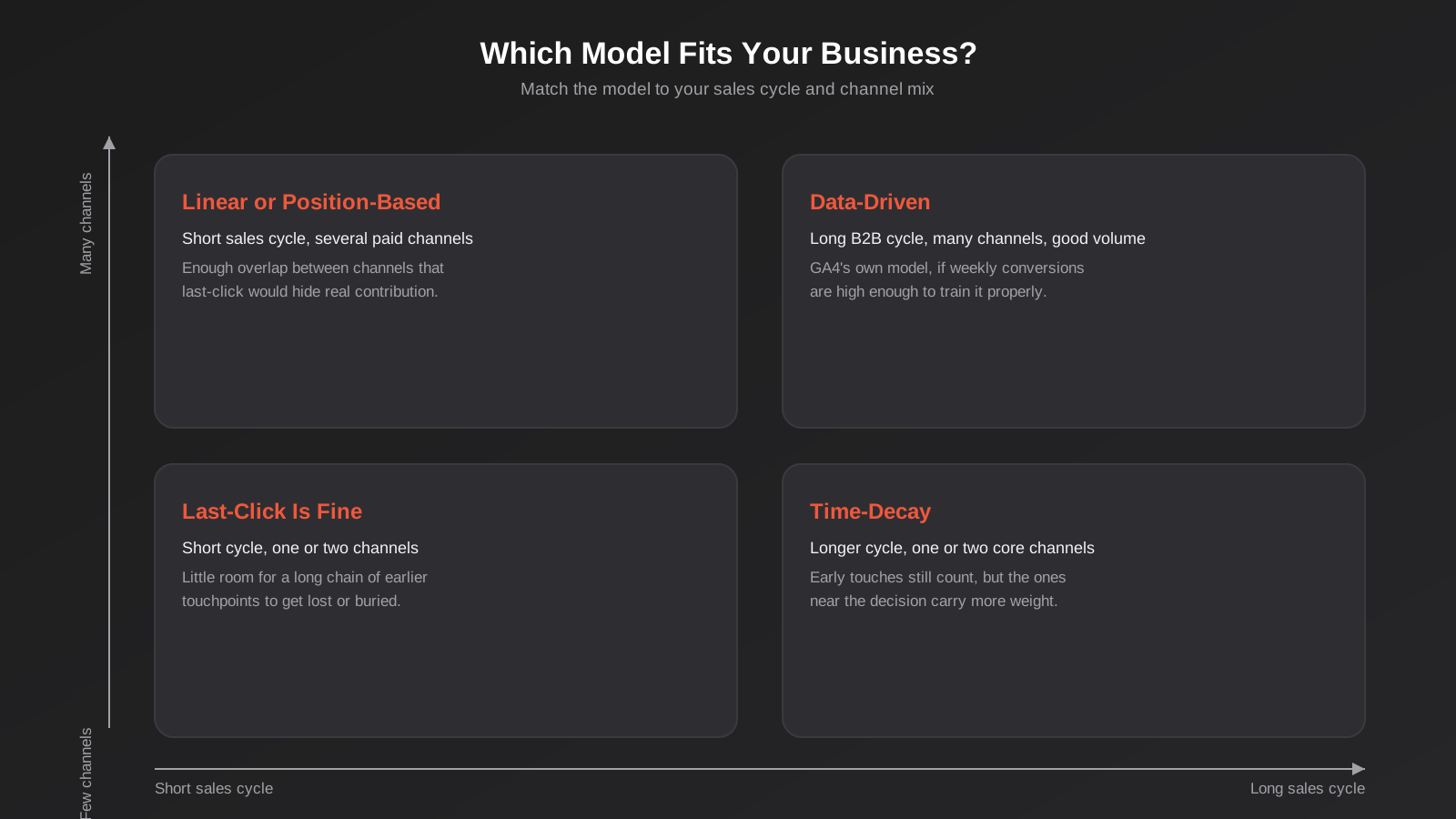
The honest answer to “which model should I use” is that it depends on how long your sales cycle runs and how many channels you’re actually running, not on which model sounds most sophisticated. Here’s how we think about it with clients.
Short Sales Cycle, Few Channels
If you’re running an ecommerce store with most purchases happening within a single session or a day or two, and your paid spend sits mostly in one or two channels, last-click attribution isn’t the disaster it is for more complex businesses. The journey is short enough that there isn’t much room for a long chain of earlier touchpoints to get buried, and the simplicity means less maintenance overhead for a business that likely doesn’t have a dedicated analyst. We’d still turn on GA4’s data-driven model if conversion volume supports it, since it costs nothing extra and tends to agree reasonably closely with last-click in these simpler journeys anyway — but it’s not the hill to die on if you’re a smaller operation with limited time.
Longer B2B Sales Cycles
This is where getting the model wrong costs real money. A business with a sales cycle measured in weeks or months — professional services, B2B software, higher-value trades and construction work, anything involving a quote and a follow-up call — will see last-click badly undercount the channels that actually generate the pipeline. The webinar someone attended two months before they requested a quote, the whitepaper they downloaded, the LinkedIn content that got your brand in front of a decision-maker early: none of that shows up if you’re only crediting whatever channel happened to deliver the final enquiry. Time-decay or position-based models are a meaningfully better fit here, because they at least acknowledge that the early-funnel work contributed something. If your sales team also closes deals offline (a phone call, an in-person meeting), you’ll need offline conversion import working properly too, which we cover further down, or the model is working with an incomplete picture no matter how sophisticated it is.
Heavy Multi-Channel Paid Mix
If you’re running Google Ads, Meta, and at least one more platform simultaneously with meaningful budget in each, the stakes of picking the wrong model go up because the money being misallocated is larger. This is the scenario where GA4’s data-driven attribution earns its keep, assuming you have the conversion volume to support it — it’s the only model in this list actually built to untangle overlapping channel influence rather than applying the same fixed rule regardless of what your data shows. It’s also worth checking each platform’s own reported conversions against GA4’s cross-channel view regularly, because Google Ads, Meta and LinkedIn will each claim credit for the same conversion under their own last-click logic, and if you add up what every platform says it delivered, the total will usually be well over 100% of your actual sales.
Subscription and Repeat-Purchase Businesses
Subscription services and businesses with a high repeat-purchase rate face a different distortion again: which model should get credit for the first purchase versus the renewals and reorders that follow months later? Most businesses in this position only ever model attribution for the first conversion and treat everything after as retention, which is reasonable, but it means the channel that originally acquired a now-loyal customer never gets credit for the lifetime value it actually generated. If repeat revenue is a meaningful share of your business, it’s worth at minimum tracking customer lifetime value by original acquisition channel alongside your attribution model for first purchase, even if you don’t attempt to model the ongoing relationship touchpoint by touchpoint. A channel that looks mediocre on first-purchase cost per acquisition can look very different once you factor in that its customers stick around twice as long as the ones from your cheapest channel.
Setting Up Attribution in GA4 (What You Already Have)
Before spending money on a dedicated attribution tool, it’s worth being clear about what GA4 already gives you for free, because for a lot of Australian SMBs it’s genuinely enough. If your GA4 setup is still running on default settings, or you’re not confident it’s capturing conversions accurately, start with our GA4 setup guide before touching attribution at all — an attribution model built on top of broken event tracking just produces a more confident-sounding wrong answer.
How GA4’s Data-Driven Attribution Works in Practice
Once your conversions are set up correctly, GA4 applies data-driven attribution automatically to most standard conversion events, and you can see the comparison across models in Advertising > Attribution > Model comparison. This report lets you pick two models side by side and see how differently they’d credit the same set of conversions, which is genuinely useful even if you never change your default model — seeing the gap between last-click and data-driven numbers for your own data tells you how distorted your current reporting actually is. For a business running a handful of channels with reasonable conversion volume, this is often all the attribution sophistication you need, and it’s already included in a standard GA4 setup at no extra cost.
The catch is conversion volume. Google doesn’t publish a hard minimum, but the general guidance is that data-driven attribution needs enough weekly conversions and click-through data across your advertising accounts to find statistically meaningful patterns. A business converting a handful of leads a week across several channels may see a data-driven model that technically works but swings around month to month as the underlying sample changes, which makes it an unreliable basis for a serious budget decision. If that’s your situation, a rule-based model like time-decay, chosen deliberately and left alone, can actually be more useful than a data-driven model with too little data to be stable.
Where GA4’s Attribution Still Falls Short
GA4’s attribution, however it’s configured, only has visibility into what it can actually observe, and there are several common gaps. Phone calls that convert outside any tracked form won’t show up unless you’ve got call tracking connected and feeding those conversions back in — a real problem for trade, legal and medical businesses where a meaningful share of conversions happen over the phone. Conversions that close in a CRM weeks after the original enquiry, through a sales call rather than a website action, need offline conversion import set up to connect back to the original touchpoint, and most businesses never configure this. Cross-device journeys where someone isn’t signed into a Google account on both devices get treated as two separate, unconnected users rather than one journey, understating the influence of whatever channel reached them on the first device. And any touchpoint that happens outside a trackable click — someone hearing about you from a friend, seeing an unlinked social post, or searching your business name because they saw a van on the road — simply can’t be attributed to anything, because there’s no data to attribute.
Beyond GA4: When You Need More
For most small and growing Australian businesses, a properly configured GA4 setup with the right model chosen deliberately is as far as this needs to go. There are two situations, though, where it’s worth spending more to close the gaps above.
Call Tracking and Offline Conversion Import
If a meaningful share of your conversions happen by phone or get closed later in a CRM rather than instantly on your website, this is almost always the higher-value investment before anything fancier. Dynamic call tracking swaps the phone number shown to a visitor based on how they arrived, so an inbound call can be attributed back to the channel and even the specific ad that generated it. Offline conversion import lets you push conversion events (and ideally conversion value) from your CRM back into Google Ads and GA4 once a lead actually closes, weeks or months after the original click, so a sales-qualified pipeline that takes time to convert doesn’t just evaporate from your attribution picture the moment the GA4 session window closes. Both of these are genuinely achievable for most businesses without a huge budget, and they fix real, specific blind spots rather than adding general sophistication for its own sake.
Incrementality Testing and Marketing Mix Modelling
At larger spend levels, some businesses move past touchpoint-based attribution entirely and toward incrementality testing (deliberately holding out a region, audience or time period from a channel to measure what actually changes) or marketing mix modelling, which uses statistical modelling across longer time periods and doesn’t depend on individual-level tracking at all. These approaches are genuinely more robust against the privacy changes reshaping cookie-based tracking, because they don’t need to follow an individual user’s journey to work. They’re also considerably more expensive to run properly and need enough historical spend and sales data to produce a reliable model. For the vast majority of Australian SMBs and mid-market businesses, this is a “later” problem, not a “now” problem — get the fundamentals in this guide right first, and revisit this once you’re running serious budget across several mature channels over a long enough period to have the data to model.
Common Mistakes Businesses Make With Attribution
- Comparing each platform’s own reported conversions (Google Ads, Meta, LinkedIn) and adding them together, instead of reconciling against one shared source of truth like GA4 — every platform claims credit under its own last-click logic, so the totals will always overstate reality when you combine them.
- Switching attribution models the moment a report looks unfavourable, rather than picking one deliberately and sticking with it long enough to compare like for like over time. Changing models resets your historical comparison and makes trend data meaningless.
- Turning on data-driven attribution for an account with too few weekly conversions to support it, then trusting a model that’s swinging wildly month to month because the underlying sample is too thin.
- Ignoring offline and phone conversions entirely because they’re harder to track, which systematically undervalues whichever channels drive enquiries rather than instant online purchases — often exactly the channels a trade, legal or professional services business relies on most.
- Treating attribution as a one-off setup task rather than something to revisit as channel mix changes. A model chosen when you ran two channels can be badly wrong a year later once you’ve added three more.
- Building an elaborate custom attribution model before fixing basic tracking gaps — duplicated conversion actions, untagged email links, broken UTM parameters — that are corrupting the input data the model relies on in the first place.
- Letting every campaign, email and social post go out without consistent UTM tagging, which forces GA4 to lump real channel activity into generic “unassigned” or “direct” traffic and makes even the best attribution model blind to where that traffic actually came from.
- Assuming a model choice made for one part of the business automatically fits another. A retail business with both an ecommerce store and a wholesale enquiry form is really running two different sales cycles under one GA4 property, and a single attribution model rarely serves both well.
Frequently Asked Questions
What’s the difference between attribution and conversion tracking?
Conversion tracking is about accurately recording that a conversion happened at all — the event firing correctly, the right value attached, no duplicates or gaps. Attribution is the separate question of which earlier touchpoints get credit for that conversion once it’s been recorded. You need accurate conversion tracking before attribution means anything; a sophisticated attribution model built on broken tracking just distributes bad data more convincingly.
Is data-driven attribution always better than a rule-based model?
Only once you have enough conversion volume to support it. Data-driven attribution is built from patterns in your own data, so with too few conversions each week, the model has too little signal to find reliable patterns and can shift noticeably from month to month. For lower-volume accounts, a deliberately chosen rule-based model like time-decay is often more stable and just as useful in practice.
Can I change my attribution model without losing historical data?
In GA4, switching your default attribution setting changes how new reports are calculated going forward, but it also recalculates how it interprets historical data under the new model when you look back, so you won’t lose anything — you’ll just see past periods reported differently than they were before the change. The real risk isn’t losing data, it’s losing a consistent baseline to compare against if you switch models frequently.
Do I need call tracking if most of my leads come through a web form?
If phone conversions are a small share of your total leads, it’s not an urgent priority. If you’re a trade, legal, medical or any service business where a real portion of enquiries happen by phone, skipping call tracking means your attribution model is working from an incomplete picture no matter how carefully everything else is configured, and the channels driving those calls will look like they’re underperforming when they’re not.
How does Australia’s privacy reform affect attribution?
As consent requirements tighten and more visitors decline tracking cookies, platforms increasingly rely on modelled rather than directly observed data to fill the resulting gaps, which makes attribution reporting a little less precise than it was when third-party cookies worked everywhere. This is one reason multi-touch and data-driven models, which work with the fuller picture GA4 can still assemble, are becoming more useful relative to simple last-click reporting — and it’s also pushing larger advertisers toward incrementality testing and marketing mix modelling, which don’t depend on individual-level tracking at all.
What should I actually look at first if I’ve never paid attention to attribution?
Open GA4’s model comparison report, pick last-click and data-driven, and look at how differently they credit your channels over the last 90 days. If the gap is small, you’re probably fine leaving things as they are for now. If it’s large — a channel that looks strong under one model and weak under the other — that’s worth understanding properly before you make your next budget decision based on last-click numbers alone.
Where to Start
If you’ve never looked past whatever your dashboards show by default, start with GA4’s model comparison report before changing anything — it costs nothing and will tell you in ten minutes whether attribution is quietly distorting your budget decisions or not. If the gap between models is small, you likely have bigger priorities. If it’s large, it’s worth getting the underlying tracking checked properly before choosing a model to commit to, because the model is only ever as good as the data feeding it.
This is the kind of work we do as part of our analytics and CRO service — auditing what’s actually being tracked, fixing the gaps, and setting up attribution and reporting that reflects how your customers actually buy rather than whatever a platform defaults to. If testing and conversion rate work is more what you need once the measurement side is sorted, our guide to conversion rate optimisation and our piece on running A/B tests that actually tell you something cover the next step: using accurate data to improve what’s converting, not just to report on it more precisely.
Analytics and CRO work at Growth Digital doesn’t run on a fixed package the way something like website design does — every tracking setup is scoped to how broken or complete your current configuration is, so it’s quoted individually rather than listed as a flat monthly fee. Because we run lean as a specialist agency rather than carrying a large account-management layer, our fixed quotes typically come in below the Australian averages covered in this guide. If you’ve already got a written quote from another agency for comparable scope, send it through and we’ll do our best to beat it.
Keep reading
Related posts

Landing Page Copywriting That Converts: Writing the Words Your Design Can’t Carry Alone
A practical guide to landing page copywriting: structure, frameworks, CTAs and the Australian Consumer Law line on testimonials and claims.
Best Analytics and Reporting Tools After GA4 for Australian Businesses (2026): 6 Compared
Six analytics and reporting tools to use alongside or instead of GA4, compared for Australian businesses on cost, privacy, data location and…
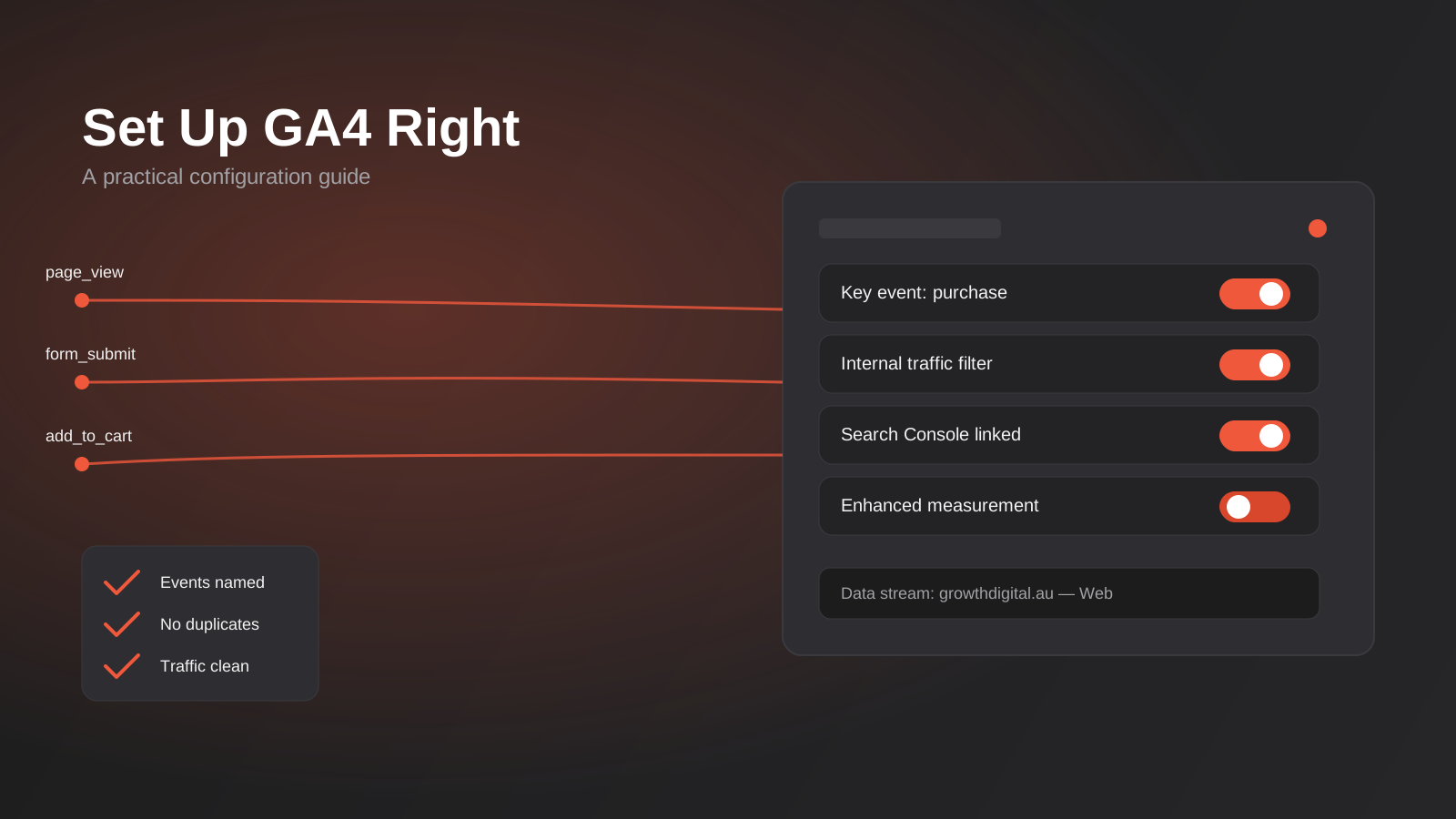
Google Analytics 4 Setup: A Practical Configuration Guide for Australian Businesses (2026)
A practical GA4 setup guide for Australian businesses: events, key events, filters and the mistakes that quietly corrupt your data.
Got a project you'd like to talk through?
Tell us what you're working on — we'll come back with a plan.
