
Single Customer View for Australian Businesses: Matching and Merging Records Across Shopify, Xero and Your CRM
 Jignesh Vagadiya
15/11/2026
23 min read
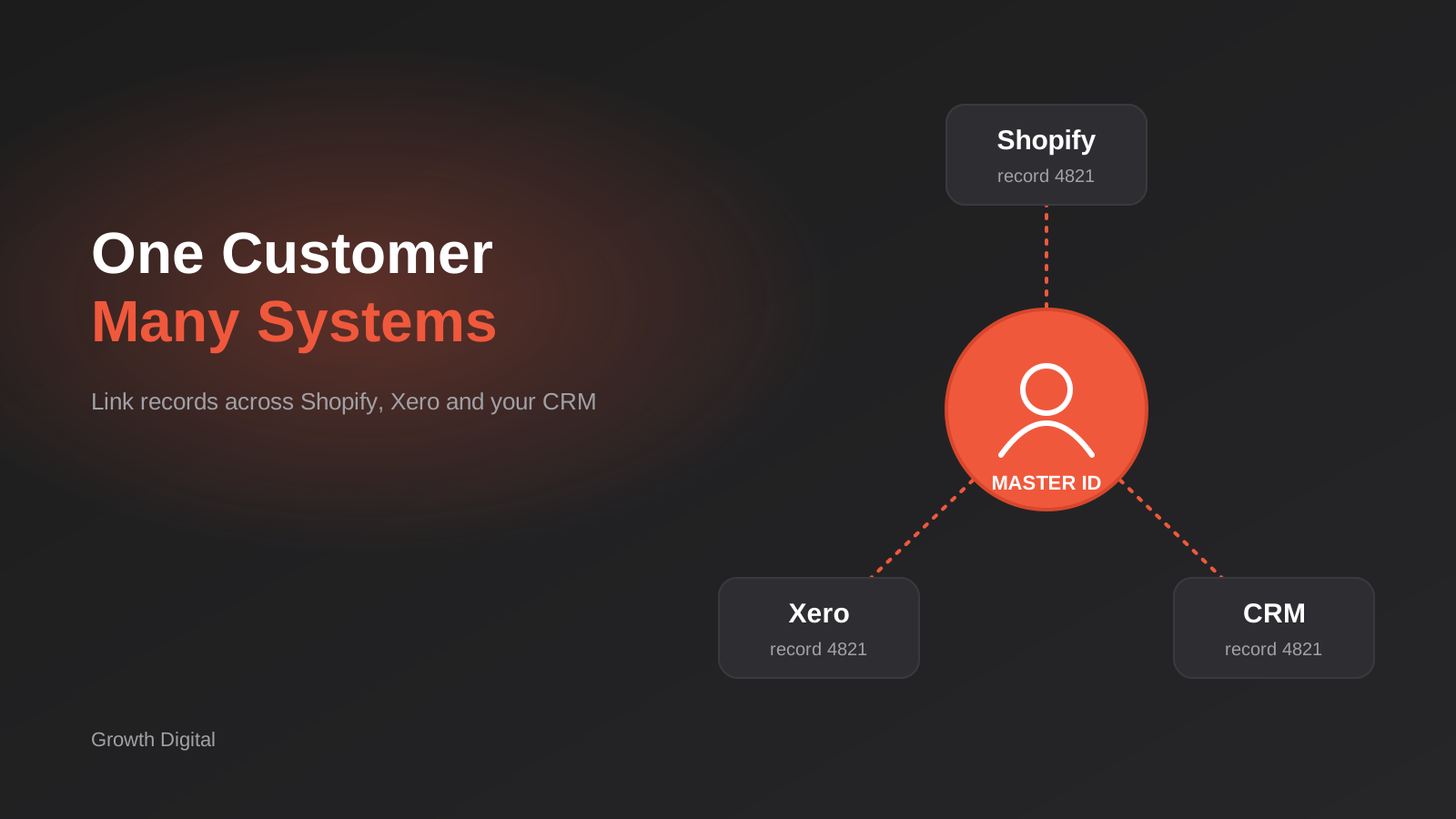
A customer rings your office and says they ordered last week. Your sales rep finds three “Sarah Mitchell” records in the CRM. The online store has her under a Gmail address, Xero has her under her employer’s name with an accounts email, and the CRM has a lead from a webinar with a typo in her surname. Nobody can say, with confidence, whether she’s a new lead, a repeat buyer, or someone who owes you $1,800.
That’s the problem a single customer view is supposed to solve, and most businesses that go looking for one come at it backwards. They shop for a platform first, or they ask someone to “just merge the duplicates”, and six months later the duplicates are back. The real work isn’t the merge. It’s deciding what counts as the same customer, writing that decision down as rules, and putting a durable link between your systems so the rules keep running after the first cleanup.
This guide is about that work, for Australian small and mid-sized businesses running some mix of Shopify or WooCommerce, Xero or MYOB, and a CRM. It’s narrower than our general pieces on cleaning data before you automate and on two-way sync and field ownership. Those cover tidying records and deciding which system wins a field. This one covers the step in between: working out which records belong to the same person or company in the first place.
What a single customer view actually is
Strip the jargon and it’s simple. A single customer view means that for any customer, you can pull up one profile that shows their orders, invoices, payments, support history and marketing status, regardless of which system each piece lives in. It does not mean all your data sits in one database. In most small businesses it shouldn’t.
Vendors who sell customer data platforms will tell you that you need to centralise everything. Sometimes you do. More often, a lightweight approach works: leave each system as the owner of the data it’s good at, and maintain a small mapping layer that says “this Shopify customer, this Xero contact and this CRM person are the same human”. Everything else is built on top of that map.
It’s an identity problem, not a storage problem
If you’ve ever tried to build a report that joins online orders to Xero invoices to CRM deals, you’ve hit this wall. The report needs a shared key, and the systems don’t have one. Shopify has a customer ID. Xero has a contact ID. The CRM has a record ID. None of them know about the others. Email might look like a shared key, but as we’ll see below, it’s far less reliable than it appears.
So the first deliverable of any single customer view project isn’t a dashboard. It’s a rule set for identity, plus a place to store the answer.
Three different things people call “a customer”
Before writing a single matching rule, get clear on which of these you mean, because the three behave differently:
- A person. An individual who buys, enquires or subscribes. They might have two email addresses and change surname.
- An account. A business that buys from you, usually identified by an ABN. Many people can sit under one account, and the account may trade under several names.
- A billing entity. Whoever gets the invoice. In B2B this is often an accounts payable mailbox or a head-office company that differs from the site doing the ordering.
Retail businesses mostly care about the first. Wholesalers and service businesses live in the second and third. A lot of messy data comes from a system that treats all three as a single “contact” type, which is exactly how Xero tends to be used in practice.
Where the duplicates come from
You can’t prevent a problem you haven’t diagnosed. In the businesses we work with, the same handful of causes show up again and again, and each needs a slightly different fix.
Guest checkout and multiple email addresses
A customer buys once as a guest with a personal email, then creates an account with a work email, then orders again through a phone call with a third address. Shopify and most store platforms will happily hold all of that as separate records. From the platform’s point of view, they are separate people, because the identifier changed.
Systems that identify people differently
In our experience Xero effectively treats a contact’s name as the thing that makes it unique, and it resists two contacts with the identical name. So when an invoice goes out to “Smith Plumbing” and later to “Smith Plumbing Pty Ltd”, someone creates a second contact to get around it, or adds a suffix like “(2)”. Your CRM, meanwhile, keys on email. So the accounting system and the CRM are using different definitions of identity from day one, and no amount of copying fields between them will reconcile that.
Data entry and lead capture
Staff create records by hand under time pressure. Web forms create a new lead every time someone submits, even if they’re already a customer. Imports from trade shows, supplier lists and old systems bring in their own spellings. Each channel is individually reasonable and collectively a mess.
Genuine ambiguity
Some “duplicates” aren’t duplicates. Two people at the same company sharing an info@ address are different customers. A parent and adult child who share a landline and a surname are different customers. A sole trader who buys personally and for their business might genuinely want to be treated as two. Any matching approach that never says “I don’t know” will eventually merge two people who shouldn’t be merged, and that’s much harder to undo than leaving a duplicate in place.
Pick your identity keys before you write any code
The matching logic is the heart of the project, so it deserves a deliberate design. Start by listing every identifier you hold for customers and ranking how much you trust each one.
A sensible hierarchy for Australian businesses
For most of the businesses we see, the order of trust looks something like this:
- Existing cross-system IDs. If a Shopify order already carries a Xero contact ID in a metafield, or a CRM record stores the Xero ID, that’s a confirmed link. Treat it as certain.
- ABN (for businesses). An 11-digit number with a built-in checksum, so you can reject typos before you ever match. Two records with the same valid ABN are the same legal entity. They’re not necessarily the same site or the same buyer. We cover validating them in our ABN lookup and validation guide.
- Normalised email. Strong for individuals, weak for shared mailboxes and role addresses.
- Normalised mobile number. Strong for individuals, as people rarely share mobiles, but they do change numbers.
- Name plus postcode or address. Weak on its own. Useful as supporting evidence.
- Name alone. Never enough. There are a lot of people called Sarah Mitchell.
Deterministic first, fuzzy second
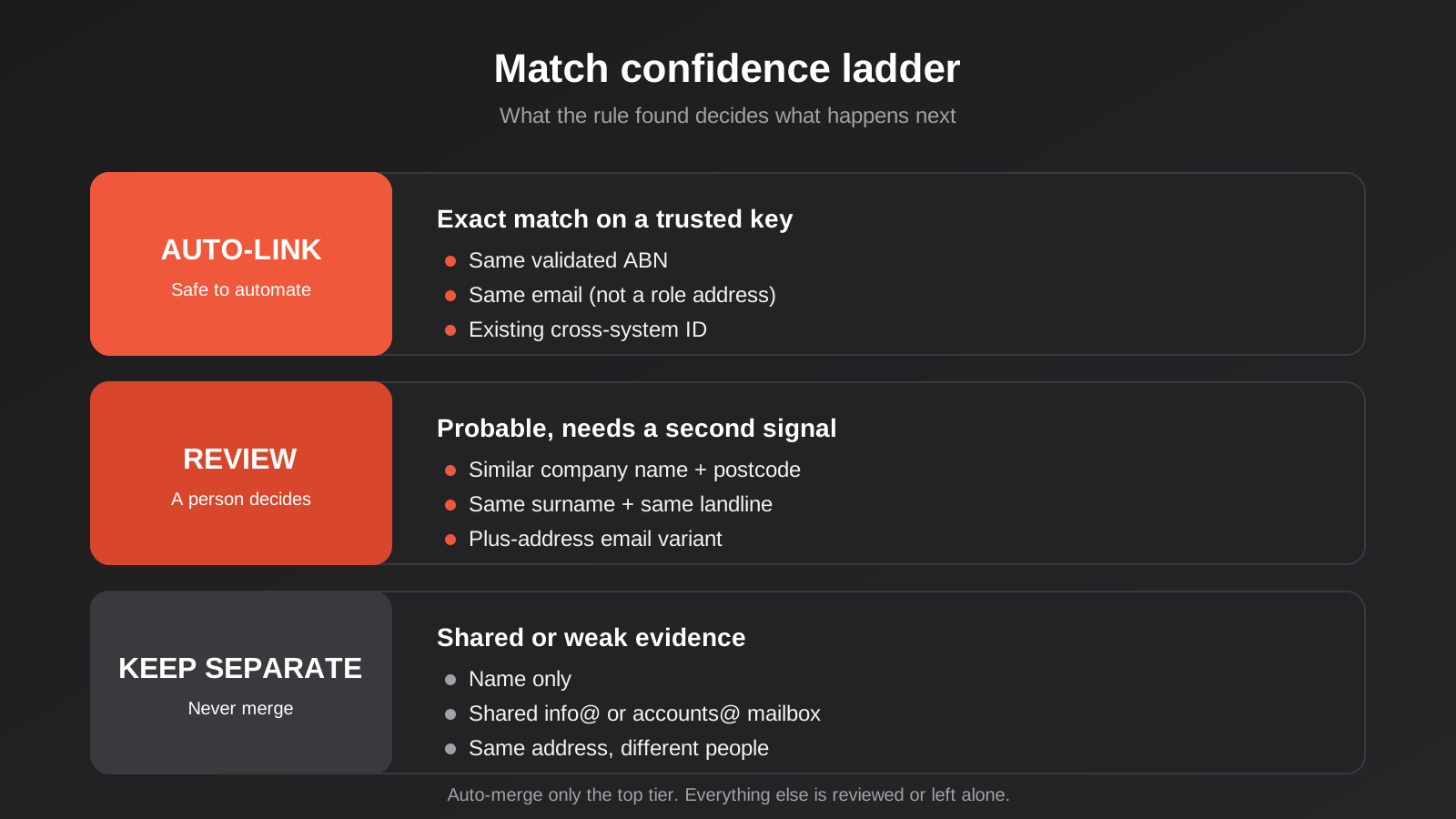
Deterministic matching means an exact match on a trusted key: same ABN, same normalised email, same mobile. It’s predictable, explainable and safe to automate. Fuzzy matching scores similarity between names and addresses (“Smith Plumbing Pty Ltd” against “Smith Plumbing”) and produces a probability rather than a yes or no.
The rule we give clients is that deterministic matches can merge automatically, and fuzzy matches go to a person. The tempting alternative, auto-merging anything above some similarity threshold, works fine in testing and then quietly joins two unrelated businesses in month four. The diagram below shows how we usually lay out the tiers.
Link records, don’t collapse them
This is the design decision that matters most, and the one people skip. There are two ways to get to a single customer view. One is to merge records inside each system until there’s only one per customer. The other is to leave the records where they are and create a separate “master” identity that points to each of them.
The cross-reference table
The mapping approach uses a small table, which can live in a database, an Airtable base or even a well-structured spreadsheet at the start. Each row represents one real customer and holds a master ID you generate, plus the matching record IDs in Shopify, Xero, your CRM and anywhere else. It also stores how the match was made (rule name, who approved it, when) and a status.
Why do it this way? Because merging inside systems is destructive and the systems disagree about what a merge means. Merge two Xero contacts and the history combines, but you can’t pull it apart again if you got it wrong. Merge two Shopify customers and the order history follows, but the record that survives may not be the one your CRM knows about, which breaks the sync you spent weeks building. A mapping table lets you change your mind. If two records were linked in error, you remove a row. Nothing was destroyed.
When merging inside a system is still right
Linking doesn’t mean you never merge. A customer with three Shopify records is a nuisance for your support team and splits their order history, so merging those inside Shopify is sensible once you’re sure. Both Shopify and Xero have their own merge tools, and you should treat each as a one-way door: check the platform’s current behaviour before relying on it, test on a copy where possible, and merge only the matches your rules rate as certain. Record every merge in your cross-reference table so you can see afterwards what happened.
Matching rules that hold up in the real world
Most of the difference between a matching system that works and one that causes damage is in the unglamorous normalisation steps. Here’s what to get right.
Email: normalise lightly, and know the traps
Lowercase everything and trim whitespace. That alone catches a surprising share of near-duplicates. Be careful about going further. Some providers ignore dots in the local part of an address and some support plus-addressing ([email protected] delivering to [email protected]), but you can’t assume that for every domain, and stripping them blindly can join two unrelated people. A safe default is to match on the exact lowercased address, and treat plus-address variants as a “probable” match that needs a second signal.
Also build a short list of role and shared addresses: info@, accounts@, admin@, sales@, reception@. These should never count as proof that two records are the same person. They’re often exactly how a business-level record gets attached to its accounts team.
Phone numbers: convert to one format first
Australian numbers arrive as 0412 345 678, 0412345678, +61 412 345 678 and 61412345678, sometimes with brackets or dashes. Convert everything to international format (+61412345678 for mobiles) before comparing. Landlines need the area code, and plenty of customers omit it. Treat a landline match as weaker than a mobile match, since households and offices share them.
Company names: strip the noise
For company matching, create a comparison version of each name by lowercasing, removing punctuation, and dropping suffixes such as Pty Ltd, Pty. Limited, Ltd, Trust, “t/as” trading phrases and “The” at the start. “The Smith Plumbing Co. Pty Ltd” and “Smith Plumbing Co” then compare cleanly. Keep the original name untouched for display. The comparison version is a working copy for matching only.
The ABN, when you have it, beats every name comparison. If a Xero contact and a CRM company share an ABN but their names look unrelated, that’s usually a trading name against a legal name, and it’s a genuine match.
Addresses: useful as evidence, rarely as proof
Address matching is where fuzzy logic earns its keep, since “Unit 3/45 Station St” and “3/45 Station Street” are plainly the same. But a shared address proves little by itself, since people live together and companies share buildings. Use it to push a borderline match up or down, not to create one. If you want to clean addresses against the national dataset before comparing them, our guide to address validation with PAF and G-NAF covers the options.
Writing the rules as a ladder
Write the rules out in plain English before anyone configures a tool. For example: “Same valid ABN means same account. Same lowercased email on two records, where the email isn’t a role address, means same person. Same mobile plus the same surname means same person. Similar company name plus same postcode goes to review.” Each rule gets a name, an outcome (auto-link, review, or keep separate) and an owner who can change it. This document is also what you hand to a developer or an automation builder, and it’s the thing you’ll come back to when someone asks why two records got joined.
Decide who wins each field
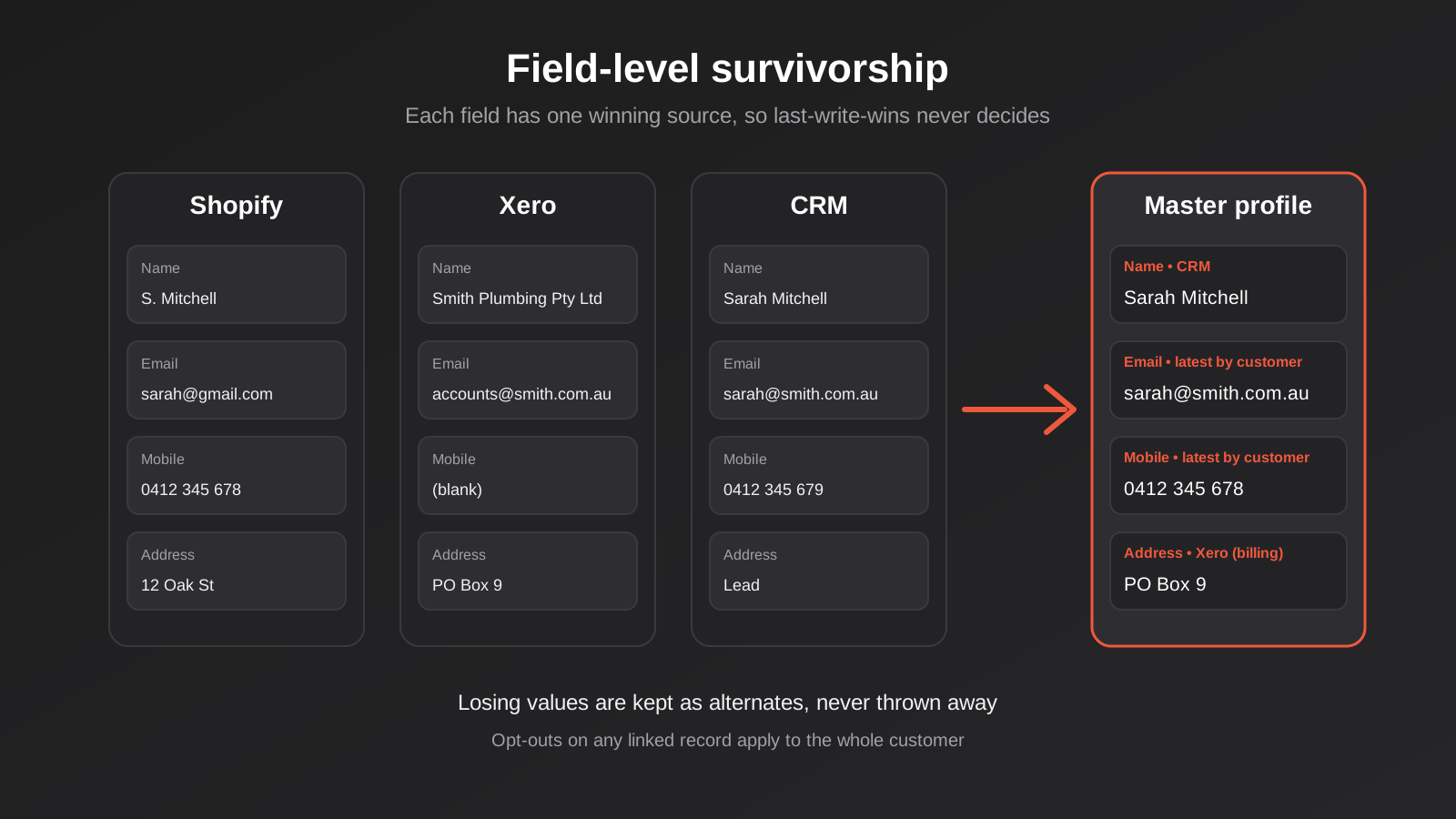
Linking records tells you they’re the same customer. It doesn’t tell you what to do when they disagree. The Shopify record says the phone number ends in 678, the CRM says 679, and Xero has no phone at all. Someone has to decide which is right, and ideally that decision is made once as a rule instead of ad hoc each time.
Survivorship rules
The term for this is survivorship: for each field, which source survives a conflict. A workable starting point looks like this:
- Legal name, ABN, billing address, payment terms: accounting system wins. These affect invoices and tax, so the finance record is the source of truth.
- Marketing consent and communication preferences: the most recent change wins, and an opt-out always beats an opt-in, whichever system it came from.
- Phone and email for day-to-day contact: whichever was updated most recently by the customer themselves, rather than by a staff import.
- Lifecycle stage, owner, notes: CRM wins.
- Order history and delivery address: the store wins, since it’s captured at the moment of purchase.
Field ownership gets deeper once data starts flowing in both directions, and we go through the conflict cases in the two-way sync article linked earlier. For a single customer view, the key point is simpler: write the rules down per field, and make sure the build implements them rather than “last write wins”, which is the default in most automation tools and the cause of many silent overwrites.
Keep the losing values
When two records merge and their values differ, don’t throw away the loser. Keep it as an alternate phone or a secondary email. Customers genuinely use more than one, and the “wrong” value is often the one they’ll quote on the phone next month. It also gives you a trail when somebody asks where a number went.
Consent, privacy and the Australian angle
Joining customer records isn’t just a technical exercise. You’re building a fuller profile of a person, and that has obligations attached. Under the Privacy Act’s Australian Privacy Principles, businesses covered by the Act need to take reasonable steps to keep personal information accurate and up to date, and to protect it. A wrongly merged profile is an accuracy problem. It can also be a disclosure problem if one customer’s order history becomes visible to another.
Consent has to survive the merge
The most common compliance slip we see is consent state getting lost. A customer unsubscribes in your email platform. Their duplicate record in the CRM still says “subscribed”, and the next campaign goes out from there. Under the Spam Act, that’s a problem regardless of which record was updated. When you link records, treat any opt-out on any linked record as applying to the whole customer, and make sure the unsubscribe propagates everywhere it needs to.
Don’t over-collect to improve matching
It’s tempting to ask customers for date of birth or other extra identifiers to make matching easier. Resist this unless you have a real need. More sensitive data means more risk if something goes wrong, and ordinary identifiers (ABN, email, mobile) are enough for nearly every business we work with. If your mapping table lives outside your main systems, secure it like the customer database it effectively is: restricted access, no sharing through open spreadsheets, and a clear answer to what happens when a customer asks you to delete their data.
If a person asks for deletion or correction, the cross-reference table is actually a help: it tells you every place their data lives. That’s a good argument for building it even if you never build a dashboard.
How to build it: three realistic approaches
What you build depends on volume, how often data changes, and how much your team can maintain. There’s no single right answer.
A one-off cleanup
For a business with a few thousand customers and slow-moving data, a structured one-off cleanup can be enough. Export from each system, normalise emails, phones and company names in a spreadsheet or script, run the deterministic rules, review the fuzzy matches by hand, then import the master IDs back as a custom field in each system. It’s cheap and it gets you most of the way. The weakness is obvious: it starts decaying the day you finish, because nothing stops new duplicates arriving.
An automation layer with a lookup table
The middle option is what most growing businesses want. A tool like Make or n8n (we compare them in our Zapier, Make and n8n comparison) runs a check whenever a customer is created or updated in any system. The check normalises the identifiers, looks them up in the cross-reference table, and either links the record to an existing master ID, creates a new one, or drops the pair into a review queue. The table sits in a proper database or Airtable base, and the automation keeps it current.
This pattern works well because new duplicates are caught at the door, and because the rules live in one place. Its limits show up at volume or when the logic gets elaborate: long chains of lookups in a no-code tool get slow, awkward to test and hard to hand over. When that happens it’s usually time to move the matching logic into a small piece of custom code that the automation calls.
A custom matching service
For larger customer bases, B2B with complicated account hierarchies, or businesses whose data feeds into operations like pricing and credit limits, a small purpose-built service is justified. It exposes one endpoint, something like “here’s a customer record from this system, tell me who they are”. It applies the rules consistently, logs every decision, and supports unmerge. This is a modest piece of software, not an enterprise platform, and it’s where CRM integration work tends to end up once the simple tools run out of road. If you’re connecting this particular trio of tools, our Xero and Shopify integration page describes what we build there.
Rolling it out without breaking anything
Matching customers touches live data. The way you roll it out matters as much as the rules.
Start with a read-only pass
Run the whole matching process against exports first and change nothing. You’ll get a report of how many records link automatically, how many land in review, and how many remain unmatched. Read the first few hundred review items yourself. You’ll almost always find a rule that’s too loose (it joined a household) or too tight (it missed an obvious trading-name variant), and it’s far cheaper to find that now.
Backfill in batches
Write master IDs into each system in batches, starting with the most recently active customers. Keep a backup of anything you modify. If you also sync data between systems, switch the sync off while you backfill, or you risk the sync reading half-updated records and propagating them.
Turn on the live check
Once the backlog is in, enable the ongoing check for new and updated records. Keep the review queue small and owned by a named person, with a rule that items older than a week get escalated. A review queue that nobody looks at is just a delayed duplicate problem. If the process touches live automations, treat changes like any other production change: stage, test, and have a way back, as we describe in our guide to change management for live automations.
Measure whether it’s working
A few measures tell you if the system is healthy, and none need fancy tooling:
- Duplicate rate: sample a few hundred records each month and count duplicates you find by eye.
- Review queue size and age: if it keeps growing, your rules are too cautious or nobody owns it.
- Orphan orders: orders or invoices that can’t be tied to a master customer. This number should trend toward zero.
- Reversals: how often a link gets undone. A rising count tells you a rule is too aggressive.
What it unlocks once it works
A single customer view isn’t an end in itself, so it’s fair to ask what you get. The practical payoffs tend to be modest and concrete rather than dramatic.
- Your sales and support team sees order history and outstanding invoices on the CRM record, without opening Xero.
- Credit and payment-term decisions use a complete picture of what a customer owes across every channel.
- Marketing segments stop double-counting people, and suppression lists work properly.
- Reporting joins across systems, so you can actually say how much a customer is worth over time.
- Customer requests for their data, or for deletion, become a lookup instead of a hunt.
None of this is glamorous, but it’s the foundation for anything smarter you want later, including AI assistants that answer questions about customers. An assistant pulling from three unlinked records will confidently give wrong answers, which is a good reason to sort identity out first.
Common mistakes
- Treating email as a perfect key. Shared mailboxes, aliases and people with several addresses make it unreliable on its own.
- Auto-merging on fuzzy scores. Similar names at similar addresses are not proof. Send those to a human.
- Merging inside systems before linking. Native merges are mostly irreversible. Link first, merge only the certain cases.
- Letting last write win. Without field-level rules, the most recent import silently overwrites the best data.
- Forgetting consent. An unsubscribe on one record has to count on all of them.
- Skipping the person-versus-account question. If you haven’t decided whether you’re matching individuals or companies, your rules will be wrong for half your data.
- Doing it once and walking away. New duplicates arrive daily. Without an ongoing check, you’ve bought a temporary improvement.
- No audit trail. If you can’t say why two records were linked, you can’t safely fix a bad link.
- An unowned review queue. Uncertain matches pile up and the project quietly stalls.
Frequently Asked Questions
Do I need a customer data platform to get a single customer view?
Usually not. A customer data platform makes sense for large consumer brands pulling in web, app and advertising events at volume. For most Australian small and mid-sized businesses, a cross-reference table, a clear set of matching rules and an automation or small service to keep it current covers the real need at a fraction of the complexity. If you later outgrow it, the rules and the master IDs carry across to a bigger platform.
Is it safe to merge duplicate customers in Shopify or Xero directly?
It can be, when you’re certain two records are the same customer, but treat the native merge tools as one-way. Check how the platform currently handles a merge, ideally test it on a copy or a low-risk record, and keep a note of what you merged. Linking records through a mapping table first means that a wrong merge is the exception, not the method.
What should I use as the unique identifier for B2B customers?
The ABN is the strongest option for Australian businesses, because it’s tied to the legal entity and has a checksum you can validate. Keep in mind that one ABN can cover several sites, brands and buyers, so use the ABN to identify the account and a separate key, such as the buyer’s email, to identify the person within it.
How many duplicates is normal?
There’s no honest universal figure, since it depends on how many entry points you have and how long the systems have run. Rather than comparing to a benchmark, sample your own data. Pull a few hundred records, count the duplicates you can spot by eye, and track that number after the cleanup. If it creeps back up, your ongoing check isn’t catching enough.
Can AI do the matching for us?
AI can help with the ambiguous cases, such as judging whether two company names with different spellings are likely the same business, and it can pre-sort your review queue. We wouldn’t let it merge records unattended. Matching decisions need to be explainable and reversible, and a rules-based approach with a human reviewing the uncertain tier gives you both. Treat AI as an assistant to the reviewer, not a replacement.
How long does a project like this take?
It depends mostly on how messy the data is and how many systems are involved, not on the volume of records. Defining the identity rules and reviewing a sample takes the longest, and it needs decisions from people in sales, finance and operations. The technical build is often the smaller part. A short discovery conversation, with a look at your actual data, is the only reliable way to estimate it.
Where to Start
You don’t need to commit to a build to make progress. Start by exporting customers from each system and finding five people you know are duplicated. Work out, for each one, what identifier would have told you they were the same. That small exercise usually shows you which keys are trustworthy in your business and which aren’t, and it makes the rule document easy to write. From there, decide whether you’re matching people, accounts or both, and write the field ownership rules in plain language.
If you’d like a second pair of eyes on the data, or you want to scope what a linked customer view would involve between your store, accounting system and CRM, we’re happy to talk it through. There’s no pitch attached. See our automation pricing page for how we scope work, and our guide to API integration costs in Australia for the factors that move a project up or down.
Worth knowing about price: because we run lean as a specialist agency rather than carrying a large account-management layer, our fixed quotes typically come in below the Australian averages covered in our API integration cost guide. If you’ve already got a written quote from another agency for comparable scope, send it through and we’ll do our best to beat it.
Keep reading
Related posts
Product Data Management for Australian Ecommerce: Supplier Feeds, Staging and When You Actually Need a PIM (2026)
How to turn messy supplier files into clean product data: staging, validation, GTINs and whether you really need a PIM. A guide…

Australian Address Validation: PAF, G-NAF and How to Stop Bad Addresses Entering Your Systems (2026)
How to validate Australian addresses with PAF and G-NAF, where to check them in your workflow, and how to store clean data…
ABN Validation and Lookup for Australian Business Systems: A Practical Guide
How to validate and verify ABNs in forms, CRMs and supplier onboarding: checksums, the ABN Lookup service, GST status, edge cases and…
Got a project you'd like to talk through?
Tell us what you're working on — we'll come back with a plan.
