
Clean Your Data Before You Automate: A Practical Guide to CRM Data Cleanup for Australian Businesses (2026)
 Jignesh Vagadiya
23/10/2026
24 min read
Jignesh Vagadiya
23/10/2026
24 min read
Here’s a scenario that plays out more often than anyone admits. A business connects its CRM to its accounting system. The brief is simple: when a deal closes, create the customer in the accounting package and raise the first invoice. The build is tested on a handful of records and works perfectly. Then it runs against the real data and creates hundreds of new customers in an afternoon, a good share of them for people and companies that already existed under slightly different names.
The integration isn’t broken. It does exactly what it was told. The problem is that the CRM holds three records for the same client: “Smith & Sons Plumbing”, “Smith and Sons Plumbing Pty Ltd”, and one under the owner’s personal name. To a person that’s obviously one customer. To an automation, it’s three, and each gets an invoice.
This guide is about the unglamorous work that should happen before you connect systems, switch on a workflow, or point an AI assistant at your records: cleaning the data. We’ll cover what actually goes wrong, a repeatable cleanup process, how to write matching and merge rules you won’t regret, the Australian-specific quirks that trip people up, and how to stop the mess from coming straight back. It’s aimed at business owners and operations managers who’ve been told “your data needs cleaning first” and want to know what that really involves.
Why Dirty Data Hurts Automation More Than It Hurts Reporting
Messy data has always been annoying. A duplicate contact in a spreadsheet costs someone thirty seconds of confusion. A human looks at two near-identical rows, shrugs, and works around it. Automation doesn’t shrug. It acts on whatever it’s given, at speed, as many times as the trigger fires.
Automation multiplies errors instead of absorbing them
When a person handles a task manually, they bring context. They notice that the phone number is missing a digit, or that the “Sydney” customer has a Perth postcode. They fix it or ask. An automated workflow has no instinct for that. A malformed email address becomes a bounced welcome email. A duplicated contact becomes two sales reps chasing the same lead. A wrong postcode becomes a parcel quoted at the wrong freight zone.
The cost also shifts. Manual errors are slow and visible. Automated errors are fast and often silent, because the whole point of automating was that nobody watches each step. By the time someone notices, the same defect has been replicated across hundreds of records and several downstream systems.
Integration exposes disagreements you didn’t know existed
Most businesses run on several systems that have quietly drifted apart. The CRM says a customer’s name is one thing, the accounting package says another, and the ecommerce platform has a third version typed in by the customer themselves. Nobody minded, because nobody compared them.
The moment you connect those systems, the disagreements surface. The sync has to decide which version wins, and if nobody has defined that, it either overwrites good data with bad or creates a second record rather than guess. We’ve written separately about field ownership and conflicts in two-way sync, and most of those conflicts are really data quality problems wearing a technical costume. Clean data won’t remove the need for ownership rules, but it shrinks the number of conflicts you have to rule on.
AI tools inherit your data’s flaws, confidently
If you plan to use an AI assistant over your customer records, product catalogue or internal documents, the same logic applies with a nastier twist. A model doesn’t flag that two records contradict each other. It will pick one, or blend them, and present the answer in fluent, assured prose. Stale pricing sheets, three versions of a returns policy and contacts who left the company in 2021 all become “facts” the assistant can repeat to a customer. Cleaning the source is cheaper than debugging the answers.
The Seven Kinds of Dirty Data That Cause the Most Trouble
Before you fix anything, it helps to name what you’re looking for. Almost every messy business database is a mix of the same handful of problems, and each needs a different fix.
1. Duplicates
The same person or company appearing more than once. They come from form submissions that create a new contact every time, imports from trade shows and old systems, staff creating a record instead of searching for one, and previous integrations that had no matching rule. Duplicates are rarely exact. They’re variations: a nickname, a maiden name, a typo, a changed email, a trading name versus a registered name.
2. Inconsistent formats
Phone numbers are the classic example. In a single Australian database you’ll typically find 0412 345 678, 0412345678, +61 412 345 678, 61412345678 and (02) 9999 1234, all valid, none equal as text. Dates cause the same pain: 03/04/2026 is the third of April to us and the fourth of March to a US-built tool that assumes month first. State fields hold “NSW”, “N.S.W.”, “New South Wales” and sometimes the suburb. Company names appear in capitals, lower case and with or without “Pty Ltd”.
3. Missing required values
Records without an email, an owner, a lifecycle stage or a billing address. Individually harmless. Collectively they mean a workflow that needs that field either fails or, worse, quietly skips the record. Which fields are “required” depends on what you’re about to automate, which is why cleanup should start from the use case rather than from a generic checklist.
4. Stale records
Contacts who’ve changed jobs, businesses that have closed, leads from a campaign three years ago that never replied. Stale data inflates your counts, pollutes segments, hurts email deliverability through bounces, and makes every automated follow-up less relevant. It also carries a privacy angle, which we’ll get to.
5. Free text where structure is needed
A “Source” field containing 40 different spellings of the same five channels. A “Job title” field you’d like to use for routing, with “MD”, “Managing Director” and “md / owner” in it. Notes fields holding information that really belongs in a proper field, such as a contract renewal date buried in a comment. Automation can only trigger on values it can reliably recognise.
6. Broken or mismatched identifiers
Customer numbers that differ between systems, SKUs that were renamed in one place but not another, ABNs typed with the wrong number of digits, or a supplier code reused for a different supplier after a system change. Identifiers are what let systems recognise the same thing. When they’re unreliable, matching falls back to names, and names are the least reliable key you have.
7. Orphans and half-finished records
Contacts attached to no company, deals attached to a deleted contact, invoices referencing a customer who was merged away, products with no category. These tend to appear after earlier migrations or manual clean-ups done without checking relationships. They break reports, and they make syncs behave unpredictably.
Australian Data Quirks Worth Planning For
Generic data cleansing guides are written for US databases. A few local details deserve explicit rules in your cleanup plan.
- Phone numbers: pick one stored format, usually E.164 (+61412345678), and display it however you like. Mobile numbers start with 04 locally and +614 internationally. Landlines carry an area code that people often drop. Numbers starting 13, 1300 and 1800 are not geographic and shouldn’t be treated as one.
- Dates: store dates in an unambiguous format (ISO 8601, like 2026-04-03) and convert only on display. Imports from spreadsheets are the usual culprit for swapped day and month.
- Addresses: unit and street number conventions vary (“3/45 Smith St”, “Unit 3, 45 Smith Street”), and PO Boxes and parcel lockers behave differently from street addresses for delivery. Postcodes should be checked against the state, as a postcode belonging to Victoria sitting on a record marked WA is almost always an error. Australia Post publishes the Postal Address File, and several address validation services build on it.
- ABNs: an ABN is 11 digits, and the Australian Business Register lets you confirm that a number is valid and see the registered entity name and GST status. That makes it the best available key for matching business customers, far better than a company name.
- Business names: a sole trader’s trading name, their personal name and their registered entity can all appear as separate “customers”. Decide in advance which one is the master record.
- Names: apostrophes (O’Brien), hyphens, and names that aren’t Anglo-style. Don’t write rules that “correct” capitalisation blindly, because you’ll mangle McDonald, de Souza and similar.
- GST treatment: in accounting and ecommerce data, make sure GST codes and tax-inclusive or exclusive flags are consistent before syncing invoices, since a mislabelled code can quietly misreport tax.
A Practical Process for Cleaning Data Before You Connect Anything
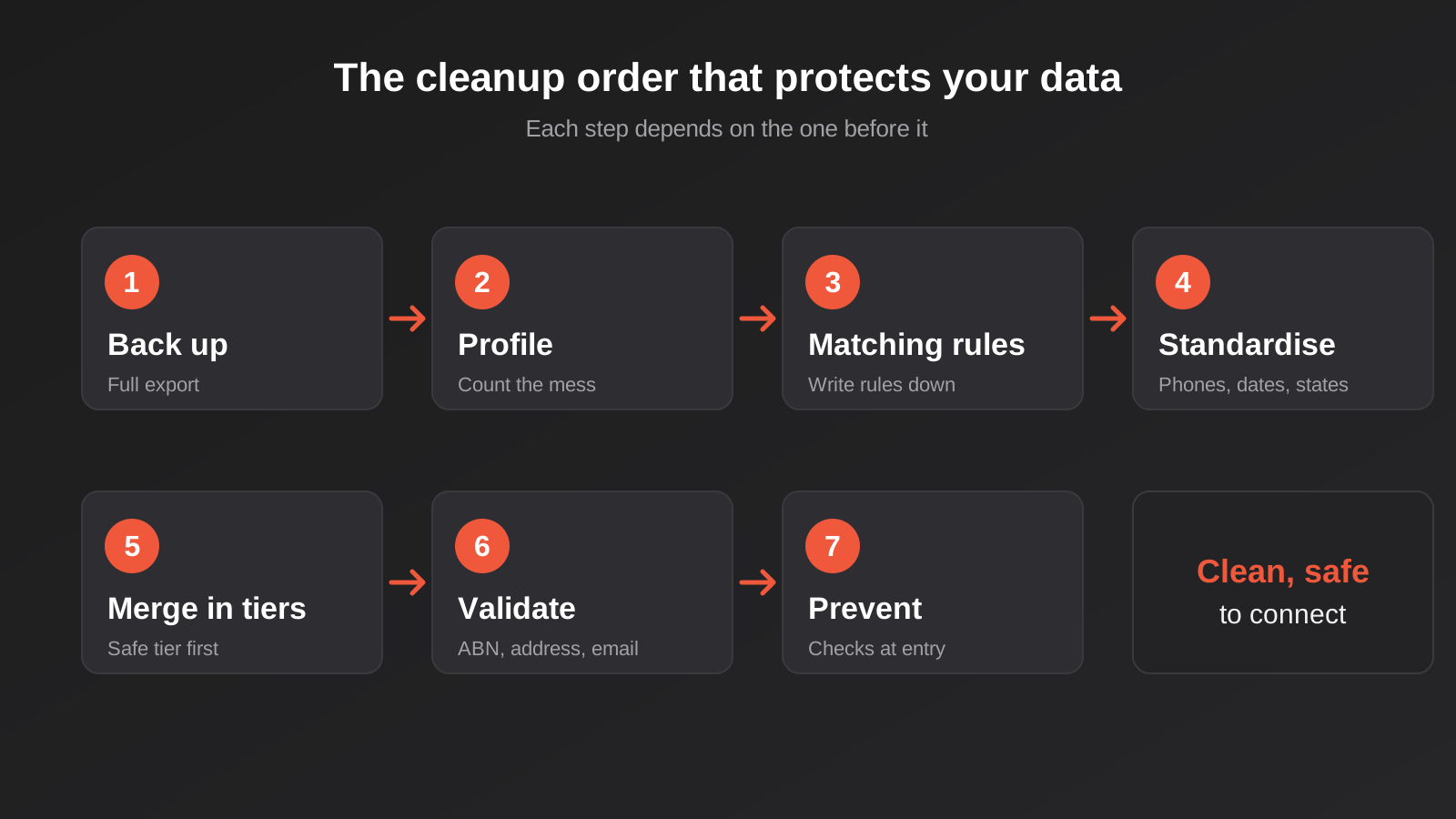
The sequence matters more than the tooling. Cleaning in the wrong order wastes effort (standardising records you’re about to merge away) or destroys information you can’t get back. This is the order we work in.
Step 1: Back everything up first
Export a full snapshot of the system you’re about to change, including relationships and IDs, and store it somewhere that isn’t the system itself. Merges in most CRMs cannot be undone. The backup is what turns a mistaken merge from a disaster into an annoying afternoon. It’s also the baseline you’ll compare against when you check your work at the end.
Step 2: Define the use case, then profile the data against it
“Clean the CRM” is not a scope. “Make the CRM safe to sync with our accounting system” is. The use case tells you which fields matter, which can stay messy, and what “good enough” looks like. Once that’s clear, profile the data: how many records, how many have each key field filled in, roughly how many duplicates, how many formats appear in the phone field, how many contacts have had no activity in two years. A few filters and pivot tables do most of this. You’re after numbers, not perfection. The numbers also tell you whether this is a one-day job or a three-week project.
Step 3: Write the matching rules down
Decide, in plain language, what makes two records the same entity. We cover the detail in the next section, but the principle is to write the rules before you run any tool, in a form someone else can read and challenge. Rules that exist only in a tool’s configuration screen are rules nobody can audit later.
Step 4: Write the survivorship rules
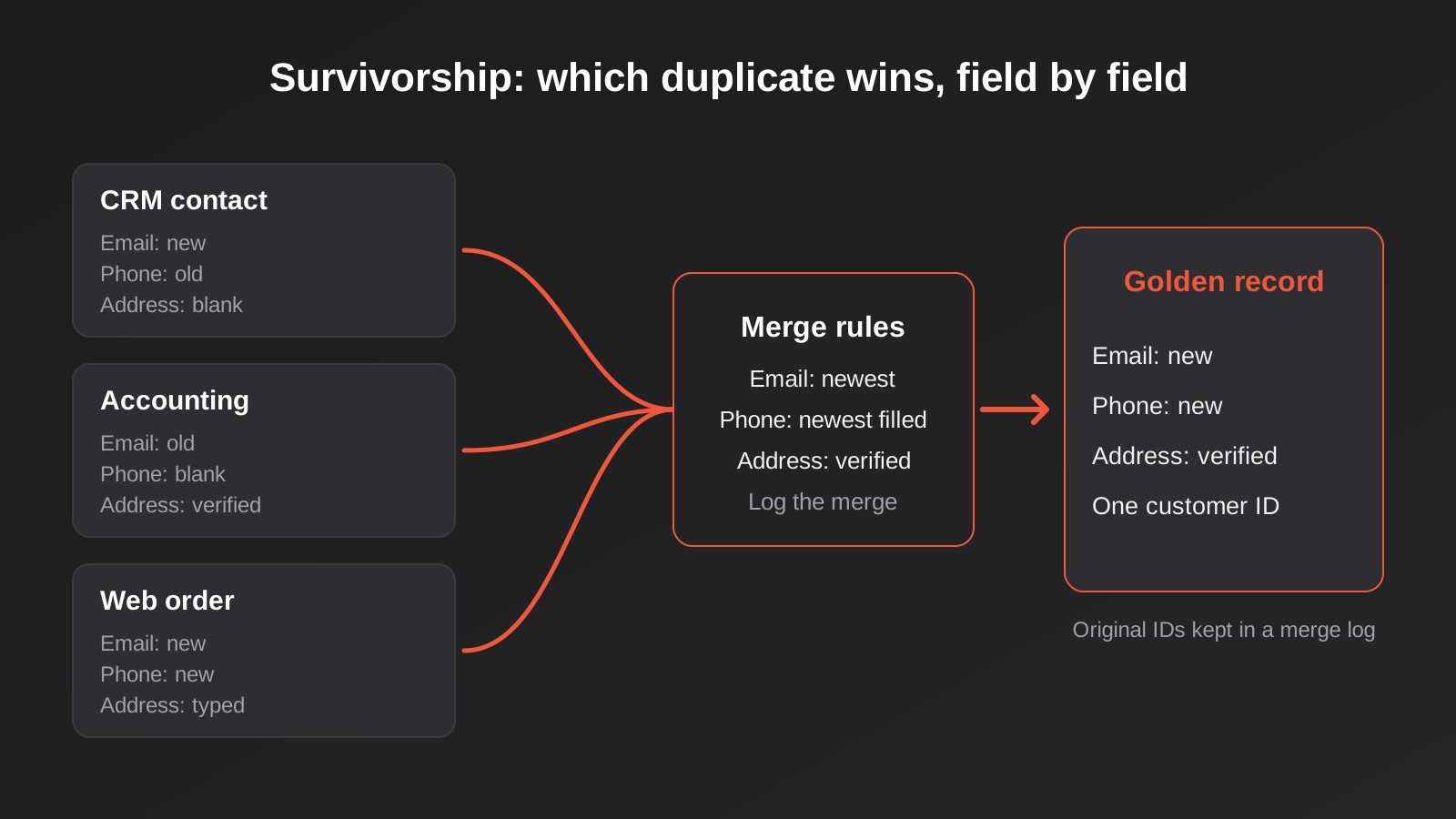
When two records are merged, one set of values wins. Which one? The most recently updated? The one with the most complete data? The one from the accounting system because it’s the legal record? Per field, these answers often differ. The email might come from the newest record, the billing address from the accounting system, and the lifecycle stage from whichever is furthest along. Define this per field. This is the step people skip, and it’s why merged records end up with the wrong phone number.
Step 5: Standardise before you deduplicate
Normalise the fields you’ll match on, because matching on messy values misses obvious duplicates. Convert phone numbers to one format, lower-case and trim email addresses, strip “Pty Ltd” and punctuation into a separate matching copy of company names, expand state abbreviations consistently. Keep the original value alongside the standardised one where you can, so nothing is lost if a rule turns out to be wrong. Standardising first also gets rid of a large share of duplicates that were never really different records, only different spellings.
Step 6: Deduplicate in tiers, not in one sweep
Start with the matches you’d stake money on, such as identical email addresses or identical ABNs, and merge those automatically. Then review medium-confidence matches by eye or in a queue. Leave low-confidence ones alone unless there’s a strong reason. Running the tool on its most aggressive setting and accepting its suggestions is how you end up with two different customers fused into one record, which is far harder to untangle than a plain duplicate.
Step 7: Validate and fill the gaps that matter
Now check what’s left against reality where it’s cheap to do so. Run email addresses through a syntax and domain check, verify ABNs against the register, validate addresses against a postal file, and flag records missing the fields your use case depends on. Fill what you can from other internal systems before paying for external enrichment. For the rest, decide whether to chase it, leave it blank, or exclude the record from the automation until someone completes it.
Step 8: Put a lock on the door
A cleanup without prevention lasts about a quarter. Add duplicate checks at the entry points: forms, imports, integrations and manual creation. Make key fields required, use dropdowns instead of free text, and validate formats at capture. Give someone ownership of data quality, even if it’s an hour a fortnight, and schedule a light review. The goal is to make the right entry the easy one.
Writing Matching Rules That Don’t Merge the Wrong People
Deduplication is a precision problem. Missing a duplicate costs you a little clutter. Wrongly merging two distinct customers can cost you an invoice sent to the wrong party or a privacy breach where one person sees another’s details. So the bias should be toward caution.
Deterministic matches
These use a field that should be unique. Same email address, same ABN, same customer number from a system of record. They’re the safe tier and usually cover the largest share of true duplicates once the data is standardised. Even these have exceptions. A shared inbox like accounts@ or info@ can belong to many people at a business, and two family members might share one email address. Exclude generic role addresses from automatic person-level merges.
Fuzzy matches
These compare similarity: names that sound alike, addresses that nearly match, company names that differ by a suffix. They find real duplicates the deterministic tier misses, and they also produce false positives. Combine signals. A similar name alone proves nothing. A similar name plus the same postcode plus a matching phone number is a strong candidate. Score the combination, and set thresholds for auto-merge, human review and ignore.
Company-level matching
Matching on web domain works well for businesses and fails for anyone using a free email provider. A contact at gmail.com doesn’t make Gmail their employer. Build an exclusion list of free providers, and prefer ABN where you have it. Be careful with franchise groups and multi-location businesses, where “the same company” might legitimately be several accounts with separate billing.
Keep a merge log
Record which IDs were merged into which, and when. If a customer later says “I used to have an account under my old email”, or a reconciliation turns up an ID that no longer exists, the log is how you trace it. It also helps downstream systems. If your accounting package still references the old customer ID, the log tells you what it should now point to.
Tools: What to Use and When
You rarely need specialist software. The right tool depends on the volume of records and where the data lives.
Built-in duplicate management
Most mainstream CRMs include duplicate detection and merge tools, though their strength varies. Some only match on email, some let you define custom rules, some handle companies better than contacts. Start here for ongoing duplicate prevention, since it works at the point of entry. Check what yours actually matches on before trusting it, and test on a copy.
Spreadsheets and Power Query
For a database of a few thousand records, exporting to a spreadsheet is often the fastest route. Filters, text functions and a tool like Power Query or a pivot table handle standardisation, find exact duplicates and surface blanks. It’s manual, but it gives you full visibility, and for small datasets visibility is worth more than elegance. The risk is version control: once the cleaned file diverges from the live system, you need a plan to push changes back without clobbering recent edits.
Scripts and workflow tools
Once you’re past a few thousand records, or need the same normalisation repeatedly, a script or a workflow tool such as n8n or Make is more reliable than hands. They can standardise phone numbers, call an ABN lookup, check an address and write the result back as part of an ongoing process rather than a one-off event. The same logic that keeps new records tidy also protects the next integration you build.
Validation and enrichment services
Address validation, email verification and business lookup services are worth paying for when the data feeds something expensive: physical mail, courier labels, or outbound campaigns where bounces damage your sending reputation. Price them against the cost of a failure. A returned parcel or a burnt sender domain typically costs more than the validation call that would have caught it.
Privacy: Data Quality Is Also a Compliance Issue
If your records contain personal information, and a CRM almost certainly does, cleaning isn’t only an operational nicety. Under the Privacy Act’s Australian Privacy Principles, APP 10 expects organisations to take reasonable steps to ensure the personal information they collect, use or disclose is accurate, up to date and complete. APP 11 requires reasonable steps to destroy or de-identify personal information once it’s no longer needed for any purpose you can lawfully use it for.
In practice that gives you a sound reason to retire records that have been dead for years, rather than syncing them into every new system you connect. It also argues for a written retention rule: for example, leads with no activity after a defined period are reviewed and removed. Treat this as general guidance, not legal advice. If your business is covered by the Act or by sector-specific rules, a privacy adviser can confirm what “reasonable steps” means for your data. If you’re automating decisions that affect individuals, the upcoming automated decision-making disclosure requirements lean heavily on the accuracy of the underlying records too.
One practical consequence for the cleanup itself: the backup you take in Step 1 contains personal information too. Store it securely, restrict who can open it, and delete it when the project has bedded in rather than leaving a spare copy of your whole customer base in someone’s downloads folder.
CRM Data Cleanup for Specific Projects
What “clean enough” means changes with the destination. Here’s where we concentrate effort for the common projects.
Before a CRM integration
The priorities are unique identifiers and duplicate contacts and companies. If the integration will create or update records in another system, it needs a reliable key to decide between “create” and “update”. Our CRM integration service page describes how we approach the build. Whatever tool you use, agree on the system of record for each field before the first sync.
Before an ERP or accounting connection
Customer and supplier master data, item codes, units of measure, GST codes and chart-of-accounts mappings are the risk areas. These systems are strict. A purchase order with an unrecognised item code gets rejected or parked, and a duplicate supplier can mean a payment goes out twice. If you’re moving between platforms rather than connecting them, see our guide to migrating ERP and ecommerce platforms without losing data, where cleanup is the largest single piece of pre-migration work. For ongoing connections, our ERP integration work starts with a master-data review for exactly this reason.
Before ecommerce automation
SKU consistency is everything. If the same product has different codes in your inventory system, your store and your supplier’s file, stock sync will fail or create ghost products. Check variants, barcodes, weights and product titles. Customer duplicates matter too, since repeat buyers who checked out as guests leave a trail of near-identical records.
Before pointing an AI assistant at your data
For records, apply everything above. For documents, the equivalent job is content hygiene: remove superseded policies, mark one version as current, fix contradictions between the FAQ and the terms page, and add dates so recency is visible. An assistant is only as trustworthy as the least reliable document it can reach. Cleanup effort also belongs on the cost side of any ROI calculation for an AI project, and error reduction on the benefit side.
How Long It Takes and Who Needs to Be Involved
Time depends far less on record count than on how many decisions are needed. A database of 20,000 contacts with one obvious duplicate pattern can be cleaned in days. A database of 3,000 records spread across four systems, with no agreement about which one is right, can take weeks, because the work is mostly people deciding things.
Three kinds of effort tend to add up:
- Mechanical work: exports, standardisation, scripted matching, bulk updates. Fast once the rules exist.
- Review work: checking medium-confidence matches, resolving records the rules couldn’t settle. Slow, and it needs someone who knows the customers.
- Decision work: choosing the system of record, agreeing survivorship rules, deciding what to retire. Short in hours but long in elapsed time, since it needs the right people in the same conversation.
The people who know which “Smith Plumbing” is the real one are usually your account managers, bookkeeper or office manager, not whoever is running the project. Budget their time up front. A cleanup that stalls waiting for answers is the most common reason these projects drag, and it’s an expensive way to find out nobody owned the data.
It’s also worth treating the first pass as the biggest, not the only one. After the initial clean, the live systems keep producing new problems at a much lower rate. A short monthly look at new duplicates, bounced emails and records missing key fields keeps the work small. Skip it for a year and you’re back to a big job.
Measuring Whether the Cleanup Worked
“It feels tidier” isn’t a result. Pick a few measures before you start and compare afterwards, using the profile numbers from Step 2.
- Duplicate rate: the share of records that match another record under your rules, before and after.
- Completeness: the share of records with each field your automation needs filled in and valid.
- Bounce and return rates: email bounces, returned mail, failed courier deliveries.
- Sync failures: errors or exceptions per week in the integration once it’s live.
- Manual corrections: how many times staff fix a record by hand each week.
The last one is the most telling because it captures the daily friction that nobody logs. If it falls and stays down, the cleanup and the prevention rules are both doing their job. If it creeps back up after a couple of months, an entry point is still letting bad data in.
Common Mistakes
- Connecting first and cleaning later. Once a sync is live it will copy the mess into the other system, and now you have two things to clean and a reconciliation problem on top.
- Skipping the backup. Merges are rarely reversible. If you can’t restore the original, you can’t prove what changed.
- Merging on the tool’s default settings. Defaults are tuned to look impressive in a demo. Review the thresholds, and test on a copy.
- Matching on names alone. Two people called Michael Nguyen in the same suburb are not one person. Require a second signal.
- Never defining survivorship. Without per-field rules, whichever record the tool picks wins everything, including its out-of-date phone number.
- Deleting instead of archiving. Where the law and your retention rules allow, archive or flag stale records first. Delete once you’re sure nobody needs them, and apply your privacy obligations consistently.
- Cleaning once with no prevention. The same forms and imports that created the mess will recreate it. Fix the entry points.
- Leaving it to IT alone. A technical person can run the merge. Only the business can say which record is right.
- Chasing perfection. You don’t need every record flawless. You need the records your automation touches to be reliable, and a clear way to handle the exceptions.
- Forgetting the downstream systems. Merge a customer in the CRM and the accounting system still has the old IDs. Plan how those references get updated.
Frequently Asked Questions
Do I really need to clean my data before automating?
For anything that creates, updates or sends based on records, yes, at least the fields and records involved. You don’t need a perfect database. You need the subset your workflow touches to be consistent, de-duplicated and complete enough that the workflow behaves predictably. A small automation on a clean slice of the data is a better start than a large one on everything.
What’s the difference between data cleansing and data migration?
Cleansing improves the data where it lives. Migration moves it somewhere else. They overlap because the best time to clean is just before a move, when you’re already questioning every record, and cleaning beforehand means you don’t pay to move junk into a new system. Many projects do both in sequence: profile, clean, migrate, then reconcile counts and totals.
Can I automate the cleanup itself?
Partly. Standardising formats, flagging likely duplicates, validating ABNs and addresses and routing exceptions to a review queue all automate well. Final merge decisions on ambiguous records are better left to a person. A sensible pattern is to auto-merge the high-confidence tier, queue the middle tier for review, and ignore the rest.
How do I stop duplicates coming back?
Address the sources. Turn on duplicate checks at the point of record creation, make email or ABN a required unique field where it makes sense, require a search before manual creation, and give integrations a clear create-or-update rule based on a stable identifier. Then watch the duplicate rate monthly, so a new leak shows up early.
Should I delete old contacts or just archive them?
It depends on your retention policy and obligations. A common approach is to flag long-inactive records, exclude them from automations and campaigns, and delete after a defined period if there’s no ongoing reason to keep them. Keep records you need for tax, warranty or legal reasons for the periods those require. If you aren’t sure what applies to you, get advice rather than guessing.
What if my data is spread across spreadsheets, a CRM and an accounting package?
That’s very common, and it makes the decision step more important than the technical one. Choose a system of record for each kind of data (customers, products, invoices), then clean toward it. Often the accounting package owns legal names, ABNs and billing details, while the CRM owns relationship and pipeline information. Once those roles are agreed, the matching and merging become much more straightforward.
Where to Start
If you do one thing this week, pick the single automation or integration you’re planning and list the five fields it can’t work without. Then export your records, count how many have those fields filled in and valid, and estimate how many are duplicated. That half-day of profiling will tell you whether you have a quick tidy-up or a proper project, and it makes any quote you ask for far more accurate.
From there, write the matching and survivorship rules on one page, back up the system, standardise, and merge in tiers. If you’d rather have a second pair of eyes on the rules before anything is merged, we’re happy to talk it through. Data preparation is a normal part of the integration and automation work we do, and we’d rather scope it honestly at the start than discover it halfway through a build. You can see how we approach scoping on our automation pricing page, or just get in touch with what you’re trying to connect and we’ll tell you what we think it’ll take.
Worth putting plainly: because we run lean as a specialist agency rather than carrying a large account-management layer, our fixed quotes typically come in below the usual Australian agency averages. If you’ve already got a written quote from another agency for comparable scope, send it through and we’ll do our best to beat it.
Keep reading
Related posts

Changing Live Automations Safely: Staging, Version Control and Rollback for Zapier, Make and n8n (2026)
How to draft, test, release and roll back changes to live Zapier, Make and n8n automations without breaking invoices, orders or customer…

Peppol E-Invoicing for Australian Businesses: Automating Accounts Payable From Structured Invoices (2026)
Peppol e-invoicing in Australia: what is and isn't mandatory, how to pick an access point, and how to automate accounts payable once…
Best Project Management Tools for Australian Small Teams (2026)
Trello, Asana, monday.com, ClickUp, Notion and Zoho Projects compared for Australian small teams: real prices, honest drawbacks and how to choose.
Got a project you'd like to talk through?
Tell us what you're working on — we'll come back with a plan.
