
Two-Way Sync Between Business Systems: Field Ownership, Conflicts and Echo Loops (2026)
 Jignesh Vagadiya
20/10/2026
24 min read
Jignesh Vagadiya
20/10/2026
24 min read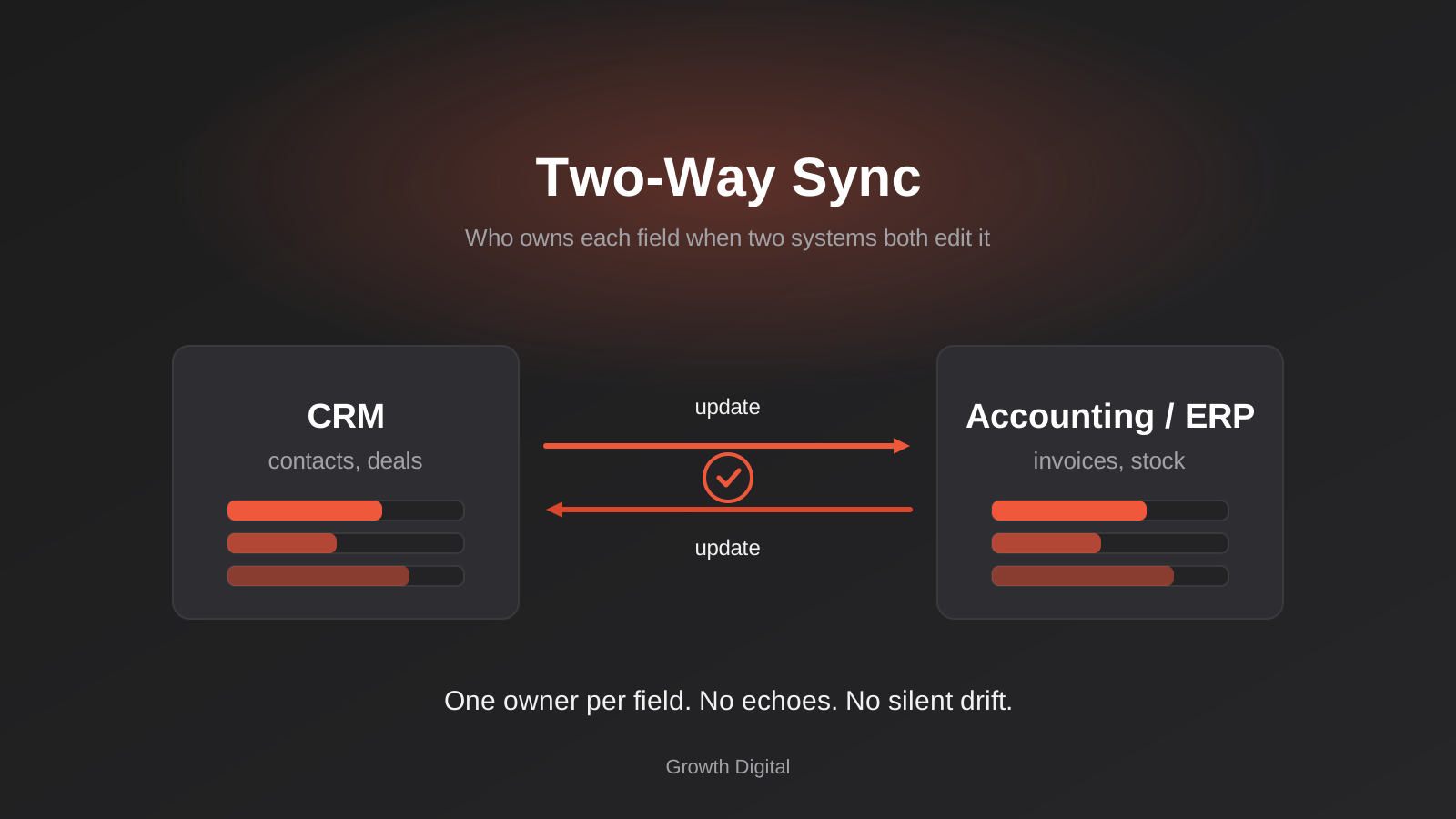
A customer changes their phone number on your website. Two days later your sales rep rings the old one from the CRM, because the update never made it across. Or worse, it did make it across, then got overwritten by an older copy from the accounting system, then bounced back again. By Friday nobody can say which number is right, and the sync that was supposed to save everyone’s time has become the thing everyone double-checks by hand.
That is the usual story with two-way sync. Pushing data one direction is a pipe: stuff goes in one end and comes out the other. Pushing it both directions is closer to two people editing the same document without being able to see each other. It works until the first time they both change the same line, and then somebody’s work quietly disappears.
This guide is about the design decisions that stop that happening: who owns each field, what to do when both sides disagree, how to stop updates echoing back and forth forever, and how to notice drift before a customer does. It’s aimed at business owners and operations leads who are about to commission a sync, and at developers who’ve inherited one. We’ve written about the plumbing around this elsewhere, including how real-time sync works with webhooks and polling and the wider picture of connecting CRM, ERP, payments and inventory. Here we go narrower: the logic that decides what happens when two systems both think they’re right.
Why two-way sync is harder than two one-way syncs
The tempting shortcut is to build one automation that copies CRM changes into the accounting system, then a second that copies accounting changes into the CRM, and call it two-way. It looks symmetrical and it takes an afternoon. It is also the single most common way we see sync projects go wrong.
The problem is that neither automation knows the other exists. Each one sees a change, copies it, and moves on. Neither asks whether the change it just spotted was made by a person or by the other automation a few seconds earlier.
The echo problem
Say a rep updates a company’s phone number in the CRM. Automation A notices and writes the number into the accounting system. The accounting system now has a “record updated” event, which Automation B notices, so it writes the number back into the CRM. The CRM now has a “record updated” event. Round it goes.
Sometimes this settles on its own, because the second write doesn’t change the value and some systems don’t fire an event when nothing changed. Sometimes it doesn’t, because a timestamp field, a “last modified by” field or a version counter changes every time, so every write looks like a fresh edit. Then you get a loop that burns through your task allowance, hits API rate limits, and in the worst case floods a customer with duplicate emails because a workflow keeps re-triggering on the “updated” event.
The fix is not clever. It is a deliberate rule that a sync’s own writes don’t count as edits. We’ll get to the mechanics further down.
The silent drift problem
The echo problem is loud. You notice a loop. The quieter failure is drift, where the two systems slowly stop agreeing and nothing complains.
It starts small. A webhook gets missed during an outage. A field gets renamed on one side. Someone bulk-imports 400 contacts into the CRM through a route that doesn’t trigger the sync. Each of these leaves a few records out of step, and because everything else keeps working, nobody looks. Six months later the finance team’s customer list and the sales team’s customer list differ by a few hundred records, and no one knows which is closer to correct.
Drift is why every two-way sync needs a reconciliation job as well as a real-time trigger. We cover that below too.
Start with field ownership, not tools
Before anyone opens Zapier, Make, n8n or a code editor, sit down with a spreadsheet and list every field that the two systems share. For each one, write down which system is allowed to change it. One system per field. If you can’t decide, you have found the first real problem in the project, and it’s far cheaper to find it now than after go-live.
This is a business conversation more than a technical one. The people who can answer “who is the authority on this?” are usually the sales manager, the finance lead and whoever runs operations, and they sometimes disagree.
What usually belongs where
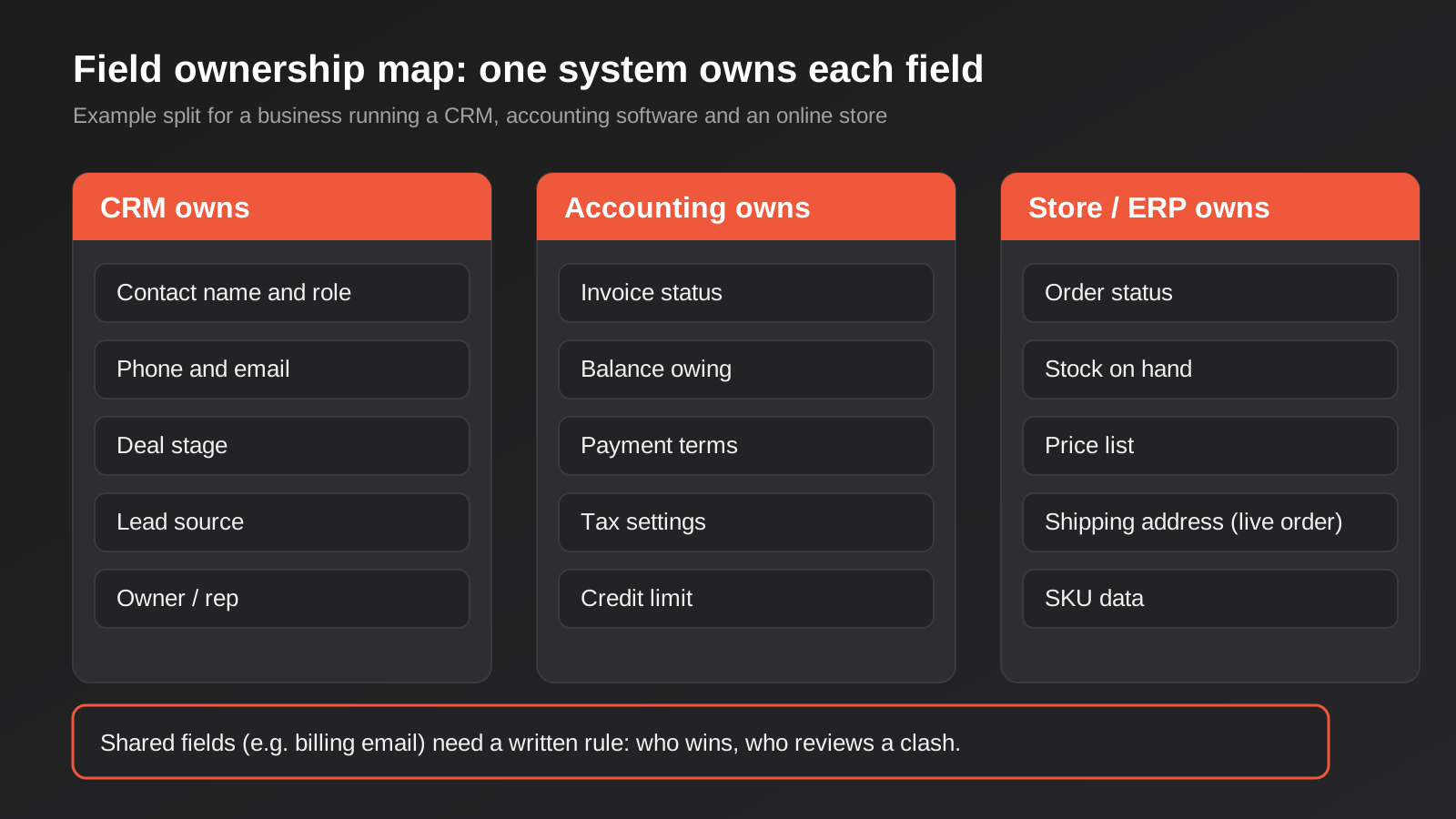
The split depends on your business, but a few patterns come up again and again. A CRM is typically the authority on people and relationships: names, roles, phone numbers, lead source, deal stage, who owns the account. Accounting software is the authority on money: invoice status, balances, payment terms, tax treatment, credit limits. An ecommerce platform or ERP is the authority on things and orders: stock on hand, price lists, order status, SKU data, and the shipping address attached to a live order.
Notice that this isn’t “CRM wins” or “ERP wins” across the board. It’s per field. A customer record is a bundle of fields with different natural owners, and a good sync treats it that way. If you want a longer look at how those boundaries play out when an ERP is involved, our guide to ERP integration for Australian businesses walks through what typically needs to sync and in which direction.
Fields that genuinely have two owners
Some fields don’t have a clean owner. A billing email is the classic. Sales learns about a new accounts contact on a call and updates the CRM. Finance gets a bounce from the old address and fixes it in the accounting system. Both are right, and both are editing the same field.
For these, don’t pretend the problem away. Write down the rule. Options we’ve seen work:
- One side is allowed to change it, and the other side gets a “request change” step that a person approves.
- Either side can change it, and the later edit wins, but every override is logged and the displaced value is kept.
- The field is split into two: a “sales contact email” and a “billing email”, each with its own owner. This is often the cleanest answer, because the business was quietly using one field for two purposes.
The third option is worth trying first. A surprising number of conflicts disappear when you notice that two fields have been sharing one box.
Write the rules down where people will find them
An ownership table that lives in one developer’s head is a liability. Keep it as a short document, a page in your wiki or a tab in a shared sheet: field name, owning system, direction, and what happens on a clash. When someone adds a custom field to the CRM next year, the first question should be “where does this go in the ownership table?” rather than “why is it overwriting finance’s data?”.
Conflict resolution: what happens when both sides change
Even with clear ownership, conflicts happen. Two people edit the same record minutes apart, an import overwrites a field, or an outage means a change arrives late and collides with a newer one. You need a policy for what the sync does. There are four honest options, and most real projects use a mix.
Last write wins
The simplest rule: whichever change has the later timestamp is kept. It’s easy to build and easy to explain, and for low-stakes fields like a job title or a free-text note it’s usually fine.
It also has sharp edges. It depends on timestamps being trustworthy, and they often aren’t. Two systems can disagree on the time by a few seconds. One system may record when the change happened and another may record when the sync received it. An import run at 2am can stamp hundreds of records with “now”, making old data look freshly edited. And “later” isn’t “more correct”: a rep fixing a typo can overwrite a carefully verified value from accounts if the rep just happened to click save last.
Use last-write-wins where being wrong costs little, and avoid it for anything involving money, stock or legal details.
Source of truth by field
This is the ownership table put to work. If the CRM owns phone numbers and accounting owns balances, then a conflict on a phone number is settled by the CRM, always, regardless of timestamp. If accounting happens to have a different phone number, it’s treated as stale and overwritten on the next pass.
This is the approach we recommend for most fields, because it’s predictable. When someone asks “why did this value change?”, the answer is a rule, not a race.
The catch is that someone has to maintain the rule set and decide what to do with edits made in the non-owning system. Silently discarding them frustrates staff. A better pattern is to revert the edit but leave a visible note (“This field is managed in the CRM. Your change was reversed.”) so people learn where to go.
Field-level merge
If two people edit different fields of the same record, there’s no real conflict. One changed the phone number, the other changed the postcode. A naive sync that copies the whole record from one side will wipe out one of those edits. A field-level sync compares each field separately and applies each change where it belongs.
This sounds obvious and is surprisingly often missed. Many “sync this record” actions in off-the-shelf tools overwrite the entire target record with the source record’s values, including fields that haven’t changed. If you’re using a connector that works that way, you may have field-level conflicts you don’t know about.
Flag it for a person
For high-stakes clashes, the right answer is to stop and ask. The sync detects that both sides changed the same owned field since the last run, parks both values in a review queue, and leaves the record alone until someone chooses. It might be a Slack message, a task in the CRM or a simple list on a dashboard.
Do this sparingly. If the queue is full of trivial items, people will ignore it, and then the genuinely important clash sits unresolved for weeks. A good test is volume: if you expect more than a handful a week, tighten the ownership rules until the queue only gets real decisions.
Stopping echo loops
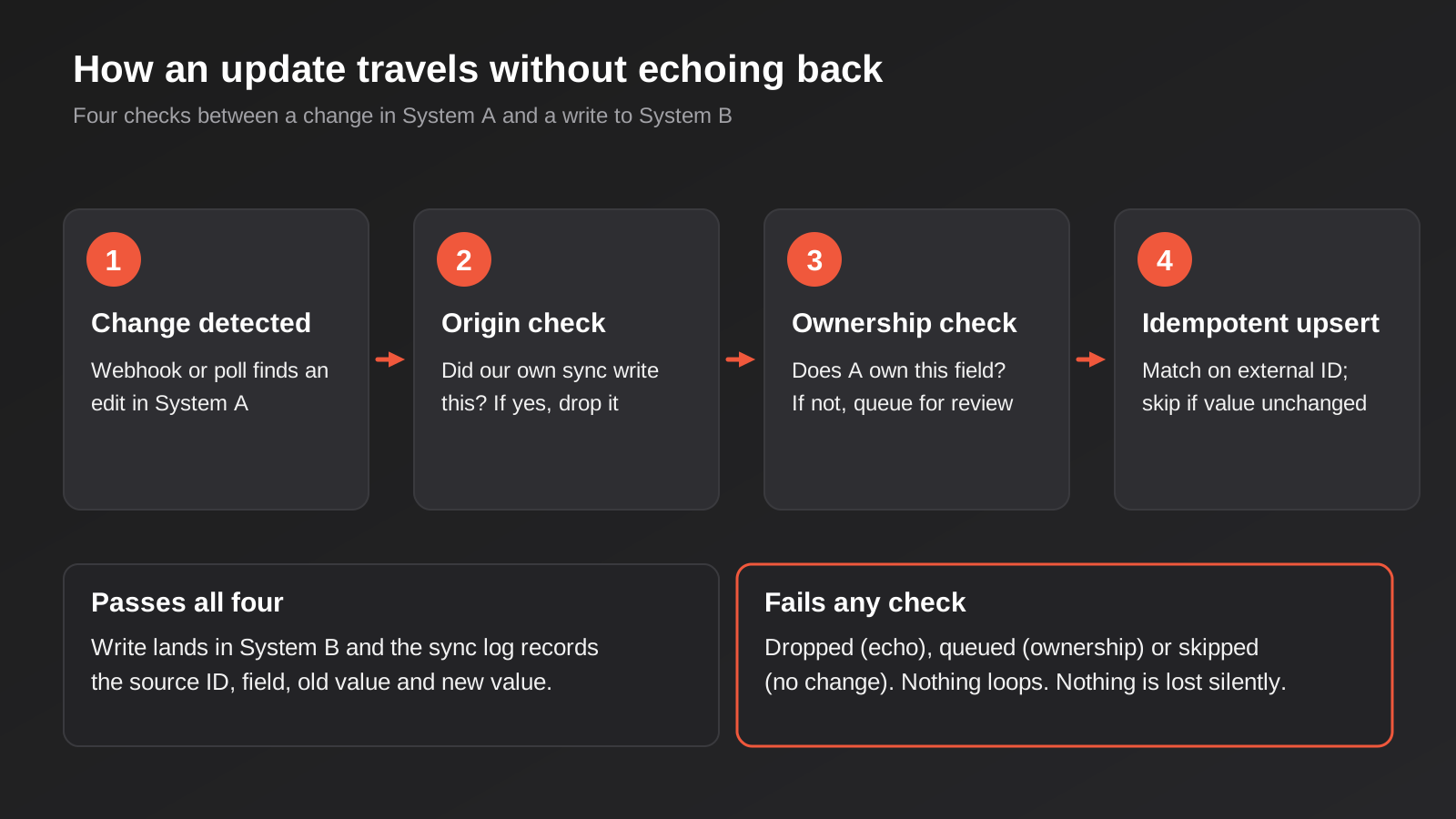
Now the mechanics. Loop prevention isn’t one trick, it’s a few cheap layers that together make an echo very unlikely. We’d put all of these into any sync we build.
Tag the origin of every write
When your sync writes into a system, mark that write as coming from the sync. Many APIs let you set a “modified by” user, a custom field, a request header or a correlation ID. Create a dedicated integration user in each system, so all sync writes appear under one identity, and teach the inbound side to ignore events from that identity.
This is the most direct form of echo filtering: if the change was made by the integration user, it’s not a human edit, so don’t send it onward. It’s cheap, it’s visible in the audit trail, and it makes debugging far easier because you can see at a glance which changes were people and which were machines.
Track a watermark
If you detect changes by polling rather than webhooks, record the time of the last successful run for each object type, and only ask for records changed since then. Your own writes land inside the window you’ve already processed, so the next run skips them.
The detail that trips people up is when to move the watermark. Move it only after the whole batch has been written successfully, and set it to the start time of the run rather than the end, minus a small safety margin. Otherwise a change made while the run was in progress can slip through the gap. The cost of the margin is that you occasionally re-see a record, which is fine as long as the next layer is in place.
Make every write idempotent
An idempotent write is one that can safely be repeated, because doing it twice has the same effect as doing it once. For sync, that means two habits.
First, compare before you write. If the target already holds the value you’re about to send, don’t send it. No write means no “updated” event, which means no echo. Second, always write by a stable external ID rather than by search, so a repeated message updates the existing record rather than creating a second one.
We went deep on this in Idempotency and Retries: Why Your Automations Duplicate Invoices, Orders and Emails, and everything there applies. The short version: if a sync can’t tolerate being run twice, it isn’t ready for production, because retries will run it twice eventually.
Add a circuit breaker
Belt and braces. Count how many times the same record has been written by the sync in the last few minutes, and if it passes a sensible limit, stop and alert someone instead of continuing. A loop that would have run all weekend gets cut off in minutes.
You’ll almost never see it trigger when everything’s built properly. That’s the point. It’s the airbag, not the brakes.
Matching records: where duplicates come from
Duplicates are usually blamed on conflict handling, but they mostly come from matching. Before a sync can update a record, it has to know which record in the other system is the same one. Get that wrong and it creates a second copy instead.
Use a stable ID, not a name
The reliable approach is to store each system’s ID for the record in the other system. The CRM contact holds the accounting contact ID, and the accounting contact holds the CRM ID, ideally in a dedicated field that staff can’t casually edit. Every subsequent update uses those IDs. Names, emails and phone numbers change; IDs don’t.
The first sync, when no IDs exist yet, is where the trouble lives. You’ll match on something softer, usually email or ABN for businesses. Plan this as a one-off migration exercise with its own review step, not as something the live sync figures out as it goes.
Why email matching bites
Email feels unique but isn’t. Shared mailboxes like accounts@ or info@ appear against many contacts. People change jobs and keep personal addresses. Two people in a household share one. A contact might have a work address in the CRM and a personal one in the accounting system.
If you match purely on email, the sync will either merge two different people into one record or fail to match two records for the same person. Both are annoying, and the first is hard to undo. Where you can, match on a combination: ABN plus a contact name for businesses, or email plus postcode for consumers. Where you can’t, route ambiguous matches to a human rather than guessing.
Dealing with existing duplicates
If your CRM already has duplicates, syncing it with another system will spread them. Clean up before you connect, not after. De-duplicate in the system that owns the contact, decide the surviving record, and make sure the merge is recorded so the other system can follow it.
Detecting changes: webhooks, polling and the reconcile job
A sync can learn about a change in two ways: the source tells you (a webhook), or you ask (polling). We cover the trade-offs properly in Webhooks vs Polling, so we’ll keep this to how the choice affects two-way behaviour.
Webhooks are quick, but they can be dropped, delivered twice, or arrive out of order. Out-of-order delivery matters a lot for conflicts: if an old update arrives after a newer one, a naive handler will apply the old value on top. Handle it by comparing a version number or timestamp carried in the event with what you last processed for that record, and discard anything older.
Polling is slower but self-correcting, because each run asks for everything changed since the watermark. Its downsides are the delay and the API call cost, which matters when you’re up against rate limits.
Most production syncs end up using both. Webhooks give you the fast path, and a scheduled sweep (say every few hours, or nightly for slow-moving data) catches whatever the webhooks missed.
The reconcile job
The sweep is worth thinking of as its own feature rather than a fallback. A reconcile job reads a set of records from both systems, compares the fields under sync, and reports or fixes any differences according to the ownership rules.
It does three jobs. It heals drift automatically. It produces a mismatch count that doubles as a health metric, because if the number climbs, something upstream is wrong. And it lets you prove the sync is working to a sceptical finance director, which is worth more than it sounds.
Deletes, merges and the awkward events
Creating and updating records are the easy cases. The nasty ones are deletes, merges, archives and status changes that mean different things in each system.
Deletes
If someone deletes a contact in the CRM, should the accounting record go too? Almost always no. The accounting system may hold invoices against that customer, and many have legal reasons to keep records. Treat deletes as a special case: propagate them as an “inactive” or “archived” flag where the target supports it, and never as a hard delete unless there’s a written rule saying so.
The reverse also matters. If the sync sees a record has vanished from a source, don’t assume it was deleted. An API error, a permissions change or a filtered view can all make records disappear from a response. Confirm with a direct lookup before acting.
Merges
When two CRM contacts are merged, one ID survives and the other goes away. Your sync must learn that the old ID now points at the survivor, or the accounting system will keep two customers and the next sync will try to recreate the one that vanished. Some platforms emit a merge event, some don’t. If yours doesn’t, the reconcile job is your safety net.
Status fields that don’t line up
Systems rarely share the same vocabulary. A CRM might have “Lead, Qualified, Proposal, Won, Lost”. An order system might have “Pending, Paid, Packed, Shipped, Refunded”. You’ll need a mapping table, and the mapping is often many-to-one or conditional. When the mapping gets awkward, resist the urge to force a perfect translation. It’s usually better to sync a simpler derived field (for example “has an open order”) than to mirror every internal status.
Testing before it touches real data
Two-way syncs deserve more testing than one-way ones, because the interesting bugs only appear when both sides change at once.
Use sandbox or test accounts for both systems if the vendors offer them. If they don’t, create a clearly labelled set of test records in production and keep everything else out of scope with a filter.
Then run the scenarios that cause trouble, not just the happy path:
- Edit the same field in both systems within a few seconds of each other.
- Edit different fields of the same record at the same time.
- Create the same customer in both systems before the sync has run.
- Turn off the network between runs, make changes on both sides, then reconnect.
- Replay an old webhook after a newer one.
- Delete a record on each side and merge two records on each side.
- Bulk import a few hundred records into one system and watch what the other does.
- Change an owned field in the wrong system and confirm it’s reverted and noted.
Keep the results. When the vendor changes an API next year, you’ll want to run the same list again, and our post on API versioning covers why that is not an if.
Monitoring: how you find out it’s broken
A sync that fails loudly is a nuisance. One that fails silently is a hazard. Put these in place from day one:
- A log of every write, with source system, target system, record ID, field, old value, new value and reason (rule applied, conflict resolved, review queued). It sounds heavy, but it’s what lets you answer “why does this say that?” in two minutes instead of two days.
- An alert when the error rate or the review-queue size passes a threshold.
- A scheduled count comparison between systems, which catches the “missed everything for a day” failure.
- A named person who looks at all of it, weekly at minimum.
That last item is the one that gets skipped. Monitoring that nobody’s responsible for is decoration. If you want a deeper treatment, Automation Monitoring covers catching broken workflows before they cost you.
Build or buy: which route fits
There are three realistic routes to a two-way sync, and the right one depends on how many fields you’re syncing, how bad a mistake would be, and who will maintain it.
Native connectors
Many platforms ship a built-in integration with others, such as a CRM with an accounting add-on. These are quick to switch on and often fine for a standard setup. Check three things before relying on one: whether it’s truly two-way or two one-way syncs, which side wins by default, and whether you can change that per field. If the answer to the last one is “no”, it works only while your data model stays simple.
Workflow tools such as Zapier, Make and n8n
These are flexible and cheap to start with, and they suit simple, low-volume syncs with a handful of fields. They get awkward when you need real conflict logic, because each scenario is stateless by default. You can add state with a datastore or a database, but at that point you’re building a sync engine inside a visual tool and it becomes hard to read. Our comparison of Zapier, Make and n8n covers how they differ in practice.
Custom integration
When the data is critical, the volume is high, the systems have awkward APIs or you need proper conflict handling and an audit trail, a purpose-built integration is usually the better fit. This is also where ERP work sits, since ERPs tend to have strict rules about what may be changed from outside. If that’s where you’re heading, our API and integrations development and ERP integration pages describe how we approach it.
A rough test: if a wrong value in this sync would cost more than a week of the tool’s subscription in rework, it deserves more than a one-step automation.
Common mistakes
These are the ones we see most often, in roughly the order they bite:
- Building two one-way syncs and calling it two-way. Without shared awareness of origin, you’ve built an echo.
- Skipping the ownership table. Everything downstream depends on it, and “we’ll sort it out as we go” turns into a conflict queue nobody trusts.
- Trusting timestamps blindly. Clock skew, import times and “received at” versus “changed at” make last-write-wins less reliable than it looks.
- Overwriting whole records. Copying every field when only one changed erases other people’s edits.
- Matching on email alone. Shared inboxes and job changes create merged and duplicated people.
- Propagating hard deletes. One deleted CRM contact removing an accounting history is a bad afternoon.
- No reconcile job. Webhooks miss things. Without a sweep, drift is guaranteed.
- Not logging old values. When something changes wrongly, you need the previous value to restore it.
- Syncing everything because you can. Every extra field is another thing to own, map and test. Sync what a process actually needs.
- Nobody owns monitoring. The alerts go to an inbox no one reads.
Frequently Asked Questions
What is the difference between two-way sync and two one-way syncs?
A true two-way sync is one system that knows about both directions: it shares state about what it has written, recognises its own changes and applies a single set of conflict rules. Two separate one-way syncs are independent automations that happen to point at each other. They don’t know the other exists, so they can loop, overwrite each other and create duplicates. Some tools market the second as the first, so it’s worth asking exactly how conflicts and echoes are handled.
Do I need a two-way sync at all?
Often not. Many “two-way” requests turn out to be one-way flows for each field, with different fields going in different directions. If the CRM owns contact details and accounting owns balances, you can send contact data one way and balance data the other, and no field travels both ways. That’s simpler, safer and easier to monitor. Reserve true bidirectional sync for the few fields that really are edited in both places.
Is last-write-wins ever the right choice?
Yes, for low-stakes fields where being occasionally wrong is cheap, such as a job title, a notes field or a preferred name. It’s a poor choice for money, stock, legal or compliance data, and anywhere timestamps may be unreliable, for example after bulk imports. For those, use field ownership or a human review step.
How do I stop a sync from creating duplicate records?
Store each system’s record ID in the other system and always update by that ID rather than searching by name or email. Handle the first run as a deliberate matching exercise with a review step for ambiguous cases, clean existing duplicates before connecting, and make writes idempotent so a retried message updates a record rather than creating another one.
How often should a two-way sync run?
It depends on how quickly staff or customers notice stale data. Stock levels and order status usually justify near real-time updates through webhooks. Contact details and reference data are often fine with a sweep every few hours. Whichever you choose, keep a slower reconcile job running as well, because real-time triggers occasionally miss events.
Can I fix a sync that’s already causing duplicates and overwrites?
Usually, yes, though you should pause it first. Stop the live sync, take a backup of both systems, write down the intended ownership of each field, then clean up duplicates in the owning system. After that, rebuild the sync with origin tagging, comparison before write and a reconcile job. Restarting without cleaning up tends to spread the existing mess to the other system.
Where to Start
If you’re planning a two-way sync, start on paper. List the fields, decide who owns each one, decide what happens in a clash, and only then pick the tool. An hour with the sales, finance and operations leads in the same room will save you weeks of untangling later, and it will often show that half the fields only need to go one way.
From there, build the smallest useful version: a handful of fields, a test account, origin tagging, comparison before write and a log. Run the awkward scenarios on purpose. Add the reconcile job before you add more fields, not after.
If you’d like a second opinion on a sync you’re designing, or you’ve inherited one that’s misbehaving, we’re happy to talk it through. Tell us which systems are involved and where the data goes wrong, and we can say whether it’s a rules problem, a tooling problem or a bit of both. Since every integration is scoped individually, our automation pricing page explains what moves the price and how we give you one fixed quote before work starts.
Because we run lean as a specialist agency rather than carrying a large account-management layer, our fixed quotes typically come in below the Australian averages for comparable scope. If you’ve already got a written quote from another agency for comparable scope, send it through and we’ll do our best to beat it.
Keep reading
Related posts

POS Integration for Australian Retail and Hospitality: Stock, Sales, Settlements and Getting the Books to Agree (2026)
How point-of-sale integration works for Australian retailers and hospitality venues: stock sync, daily sales posting, settlements and fees, and keeping the books…
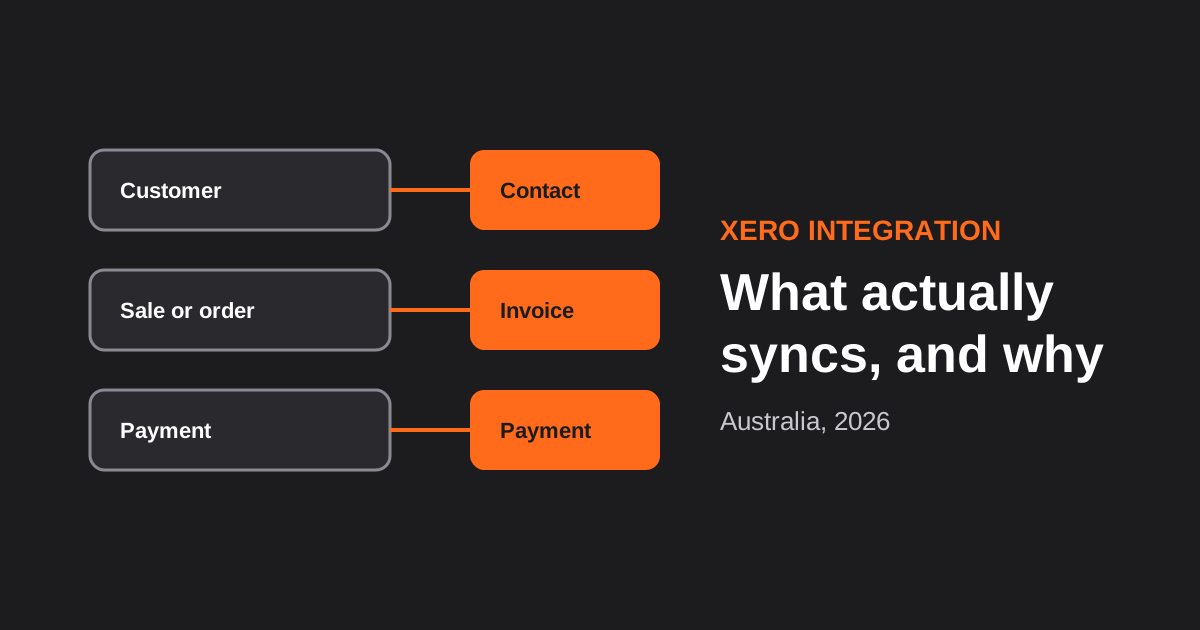
Xero Integration for Australian Businesses: What Actually Syncs, GST Mapping and the Mistakes That Break Reconciliation (2026)
How a Xero integration really works in Australia: what to sync, how to map invoices, payments, refunds and GST, and the mistakes…
CRM Integration for Australian Businesses: What to Connect First and How to Do It Properly (2026)
A practical guide to CRM integration for Australian businesses: what to connect first, which way data should flow, native vs middleware vs…
Got a project you'd like to talk through?
Tell us what you're working on — we'll come back with a plan.
