
Security Testing for Custom Software: Pen Tests, Scanning and What to Check Before Launch (2026)
 Jignesh Vagadiya
18/11/2026
25 min read
Most custom software gets tested for one thing before it goes live: does it work? Can a user log in, submit the form, see the report. That’s a reasonable question, and it’s the one every project plan covers. The question that tends to get skipped is the opposite one: what happens when someone tries to make it not work? Or worse, makes it work in a way nobody intended, by changing a number in a web address and landing on another customer’s invoice.
Security testing is the work of asking that second question on purpose, before a stranger asks it for you. It isn’t one activity. It’s a handful of different checks that happen at different points in a build, cost wildly different amounts, and catch different kinds of problems. Businesses commissioning their first piece of custom software usually hear the term “penetration test” and assume that’s the whole story. It’s one piece, and often not the first one you should pay for.
This guide is the version we’d give a client over a coffee. What each type of testing actually is, which ones you can get almost for free, what a pen test costs in Australia and what you should expect to get back, how to scope one so you’re not paying to test the wrong thing, and what to do the day a real finding lands. It’s written for owners and operations people commissioning software, not for security specialists, though your developer should be able to read it without wincing.
What “security testing” actually covers
The phrase gets used loosely, and loose language is how a business ends up paying $8,000 for something it believed it already had. Four activities tend to get lumped together, and they’re genuinely different.
Automated scanning
Software that checks your software. Some tools read your code and flag risky patterns (static analysis). Some check the libraries you depend on against lists of known vulnerabilities (dependency scanning). Some poke at a running copy of your application from the outside, the way a very patient and not very clever attacker would (dynamic scanning). All of these are cheap or free, they run in minutes, and they’re good at one thing: finding the known, boring problems. They’re poor at finding anything that depends on how your particular business works.
Code review
A person reads the code, with security in mind. It’s slower than scanning and finds a different class of problem: logic mistakes, missing checks, a permission rule that was applied to the screen but not to the data behind it. It works best when the reviewer isn’t the person who wrote the code, because authors tend to read what they meant rather than what they typed.
Vulnerability assessment
Usually a scan with a human tidying up the output. You get a list of potential weaknesses, ranked, without anyone confirming whether each one can really be exploited. Useful as a health check. Not the same as a pen test, though some providers sell it under that name, which is worth watching for when you compare quotes.
Penetration testing
A skilled person, ideally accredited, tries to break into your application using the same tricks a real attacker would, then writes up what worked, how, and what to fix. The value is in the word “worked”. A pen test report should contain demonstrated problems, with evidence, not a catalogue of theoretical ones. It’s the most expensive of the four per hour and the only one that tests your system the way an adversary would.
The practical takeaway: these are layers, not alternatives. Cheap layers run constantly. The expensive layer runs rarely and is most valuable when the cheap layers have already cleared out the obvious problems, so the tester spends their time on the hard stuff instead of reporting that you left an outdated library in place.
Start with what you’re protecting
Before anyone runs a tool, it helps to write down three things on a single page. This is a lightweight version of what security people call threat modelling, and it takes about an hour with the people who actually use the software.
Who can log in, and who shouldn’t see what
List every kind of user: staff, managers, customers, suppliers, contractors, the accountant who gets read-only access at tax time. For each, write what they should be able to see and change. This sounds obvious. In practice it’s the single most useful exercise in the whole process, because the biggest real-world weakness in business software isn’t clever hacking, it’s one user being able to reach another user’s records. If you’re building anything with more than one role, our guide to role-based access control for client portals and internal tools goes through how to structure those rules properly.
What data is in there
Names and emails are personal information. So is a customer’s address history, their purchase records, their health notes if you’re in an allied health setting, their payroll details if it’s an HR tool. The more sensitive the data, the more testing it deserves. A tool that holds a list of internal job numbers is a different proposition from one holding identity documents.
What it’s connected to
Every connection is a door. The payment gateway, the accounting system, the CRM, the email platform, the webhook that tells your warehouse an order arrived. Those connections carry credentials, and credentials get leaked, over-shared and forgotten. Mapping them is half the job of working out where an attacker would start.
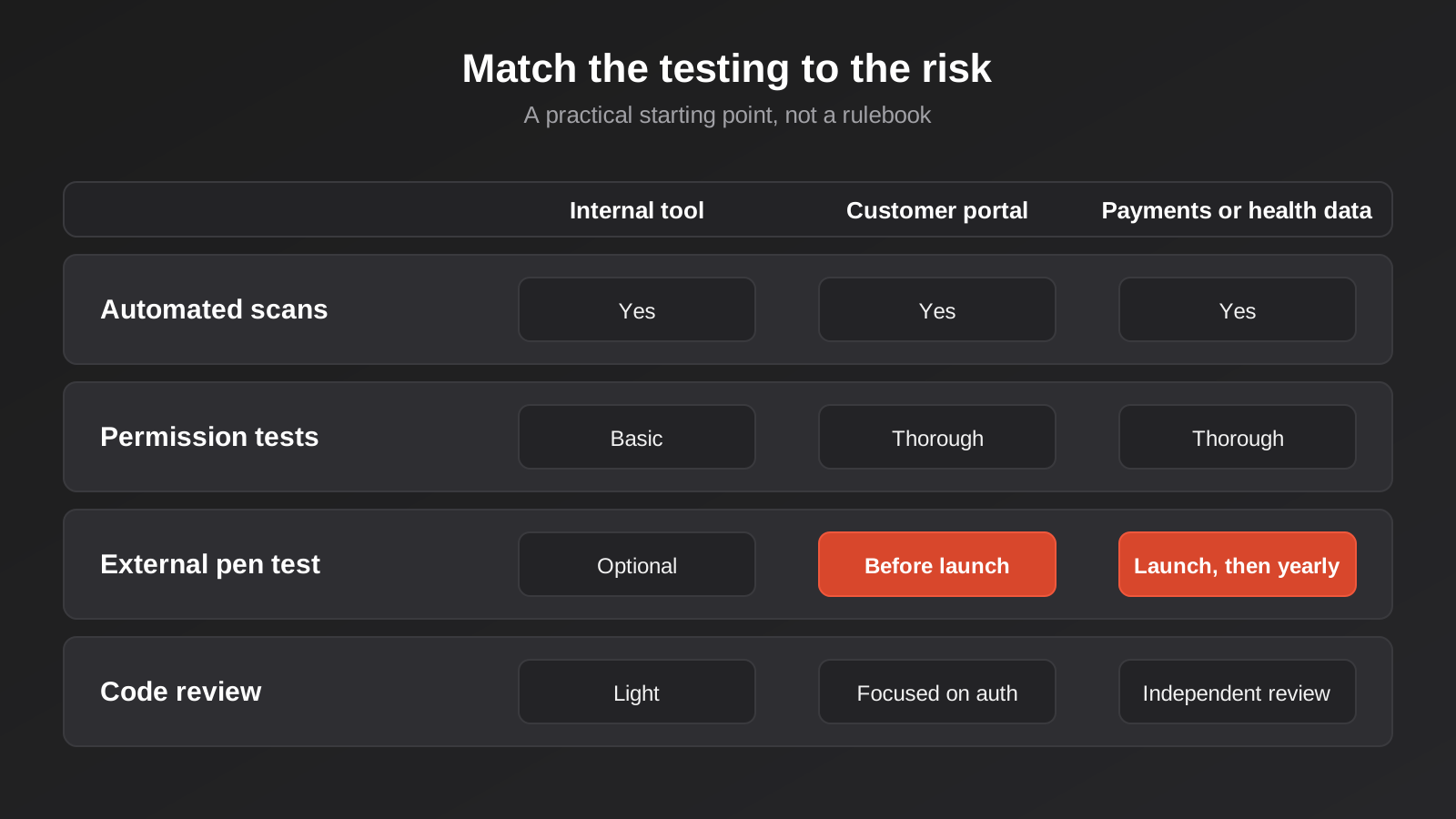
Once you have that page, you know what to test and roughly how hard to test it. An internal tool for six staff with no sensitive data and no outside connections can get by on automated checks and a decent code review. A customer portal holding personal information, connected to your accounting package, deserves the full treatment. That page also becomes the scope document if you do commission a pen test later, which saves a day of back and forth.
What the OWASP Top 10 means for business software
If you’ve read anything about web application security, you’ve seen the OWASP Top 10. It’s a widely used list, maintained by the Open Worldwide Application Security Project, of the most common and serious categories of web application weakness. The most recent edition is the 2025 list. It’s useful less as a checklist and more as a vocabulary, because pen testers and developers use it to describe what they find. A few categories matter far more than the rest for the kind of software small and mid-sized Australian businesses commission.
Broken access control
Still number one. This is the category where a logged-in user can do or see something they shouldn’t: reading another customer’s order by changing an ID in the address bar, using a staff-only function by calling it directly, or promoting themselves to an admin role. Scanners are poor at finding it, because the scanner doesn’t know who should be allowed to see what. A human who understands your rules is the only reliable detector, which is why the page we described above matters so much.
Security misconfiguration
It climbed to second place in the 2025 list, and that fits what we see in real builds. Debug mode left on in production. A storage bucket that’s publicly readable. A database reachable from the open internet. Default admin credentials nobody changed. None of this is code a developer wrote badly. It’s the environment around the code, set up in a hurry. It’s also one of the cheapest categories to fix, once somebody looks.
Software supply chain failures
New at number three in the 2025 list, and it reflects how modern software is actually built. A typical business application is a small amount of your code sitting on top of hundreds of third-party packages, each with its own dependencies. If one of them has a known flaw, or is quietly replaced with something malicious, your application inherits the problem. This is the category where automated scanning earns its keep, because it’s a database lookup, not a judgement call.
Authentication failures
Weak password rules, no protection against repeated guessing, sessions that never expire, password reset links that can be reused. Most of this is solved by not building authentication yourself. Using an established identity provider, or at minimum a well-maintained library, removes entire categories of mistake. Single sign-on is worth considering for the same reason, since it moves the hardest part somewhere better maintained.
Injection
Where input from a user ends up being treated as an instruction by the system. The classic example is SQL injection. Modern frameworks defend against most of it by default, so when it shows up it’s usually in a hand-written query, a report builder, or a search feature somebody added quickly. Static analysis is reasonably good at spotting it.
Mishandling of exceptional conditions
The other new entry, at number ten. It’s about what software does when things go wrong: an error message that reveals the database structure, a failed payment check that defaults to “approved”, a timeout that leaves a record half-written. It’s the least glamorous category and probably the most relevant to automations and integrations, where failure paths often get far less attention than the happy path.
You don’t need to memorise any of this. What you need is the habit of asking your developer, “which of these have you specifically checked for?” A good answer names a couple and explains how. A vague answer is information too.
Security testing for custom software starts inside the build
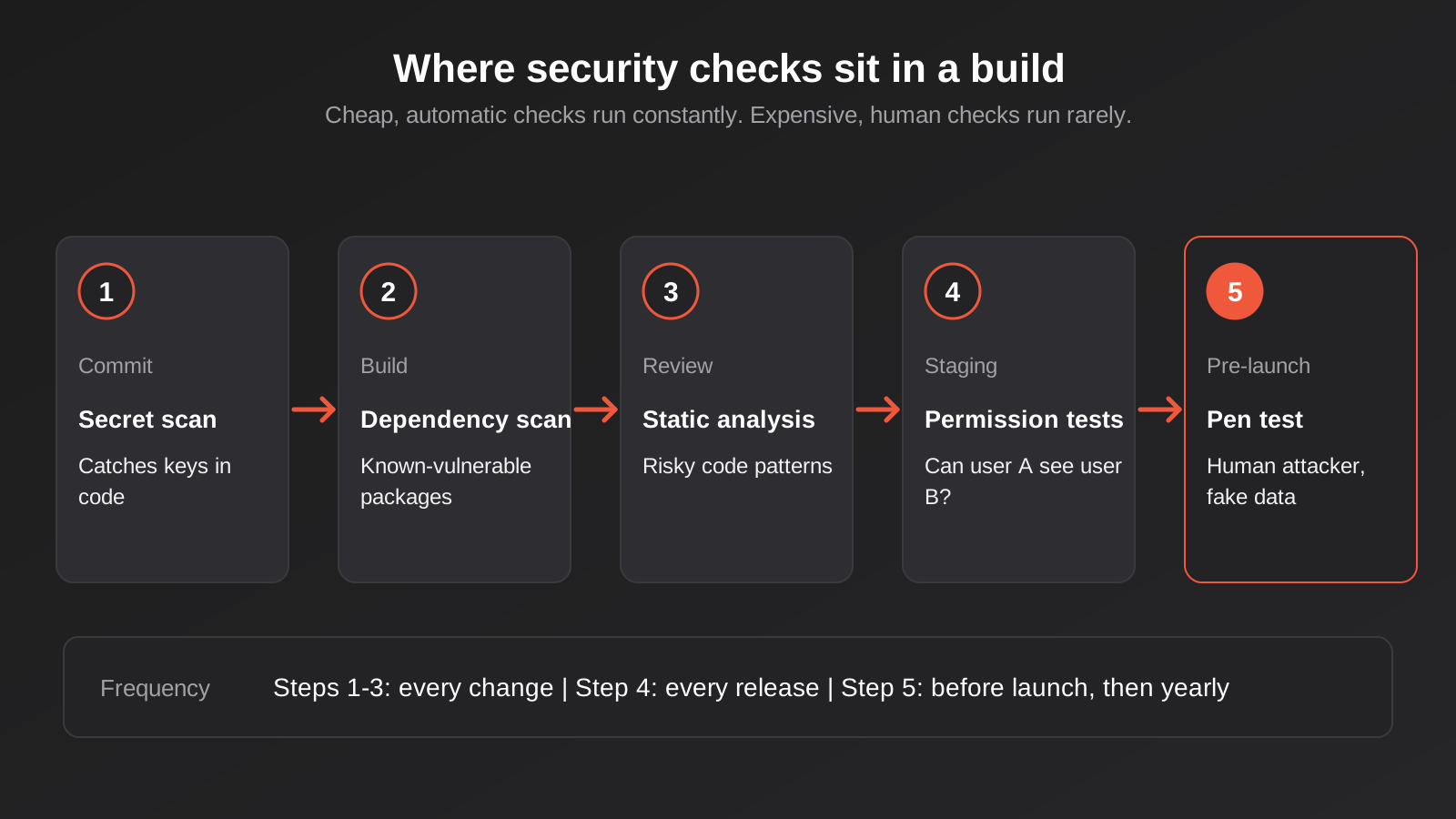
The cheapest time to find a security problem is the day somebody introduces it. By the time software is live, the same problem costs more to fix, more to investigate, and may already have been exploited. So the first group of checks isn’t something you buy separately. It’s something your build process either includes or doesn’t, and it’s reasonable to ask for it in writing.
Secret scanning
A secret is any credential: an API key, a database password, a token for your payment provider. The most common developer mistake in the industry is committing one into the code repository, where it sits in the history forever, even after it’s deleted from the current version. Secret scanning tools check every change for things that look like credentials and block them. Some code hosting platforms include this; free command-line tools do the same job. If a key does leak, the fix isn’t deleting it from the code. It’s rotating it, meaning generating a new one and cancelling the old one. We cover how credentials should be handled across integrations in OAuth vs API keys for business integrations.
Dependency scanning
Tools that read your list of third-party packages and compare it against databases of known vulnerabilities. The common code platforms offer this built in, and every major language ecosystem has a command-line equivalent. It generates a steady trickle of alerts. The skill isn’t running it, it’s triaging the results: a flaw in a package that your application never actually calls is not the same as a flaw in your login library. Someone has to look at each alert and decide, and that someone should be named in your maintenance arrangement. More on that in the post-launch section below.
Static analysis
Automated review of the code you wrote, looking for patterns associated with vulnerabilities. It produces false positives, so expect some noise, and it works best when configured to the languages and frameworks you actually use. Think of it as a spell-checker: it won’t tell you whether the document makes sense, but it catches the typos.
Automated permission tests
This is the one most businesses don’t know to ask for, and it’s the highest-value check on the list. A permission test is an ordinary automated test, written by the developer, that logs in as one user and attempts to reach another user’s data or a function that user shouldn’t have. The test passes when the system says no. You write one for every sensitive action, and they run on every change from then on. Because they encode your actual business rules, they catch exactly the broken access control that scanners miss. If you take one practical step from this article, make it this: ask your developer how many tests exist that check what a user is not allowed to do.
Dynamic scanning on a staging copy
Tools such as OWASP’s free ZAP can attack a running copy of your application and report what they find: missing security headers, exposed files, obvious injection points. Run it against a staging environment, never against live, and never against someone else’s system without permission. It takes an afternoon to set up and finds a surprising amount of misconfiguration. A staging environment with realistic but fake data also becomes the right place for every other kind of testing that follows.
Penetration testing: what you’re really buying
Now the expensive layer. A penetration test is a time-boxed engagement where a qualified tester attacks your application, with your permission, and reports what they achieved. It’s the closest thing you can buy to finding out what a motivated outsider could do before a motivated outsider tries.
When you actually need one
Not every project does. A rough rule that holds up in practice: if the software is exposed to the public internet, holds personal or financial information about people outside your organisation, or processes payments, a pen test before launch is justified. If it’s a small internal tool behind a company login with no sensitive data, strong automated checks and a code review will usually do, and the pen test money is better spent elsewhere.
Contracts sometimes decide it for you. Larger customers, government buyers and insurers increasingly ask for evidence of independent testing in supplier questionnaires. If you’re building something to sell to businesses, expect a report to become part of your sales process, and plan for it. A pen test that’s commissioned before the first big customer asks is far less stressful than one scrambled together during a procurement deadline.
What it costs in Australia
Pricing varies a lot between providers, and most published figures come from the providers themselves, so treat the following as indicative rather than gospel. For a small web application or API, a pen test in Australia commonly lands somewhere between about $5,000 and $15,000, ex GST, for a few days of tester time. Larger or more complex applications, multi-role platforms and SaaS products with several integrations are often quoted in the $10,000 to $30,000 range or higher, and consultant day rates are commonly cited at somewhere between $1,500 and $2,500. Red-team engagements, which simulate a sustained campaign against an entire organisation rather than testing one application, cost far more and aren’t what a business commissioning a portal needs.
What moves the price: the number of distinct user roles, the number of screens and API endpoints, whether the tester gets logged-in access (authenticated testing takes longer and finds more), how many integrations are in scope, and whether the quote includes a retest. That last one matters. A pen test that finds problems is only useful if somebody confirms the fixes worked, and some providers charge separately for it.
Scoping it properly
The page you wrote earlier about users, data and connections becomes the brief. A good scope states which application and environment is being tested, which user roles the tester will be given accounts for, which integrations are in or out, and which actions are off limits (for instance, no denial-of-service attempts, no touching the live payment gateway). Test against a staging copy with fake data wherever possible. If the tester has to test live, agree the window in advance and make sure somebody who can act on a problem is available while the test runs.
The most common scoping mistake is testing the wrong thing. It’s easy to end up paying to have the marketing website tested while the customer portal on a subdomain, holding the real data, sits outside the scope. Write the list of what holds sensitive data first, then scope the test around it.
Choosing who does it
Look for testers with recognised credentials, and ask what they actually are. CREST accreditation is the one most commonly referenced for Australian providers, and individual testers often hold certifications such as OSCP. Credentials aren’t a guarantee of quality, but their absence is worth asking about. Better signals: a sample report you can read before buying, a named person who will do the work rather than a rotating pool, and a willingness to talk to your developer directly.
There’s also a question of independence. The team that built the software isn’t the right party to certify it as secure, in the same way you wouldn’t have a builder sign off their own structural inspection. A good development partner will run all the in-build checks above and will welcome an independent tester. If a developer is reluctant to have their work tested by somebody else, that’s information.
Reading the report
A useful report has an executive summary a non-technical person can read, a list of findings each with a severity rating, evidence of how it was exploited, and a specific recommendation. Be wary of reports that are mostly scanner output pasted into a template; you can tell because the findings are generic and there’s no mention of your actual business logic. Expect most reports to contain several findings, and don’t read that as failure. A report with nothing at all in it, for anything but a trivial application, is more likely to mean a shallow test than a perfect system.
Severity ratings are guides, not verdicts. A “medium” rating on a flaw that exposes customer records may matter more to your business than a “high” on something obscure. Discuss the list with your developer and the tester, and rank by what would actually hurt you.
Integrations, webhooks and AI features are part of the attack surface
A lot of the software we see commissioned now isn’t a single application. It’s an application plus a set of connections: to accounting, to a CRM, to a payments provider, to a shipping carrier, increasingly to an AI model. Each connection carries its own testing questions, and they’re easy to miss because they don’t appear on any screen.
Inbound webhooks
If another system sends your application events, anyone who learns the URL can pretend to be that system unless you verify the signature on each request. It’s a classic gap: the webhook works perfectly in testing, because the real sender is the only one anyone tried. Test it by sending a forged request and checking that it’s rejected.
Stored credentials
Where does the application keep the keys it uses to talk to other systems? Environment variables or a secrets manager is the right answer. Plain text in a settings table is the wrong one. Ask who in your organisation can see them, and what happens to access when a staff member or contractor leaves. Offboarding is where an astonishing number of real-world access problems start.
AI features and agents
If the software includes an AI assistant that reads documents, answers customer questions or takes actions, there’s an extra category of testing: trying to make it misbehave. Can a customer coax it into revealing another customer’s data? If it reads emails or web pages, can hidden instructions in that content redirect it? Does it have access to more systems than its job needs? These are different questions from classic web testing, and not every pen test provider covers them. If AI is part of the build, say so when scoping.
Logging what happened
Testing tells you about problems that exist today. Logging tells you about the ones that happen tomorrow. If something does go wrong, the first thing you’ll want is a trustworthy record of who did what and when. Decide what to record before launch, not after an incident. Our post on audit logging for custom software and automations explains what to capture and what to leave out.
When something is found
Whether it comes from a scanner, a pen test, a customer or a researcher who emails you out of the blue, a security finding triggers the same short sequence. Having it agreed in advance turns a stressful afternoon into a routine one.
Triage first, then fix
Decide three things quickly. Is it real? Can it be exploited by someone without special access? And what’s exposed if it is? A flaw that lets an anonymous visitor read customer records is an emergency. A flaw that requires an admin login to exploit is serious but gives you time. Write the answer down, with a date, because you’ll want the timeline later.
Fix, retest, record
The developer fixes it; somebody other than the developer confirms it’s fixed; and the finding gets closed in a register with the date and the evidence. The register is a spreadsheet at its simplest. Its value shows up months later when a customer’s security questionnaire asks what your process is, or an insurer asks what you did about the last report.
Know your notification obligations
If personal information is involved, Australian businesses covered by the Privacy Act have obligations under the Notifiable Data Breaches scheme. Where there are reasonable grounds to suspect an eligible breach, which broadly means one likely to result in serious harm to someone, you’re expected to complete an assessment promptly and within 30 days at most, and notify the Office of the Australian Information Commissioner and affected individuals if it turns out to be an eligible breach. The regulator treats 30 days as a ceiling, not a target. Whether your business is covered depends on its size and what it does, so get proper legal advice on your own position rather than relying on a general guide, ours included. The relevant point for software is simpler: you can’t assess a breach you can’t see, and that’s the job logging and monitoring do.
Privacy law also expects entities to take reasonable steps to protect the personal information they hold. What counts as reasonable isn’t defined in a number, and it moves over time, but evidence that you tested the software, fixed what you found and kept records of both sits comfortably on the right side of the line.
Keeping it up after launch
A clean report on launch day describes the software on launch day. A month later someone adds a feature, a library publishes a security update, a new staff member is given admin rights they don’t need. Security isn’t a state you reach. It’s a habit you keep up, and the good news is that the habit is mostly cheap.
What a sensible rhythm looks like
- Automated scans on every code change, as part of the normal build.
- Dependency updates reviewed and applied on a schedule, monthly for most business software, immediately for anything rated critical.
- A permissions review every six months: who has access, who has admin, who left.
- A pen test before launch for exposed or sensitive software, then roughly annually or after a major change such as a new payment method, a new user type or a significant integration.
- A tested restore from backup at least once a year, because an untested backup is a hope, not a plan.
The scheduled dependency and permission work is exactly the kind of thing that falls between the cracks if nobody owns it. Whoever looks after your software after launch should have security patching written down as a named responsibility, not an assumption.
Common mistakes
- Treating a scan as a pen test. A scanner report with a logo on it isn’t a penetration test, and the difference is the price gap. Ask whether a human attempted exploitation, and for a sample report.
- Testing only the public site. The marketing website is rarely where the sensitive data is. Scope the portal, the API and the admin area first.
- Testing after launch, not before. Findings are cheaper to fix when the software has no live data and no users who’ll notice downtime.
- Never testing permissions. The most common serious flaw in business software is one user reaching another’s records, and it’s the one automated scanners are worst at catching.
- Using real customer data in staging. Test environments tend to be less protected than production. Use realistic fake data, and never copy live records into a place with weaker controls.
- Letting the builder mark their own homework. In-build checks are the developer’s job. Independent testing is a separate step by a separate party.
- Treating the report as the finish line. The report is the beginning. Unfixed findings with a date on them are, if anything, worse than not knowing.
- Forgetting credentials in integrations. Shared logins, keys in spreadsheets and access that survives a staff departure account for a large share of real incidents.
- Buying the biggest test first. Spending $12,000 on a pen test of software with no dependency scanning or permission tests means paying an expensive specialist to find cheap problems.
- Assuming a framework or platform handles everything. Good frameworks remove many classic flaws. They don’t know your business rules, and the business-rule flaws are the ones that matter.
Frequently Asked Questions
Do small businesses really need a penetration test?
Not always. If the software is internal, behind a company login and holds nothing sensitive, strong automated checks and a code review are usually proportionate. If it’s exposed to the internet and holds personal, financial or health information about customers, or takes payments, an independent test before launch is a sensible and often contractually expected step. The decision turns on exposure and data, not on the size of your business.
How much does a penetration test cost in Australia?
Published figures vary and mostly come from providers, so treat them as indicative. A small web application or API commonly sits around $5,000 to $15,000 ex GST, while larger multi-role platforms are often quoted from roughly $10,000 to $30,000 or more. The price depends on the number of user roles, screens and endpoints, whether the tester gets logged-in access, how many integrations are included and whether a retest is part of the quote. Get at least two written quotes and ask what the retest costs.
How often should custom software be tested?
Automated scans should run on every change. An independent pen test is usually done before launch and then roughly annually, plus after major changes such as a new payment method, a new type of user or a significant new integration. Permissions are worth reviewing every six months, because access tends to accumulate as people change roles and leave.
What’s the difference between a vulnerability scan and a penetration test?
A scan is automated and reports potential weaknesses, many of which may not be exploitable. A penetration test is performed by a person who tries to exploit weaknesses and reports what they actually achieved, including the business-logic flaws that tools can’t see. Scans are cheap and frequent. Pen tests are expensive and occasional. You want both, in that order.
Can we test our own software, or does it have to be an outside party?
You can and should run the automated checks yourselves, and your developer should be writing permission tests as part of the build. For a formal assurance that you can show customers, insurers or auditors, independence matters: the people who wrote the code are the wrong people to certify it. Use an outside tester for the pre-launch test, and make sure they have written permission and a clearly agreed scope.
What should we do if a test finds something serious?
Triage it first: is it real, who can exploit it, and what is exposed? Fix it, have someone other than the developer confirm the fix, and record the date and evidence. If personal information may have been accessed, check your obligations under the Notifiable Data Breaches scheme promptly and take legal advice on your position. The 30-day assessment window is a ceiling, and containment should start straight away.
Where to Start
If you’re planning a build, or you’ve inherited one and don’t know how it’s been tested, start with the one-page exercise: who uses it, what data it holds and what it connects to. It costs an hour and tells you how much testing the software actually needs. From there, ask your developer for the cheap layers in writing: secret scanning, dependency scanning, and automated permission tests. Decide on an independent pen test based on exposure and data, not on habit or fear.
We build and maintain custom software and integrations for Australian businesses, and security and compliance requirements are part of how we scope a build rather than an afterthought. If you’d like to talk through a specific project, our web application development service is a good place to see how we work, and if you’re still at the idea stage, the way we approach a lean first release in MVP development keeps the attack surface small while you learn what customers want. No pressure either way. A conversation is free, and it’s usually enough to work out which of the layers above your project actually needs.
For web application builds we don’t publish fixed packages, because the work varies too much; the factors that move the price are laid out on our web app development pricing page, and every project gets one fixed quote before work starts.
Because we run lean as a specialist agency rather than carrying a large account-management layer, our fixed quotes typically come in below the Australian averages covered in this guide. If you’ve already got a written quote from another agency for comparable scope, send it through and we’ll do our best to beat it.
Keep reading
Related posts
Data Migration for Custom Software: Moving Off Spreadsheets and Legacy Systems Without Losing Records (2026)
How to plan a data migration to new custom software: cleaning, mapping, reconciliation, cutover strategy and rollback, so nothing goes missing on…
Audit Logging for Custom Software and Automations: What to Record, What to Leave Out and How Long to Keep It
Audit logging for custom software and automations: what to record, what to leave out, and how long to keep logs under Australian…
Custom Software Maintenance in Australia: What You Pay for After Launch (2026)
What custom software really costs after launch in Australia: maintenance types, the 15–20% budget rule, support agreements and the mistakes to avoid.
Got a project you'd like to talk through?
Tell us what you're working on — we'll come back with a plan.
