
Custom Software Maintenance in Australia: What You Pay for After Launch (2026)
 Jignesh Vagadiya
10/11/2026
22 min read
Most people who commission custom software budget carefully for the build and then assume the story ends at launch. The invoice is paid, the system works, the team starts using it. Six months later a login stops working because a hosting provider retired an old runtime. A year in, the payment provider changes how its API authenticates and orders quietly stop syncing. Nobody is on the hook, because nobody wrote down who would be.
This is the least glamorous part of owning software, and it’s the part that decides whether the system is still an asset in year three. At Growth Digital we build and support custom web applications, integrations and automations, and the pattern is consistent: the projects that age well are the ones where someone planned for after-launch before the first line of code was written. The ones that age badly were usually treated as finished.
This guide is about that second phase. What maintenance actually consists of, what Australian businesses should expect to budget, what a sensible support agreement contains, and how to avoid the common ways it goes wrong. It isn’t about website upkeep, which we’ve covered in our guide to website maintenance plans. Custom software has different failure modes, different costs and a different relationship with the people who built it.
Why custom software maintenance is needed when nothing seems to change
The instinct that “if we don’t touch it, it can’t break” is wrong for almost every piece of software connected to the internet. Your code stays still, but everything it stands on keeps moving. There are four moving parts worth understanding, because each one maps to a line in a maintenance budget.
Dependencies and frameworks age
A typical modern web application is a small amount of your own code sitting on top of hundreds of open-source packages. Those packages release security fixes constantly. A vulnerability found in a widely used library is public knowledge within days, and automated scanners start probing for it almost immediately. If your application pins an old version and nobody updates it, you carry a known weakness that anyone can look up.
Frameworks and language runtimes also have support windows. Node.js, PHP, Python and the major frameworks all publish end-of-life dates, after which they stop receiving security patches. An application built on a runtime that reaches end of life doesn’t stop working that day. It just becomes steadily riskier, and eventually your host or your insurer asks why you’re running unsupported software. Upgrading a runtime one version at a time is a routine afternoon. Upgrading across four versions after five years of neglect is a small project, sometimes a rewrite.
Hosting and infrastructure change underneath you
Cloud providers deprecate instance types, database versions, storage classes and APIs. They give notice, usually by email to whoever set up the account, which is often a person who has since left. Managed database versions are retired on a schedule. TLS certificate rules tighten. Someone has to read those notices and act on them, and that is maintenance work whether or not anyone calls it that.
Third-party APIs move
Almost every business application talks to other systems: accounting, payments, shipping, email, a CRM. Each of those vendors changes its API over time. Most do it politely, with versioning and a deprecation period, but the deadline still arrives. We covered the mechanics in our piece on API versioning for business integrations, and the short version is that an integration is a relationship, not a one-off delivery.
Your business changes
The fourth moving part is the one nobody can schedule: you. A new product line needs a new field. A supplier changes their invoice format. A staff member asks for an export that didn’t seem necessary at the start. Legislation shifts, for example around privacy or e-invoicing. Software that can’t absorb ordinary change becomes the thing everyone works around, and the workarounds are where spreadsheets creep back in.
The four kinds of maintenance (and why the distinction matters)
Software engineering textbooks split maintenance into four types, and the split is more than academic. It tells you which work is urgent, which is optional and which you can’t skip. When a developer quotes “maintenance” as a single lump, you can’t tell what you’re buying. Break it down and the conversation gets honest quickly.
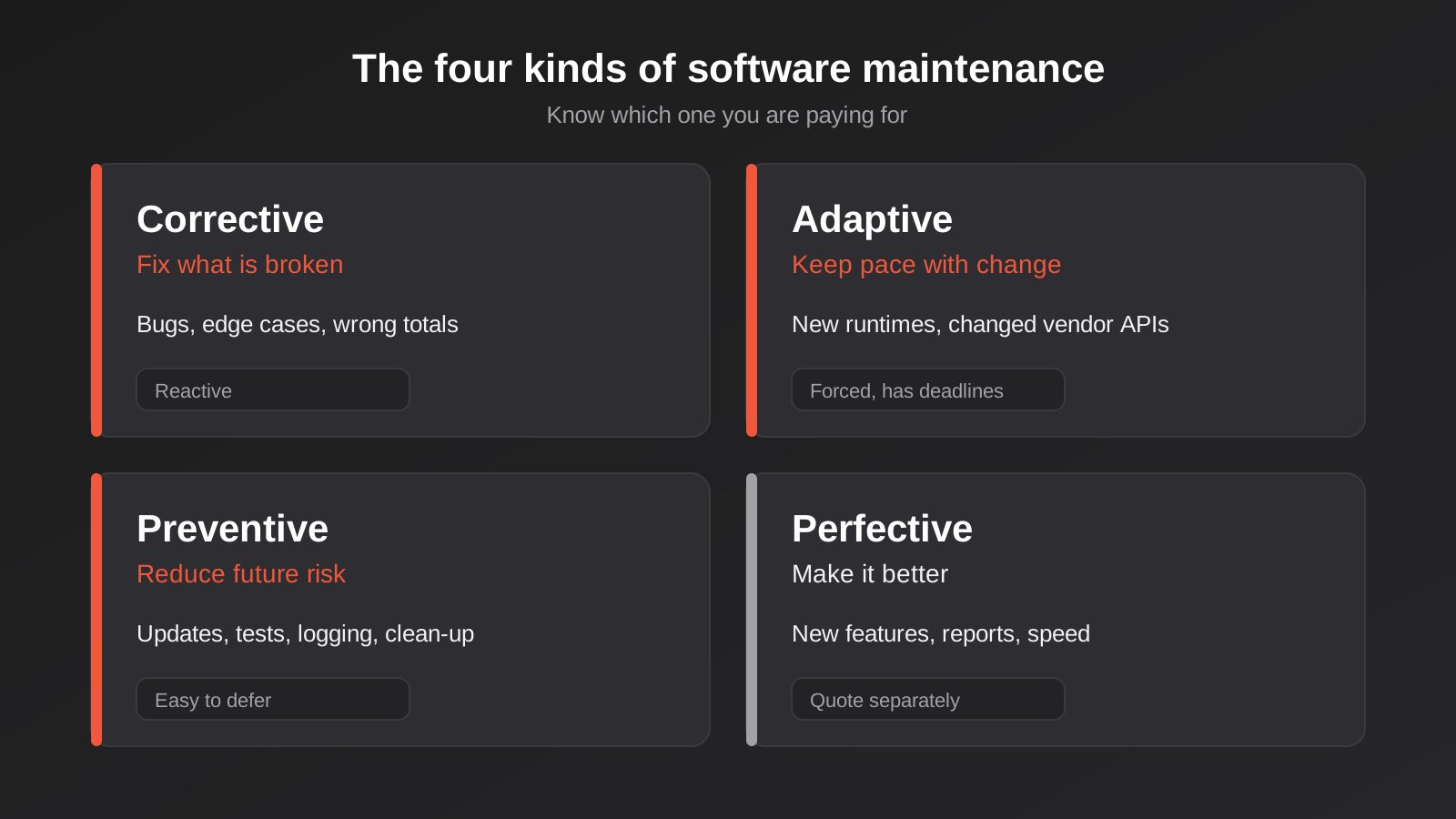
Corrective: fixing what’s broken
Bugs that slipped through testing, edge cases that only appear with real data, a report that adds up wrongly when a customer has two billing addresses. Corrective maintenance is reactive. Good teams expect a bump in it for the first few weeks after launch, because real users do things test plans never imagined, and then a long tail that settles down.
Adaptive: keeping pace with the environment
This is the work forced on you from outside: a new runtime version, a changed API, a browser behaviour change, a payment provider retiring an old endpoint. It isn’t optional and it has deadlines you don’t control. Adaptive work is the main reason software with no ongoing support eventually stops working even though nobody touched it.
Preventive: reducing future risk
Updating dependencies on a schedule, removing dead code, adding tests around fragile areas, improving logging so the next fault is easier to find. Nothing visible changes for users, which is exactly why it gets cut first when budgets tighten. It is also the category that most affects how expensive everything else becomes. Neglected preventive work is how technical debt compounds, and we looked at what that looks like when you inherit it in our guide to auditing an inherited codebase.
Perfective: making it better
New features, usability improvements, performance work, extra reports. Many agencies fold this into “maintenance” and it muddies the numbers. A feature request is development, not upkeep, and it should be scoped and priced as such. Keeping the two apart protects both sides: you aren’t paying a support retainer for a new module, and the team isn’t absorbing unlimited feature requests under a fixed monthly fee.
What should you budget? The 15–20% rule and its limits
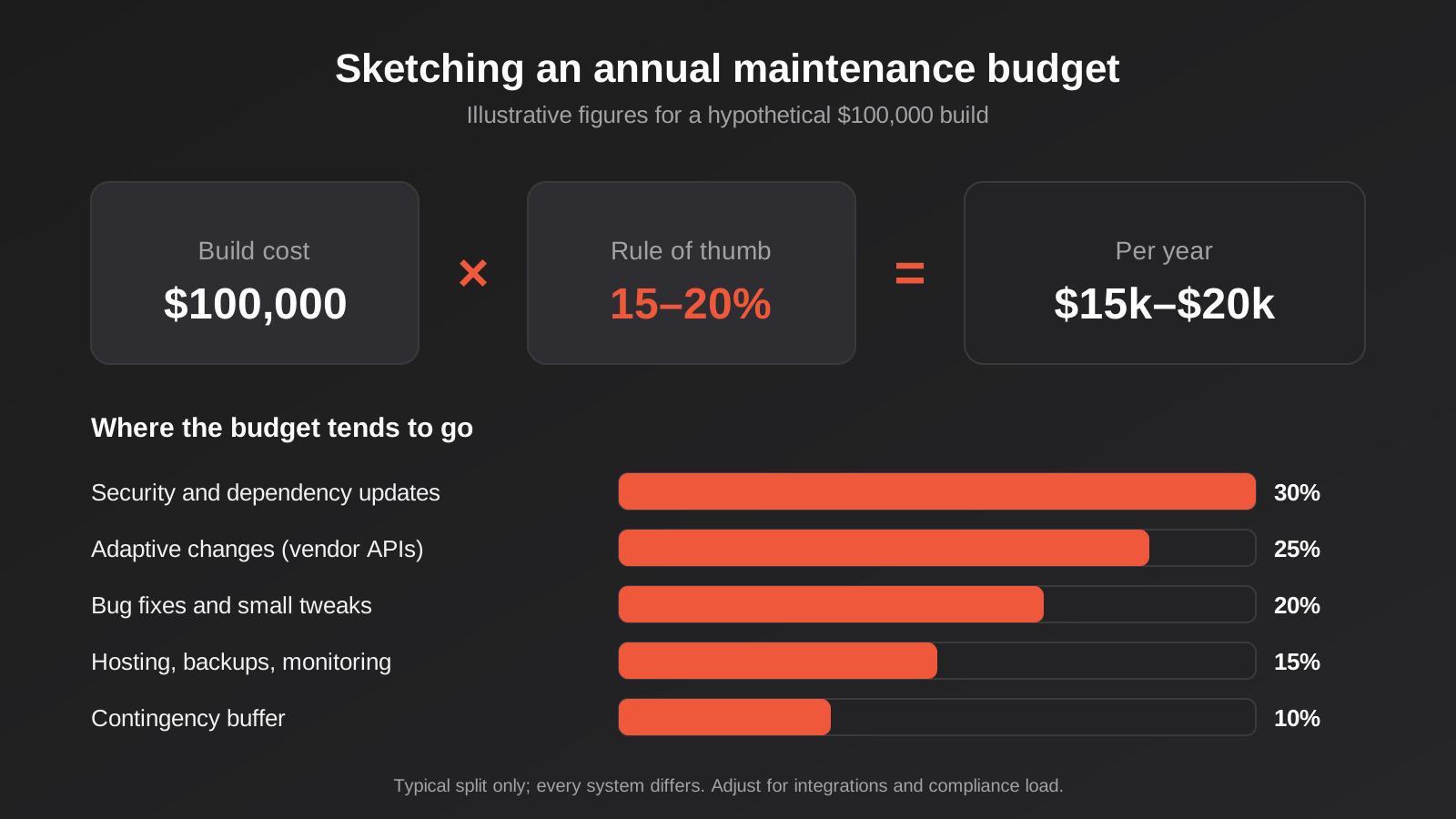
The most commonly quoted rule of thumb for custom software is to budget roughly 15–20% of the original build cost per year for maintenance. You’ll see it repeated across vendor blogs. It’s worth being clear about what it is: a directional benchmark, mostly from agency and software-vendor content rather than independent studies, and it isn’t a law. Some sources put low-risk internal tools nearer 10–16%, and fast-evolving products or systems with heavy technical debt well above 20%, sometimes into the 25–40% range.
We think the percentage is a reasonable first guess and a poor final answer. It anchors on the build price, which says little about what the software needs. A modest system with six live integrations to third-party APIs needs more upkeep than a large but self-contained tool. So treat the percentage as a sanity check against a bottom-up estimate, not a replacement for one.
A worked example, with invented numbers
To make this concrete, take a hypothetical internal operations portal that cost $100,000 to build. These figures are illustrative, not a quote. Using the rule of thumb, you’d plan for $15,000 to $20,000 a year. Where does that go?
- Hosting, backups and monitoring tools: often the smallest line, and largely a pass-through cost.
- Scheduled dependency and security updates: a few hours each month, plus extra when a critical vulnerability lands.
- Adaptive changes: one or two vendor API changes per year, each a day or two of work including testing.
- Bug fixes and small adjustments: front-loaded in year one, tapering after.
- A buffer for the unexpected: the thing that stops a year-end surprise.
Notice what isn’t in the list: new features. If the business wants a customer-facing extension in year two, that’s a separate piece of work with its own scope. We cover how to scope that sort of thing in how to write a software brief and run a discovery phase.
What pushes the number up or down
- Number of integrations. Every connected system is a future change you don’t control. Four integrations means roughly four times the exposure to someone else’s roadmap.
- Code quality and test coverage. Well-tested code is cheap to update because changes can be verified quickly. Untested code makes every update a gamble, so the careful developer spends hours checking by hand.
- Compliance load. Systems that hold health, financial or personal data carry extra obligations around logging, retention and breach response.
- User count and criticality. A tool five people use on weekdays can tolerate a next-day fix. A customer-facing checkout cannot.
- Documentation. If the original build left a clear README, deployment notes and an architecture overview, a new engineer can be productive in hours. Without them, they spend days reconstructing intent.
- Age. Year one is bug-heavy, years two to four are steady, and year five onwards often brings a platform-level decision about whether to modernise. That decision has its own guide in legacy system modernisation: wrap or replace.
What a sensible support agreement actually contains
Australian small and mid-sized businesses often sign a support agreement without really reading it, because the sales conversation was about the build. A few minutes spent on the details is worth more than any discount. Legal guides aimed at Australian businesses describe the usual elements as bug fixes, security patches, version upgrades, monitoring and backup support, wrapped in defined service levels. Here is what we’d want to see, and why.
A clear scope, with exclusions in plain language
The agreement should say what is covered and what isn’t, in words a non-technical director can follow. “Bug fixes” should be defined as correcting behaviour that doesn’t match the agreed specification. “Enhancements” should be defined as anything new. Without that line, disputes are close to inevitable, because both sides will honestly remember different expectations.
Severity levels and response times you can hold someone to
A realistic agreement defines what counts as an outage versus an annoyance and attaches a response time to each. For example, the system is down or data is at risk, a major function is impaired with a workaround, a minor fault, a question or request. Each gets a first-response target and a target for a fix or workaround.
Be a little suspicious of promises that look too impressive. A small team offering business-hours support shouldn’t promise 15-minute response around the clock unless they genuinely have people and monitoring to deliver it. Vague terms like “as soon as possible” are worse, because they can’t be measured. We would rather write down a slower target we always hit than a fast one we sometimes miss.
Maintenance windows and change notice
Planned work such as runtime upgrades or database migrations should happen in an agreed window, with notice. This also defines what counts as downtime. Planned, notified maintenance in the window usually isn’t counted against an uptime target; unplanned outages are. Make sure both are described.
Reporting and a periodic review
Ask for a short monthly or quarterly summary: what was patched, what was fixed, what incidents occurred, what is coming up. It doubles as evidence that the work is happening. A review every six to twelve months should look at whether the support level still fits. A tool that was peripheral at launch can become business-critical, and the agreement should change with it.
Fair terms and an exit path
Under Australian Consumer Law, unfair terms in standard-form small business contracts can be void, and one-sided clauses that let a provider avoid responsibility broadly are a red flag. Beyond the legal angle, check the practical exit. Can you leave with thirty days’ notice? Do you hold the repository, the hosting account and the credentials? We wrote about this in who owns your custom software source code and IP, and it matters most at exactly the moment you’re negotiating a support agreement. A relationship you can leave is one that stays honest.
Retainer, pay-as-you-go or in-house?
There are three realistic ways to cover maintenance, and none is universally right. The best choice depends on how critical the system is and how predictable the workload is.
A monthly retainer
A fixed monthly fee buys a set amount of time or a defined list of tasks, plus a response commitment. The advantage is predictability, and a team that already knows your system when something breaks. The disadvantage is paying for capacity in quiet months. Retainers suit customer-facing or revenue-critical systems where speed matters more than saving a few dollars.
Pay-as-you-go
You raise a request, get a quote or an hourly rate, and approve it. This works for low-risk internal tools that rarely change. The trap is that nobody is watching the system between requests, so security updates and expiring certificates go unnoticed until something fails. If you choose this route, pay for at least a light scheduled check, even if it’s quarterly.
An in-house developer
Hiring a developer makes sense once the software is large enough, or changing fast enough, to keep someone busy. For most small and mid-sized organisations a single in-house developer is also a single point of failure: leave, illness or resignation and nobody understands the system. If you go this way, insist on documentation, a second pair of eyes through a part-time external reviewer, and shared ownership of every account.
Hybrid arrangements
A common middle path is a light retainer for monitoring, patching and emergencies, with feature work quoted separately as it comes up. It keeps the baseline safe and the cost predictable, without locking the business into paying for development it doesn’t need that month. For a system built by us this is our usual suggestion, though we’d only recommend it where it fits the actual workload.
The running costs that aren’t maintenance
Maintenance is labour. Running costs are the recurring bills that keep the lights on, and they often get lumped together or forgotten. A realistic annual picture includes both, so list the running costs separately.
- Hosting and database: scales with traffic and data volume, and sometimes with the compliance requirements around data location.
- Third-party licences: mapping, SMS, email delivery, document generation, error monitoring, search.
- Usage-based API fees: payment, AI model and messaging services that charge per call.
- Domains and certificates: small but easy to let lapse, and the lapse takes the system offline.
- Backups and storage: needs to be tested, not just configured. Our guide to backup and disaster recovery for custom software and automations goes into what a restore test looks like.
One habit pays off quickly: put all the accounts on a single, documented register with named owners and renewal dates. The expiry of a forgotten account is a more common cause of outages than clever attacks.
Security patching in practice
Security is the part of maintenance with the sharpest consequences, and the part most easily deferred. The routine itself is unexciting, which is how it should be.
A routine you can describe in one paragraph
Dependencies are scanned automatically, usually on every code change and again on a schedule. Low-risk updates are batched monthly and tested on a staging copy before reaching production. A critical vulnerability in something the application actually uses is handled out of cycle, within days. The runtime and framework versions are tracked against their end-of-life dates so upgrades are planned a year ahead rather than forced.
Know which of your components are exposed
Not every vulnerability matters equally. A flaw in a library used only in a build tool is less urgent than a flaw in the package that parses uploaded files. A good maintainer explains the difference in plain English rather than forwarding a scanner report with 200 findings. That judgement is a major part of what you pay for.
Staging, tests and rollback
Updating without a safety net is how maintenance causes outages. At minimum you want a staging environment that mirrors production, automated tests covering the critical paths, and a documented way to roll back a release. For software that is tied to live automations, the same discipline applies, as we set out in change management for live automations.
If the original developer disappears
It happens more often than anyone admits. A freelancer moves overseas, an agency closes, a founder-developer goes quiet. Your position depends almost entirely on decisions made during the build, not afterwards.
- Do you hold the source repository, with full history, in an account you control?
- Do you own the hosting and cloud accounts, or does the developer?
- Are credentials and API keys stored somewhere you can reach them?
- Is there a document that explains how to build, test and deploy the application?
- Are environment variables and scheduled jobs written down?
If the answer to most of these is yes, a new team can take over with a short onboarding. If most are no, you are looking at a forensic exercise before any maintenance can begin, and the first invoice from the new team will be for working out what exists. This is why we hand over repositories and accounts as a standard part of delivery, and why our custom software development work starts from the assumption that you may one day work with someone else.
Where AI and integrations change the maintenance picture
Two kinds of systems age faster than ordinary web applications, and they deserve their own line in the budget.
Systems that call AI models
Model providers retire older versions on a published schedule, and a replacement model can behave differently on the same prompt. An assistant that was accurate in March may give subtly different answers after a forced upgrade. Anything calling a model needs a small set of regression tests, a way to see cost per request, and someone watching deprecation notices. Our posts on AI running costs and model routing and testing chatbots before launch show what that tooling looks like.
Systems wired to many others
An application that exchanges data with an ERP, a CRM, a payments provider and a shipping platform has four times the surface area for change. If much of your value comes from those connections, our ERP integration and API work is worth reading about, because the support model matters as much as the build. Monitoring should tell you when a sync has failed before a customer does.
What the first twelve months usually look like
It helps to know the shape of the curve, because the first invoice after launch is often the one that surprises people. In our experience the pattern is fairly consistent, though every system differs.
Weeks one to six: the hypercare window
Real users find things test plans missed. Expect a cluster of small fixes, a few usability tweaks and some data clean-up. A good team stays closely involved during this stretch, watching error logs daily rather than waiting for complaints. Many agencies include a warranty period for defects against the original specification, and it’s worth confirming whether yours does and exactly what it covers.
Months two to six: settling in
The fault rate drops and the requests change character. People stop reporting bugs and start asking for improvements: a filter here, an export there. This is where the line between support and development needs to be drawn clearly, because the temptation is to treat every request as a quick favour. A short monthly triage call that sorts requests into fix, enhance or ignore keeps this under control.
Months six to twelve: the first adaptive wave
Somewhere in the first year, a vendor you integrate with will change something. A runtime will approach end of life. A certificate will come up for renewal. None of it is dramatic, and all of it is easy when someone owns it. The anniversary of launch is a natural moment for a proper review: patch levels, hosting costs, backup tests and a conversation about the next twelve months.
How to compare two support quotes properly
Two quotes with the same monthly fee can describe very different things. When we’re asked to review a support proposal from another provider, we go through the same short list.
- What is the response target for an outage, and during which hours does it apply? Business-hours cover and round-the-clock cover are priced differently for a reason.
- Does the fee include scheduled security updates, or only fixes you report? Reactive-only support leaves patching to chance.
- How many hours are included, and what happens to unused ones? Rolling over, expiring or being refunded are three different deals.
- Who holds the accounts, the repository and the credentials, and can you leave with reasonable notice?
- Is monitoring included, and who gets the alerts at 2am?
- What’s excluded, and is new development quoted separately rather than eating into the retainer?
Lay the two proposals side by side against those questions and the real difference usually becomes obvious within ten minutes. Sometimes the cheaper one is perfectly fine for a low-risk tool. Sometimes it’s cheap because it quietly excludes everything that matters.
Common mistakes
- Treating launch as the finish line and having no budget line at all for year two.
- Agreeing to “maintenance” with no definition of what is excluded, then arguing about feature requests.
- Letting the developer own the hosting account, the domain or the code repository.
- Skipping monitoring because the system “never really goes down”, and then finding out from a customer.
- Postponing runtime and dependency upgrades until they have become a project instead of a routine.
- Signing a long lock-in with no review point, as the business changes around the contract.
- Having a single person who understands the system, whether in-house or a freelancer, with nothing written down.
- Never testing a restore from backup, so the first test is during an actual emergency.
- Choosing the cheapest retainer on the strength of a headline monthly figure, without comparing response times and exclusions.
- Folding new development into the support retainer, which hides the real cost of both.
Frequently Asked Questions
How much should I budget each year to maintain custom software?
A common rule of thumb is 15–20% of the original build cost per year, with simpler internal tools sometimes lower and fast-changing or poorly built systems higher. It’s a starting point rather than a rule. A bottom-up estimate based on the number of integrations, compliance requirements and how critical the system is will be more reliable.
Is software maintenance the same as adding new features?
No. Maintenance keeps existing behaviour working: bug fixes, security updates, adapting to changed APIs. New features change what the software does and should be scoped and priced separately. Mixing the two makes it hard to judge whether either is good value.
Do I need a monthly retainer, or can I pay when something breaks?
It depends on how critical the system is. Customer-facing or revenue-critical software usually justifies a retainer, mainly for monitoring and quick response. A low-risk internal tool can run on request-based support, as long as someone still reviews security updates and expiring certificates on a regular schedule.
What happens if my original developer is no longer available?
If you own the repository, hosting accounts and credentials, a new team can usually take over after an onboarding and code review. If the previous developer held those, recovery is slower and more expensive. Ask for repository and account access at handover, not later.
How often should dependencies and frameworks be updated?
Routine updates are typically batched monthly or quarterly and tested on staging first. Critical security fixes affecting components you actually use should be applied within days. Runtime and framework versions should be tracked against their end-of-life dates, so upgrades are planned in advance.
Does maintenance cover hosting and third-party fees?
Usually not. Maintenance is labour. Hosting, licences, domains and usage-based API fees are running costs, billed by the providers or passed through. Check that your agreement lists them separately so the annual total is clear.
Where to Start
If you already own custom software, the first step is a short audit rather than a purchase. List what it depends on, who holds each account, which versions of the runtime and framework are running, and the last time a restore from backup was tested. That list alone usually shows where the real risk sits, and it gives any provider, including us, something concrete to quote against.
If you are planning a build, raise maintenance in the first conversation, not the last. Ask what after-launch support looks like, what it costs, and what you receive if you leave. We scope web applications individually, and our web application development pricing page explains what drives the cost of the build itself, with ongoing support quoted separately and with no lock-in contract.
Worth putting plainly: because we run lean as a specialist agency rather than carrying a large account-management layer, our fixed quotes typically come in below the Australian averages covered in this guide. If you’ve already got a written quote from another agency for comparable scope, send it through and we’ll do our best to beat it.
If you’d like a second opinion on a system you already run, or you’re weighing up how to support something that’s about to launch, we’re happy to talk it through. There’s no pressure to commit to anything, and a plain conversation about what the software needs is often enough to point you in the right direction. Our web application development team can walk through it with you.
Keep reading
Related posts
Audit Logging for Custom Software and Automations: What to Record, What to Leave Out and How Long to Keep It
Audit logging for custom software and automations: what to record, what to leave out, and how long to keep logs under Australian…
How to Write a Software Brief and Run a Discovery Phase Before You Build (2026)
How to write a software brief and run a discovery phase before you commission custom software in Australia: what to include, what…
Backup and Disaster Recovery for Custom Software and Automations: A Practical Guide for Australian Businesses (2026)
How to back up custom apps and Zapier, Make or n8n automations: set RPO and RTO, protect secrets, test restores, and avoid…
Got a project you'd like to talk through?
Tell us what you're working on — we'll come back with a plan.
