
How to Write a Software Brief and Run a Discovery Phase Before You Build (2026)
 Jignesh Vagadiya
09/11/2026
22 min read
Most custom software projects that go sideways don’t fail in the code. They fail in the first fortnight, when someone says “we just need a portal where customers can log in and see their jobs” and everyone nods as if they’re picturing the same thing. They aren’t. The owner is picturing a simple status page. The operations manager is picturing quotes, invoices and document uploads. The developer is picturing a database schema with eleven tables and a permissions model nobody has asked for yet.
The gap between those three pictures is where budgets blow out. It’s also cheap to close, if you do it before anyone writes code. That’s what a software brief and a discovery phase are for. This guide covers what each one is, what goes in them, what a sensible version costs in time and money, and how to tell when a supplier is skipping the step that protects you most.
We’ve written this from the buyer’s side of the table. If you’re an Australian business owner or operations lead about to commission a web app, internal tool, portal or integration, it should leave you able to write a brief that gets sharper quotes, and able to judge whether a proposed discovery phase is the real thing or a sales call with an invoice attached.
Brief vs discovery: two different jobs
People use the two terms as if they mean the same thing, which causes a lot of confusion when quotes arrive. They’re different jobs done by different people at different times.
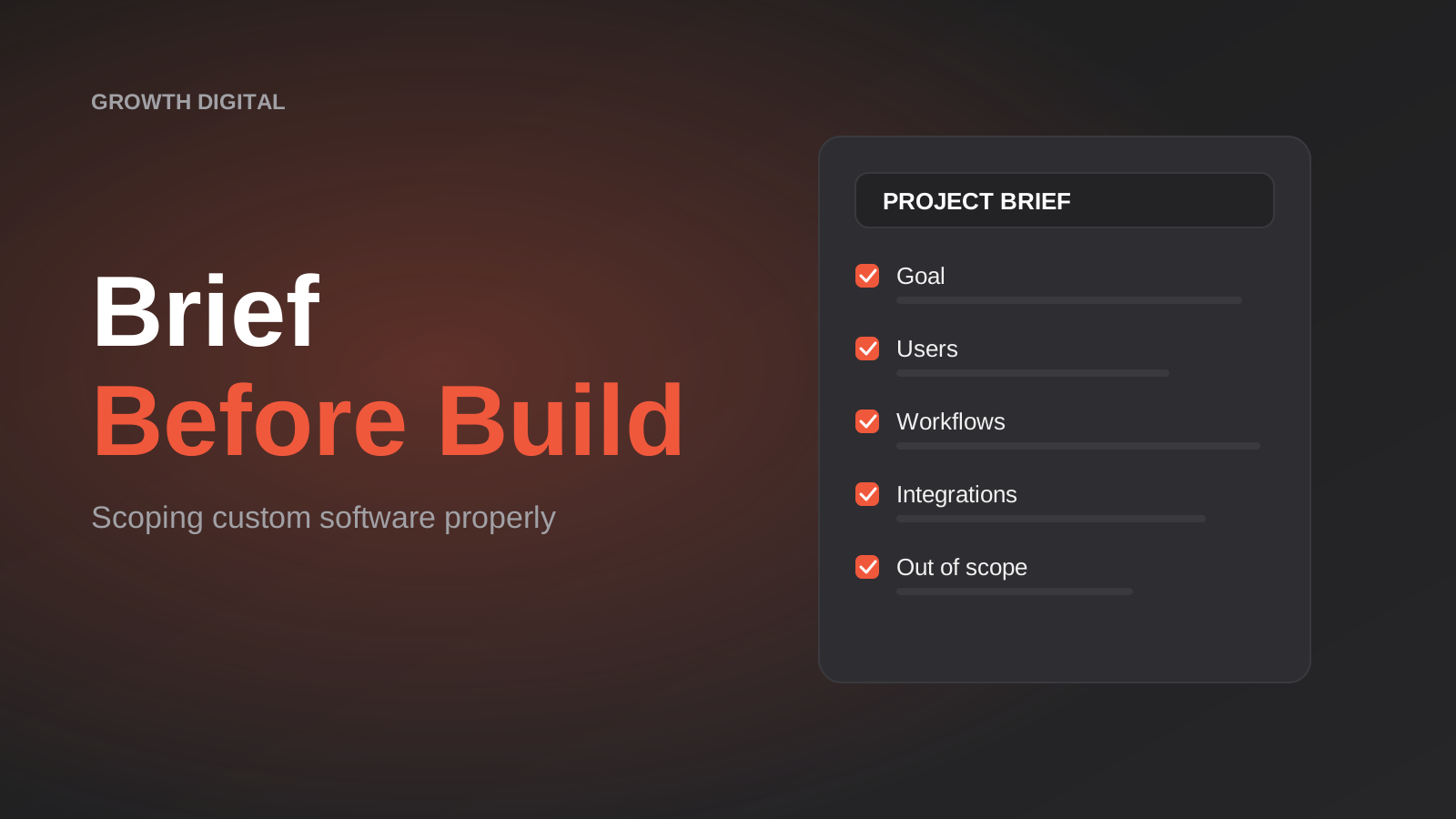
A brief is your document. You write it, from inside your business, before you talk to suppliers. It says what problem you’re solving, who is affected, what you already use, and what a good outcome looks like. It’s deliberately incomplete, because you can’t know what you don’t know about software. Its job is to get several suppliers to quote against the same understanding, and to filter out the ones who quote without asking questions.
A discovery phase is a short, paid, structured piece of work done with the supplier you’ve chosen. They interview your staff, watch the current process, look at the systems the new software will touch, and turn all of that into written requirements, a list of risks and a scoped plan. Its job is to replace assumptions with specifics, so the build quote that follows is based on something real.
Put simply: the brief gets you to the right supplier, and discovery gets you to the right quote. Skip the brief and you’ll get quotes that vary wildly because each supplier guessed differently. Skip discovery and the first quote you accept is built on those guesses, with change requests waiting to turn up later.
Why vague scope is the expensive kind
There’s a persistent idea that detailed planning is overhead and the fast path is to start building and adjust as you go. For a small, disposable prototype that can be true. For software your staff or customers will depend on, the maths runs the other way.
Every unresolved question in a brief becomes a decision somebody makes later, usually a developer in the middle of building something else. Sometimes they guess right. When they guess wrong, you find out at a demo, three weeks in, and the fix involves rework on something already built on top of the wrong assumption. That’s the pattern behind most “the quote was $X but we paid $Y” stories, and it isn’t dishonesty on either side. It’s two parties filling gaps differently.
The questions that hurt most are the boring ones. How does a job get from “quoted” to “complete” today, and who touches it? What happens when a customer has two businesses under one login? Which system is the source of truth for a customer’s address? What did the last person who ran this spreadsheet do that nobody wrote down? None of these show up in a feature list. All of them show up in the invoice.
If you’re deciding how to pay for the build itself, our piece on fixed price vs time and materials goes through how scope clarity changes which contract model makes sense. The short version is that a fixed price is only as honest as the scope it’s fixed against, and discovery is what makes the scope honest.
How to write a software brief a supplier can actually quote
A good brief is two to four pages, written in plain language, with no technology names unless you already depend on them. You’re describing the business problem, not designing the solution. Here’s the structure we’d suggest.
1. The problem, in one paragraph
Start with what’s going wrong today, in terms a stranger would understand. “Our field team texts job updates to the office, someone retypes them into a spreadsheet, and customers ring us to ask where their job is” is a better opening than “we need a custom CRM with a customer-facing portal.” The first describes a problem a supplier can reason about. The second prescribes a solution that may or may not fit.
Add the cost of the problem if you can estimate it honestly: hours per week, errors per month, customers lost, delays. A rough figure is fine. If you can’t put a number on it, say so. That tells a good supplier that part of discovery will be working out whether the project is worth doing at all, which is a legitimate outcome.
2. Who uses it, and what each group needs
List every type of person who will touch the software: staff in different roles, customers, suppliers, contractors, an accountant, an auditor. For each, one or two sentences on what they need to do. Don’t worry about screens. “A site supervisor needs to mark a job complete from their phone with a photo” is the level you want.
This list matters more than it looks, because user types drive permissions, and permissions are one of the biggest hidden cost drivers in custom software. A system with one kind of user is a very different build from one with five kinds who each see different data. We cover the technical side of that in our guide to role-based access control for client portals and internal tools.
3. How the work happens today
Describe the current process as it really runs, including the workarounds. If three people use three slightly different versions of the same spreadsheet, say that. If the process depends on one long-serving employee who “just knows,” say that too. It’s the single most useful paragraph in a brief, because the new software has to survive contact with how work is actually done, not how the procedures manual says it’s done.
Attach examples: a sample spreadsheet with the customer data removed, a typical quote, a screenshot of the tool people hate. Real artefacts beat descriptions every time.
4. What it has to connect to
List the systems the new software needs to read from or write to: accounting package, CRM, payment gateway, inventory system, email platform, a supplier’s portal. Name the product and, if you know it, the plan or version. Integrations are where estimates are most often wrong, because the effort depends on the quality of the other system’s API, not on your requirements. A well-documented API can be a few days of work. A legacy system with no API can be months.
If you’re unsure whether something is connectable, write “unknown” next to it. Suppliers respect that far more than a confident guess that turns out to be wrong.
5. Constraints you can’t negotiate
Hard deadlines tied to something real (a trade show, a contract renewal, the end of a software licence), compliance obligations, data that must stay in Australia, accessibility requirements, a fixed ceiling on budget. Separate the real constraints from the preferences. “We’d like it by March” and “our current licence expires on 31 March” are different statements with different consequences.
6. What’s out of scope
This is the section almost nobody writes and almost everyone should. Write down what you are not asking for in this project, even if you might want it later. “No mobile app in this phase. No automated invoicing. No migration of data older than two years.” Listing the exclusions gives suppliers a boundary to price against and gives you something to point to when a feature request arrives mid-project.
7. How you’ll know it worked
Two or three measurable outcomes. Time to produce a quote drops from two days to two hours. Customers can see job status without calling. Month-end reconciliation takes one person half a day instead of three people a day each. These become the acceptance criteria that keep the project honest. They also stop the common failure where software is delivered exactly as specified and the business problem is still there.
What a discovery phase actually involves
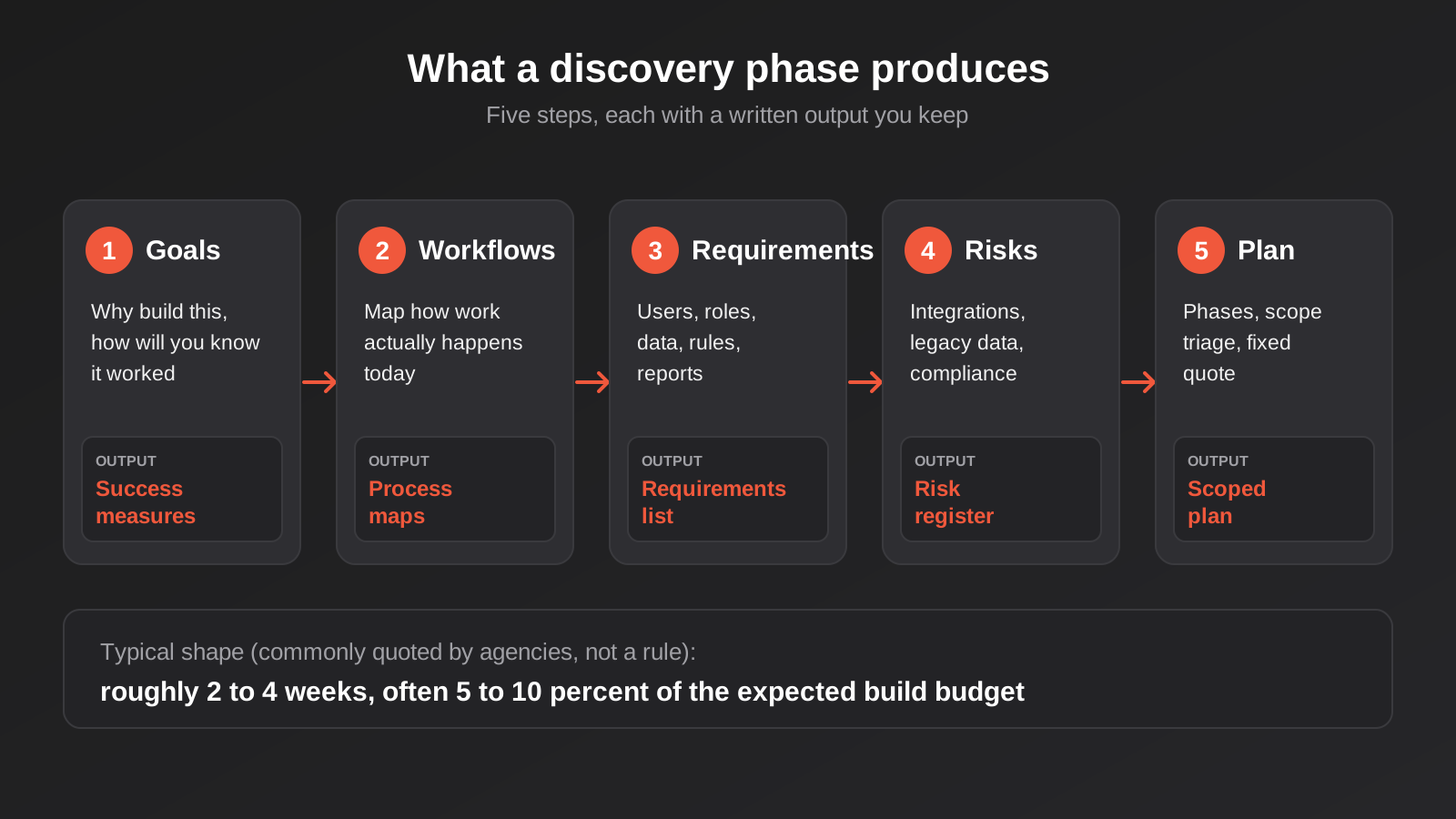
Discovery is not a proposal. It’s work, and it should produce documents you keep whether or not you go on to build with the same supplier. Here’s what we’d expect to see in a properly run one, and what each part is for.
Stakeholder interviews and process observation
The supplier talks to the people who will use the system, not only the person signing the cheque. Front-line staff are where the real requirements live. A good discovery includes at least one session where someone watches a task being done start to finish, because people routinely forget to mention steps that have become automatic. “Oh, and then I check the other spreadsheet” is the sentence that changes a quote.
Workflow and data mapping
The current process gets drawn up as a simple flow: who does what, in which tool, in what order, where information is re-entered, where it gets stuck. Alongside that, the supplier maps the data: what records exist (customers, jobs, products, invoices), how they relate, and where each one currently lives. This is the point where “customer” turns out to mean three different things in three different systems, and someone has to decide which one the new software treats as the truth.
If the existing data is messy, discovery is where that surfaces. Duplicate customers, inconsistent product codes and free-text fields that should have been dropdowns all affect the build. Our guide to cleaning your data before you automate applies just as much to custom software as it does to workflow tools.
Requirements, written so they can be tested
Requirements come in two flavours. Functional ones describe what the system does: a supervisor can mark a job complete and attach photos. Non-functional ones describe how well it does it: pages load in under three seconds on a mobile connection, a record can’t be deleted without an audit entry, the system handles 200 concurrent users. Both need to be written so someone could check them. “Easy to use” can’t be tested. “A new staff member can create a job within five minutes of first login without training” can.
Technical feasibility and integration checks
Here the supplier looks hard at the systems your software must connect to. They read the API documentation, check authentication methods, look for rate limits and webhook support, and where possible try a few test calls. This is cheap compared with discovering mid-build that your accounting package only allows 60 calls per minute, or that the supplier’s portal has no API at all and the integration needs a different approach. Where an integration is the crux of the project, a small proof of concept at this stage can save an enormous amount of money.
Risk register
A short list of things that could derail the project, with a likelihood, an impact and a plan for each. Typical entries: the legacy database export is incomplete; a key staff member is leaving before launch; the third-party API changes pricing; users resist the new process. Writing risks down doesn’t make them disappear, but it moves them from “surprises” to “things we saw coming,” and it lets you price contingency honestly instead of burying it.
Scope triage and a phased plan
The final step is sorting everything gathered into what’s essential for a first release, what can follow, and what can wait. This is where most projects get their budget under control, and we’ve given it its own section below. The output is a phased plan with a quote attached, ideally one you can approve in stages.
Scope triage: the cheapest cost control there is
After a few interviews, the feature list always balloons. Everyone has been waiting years for someone to ask what they want, and they tell you. Most of it is reasonable. Not all of it belongs in release one.
The test we like is blunt: does the first release fail without this? If staff can’t do their job or customers can’t complete the core task without a feature, it’s a must-have. If the feature makes things nicer, faster or tidier but the core flow works without it, it’s a should-have for a later release. Everything else goes in a backlog, written down so nobody feels ignored, and revisited once real usage shows what people actually miss.

Two things tend to happen once triage is done properly. The first release gets smaller and cheaper than the original wish list suggested. And several “must-haves” quietly drop down a tier when someone asks what happens if the feature isn’t there on day one. Usually the answer is “we’d keep doing it the old way for a few weeks,” which is a very different thing from “we can’t launch.”
This is the same discipline behind a good minimum viable product. If you’re building something new rather than replacing an existing process, our MVP development guide goes deeper on choosing the smallest release that teaches you something real, and our MVP development service is built around exactly that approach.
What discovery costs and how long it takes
Published, comparable pricing for discovery work in Australia is thin, and we’d be wary of anyone who quotes a precise figure without knowing your project. What we can say is what the wider industry commonly cites, with the caveat that most of it comes from agencies that sell this work, so treat it as a planning heuristic and not a benchmark.
- Duration: typically two to four weeks for a mid-sized business application. Simple internal tools can be done in days. Large, multi-system platforms can run six to eight weeks.
- Cost: commonly cited as roughly 5 to 10 percent of the expected build budget. Some sources go higher for complex work, and some go lower for tightly scoped projects.
- Pricing model: usually a fixed fee for a defined set of deliverables, not open-ended hours.
- Credit toward the build: some suppliers credit the discovery fee against the build if you proceed. Worth asking, though not a reason on its own to choose one supplier over another.
If a supplier tells you discovery is free, ask what you’re getting. Sometimes it’s a genuine short scoping call that costs them little and is worth having. Sometimes “free discovery” is a sales conversation that produces a quote with large gaps in it, and the gaps become change requests. Neither is wrong, but know which one you’re buying.
For context on what the build itself tends to cost once scope is settled, see our custom software cost guide, which compares build cost with several years of licence fees. Discovery is a small slice of that overall number, and it’s the slice that makes the rest predictable.
When you can shorten it
Discovery scales with uncertainty, not with project size alone. You can reasonably compress it when the process is simple and well understood, there are few or no integrations, one or two user types, and the people who will use the software are available and decisive. A single-purpose internal dashboard can often be scoped in a handful of conversations.
When you shouldn’t
Don’t compress it when the software touches money, personal information or regulated records. Don’t compress it when the project replaces a system the business runs on. And don’t compress it when several departments want different things from the same tool, because that disagreement is cheaper to resolve on paper than in code.
What you should have in hand when discovery ends
A useful test of a discovery phase is whether you could hand the output to a different supplier and get a comparable quote. If you couldn’t, you’ve paid for a relationship, not for work. The deliverables should be yours, in plain documents, not locked into a proprietary tool. At minimum:
- A written statement of goals and measurable success criteria.
- Process maps of the current workflow and the proposed one.
- A requirements list, split into functional and non-functional, written so each item can be tested.
- A data model or at least a plain list of the records and how they relate.
- An integration inventory covering each connected system, how it connects, and any known limits.
- A risk register with owners and mitigations.
- A phased plan with scope triage, estimates per phase and a quote.
- A clear list of what is explicitly excluded.
The last point connects to something that gets overlooked until a relationship ends badly: who owns the work. Documents, designs and code should be yours. We’ve covered the detail in our guide to who owns custom software, source code and handover, and it’s worth reading before you sign anything.
Red flags in a supplier’s approach to scoping
You can tell a lot about a supplier from how they respond to a brief. These are the behaviours that, in our experience, predict trouble.
- A firm price from a two-page brief and no questions. Either they’re padding heavily to cover unknowns, or they’re planning to discover the unknowns later at your expense.
- An estimate in hours with no breakdown. You can’t compare it, challenge it or phase it.
- No interest in your staff. If they only want to talk to the person paying, they will build what that person imagines, not what the team needs.
- No questions about integrations. Every business has connected systems, and a supplier who doesn’t ask about them hasn’t thought about the hard part.
- Discovery output that only they can use. If you can’t take the documents elsewhere, you’re locked in before the build starts.
- Everything is a must-have. A supplier who never pushes back on scope is optimising for a bigger quote, not a better product.
None of these is proof of bad intent. But if you see two or three together, it’s worth slowing down and asking some direct questions before you commit.
What if you’ve inherited a system and have no brief at all?
A common variation: you aren’t commissioning something new. You’ve taken over software built by someone else, there’s no documentation, and you need to know whether to fix it, extend it or replace it. The discovery work is similar but the starting point differs. Instead of interviewing users first, a supplier reads the code, maps the data, and works backwards to what the system actually does.
That process is its own discipline, and we’ve written separately about how to audit an inherited codebase before you commit. If that’s your situation, start there, then come back to the brief structure above once you know what you’re replacing.
Common mistakes
These are the errors we see most often, in rough order of how much they cost.
- Describing a solution instead of a problem. “We need an app” tells a supplier nothing about whether an app is what you need. Describe the pain and let them propose the fix.
- Briefing from the boardroom only. The person who commissions the software is rarely the person who uses it daily. Talk to the users before you write the brief.
- Leaving out the ugly parts. The manual workaround, the legacy spreadsheet, the system nobody wants to touch. If you hide them, they reappear mid-build as surprises.
- Treating the feature list as the scope. Features are the visible tip. Roles, data rules, integrations, reporting and migration are the bulk.
- Skipping the out-of-scope list. Without a written boundary, every conversation about “while you’re in there” becomes a negotiation.
- Comparing quotes on price alone. A cheaper quote based on a thinner understanding usually isn’t cheaper by the end. Compare what each quote assumes.
- Not naming a decision-maker. Projects stall when five people can veto and nobody can approve. Name one person with authority to say yes.
- Forgetting data migration. Moving years of records into a new structure is often a project inside the project. Scope it explicitly.
- Treating discovery as optional because the budget is tight. It’s the cheapest insurance in the project. A tight budget is a reason to do it, not skip it.
- Locking requirements for ever. Discovery gives you a baseline, not a prophecy. Build in a way to review and adjust at the end of each phase.
A one-page checklist before you brief anyone
If you do nothing else from this guide, answer these before you contact a supplier. If you can’t answer one, that’s useful too: it’s a question for discovery.
- What is the problem, in a sentence a stranger would understand?
- Who loses time or money because of it, and roughly how much?
- Who will use the software, and what does each group need to do?
- What systems does it need to connect to, and do you know whether they have APIs?
- What is the one thing the first release must do?
- What are you explicitly not asking for?
- What deadline is real, and what is just preferred?
- How will you know, three months after launch, that it worked?
- Who has the authority to approve the plan and the budget?
Frequently Asked Questions
How detailed does a software brief need to be?
Two to four pages is plenty. It should describe the problem, the users, the current process, the systems involved, the constraints and what’s out of scope. It doesn’t need screens, technology choices or a full feature list. Anything you can’t answer yet is better flagged as an open question than guessed at.
Is a discovery phase worth paying for on a small project?
Usually, in a lighter form. A small, single-purpose tool might need only a few days of conversations and a short written scope. The cost scales down with the project. What you’re paying for is the removal of guesses, and a small project with a wrong guess still wastes real money in proportion to its budget.
Can I take the discovery documents to another supplier?
You should be able to. Ask before you commit. Requirements, process maps and the scoped plan should be delivered to you as ordinary documents that belong to you. If a supplier is reluctant to confirm that, treat it as a warning about how the rest of the relationship may go.
What’s the difference between discovery and a proof of concept?
Discovery is about understanding the problem and planning the solution. A proof of concept is a small piece of working technology built to test one risky assumption, such as whether an integration with a particular system is workable. Discovery often includes a small proof of concept when one technical risk could decide whether the project is viable.
How do I stop scope creep after the build starts?
Write down what’s in and out of scope during discovery, agree a simple change process, and keep a visible backlog for ideas that arrive mid-project. Most scope creep isn’t bad faith; it’s people having good ideas. A backlog lets those ideas be captured and priced without derailing the current phase.
Should I get multiple quotes before or after discovery?
Before, to choose who does the discovery, using your brief so each supplier responds to the same information. After discovery, you can take the documents to others for a comparable build quote if you want a second view, though many businesses simply proceed with the team that already understands the project.
Where to Start
Start with the nine-question checklist above and write the brief in an afternoon. It won’t be perfect and it doesn’t need to be. The goal is to turn a vague idea into something a supplier can ask sharp questions about, and to find out which of those questions you can’t yet answer.
If you’d rather talk it through, we’re happy to have that conversation with no obligation. Every custom build we do starts with a discovery phase so the quote is based on your actual workflow, and we give one fixed number before work begins. You can read how that works on our web app development pricing page, or just tell us what you’re trying to build and we’ll say honestly whether it needs custom software at all.
Worth putting a number on it: because we run lean as a specialist agency rather than carrying a large account-management layer, our fixed quotes typically come in below the Australian averages covered in this guide. If you’ve already got a written quote from another agency for comparable scope, send it through and we’ll do our best to beat it.
Keep reading
Related posts
Security Testing for Custom Software: Pen Tests, Scanning and What to Check Before Launch (2026)
What security testing custom software needs before launch: scanning, permission tests and pen tests, what they cost in Australia, and how to…
Data Migration for Custom Software: Moving Off Spreadsheets and Legacy Systems Without Losing Records (2026)
How to plan a data migration to new custom software: cleaning, mapping, reconciliation, cutover strategy and rollback, so nothing goes missing on…
Audit Logging for Custom Software and Automations: What to Record, What to Leave Out and How Long to Keep It
Audit logging for custom software and automations: what to record, what to leave out, and how long to keep logs under Australian…
Got a project you'd like to talk through?
Tell us what you're working on — we'll come back with a plan.
