
Data Migration for Custom Software: Moving Off Spreadsheets and Legacy Systems Without Losing Records (2026)
 Jignesh Vagadiya
17/11/2026
26 min read
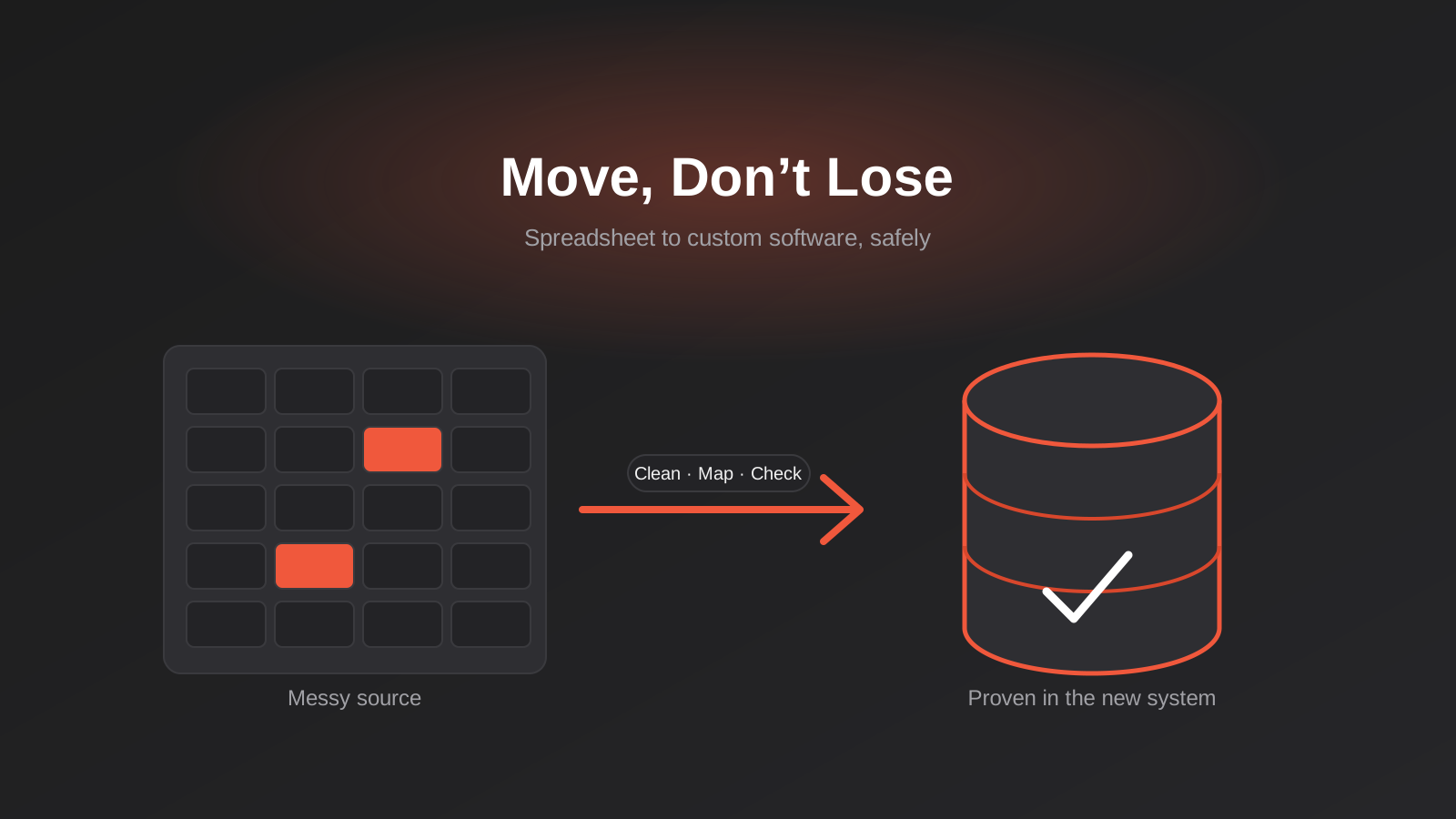
Most custom software projects don’t fail on the build. The screens get designed, the code gets written, the demo goes well, and everybody relaxes. Then someone tries to load eleven years of customer records out of a spreadsheet that three different people have edited, and the project quietly doubles in difficulty.
Data migration is the part of the job that gets a single line in the proposal and far more of the real effort than it was given. It’s also the part where mistakes are most expensive, because a bug in a screen is visible and fixable, whereas a customer record that quietly lost its history during import can sit unnoticed for months. By the time somebody asks why a client’s invoices are missing, the old system has been switched off and nobody remembers which file it came from.
This guide is about moving data from spreadsheets, old databases and ageing desktop tools into a new custom-built system, and doing it in a way you can prove worked. It’s deliberately narrower than our piece on migrating ERP or ecommerce platforms, which deals with packaged software moving between vendors. Here we’re talking about the situation where the destination is something bespoke, and the source is usually messier than anyone admits.
Why Migration Is Harder Than It Looks
When people picture a migration, they picture copying. Rows go in one end, rows come out the other. If that were the job, it would take an afternoon. The real work is that the old system and the new one disagree about what the data means.
A spreadsheet has no rules. It will happily accept “Sarah Mitchell”, “S. Mitchell” and “Mitchell, Sarah” as three separate customers, a phone number typed as 0412 345 678 in one row and +61412345678 in the next, and a date cell that holds the text “ASAP”. A properly designed database refuses all of that. It wants one customer, one phone format and a real date. Every place the old data breaks those rules, someone has to make a decision, and those decisions are business decisions rather than technical ones.
The data carries decisions nobody wrote down
Old systems accumulate conventions. A customer whose name is prefixed with “ZZ” might mean they’ve closed their account. A row highlighted yellow might mean “waiting on payment”. A notes column might contain the only record of a verbal agreement about pricing. None of this is in a schema or a data dictionary, and the person who knows the convention is often the one person who isn’t in the project meetings.
We’ve found the fastest way to surface these is to sit with the people who actually use the spreadsheet every day and ask them to explain a handful of strange-looking rows. Ten minutes of that is worth more than a week of automated profiling, because profiling tells you what the data looks like and the user tells you what it means.
The old system is still running while you migrate
A migration isn’t a single moment. The business keeps taking orders, logging jobs and issuing invoices while you extract, transform and test. Any copy you take on Monday is stale by Friday. That means the migration has to be a repeatable process rather than a one-off event, and it means you need a clear plan for what happens to changes made after your last extract.
Treat the migration as software in its own right. It gets written, tested, run many times, and fixed when it fails. The final run on cutover day should be the boring one, not the first time anyone has seen the scripts execute end to end.
Start With an Inventory, Not a Script
Before anyone writes a line of migration code, you need to know what you actually have. This sounds obvious. In practice it’s the step people skip, because it feels like paperwork rather than progress.
List every source, including the ones people forget
The main spreadsheet is easy to find. The harder ones are the personal copies. The sales manager keeps their own pipeline file because the shared one is slow. The accounts person has a second workbook that reconciles against the accounting package. Someone in operations has a folder of PDFs that are, in effect, a database of signed contracts. Ask each team a plain question: “If this system vanished tomorrow, what would you have to reconstruct, and where does that information live?”
Write the answers down as a simple table with five columns: source name, owner, format, approximate record count and whether it’s the system of record or a copy. The “system of record” column matters most. When two sources disagree, you need to know which one wins before you’re in the middle of an import.
Decide what you’re actually migrating
Not everything needs to come across. Eleven years of closed jobs might be worth keeping for reference and have no business sitting in the live database where it slows every search. A reasonable split is three tiers:
- Live data: open jobs, active customers, current stock. This migrates fully and gets the most testing.
- History: completed orders, past invoices, old correspondence. This migrates, but often with less detail, or into a read-only archive area.
- Dead weight: duplicates, test records, customers who never bought anything. This gets left behind on purpose, with a dated copy kept somewhere safe.
The ATO generally expects businesses to keep tax-related records for five years, and there are other retention rules depending on your industry, so “leave it behind” never means “delete it”. It means “keep it somewhere that isn’t the live system”. If you’re unsure what your obligations are, ask your accountant before you decide, not after. We cover the privacy side of keeping and deleting personal information in our guide to data retention automation under APP 11.
Profile and Clean the Data First
Cleaning the data is a separate activity from moving it, and it should happen before you design the final import. Moving mess into a new system doesn’t fix the mess. It just gives it a nicer interface.
We’ve written about this in more detail in cleaning your data before you automate, and most of that applies here. The short version for migrations is that you want to measure the damage before you decide how to deal with it.
What profiling should tell you
For each column that matters, you want to know how many rows are empty, how many distinct values there are, what the longest and shortest entries look like, and whether the format is consistent. A column that’s supposed to hold dates but contains 40 different text patterns is a very different problem from one that’s 98% clean with a few stragglers.
You can do this in a spreadsheet with pivot tables for small datasets. For anything bigger, a short script that loads the data and prints counts per column is plenty. You don’t need a data quality platform. You need a few hours and a willingness to read the output.
The usual suspects in Australian data
Some problems turn up on almost every project we see:
- Ambiguous dates. 03/04/2025 is the third of April in Australia and the fourth of March in the US. If any of your data came from an American tool or a person using US regional settings, you’ll have both formats in one column, and no script can reliably tell them apart. Look for values where the first number exceeds 12 to work out which convention a given batch used.
- Phone numbers. Mobiles typed with and without the leading zero, with spaces, with brackets around area codes, with “ph:” in front. Normalise them to one format on the way in and keep the original in a notes field if you’re nervous.
- Postcodes that lost a zero. Spreadsheets treat 0800 as the number 800. Every Northern Territory and some ACT postcodes are at risk. Check anything starting with 0 as text.
- Business names and ABNs. The same company entered five different ways. If you hold ABNs, validating them is a good way to merge duplicates safely.
- Free-text status fields. “Done”, “done”, “Completed”, “complete – waiting invoice”. These need mapping to a short, fixed list of statuses in the new system.
When you find something you can’t resolve automatically, don’t guess. Put it in an exceptions list and have someone who knows the business make the call. A migration that silently picks a winner between two conflicting records will eventually pick wrong, and nobody will know it did.
Deduplication needs a human in the loop
Merging duplicate customers is where migrations most often cause real damage. Merge too aggressively and you combine two different people with the same name into one record, sending one person’s invoice history to another. Merge too cautiously and you carry the mess forward. The safe pattern is to auto-merge only on strong identifiers (an exact ABN, an exact email address), flag fuzzy matches for a person to review, and never delete the losing record outright. Keep a mapping table of old ID to new ID so any merge can be reversed.
Mapping: Deciding Where Every Field Goes
A field mapping document is the most useful single artefact in the whole migration. It’s a table with one row per field in the new system, and it records where the value comes from, how it’s transformed and what happens when the source is empty.
What a good mapping row contains
For every target field, write down the source column, the transformation rule in plain English (“strip spaces, convert leading 04 to +614”), the default if the source is blank, whether the field is required, and who signed off on the rule. The sign-off column sounds bureaucratic, but it’s what saves you three months later when someone asks why all the old customers have a “Residential” type. It was a rule, someone approved it, and you can point to it.
Where the new system is more structured than the old one, you’ll need to split things. A single “Address” cell becomes street, suburb, state and postcode. A single “Contact” cell with two names and a phone number becomes two contact records. Splitting is where most transformation bugs live, so these rows deserve the most testing.
Keep the old identifier
Every migrated record should carry its original ID, or row number, in a dedicated field in the new system. This is cheap insurance. When a user says “the Henderson job from 2022 looks wrong”, you can trace it back to the exact source row in thirty seconds. Without it, you’re comparing names and hoping. Most teams stop needing the field after a year or so, and by then it has paid for itself many times over.
Relationships matter more than rows
Spreadsheets flatten relationships. A job row repeats the customer’s name rather than pointing to a customer record. A database wants real links between tables. During migration you have to create the customer records first, then the jobs, then connect each job to its customer using the old-ID mapping. Load order matters, and so does what you do when a job refers to a customer who doesn’t exist in the customer list. Decide that rule in advance: create a placeholder customer, reject the job, or park it for review.
The Migration Pipeline
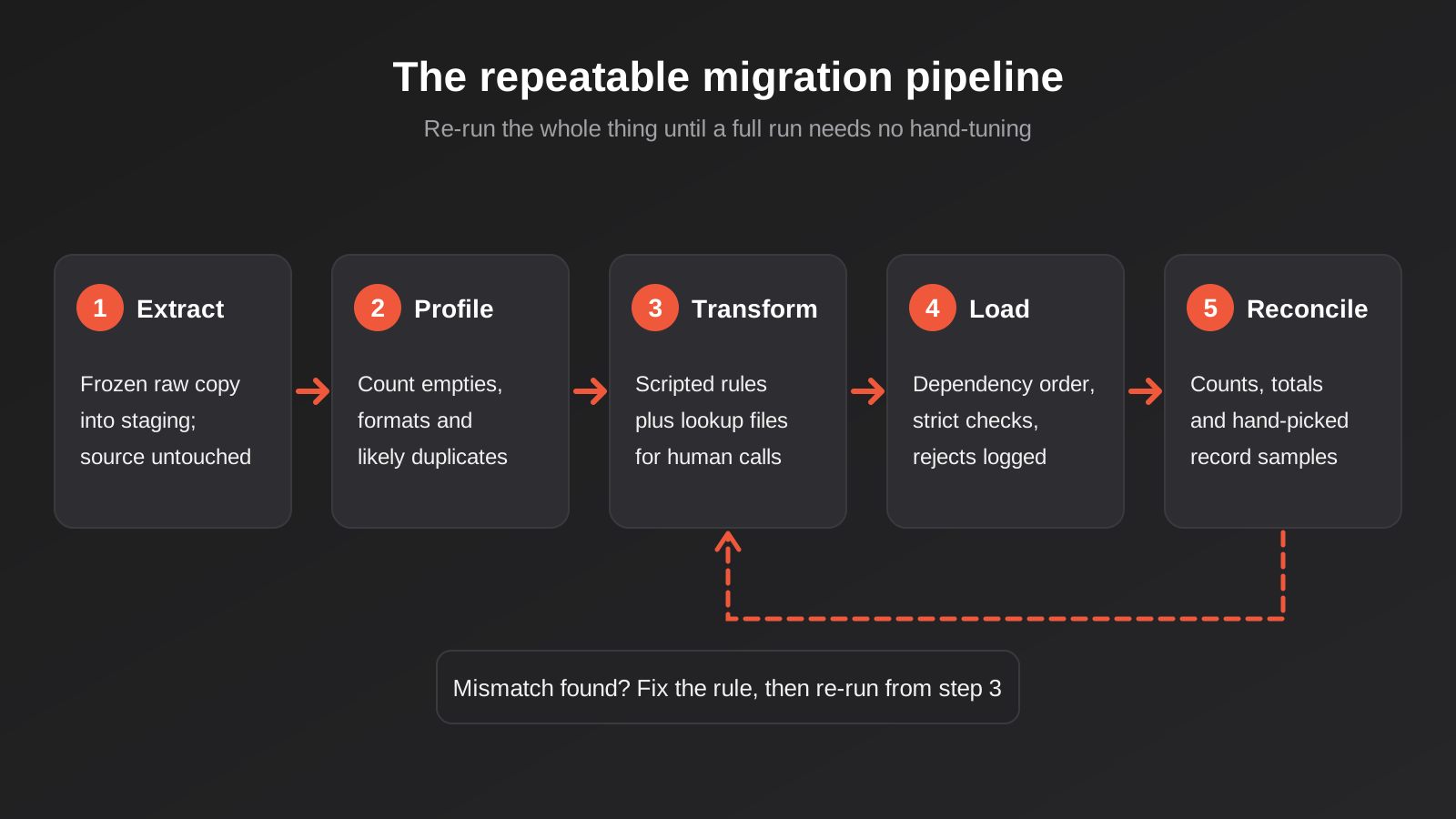
Once the inventory, cleaning rules and mapping exist, the migration itself becomes a pipeline you can run repeatedly. The shape is always roughly the same, whether the source is a single workbook or three legacy databases.
Extract into a staging area
The first step is to copy the raw source data, unchanged, into a staging area. That might be a set of tables in a scratch database or a folder of untouched files. Nothing gets cleaned yet. The point is to freeze a known snapshot you can refer back to, and to make sure you never modify the original while you’re working.
Transform with scripts you can re-run
Every cleaning and mapping rule goes into code, not manual editing. If an analyst fixes 300 rows by hand in a spreadsheet, those fixes vanish the moment you re-extract fresh data on cutover day. A scripted rule can be run a hundred times and produces the same result. When you find a new problem during testing, you add a rule and re-run the whole thing. That loop is the core of the work.
Some fixes really do need a human, such as deciding which of two conflicting addresses is correct. Capture those decisions in a lookup file that the script reads, rather than in someone’s head. The script stays repeatable, and the human judgement is recorded.
Load in dependency order
Load reference data first (statuses, categories, staff), then the records that depend on it, then the records that depend on those. Load into a test copy of the new system, never the live one, until the process has proved itself. Use the same import code path every time, and keep the loader strict. If a record fails validation, it should be rejected and logged, not quietly patched.
Reconcile everything that went in
Reconciliation is the step that turns “it seemed to work” into “we can prove it worked”. It deserves its own section.
Reconciliation: Proving Nothing Went Missing
The most common mistake in migration testing is checking that the number of rows going in matches the number coming out. That check is necessary and almost worthless on its own. A load can bring across 4,812 of 4,812 records and still have scrambled every phone number, put every date a day out because of a timezone conversion, or attached half the jobs to the wrong customer.
Three layers of checking
We think about reconciliation in three layers, each catching different failures.
- Counts. Records loaded versus records in source, per table, with rejected records listed and explained. This catches dropped data and failed batches.
- Totals. Sum of invoice values, count of open jobs, total stock on hand, number of active customers, compared against the old system’s own numbers. This catches data that arrived but changed. If the old accounts total $1,284,330.15 outstanding and the new system says $1,284,030.15, something is wrong, and it’s three hundred dollars’ worth of wrong.
- Samples. A person opens fifty real records in the old system and the same fifty in the new one, and compares them field by field. This catches the things totals can’t, such as notes landing in the wrong field or a relationship pointing at the wrong parent.
Choose the sample deliberately. Random records are fine, but add the awkward ones: the oldest customer, the one with the longest name, the one with fifty jobs, the one with a character like an apostrophe or an accent in their name. Edge cases are where migrations break, and a purely random sample tends to land on the boring middle.
Let the people who own the data do the checking
Developers can verify that data arrived intact. They can’t tell you whether it still makes sense. The accounts person looking at the aged debtors report will notice in thirty seconds that a customer’s balance is wrong, because they know roughly what it should be. Build time into the schedule for the actual users to review their own data in the new system, and make it easy for them to report problems against specific records.
Write down what you accept
No migration is perfect. A handful of records will always be unresolvable: a customer with no name, a job with a date in the year 1900. Decide up front what level of loss is acceptable, record each excluded record in a file with the reason, and get a named person to sign off. That file is your answer if anyone asks later why a record isn’t there.
Choosing a Cutover Strategy
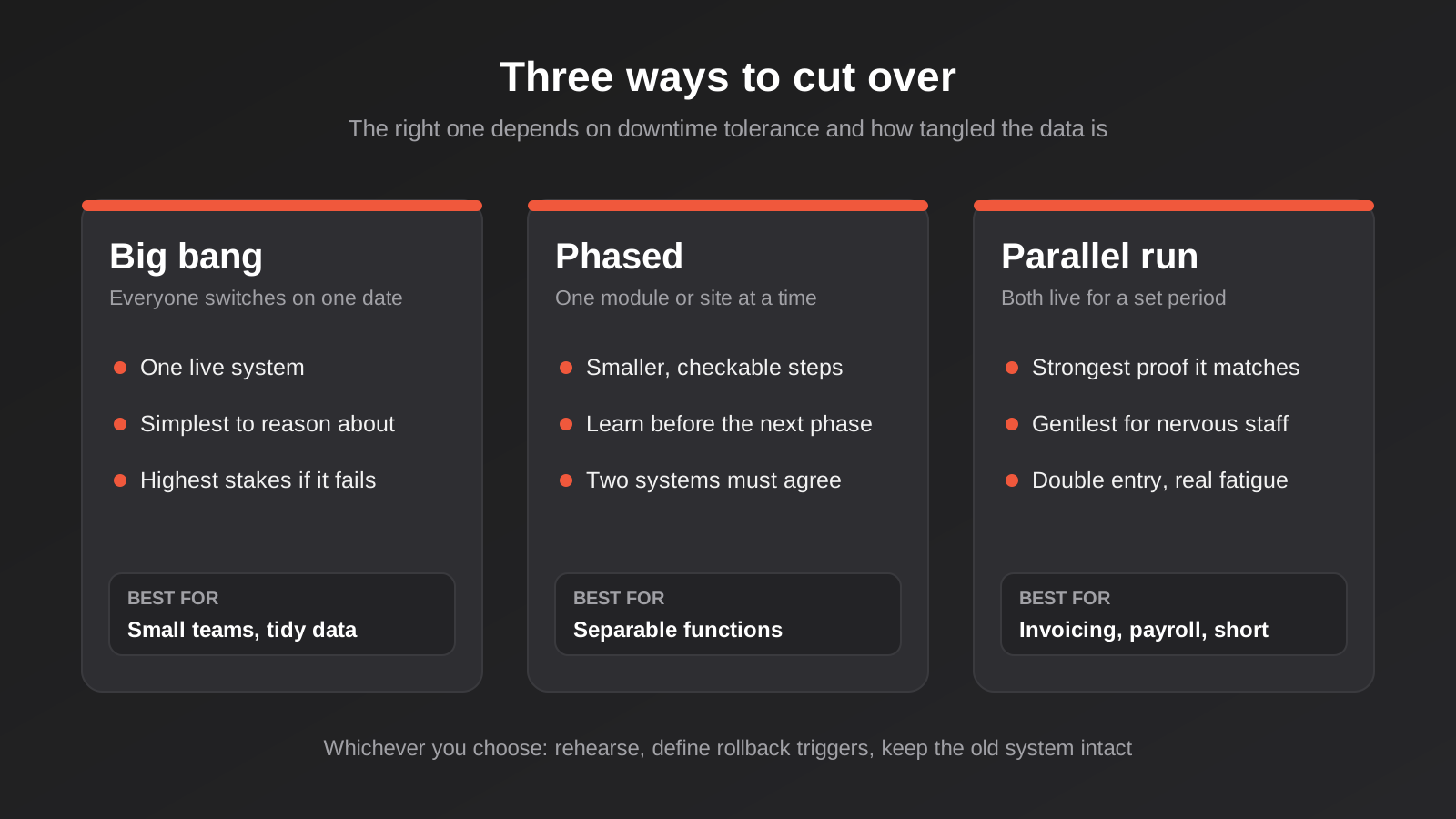
Cutover is the moment the business stops using the old system and starts using the new one. There are three common ways to do it, and the right one depends on how much disruption the business can tolerate and how much risk it’s willing to carry.
Big bang: everyone switches at once
You pick a date, usually a weekend, freeze the old system, run the final migration, check it, and open the new system on Monday. This is the simplest to reason about, because there’s only ever one live system. It’s also the highest stakes, since any problem you didn’t find in rehearsal hits everyone at the same moment.
Big bang suits smaller businesses with a modest data volume and a team that can all be trained together. If your data fits in a few thousand rows and your migration scripts have been rehearsed several times, it’s often the sensible default.
Phased: one slice at a time
You migrate by function, location or customer group. The quoting module moves in March, job scheduling in May, invoicing in July. Or the Brisbane branch goes first as a pilot, then the rest follow. Each phase is smaller and easier to check, and you learn from each one before starting the next.
The catch is that during the transition, the business runs on two systems that need to agree. Somebody has to keep them in sync, or accept that certain reports need data from both. If the data is heavily interconnected, phasing can create more work than it saves. It works best when the pieces are genuinely separable.
Parallel run: both systems live for a while
Staff enter data into both systems for a defined period, and you compare the results. This gives the strongest proof that the new system behaves like the old one, and it’s the gentlest on nervous users. It’s also the most tiring. Double entry is slow, people make different mistakes in each system, and the temptation to extend the parallel period forever is real.
If you run in parallel, set the end date before you start and be honest about what you’re comparing. Running both systems without actually reconciling the outputs is just doing the work twice.
How to choose
Ask three questions. How long can the business tolerate being unable to use the system if something goes wrong? How interconnected is the data? And how much appetite do the staff have for running two systems? A field service business that must dispatch jobs every morning has very little tolerance for downtime and might favour a phased approach. A small professional services firm with a tidy client list can probably do big bang on a quiet weekend. The answer isn’t universal, and anyone who tells you there’s a single right way hasn’t done it in your situation.
Rehearse the Cutover Until It’s Dull
A rehearsal is a full run of the migration, from extract to reconciliation, into a copy of the new system that looks like production. You do it to find out how long it takes, what breaks, and whether the written runbook is actually followable by someone who didn’t write it.
Run it more than once
The first rehearsal will fail in ways nobody predicted. That’s its purpose. After you fix those problems, run it again, because fixes cause new problems. A rehearsal that needed manual intervention to finish hasn’t passed, so you do it again until it runs from start to end with no hand-tuning. For a small system that might mean three rehearsals. For a larger one it can be more. The number matters less than the pattern: you’re finished when a run is boring.
Time each step too. If the final extract and load takes six hours, you need to know that before you’ve told the business the system will be down for “a couple of hours on Saturday morning”.
Write the runbook as if you won’t be there
The runbook is a numbered checklist of every action on cutover day, with who does it, how long it takes, and how you know it worked. Include the freeze time for the old system, the final extract, the load, reconciliation, the go or no-go decision, and the point at which you tell staff the new system is open. Someone competent but unfamiliar should be able to follow it. People get sick, and cutover weekends have a way of colliding with holidays.
Define rollback before you need it
Decide in advance what would make you abandon the cutover and go back to the old system, and who has the authority to make that call. Agree the triggers in writing: reconciliation totals that don’t match, a critical workflow that doesn’t work, a data error above a threshold you’ve set. When you’re tired at two in the morning with the business expecting to open at eight, a pre-agreed rule is much easier to follow than a judgement call.
Rollback only works if the old system is still intact. Don’t decommission it, delete the spreadsheets or cancel the subscription on cutover day. Keep it in read-only mode for a defined period, and take a dated copy of every source file. Our guide to legacy system modernisation goes into when keeping an old system running alongside a new one is the right call.
The Freeze Window and Changes in Flight
Whichever strategy you choose, there’s a gap between your last extract and the new system going live. Anything that happens in that gap needs handling.
For a big bang cutover, the answer is usually a freeze. From a stated time, nobody edits the old system. If staff can’t work during the freeze, they use a paper or spreadsheet fallback and key those entries into the new system afterwards. This needs communicating clearly, because the person who forgets and updates the old system at 9pm on freeze night creates a discrepancy that surfaces weeks later.
For phased or longer-running migrations, you need a delta process: a way of identifying records changed since the last extract and loading just those. Reliable deltas need a “last modified” timestamp or a change log in the source, which many spreadsheets simply don’t have. If that’s your situation, the practical choice is a short, hard freeze rather than trying to reconstruct changes after the fact.
Don’t forget the things that point at the old system
Data isn’t the only thing that moves. Email templates link to old record numbers. Staff have bookmarks. Customers have PDFs with reference numbers printed on them. Other tools might read from the old spreadsheet through a connection nobody remembers setting up. Part of the inventory is a list of everything that reads from, writes to or refers to the old system, so none of it breaks silently on Monday. If the new system needs to connect to other software, that’s usually a job for proper integration work rather than another spreadsheet export.
After Go-Live: The First 30 Days
Cutover isn’t the finish line. The first month is when problems that rehearsal couldn’t reveal show up, because real users do unexpected things with real data.
Hypercare, not a handshake
Plan for a period of heightened support right after launch. Someone should be watching for errors, answering “this looks wrong” questions the same day, and fixing data issues quickly while the source system is still available for comparison. Make it easy for staff to report a problem: a single shared inbox or a simple form with the record reference. If reporting takes effort, people will quietly work around the problem and you’ll never hear about it.
Run the checks again
Repeat your reconciliation totals after a week and again at month end. Month end is a particularly good test because accounting reports pull from everywhere, and a mismatch in aged debtors or stock valuation is the sort of thing that shows up when somebody runs the real report for the first time. If the numbers agree against the old system’s final figures, you can be confident in the migration.
Retire the old system deliberately
When you’re satisfied, decommission the old system on a date you’ve announced, after a final dated archive. Store that archive somewhere secure and documented, and make sure you can still open it. A backup in a format nothing can read any more is not a backup. If the old data contains personal information, it still falls under your privacy obligations, so keeping it indefinitely “just in case” isn’t a free option either.
Where Migration Sits in a Custom Build
If you’re planning custom software, migration should show up in the project scope from the start, not appear as a surprise in month four. It affects the data model, because the new system has to be able to hold what the old one held. It affects the timeline, because rehearsals and user review need real calendar time. And it affects the budget, because cleaning and mapping take people’s time on both sides.
A good discovery phase asks for sample data early. We’d rather see the messy spreadsheet in week one than discover it in week eight, because it changes how we design the database. Migration questions belong in your software brief from the beginning.
It also shapes how big a first release should be. If you’re building a minimum viable product, you may not need to migrate everything on day one. Starting with live data only, and bringing history across in a second pass, keeps the first release small and the risk low. For internal tools replacing shared files, our guide to client portals and internal tools that replace spreadsheets shows how that move usually plays out from the user side.
Common Mistakes
- Treating migration as a final-week task. It needs scoping, ownership and calendar time from the start of the project, and the cleaning work has to begin well before the new system is ready.
- Checking row counts and calling it done. Counts prove records arrived. They don’t prove the values are right, the relationships are intact or the totals agree.
- Fixing data by hand in the source. Manual edits can’t be repeated on cutover day. Capture every fix as a scripted rule or a lookup entry.
- Merging duplicates automatically on weak matches. Two people with the same name and suburb aren’t necessarily one person. Merge on strong identifiers and review the rest.
- Skipping rehearsals because the schedule is tight. The rehearsal is where you find the problem while it’s still cheap to fix.
- Turning off the old system on cutover day. Without it you have no rollback and no way to check disputed records.
- Leaving users out of validation. The people who work with the data every day spot wrong values faster than anyone else, so give them time and a clear way to report what they find.
- Not keeping the original IDs. Without them, tracing a bad record back to its source turns into guesswork.
- Forgetting what depends on the old system. Linked documents, scheduled exports and quietly connected tools all need a plan.
Frequently Asked Questions
How long does a data migration to a new system take?
It depends far more on data quality than data volume. A clean spreadsheet with a few thousand rows and simple relationships can be migrated in a couple of weeks of focused effort, including testing. Ten years of inconsistent records across several files can take months, most of it spent on cleaning and decisions rather than moving anything. The most reliable way to estimate is to profile a real sample of your data early and see how much of it needs attention.
Can we just import our spreadsheet directly into the new software?
Sometimes, if the data is already tidy and the new system’s structure closely matches your sheet. Usually it doesn’t. A database enforces rules a spreadsheet doesn’t, so rows with missing values, duplicate customers or inconsistent formats get rejected or, worse, accepted and wrong. A direct import with a basic validation report is fine for simple lists. For anything with relationships between records, a scripted, repeatable process is safer.
Should we migrate all our historical data?
Not necessarily into the live system. Live data such as open jobs and active customers should migrate fully. Older history is often better placed in a read-only archive or a reporting area, which keeps the day-to-day system fast and the migration smaller. Check your record-keeping obligations first, because some records must be kept for years even when you never look at them. Archiving is fine. Deleting needs a reason.
What happens if the migration goes wrong on cutover day?
That’s what the rollback plan is for. You agree in advance which problems trigger a rollback, who decides, and how you return to the old system, which stays intact and read-only for exactly this reason. If rehearsals have been done properly, a rollback is unlikely, but having the option is what makes the cutover calm rather than frantic.
Who should be involved in the migration on our side?
At least one decision-maker who can settle disputes about what the data means, and the day-to-day users of each data set. The IT or technical contact matters less than you’d think. The knowledge that matters is in the heads of the people who use the data, such as the bookkeeper who knows why a customer is flagged or the operations lead who knows which job statuses are really the same. Expect a few hours per week from them during cleaning and validation.
Is it safer to run both systems in parallel?
It’s the gentlest approach for users, and it gives strong evidence the new system behaves correctly, but it has real costs. Double entry is slow and error-prone, and the comparison only helps if someone actually reconciles the two sets of results. Parallel running works best for a short, defined period around a critical process like invoicing or payroll, not as a blanket approach for everything.
Where to Start
Start small and concrete. Make a list of every place your business data lives today, mark which one is the system of record, and pull a sample of a few hundred rows from each. Read them with a critical eye, ideally alongside the person who uses them daily. Within an hour or two, you’ll have a realistic sense of how much cleaning is ahead and which decisions need an owner.
If you’re planning a build and want migration scoped properly from the start, talk to us about custom software development. We’d rather look at a messy file early than be surprised by it late, and we’re happy to give you an honest view on what’s involved, even if the answer is that your current setup is closer to fine than you feared. There’s no pressure to commit to anything. Our web app development pricing page explains how we scope and quote.
Worth putting a number on it: because we run lean as a specialist agency rather than carrying a large account-management layer, our fixed quotes typically come in below the Australian averages for comparable scope. If you’ve already got a written quote from another agency for comparable scope, send it through and we’ll do our best to beat it.
Keep reading
Related posts
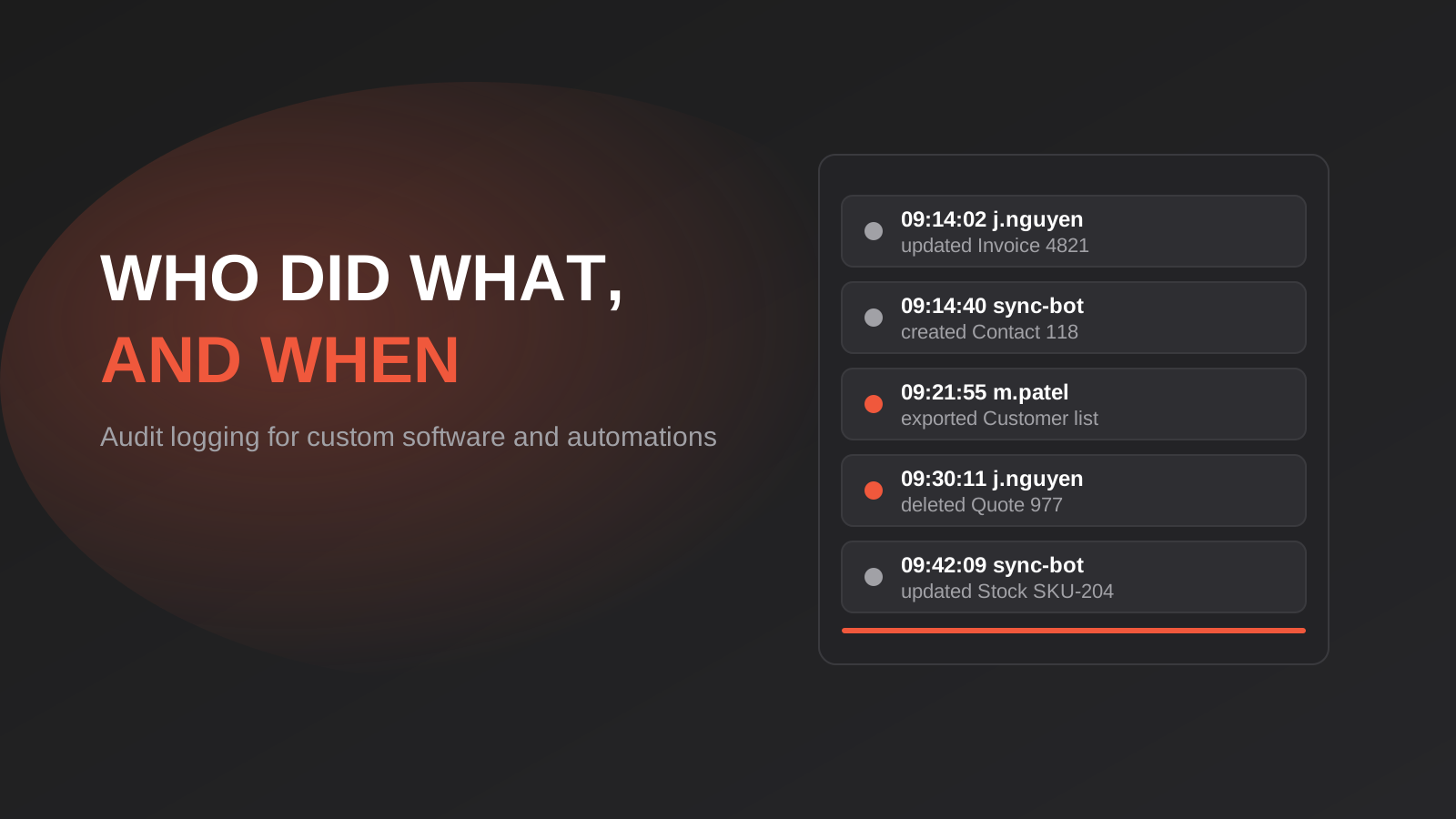
Audit Logging for Custom Software and Automations: What to Record, What to Leave Out and How Long to Keep It
Audit logging for custom software and automations: what to record, what to leave out, and how long to keep logs under Australian…
Custom Software Maintenance in Australia: What You Pay for After Launch (2026)
What custom software really costs after launch in Australia: maintenance types, the 15–20% budget rule, support agreements and the mistakes to avoid.
How to Write a Software Brief and Run a Discovery Phase Before You Build (2026)
How to write a software brief and run a discovery phase before you commission custom software in Australia: what to include, what…
Got a project you'd like to talk through?
Tell us what you're working on — we'll come back with a plan.
