
Legacy System Modernisation: Wrap With APIs or Replace It? (2026 Guide)
 Jignesh Vagadiya
09/10/2026
21 min read
Jignesh Vagadiya
09/10/2026
21 min read
Somewhere in most Australian businesses more than about fifteen years old, there’s a system nobody wants to touch. It might be a practice management tool from the mid-2000s, a bespoke Access database one former employee built and nobody else fully understands, or an ERP module that’s been patched so many times the vendor barely remembers selling it. It works. It holds years of clean data. And it can’t talk to anything else in the business without someone exporting a spreadsheet and re-keying it somewhere else.
The instinct, especially after a few months of that manual re-keying, is to call it “legacy” and start pricing up a replacement. Sometimes that’s the right call. Often it isn’t. We’ve scoped enough of these projects to know that the business case for a full rebuild and the business case for simply wrapping the old system in a modern API are built on completely different assumptions — and picking the wrong one wastes six figures and a year of everyone’s patience.
This guide to legacy system modernisation walks through how to tell which situation you’re actually in, what wrapping an old system with an API really involves, when a full replacement is unavoidable, and the middle path — module-by-module replacement behind a stable interface — that most growing Australian businesses end up taking without planning to.
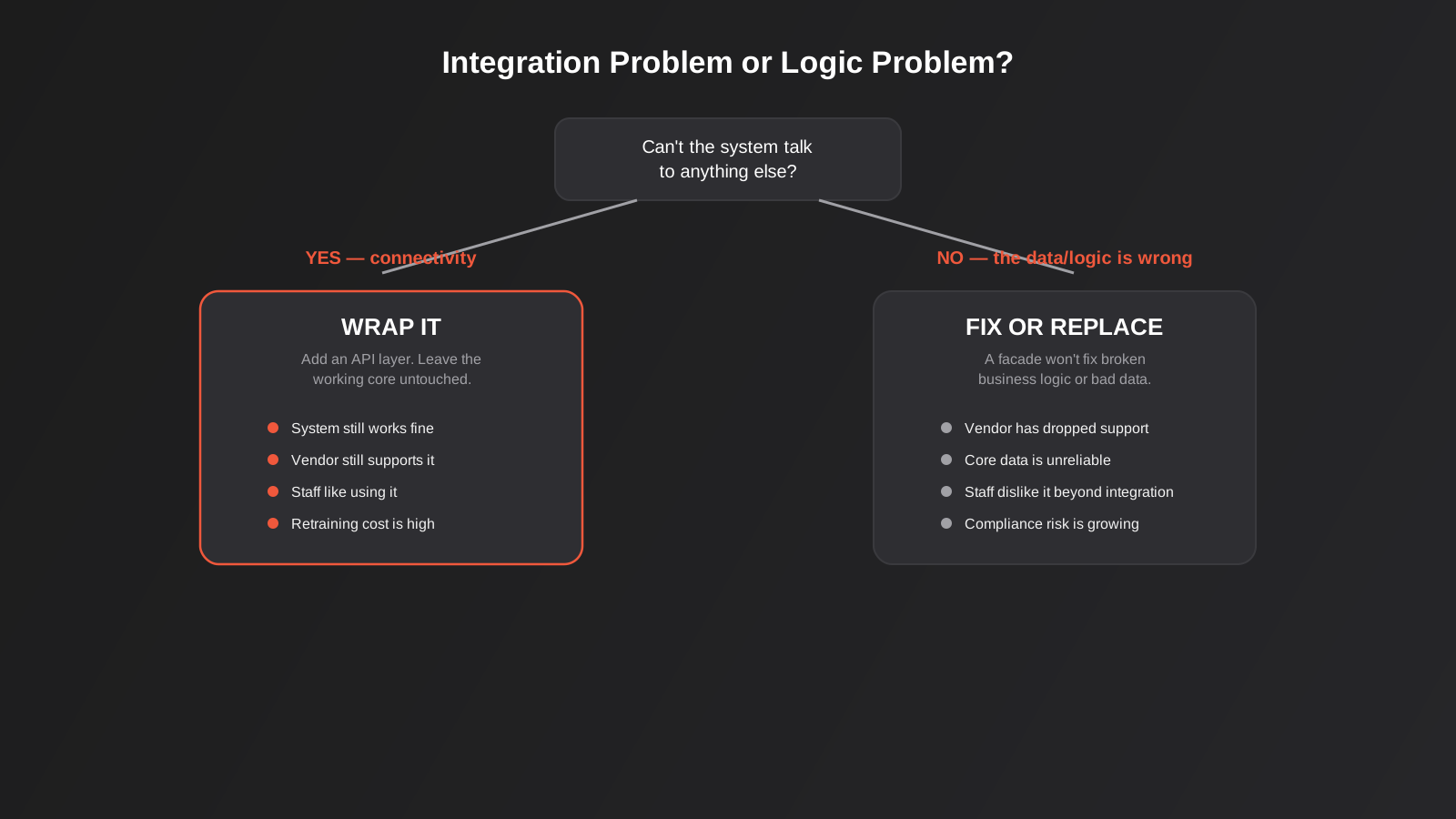
Legacy System Modernisation Starts With One Question: Integration Problem or Logic Problem?
Almost every legacy system conversation starts in the wrong place. Someone in the business says “the old system needs to go” and everyone immediately starts pricing a replacement, without first asking what’s actually broken. There are really only two categories of problem, and they call for opposite responses.
An integration problem means the system itself does its job fine. Staff can use it, the data inside it is accurate, and the vendor (if there still is one) hasn’t abandoned it. The only issue is that it’s an island — nothing else in the business can read from it or write to it without a human in the loop. A logic problem is different: the system’s own rules, calculations or data are wrong, incomplete or no longer match how the business actually operates. No amount of clever interfacing fixes a logic problem, because you’d just be exposing the same broken logic to more systems, faster.
How to tell which one you’ve got
Before anyone prices a rebuild, we sit down with whoever actually uses the system daily and work through a short list:
- Does the system produce correct output today, assuming someone enters the right inputs? If yes, that’s a point toward “integration problem.”
- Is the vendor still trading and still patching security issues? A system from a vendor that’s gone quiet for three years is a different risk profile to one still getting updates.
- Do staff actively dislike using it, for reasons that have nothing to do with it talking to other systems — slow screens, confusing workflows, missing features they need daily?
- Would retraining the whole team on a replacement cost more, in lost productivity, than the integration problem itself is costing?
- Is there a compliance or data-security reason the current setup can’t continue, regardless of whether it integrates with anything?
If the honest answers point to “it works, it’s just isolated,” wrapping is almost always the cheaper, lower-risk, faster option. If the honest answers point to “the data or the workflow itself is the problem,” no API layer will fix that, and it’s worth looking at our guide to choosing between custom software and off-the-shelf for what a properly scoped replacement actually costs.
Wrapping: Adding an API Layer Without Touching the Core
Wrapping means building a translation layer that sits in front of the legacy system, speaks modern REST or JSON on the outside, and speaks whatever the old system understands — SOAP, a proprietary file format, a database table nobody’s supposed to touch directly, or even a terminal screen — on the inside. The legacy system never knows anything changed. Everything that calls it goes through the wrapper instead.
What a wrapper actually does
In practice a wrapper for an ageing business system usually does one or more of these jobs:
- Protocol translation — converting the old system’s native format (fixed-width files, SOAP XML, a proprietary export) into clean JSON over REST that modern tools can consume.
- Database-level access — reading (and sometimes writing) directly against the underlying database when the application itself has no API at all, which is common with older desktop software.
- Screen scraping or RPA — when there’s no database access either, a robotic process automation tool can drive the existing user interface the way a human would. It’s the least elegant option and the most fragile, but sometimes it’s the only one available. We cover where this fits against proper integration in our RPA vs API integration guide.
- Caching and rate limiting — old systems are rarely built to handle frequent automated requests, so the wrapper often needs to cache results and throttle calls so it doesn’t fall over under load it was never designed for.
Where wrapping works well
Wrapping tends to be the right call for systems that are functionally fine but socially isolated: an older CRM that staff know well, a practice or property management platform that does its one job competently, a scheduling tool with no native integrations, or an ERP module that’s simply too embedded in daily operations to touch. These are usually systems where the people cost of change — retraining, lost muscle memory, resistance to yet another new tool — outweighs the technical cost of building a facade. A reasonable rule of thumb from the integration consultancies that specialise in this work is that a well-scoped connector captures a large majority of the integration value most businesses actually need, without the risk of a full rebuild.
This is also where ERP systems specifically come up a lot. Businesses running an older ERP that’s core to finance and operations are rarely in a position to replace it quickly, and wrapping it with a proper API layer — rather than exporting CSVs by hand every week — is usually the pragmatic middle ground. If that’s your situation, our dedicated guide to ERP integration goes deeper into the connection methods and what it actually takes to get a legacy ERP talking to the rest of your stack.
The hidden cost of wrapping
A wrapper is not free maintenance. It adds a new piece of software the business now owns, and if the legacy system’s business logic is already shaky, the wrapper just moves that problem one layer up and gives it a shinier interface. We’ve seen businesses wrap a system, declare victory, and then spend the following year debugging data inconsistencies that were always there — they just weren’t visible when the only person touching the data was the one employee who’d learned to work around its quirks. Before committing to a wrapper, it’s worth being honest about whether the underlying data is actually trustworthy, because exposing bad data to three new systems instead of one is not progress.
What a Wrapper Project Actually Involves
“Just build an API on top of it” sounds like a weekend job until you’re the one scoping a legacy system modernisation project. In practice a wrapper project has four distinct phases, and skipping any of them is where most of these projects go sideways.
Discovery and access audit
Before writing a line of code, the first job is working out exactly how the legacy system can be reached. Does it expose any kind of export, even a clunky scheduled CSV dump? Is there ODBC or direct database access, and if so, is the schema documented anywhere or does someone need to reverse-engineer it from the application’s behaviour? Is there a desktop client only, with no server-side access at all, which pushes the project toward RPA by default? This phase also has to answer who currently has admin rights to the system, because that person usually ends up being the one who can grant (or accidentally revoke) the wrapper’s access down the track. We’ve seen projects stall for weeks here simply because the one person who knew the database credentials had left the business two years earlier and nobody had rotated them since.
Choosing the access method
Once discovery is done, there’s usually a ranked list of options, from least to most invasive: a native export or API if one exists, ODBC or direct database reads for systems with an accessible backend, a message queue or file-drop integration for systems that already produce scheduled exports, and RPA or screen automation as the last resort when nothing else is available. Each step down that list adds fragility and ongoing maintenance cost, so part of this phase is an honest conversation about whether a slightly more invasive but far more stable method is worth paying for up front, rather than defaulting to whatever’s cheapest to build first.
Building and testing the facade
The facade itself is usually a small, purpose-built service — it doesn’t need to be a sprawling platform, just a translator that exposes clean REST endpoints and handles the specific fields the rest of the business actually needs. This is also where caching and throttling get built in, since legacy systems were rarely designed to handle automated polling at the frequency a modern integration wants. Testing has to go beyond the happy path: what happens when the legacy system is down for its nightly backup, when a field comes back empty that’s never been empty before, or when someone manually edits a record mid-sync? A wrapper that only works when everything behaves perfectly isn’t actually solving the problem.
Monitoring, documentation and handover
A wrapper that nobody is watching will fail silently, usually at the worst possible moment, and nobody notices until downstream data is already wrong. Documentation matters more here than on most projects, specifically because the whole point of a wrapper is to outlive the quirks of a system most of the business doesn’t understand. Whoever maintains it next needs a clear record of why each workaround exists, not just that it does.
Replacing: Why Rip-and-Replace Rarely Works for Growing Businesses
Sometimes wrapping genuinely isn’t an option. The vendor has shut down entirely and there’s no more security patching. The core data is corrupted or has drifted so far from reality that nobody trusts the reports it produces. Staff dislike the system for reasons that have nothing to do with integration — it’s slow, it crashes, it’s missing features the business now needs daily. Or there’s a compliance obligation that the current platform simply can’t meet, regardless of what gets bolted onto it.
Even then, replacing everything in one go — picking a new platform, migrating every workflow, and cutting over on a single weekend — is the riskiest way to do it. It’s also the most common way these projects blow their budget and timeline, because every edge case in the old system (the weird pricing rule from 2014, the one customer with a non-standard account setup) surfaces at once, under deadline pressure, usually the week before go-live.
The strangler fig approach
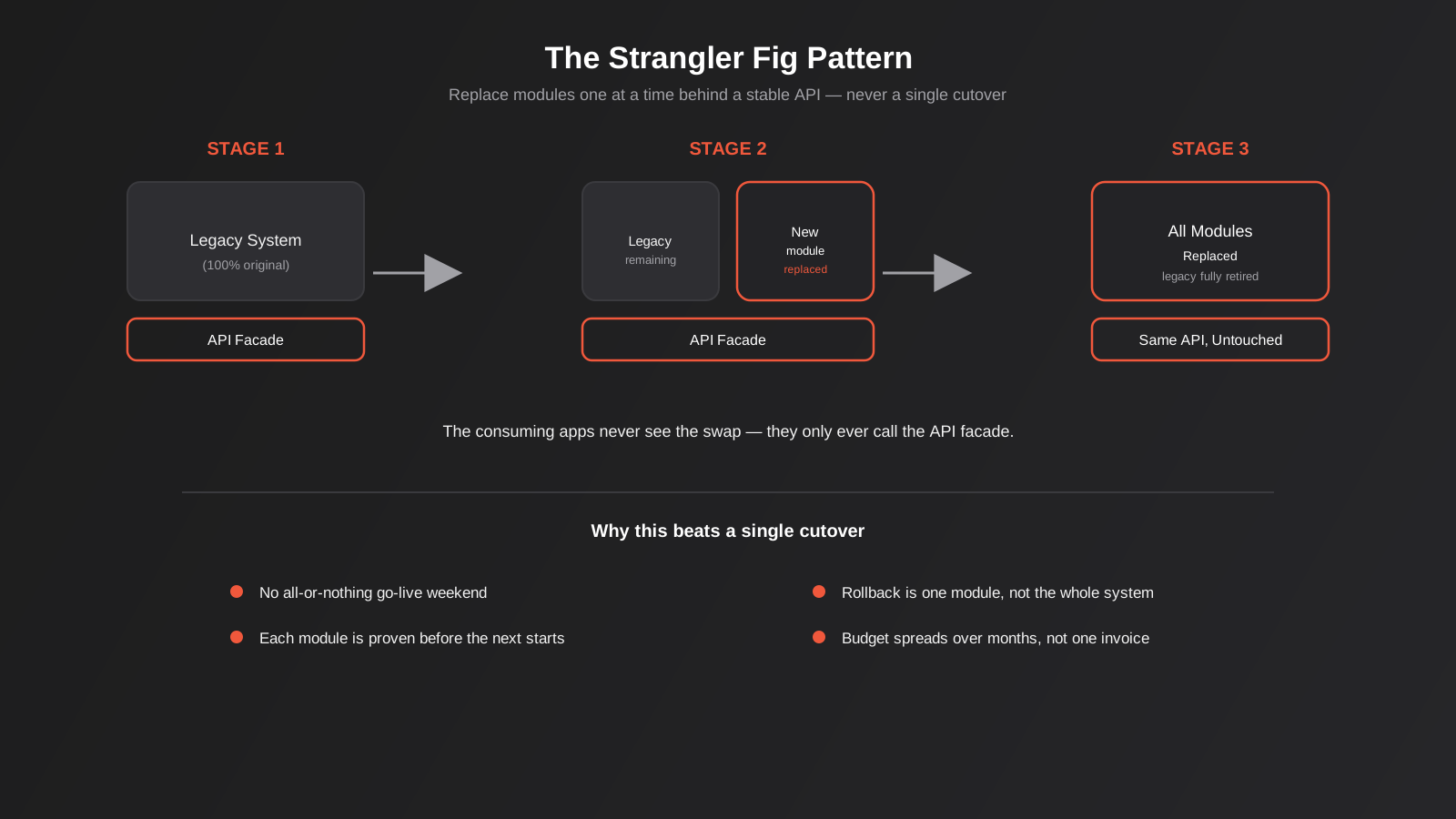
The pattern that avoids this is borrowed from a tree: a strangler fig grows around its host a branch at a time until eventually the host is gone and only the fig remains, but at no point does the host disappear suddenly. Applied to software, it means putting a stable API facade in front of the legacy system first — the same facade you’d build for a pure wrapping project — and then replacing the functionality behind that facade, one module at a time, while everything that consumes the API keeps working exactly as before.
A typical sequence looks like this: start with the facade sitting entirely in front of the untouched legacy system. Pick the module causing the most pain — often reporting, or a particular workflow with known data problems — and rebuild just that piece behind the same API contract. Run it in parallel, verify it against the legacy output, and only cut over once it’s proven. Repeat for the next module. Eventually the legacy system has nothing left to do and can be retired, but nobody ever experienced a single catastrophic go-live weekend.
Module-by-module replacement behind a stable API
The practical advantage of this approach is that each piece gets proven in isolation before the next one starts, so a mistake costs you one module’s worth of rework rather than the whole system’s. It also spreads the budget over several smaller pieces of work rather than one large capital outlay, which matters for a business trying to keep cash flow sane while modernising. And because the consuming applications — the website, the reporting tool, the mobile app, whatever else talks to the system — only ever see the stable API, they don’t need to change at all while the replacement happens underneath them. If you’re weighing this against a full platform swap, our guide on migrating ERP or ecommerce platforms without losing data covers the all-at-once approach in detail, including the audits and rollback planning that a true platform migration needs.
The trade-off is time. A strangler fig migration genuinely takes longer end-to-end than a single cutover would, on paper, because you’re running two systems in parallel for each module during its transition. For most growing Australian businesses, that extra calendar time is a reasonable price for never having a weekend where the whole business holds its breath.
Governance: Who and What Can Actually Call the New API
Once a legacy system gets an API in front of it, for the first time in its life other software can reach it automatically, and that cuts both ways. The same facade that finally lets your CRM read customer records can, if it’s built carelessly, let far more than the CRM read them. This matters more than it used to, now that AI agents and AI-powered tools are increasingly the thing making those calls rather than a handful of known integrations a developer set up once and forgot about.
A few governance basics are worth building in from day one rather than retrofitting later: authenticate every caller individually rather than sharing one API key across everything that needs access, so a compromised key can be revoked without breaking every integration at once; log every read and write with enough detail to reconstruct what happened if something goes wrong; and apply the same least-privilege thinking you’d apply to a new staff member — a reporting tool that only ever needs to read data should never also have write access, no matter how convenient it would be to grant it once and move on. These habits matter just as much when AI tools or agents end up among the things calling the new API, not just the integrations a developer set up once and documented.
Real Timelines and What Drives the Cost
Every legacy system is different enough that a single number is more misleading than useful, but the shape of the cost is consistent. A wrapper built against a system with a usable export or existing database access is the cheapest and fastest option — often a matter of weeks rather than months, because most of the work is mapping fields and handling edge cases rather than inventing new access paths. A wrapper that has to be built on RPA because there’s genuinely no other way in costs more up front and more to maintain ongoing, because it breaks whenever the underlying screen changes even slightly, and someone has to notice and fix it each time.
A staged, strangler-fig replacement is priced less like a single project and more like a programme of smaller projects, one per module, each with its own discovery, build, parallel-run and cutover. That spreads cost over a longer period, which is usually the point, but it also means the total spend across the whole programme can end up higher than a single clean rebuild would have cost on paper — the premium is for risk reduction, not for saving money. The honest conversation to have before committing to either path is whether your business can absorb a single large project with a fixed go-live date, or whether it needs the cost and the risk spread out, even if that costs somewhat more in total. Most growing businesses, once they’ve actually thought about what a failed go-live weekend would cost them in lost orders, missed invoices or angry clients, decide the staged premium is worth paying.
A Practical Decision Framework
When a legacy system comes up for review, we work through these questions roughly in this order:
- Is the vendor still supporting it? No ongoing security patches is the clearest signal that “keep as-is” is off the table, even if wrapping would otherwise make sense.
- Is the core data and logic trustworthy? If people routinely double-check its output manually, that’s a logic problem no wrapper fixes.
- What does the system actually need to do that it can’t do today? Usually it’s “talk to the CRM” or “feed the reporting dashboard,” which is squarely a wrapping job — see our guide to API and systems integration for how that typically gets scoped.
- What would retraining cost, in real lost hours, against the cost of an API layer? For a five-person team using a quirky but functional tool, retraining almost always costs more than wrapping.
- If replacement is unavoidable, can it be staged? Almost always yes. The exceptions are small, self-contained systems with one clear function and one clear replacement candidate, where a single clean cutover is genuinely simpler than building a temporary facade for something about to disappear entirely.
- What’s the compliance and data-residency picture? Before exposing legacy data through any new API, check it against current Privacy Act obligations, particularly if the data includes customer or health information.
What This Looks Like in Practice
A few patterns come up often enough across different industries that they’re worth naming directly.
Trades and field service businesses
An older job-management or scheduling tool that staff genuinely like, but that has no native connection to accounting or to the website’s booking form. This is almost always a wrapping job — a thin API that pushes new jobs in and pulls completed job data out, leaving the tool itself untouched.
Professional services and finance
A practice management or case management system that’s core to compliance and years of client history, where the complaint is “it doesn’t talk to our CRM.” Again, usually a wrapping job, though these often need more careful handling of access control given the sensitivity of the data inside.
Retail and wholesale
An ageing inventory or POS system where the actual stock counts have drifted from reality over years of workarounds. This is a logic problem wearing an integration problem’s clothes — wrapping it just automates the propagation of wrong numbers faster. These situations usually need a data reconciliation project before any integration work, and often end up as a staged replacement once the reconciliation reveals how deep the problem goes.
Manufacturing and distribution
Older MRP or production-scheduling systems are a frequent wrapping candidate, mainly because the alternative — replacing a system that production staff have run for a decade without complaint — carries real operational risk if anything goes wrong during a changeover. The usual request here is a feed into modern reporting or into an ERP for finance, not a replacement of the scheduling tool itself. These projects tend to lean on direct database access or scheduled file exports rather than screen automation, since most MRP platforms of that vintage were built with some form of reporting export even if they never shipped a proper API.
Common Mistakes
- Deciding to replace before diagnosing whether it’s an integration or a logic problem. This is the single most expensive mistake, because it skips the one question that determines everything else.
- Wrapping a system whose underlying data nobody trusts. A wrapper exposes existing logic to more places faster; it doesn’t fix the logic.
- Planning a single cutover for a system with more than a handful of interconnected workflows. The edge cases that get missed in planning always surface at the worst possible time.
- Treating screen-scraping or RPA as a permanent architecture rather than a stopgap. It’s fragile by nature and breaks whenever the legacy interface changes, even slightly.
- Skipping a parallel-run and verification step for each replaced module. Comparing new module output against the legacy system’s output, side by side, for a real operating period is what makes staged replacement safe.
- Not budgeting for the wrapper itself as ongoing software. It needs monitoring, patching and someone who understands it, the same as any other system the business depends on.
- Ignoring compliance and data-residency questions until after the API is already exposing customer data. This needs checking before go-live, not after.
- Granting one shared, all-access API key to everything that integrates with the new facade. It’s quicker to set up and far harder to secure or audit once more than one system depends on it.
- Underestimating how much institutional knowledge lives in the one person who’s always worked around the legacy system’s quirks. That knowledge needs to be captured in documentation before, not after, that person is unavailable.
Frequently Asked Questions
How do I know if my old system is worth wrapping rather than replacing?
Start with whether the system does its job correctly today, assuming the right inputs. If staff trust its output and the vendor is still patching it, wrapping is almost always cheaper and lower-risk than replacing. If the data or workflow itself is wrong, no interface layer fixes that — you’re looking at a fix or replacement regardless of integration needs.
What does an API wrapper for a legacy system typically cost in Australia?
It depends heavily on what access the legacy system allows. A system with some existing export functionality or direct database access is the cheapest to wrap. A system that requires screen-scraping or RPA because there’s no other way in costs more to build and more to maintain, since it breaks more easily. Scoping this properly against your specific system is the first step before any number means much.
Can I wrap a system that has no API or export function at all?
Usually yes, through either direct database access (if the underlying database is reachable and its schema can be reverse-engineered safely) or RPA that drives the existing screens the way a person would. Both are more fragile than a proper API and need more ongoing maintenance, so they’re best treated as a bridge rather than a permanent answer.
Is the strangler fig pattern slower than just replacing everything at once?
Yes, in calendar time, because each module runs in parallel with its legacy equivalent during its own transition. What it buys in return is a much lower chance of a catastrophic failure during go-live, and the ability to spread cost over months instead of one large project.
Does wrapping a legacy system create security risks?
It can, if the wrapper isn’t built with the same access controls and authentication standards as any other integration. The legacy system itself may also have known vulnerabilities if the vendor has stopped patching it, which a wrapper doesn’t fix — it only changes how other systems talk to it. Treat authentication for the new API layer with the same rigour you’d apply to any customer-facing integration, not as an afterthought.
What’s the difference between this and a platform migration?
A platform migration moves data and workflows from one known platform to another — one ERP to a different ERP, or one ecommerce platform to another — usually because the destination platform is a clear, named upgrade. Legacy modernisation is broader: it covers ageing, often bespoke or unsupported systems where the destination isn’t necessarily a named platform at all, and where wrapping rather than replacing is frequently the better answer.
Who should own the API wrapper once it’s built?
Someone specific, named, and ideally not the one person who also happens to be the last remaining expert on the legacy system itself. Wrapper projects that get built and then left with no clear owner tend to fail silently months later when the legacy system changes something small and nobody notices until downstream data starts looking wrong.
Where to Start
If there’s a system in your business that everyone quietly works around rather than talks about, the first useful step in any legacy system modernisation project isn’t pricing a replacement — it’s an honest audit of whether the problem is connectivity or correctness. That one afternoon of diagnosis usually saves months of the wrong kind of project.
If you want a second set of eyes on a specific system — whether that’s scoping an API wrapper, planning a staged replacement, or just getting an honest read on which one you actually need — we’re happy to have that conversation before anything gets quoted or built.
Keep reading
Related posts
POS Integration for Australian Retail and Hospitality: Stock, Sales, Settlements and Getting the Books to Agree (2026)
How point-of-sale integration works for Australian retailers and hospitality venues: stock sync, daily sales posting, settlements and fees, and keeping the books…
Xero Integration for Australian Businesses: What Actually Syncs, GST Mapping and the Mistakes That Break Reconciliation (2026)
How a Xero integration really works in Australia: what to sync, how to map invoices, payments, refunds and GST, and the mistakes…
CRM Integration for Australian Businesses: What to Connect First and How to Do It Properly (2026)
A practical guide to CRM integration for Australian businesses: what to connect first, which way data should flow, native vs middleware vs…
Got a project you'd like to talk through?
Tell us what you're working on — we'll come back with a plan.
