
RPA vs API Integration: Which Automation Approach Actually Fits Your Business? (2026)
 Jignesh Vagadiya
18/09/2026
22 min read
Jignesh Vagadiya
18/09/2026
22 min read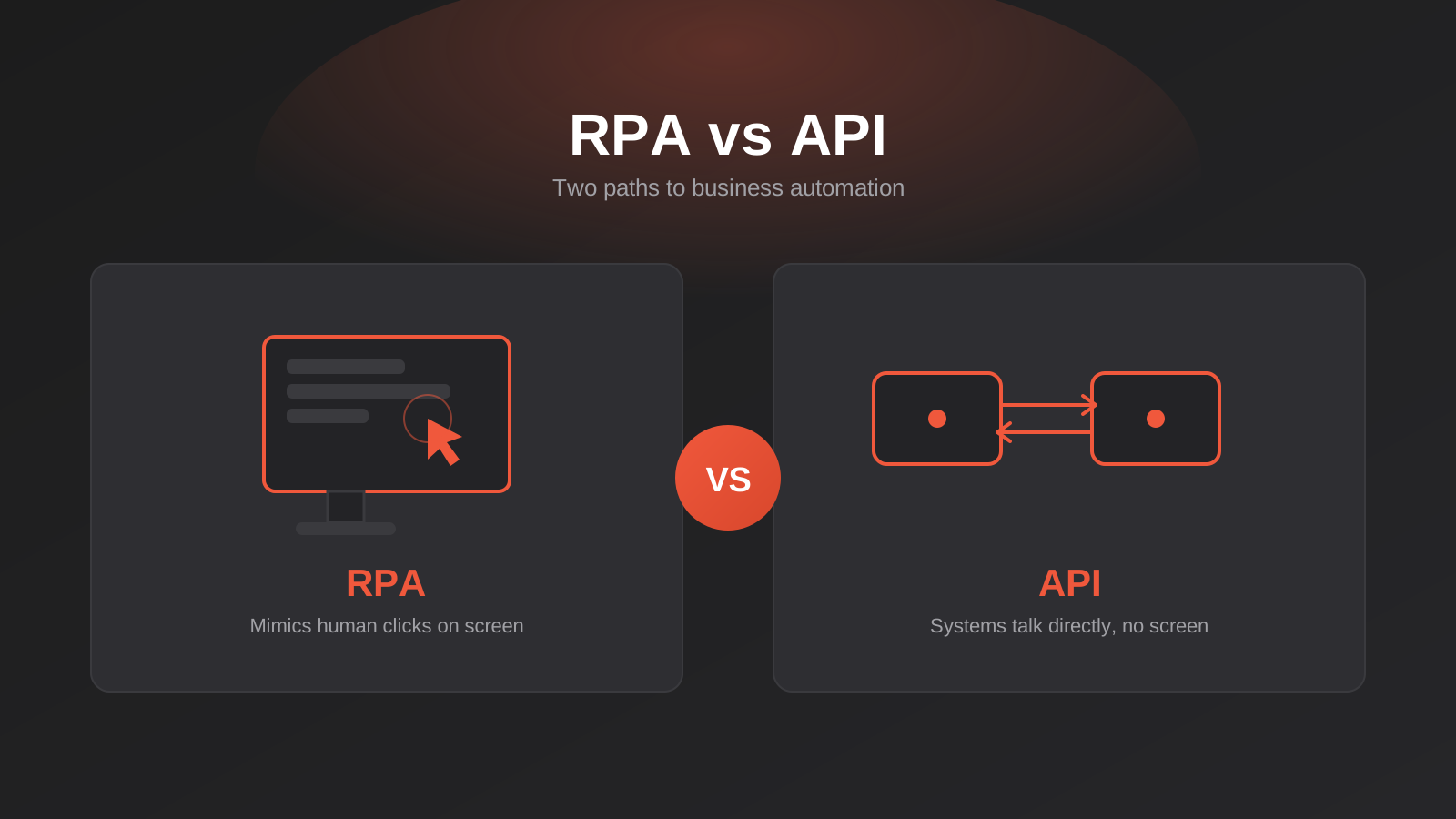
A trades business we spoke with recently had two automation quotes on the table for the same problem: getting supplier invoices out of a wholesaler’s ordering portal and into their accounting system without someone copying numbers by hand every Friday afternoon. One quote proposed a bot that would log into the portal, click through the same screens a staff member would, and download each invoice automatically. The other proposed wiring the accounting system directly to the wholesaler’s data feed via an API, no login screen involved. Both were called “automation.” Both would have solved the problem. They are not the same thing, they don’t cost the same, and they don’t fail in the same way six months later.
This mix-up is common, and it’s not really the client’s fault. Automation, RPA, integration, workflow — the terms get used interchangeably in sales conversations, and most business owners have no reason to know that “robotic process automation” and “API integration” describe two genuinely different pieces of engineering with different failure modes, different price tags and different maintenance obligations. Pick the wrong one for a given task and you either overpay for something that will break constantly, or underpay for something that quietly turns into a support headache six months in.
This guide breaks down RPA vs API integration properly: what each one actually is, when each is the right tool, why Australian businesses in particular still run into situations where RPA is the only realistic option, and how the two approaches usually end up working side by side rather than as a strict either/or. If you’ve been quoted for “automation” and aren’t sure what you’re actually buying, this should clear it up.
What RPA Actually Is (and Isn’t)
Robotic Process Automation is software that operates a computer the way a person would. It opens applications, clicks buttons, types into fields, reads text off the screen, and moves between windows — all without a human at the keyboard. There’s no “robot” in the physical sense; it’s a script sitting on a virtual machine or a desktop, driving the same interface a staff member uses.
That’s the whole idea, and it’s also the whole limitation. An RPA bot doesn’t talk to a system’s database or its backend logic. It sees what’s rendered on screen — buttons, fields, table rows — the same way a human does, using image recognition or the underlying UI element tree to find what to click. If a system doesn’t expose a proper way for other software to request its data, but it does have a screen a person can log into, RPA can still automate the job.
Attended vs Unattended Bots
RPA tools split bots into two categories, and the distinction matters for cost and planning. An attended bot runs on a staff member’s own machine, triggered by that person, usually to speed up a task they’re still involved in — pulling data into a form while they review it, for instance. An unattended bot runs on its own schedule on a dedicated machine or virtual server, with nobody watching, the way you’d expect a fully automated overnight job to run. Unattended bots are the ones that actually remove headcount from a process, and they’re priced accordingly — vendors like Microsoft and UiPath charge meaningfully more for an unattended “bot runner” than for attended, human-triggered automation.
Where RPA Genuinely Earns Its Keep
RPA is the right call when a task is repetitive, rules-based and lives inside a system that simply doesn’t offer an API, or where the API exists but doesn’t cover the specific screen you need. That’s a bigger slice of the Australian business landscape than the automation industry’s marketing suggests. Practice management software in law firms and allied health, some state government licensing and compliance portals, older point-of-sale and warehouse systems, and desktop editions of accounting software that predate cloud APIs are all still very much in use, and none of them were built assuming another program would need to talk to them programmatically.
What API Integration Actually Is
An API (application programming interface) is a defined, documented way for one piece of software to ask another for data or to trigger an action, without going anywhere near a screen. When your ecommerce platform pushes a new order straight into your accounting system the moment a customer pays, that’s an API call — structured data moving from one system to another in a format both sides agree on, with no clicking involved anywhere.
Because the exchange happens at the data layer rather than the visual layer, API integration tends to be faster, more reliable at volume, and less likely to fall over from a cosmetic change to a website. It’s also inherently more scalable: a well-built API integration can move thousands of records a minute, where an RPA bot clicking through a UI is bound by how fast that UI can render and respond.
iPaaS Platforms vs Custom-Built Integrations
Most businesses don’t hand-code API calls from scratch. Integration platform-as-a-service tools like Zapier, Make and n8n sit between systems and handle the API calls for you through pre-built connectors, which is why they’ve become the default entry point for API-based automation for small and mid-sized businesses. We’ve covered the differences between those three tools in detail in our Zapier vs Make vs n8n comparison — that piece is about choosing between iPaaS platforms once you already know you want API-based automation. This article is a level above that decision: figuring out whether API integration is even the right approach for the task in front of you, or whether it’s RPA territory.
For situations that outgrow what an iPaaS tool can handle — complex data transformation, high volume, several systems that all need to stay in sync in real time — a custom-built integration talking directly to each system’s API becomes the better long-term investment. We go through those integration patterns properly, including when iPaaS stops being enough, in our guide to API integrations for growing businesses.
Where API Integration Wins Outright
If both systems in the exchange have documented, stable APIs, there’s very little argument for RPA. API integration is more reliable, handles higher volumes without breaking a sweat, and doesn’t need a dedicated virtual machine sitting idle waiting to click things. Modern SaaS platforms — Xero, Shopify, HubSpot, most current CRMs — are built assuming other software will connect to them this way, and fighting that by automating their screens instead is usually a sign the automation was scoped by someone more familiar with RPA tooling than with the systems involved.
RPA vs API Integration: The Decision Factors That Actually Matter
Does an API Exist at All?
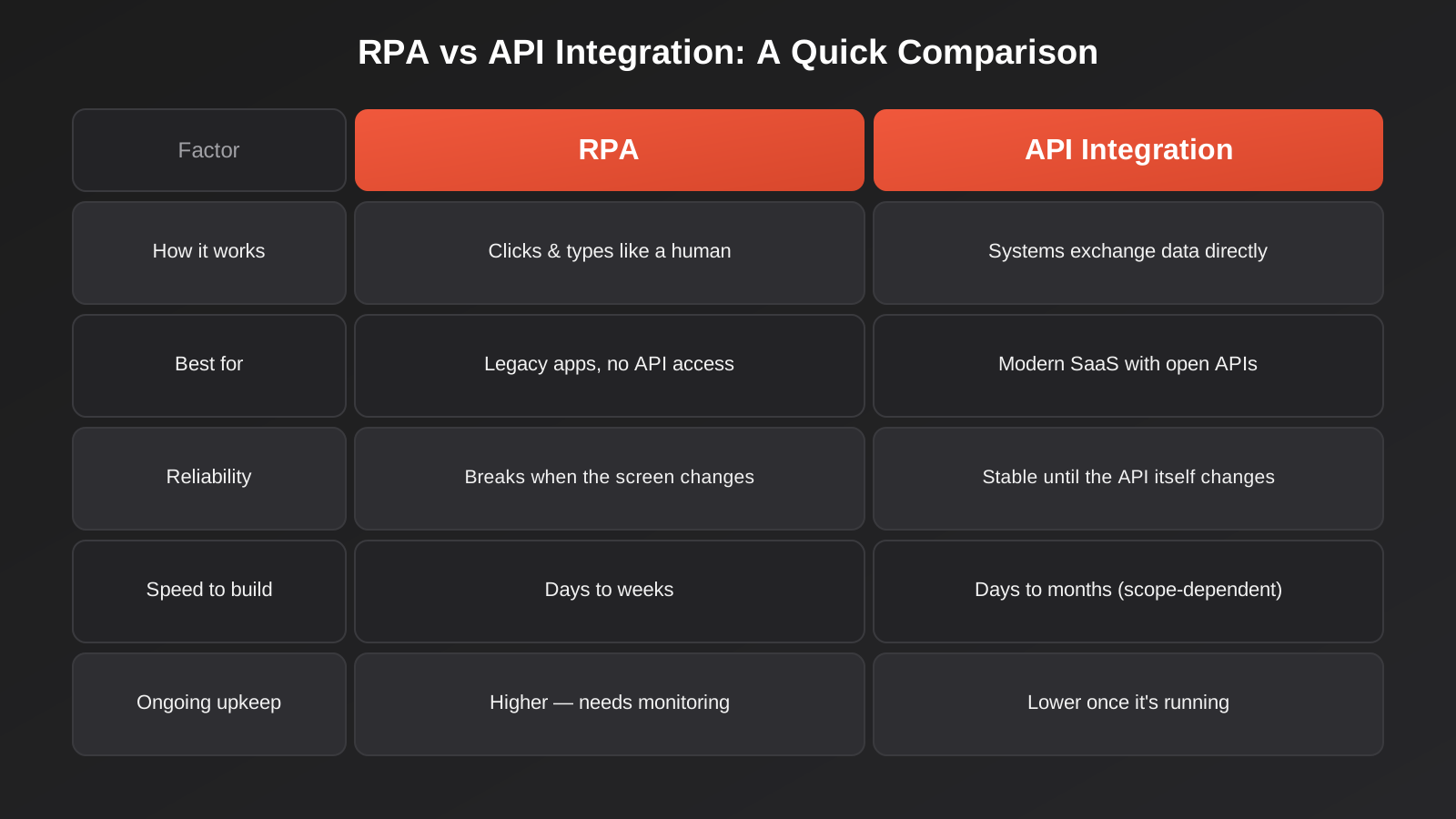
This is the first and most decisive question, and it’s asked far less often than it should be. Before scoping any automation project, check whether the system in question has a documented API and whether your plan or licence tier actually includes access to it — some platforms gate API access behind their higher-priced plans, which changes the maths considerably. If there’s no API, or the specific function you need isn’t exposed through it, RPA stops being a fallback option and becomes the only realistic path, short of asking the vendor to build the feature.
Reliability and What Breaks First
This is where the two approaches diverge most sharply in practice. An API integration keeps working until the API itself changes — a field gets renamed, an endpoint gets deprecated, authentication requirements shift — and reputable vendors version their APIs and give developers warning before that happens. An RPA bot, by contrast, is watching a visual layout that can change without any warning at all: a vendor redesigns their portal, moves a button three pixels to the left, adds a new pop-up dialog, and the bot that worked perfectly yesterday is now clicking the wrong thing or failing silently. This is the single biggest hidden cost of RPA that gets underestimated in initial quotes.
Speed to Build and Total Cost
A narrowly scoped RPA bot for one specific screen sequence can often be built faster than a full API integration, particularly if the API in question is poorly documented or requires back-and-forth with the vendor to get credentials sorted. But that upfront speed advantage tends to invert over time. API integrations cost more to build properly but settle into a low-maintenance state once they’re live. RPA bots are usually quicker and cheaper to stand up, then accumulate maintenance cost every time the target screen changes — which is a matter of when, not if, for anything running against a commercial SaaS product’s front end.
Data Volume and Speed of Execution
RPA bots are throttled by how fast a user interface can load, render and respond — you can’t meaningfully speed up a bot beyond how fast the screens it’s clicking through will actually load. That’s fine for a task that runs a few dozen times a day. It becomes a real constraint for anything processing hundreds or thousands of records, where an API call moving structured data directly will outperform UI automation by an order of magnitude.
Security, Credentials and Audit Trail
An RPA bot generally needs to log in as if it were a person, which means storing a username and password (or session token) somewhere the bot can access it, and that credential typically has the same access level as a full human user — often more than the bot actually needs. API integrations, done properly, use scoped API keys or OAuth tokens that can be limited to exactly the permissions required and revoked independently without resetting anyone’s login. If the task involves financial data or personal information, that difference in the size of the attack surface is worth taking seriously, not treating as a footnote.
Where Legacy Systems Force the Decision in Australia
The automation industry’s content is heavily skewed toward businesses running entirely modern, API-friendly stacks, which makes RPA sound like a technology people only use if they haven’t modernised yet. In practice, a meaningful share of Australian small and mid-sized businesses run at least one system that simply has no API to speak of, and it’s rarely by choice — it’s because switching that system carries its own cost and disruption that hasn’t been worth it yet.
Common Scenarios We See
- Trade and wholesale supplier portals that only offer a web login for placing orders and downloading invoices, with no data feed on offer.
- Older desktop accounting packages, or MYOB and Xero configurations still tied to legacy add-ons that predate their current API layer.
- State and territory government portals for licensing, compliance filings or rates and permits, which are built for human data entry, not machine access.
- Practice management systems in legal, allied health and some medical software categories, where vendors have historically prioritised compliance and record-keeping features over exposing an integration layer.
- Bank portals for businesses not yet using open banking-compliant data feeds, where statement or transaction data still has to be pulled manually or downloaded as a file.
None of these are edge cases. They’re the ordinary operating reality for a large number of businesses that are otherwise perfectly capable candidates for automation everywhere else in their stack. The mistake is assuming that because RPA sounds like the “old” technology, it must always be the wrong choice — when for these specific systems, it’s frequently the only one on the table.
A Concrete Example: Compliance Filings
A manufacturing or transport business submitting regular compliance data to a state regulator is a good illustration of why this isn’t just a theoretical distinction. Many of these portals were built years ago for a person to sit down, log in and fill in a form once a month or once a quarter. There’s often no public API, no partner program, and no realistic prospect of one appearing soon — government IT roadmaps move on their own timeline, not yours. For a business filing the same categories of data repeatedly, an RPA bot that logs in, populates the known fields from an internal spreadsheet or system, and submits the form is often the only way to remove that manual step at all. Waiting for an API that may never arrive isn’t a strategy; it’s just unautomated busywork with an excuse attached.
Most Real Deployments Use Both
Very few automation projects, once you look past the pitch deck, are purely RPA or purely API-based. A single end-to-end process usually has some steps that touch a system with no API and other steps that touch systems with excellent ones, and the sensible approach uses the right tool for each step rather than forcing the whole workflow through one technology because that’s what the vendor sells.
Take a supplier invoice process, which is one of the most common places we see this play out for wholesale, trade and retail businesses. The supplier’s ordering portal has no API, so an RPA bot logs in on a schedule and downloads any new invoices as PDFs. From there, the process shifts entirely to API-based automation: an OCR and data-extraction step reads the invoice fields, and the extracted data is pushed via API straight into Xero or MYOB for matching and approval, with a notification firing automatically once it’s ready for a manager to sign off. We go into the accounting side of this in more detail in our guide to accounts payable automation, which focuses on what happens once invoice data actually reaches your accounting system — matching, approval routing and payment scheduling.
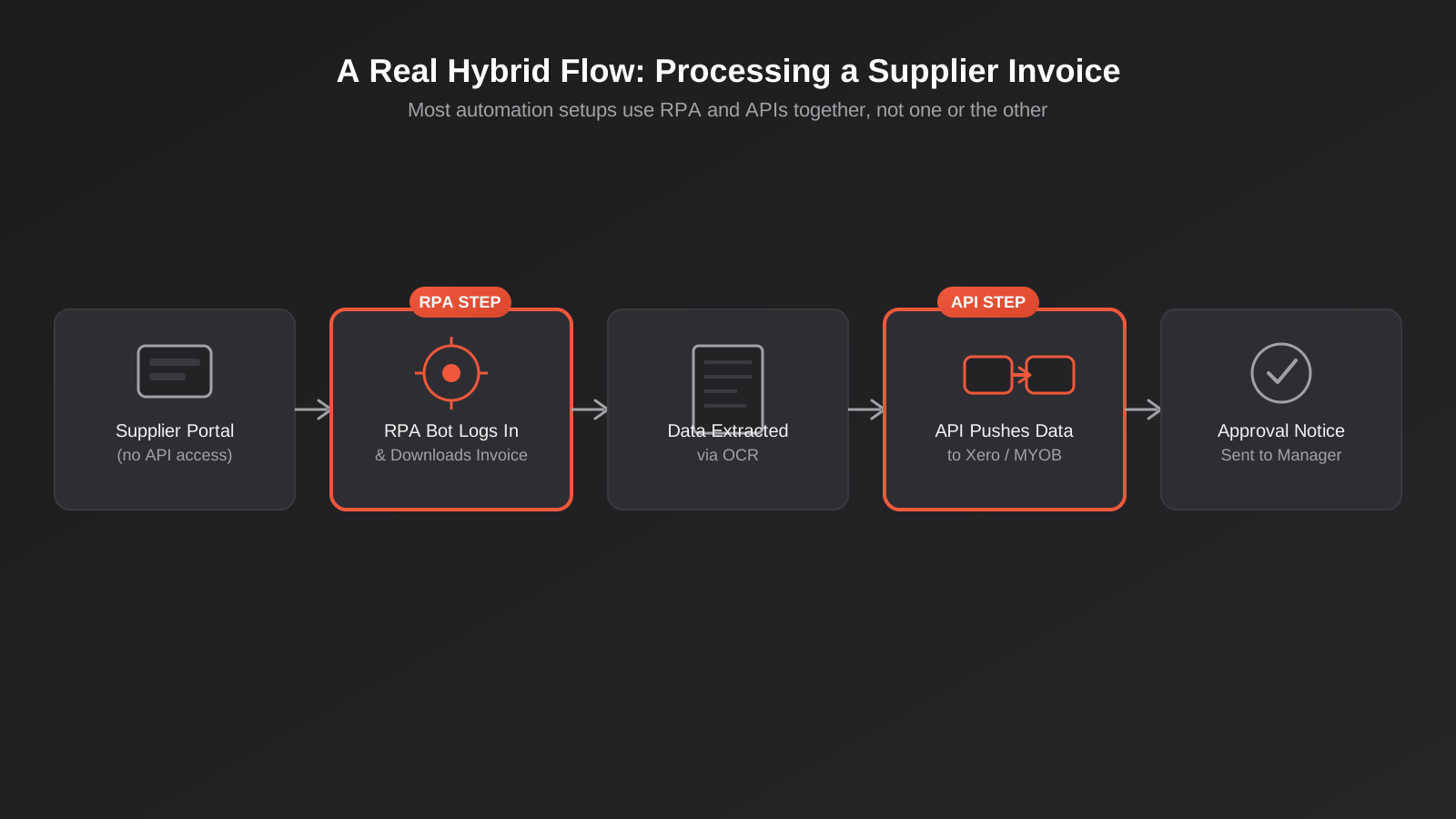
This is also, in our experience, the pattern that survives contact with reality best. Treating an entire workflow as an RPA project when only one step actually needs it means paying RPA’s higher maintenance cost across steps that didn’t need it. Treating an entire workflow as an integration project when one system genuinely has no API means the project stalls until someone accepts that a bot has to click through that one portal. Scoping step by step, rather than technology-first, avoids both traps. It’s the same logic we apply when scoping any workflow automation engagement — map the process first, then match the tool to each step rather than the other way around.
How to Audit Your Process Before You Choose a Technology
Most of the mismatched-quote problems we see trace back to skipping this step entirely. Before anyone talks about tools, vendors or pricing, the process itself needs to be mapped in enough detail to see where the API gaps actually are.
Map Every System the Process Touches
Write out the process as a literal sequence: what happens first, what system that lives in, what happens next, what system that lives in. Don’t skip steps that feel too small to mention — the “someone checks an email and manually forwards the attachment” step is exactly the kind of thing that gets left off a process map and then discovered halfway through a build.
Check What Each System Actually Exposes
For every system on that list, find out whether it has a documented API, and whether your current plan or licence actually includes access to it. This is a five-minute check per system — a search of the vendor’s developer documentation, or a direct question to their support team — and it will tell you immediately which steps are realistic API candidates and which ones are RPA territory by default.
Estimate Volume and Frequency
A task that runs five times a week can tolerate a slower, screen-based approach without anyone noticing. A task that needs to run continuously against hundreds of records will expose RPA’s speed ceiling quickly, and that alone can tip a marginal call toward finding an API-based workaround even for an awkward system — sometimes via a smaller third-party connector or middleware product that already solved that specific integration problem, rather than screen automation.
Decide Step by Step, Not Workflow-Wide
Once you know which systems have APIs and which don’t, assign the technology per step, not per project. This is the single biggest mindset shift that prevents the all-RPA or all-API mismatches described earlier, and it’s what separates a process map from a genuine automation architecture.
What This Actually Costs in Australia
Pricing varies a lot by vendor and scope, but the shape of the cost is fairly consistent. On the RPA side, Microsoft’s Power Automate is the most accessible entry point for Australian small businesses, largely because many already hold Microsoft 365 licensing that includes basic flow-level automation; premium connectors and attended desktop automation sit in the range of roughly $20–25 AUD per user per month, while unattended, fully autonomous bots — the kind that genuinely remove manual work rather than just speeding up a person’s task — are priced per bot per month and cost substantially more, often several hundred dollars per bot. Enterprise-grade RPA platforms like UiPath sit at the top of the market, with unattended bot licensing commonly landing in the AUD $9,000–15,000-per-year range once you include the control room and supporting infrastructure, which is why UiPath tends to show up in larger organisations rather than SMBs.
API integration costs scale with complexity rather than per-seat or per-bot licensing. A straightforward integration built on an iPaaS platform can be relatively inexpensive to set up and run, particularly for well-documented, popular connectors. A custom-built integration between systems with more involved data models, or one that needs to handle high volume reliably with proper error handling and retry logic, is a bigger upfront build cost but tends not to carry an ongoing per-bot licence fee the way RPA does — the ongoing cost is mostly about monitoring and occasional maintenance when an API version changes, not a recurring seat cost per automation.
The practical takeaway: don’t compare a Zapier subscription to a UiPath quote and conclude API integration is always cheaper. Compare like for like — what it actually costs to automate this specific task, this specific way, including what it’ll cost to keep working in twelve months.
Treat RPA as a Bridge, Not a Foundation
One thing worth planning for from the outset: the system an RPA bot is automating today probably won’t be the system your business runs in three or five years. Businesses eventually replace the legacy accounting package, migrate off the ageing practice management system, or move to a platform that finally offers a proper API — often as part of a broader platform migration project. When that happens, the RPA bot built around the old screen layout becomes redundant overnight, which is a good outcome, not a wasted investment, provided it was scoped and documented as an interim measure rather than treated as permanent infrastructure.
This is worth raising directly with whoever builds your automation: ask them to document which parts of the solution are RPA-based specifically because no API existed at build time, so that if and when the underlying system changes or gains proper API access, replacing that piece with a cleaner integration is a planned upgrade rather than a discovery made by accident. For businesses running older ERP or accounting systems that are likely candidates for replacement down the track, it’s worth looking at what a proper ERP integration would involve now, even if you’re not ready to commit to it, so the RPA bridge has a clear endpoint rather than becoming permanent by default.
Common Mistakes We See Businesses Make
- Defaulting to whichever technology the vendor in the room sells. An RPA vendor will scope your problem as an RPA project, and an integration specialist will scope it as an API project, regardless of which one actually fits better. Get the task mapped out before you get a technology recommendation.
- Building an RPA bot for a system that already has a perfectly good API. This happens more than you’d think, usually because nobody checked the API documentation before starting the build, or because the API exists but requires a paid plan tier the business hadn’t budgeted for.
- Not budgeting for RPA maintenance from day one. A bot that isn’t monitored will eventually fail silently after a UI change, and the business often doesn’t notice until data has been missing for days or weeks. Maintenance needs to be quoted and planned for up front, not treated as a surprise support call later.
- Storing full user credentials for an RPA bot with no access controls. A bot account should have the minimum access it needs to do its specific job, ideally its own dedicated login rather than a shared or personal one, with credentials stored in a proper secrets manager rather than a spreadsheet or a script.
- Over-engineering a one-off task with a custom API build. Not every integration needs bespoke development. If an iPaaS connector already exists and the volume is modest, a custom build is often solving a problem that doesn’t exist yet.
- No plan for what happens when the developer or partner moves on. Whichever approach you use, make sure you actually own the automation — the workflow definitions, the credentials, the documentation — and could hand it to someone else if you needed to, rather than it living entirely in one person’s head or one partner’s private tooling.
Frequently Asked Questions
Is RPA the same thing as AI?
No, though the two are increasingly bundled together in vendor marketing. Traditional RPA follows fixed, rules-based scripts — click here, type this, read that field — with no judgement involved. Newer “intelligent automation” platforms combine RPA with AI models to handle unstructured inputs, such as reading a scanned invoice with varying layouts, but the underlying screen-driving mechanism is still classic RPA. Genuine AI decision-making — where a system judges and acts rather than simply following a fixed script — is a different question again, and one we’ve covered separately in our comparison of AI agents and rules-based automation.
Can RPA and tools like Zapier, Make or n8n work together?
Yes, and in practice this is exactly how most hybrid workflows are built. Zapier, Make and n8n handle the API-based steps between systems that connect cleanly, while a separate RPA tool (or, for simpler cases, a browser automation script) handles the one step involving a system with no API. Some iPaaS platforms can trigger an RPA bot as one step in a larger flow, which keeps the whole process visible in one place even though two different technologies are doing the work.
How long does it take to build an RPA bot?
For a single, well-defined screen sequence — log in, navigate to a specific page, extract or enter data, log out — a bot can often be built and tested within one to two weeks. Timelines stretch when the target system has inconsistent layouts, multiple pop-ups or conditional screens, or when the process needs to handle a wide range of exceptions rather than a single predictable path.
What happens when the system an RPA bot is using changes its layout?
The bot typically fails at the step where the layout changed, either erroring out or, in worse cases, clicking the wrong element without immediately failing. This is why monitoring and alerting matter as much as the initial build — you want to know within hours that a bot has stopped working correctly, not discover it weeks later when someone notices missing data. Well-run RPA deployments include scheduled checks specifically to catch this early.
Do Australian Privacy Act rules affect RPA bots handling personal information?
If a bot is moving personal information — customer names, contact details, health or financial data — the same Australian Privacy Principles that apply to any system handling that data apply here too, including where the data is stored, who can access the bot’s logs, and how long extracted data is retained. This is worth raising explicitly with whoever builds the automation, since RPA tools often log screenshots or session recordings by default for debugging, which can itself become a store of sensitive information if it isn’t managed properly.
Should a small business start with RPA or API integration?
Start by mapping the actual process end to end and checking, system by system, which ones have an API you can use. For most small businesses, the bulk of the process will run on modern systems with good APIs, and an iPaaS tool will cover that comfortably. RPA should be reserved specifically for the steps where no API exists, rather than adopted as a general-purpose automation strategy from the outset.
Where to Start
The fastest way to get this right is to map the process before choosing a technology: list every system the task touches, check what each one actually exposes to other software, and only then decide which parts need RPA, which parts are a clean API job, and which parts might not need automating at all. Get that sequence backwards — picking the tool before understanding the systems — and you end up with the mismatched quote problem we opened with.
If you’re weighing up an automation project and aren’t sure which category it falls into, or you’ve already got a quote that doesn’t feel like it matches the task, we’re happy to have a straightforward conversation about it. No pressure to sign anything — sometimes the most useful outcome of that chat is confirming you don’t need what you were about to buy.
Keep reading
Related posts

Changing Live Automations Safely: Staging, Version Control and Rollback for Zapier, Make and n8n (2026)
How to draft, test, release and roll back changes to live Zapier, Make and n8n automations without breaking invoices, orders or customer…

Peppol E-Invoicing for Australian Businesses: Automating Accounts Payable From Structured Invoices (2026)
Peppol e-invoicing in Australia: what is and isn't mandatory, how to pick an access point, and how to automate accounts payable once…

Clean Your Data Before You Automate: A Practical Guide to CRM Data Cleanup for Australian Businesses (2026)
Connecting systems on messy data copies the mess everywhere. Here's how to clean, match and merge records before you automate or integrate.
Got a project you'd like to talk through?
Tell us what you're working on — we'll come back with a plan.
