
Best CRM for Australian Small Business (2026): 6 Compared
 Jignesh Vagadiya
10/11/2026
21 min read
Most small businesses don’t choose a CRM. They inherit one. Someone set up a spreadsheet in 2021, someone else bolted on a free tool, and by the time a third person asks “where did that quote go?” there are three half-used systems and no single record of any customer. Picking a proper CRM at that point feels like admin. It’s actually the decision that determines whether follow-ups happen at all.
This round-up covers six CRMs we think are worth a serious look for an Australian business with somewhere between one and about thirty people: HubSpot, Zoho CRM, Pipedrive, Capsule, Salesforce Starter Suite and monday CRM. We left out the enterprise end deliberately, and we left out industry-specific systems (trade job management, real estate, clinic software) because they’re a different buying decision. Our selection criteria were practical. Does it work for a team that has no dedicated admin? Can it connect to Xero or MYOB and a website form without a developer? Is Australian data hosting available? And does the price stay sensible once you add the fourth, fifth and sixth user, which is where most “cheap” tools stop being cheap?
A note on prices before we start. Vendors change plan names and numbers often, quote in US dollars on their global pages, and discount heavily for annual billing. We’ve given rounded figures from published list prices and flagged where sources disagreed, but treat every number here as a guide and check the vendor’s own Australian pricing page before you commit. GST is extra on most of these. Every tool below gets a real drawback, because a list where everything is great is just advertising.
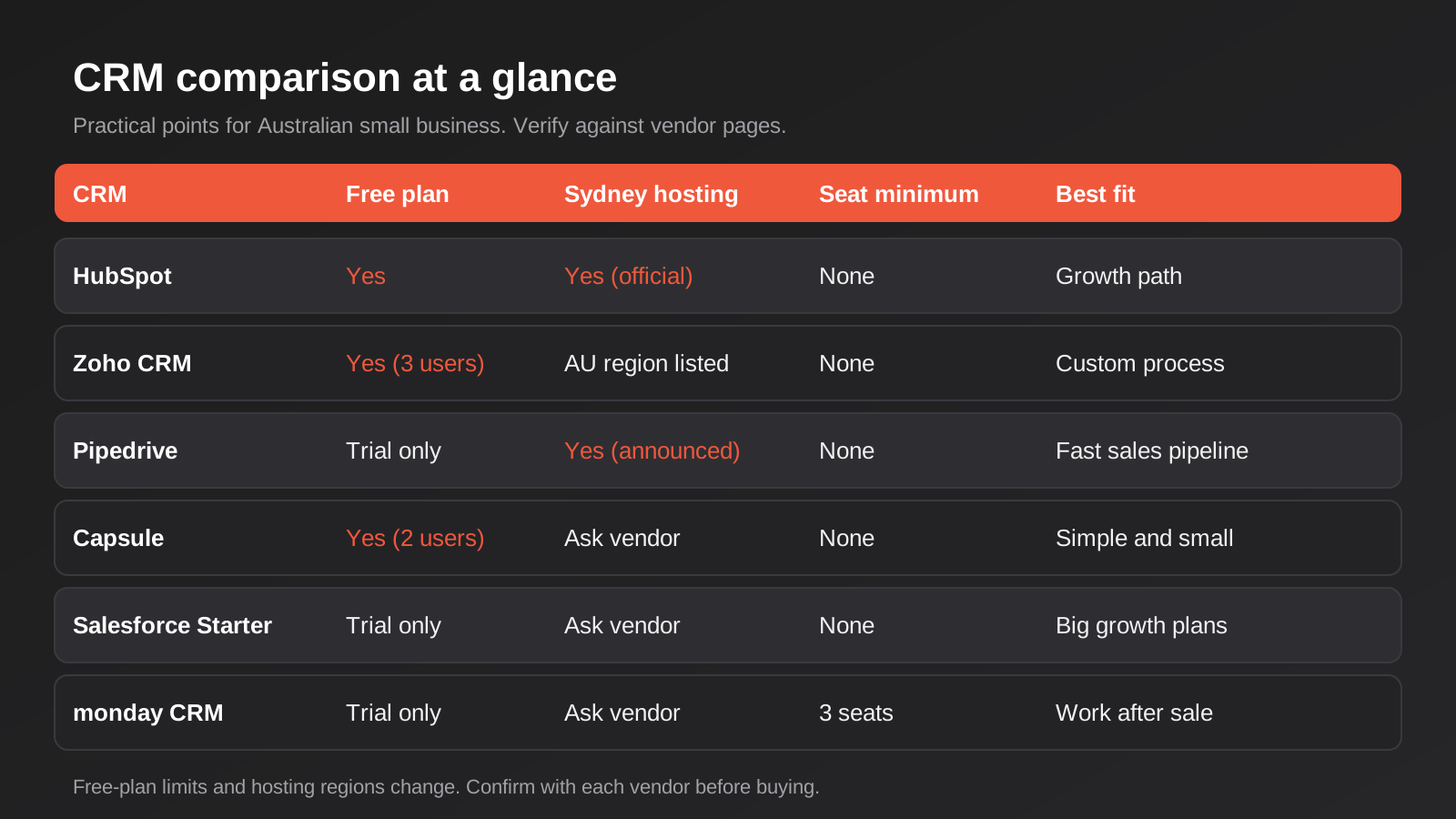
What We Actually Look at When Comparing CRMs
Feature lists are nearly useless for this category, because every product on this page can store contacts, track deals and send an email. The differences show up in four less glamorous places.
- Time to a working pipeline. How long until a non-technical owner has deals moving across a board and reminders firing? Some tools get you there in an afternoon. Others need a consultant first.
- What happens at user number six. Pricing that looks gentle for two people can jump sharply when you need a proper sales tier with automation, reporting and permissions.
- Australian fit. GST on invoices and subscriptions, local data hosting, support hours that overlap with your day, and integrations with the accounting software Australian businesses actually use.
- The exit. How painful is it to export your data and leave? Nobody plans to switch, but most businesses do within five years.
If you’re also weighing accounting software at the same time, our comparison of accounting software for Australian small businesses is worth reading alongside this, because the CRM-to-accounting connection is where a lot of the day-to-day value sits.
1. HubSpot CRM
What it is
HubSpot is the one most Australian owners have heard of, mostly because the free CRM at the bottom of its range is genuinely usable. Contacts, companies, deals, a task list, email logging and basic forms are all included without paying. Paid plans are sold as “Starter”, “Professional” and “Enterprise” tiers across separate sales, marketing and service products, which is where it gets confusing.
What it does well
The free tier is the best starting point of the group. You can run a small pipeline, log emails from Gmail or Outlook and capture website form submissions properly for no outlay, and you can find out whether your team will actually use a CRM before spending anything.
The ecosystem is the other strength. The integration marketplace is large, the documentation is thorough, and most agencies and freelancers know the platform, so help is easy to find. HubSpot also opened an Australian data centre in Sydney in early 2024, which matters if a client contract or your own policy requires onshore hosting.
Where it falls short
The price curve is steep. The step from free or Starter to a Professional-level sales tier is large, and the features people expect to be standard (sequences, proper automation, custom reporting) tend to live there. Professional tiers have also carried a one-off onboarding fee on top of the subscription.
It also tries to be a marketing platform, a service desk and a CMS, so the interface carries more than a five-person sales team needs. Plenty of teams end up paying for a bundle and using a fraction of it.
What it costs
Published US list prices put Starter seats at roughly US$15 to US$20 per user per month, with Professional sales seats around US$90 to US$100 per user per month plus a one-off onboarding fee reported at around US$1,500. At recent exchange rates that’s very roughly A$30 per Starter seat and A$140 to A$155 per Professional seat, before GST. Several sources disagreed on the exact numbers and HubSpot adjusts promotions regularly, so confirm on the Australian pricing page.
Who it suits
Businesses that want to start free, expect to grow into marketing automation, and have someone who’ll own the system. Less ideal if you know you’ll need Professional-tier features for a team of eight from day one, because the cost lands quickly.
2. Zoho CRM
What it is
Zoho CRM is the value pick. It’s part of a very large suite (books, inventory, desk, campaigns, a forms tool) and the CRM itself is one of the most configurable products at its price. It has a free plan for a very small team and four paid tiers above that.
What it does well
Configurability for the money is the headline. Custom modules, custom fields, approval flows, blueprints that force a deal through defined stages and a built-in workflow engine are available at prices where competitors give you a pipeline board and little else. If your sales process has odd steps (a site inspection, a quote revision, a compliance check), Zoho can model it without code.
Zoho also lists an Australian data centre among its regions, and the company has a local presence, so hosting and support are less of a concern than they used to be. If you already use other Zoho apps, the CRM integrates with them cleanly.
Where it falls short
The flexibility has a cost: the interface is busier and the setup takes longer. Left at defaults, Zoho feels clunky next to Pipedrive, and teams that don’t configure it properly end up with fields nobody fills in. The add-ons (extra storage, additional modules, some AI features) can also nudge the real bill up beyond the headline price.
Third-party integrations are broad but sometimes thinner than the same connection in HubSpot, so check the specific connector you need before assuming it works the way the marketing page implies.
What it costs
Aggregator listings for Australia put the Standard tier at roughly A$20 per user per month and Professional at roughly A$35 on monthly billing, with annual billing cheaper and the free plan limited to around three users. Those figures came from comparison sites rather than Zoho itself and a couple of sources disagreed, so check zoho.com/au before budgeting.
Who it suits
Teams with a process that doesn’t fit a standard pipeline, businesses already in the Zoho ecosystem, and owners happy to invest a few days configuring it. Not ideal if nobody wants to own the setup.
3. Pipedrive
What it is
Pipedrive is built around one idea: a visual pipeline where you drag deals from stage to stage. It’s a sales tool first and a general contact database a distant second, and it’s better for being narrow. It has no free plan, but it has a free trial.
What it does well
It’s the fastest of the six to get working. A salesperson can understand the board in about ten minutes, and the activity-based approach (every deal should always have a next scheduled action) quietly fixes the most common sales problem in small businesses, which is deals that go cold because nobody wrote down the next step.
Pipedrive announced a Sydney data centre in 2026, with Australian customer data hosted within the AWS Sydney region. Combined with a clean mobile app and a large library of integrations, it’s a very low-friction option for a field-sales or enquiry-driven team.
Where it falls short
It’s weak outside the pipeline. Marketing features are an add-on, customer service is not really its job, and anything resembling a custom data model (projects, assets, multi-step fulfilment) is awkward. Reporting on the lower tiers is basic.
Plan names and limits were reshuffled in 2025, and some features you might assume are standard (advanced automation, higher email limits) sit on the upper tiers, so read the plan comparison carefully.
What it costs
Sources conflict. One Australian aggregator that checked in March 2026 lists the entry plan at around A$24 per user per month, the mid tier around A$49 and the top-of-range paid plan around A$79, excluding GST. Several US-based sources quote lower figures on annual billing. Treat the Australian pricing page, set to AUD, as the only reliable number.
Who it suits
Service businesses, agencies and any team where the main job is moving enquiries to signed work. A poor fit if you want one tool to cover sales, support and marketing.
4. Capsule CRM
What it is
Capsule is a small, calm, contact-focused CRM from a UK company. It does less than the others on purpose. There’s a free plan for up to two users and a few hundred contacts, then straightforward paid tiers.
What it does well
It’s easy to understand, and that’s a real advantage when the people using it are not CRM people. Contacts, organisations, a pipeline called “opportunities”, tasks, and tracks (a repeatable sequence of tasks you attach to a deal) cover the core of a small business without the clutter. It integrates with Xero, which is the connection many Australian users want most.
The pricing structure is also refreshingly predictable. There’s no sales-tier cliff and no onboarding fee.
Where it falls short
Reporting and automation are shallow compared with Zoho, HubSpot or Pipedrive’s upper tiers, and mass email is handled through an add-on rather than built in. We couldn’t verify Australian data hosting from the sources we checked, so ask Capsule directly if residency matters to you.
It will also run out of road. A team that grows past about fifteen people with several pipelines and approval needs will outgrow it.
What it costs
Recent published pricing sits around US$18 to US$72 per user per month on annual billing across four paid tiers, with monthly billing costing more. One source reported a mid-2026 price cut at the top tier, so the upper figures in particular are unsettled. The free plan is limited to two users and 250 contacts.
Who it suits
Sole traders, small consultancies and trades businesses that want a tidy contact record and a simple pipeline. Poor value if you need heavy automation or detailed reporting.
5. Salesforce Starter Suite
What it is
Salesforce needs little introduction, but the entry product matters here: Starter Suite is a cut-down package aimed at small teams, with sales, service and some marketing in one place. It exists so smaller businesses can start inside Salesforce and upgrade later.
What it does well
The upgrade path is the point. If you expect to grow into a multi-team business with serious reporting, complex permissions and a long list of integrations, starting inside the Salesforce ecosystem avoids a migration later. The AppExchange marketplace has a connector for almost anything, and the pool of Australian consultants who know the platform is large.
The guided setup in Starter Suite is also much friendlier than classic Salesforce used to be.
Where it falls short
It’s more platform than most small businesses need, and the real costs tend to sit outside the licence: configuration, training and the temptation to bolt on extras. Plans have limits on customisation compared with the full Sales Cloud, and the jump to Pro Suite or full Sales Cloud is large.
We could not confirm Australian data residency for this specific product from the sources we reviewed, so ask your account rep for it in writing if it matters.
What it costs
Most sources list Starter Suite at about US$25 per user per month, with Pro Suite around US$100 per user per month on an annual contract. One guide lists an Australian price near A$35 per user, which doesn’t match a straight conversion, so check Salesforce’s Australian page.
Who it suits
Businesses that expect significant growth, already have a Salesforce-literate person, or sell to enterprise customers who expect a Salesforce-style process. A heavy choice for a five-person team that mostly needs a contact list.
6. monday CRM
What it is
monday CRM is built on monday.com’s work management platform. It looks and behaves like a very flexible spreadsheet-board hybrid, which is great if your team already lives in monday and awkward if you’ve never used it.
What it does well
Flexibility and visual clarity. Pipelines, tasks and customer records sit on the same boards as projects, so a business that does delivery work after the sale (builders, agencies, event companies) can follow a customer from enquiry to completed job without switching tools. The automations recipe builder is easy to use, and the interface is friendly to non-technical staff.
Where it falls short
There’s a three-seat minimum on paid plans, which sounds trivial until you’re a two-person business. Seat bundles can also step up in blocks rather than one at a time, so a six-person team can end up billed for more than six. It’s a work-management tool wearing a CRM hat, so deep sales features (forecasting, territory rules, proper email sequences) are less mature than in Pipedrive or HubSpot.
As with Capsule and Salesforce, check data residency directly with the vendor.
What it costs
Published per-seat prices cluster around US$12 for the entry tier, US$17 for the middle and US$28 for the upper tier on annual billing, with monthly billing costing noticeably more and a higher tier priced by quote. With the three-seat minimum, the cheapest paid starting point is a few hundred US dollars a year.
Who it suits
Teams that run projects after the sale, or that already use monday for delivery. A weaker choice if the main job is cold outbound sales.
Quick Comparison: Which CRM for Which Situation
If you want the short version, this is how we’d sort them. These are tendencies, not rules, and your own process matters more than any table.
- Cheapest way to start properly: HubSpot free, or Capsule’s free plan for one or two people.
- Best value once you’re paying: Zoho CRM, if someone will configure it.
- Fastest to adopt: Pipedrive.
- Simplest for non-technical users: Capsule.
- Best if you plan to be much bigger: Salesforce Starter Suite.
- Best if projects follow the sale: monday CRM.
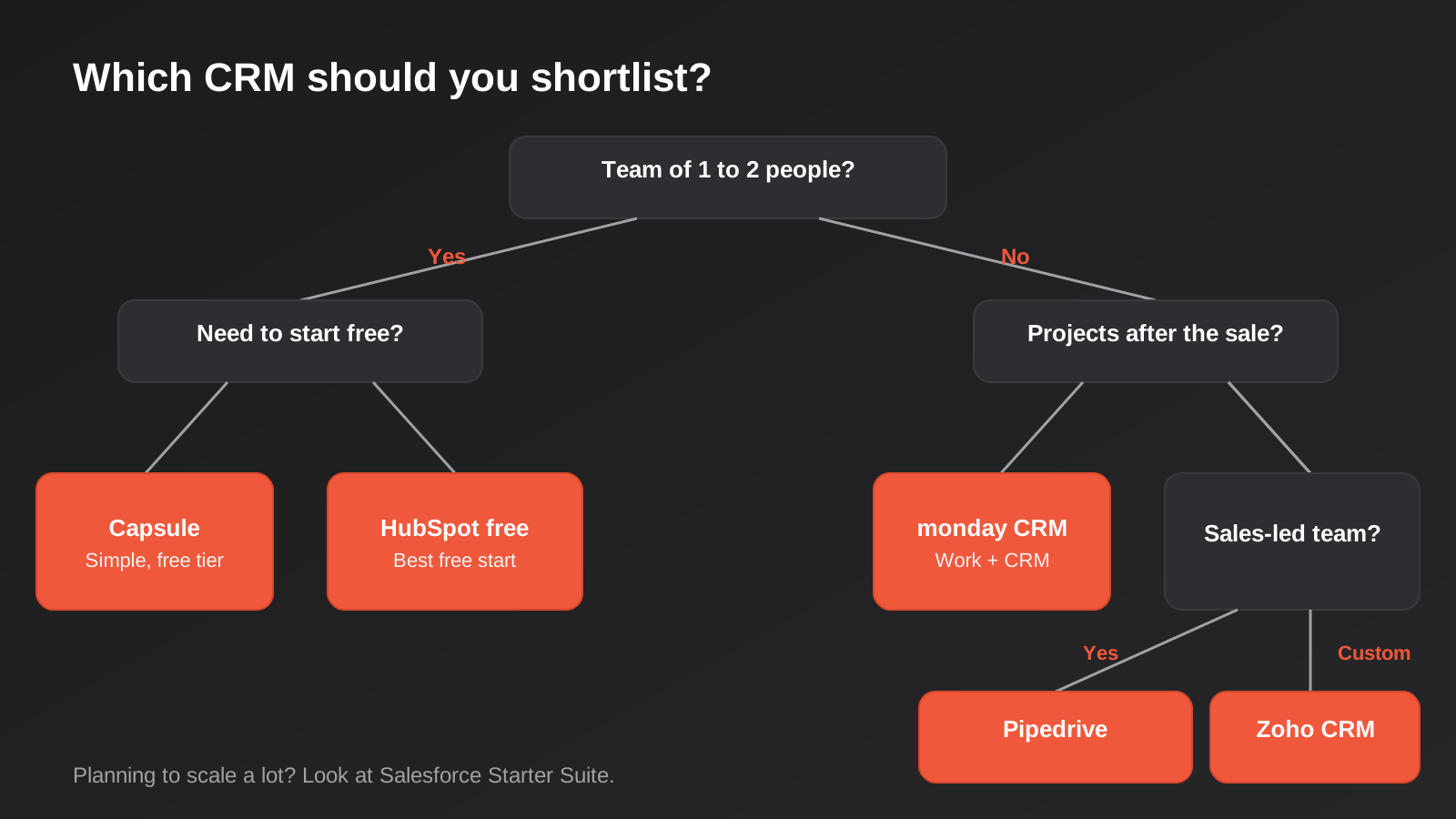
How to Choose the Right CRM for Your Business
Skip the feature comparison and answer five questions first. They narrow six options to two quickly.
How many people will use it in the next 18 months?
One or two users points to a free plan. Three to ten points to Pipedrive, Zoho or a lower HubSpot tier. Beyond that, plan the pricing at the tier you will actually need, not the tier on the home page.
What happens to a customer after they say yes?
If the sale ends the relationship until renewal, a pure sales CRM is fine. If delivery is a project with its own stages, you want something closer to monday, or a CRM that connects to your job or project software.
Who owns the data and where does it live?
If you handle health, legal or financial information, or sell to government and large corporates, onshore hosting can be a contract requirement. HubSpot and Pipedrive both publicise Sydney hosting; for the others, ask in writing. Either way, work out your retention and deletion process early, because you will need to delete customer data on request. We’ve covered how that works across tools in our guide to automating data retention under APP 11.
What does it have to connect to?
List the three systems the CRM must talk to: usually accounting, your website forms and email or SMS. Check each connection exists for the specific CRM and what it syncs. “Integrates with Xero” can mean a full two-way sync or a one-way invoice push, and the difference matters. For the longer version, see our CRM integration guide for Australian businesses.
Who is going to run it?
This is the question people skip. A CRM with no owner decays within months. Name one person who is responsible for fields, pipelines and clean-up, even if it’s five hours a month. If nobody will, choose the simpler tool.
What a CRM Costs Beyond the Licence
The monthly subscription is the number everyone compares, and it’s rarely the number that hurts. Over the first year, most small businesses spend more on getting the CRM set up and keeping it clean than on the licence itself. That isn’t a reason to avoid a CRM. It’s a reason to budget for the real work.
Setup and data migration
Someone has to design the pipeline, create the custom fields, import the existing contacts and tidy the duplicates. For a very small team on a simple tool, that’s a few hours. For a business with years of messy spreadsheets and a process with real exceptions, it’s days, whether it’s your time or someone else’s.
Integrations
The connection to accounting, your website and your email platform is where cost varies most. A marketplace app is cheap and quick but limited. An automation platform gives you more control for a modest monthly fee. A custom integration costs the most and is only worth it when the off-the-shelf options can’t do what your process needs, for example two-way sync of customer records with an ERP. Tell any provider exactly which fields need to sync and in which direction, because that detail drives the quote.
Training and adoption
A CRM nobody uses is the most expensive kind. Budget an hour or two of structured training per person and a short review a month in, once people have hit the real problems. It’s the cheapest insurance in the whole project.
Add-ons and upgrades
Extra storage, email sending limits, additional modules, phone integrations and AI features often sit outside the base plan. Ask for the all-in price for the setup you actually intend to run, and ask what changes at renewal. Several vendors discount heavily in the first year.
When we scope integration work for clients, the same pattern shows up: the licence is predictable, and the surprises come from unclear field mapping and unclean data. A clear brief fixes most of it.
Common Mistakes When Choosing a CRM
- Buying for the feature you’ll use in year three. Most small teams need contacts, a pipeline and reminders. Pay for the rest when you actually need it.
- Pricing it at the entry tier. The advertised “from” price is almost never the plan that includes automation, reporting and permissions. Price the plan you’ll genuinely use.
- Ignoring seat minimums and bundles. Some vendors sell seats in blocks or require a minimum, which makes a small team’s effective price higher than the maths suggests.
- Importing a messy spreadsheet as-is. Duplicates, half-filled fields and three spellings of the same company will follow you into the new system. Clean the data first, even roughly.
- Skipping the pipeline design. Agree stage names and what moves a deal from one to the next before you build. Otherwise everyone interprets the stages differently and the reports mean nothing.
- Forgetting the people. If staff see the CRM as surveillance, they’ll avoid it. Show them what it saves them, such as automatic follow-up reminders, not just what it tells management.
- Assuming the integration does what the listing says. Test the Xero or MYOB sync with a real invoice before you rely on it. Check which direction data flows and which fields map.
- Not checking the exit. Before you commit, confirm you can export contacts, deals, notes and attachments in a usable format.
Frequently Asked Questions
What is the best CRM for a small business in Australia?
There isn’t one answer, but for most small teams the choice is between HubSpot (best free start and growth path), Pipedrive (fastest to adopt for sales teams) and Zoho CRM (best value if you’ll configure it). Capsule suits very small, simple setups. Match the tool to your process and the person who’ll run it, not to a feature list.
Is there a good free CRM?
Yes. HubSpot’s free CRM, Zoho’s free plan for a small team and Capsule’s free plan for up to two users are all usable, not just demos. The limits are on users, contacts and automation, so check them against your real numbers before you build your process around a free tier.
Do I need a CRM that hosts data in Australia?
Not always, but it can be a contract or policy requirement in health, legal, financial and government work. HubSpot and Pipedrive have both announced Sydney data centres, and Zoho lists an Australian region. For any other vendor, ask for confirmation in writing rather than relying on a marketing page. Even with onshore hosting, you still have obligations under the Privacy Act for how you collect, store and delete personal information.
How much should a small business budget for a CRM?
The licence is usually the smaller part. For a five-person team on a mid-tier plan, licences commonly run from a few hundred to a few thousand dollars a year depending on the vendor and tier. Then add setup time, data clean-up, integrations and training. We’d rather give you the questions than a made-up total: how many seats, which tier, what connects to what, and who sets it up.
Can I connect my CRM to Xero or MYOB?
Usually yes, either through a built-in integration, a marketplace app or an automation platform such as Zapier, Make or n8n. The detail is what matters: whether customers, invoices and payment status sync one way or both, and how duplicates are handled. Test with real data before you commit.
When should I switch CRMs?
When the tool is blocking something you need (reporting, permissions, an integration) and workarounds are costing time every week. Don’t switch because a competitor has a nicer interface. Most “CRM problems” are actually process or data problems that follow you to the next system.
Where to Start
Pick two candidates, not six. Write down your pipeline stages, the three systems the CRM has to connect to and the one person who will own it. Run a two-week trial of each with real enquiries, not demo data, and see which one your team actually opens without being asked.
A useful trial script: log twenty real enquiries from the past month, move them through the pipeline as they actually progressed, then try to answer three questions. Which deals are stuck? Who needs a call today? What did we quote last quarter and how much of it did we win? If a CRM answers those without a fight, it fits. If you’re hunting through menus for each one, it won’t get easier once you have two hundred records. Also test it on a phone, because most small-business sales conversations happen away from a desk and the mobile app is where adoption is won or lost.
If you’d rather not spend that time wiring it together, connecting a CRM to your website forms, accounting and email is the kind of work we do. Our CRM integration service covers it, and if you want to automate what happens after a lead arrives, see how automation pricing works or compare options in our round-up of workflow automation tools for Australian businesses.
Worth putting a number on it: because we run lean as a specialist agency rather than carrying a large account-management layer, our fixed quotes typically come in below the Australian averages covered in this guide. If you’ve already got a written quote from another agency for comparable scope, send it through and we’ll do our best to beat it.
Keep reading
Related posts
Best CRM for Australian Small Business (2026): 6 Compared
Six CRMs compared for Australian small businesses: free plans, AU data hosting, real costs, Xero fit and the drawbacks vendors skip.
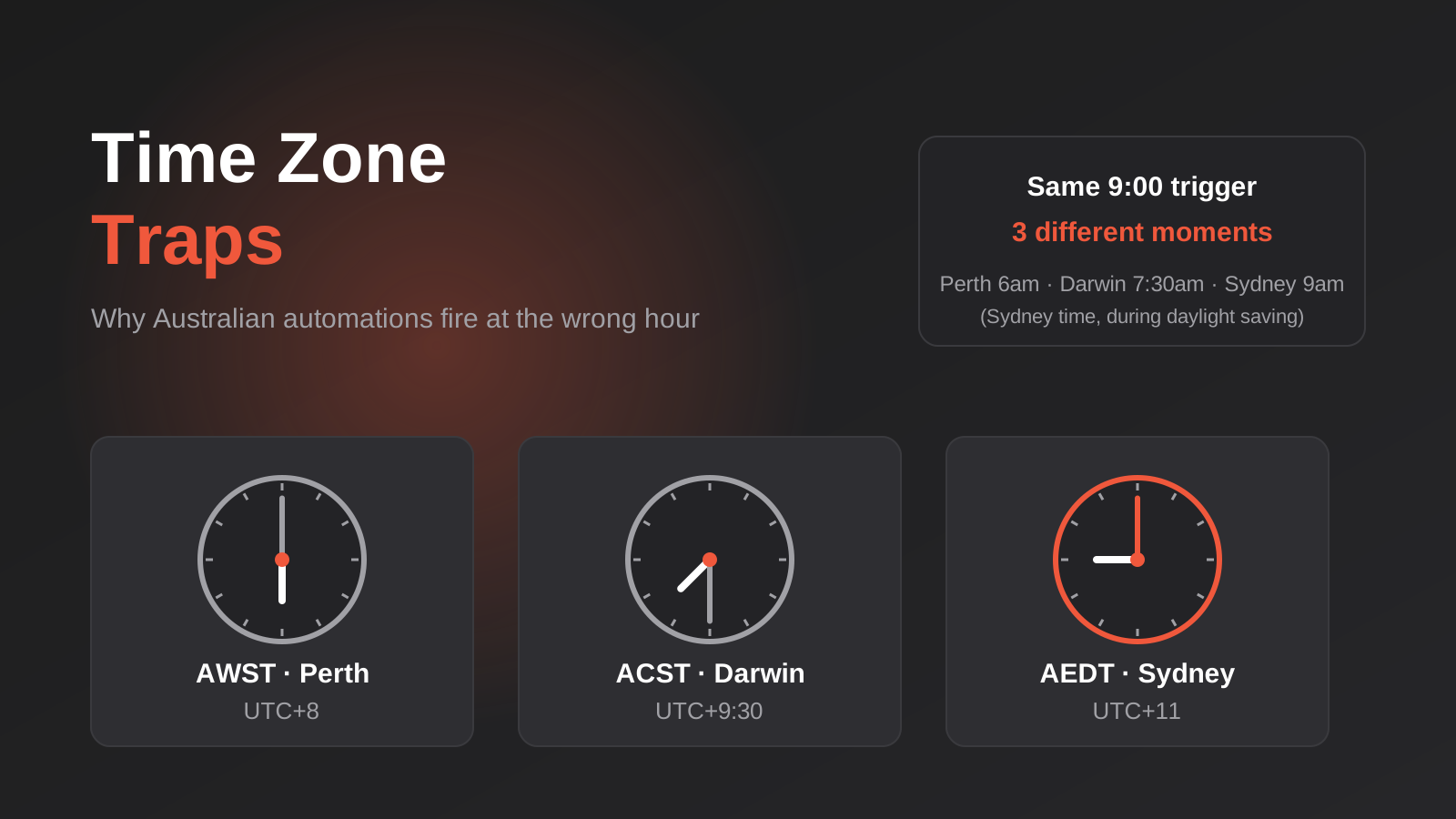
Time Zones, Daylight Saving and Public Holidays: Why Australian Automations Fire at the Wrong Time (2026)
How a 9am automation fires at the wrong time across Australian time zones, daylight saving and state public holidays, and how to…
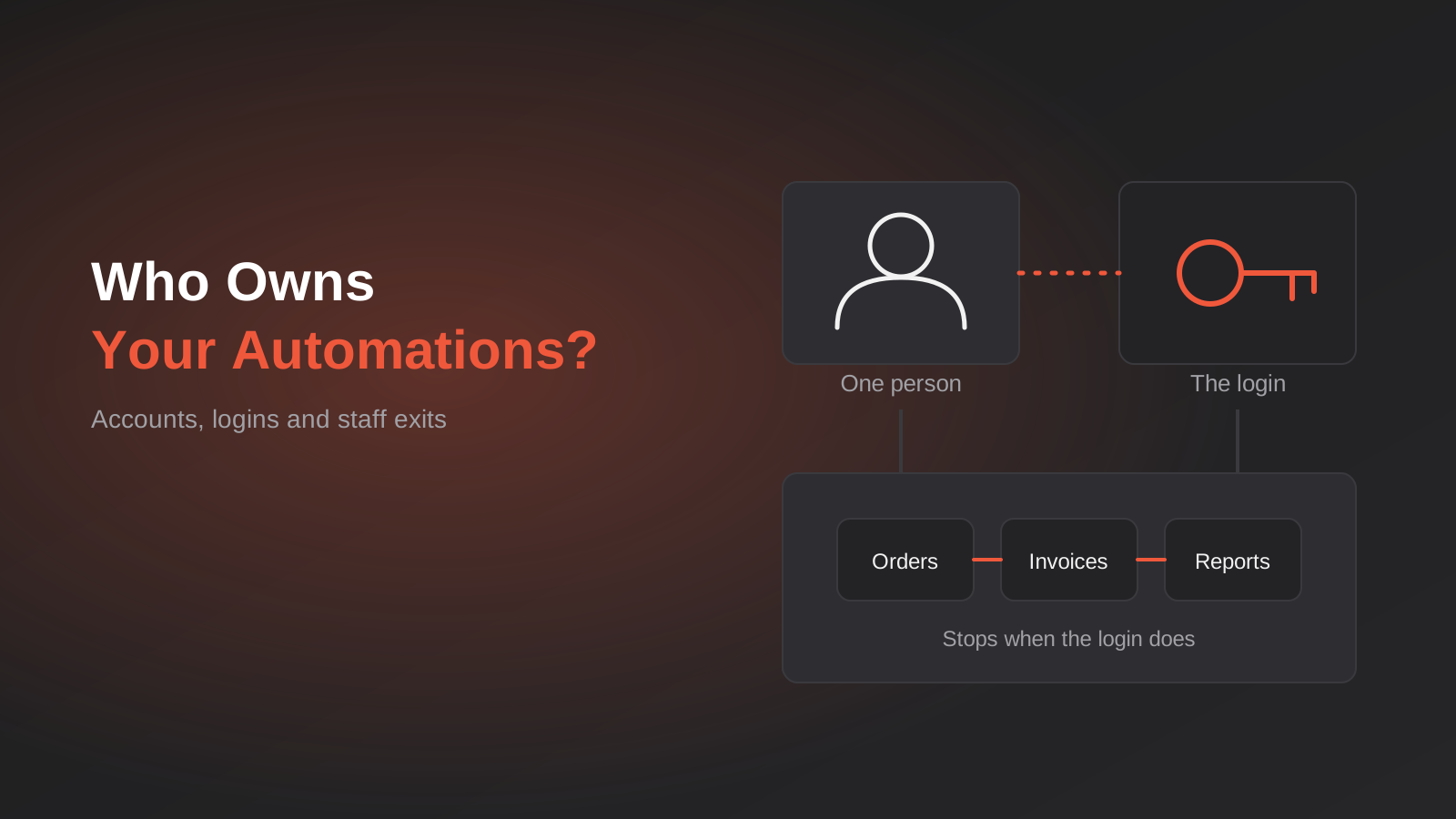
Who Owns Your Automations? Account Ownership, Service Accounts and Staff Offboarding for Zapier, Make and n8n (2026)
Who owns your Zapier, Make or n8n automations? How to fix account ownership, service accounts and staff offboarding before someone leaves.
Got a project you'd like to talk through?
Tell us what you're working on — we'll come back with a plan.
