
Best Workflow Automation Tools for Australian Businesses (2026): 6 Compared
 Jignesh Vagadiya
13/10/2026
21 min read
Jignesh Vagadiya
13/10/2026
21 min read
Every automation project at some point comes down to the same conversation: which platform do we actually build this in? The answer used to be simple — Zapier, because everyone used Zapier. That stopped being true a few years ago. We now run workflows for Australian clients across half a dozen platforms, and the honest answer is that the “best” one depends entirely on who’s going to maintain it, what systems it needs to talk to, and how much you’re willing to spend when a workflow outgrows the free tier.
This list covers the six platforms we see most often in Australian small and mid-sized businesses: Zapier, Make, n8n, Microsoft Power Automate, Workato and Pabbly Connect. We left out pure RPA tools (UiPath, Automation Anywhere) because that’s a different job — desktop-level automation rather than connecting cloud apps — and we left out “best agency” style round-ups entirely, because this is about the software, not who implements it.
Our criteria were practical, not theoretical: real published pricing where it exists, how the platform behaves once a workflow has more than three steps, what happens to your data (and where it physically sits, which matters more than most buyers realise under the Privacy Act’s APP 8), and where each tool falls down. If a section below doesn’t mention a genuine drawback, we haven’t done our job. Every platform here is good at something and bad at something else — the trick is matching the tool to your actual workflow, not the one with the best marketing site.
One thing worth flagging before you read any further: none of these six platforms is based in Australia, bills in AUD by default, or offers support during Australian business hours as standard. That’s not unique to automation software — it’s true of most SaaS categories — but it’s worth factoring in alongside the headline pricing, because the real cost of a platform includes what happens when something breaks at 9am Sydney time and the support queue is still asleep in San Francisco.
What Each Platform Actually Costs in Australia
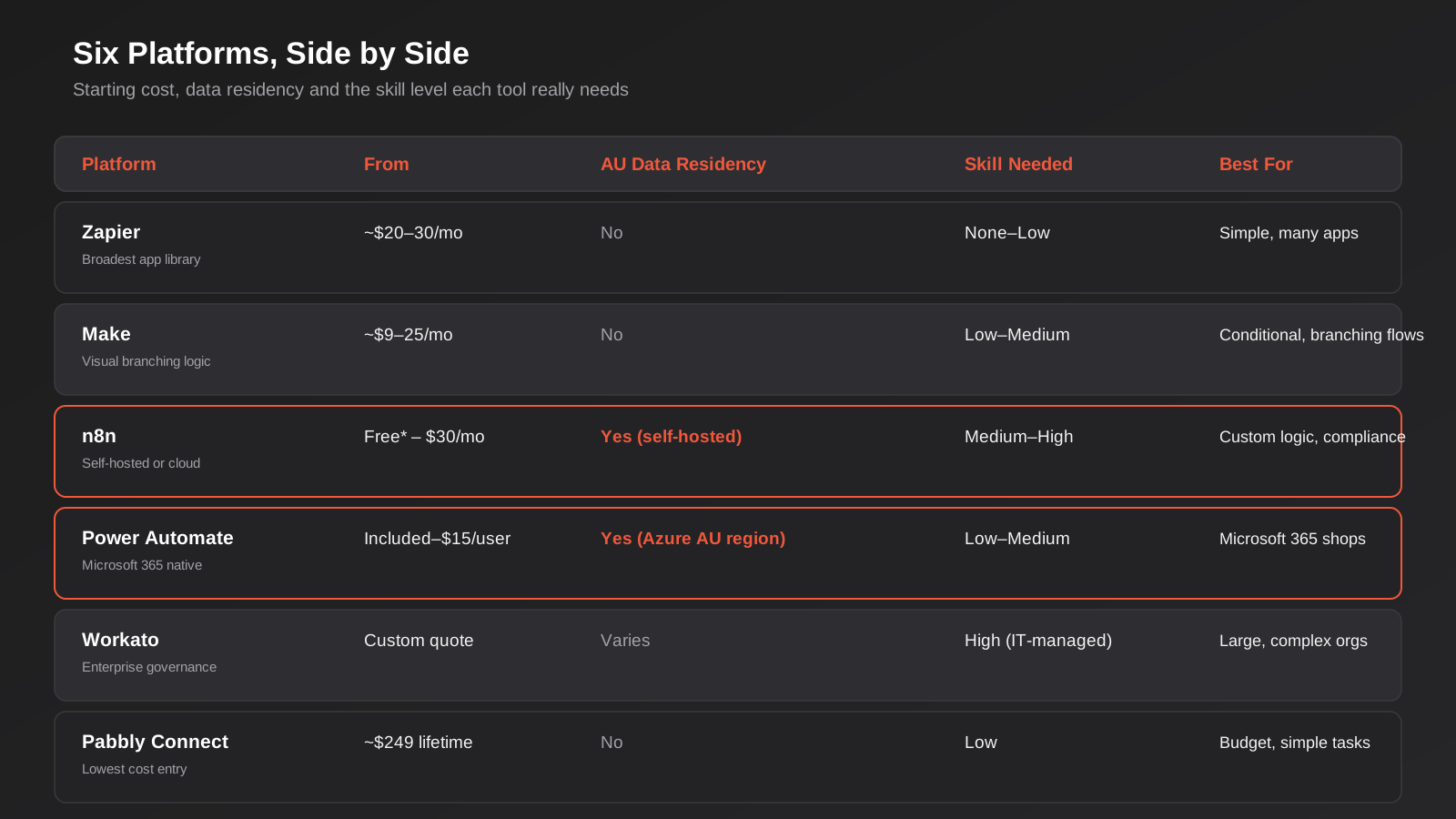
Before the individual breakdowns, a quick note on what “cost” means for this category, because it genuinely isn’t just the plan price. Every one of these vendors except Workato bills overseas in USD or EUR, which means your actual monthly debit moves with the exchange rate and your card provider’s foreign transaction fee, typically adding a few per cent on top of the advertised figure. None of them charge GST on the invoice, because as overseas suppliers of digital services below the relevant threshold they’re generally outside the scope of charging it directly — but if your business is GST-registered and these are deemed imported services, you may still need to self-assess GST under the reverse charge rules, which is worth raising with your accountant rather than assuming it nets out to zero. Stack the FX cost, the card fee and the bookkeeping overhead of a dozen small USD subscriptions across a finance stack, and a platform that looked like the cheapest option on paper can end up costing more in practice than one with a slightly higher sticker price and cleaner billing.
Zapier
Zapier is still the default most Australian businesses reach for first, and for a straightforward reason: it has more app integrations than anything else on this list, by a wide margin, and the builder is genuinely usable by someone who has never touched an API in their life. If you need to connect a form tool to a CRM to a Slack channel, Zapier will have a pre-built connector for all three and the whole thing will be running in twenty minutes.
Where it struggles is cost discipline. Zapier prices on “tasks” — every action a Zap performs counts, which means a five-step Zap that runs a hundred times a day burns through your monthly allowance far faster than it looks like it should on the pricing page. We’ve seen businesses quietly outgrow three pricing tiers in a year without adding a single new workflow, purely because existing Zaps got more complex. Multi-step logic (paths, filters, loops) is also noticeably more fiddly to build and debug than in Make, and when something breaks, Zapier’s error logging tells you a step failed without always telling you clearly why.
On the Australian angle specifically: Zapier bills in USD with no AUD option, so every invoice carries a floating exchange-rate cost on top of the subscription, and its support is email/chat only, routed through US and European hours — don’t expect same-day resolution on anything time-zone sensitive. Data is processed on US infrastructure, which is a genuine consideration if you’re moving anything covered by the Australian Privacy Principles through it.
Pricing (reference, checked against current vendor figures and subject to change): a limited free plan covers around 100 tasks a month with two-step Zaps only. Paid plans start near AU-equivalent of USD $20–$30 a month on the entry Professional tier for a few hundred tasks, stepping up to roughly USD $70–$100+ a month for team plans with a few thousand tasks and multi-user access, and custom Enterprise pricing above that. The exact task allowances and dollar figures shift often enough that we’d check Zapier’s own pricing page before you commit rather than trust any number in a blog post, ours included.
Zapier suits businesses that want the broadest integration coverage, have a non-technical person building the workflows, and run a modest number of relatively simple automations rather than one enormous, complex one.
Make
Make (formerly Integromat) is the platform we reach for when a workflow needs real branching logic — if/then paths, loops, error routing, aggregating data from multiple sources before acting on it. The visual canvas shows the whole scenario as a flowchart rather than a linear list of steps, which makes genuinely complex automations easier to reason about than the equivalent build in Zapier.
It’s also usually cheaper per unit of actual work. Make prices on “operations” rather than Zapier’s per-task model, and because a single module execution typically costs one operation regardless of how the scenario branches, equivalent workloads often come out meaningfully less expensive once you’re past the free tier. That’s the theory, at least. In practice, a scenario with loops or iterators over large datasets can burn through an operations allowance just as fast as Zapier burns through tasks — the pricing model is different, not automatically cheaper, and it depends entirely on how your specific workflow is built.
The trade-off is a steeper learning curve. Make’s interface assumes you’re comfortable thinking in data structures and routing logic; a marketing coordinator who can build simple Zaps unsupervised will usually need more hand-holding to build an equivalent Make scenario, or will need someone technical to build it for them. Its app library, while large, is still smaller than Zapier’s, so niche or newer SaaS tools sometimes aren’t supported yet and need a generic HTTP module workaround.
Pricing (reference only, confirm current figures on Make’s site): a free tier covers roughly 1,000 operations a month with a handful of active scenarios. Paid Core and Pro tiers typically land somewhere in the USD $9–$25 a month range depending on operation volume and billing term, with Teams and Enterprise tiers moving into the USD $30–$40+ a month range and beyond for larger allowances and collaboration features. Like Zapier, billing is in USD/EUR with no native AUD option, and support runs on European and US hours.
Make suits businesses with workflows that genuinely branch — conditional routing, multi-source data merging, error handling — and that have someone reasonably comfortable with logical thinking building and maintaining them, even if that person isn’t a developer.
n8n
n8n is the odd one out on this list because it’s open-source, and that single fact changes almost everything else about how it fits an Australian business. The core Community Edition is free, with no execution limits, and you can self-host it on a server of your choosing — including one sitting in an Australian data centre or Sydney-region cloud instance. For any business handling sensitive customer data where the physical location of that data actually matters under APP 8, that’s a meaningfully different proposition to a US-hosted SaaS tool.
The workflow builder itself is node-based like Make’s, but goes further: it supports writing custom JavaScript or Python directly inside a workflow step, which means genuinely unusual integration logic that neither Zapier nor Make can handle natively is often still possible in n8n without leaving the platform. Pricing on n8n Cloud is also per-workflow-execution rather than per-step, so a complex multi-step workflow that runs once doesn’t cost more than a simple one that runs once — the opposite of how Zapier’s task model behaves.
The catch is that self-hosting is a genuine technical commitment, not a toggle. Someone on your team (or an agency partner) needs to handle the server, Docker deployment, security patching, backups and uptime monitoring. That’s a real ongoing cost even though the software licence is free, and it’s the single biggest reason n8n doesn’t suit every business that likes the idea of it. The n8n Cloud option removes that maintenance burden but currently runs on US and EU infrastructure by default, which undoes the data residency advantage unless you specifically negotiate otherwise — so “n8n” and “n8n for data residency” aren’t automatically the same purchase decision.
Pricing (reference only): self-hosted Community Edition is free software, with your only ongoing cost being server hosting — typically a modest VPS bill rather than anything substantial. n8n Cloud starts around the AUD-equivalent of USD $25–$30 a month (billed around €20) for a Starter tier with a few thousand executions a month, stepping up to a Pro tier in the USD $50–$65 a month range for higher volume. A separate self-hosted Business/Enterprise licence — needed for SSO, audit logs and version control even on your own servers — starts in the many-hundreds-of-euros-a-month range and is really an enterprise purchase, not a small business one.
n8n suits technically capable businesses (or those working with a development partner) that need either genuine custom logic, cost control on high-volume workflows, or data residency control that a pure SaaS tool can’t offer.
Microsoft Power Automate
If your business already runs on Microsoft 365, Power Automate deserves a serious look before you pay for anything else, because a meaningful chunk of it is already included. Standard connectors — Outlook, SharePoint, Teams, OneDrive, Excel — are bundled into most Microsoft 365 business plans at no extra cost, and the automation runs inside Microsoft’s own environment rather than a third-party platform holding a copy of your data.
That data residency point is worth being specific about: Power Automate environments are tied to the Azure region you select, and Australia East and Australia Southeast are both available regions with data stored at rest within Australia. For a business that needs to keep workflow data onshore and already has Microsoft 365 in place, that’s a straightforward answer that none of the pure SaaS automation tools on this list can match without extra configuration.
The limitations show up once you need anything outside the Microsoft ecosystem or outside the standard connector tier. Premium connectors (Salesforce, most third-party SaaS tools, many databases) require a per-user Premium licence on top of your existing Microsoft 365 subscription, and process-level automation (unattended desktop flows, RPA-style bots) is licensed per-bot rather than per-user, which gets expensive quickly for anything beyond a handful of processes. The builder itself is also less intuitive than Zapier’s for someone coming in cold — it’s a capable tool, but it’s built with the assumption you’re reasonably comfortable in the Microsoft ecosystem already.
Pricing (reference only, confirm on Microsoft’s own pricing page): standard connectors are included with most Microsoft 365 business and enterprise plans at no additional cost. A Premium per-user licence runs around USD $15 a user per month (billed annually) and unlocks premium connectors and unlimited cloud flows. Process licensing for unattended bot automation runs roughly USD $150 a bot per month, or around USD $215 a bot per month for Microsoft-hosted execution. These figures move with Microsoft’s licensing changes more often than most vendors, so treat them as a planning range rather than a quote.
Power Automate suits Microsoft 365 businesses automating mostly within that ecosystem, or any Australian business where onshore data residency is a hard requirement and the workflows justify Microsoft’s licensing model.
Workato
Workato sits in a different weight class to everything else on this list, and it’s worth including precisely so growing businesses know what the next tier up actually looks like. It’s built for organisations running automation as core infrastructure — dozens or hundreds of interconnected “recipes” governed centrally, with proper version control, role-based access and audit trails across an entire company, not a handful of workflows one person maintains.
Where it earns that positioning is governance and reliability at scale. Large Australian businesses with complex ERP, CRM and finance system integrations use Workato because it’s built to be managed by an IT or ops team as a platform, with the recipe reuse, environment promotion (dev/test/production) and monitoring that implies. It’s genuinely strong software. It’s also genuinely not built for a ten-person business automating its lead intake.
The honest drawback is that Workato doesn’t publish pricing at all — it’s entirely quote-based and tied to usage volume and edition (Standard, Business, Enterprise, and a newer “Workato One” tier aimed at agentic automation). Third-party pricing trackers that analyse real customer contracts put typical small-to-mid-market spend in the tens of thousands of dollars a year, climbing well past AUD $100,000–$150,000 annually for larger enterprise deployments. There’s no meaningful entry point for a small business, and the sales process itself — a formal quote rather than a self-serve signup — tells you who it’s built for.
Pricing (reference only): no published list pricing exists. Industry pricing analyses based on real contracts suggest realistic annual budgets start somewhere in the AUD $15,000–$30,000 range for smaller deployments and extend well into six figures for enterprise-scale usage. Get an actual quote before assuming any number here applies to you.
Workato suits larger Australian businesses with dedicated IT or operations resourcing and genuinely complex, high-volume integration needs across core business systems — and almost nobody below that size.
Pabbly Connect
Pabbly Connect is the budget option on this list, and we mean that as a genuine description rather than a knock. It covers the same basic category — connect app A to app B, trigger on an event, take an action — with a smaller but perfectly workable integration library, and its pricing undercuts Zapier and Make substantially, particularly through its lifetime-deal plans that avoid an ongoing subscription entirely.
For a bootstrapped business or sole operator automating a handful of simple, repetitive tasks — new lead into a spreadsheet, new order into an email, form submission into a CRM — Pabbly does the job at a fraction of the cost of the bigger names, and its pricing model (based on tasks rather than per-step billing in some configurations) can work out considerably cheaper for high-volume, simple workflows.
The drawbacks are proportional to the price. The app library, while reasonable for common SaaS tools, has real gaps once you move away from mainstream platforms, and the community and documentation around it is thinner than the ecosystem that’s built up around Zapier or Make over the past decade — which matters when you’re stuck and searching for how someone else solved the same integration problem. There’s no dedicated Australian presence, support hours or billing option, and the interface, while functional, feels less polished than its more expensive competitors. It’s also worth noting that lifetime-deal pricing for SaaS tools carries its own risk: the deal only has value if the company stays in business and keeps the product maintained, and that’s a bet you’re making on a vendor’s longevity, not just its current feature set.
Pricing (reference only, confirm current terms before buying): a free plan covers around 100 tasks a month. Paid monthly plans and one-off lifetime-deal tiers both exist; lifetime pricing has been reported anywhere from roughly USD $249 up to $699 depending on the tier and task allowance, though reported allowances vary enough across sources that we’d verify the current terms directly with Pabbly rather than rely on any figure here, including ours.
Pabbly Connect suits cost-sensitive small businesses and solo operators with straightforward, high-volume automation needs who are comfortable with a smaller support ecosystem in exchange for a meaningfully lower price.
How to Choose
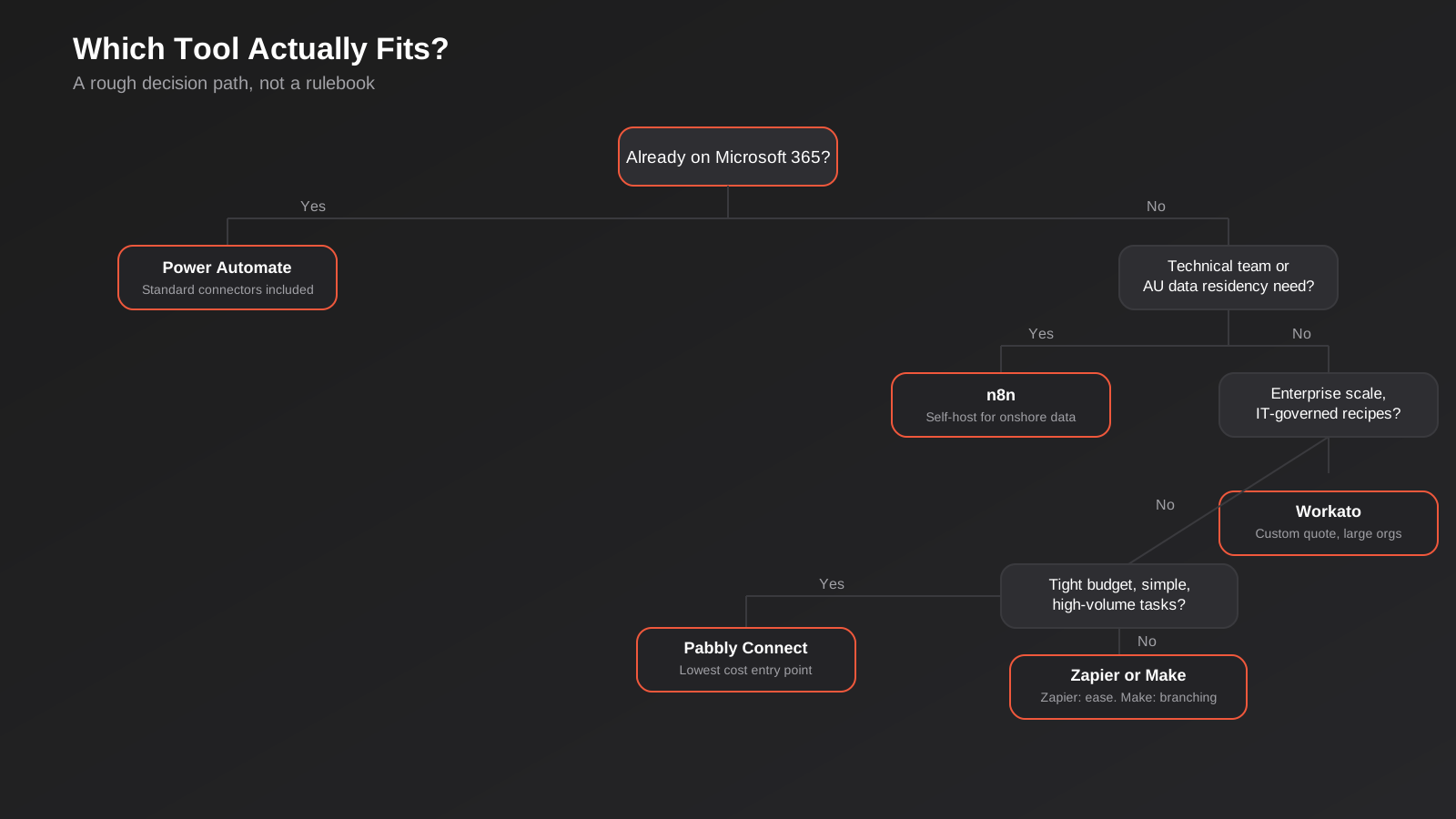
Start with who’s actually going to build and maintain the workflow, not which platform has the best features on paper. A non-technical marketing or ops person who needs to connect common SaaS tools without writing code should start with Zapier or Make. A business with a developer on staff or an agency partner, or with genuine data residency requirements, should look seriously at n8n. A Microsoft 365 shop should check what Power Automate already covers for free before paying for anything else. Everyone else sits somewhere between Pabbly Connect at the cost-conscious end and Workato at the enterprise-governance end, with Zapier and Make covering the broad middle.
Second, model the actual workflow against the pricing unit before committing, not the headline plan price. Count the steps in your busiest workflow, estimate how many times a day or month it runs, and work out what that costs on each platform’s task or operation model — the gap between platforms on a genuinely complex, high-volume workflow can be an order of magnitude, even though the entry-level plans look similar on the pricing page.
Third, treat data residency as a real criterion, not an afterthought, if you handle any personal information covered by the Australian Privacy Principles. APP 8 requires reasonable steps to ensure an overseas recipient of personal information handles it consistently with the APPs before you disclose it overseas — which most SaaS automation platforms, hosted in the US or EU, technically are. Self-hosted n8n on Australian infrastructure or Power Automate in an Australian Azure region are the two options on this list that sidestep the question outright; everyone else needs a genuine look at what data actually flows through the platform and whether that’s a problem for your business.
Fourth, don’t underestimate support hours as a deciding factor. None of these six vendors runs a support desk on Australian time, which is fine for a workflow that fails quietly and can wait until tomorrow, and genuinely not fine for one that processes customer orders or payments in real time. If a broken automation would cost you money within hours rather than days, factor that into which platform you pick and how much in-house or agency support you keep on standby — the platform’s own support team almost certainly won’t be awake when you need them.
Finally, resist the urge to standardise on a single platform for its own sake. We regularly run Zapier for a client’s simple marketing automations and n8n for the same client’s higher-volume order processing, because forcing one tool to do both jobs well is harder than using two tools that are each good at one thing. Consistency is worth something, but it’s not worth more than picking the right tool for the workflow in front of you.
Common Mistakes
- Picking a platform based on the free tier, then discovering the pricing model it switches to at scale is fundamentally different from what the free tier suggested.
- Building workflows with no monitoring or alerting, so a silently broken trigger loses leads or duplicates orders for weeks before anyone notices.
- Letting one person build every automation with no documentation, so the business has no idea what’s running, why, or how to fix it when that person leaves.
- Choosing the cheapest option for a workflow that handles sensitive customer data without checking where that platform actually processes and stores it.
- Assuming a platform’s published pricing page reflects what you’ll actually pay once real-world task or operation volume kicks in — always model your own numbers before committing to an annual plan.
- Building one enormous, fragile workflow instead of several smaller, more resilient ones that fail independently rather than taking the whole process down with them.
Frequently Asked Questions
Which workflow automation tool is cheapest for a small Australian business?
Pabbly Connect is generally the cheapest entry point, particularly through its lifetime-deal pricing, followed by Make for businesses with moderate operation volumes. n8n’s self-hosted Community Edition is technically free beyond server hosting costs, but that’s only genuinely cheap if you or a partner already have the technical capability to run it. The platform with the lowest sticker price isn’t always the cheapest once you account for the time spent building, fixing and maintaining the workflow.
Can I keep automation data onshore in Australia?
Yes, with two of the platforms on this list by default: n8n self-hosted on Australian infrastructure, and Microsoft Power Automate using an Australian Azure region (Australia East or Australia Southeast). Zapier, Make, Workato and Pabbly Connect all process data on overseas infrastructure as standard, which triggers APP 8 considerations under the Privacy Act if you’re moving personal information through them.
Is Zapier or Make better for complex workflows?
Make generally handles complex, branching logic more cleanly because its visual canvas is built around routing and conditional paths rather than a linear step list. Zapier can do the same things with its Paths and Filters features, but the build and debugging experience gets noticeably more cumbersome as a workflow grows past a handful of steps. If your workflow is simple, this distinction barely matters; if it genuinely branches, Make is usually the easier build.
Do I need a developer to use n8n?
Not strictly to build workflows — the node-based builder is usable without coding for many standard integrations. But getting real value out of n8n, particularly its custom code steps, and definitely its self-hosting, benefits enormously from technical capability either in-house or through an agency partner. Treat it as a platform that rewards technical skill rather than one that requires it for every task.
What happens if I outgrow one of these platforms?
Migration between automation platforms is manual work — there’s no one-click export from Zapier to Make or n8n, because the underlying logic has to be rebuilt in each platform’s own structure. This is exactly why it’s worth modelling your real workflow volume against pricing before you commit at scale, rather than building out dozens of workflows on a platform you later need to leave.
Should I use Power Automate if I’m not a Microsoft 365 business?
Generally no. Power Automate’s main advantage — standard connectors bundled into an existing Microsoft 365 subscription — disappears if you’re not already paying for that ecosystem. Outside Microsoft 365, Zapier, Make or n8n will usually be a more natural fit and a more mature non-Microsoft integration library.
Can I run more than one automation platform at once?
Yes, and it’s often the right call rather than a sign of a messy stack. A simple marketing automation and a high-volume, sensitive order-processing workflow don’t necessarily belong on the same platform, and forcing them together usually means compromising on one or the other. The real risk with running multiple platforms is losing track of what’s running where, so keep a simple register of every active workflow, which platform it lives on, and who owns it — that document matters more than which tool you chose.
Where to Start
If you’re choosing a workflow automation platform for the first time, start by mapping the actual workflow you want to automate — every step, every system, every condition — before you open a single pricing page. Most of the mistakes above come from picking a platform first and forcing the workflow to fit it, rather than the other way around. If you’ve already got automations running and they’re starting to feel fragile, inconsistent, or more expensive than they should be, that’s usually a sign the platform and the workflow have drifted apart, not that you need to start again from scratch.
We build and maintain workflow automation across all of these platforms for Australian businesses, and we’re generally platform-agnostic about which one we recommend — we’d rather put you on the tool that fits your systems and budget than the one we personally prefer to build in. If you want a second opinion on what you’re currently running, or help scoping a new automation properly before you commit to a platform, our workflow automation team can take a look. You can also browse what we cover more broadly under automation services, or read how we think about auditing and consolidating a workflow stack that’s gotten away from you, what retries and duplicate records actually cost a business, and how to monitor Zapier, Make and n8n workflows so a silent failure doesn’t cost you a week of missed leads.
Keep reading
Related posts

Changing Live Automations Safely: Staging, Version Control and Rollback for Zapier, Make and n8n (2026)
How to draft, test, release and roll back changes to live Zapier, Make and n8n automations without breaking invoices, orders or customer…

Peppol E-Invoicing for Australian Businesses: Automating Accounts Payable From Structured Invoices (2026)
Peppol e-invoicing in Australia: what is and isn't mandatory, how to pick an access point, and how to automate accounts payable once…

Clean Your Data Before You Automate: A Practical Guide to CRM Data Cleanup for Australian Businesses (2026)
Connecting systems on messy data copies the mess everywhere. Here's how to clean, match and merge records before you automate or integrate.
Got a project you'd like to talk through?
Tell us what you're working on — we'll come back with a plan.
