
Automation Monitoring: Catching Broken Zapier, Make and n8n Workflows Before They Cost You (2026)
 Jignesh Vagadiya
24/09/2026
21 min read
Jignesh Vagadiya
24/09/2026
21 min read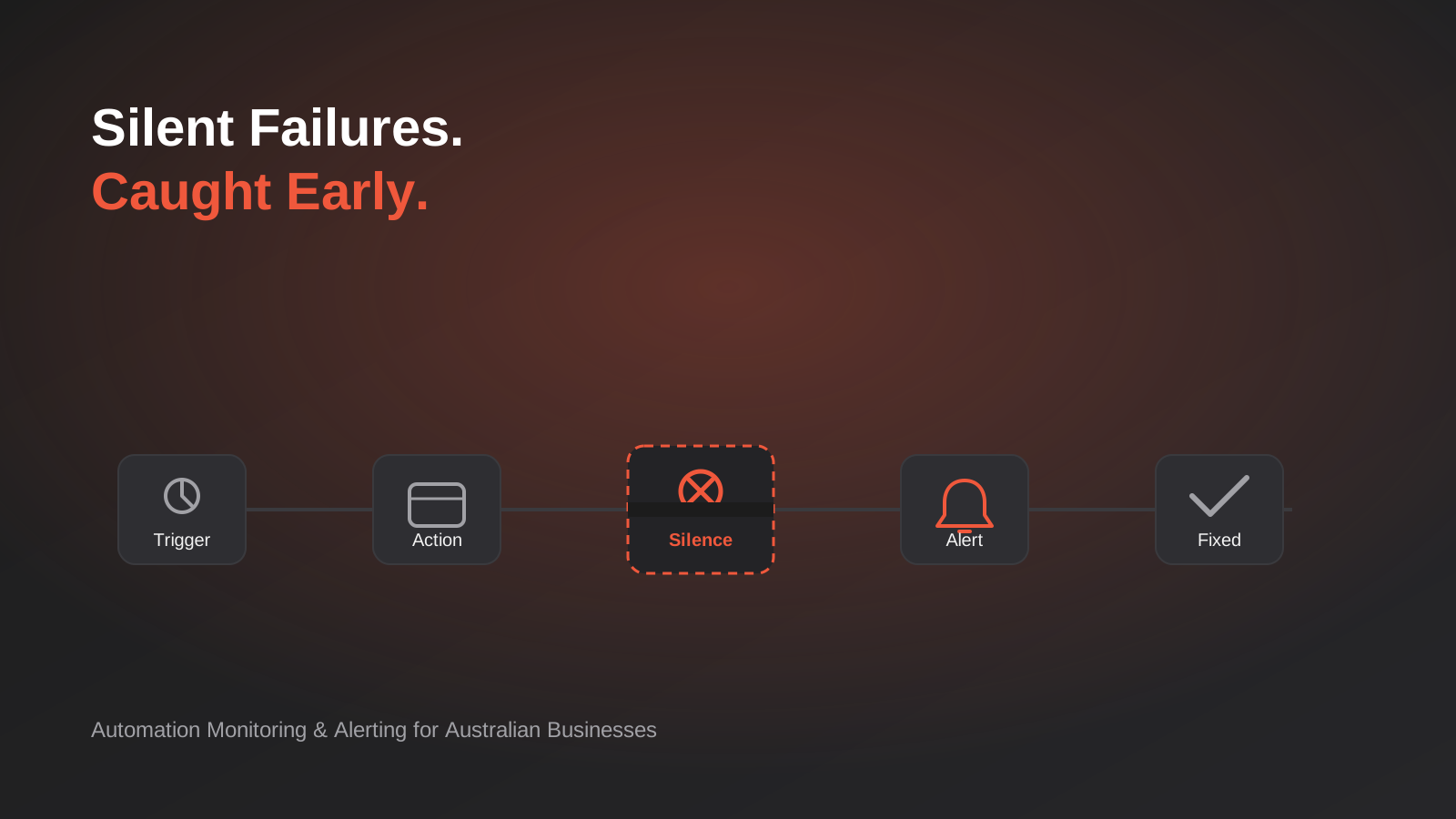
A Melbourne joinery business found out its Zapier lead-capture automation had been dead for eleven days when a prospective client rang to ask why nobody had followed up on the quote request she’d submitted through the website form. The Zap hadn’t crashed loudly. It hadn’t sent an error email anyone read. A connected app had quietly revoked an OAuth token during a routine security update, the trigger stopped firing, and every form submission since simply vanished into a queue nobody was watching. Eleven days of leads, gone, and the business only found out because one of them happened to be persistent enough to call.
That story isn’t unusual. It’s the default outcome for most small and mid-sized automation setups in Australia, because almost everyone treats “we built the automation” as the finish line. The build gets attention, the demo works, everyone moves on to the next project. Nobody budgets time for what happens six months later when an API changes its response format, a spreadsheet column gets renamed, a Gmail filter starts catching the notification emails, or a free trial silently expires. Automations don’t fail like normal software. A broken app throws an error on screen. A broken automation just stops, quietly, and the absence of activity looks exactly like a slow day until someone notices the numbers don’t add up.
We’ve rebuilt enough of these workflows for Australian businesses to know the pattern by heart: someone or an agency sets up a genuinely good automation, it runs cleanly for a few months, and then it breaks in a way that goes unnoticed for anywhere from a few days to a few months. This isn’t a guide to choosing an automation tool or deciding between RPA and API integration — we’ve covered how Zapier, Make and n8n actually compare and when RPA fits better than API integration elsewhere. This is about automation monitoring and alerting — the layer that decides whether a good automation stays good, built properly, without turning into a second full-time job.
Why automations fail silently (and why nobody notices until it’s too late)
Traditional software fails loudly because someone is looking at it when it breaks. A website goes down and visitors see an error page immediately. An app crashes and the user is staring at the crash. Automations are different because, by design, nobody is watching them run. That’s the entire point of automating a task — you stop having to think about it. Which also means you stop noticing when it stops working.
There are four common ways an automation goes quiet, and understanding which one you’re dealing with changes how you catch it.
The trigger stops firing
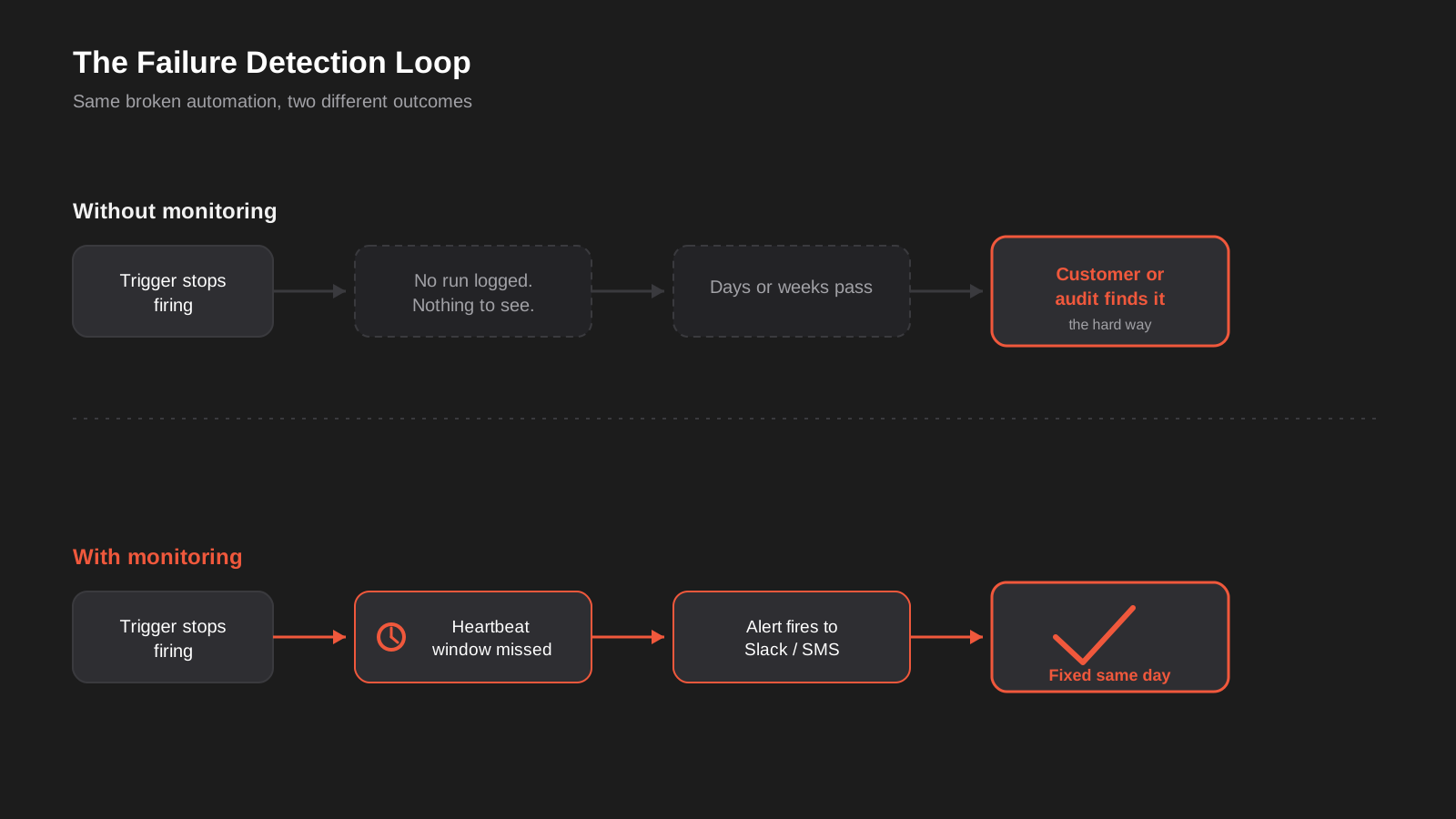
This is the OAuth token scenario above, but it has plenty of siblings. A webhook URL gets regenerated when someone reconnects an app. A form plugin gets updated and changes its submission hook. A shared inbox gets a new filter rule that routes messages away from the folder your automation watches. In every case, the automation platform itself is perfectly healthy — there’s just nothing arriving for it to act on. Zapier, Make and n8n will all report this as normal, because from their point of view, nothing went wrong. No trigger, no run, no error. Just silence.
The action fails but nobody reads the error
This is the more familiar failure mode: the automation runs, hits a step it can’t complete — an API rate limit, a validation error, a field that’s gone missing from a connected app — and logs an error. Every major platform does log these. The problem is where that error goes. By default, it goes to an activity history page inside the automation tool that almost nobody checks unless they’re already suspicious something is wrong. An error that nobody reads is functionally identical to no error at all.
The automation runs, but the data is wrong
This is the hardest one to catch and the most expensive when it goes unnoticed. The automation executes successfully from the platform’s perspective — no error, no failed step — but a source field changed type, a currency conversion is off, a mapping points at the wrong column after someone reordered a spreadsheet, or a date format mismatch quietly corrupts every record. Orders sync to the wrong warehouse. Invoices post against the wrong cost centre. Nothing in the automation’s own logs shows a problem, because from a purely mechanical standpoint, it isn’t having one.
The upstream system changes underneath you
APIs version, deprecate fields and change authentication requirements on their own schedule, not yours. A CRM vendor ships an update that renames a custom field. A payment gateway deprecates an old webhook format with sixty days’ notice sent to an inbox nobody checks. Xero, MYOB, Shopify and most major platforms genuinely try to give warning, but that warning arrives as an email, not an alert inside your automation tool, so it’s trivially easy to miss if you’re not specifically watching for it.
What built-in monitoring actually covers (and where the gaps are)
Before building anything extra, it’s worth being honest about what your existing automation platform already does, because the answer is “more than most businesses realise, and less than most businesses assume.”
Zapier
Zapier logs every run in its Zap History and will send an email if a Zap fails outright — but only on paid plans, and only for zaps that actually attempt to run and hit an error. A zap that never triggers because the source stopped sending data generates no history entry and no email, because there was nothing to fail. Zapier also auto-pauses a Zap after enough consecutive failures, which stops it consuming task quota but also means a struggling automation can silently switch itself off entirely if nobody’s watching the pause notification.
Make
Make’s scenario history is more detailed than Zapier’s out of the box, and its incomplete-execution handling (where a failed run gets stored so you can resolve and resume it) is genuinely useful. You can also build dedicated error-handler routes inside a scenario using its built-in error handling tools, routing failures to a Slack message or email rather than leaving them in the log. Very few businesses actually build these error routes, though — they’re opt-in, and opting in requires knowing they exist.
n8n
If you’re self-hosting n8n, monitoring is entirely your responsibility, not the platform’s. n8n supports error workflows — a separate workflow that triggers whenever another one fails — which is a solid building block, but somebody has to build it. On top of that, self-hosting adds an entire extra layer of things that can go wrong silently: the server running out of disk space, a Docker container failing to restart after an update, an expired SSL certificate blocking webhook delivery, or the underlying database filling up. None of that shows up in n8n’s own execution log because n8n itself is the thing struggling, not the workflow running inside it.
The consistent gap across all three platforms is the same: they tell you when something they attempted went wrong. None of them reliably tell you when something stopped happening that should have happened, or when something completed but produced the wrong result. That gap is what a proper monitoring layer needs to fill.
Building an automation monitoring layer that actually catches problems
You don’t need enterprise observability tooling for this. Most Australian SMBs need three fairly simple mechanisms layered on top of what their automation platform already gives them.
Heartbeat checks for anything that should run regularly
A heartbeat check (sometimes called a dead man’s switch) flips the monitoring question around. Instead of asking “did this fail?” it asks “did this run at all?” The pattern is simple: every time the automation completes successfully, it pings a monitoring endpoint (services like Healthchecks.io, Cronitor or Better Uptime all do this cheaply, and some are free at small scale). If that ping doesn’t arrive within an expected window — say, every automation that’s meant to run hourly should ping within ninety minutes — the monitoring service assumes something’s wrong and sends an alert. This is the single most effective fix for the “trigger stopped firing” failure mode, because it doesn’t rely on the broken automation to report its own absence. Something outside the automation is watching for silence.
In practice, wiring this up is a five-minute addition to a workflow that already exists. In Zapier, the last step of the Zap makes a simple webhook call (a “Webhooks by Zapier” GET or POST action) to the unique URL your monitoring service issued. In Make, it’s an HTTP module dropped at the end of the scenario, after the real work is done. In n8n, it’s an HTTP Request node, and because n8n already supports dedicated error workflows, you can pair the heartbeat with an error-triggered workflow that fires the moment a run actually fails, covering both failure modes with two small additions rather than a rebuild. None of this needs to be more complicated than that. The value comes from consistency — every business-critical automation getting the same treatment — not from sophistication in any one of them.
Data validation, not just execution status
Catching the “ran successfully but produced garbage” failure mode means checking outcomes, not just whether a step returned a success code. In practice this is usually a lightweight secondary check: a scheduled scenario that queries “how many orders synced in the last hour” and compares it against a rough expected baseline, or a check that a required field is never null in the destination system. It doesn’t need to be sophisticated. A daily Make scenario that counts yesterday’s synced records and flags anything more than 50% off the trailing average catches most of the expensive silent-corruption failures without much engineering effort.
Alert routing that someone will actually see
This sounds obvious and is the step most setups get wrong. An alert emailed to an inbox that already has 400 unread newsletters is not an alert, it’s a diary entry. The alerts that get acted on are the ones that interrupt someone: a dedicated Slack or Microsoft Teams channel that the operations lead actually has notifications on, an SMS for anything genuinely revenue-critical, or at minimum a separate email address that only ever receives automation alerts so it’s never buried. It’s also worth deciding, in advance, who owns the response. An alert that fires into a channel with no clear owner just becomes ambient noise that everyone assumes someone else is handling.
What to monitor first (you don’t need to watch everything)
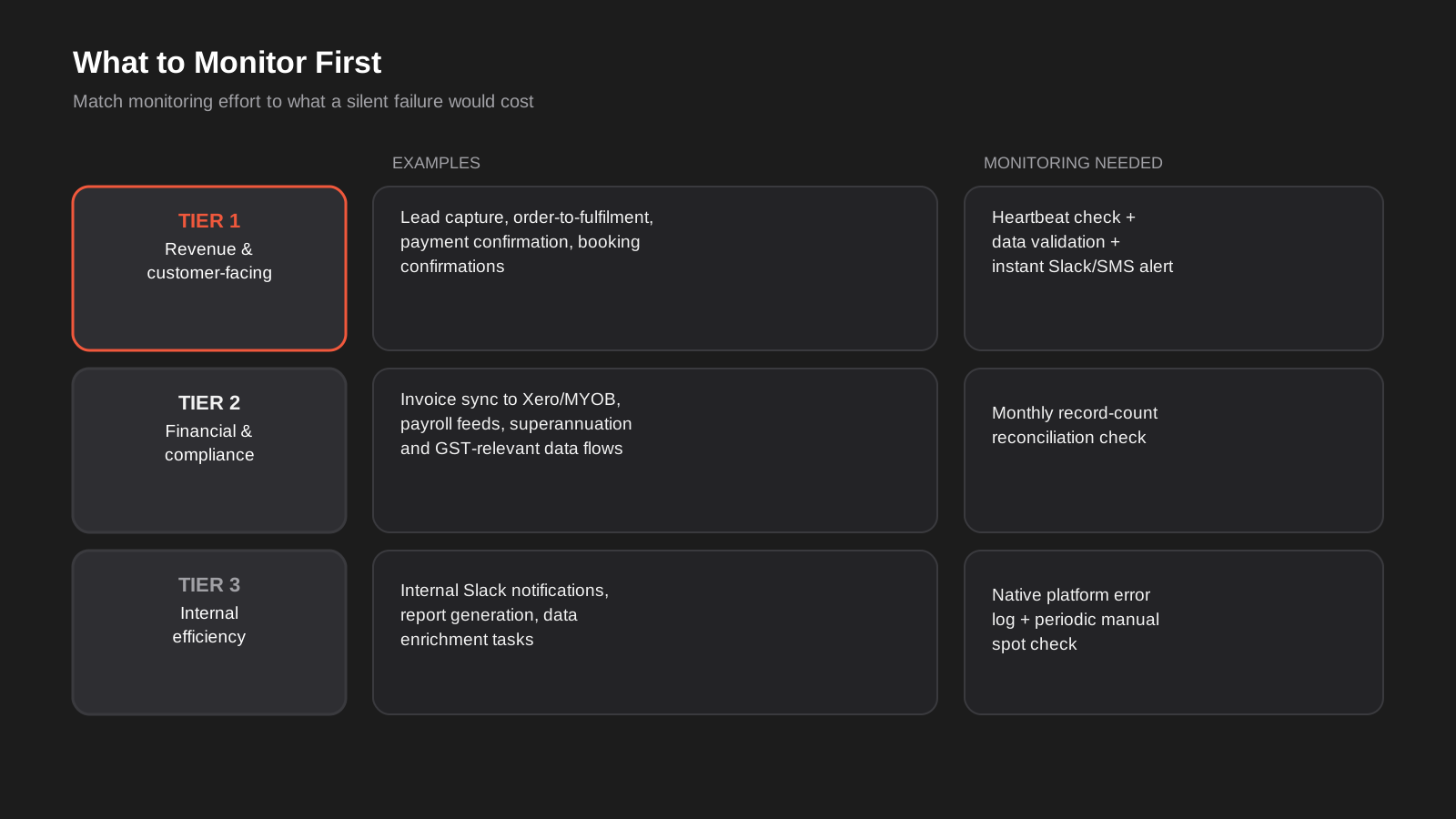
Monitoring every automation to the same standard is a waste of effort and a fast route to alert fatigue, where so many low-stakes notifications fire that the important ones get ignored along with the rest. The businesses that do this well triage first, based on two questions: how much does it cost if this breaks and nobody notices for a week, and how would we actually find out if it broke?
Tier one: revenue and customer-facing
Lead capture from your website into your CRM. Order-to-fulfilment syncs for an online store. Payment confirmation and receipt automations. Booking and appointment confirmations. These deserve heartbeat checks, data validation, and an alert channel that actually interrupts someone, because a silent failure here directly costs revenue or damages customer trust, and it’s the category least likely to be self-reported — customers rarely chase up a business that’s gone quiet, they just go to a competitor.
Tier two: financial and compliance
Invoice sync between your ecommerce platform and Xero or MYOB, payroll data feeds, superannuation reporting, GST-relevant data flows. These are less likely to fail invisibly forever because accounting eventually surfaces a discrepancy — but “eventually” might be at BAS time, months after the error occurred, when reconciling it is a genuine chore. A monthly reconciliation check (does the automation’s record count match the source system’s record count) is usually enough here.
Tier three: internal efficiency
Internal Slack notifications, report generation, data enrichment tasks, and anything where a human is still doing a manual check downstream anyway. These can generally rely on the platform’s native error logging plus a periodic manual spot check. The cost of a silent failure here is annoyance, not lost revenue, so the monitoring investment should match that.
Monitoring gets harder once AI is doing part of the work
Everything above assumes a failure is mechanical: a step either completed or it didn’t, a record either arrived or it didn’t. Once a custom AI integration is doing part of the workflow — classifying an inbound email, extracting line items from an invoice, drafting a reply, deciding which pipeline stage a lead belongs in — a new failure mode shows up that none of the checks so far will catch: the step completes successfully, returns a well-formed response, and the response is simply wrong.
Confidently wrong isn’t a failure the platform sees
A language model asked to extract an invoice total will, almost always, return a number. It won’t throw an error because it misread a poorly scanned PDF and picked up the subtotal instead of the GST-inclusive total — it will hand back a confident, correctly formatted, wrong figure, and every technical check downstream will pass, because as far as the automation platform is concerned, the step ran and produced valid output. We touched on this risk in our guide to document automation beyond the invoice: the failure isn’t visible in execution logs at all, only in the business outcome, sometimes weeks later when a reconciliation doesn’t balance or a customer query reveals a support bot gave out the wrong policy detail.
What to check instead
The fix isn’t more logging, it’s a different kind of check. Confidence thresholds help where the model or the platform exposes them — routing anything below a set confidence score to a human queue rather than letting it flow straight through. Sampling helps more than most businesses expect: pulling a random five or ten percent of AI-processed records for a quick human review each week turns an invisible failure rate into a known, trackable one, and usually surfaces a systemic problem (a document template the model consistently misreads, a category it consistently gets wrong) well before it becomes expensive. And for anything genuinely consequential — a refund decision, a contract term, a number that feeds directly into accounts — a human-in-the-loop approval step before the action executes is still the most reliable safeguard, even though it trades away some of the automation’s speed. We covered this trade-off in more depth in AI agents vs automation: the more autonomous a step is, the more its monitoring needs to shift from “did it run” to “was it right.”
Building fallbacks: what happens when an automation is down
Monitoring tells you something broke. It doesn’t fix the gap in the meantime, which matters more than it sounds for anything customer-facing. If your lead-capture automation goes down for six hours before an alert fires and gets actioned, those leads shouldn’t just be lost.
The simplest fallback for most workflows is a durable queue between the trigger and the action, rather than a direct pass-through. A form submission that writes to a Google Sheet or a lightweight database row before anything else happens means that even if the CRM sync step fails, the raw submission still exists somewhere and can be replayed once the fix is in. This is a small amount of extra setup for a meaningful reduction in what a failure actually costs you. It’s also why we generally build queuing into anything we set up under workflow automation for clients handling genuinely time-sensitive triggers — not because failures are expected, but because the cost of building it in upfront is a fraction of the cost of losing real customer data.
For automations feeding into more structurally important systems — an ERP integration handling stock levels across warehouses, for instance — a manual fallback procedure matters as much as the technical queue. If the sync between your ecommerce platform and your ERP goes down, does anyone know how to manually check and update stock levels in the interim, or does the business just find out when it oversells a product that’s actually out of stock? Writing this down once, before it’s needed, is cheap. Figuring it out during an actual outage, under pressure, is not.
Retry logic is the other half of this. Most platforms support automatic retries on failed steps, usually with a delay, which handles the very common case of a transient failure — an API that was down for ninety seconds, a rate limit that clears itself shortly after. Configuring two or three retries with a short backoff before an alert fires at all filters out a lot of noise that would otherwise page someone for a problem that resolved itself. It’s worth setting the backoff deliberately rather than accepting a platform’s default: retrying immediately three times in the same second against a rate-limited API just trips the same limit again, while spacing retries out by a minute or two gives a genuinely transient issue time to actually clear.
The other question worth answering upfront is what happens to a record that fails all its retries. Does it sit in a dead-letter queue for manual reprocessing once the underlying issue is fixed, or does it just vanish? Make’s incomplete-execution store handles this natively — failed runs sit there until someone resolves and resumes them — but Zapier and a self-hosted n8n setup generally need this built deliberately, usually as a simple log of failed payloads written somewhere durable before the automation attempts the risky step. It’s a small addition at build time and the difference between a two-hour outage costing you nothing once it’s fixed, versus costing you every record that failed during it.
Common mistakes we see in automation monitoring (or the lack of it)
- Relying entirely on the automation platform’s default error email, which only fires for runs that actually attempted and failed — not for triggers that silently stopped firing altogether.
- Sending every alert to a general inbox or channel with no clear owner, so notifications accumulate unread until someone happens to notice a business problem downstream.
- Alerting on everything with the same urgency, which trains the team to ignore automation notifications entirely within a few weeks.
- Checking only that a step ran without error, never checking that the data it produced was actually correct.
- Testing the automation once at launch and never revisiting it, even as the connected systems get updated independently over the following months.
- Having no documented fallback for what a human does manually if a customer-facing automation goes down for a few hours.
- Putting all monitoring alerts through a single channel (usually email) with no backup path, so a filter rule or a full inbox can silently swallow the one notification that mattered.
- Not knowing what “normal” volume looks like for a given automation, which makes it impossible to spot when volume quietly drops to zero or spikes unexpectedly.
- Treating an AI step’s successful, well-formatted response as proof it’s correct, with no sampling or confidence check to catch the confidently wrong answer that slips through every technical check.
Frequently Asked Questions
How do I know if my automation is broken right now, without waiting for a customer to tell me?
Check the execution history inside your automation platform first — Zapier’s Zap History, Make’s scenario history, or n8n’s execution log — and compare recent run counts against what you’d expect for a normal day or week. If the numbers look thin or there’s a gap, that’s your first clue. Beyond that manual check, a heartbeat monitor is the only reliable way to know immediately rather than retrospectively, because it catches the case where the automation stopped triggering at all and therefore has nothing to show in its own history.
Does Zapier, Make or n8n tell me automatically when something breaks?
Partially. All three log failed runs, and Zapier and Make can email or notify you when a step errors out, provided you’re on a plan that includes it and you’ve got notifications switched on. None of them reliably tell you when a trigger has simply stopped receiving data, because from the platform’s perspective nothing happened, so there’s nothing to report. That specific gap is what an external heartbeat check is for.
What’s a heartbeat check and do I actually need one?
A heartbeat check is a monitoring service that expects to hear from your automation on a regular schedule, and alerts you the moment it doesn’t. Every time the automation runs successfully, it sends a quick ping to the monitor; if the ping doesn’t arrive within the expected window, you get notified. You need one for anything time-sensitive and customer-facing — lead capture, order processing, booking confirmations. For a low-stakes internal report that runs monthly, it’s probably overkill.
How much does it cost to set up proper automation monitoring?
For most small businesses, the monitoring tools themselves are cheap or free at low volume — heartbeat services like Healthchecks.io have generous free tiers, and Make’s built-in error handling costs nothing extra. The real cost is the setup time: building the heartbeat pings into existing scenarios, writing a validation check or two, and setting up a dedicated alert channel typically takes a few hours per critical automation, not days. It’s a fraction of the cost of the original build, and considerably cheaper than the revenue lost during an unnoticed outage.
Should I build monitoring myself or use a third-party tool?
For a handful of automations, building it yourself with a free heartbeat service plus the platform’s native error handling is usually enough and costs nothing beyond setup time. Once you’re running dozens of interconnected workflows across multiple platforms, a dedicated automation monitoring tool that centralises visibility across Zapier, Make and n8n in one dashboard starts to earn its subscription cost, mostly by saving you from checking three separate history logs to figure out where something went wrong.
What’s the actual difference between an error and a silent failure?
An error is something the automation platform noticed and logged — a step failed, an API returned a rejection, something visibly broke inside a run that did happen. A silent failure is when nothing runs at all, or when something runs and reports success while producing the wrong result. Errors are (relatively) easy to catch because the platform already flags them; silent failures require you to actively check that expected activity is happening and that its output looks right, which is exactly the gap monitoring and alerting is meant to close.
How do you monitor an automation step that uses AI, if it never technically “fails”?
You shift the check from “did it run” to “was it right.” That usually means one of three things: routing low-confidence outputs to a human review queue where the model or platform exposes a confidence score, regularly sampling a small percentage of AI-processed records for manual spot checks, or requiring human approval before any AI-generated output triggers a consequential action like a refund or a contract change. None of these show up as an “error” in the platform’s logs, which is exactly why they need to be built in deliberately rather than assumed to be covered by normal error handling.
Where to start
If you’ve got automations running today and you’re not entirely sure how you’d find out if one of them quietly stopped, that’s the honest starting point — not a monitoring platform, just an audit. List what’s automated, rank it by what a week of silent failure would actually cost, and add a heartbeat check to the two or three that matter most. That alone closes most of the risk for most businesses.
We build this monitoring and alerting layer into the workflow automation we set up for clients as standard, rather than treating it as an optional extra bolted on later, because we’ve seen too many perfectly good automations quietly rot without it. If you want a second set of eyes on what you’ve already got running — or you’re not sure which of your automations would actually be missed if they stopped — happy to have a conversation about where the gaps are.
Keep reading
Related posts

Changing Live Automations Safely: Staging, Version Control and Rollback for Zapier, Make and n8n (2026)
How to draft, test, release and roll back changes to live Zapier, Make and n8n automations without breaking invoices, orders or customer…

Peppol E-Invoicing for Australian Businesses: Automating Accounts Payable From Structured Invoices (2026)
Peppol e-invoicing in Australia: what is and isn't mandatory, how to pick an access point, and how to automate accounts payable once…

Clean Your Data Before You Automate: A Practical Guide to CRM Data Cleanup for Australian Businesses (2026)
Connecting systems on messy data copies the mess everywhere. Here's how to clean, match and merge records before you automate or integrate.
Got a project you'd like to talk through?
Tell us what you're working on — we'll come back with a plan.
