
Time Zones, Daylight Saving and Public Holidays: Why Australian Automations Fire at the Wrong Time (2026)
 Jignesh Vagadiya
11/11/2026
26 min read
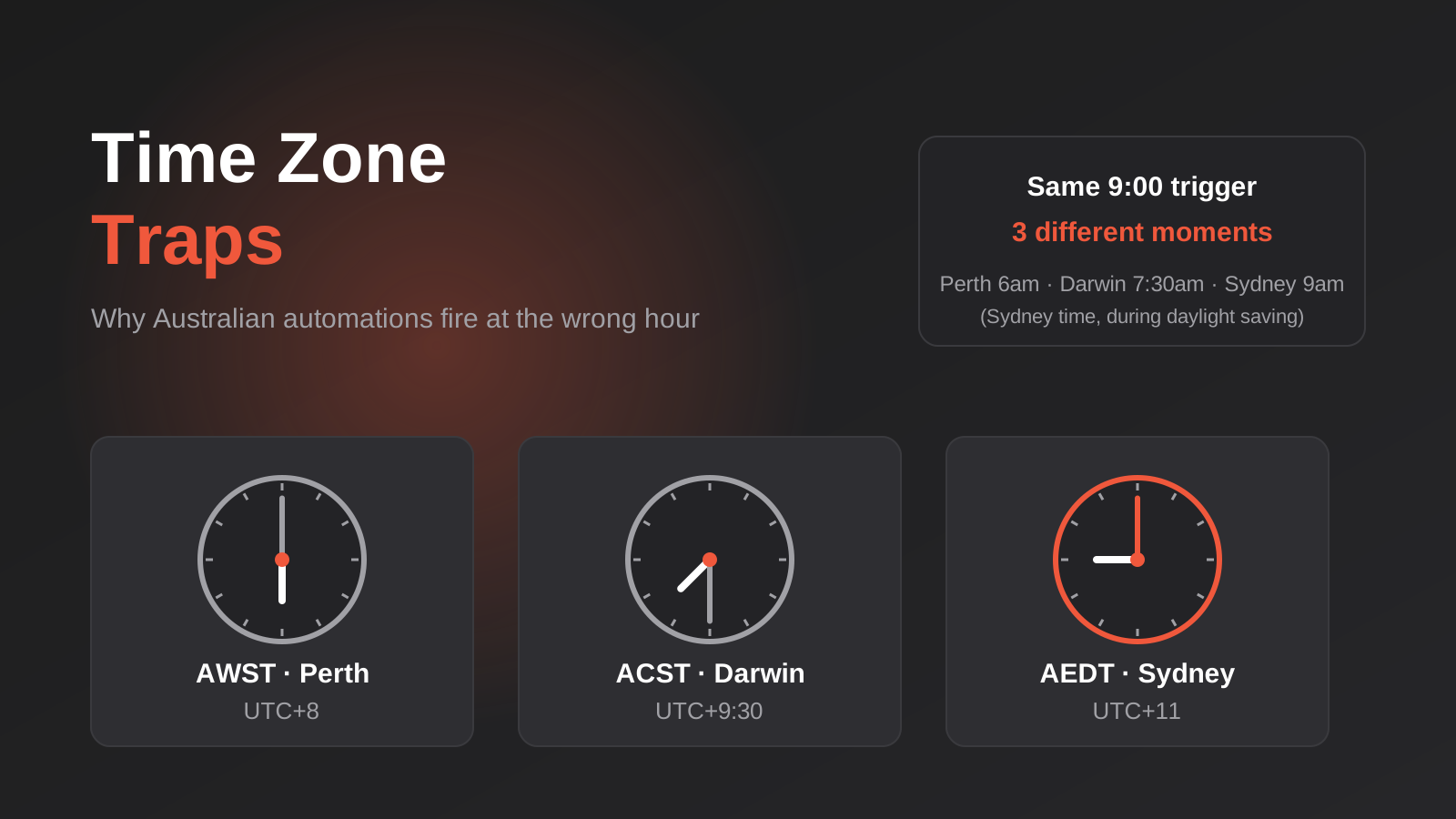
A reminder email goes out at 9am. Except the customer in Perth gets it at 6am, the one in Brisbane gets it an hour early for half the year, and on the first Sunday in October someone’s nightly sync simply doesn’t run. Nobody changed anything. The business just crossed a boundary that the automation never knew existed.
Time handling is the least glamorous part of building automations, and it’s where a surprising number of “it worked in testing” failures come from. Australia makes it harder than most countries. We have three standard time zones, daylight saving that applies in some states and not others, a few half-hour offsets, a public holiday calendar that differs by state and sometimes by suburb, and a financial year that starts in July while most software assumes January. Almost every automation platform was designed in the northern hemisphere, and its defaults reflect that.
This guide is about getting those details right in the tools Australian businesses actually use: Zapier, Make, n8n, your CRM, your booking system and any custom code sitting behind them. It’s not about picking a platform. It’s about what goes wrong after you’ve picked one, and how to build so it doesn’t.
Why Australia Is Harder Than It Looks
Most developers learn time zones from US examples, where the rule is simple enough: everyone shifts by an hour on the same weekend. Australia doesn’t work that way, and the differences show up the moment your business operates in more than one state, or sells to customers in more than one.
Three standard zones, five rule sets
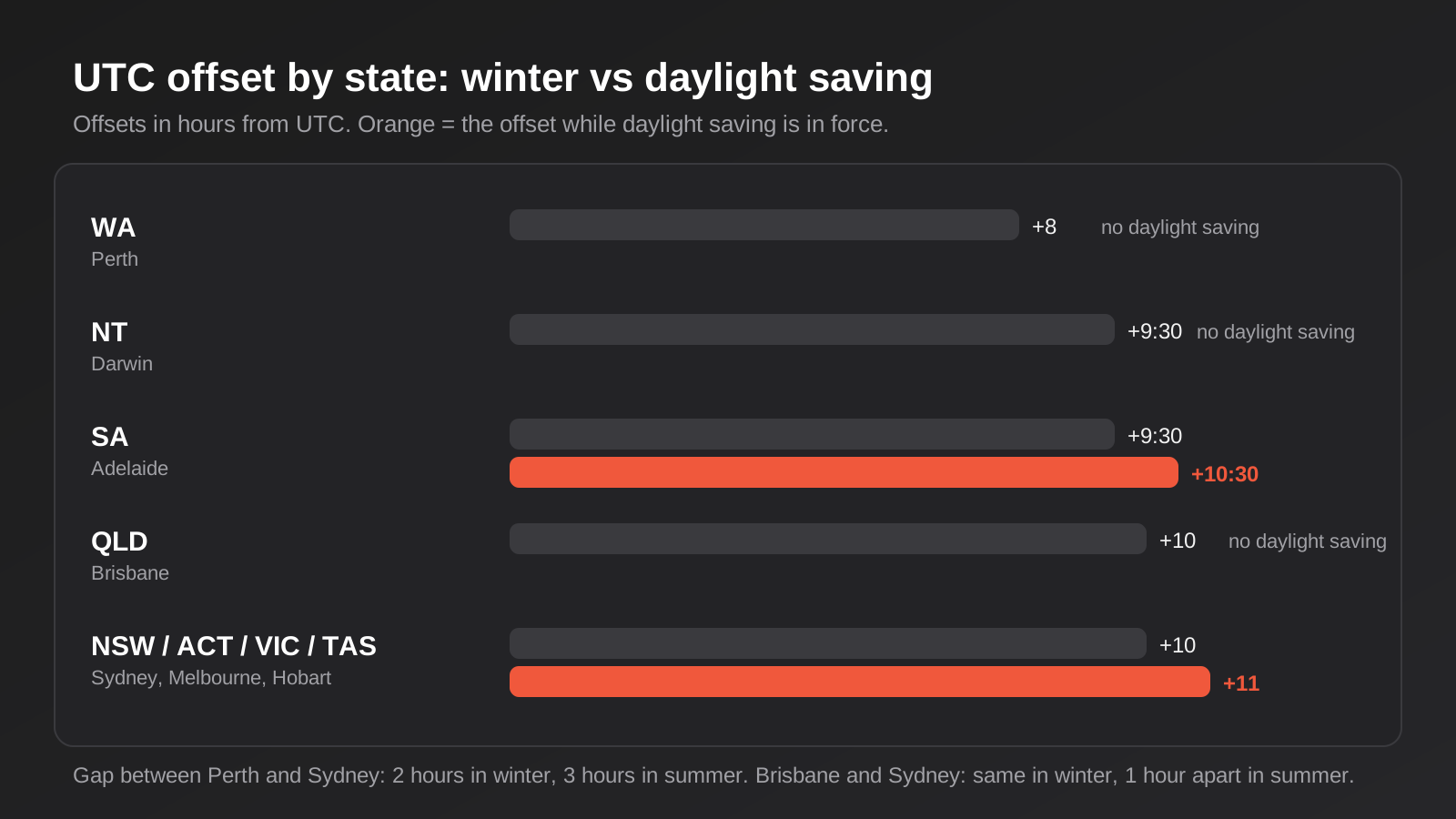
Mainland Australia has three standard time zones. Western Australia runs on Australian Western Standard Time, UTC+8. The Northern Territory and South Australia run on Central Standard Time, UTC+9:30. Queensland, New South Wales, Victoria, Tasmania and the ACT run on Eastern Standard Time, UTC+10.
That’s the easy part. The complication is that daylight saving doesn’t follow the zones. New South Wales, Victoria, Tasmania, the ACT and South Australia all move their clocks forward, while Queensland, the Northern Territory and Western Australia stay put all year. So South Australia shares a standard-time offset with the Northern Territory but not a summer one, and Queensland shares a standard-time offset with Sydney and Melbourne but not a summer one.
The practical effect is that the time difference between two Australian cities isn’t a fixed number. Perth and Sydney are two hours apart for about six months and three hours apart for the other six. Brisbane and Sydney are identical in winter and an hour apart in summer. Adelaide and Sydney are half an hour apart all year, which surprises people from overseas every time. Darwin and Sydney are half an hour apart in winter and an hour and a half apart in summer.
When the clocks actually change
Daylight saving starts at 2am standard time on the first Sunday in October, when clocks jump to 3am, and ends at 3am daylight time on the first Sunday in April, when clocks go back to 2am. In 2026 the start was Sunday 4 October, and the next end is Sunday 4 April 2027. Those dates move around, because “first Sunday” isn’t a fixed date, so any rule hard-coded as “1 October” or “the first weekend in April” will be wrong in some years.
Two consequences matter for automation. On the spring-forward Sunday, the local hour from 2:00 to 2:59am doesn’t exist. On the fall-back Sunday, the local hour from 2:00 to 2:59am happens twice. Anything scheduled in that window, or any logic that adds 24 hours to a timestamp and expects the same time tomorrow, can misbehave on exactly two nights a year. That’s rare enough to slip past testing and common enough to cause real incidents.
The odd corners
There are a few places that don’t follow their state’s pattern, and they matter if you have customers or sites there. Broken Hill in western New South Wales uses Central time rather than Eastern. Lord Howe Island runs on UTC+10:30 in winter and UTC+11 in summer, so its daylight saving shift is 30 minutes rather than an hour. And a small stretch of the Nullarbor around Eucla informally runs on UTC+8:45, though that isn’t an official zone and most software ignores it.
You probably won’t hit these often. But the right fix for all of them is the same one that makes the big cases work: use proper zone names from the IANA time zone database, such as Australia/Sydney, Australia/Perth, Australia/Adelaide, Australia/Brisbane, Australia/Darwin, Australia/Hobart, Australia/Broken_Hill and Australia/Lord_Howe. Those names carry the daylight saving rules with them. A bare offset like +10:00 carries none.
Where Time Zone Bugs Actually Come From
After enough projects, the failures sort into a handful of repeat patterns. Knowing them is most of the battle, because each one has a specific place to look.
Three clocks, and they don’t have to agree
A typical scheduled automation involves at least three different ideas of what time it is. There’s the timezone setting of your automation account or workspace. There’s the timezone of the server or container the platform runs on, which is very often UTC. And there’s the timezone of the system you’re reading from or writing to, such as your CRM, whose user profile may be set to something else entirely.
Each of those can be right and the result can still be wrong. n8n is a good illustration, because it documents this openly. A schedule trigger uses the timezone set on the workflow if there is one, otherwise the instance-level setting, and if nobody has configured anything, a default that is a US city rather than anywhere in Australia. Self-hosted setups add another layer, since the container’s own timezone variable has to be set consistently across every worker, not only the main process.
Zapier and Make each have their own account or scenario timezone settings too, and the specific menu names change over time, so rather than quoting a screen path we’d rather give you the habit: the first time you build a scheduled automation on any platform, find where its timezone is set, set it deliberately, and write down what you chose.
Cron expressions written in UTC
A lot of scheduling is done with cron expressions, and cron has no concept of Australia. If your scheduler evaluates cron in UTC and you want something to run at 8am in Sydney, you have to translate. At 8am AEST, that’s 10pm UTC the previous day. At 8am AEDT, it’s 9pm UTC the previous day. Write one UTC expression, and your 8am job becomes a 9am job for half the year without anyone touching it.
The fix is to schedule against a named zone, not a UTC offset, wherever your tool allows it. If the tool only accepts UTC, you need two schedules or a small check step that decides whether it’s the right local hour before doing the work.
The gap and the repeat
A job scheduled for 2:30am local time is a great example of a bug that waits for its night. On the spring-forward Sunday there’s no 2:30am, so depending on the scheduler the job may be skipped entirely, or may run at 3:30am, or in some implementations run at 3:00am. On the fall-back Sunday there are two 2:30ams, and a naive scheduler can run the job twice.
Skipped is bad when the job is a nightly sync or a billing run. Doubled is worse when the job sends invoices or emails. That second case is a classic source of duplicates, and it’s the same problem we describe in why automations duplicate invoices, orders and emails. If your job is idempotent, running twice is harmless. If it isn’t, daylight saving is how you find out.
Date-only values stored as timestamps
This one is subtle and it causes more quiet data corruption than any of the others. A delivery date, a due date, a birthday, a contract start date: these are calendar dates, not moments in time. But many systems store everything as a timestamp, and when a date gets saved as midnight in one zone and then read back in another, it can shift by a day.
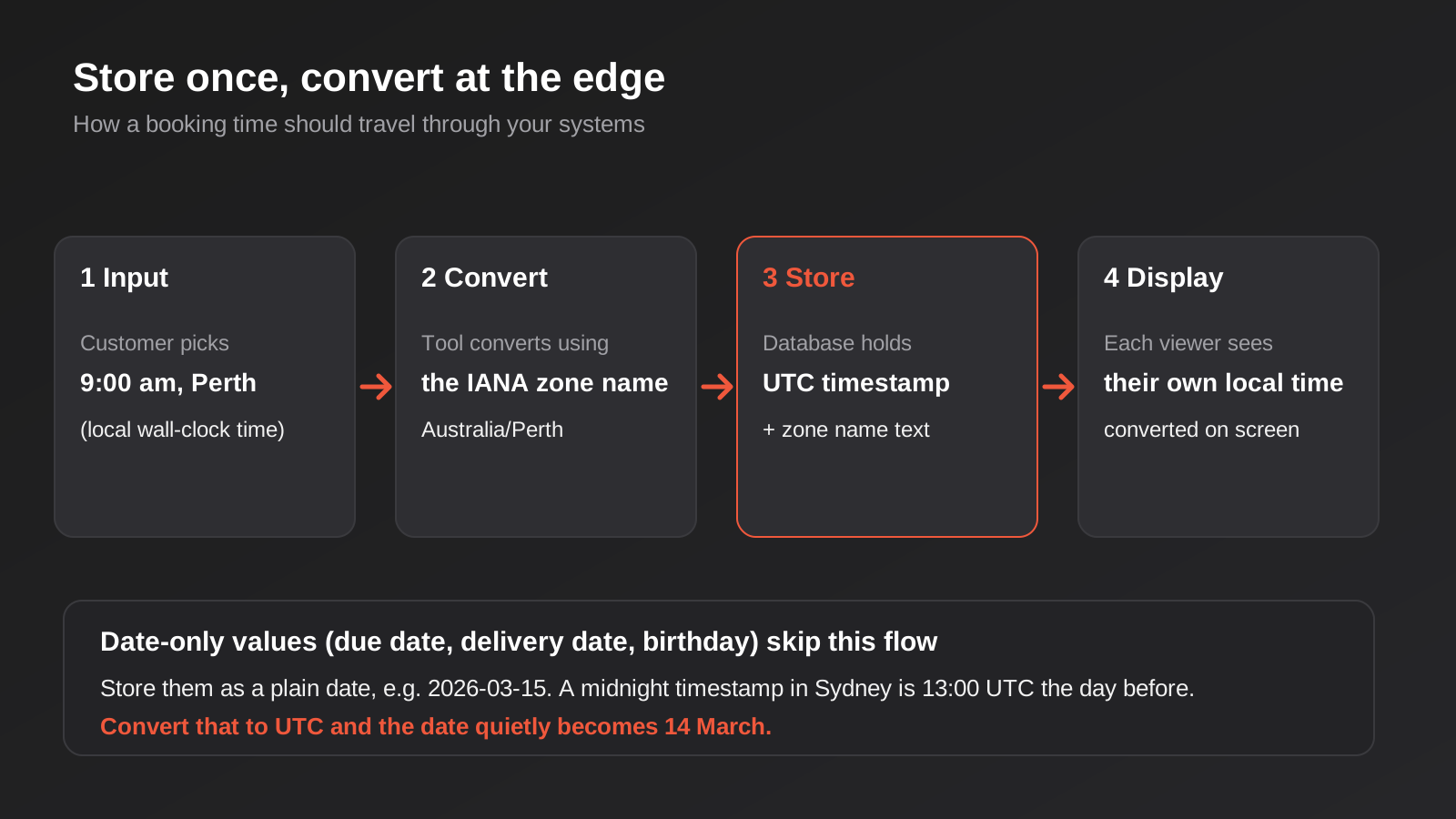
For example, 15 March at midnight in Sydney during daylight saving is 13:00 UTC on 14 March. A tool that converts to UTC and then formats just the date part will report 14 March. The invoice is now due a day early, or the booking sits on the wrong day in the report. Nothing errored. The number is just wrong.
Tools that assume the US
Date handling also fails at the edges where text is parsed. A CSV with a date that reads 03/04/2026 means 3 April in Australia and 4 March in the US, and a tool with US defaults will read it the second way unless told otherwise. If the day is above 12 the parse will fail loudly, which is the lucky outcome. If the day is 12 or below, it succeeds quietly and gets it wrong. More on that further down.
Store in UTC, Keep the Zone, Convert at the Edge
The pattern that avoids most of these problems is boring and well established, and it applies whether you’re building a Zap, a Make scenario or a custom system. The rule is to store moments in UTC, keep the zone that meant something to the user, and convert only when you display or schedule.
What to store for a moment in time
When something happens at a specific instant, such as a booking, a payment, a ticket creation or a login, store it as a UTC timestamp. That value is unambiguous. It means the same thing whether you read it in Perth, Sydney or Auckland, and it doesn’t change when the clocks do.
Alongside it, store the zone name that the user was working in, as a text value like Australia/Perth. This is the part people skip, and it’s the part you’ll want later. Without it you can’t answer questions like “what time did the customer think this was?” or “what time should the reminder go out?” A bare offset isn’t a substitute, because +8:00 tells you nothing about what happens next October.
Date-only values are different
For calendar dates, store a plain date with no time and no zone. A due date of 2026-03-15 stays 2026-03-15 everywhere. If your database or CRM insists on a timestamp, pick a convention, such as noon local time, and apply it everywhere, because noon survives zone shifts of up to eleven hours in either direction without crossing midnight.
Where you can, tell the difference in the field name too. A field called delivery_date and one called delivered_at make it obvious which kind of value each one holds, and that clarity helps whoever builds the next automation on top.
Recurring events: store the rule, not the instances
A weekly meeting at 10am Perth time is a rule, not a list of timestamps. If you expand it into UTC timestamps in advance, every instance after the next clock change will be an hour out for people in zones that shift. Store the rule, “every Tuesday at 10:00 in Australia/Perth”, and compute each occurrence when you need it. Perth doesn’t shift, but a 10am Tuesday meeting in Melbourne does, and the UTC value behind it changes twice a year.
The same applies to anything recurring: subscription renewal dates, maintenance windows, rostered shifts. Rostering is a good example, because the shift is the rule and award interpretation depends on local time, including overnight and weekend penalty windows that straddle midnight.
Scheduling That Survives Daylight Saving
Most businesses don’t need to care about every edge case here. A few habits cover nearly all of it.
Pick a city-based zone, never a fixed offset
If your platform lets you set a timezone, choose a named zone like Australia/Sydney, not “GMT+11” or “UTC+10”. A named zone follows the daylight saving rules for that place. A fixed offset follows nothing, and your schedule will drift by an hour twice a year.
The only time you want a fixed offset is when you deliberately want a job to run at the same absolute moment all year round, for example to align with an overseas system’s daily cutoff. Even then, write it down, because the next person will otherwise assume it’s a mistake.
Stay out of the 2am to 3am window
The cheapest fix for the gap-and-repeat problem is not to schedule things there. Run nightly jobs at 1am, or at 4am, or any time that exists exactly once on every night of the year. This isn’t elegant but it works, and it needs no special code.
Be aware that this applies to the zone that matters, not just yours. A job in Perth never hits the gap, because Western Australia doesn’t observe daylight saving. A job aimed at a Sydney-based system might, even if the automation platform itself is configured for Perth.
Plan for missed runs
Some schedulers don’t run jobs that were due while they were down. If a self-hosted n8n instance is restarted at the wrong moment, or a platform has an incident, a scheduled run can simply not happen, and nothing marks it missing. For anything where a skipped run has a cost, make the job catch up: have it look at what’s outstanding since the last successful run, not just at “today”.
That means saving a “last processed” marker, such as a timestamp or record ID, and using it as the starting point next time. A job built that way handles daylight saving gaps, outages and restarts with the same logic. It’s also much easier to monitor. If you’re setting up alerts for this kind of thing, our piece on monitoring Zapier, Make and n8n workflows explains what to watch for.
Make repeated runs harmless
Assume that any job might sometimes run twice, whether from a daylight saving repeat, a retry or a manual re-run. Give each unit of work a stable key, such as an invoice number or an order ID, and check for it before creating anything. Then the repeat is a no-op instead of a duplicate.
Public Holidays and Business Days
Time zones get the attention, but public holidays cause at least as many wrong-looking results, particularly in anything that promises a response or delivery by a certain number of business days.
There’s no single Australian holiday calendar
Some holidays are national in name: New Year’s Day, Good Friday, Easter Monday, Anzac Day, Christmas Day and Boxing Day, and in most places Australia Day. But even these have quirks, such as which day a holiday is observed on when it falls on a weekend, and the substitute day isn’t the same everywhere.
Then there are the ones that differ by state. Labour Day falls in different months depending on where you are. The King’s Birthday holiday is in June in most states but a different date in Queensland and Western Australia. Melbourne Cup Day is a public holiday in parts of Victoria, and not in the rest of the country. Some states have holidays for specific events or days that others don’t have at all.
On top of that, some holidays are regional or local. Show days and certain regional race days apply only to specific areas within a state. So the honest answer to “is Tuesday a public holiday?” is “for whom, and where?”
Where to get holiday data
You need holiday data from somewhere that’s kept up to date, and you need to know what you’re trusting. The federal government has published a machine-readable Australian public holidays dataset on data.gov.au, split by jurisdiction. The listing shows its reference period running to the end of 2025 and some copies are labelled inactive, so check whether it covers the years you need before building on it. The official state and territory government pages remain the authoritative source for any given year.
For most small and mid-sized businesses, the practical approach is to keep your own holiday table, one row per date per jurisdiction, and update it once a year when the state governments publish the next year’s dates. It’s a ten-minute job in each January. If you’d rather use a third-party holiday API or library, check which Australian regions it covers and whether it distinguishes states before you rely on it, because some treat Australia as one country with a single list.
Whichever source you use, keep it in one place. When three different automations each carry their own hard-coded list of holidays, they’ll disagree the first time one is updated and the others aren’t.
Business-day arithmetic
Many workflows promise things in business days: respond within two business days, deliver within five, invoice is due in seven. Computing that properly means skipping weekends and the right holidays for the right place.
The key question is whose calendar you’re counting on. A support SLA is usually counted on the calendar of the business that made the promise. A delivery estimate depends on the warehouse and the carrier. A payment term is often defined in a contract. If you serve customers in several states, you may need to count against more than one calendar, and the place to store which one applies is on the record itself, as a state or region field.
Helpdesk automation shows where this bites in practice: SLA clocks that should pause outside business hours but don’t know it’s a public holiday in Hobart.
The postcode problem
When a holiday applies to a region within a state, the only way to know whether it applies to a customer is to map their location to that region. For most businesses that mapping is overkill. If you’re running a hospitality, retail or trade business that really does care about regional holiday trading rules, use the customer’s or site’s postcode or suburb and build a small lookup, instead of trying to infer it from the state alone.
Think about what a wrong answer costs. If a reminder goes out on a local holiday, the cost is trivial. If a payroll or award calculation uses the wrong penalty rate, it’s a compliance issue. Match the effort to the risk.
Financial Year, BAS Dates and Other Calendar Rules
Australian businesses run on a 1 July to 30 June financial year, and a lot of reporting automation inherits assumptions from tools built around the calendar year. If your dashboard has a “year to date” widget that counts from 1 January, it isn’t telling your accountant what they need.
Define periods once
Quarters are the same trap. The Australian financial year’s first quarter is July to September, so “Q1” means different things to your accounting system and a US-built reporting tool. Decide what your quarter definitions are, document them and apply them in every report and automation. Where a tool lets you set the fiscal year start, set it to July.
For tax-related cycles, such as BAS lodgements and quarterly super contributions, due dates generally fall on set days after each quarter ends, and they roll to the next business day when they land on a weekend or holiday. Check the ATO for the dates that apply to your situation and your lodgement method, because they can differ if you use a tax agent. If you automate reminders around those dates, compute them from the actual dates for the year rather than assuming “the 28th”.
End-of-month and “last day” logic
“Run on the last day of the month” sounds simple, and it’s a common source of bugs. Months have 28 to 31 days, so a rule written as “day 30” skips February and a rule written as “day 31” skips five other months. Use your tool’s end-of-month option if it has one, or compute the last day from the first day of the next month minus one.
Month-end reports have an additional trap with time zones: “the whole of March” means 1 March at 00:00 local time to 31 March at 23:59:59 local time, which isn’t the same range in UTC. A report that filters in UTC will quietly pull in the last few hours of February and drop the last few hours of March. If revenue reports from your automation don’t match your accounting system by a small, odd amount, this is a likely cause.
Date Formats, Spreadsheets and CSV Imports
Dates also go wrong at the point where text becomes a date, and this happens constantly in spreadsheets and imports.
Use an unambiguous format between systems
When two systems exchange dates, use the ISO 8601 format: 2026-04-03 for a date, and 2026-04-03T09:30:00+10:00 or 2026-04-02T23:30:00Z for a moment in time. It’s unambiguous, it sorts correctly as text and nearly every tool can parse it. Save the dd/mm/yyyy display format for the screen that a person reads.
When a tool receives a date as text, check what format it’s expecting. If it offers a “date format” or “locale” field in the step, set it explicitly instead of relying on the default. That one setting prevents an entire category of silent errors.
Spreadsheet locale is a setting, not a given
Google Sheets and Excel interpret typed dates according to the locale of the file or machine. A sheet created by a US-based contractor may be set to the United States, in which case typing 03/04/2026 gives you 4 March. If your automations read from or write to a sheet, check its locale, and if you can, store dates there in ISO form or as proper date-formatted cells instead of text.
Imports and exports
If your imports have ever shifted a batch of dates, look at the source file’s format first. Export files from different systems use different conventions, and some include a time zone, while others silently use the user’s. Before you run a large import into a CRM, test with a handful of rows where the day is above 12, and a few where it isn’t, and check what lands in the target. That small test is cheap compared to cleaning 8,000 records afterwards.
AI Assistants and Dates
If you’re adding an AI model to a workflow, such as a chatbot that books appointments or an assistant that drafts follow-up emails, there’s a related trap. Language models don’t know what the date or time is unless you tell them. If a customer says “can we do next Tuesday?” and the model has no current date, it will guess, and the guess can be months wrong.
The fix is straightforward. Put the current date, the day of the week and the business’s time zone in the system prompt or the tool context on every request, and have the model return dates in a fixed format that your code then validates. Don’t trust the model to do date arithmetic across daylight saving boundaries or public holidays. Ask it to extract the intent (“a Tuesday the week after this one, in the afternoon”), then let normal code work out the actual date, check availability and apply holiday rules.
The same approach applies to anything a customer types in free text. Parse it, confirm it back in their words with the zone attached (“Tuesday 14 April, 2:00pm Perth time”), and only then store it.
A Practical Test Plan for Time-Sensitive Automations
You can test most of this without waiting for October. The aim is to deliberately feed your automation awkward dates and see what it does.
- Run the workflow with a test record dated on each of the two daylight saving change days, with times just before, inside and just after the 2am hour.
- Create a record dated 31 January, 28 February and 30 June, and check that anything based on month-end or financial year-end lands where you expect.
- Use a customer in Perth and a customer in Sydney in the same test, at the same moment, and confirm each sees the right local time.
- Include a record on a state-specific public holiday, and one on a national one, and check that business-day counts skip the right days for the right place.
- Import a small CSV with ambiguous dates, such as 04/05/2026, and check the result.
- Re-run a completed job on purpose, to confirm it doesn’t duplicate anything.
Many platforms let you set a test run’s date or replay a past execution with sample data, and in custom code you can inject a fixed clock. If a tool can’t do either, you can create test records with future dates and trigger the workflow manually. If you’re making changes to something already live, do it the safe way, with a copy of the workflow instead of editing the live one.
Put the next two clock changes in your calendar, Sunday 4 April 2027 and Sunday 3 October 2027, with a note to check that scheduled jobs ran and that nothing doubled. It takes five minutes and catches the failure while it’s small.
Common Mistakes
These are the ones we see repeatedly, roughly in order of how often they cause real problems.
- Setting the platform timezone once, never checking it. The default is rarely Australian, and the setting can differ between workspace, workflow and server.
- Using a fixed offset instead of a named zone. +10:00 is right in winter and wrong in summer for anyone in Sydney or Melbourne.
- Scheduling jobs between 2am and 3am local time. The hour that disappears in October and repeats in April.
- Storing a date as a timestamp. Due dates and delivery dates shift by a day when converted between zones.
- Hard-coding public holidays in several places. The copies drift apart, and one is always out of date.
- Treating Australia as one time zone. Perth, Darwin, Adelaide and Brisbane all behave differently from Sydney.
- Counting business days without a state. A holiday in Melbourne isn’t a holiday in Brisbane.
- Accepting dd/mm and mm/dd dates without checking the locale. Failures are silent for any day of the month up to 12.
- Calendar-year reporting for an Australian financial year. Year-to-date and quarterly figures don’t line up with accounting.
- Letting an AI assistant guess the date. It will, and it will sound confident.
- No catch-up logic. One missed run leaves a gap nobody notices until a customer does.
Frequently Asked Questions
Which time zone should I set in Zapier, Make or n8n for an Australian business?
Set it to a named zone for the place your business operates, such as Australia/Sydney or Australia/Perth, rather than a fixed offset. A named zone follows daylight saving automatically. If you serve customers in several states, keep the platform on your head-office zone and store each customer’s own zone on their record, so reminders and reports can be converted correctly. Check the setting at every level the tool offers, because workspace, workflow and server settings can differ.
Why did my scheduled automation run an hour early or late in October or April?
Most likely the schedule was defined in UTC, or against a fixed offset, instead of a named local zone. When daylight saving started or ended, the local time of the run moved by an hour while the UTC time stayed the same. Switch the schedule to a named zone such as Australia/Sydney, or if the tool only supports UTC, rework the schedule when the clocks change and add a check that confirms the local hour before the work runs.
What happens to a job scheduled for 2:30am on the day daylight saving starts or ends?
On the start day, 2:30am doesn’t exist in daylight-saving states, so depending on the scheduler the job may be skipped or run at a different time. On the end day, 2:30am happens twice, so a naive scheduler may run it twice. The simplest fix is to schedule overnight jobs outside the 2am to 3am window, and to make the job safe to repeat by using stable keys, so a second run does nothing.
How do I handle Australian public holidays in an automation?
Keep one holiday table with a row for each date and jurisdiction, and update it each year from the official state and territory government sources. Store the state or region on each customer or site record, so business-day calculations use the right calendar. Avoid copying the list into several workflows, because the copies will fall out of step. Check any third-party holiday API for whether it separates Australian states before you rely on it.
Should dates be stored as text, as a timestamp or as a date?
It depends on what the value means. A specific moment, such as a booking time or a payment, should be stored as a UTC timestamp along with the zone name. A calendar date with no time, such as a due date or a birthday, should be stored as a plain date. Using a timestamp for a date-only value is a common cause of off-by-one-day errors when systems convert between zones. When text is exchanged between systems, use the ISO 8601 format.
Do I need a developer for any of this, or can I fix it in the platform?
Many of these fixes are settings: the platform timezone, a named zone on each schedule, a date format on an import step, a fiscal year start. You can usually do those yourself. A developer becomes useful when the logic is more involved, such as business-day calculations across several state calendars, catch-up logic for missed runs, or custom systems that store times in the wrong format. If you aren’t sure which side you’re on, an audit of your current automations will tell you quickly.
Where to Start
You don’t need to audit everything at once. Start with the automations where a wrong time has a real cost: anything that sends customers a message, creates an invoice, applies a deadline or feeds a report your accountant relies on. For each one, answer four questions. What time zone is it running in? Is that a named zone or an offset? Does it touch the 2am to 3am window? And if it runs twice, or not at all, what happens?
That short list usually turns up two or three things worth fixing immediately, and a few more that can wait until the next time you touch the workflow. If it’s more tangled than that, particularly where several systems each keep their own idea of time, it’s often a sign that the underlying API integrations need a proper design pass, with a single agreed convention for how times and dates travel between them.
If you’d like a second pair of eyes on a specific workflow, we’re happy to have a conversation about it. We build and maintain business process automation for Australian businesses, and checking time handling is a regular part of how we review existing setups. You can also read how we approach scoping on our automation pricing page.
Because we run lean as a specialist agency rather than carrying a large account-management layer, our fixed quotes typically come in below the Australian averages. If you’ve already got a written quote from another agency for comparable scope, send it through and we’ll do our best to beat it.
Keep reading
Related posts

Best Job Management Software for Australian Trade Businesses (2026)
Six job management tools for Australian trades compared: ServiceM8, Tradify, Fergus, AroFlo, simPRO and Jobber, with real drawbacks and pricing models.
Best CRM for Australian Small Business (2026): 6 Compared
Six CRMs compared for Australian small businesses: free plans, AU data hosting, real costs, Xero fit and the drawbacks vendors skip.

Best CRM for Australian Small Business (2026): 6 Compared
Six CRMs for Australian small business compared: HubSpot, Zoho, Pipedrive, Capsule, Salesforce and monday. Pricing, Sydney hosting and real drawbacks.
Got a project you'd like to talk through?
Tell us what you're working on — we'll come back with a plan.
