
Best Inventory Management Software for Australian Ecommerce Stores (2026): 6 Compared
 Jignesh Vagadiya
17/11/2026
21 min read
Somewhere in your business there is a spreadsheet with a column called “actual stock”, and nobody fully trusts it. It gets updated after a delivery, after a stocktake, after a customer rings to say the item they ordered online wasn’t on the shelf. Most Australian online stores run that way for longer than they should, and then one busy weekend the oversell emails start arriving. The question stops being whether you need inventory software and becomes which one you can live with.
The timing matters this year. Shopify’s Stocky app, which a lot of Australian merchants used for purchase orders, low-stock reports and forecasting, was pulled from the App Store in February 2026 and stopped working on 31 August. Shopify’s answer is its built-in inventory tools, which have improved but don’t cover everything Stocky did. If you were one of the stores that relied on it, you’ve had a few months of improvising. If you weren’t, the shutdown is a useful nudge to look at how you manage stock before it hurts.
We build and integrate Shopify stores for a living, so we see what happens after the software is chosen: the sync that double-counts a bundle, the Xero invoice that arrives without the right tax code, the warehouse that books stock in faster than the website can read it. That shaped the criteria below. We judged six options on how well they handle multiple locations, purchase orders and suppliers, bundles or assembly, the Shopify and Xero connections, how the pricing behaves as you grow, and whether the vendor treats Australia as a real market (AUD billing, GST, local support hours) or an afterthought. Every tool gets a real drawback, because none of them is perfect. One caution on prices: inventory vendors change plans often, publish in different currencies, and in some cases don’t publish a clear Australian price at all, so treat every figure as a signpost and confirm it on the vendor’s own page before you commit.
Shopify’s Built-In Inventory Tools
What it is. The inventory features already inside your Shopify admin and Shopify POS: stock counts per location, transfers between locations, purchase orders to suppliers, and basic low-stock visibility. Since the Stocky shutdown, these are Shopify’s official answer for merchants who want to manage stock without adding another subscription.
What it does well. It’s already there. There’s no sync to build because there’s nothing to sync: an order reduces the number, a received purchase order raises it, and the figure you see is the figure the storefront uses. For a store with one warehouse, a few hundred SKUs and a single sales channel, that’s often enough, and enough is a perfectly good place to stop. Shopify’s Australian pages describe purchase orders and transfers as built-in features, which covers the two jobs most small merchants actually need.
Where it falls short. It is Shopify’s view of the world and no one else’s. Forecasting is thin compared with a dedicated tool, there’s no real assembly or bill-of-materials handling, and batch or expiry tracking is limited. Stores that sold through Stocky also found that historical purchase orders and stocktakes don’t move across automatically, so check what you need to export. Which features you get, and how many locations you can run, depends on your Shopify plan, and third-party guides disagree on the exact limits, so read Shopify’s current plan comparison rather than a blog post from 2024.
What it costs. Nothing extra beyond your Shopify plan. That’s the point of it.
Who it suits. Single-warehouse retailers with a modest catalogue who sell mainly through Shopify and POS. If your real problem is that updating counts one product at a time is painfully slow, you may not need new software at all. A bulk import tool solves that, and we’ve written up the method in our guide to updating Shopify inventory in bulk by SKU.
Zoho Inventory
What it is. A cloud inventory and order management product from Zoho, sold in tiers that scale by order volume, locations and automation. It connects to Shopify and several marketplaces, and it sits naturally beside Zoho Books and the rest of the Zoho suite.
What it does well. It’s the cheapest serious option here. The Australian figures we found (from a third-party listing last checked in March 2026, so confirm them) put the plans at roughly A$54 a month at the bottom to about A$241 a month at the plans most growing retailers would look at, quoted in AUD including GST. For that you get purchase orders, sales orders, bundles, multiple warehouses on the higher tiers and barcode support. A business that already lives in Zoho gets a tidy single-vendor setup, which means fewer connectors to maintain.
Where it falls short. The cheap tiers are capped. The listing we found showed two locations on the entry plan and four on the higher ones, with limits on users and automation that bite as you grow. The ecosystem advantage runs both ways: if your accounting sits in Xero or MYOB, Zoho’s tight pairing is with its own Books product, so check how stock and invoice data will travel before assuming the numbers will match. Reviewers also tend to describe the interface as functional rather than pleasant, which matters if five people use it daily.
What it costs. From the low tens of dollars a month to a couple of hundred, depending on plan, with add-ons priced separately. Zoho lists Australian plans in local currency, so there’s no exchange-rate drift on the invoice.
Who it suits. Small retailers and wholesalers on a tight budget who want purchase orders and proper multi-location stock without a four-figure monthly bill, especially if they’re already using Zoho for accounting or CRM.
inFlow Inventory
What it is. An inventory and order management platform aimed at small product businesses, with a desktop-style cloud interface, a barcode scanning app for warehouse staff, and a customer portal for wholesale orders. It’s a North American product that small Australian businesses also use.
What it does well. The warehouse side is its strength. Receiving stock, picking orders and doing stocktakes with a phone scanner is straightforward, and the B2B ordering portal suits businesses that take repeat orders from trade customers. Setup is quicker than for the heavier systems below, and it offers a 14-day trial so you can load real products before paying anything.
Where it falls short. It bills in US dollars, so your cost moves with the exchange rate and your card issuer’s foreign transaction fee. Its plan structure has also changed more than once and the aggregator sites we checked don’t agree on current tier names or prices. We saw entry pricing somewhere around US$130 to US$160 a month and top tiers above US$800, but confirm that on inFlow’s own page, because we couldn’t verify it from the vendor. Plans cap users, orders or locations, and the Australian-specific parts (GST handling, local accounting links) are things you configure rather than things that arrive built in.
What it costs. Mid-range for small-business software, in US dollars, climbing with team size and order volume. Ask what happens to the price when you add a second warehouse or a few more users.
Who it suits. Small to mid-sized product businesses with a physical stockroom, barcode-driven receiving, and some wholesale customers, who’d rather have strong warehouse tools than a big ecosystem.
Unleashed
What it is. Inventory management software built in New Zealand with a long history in Australian wholesale, distribution and light manufacturing. It handles stock across warehouses, purchasing, sales orders, batch and serial tracking, and bills of materials.
What it does well. It behaves like software made for this market. Pricing is available in Australian dollars, and Xero is one of its core integrations, which matters because a clean inventory-to-ledger link saves a bookkeeper a lot of hours. Assembly and manufacturing workflows are genuine features rather than a workaround, and it copes with the awkward cases: stock in a warehouse and a retail shop, products bought in one unit and sold in another, trade price tiers.
Where it falls short. It’s priced like a business system. When we looked, the Australian pricing page listed plans starting at about A$449 a month with the next tier near A$819, each with a small allowance of user licences, so a team of eight pays more than the headline. It was built around wholesale and distribution, so a retail-heavy business with a lot of POS traffic may find the Shopify side less polished than the back-office side. As with anything here, test the connection with your real catalogue before you sign, particularly variants and bundles.
What it costs. A few hundred dollars a month at the entry point, rising with users and plan tier, in AUD. Implementation help is usually extra and worth asking about.
Who it suits. Wholesalers, distributors and importers with more than one location, Xero for accounting, and products that get assembled, batched or sold in different units. Less obviously right for a single-warehouse boutique.
Cin7 Core
What it is. The product that began life as DEAR Systems, an Australian inventory platform, and is now part of Cin7. Core handles inventory, purchasing, sales orders, light manufacturing and a long list of integrations. Cin7’s other product, Omni, is a separate and more expensive system with built-in POS and EDI, quoted per business, so don’t mix the two up when you read reviews.
What it does well. It’s the most feature-complete option in the middle of the market. Multiple warehouses, purchasing with approval steps, assembly, wholesale pricing tiers, a lot of channel connectors, and an accounting link to Xero that most reviewers rate well. Onboarding and support get mostly positive comments from users, which is not always the case with software at this size.
Where it falls short. Cost, and the way it’s presented. The published tiers are in US dollars, with Standard at US$349 a month and the upper tiers ranging from about US$599 to over US$1,000 depending on which source you trust, and the vendor’s own page doesn’t make clear whether the figure is monthly billing or the prepaid annual rate. Reviewers on public sites mention repeated price rises and some friction with Shopify syncing of retail prices, costs and barcodes. One ANZ cost guide put implementation at NZ$5,000 to NZ$25,000, though that is a third-party estimate and not a Cin7 figure. Ask for a written quote that lists the plan, the user count, the connectors and any onboarding fee, and ask where your data is hosted if that matters to you.
What it costs. Upwards of roughly US$350 a month, plus implementation, plus integration work where your setup isn’t standard. It’s a real commitment.
Who it suits. Growing multichannel sellers and wholesalers with several warehouses, a team of purchasing and fulfilment staff, and enough revenue that a five-figure setup is proportionate. Overkill for a store doing a few orders a day.
Katana
What it is. A cloud inventory and manufacturing planning tool built for small makers: it tracks raw materials, production orders, and finished goods against live sales. It has a native Shopify connection and sits closer to a lightweight ERP than a stock counter.
What it does well. If you make what you sell, it answers questions generic inventory tools can’t. How many bottles can I fill with the packaging I have? What’s the cost of goods on this batch? When do I need to reorder the raw ingredient so a Friday order doesn’t stall? A visual workflow for production and a clear picture of what’s committed to open orders suit candle makers, food producers, apparel labels and similar small manufacturers.
Where it falls short. It’s built for makers, so a reseller who never assembles anything is paying for features they won’t touch. It’s a US-dollar product with no Australian localisation to speak of: GST and tax handling come through your accounting connection, not from Katana itself. Its pricing was restructured early in 2026, with reports of a lower-cost Core plan around US$299 a month and a custom-quoted tier above it, but confirm the current plans on its pricing page, since the details differ between sources.
What it costs. Roughly the same bracket as Cin7’s entry plan, in US dollars, with larger operations moving to a quoted price.
Who it suits. Australian makers and small manufacturers selling through Shopify, who need bills of materials, production tracking and a live view of ingredient stock more than they need wholesale distribution features.
How to Choose
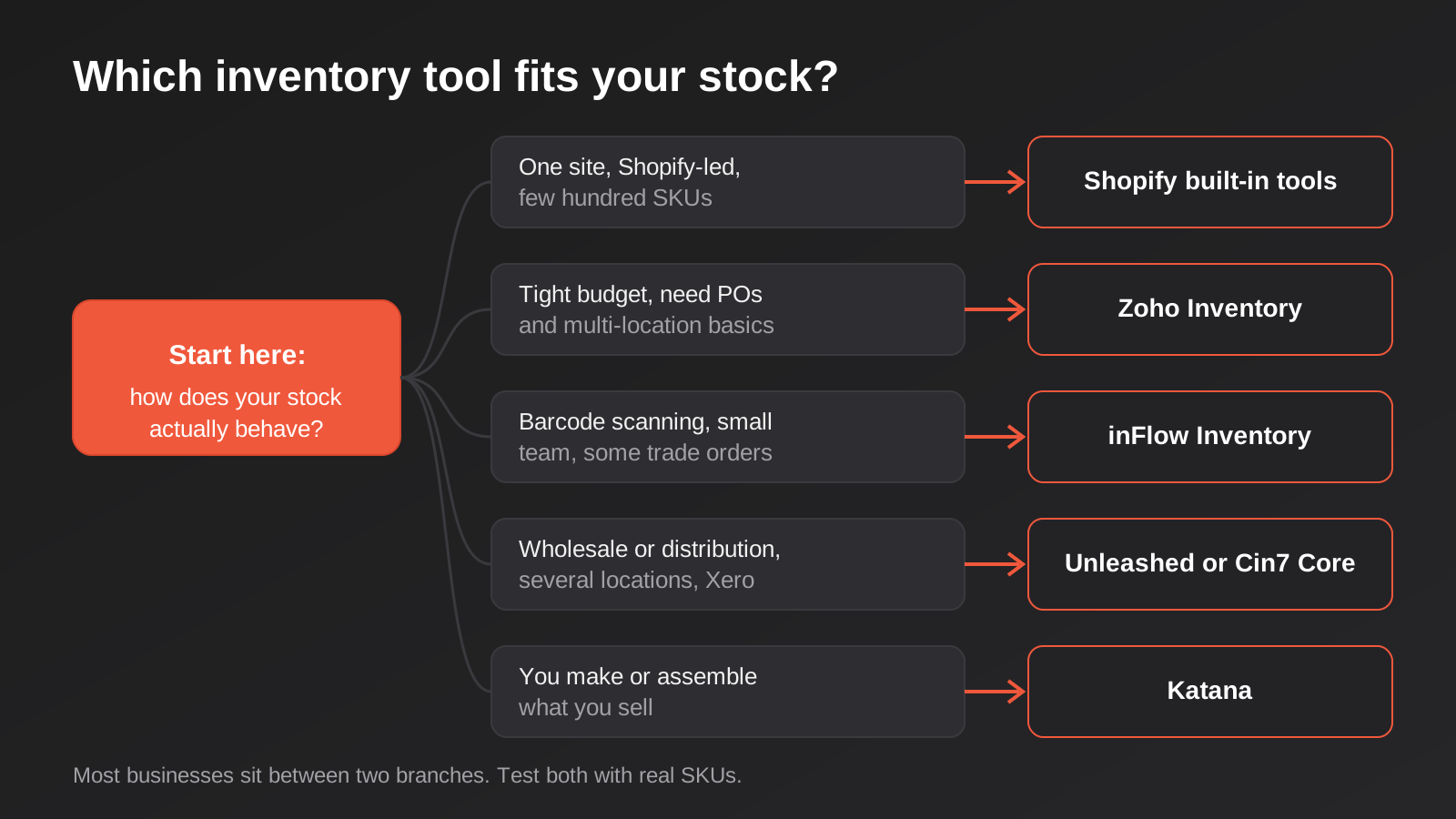
Start by describing your stock honestly instead of your ambitions. How many places does it physically sit? Does anything get assembled, cut, filled or bundled before it ships? Do you buy in cartons and sell singly? Does a supplier deliver it, or do you manufacture it? The answers narrow the field faster than a features table, because the tools split into recognisable camps: Shopify’s own tools for simple single-site retail, Zoho and inFlow for small businesses that want purchasing and warehouse discipline cheaply, Unleashed and Cin7 for multi-location wholesale and distribution, and Katana for makers.
Then look at your neighbours. Inventory software isn’t an island: it has to agree with your online store, your accounting package, your point of sale and your carrier labels. If Xero is the ledger, a vendor with a mature Xero link will save a lot of reconciliation, and our comparison of accounting integrations for Shopify and WooCommerce in Australia goes through how those connections differ. If you sell in a physical shop, you’ll also want to know whether your POS or the inventory system owns the stock count.
Finally, test with ugly data. A demo with ten neat products tells you nothing. Load a few hundred of your real SKUs, including the ones with variants, bundles, odd units and the supplier codes nobody tidied. Place a handful of test orders, receive a purchase order half-delivered, adjust a count, and see what flows where and how fast. The problems that cost money are always in the edge cases, and the trial period is the cheapest time to find them.
Three Setups We See Often
These are composites of common situations, not client stories, but they show how the choice plays out in practice.
The single-warehouse Shopify retailer. Imagine a homewares store with a few hundred SKUs, one storage unit and a part-time packer. Their pain is almost never missing software features. It’s slow count updates and no record of what arrived when. Shopify’s native purchase orders plus a bulk import routine usually fix both. Spending hundreds of dollars a month on a mid-market system here buys complexity the business doesn’t have the staff to operate.
The wholesaler with a shop out the front. Picture an importer holding stock in a warehouse and a retail showroom, selling to trade customers on tiered pricing and to the public through Shopify, with Xero in the back office. This is the classic Unleashed or Cin7 Core customer. The value comes from one stock ledger across both locations, purchase orders that update costs, and an accounting link that doesn’t need a bookkeeper to re-key anything. The risk is the Shopify sync for retail prices and variants, so that’s what to test hardest.
The small maker. Think of a skincare or food label buying raw materials, producing in batches and shipping through Shopify. Tracking finished goods alone misses the real constraint, which is ingredients and packaging. A manufacturing-aware tool like Katana earns its price here, and a generic stock counter would leave the owner back in a spreadsheet for the production side.
What the Licence Price Leaves Out
The monthly subscription is the visible part of the cost. The rest tends to arrive later, and it’s where budgets blow out, so it’s worth making a list before you commit.
Cleaning up your product data. Inventory systems are unforgiving about SKUs. If your catalogue has duplicates, missing codes, or variants that don’t match between Shopify and your supplier’s spreadsheet, the new system will expose every one of them in its first week. Someone has to fix that, and it’s usually a few days of unglamorous work.
Implementation and training. Some vendors include onboarding, some charge a fee, and some partner with a third-party consultant. Staff time counts too. The warehouse team who have used a clipboard for six years will need a few weeks to trust a scanner.
Connectors. Many of these products connect to Shopify, Xero and the common marketplaces out of the box. Plenty of businesses discover that their setup isn’t common: a second sales channel, an old ERP, a 3PL with its own portal, a loyalty system, a supplier who sends stock files in a format that needs transforming. That’s where custom integration work enters the picture. If your stock has to talk to an existing business system, read how ERP integration works, and if your accounting link is the weak point, our Xero and Shopify integration page shows what a purpose-built connection involves.
Currency and price rises. US-dollar billing makes your monthly cost float. Several vendors in this category also raise prices annually, and public reviews of at least two products in this list mention the pattern. Ask what the renewal terms are and whether the price is locked for a year.
Hardware. Barcode scanners, label printers and a decent tablet or two aren’t free. They’re cheap compared with a mispick, but they’re a cost that nobody quoted.
How the Sync Actually Works
It helps to know what you’re buying when a vendor says “Shopify integration”. Most connectors do three jobs. They push available stock quantities from the inventory system to the store, they pull new orders back so stock is deducted and fulfilment can start, and they sync product details such as titles, prices and barcodes in one direction or both. Each of those has settings that decide whether you have a calm year or a noisy one.
Frequency is the first. Some connectors push stock changes within seconds using webhooks. Others poll on a schedule, every few minutes or longer, which leaves a window where two customers can buy the last unit. For a slow-moving catalogue that window is harmless. For limited drops and flash sales it’s the reason oversells happen, so ask how quickly a change travels and what happens under load.
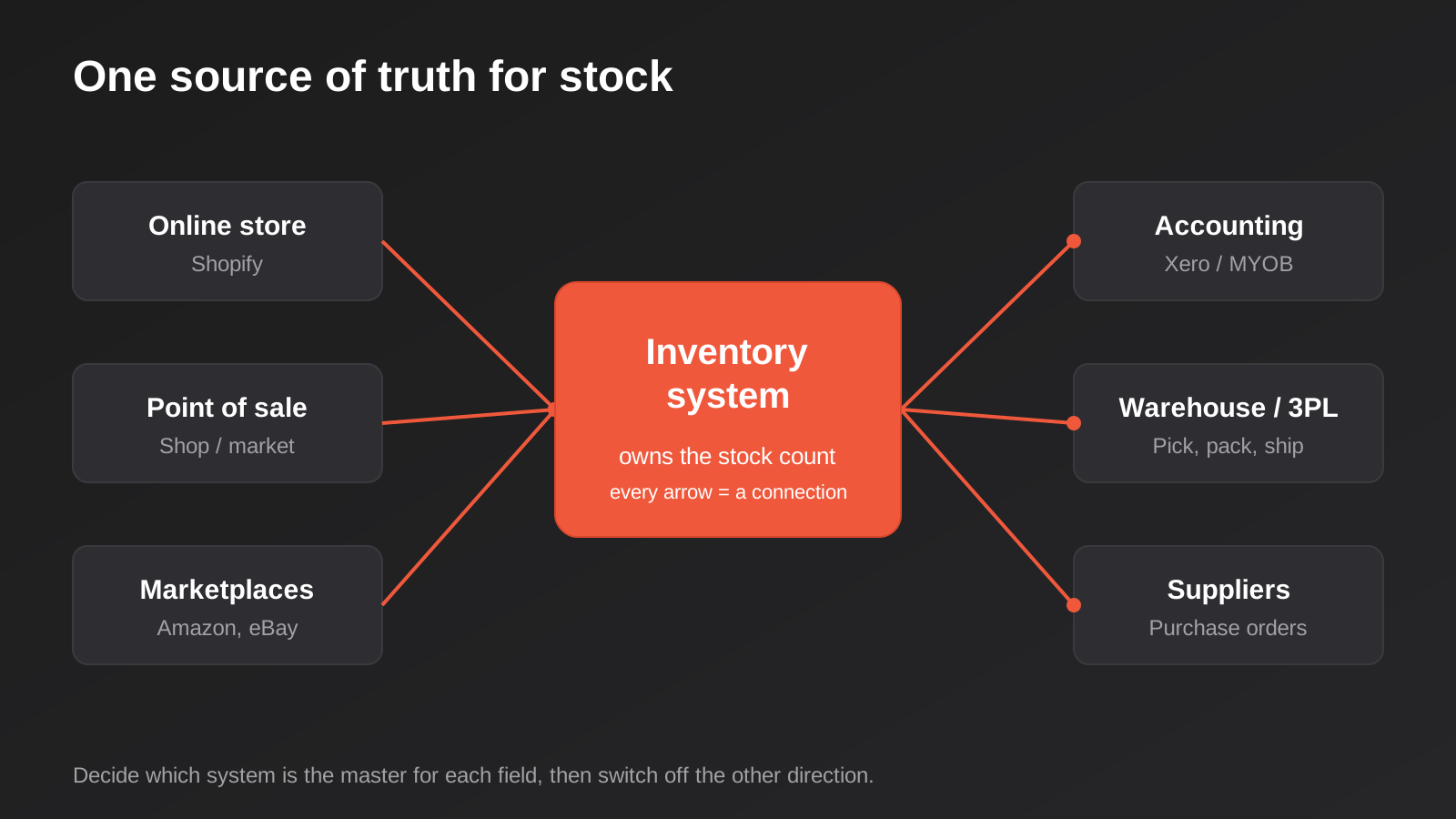
Direction is the second. If prices and descriptions can be edited in both places, one system will eventually overwrite the other. Pick one as the master for each field and switch off the other direction. Third is what the connector does when it fails. A good one retries, logs the failure and tells someone. A bad one stops quietly and you find out when a customer emails. This is the part of the setup most worth monitoring, and it’s the reason businesses with unusual requirements end up commissioning a custom connection instead of relying on a generic one.
Finally, think about the unit of stock. Shopify counts variants. Your warehouse might count cartons, pallets or kits. If the inventory system and the store disagree about what a “unit” is, the numbers will drift by a consistent multiple and it’s maddening to diagnose. Settle the units and bundle rules on paper before you configure anything.
Common Mistakes
- Buying for the business you hope to be in three years. A system built for five warehouses is a drag on a business with one. You can move up later, and migrating is far less painful than most people fear if your SKUs are clean.
- Letting two systems both own the stock count. If Shopify, your POS and your inventory tool all think they’re the master, they will argue. Decide which one is the source of truth and make the others read from it.
- Skipping the stocktake before go-live. You are about to trust software with a number. Make sure the starting number is right, or every report afterwards inherits the error.
- Ignoring how bundles and kits behave. A “gift set” that contains three SKUs has to deduct three stock lines when it sells. Many sync problems come from kits that were set up as a single product on one side and three on the other.
- Choosing on the headline price alone. A cheaper subscription that needs three paid connectors, a consultant and a monthly spreadsheet export isn’t cheaper.
- Forgetting GST and tax mapping. If tax codes on purchase orders and sales don’t line up with your accounting package, the bookkeeper finds out at BAS time.
- Not planning for sync failures. Integrations fail quietly: an expired token, an API limit, a renamed field. Decide who checks the error log and how often, and set up alerts for failed jobs.
- Migrating on a peak weekend. Switch systems in a quiet fortnight, not the week before a sale.
Frequently Asked Questions
Do I need inventory software if I only sell on Shopify?
Not necessarily. Shopify’s built-in tools handle stock per location, transfers and purchase orders, and for a single warehouse with a manageable catalogue that can be enough. You start to need something more when you have several warehouses or sales channels, you assemble or manufacture products, you need forecasting or batch tracking, or you’re spending hours a week reconciling counts by hand.
What replaced Shopify Stocky?
Shopify’s stated replacement is its native admin and POS inventory tools, including purchase orders and transfers. They don’t match everything Stocky did, particularly forecasting depth, so merchants who relied on those reports either work with what the admin now offers or move to a dedicated app or system such as the ones in this guide. Export any historical purchase order data you care about, because it doesn’t migrate automatically.
How much does inventory management software cost in Australia?
It runs from nothing extra (Shopify’s own tools) through to roughly A$50 to A$250 a month for the budget cloud products, a few hundred dollars a month for mid-market systems such as Unleashed and Cin7 Core, and well beyond that for ERP-grade software. The subscription is only part of the cost. Implementation, data cleanup, connectors and training can equal or exceed the first year’s licence, so ask every vendor for a written quote that spells all of it out.
Will it connect to Xero or MYOB?
Most of the tools here connect to Xero in some form, and the depth varies. Some push summarised journals, some push every invoice and bill, and some leave tax code mapping to you. MYOB support is patchier across the category. Check the specific integration with your own chart of accounts and tax setup, because “integrates with Xero” on a pricing page can mean very different things.
Does the data have to be hosted in Australia?
For most small businesses it doesn’t, but it can matter for government supply, health-adjacent work or large corporate customers with procurement rules. Vendors differ on where they host and publish this information inconsistently, so ask each one in writing and don’t rely on a third-party review site.
How long does it take to switch from spreadsheets?
For a small catalogue with clean SKUs, a few weeks from sign-up to go-live is realistic. For a multi-warehouse business with messy product data and several connected systems, plan for a few months. The calendar time is mostly data cleanup, a trial run in parallel with the old process, and a proper stocktake to set opening balances.
Where to Start
Before you open any trial, write down how many places your stock sits, what systems need to agree with it, and which three problems you most want gone. That page is more useful than any comparison table, including this one, and it gives a vendor something concrete to quote against. Run two trials at most, with your real data, and keep notes on what breaks.
If you’ve chosen a system and the hard part is getting it to talk to your store, your accounting package or your warehouse, that’s the work we do. Connecting stock between Shopify, Xero, a POS and an ERP is custom-scoped work, and our automation pricing page explains how we quote it: each project is priced to its own requirements rather than from a rate card.
Because we run lean as a specialist agency rather than carrying a large account-management layer, our fixed quotes typically come in below the Australian averages covered in this guide. If you’ve already got a written quote from another agency for comparable scope, send it through and we’ll do our best to beat it.
Keep reading
Related posts
Retail Media Networks in Australia: Cartology, Coles 360 and Whether Your Brand Should Buy In (2026)
Cartology, Coles 360 and Bunnings are reshaping Australian retail advertising. What retail media networks actually cost, and who should buy in.
Black Friday & Cyber Monday Marketing for Australian Ecommerce Stores (2026)
A practical guide to Black Friday and Cyber Monday 2026 for Australian stores: email flows, site readiness, ad budgets and ACCC pricing…
Best Payment Gateways for Australian Businesses (2026): 6 Compared
Six payment gateways compared for Australian businesses after the surcharge ban: Stripe, PayPal, Square, Tyro, Airwallex and eWAY, with fees and drawbacks.
Got a project you'd like to talk through?
Tell us what you're working on — we'll come back with a plan.
