
Google Display Ads in 2026: Costs, Demand Gen Migration and Whether It’s Worth Running
 Jignesh Vagadiya
17/11/2026
21 min read
Most Australian businesses running Google Ads have never deliberately switched on a Display campaign. It usually happens by accident — tick the wrong box inside Performance Max, or inherit an account from a previous agency that set one up in 2022 and never looked at it again. Then someone glances at the numbers, sees a CPC of eleven cents, and assumes they’ve found the cheapest traffic on the internet. They haven’t. They’ve found the easiest channel to waste a marketing budget on without anyone noticing for months, because the reporting looks healthy right up until you ask what it actually sold.
2026 is also the year Display stopped sitting still. Google has been folding standalone Display campaigns into Demand Gen, the same way Display, Discovery and other formats have progressively been absorbed into broader, more automated campaign types over the past few years. Advertisers can still run display-only campaigns if they genuinely want to, but the direction is clear: Google wants fewer isolated campaign types and more automated ones that span Search, Display, YouTube and Gmail from a single budget. If you’ve been ignoring Display because it never seemed worth the attention, this is the year that decision gets made for you one way or another.
This guide works through what Google Display Ads actually are in 2026, what they genuinely cost in Australia, where they earn their place in a marketing mix and where they quietly burn money, and how to set one up properly if you decide it’s worth running. We manage Search, Performance Max, Shopping and Display campaigns for Australian businesses every day, and Display is the one we get asked to justify most often — usually by someone who’s been told it’s either essential or useless, when the truth sits in between.
What Google Display Ads actually are in 2026
The Google Display Network is the collection of websites, apps, and Google-owned properties (Gmail, YouTube’s display inventory, Discover) that carry Google-served ads instead of, or alongside, their own content. Depending on which source you read, that’s somewhere between two and several million sites and apps — the exact figure moves as Google reports it differently across its own documentation, but the scale isn’t really the point. The point is that Display is the only major Google Ads format that doesn’t rely on someone actively searching for something. You’re not capturing demand, you’re interrupting attention, and that single distinction explains almost everything else about how Display behaves, what it costs, and where it fits.
Display ads come in two main shapes. Responsive display ads are the default now — you upload headlines, descriptions, logos and images, and Google assembles them into whatever size and format fits the placement, from a banner on a news site to a native-feel card inside an app. Uploaded image ads (fixed-size banners you design yourself) still exist and still matter for brand campaigns that need pixel-perfect control, but they’re a smaller slice of what actually runs today.
Display vs Search vs Performance Max vs Demand Gen
It’s worth being precise about where Display sits relative to the other formats, because the overlap is where most of the confusion — and most of the wasted budget — comes from.
Search ads answer a question someone’s already asking. Shopping ads answer it with a product, price and photo. Both are intent-driven: you’re bidding on demand that exists the moment someone types it. Display and Demand Gen are the opposite — they create or re-trigger attention rather than respond to it. Performance Max sits across all of them, blending Search, Shopping, Display, YouTube and Gmail into one automated campaign that Google’s bidding system allocates between based on your conversion data. If you’re running Performance Max, you are very likely already running some Display inventory without a standalone campaign to show for it; it’s just absorbed into the asset groups, and you can restrict how much of your budget it’s allowed to spend there through content suitability controls, which we’ll come back to.
Demand Gen is where things get genuinely confusing in 2026, because it’s the destination for Google’s broader push to consolidate awareness-stage formats. Demand Gen runs visually rich ads — image, carousel and short video — across YouTube Shorts, Discover, Gmail and the Display Network, aimed at look-alike and interest-based audiences rather than remarketing lists specifically. If you’ve read that “Display is being killed off,” what’s actually happening is narrower: Google is nudging advertisers who want broad-reach, creative-led awareness campaigns toward Demand Gen, while leaving standalone Display campaigns available for the use cases Demand Gen doesn’t cover well, mainly tight remarketing and placement-specific targeting. Both still draw on the same underlying network of sites and apps.
The 2026 shift, and what it means if you’re already running Display
If you have an existing standalone Display campaign, nothing forces you to migrate it today. Google has historically handled these transitions with optional upgrade prompts inside the interface rather than a hard cutover date, and Display-specific reporting and placement-level control — the ability to see and exclude exactly which app or site served your ad — still isn’t fully replicated inside Demand Gen or Performance Max. That reporting gap is the real reason to keep a standalone campaign alive rather than folding everything into an automated format: you lose visibility the moment you hand placement decisions entirely to Google’s algorithm, and Display inventory has historically been where the worst placements (low-quality apps, accidental clicks, content nowhere near your brand) hide.
The practical takeaway for an Australian business right now is this: if remarketing is the only reason you’re interested in Display, a standalone campaign with tight placement controls will usually still serve you better in 2026 than throwing the same budget at Demand Gen and hoping the algorithm finds the right audience on its own. If you want broad creative-led brand awareness with less manual oversight, Demand Gen is the newer, better-supported option, and it’s where Google is clearly investing. Treat the choice as a decision about control versus reach, not a decision about which one is “better” in the abstract.
What Display ads actually cost in Australia
Display pricing confuses people because the headline numbers look nothing like Search. A Search campaign for a competitive trade keyword might run $8–$25 per click. A Display campaign serving the same business might show a cost-per-click under twenty cents. That’s not Display being ten times more efficient — it’s Display being bid and measured on a completely different basis, and the comparison is close to meaningless without understanding why.
CPM vs CPC: how Display is actually billed
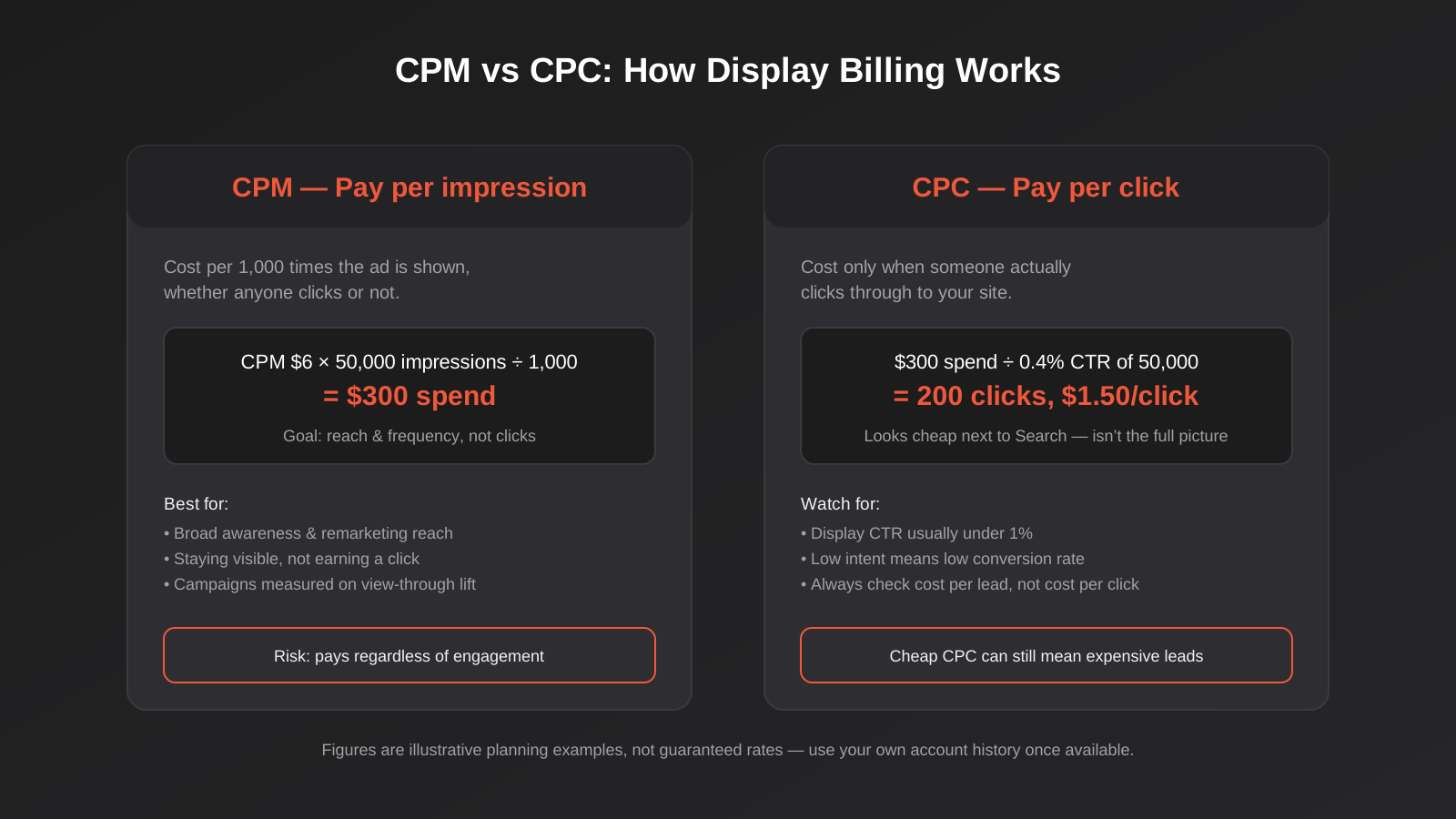
Display campaigns can be bid on a cost-per-click basis, same as Search, but a lot of awareness-focused Display activity runs on cost-per-thousand-impressions (CPM) instead, because the goal is exposure, not a click. Under CPM bidding, you pay for the ad being shown, whether or not anyone interacts with it at all. Reported Australian CPM figures for Display vary widely depending on who’s publishing them and what inventory they’re counting — broad run-of-network placements sit well below premium, high-viewability or private marketplace inventory, and the gap between the two can be several times over. Treat any single quoted CPM figure as a planning assumption, not a guarantee; your own account history, once you have thirty days of data, is a far more reliable number than anything in a benchmarking article, including this one.
Click-through rate on Display typically sits well under one per cent — often a tenth of what a well-targeted Search campaign achieves — because people aren’t looking for an ad, they’re reading an article or checking a weather app. That low CTR is exactly why the cost-per-click number looks so cheap: you’re dividing a small CPM by a tiny click volume, and the resulting CPC understates what you’re actually paying for attention that mostly doesn’t convert to anything. If you want a single number to anchor expectations, treat Display CPC as roughly a tenth to a twentieth of what the same business pays on Search, and treat the clicks themselves as roughly a tenth to a twentieth as likely to convert. The two effects cancel out more often than the “cheap clicks” framing suggests.
What actually drives Display costs up or down
A handful of factors move Display pricing more than people expect. Premium placements — inventory with verified high viewability, brand-safety certification, or exclusive publisher deals — cost more because there’s simply less of it relative to demand. Stricter brand-safety and content exclusion settings narrow your eligible inventory pool, which can push CPMs up even though you’re seeing fewer, better-matched placements. Audience targeting matters too: a tight remarketing list of people who added something to cart in the last seven days costs more per impression than broad, interest-based targeting across a general audience, because you’re competing with fewer advertisers for a more valuable slice of people. And seasonality hits Display the same way it hits every other channel — expect higher CPMs through November and December as every retailer in the country chases the same eyeballs ahead of Christmas.
Why “cheap” Display spend is often a false economy
The number that actually matters is cost per qualified lead or sale, not cost per click or cost per thousand impressions, and on that metric Display frequently loses to Search even though every intermediate number looks better. A trade business we’ve audited more than once had a Display campaign reporting cost-per-click under ten cents, next to a Search campaign running $12 per click — and the Display campaign had produced zero tracked leads in three months, while Search had produced forty. The account looked efficient on a dashboard that only showed clicks and cost. It wasn’t efficient at all once you asked what the clicks were worth. This is the exact trap a proper PPC formulas reference is built to catch — working out true cost per acquisition rather than stopping at the vanity metric a platform defaults to showing you.
Where Display actually earns its place (and where it doesn’t)
Display isn’t a bad channel. It’s a badly-scoped one, most of the time. Used for the right job it’s genuinely efficient; used as a substitute for demand generation, it’s close to the worst return in the Google Ads toolkit.
Remarketing is the job Display reliably does well
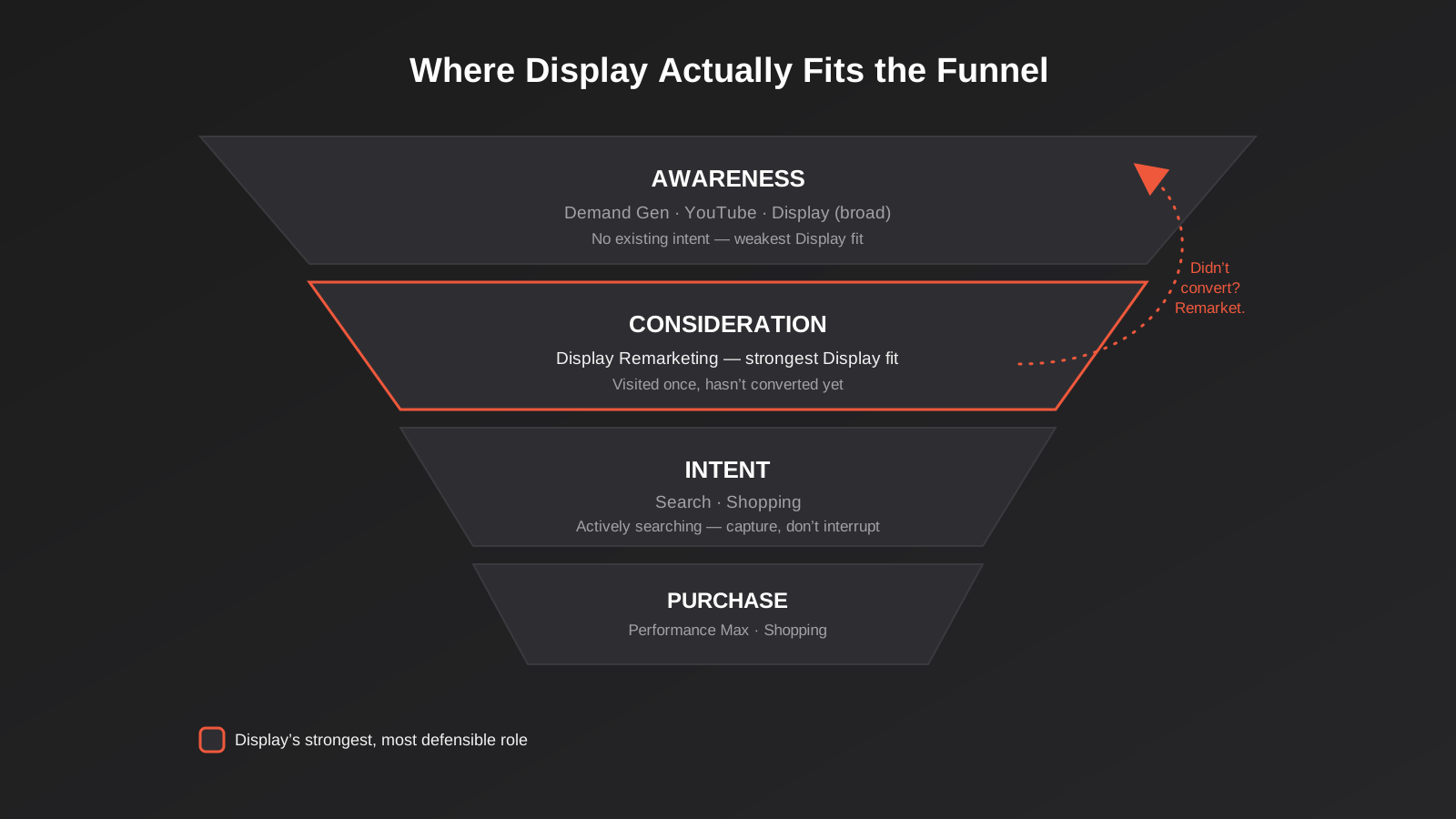
Someone visits your site, looks at a product or service page, and leaves without converting. A standard remarketing Display campaign keeps your brand visible to that specific person across the sites and apps they browse afterward, at a cost per impression low enough that even a modest conversion lift pays for the spend many times over. This works because you’re not trying to create interest from nothing — the person already showed it, once, and you’re simply staying in view until they’re ready to act or comparison-shop you against a competitor who’s forgotten they exist. For ecommerce stores in particular, a cart-abandonment remarketing campaign running alongside email flows is one of the more reliably profitable uses of a Display budget we see, and it pairs naturally with the kind of lifecycle thinking covered in our guide to email marketing automation, since the two channels are often retargeting the exact same abandoned-cart audience from different angles.
Why Display rarely works as a standalone lead-generation channel
If a business has no existing visitors to remarket to, and tries to use Display to generate brand-new leads cold, the economics usually don’t hold up. Low click-through rate means you need enormous impression volume to produce a meaningful number of clicks, and low intent means a tiny fraction of those clicks turn into anything. We occasionally see businesses move budget away from an underperforming Search campaign into Display because the CPC looks more attractive, which almost always makes lead volume worse, not better — they’ve swapped a channel that captures existing demand for one that has none to capture. If lead generation is the actual goal, Search and, once there’s enough conversion history, Performance Max are doing the heavy lifting; Display’s role there is supporting, not carrying, the campaign.
Display inside Performance Max vs a standalone campaign
This is the decision most Australian accounts actually face in 2026, because very few businesses run a genuinely standalone Display campaign anymore — most Display impressions now happen inside Performance Max asset groups, invisible unless you go looking. The trade-off is control for convenience. Inside Performance Max, Google’s bidding algorithm decides how much of your budget reaches Display inventory versus Search, Shopping or YouTube, based on where it predicts conversions will come from, and you can only influence that decision indirectly through content suitability settings that restrict categories of content rather than letting you see and exclude individual placements. A standalone Display campaign gives you placement-level reporting and exclusion lists, at the cost of losing Performance Max’s cross-channel budget optimisation. Our general advice: if Display performance inside Performance Max looks healthy and you don’t need placement-level visibility, leave it alone. If you suspect Performance Max is spending meaningfully on low-quality Display inventory — a common pattern on newer accounts with limited conversion history — pull Display out into its own campaign with tight placement exclusions until you can see exactly where the money’s going.
Google Display remarketing vs Meta retargeting
Businesses already running Meta retargeting often ask whether Google Display remarketing is worth adding on top, rather than just running one or the other. The honest answer is that they reach overlapping but not identical people, at different moments. Meta’s retargeting runs inside Facebook and Instagram, where someone is scrolling a feed with social intent, while Google Display reaches the same person while they’re reading the news, checking email, or using an app with no social context at all — different mental mode, different likely response. Running both isn’t automatically wasteful duplication; it’s closer to covering two separate pockets of someone’s day. Where it does become wasteful is frequency: if the same person is seeing your remarketing ad on Instagram, in Gmail, and on a news site all within the same afternoon, you’ve likely over-capped on reach and under-capped on frequency limits across both platforms, which is worth checking in each platform’s own frequency settings rather than assuming they’ll self-regulate against each other.
Setting up a Display campaign that doesn’t waste budget
If you’ve decided Display earns its place — almost always for remarketing, occasionally for broader brand-awareness goals with budget to spare — the setup work is what determines whether it performs or quietly leaks money for months.
Placement exclusions and brand safety controls
The single highest-leverage thing you can do on a new Display campaign is build an exclusion list before you launch, not after you notice the waste. Exclude mobile app games and children’s content categories unless you have a specific reason to target them — accidental clicks from in-app ad placements, particularly inside games, are a well-documented source of cheap, worthless traffic. Exclude placements with no meaningful content (parked domains, link farms) using Google’s content exclusion categories, and review the placement report after the first two to three weeks to manually exclude anything serving clicks with zero engagement past the landing page. This single habit, done consistently, is the difference between a Display campaign that’s merely inefficient and one that’s actively harmful to your numbers.
Audience targeting options worth understanding
Remarketing lists (people who’ve visited your site, segmented by what they viewed or how recently) are the foundation for most profitable Display use. Custom intent audiences, built from the search terms and sites your ideal customer is likely to engage with, extend reach beyond people who’ve already visited you, with a corresponding drop in intent quality. In-market audiences (people Google has identified as actively researching a category) and affinity audiences (longer-term interest groups) sit further toward brand awareness than conversion, and are generally the territory Demand Gen is better suited to than standalone Display. Layer these thoughtfully rather than stacking every audience type into one campaign — a remarketing list combined with a broad in-market audience dilutes the one list that was actually converting.
Creative that actually works on Display
Responsive display ads need multiple headline and description variations, a logo in both square and landscape formats, and at minimum one square and one landscape image, ideally several of each so Google’s automation has real options to test rather than reusing the same asset in every size. Generic stock photography performs worse than anything showing your actual product, premises or work — which is exactly where businesses without an internal design resource tend to fall down, since Display creative genuinely benefits from a proper design pass rather than a logo stretched into whatever dimensions the platform demands. If that’s a gap for you, it’s worth treating as a graphic design job in its own right rather than an afterthought bolted onto the media buy; a banner set that actually looks considered tends to outperform a generic one by enough to justify the design spend on its own.
Where the click lands matters as much as the ad that earned it. A remarketing click that lands on your generic homepage, forcing the visitor to re-find the exact product or service page they already looked at once, throws away most of the advantage remarketing was supposed to give you. Sending Display and remarketing traffic to a focused landing page built around the specific offer or product the audience already showed interest in consistently lifts the conversion rate on this kind of traffic, because you’re removing the one extra step between recognising your brand and acting on it.
Frequency capping
Set a frequency cap — a limit on how many times one person sees your ad per day or week — from day one. Without one, remarketing campaigns in particular can serve the same person the same ad dozens of times in a week, which moves from “staying top of mind” to actively irritating the exact audience you’re trying to win back. A cap of roughly three to five impressions per user per day is a reasonable starting point for remarketing; broader awareness campaigns can run looser, since the goal there is closer to reach than repetition.
Measuring Display properly
Click-through conversions — someone clicks the ad, then converts — are the easy part to measure and the smallest part of what Display actually does. View-through conversions, where someone sees but doesn’t click your ad, then converts later through a different channel (often a direct visit or a branded search), are a real and legitimate part of Display’s contribution, but they’re also the easiest metric to abuse, because the attribution window is generous and the causal link is genuinely harder to prove than a click. Treat view-through numbers as directional evidence that Display is contributing to awareness, not as proof it’s driving sales on its own, and be sceptical of any report that leans heavily on view-through conversions to justify a campaign’s existence without a click-through number anywhere near it. If you’re already uncertain how your conversion data holds together across channels, that’s worth fixing before adding another layer of attribution complexity on top — the same Shopping-vs-Performance-Max decision many Australian stores face hinges on exactly this kind of conversion-data maturity, and the same principle applies here: don’t lean on automation or soft attribution metrics until you trust the data feeding them.
Common mistakes we see with Display campaigns
- Launching a standalone Display campaign with no placement exclusions and no review for the first month, letting mobile app inventory and low-quality sites eat the budget unnoticed.
- Using cost-per-click as the headline metric without checking what those clicks actually convert into, mistaking a cheap CPC for an efficient campaign.
- Running Display as a cold lead-generation channel with no remarketing list or existing site traffic to draw on, then blaming the format when it underperforms.
- Reusing Search or social creative on Display without resizing or redesigning it, resulting in stretched logos, cropped text and ads that look broken on half the placements they serve on.
- Sending remarketing clicks to a generic homepage instead of the specific page the visitor already showed interest in, losing most of the advantage remarketing was meant to provide.
- Setting no frequency cap, so the same small remarketing audience sees the same ad dozens of times a week and starts actively avoiding the brand.
- Treating view-through conversions as equivalent to click-through conversions when reporting results to a business owner or board, overstating what the channel actually proved.
Frequently Asked Questions
Is Google Display still worth running in 2026?
For remarketing to an existing audience of site visitors, yes — it remains one of the more cost-effective ways to stay visible to people who’ve already shown interest. As a standalone channel for generating new leads or sales from a cold audience, it’s rarely worth the spend compared with Search or a mature Performance Max campaign. The honest answer depends entirely on what job you’re asking it to do.
Is Google Display Network being replaced by Demand Gen?
Not entirely. Google is actively steering broad, creative-led awareness campaigns toward Demand Gen, which draws on Display inventory alongside YouTube Shorts, Discover and Gmail. Standalone Display campaigns remain available and still offer placement-level reporting and exclusion controls that Demand Gen and Performance Max don’t fully replicate. If tight remarketing with full visibility matters to you, keep a standalone campaign; if broad reach with less manual oversight suits you better, Demand Gen is the newer option Google is investing in.
Why is my Display cost-per-click so much lower than Search?
Because you’re measuring a fundamentally different kind of traffic. Display clicks come from people who weren’t looking for you, so click-through rate is a fraction of Search’s, which drops the calculated CPC even though the underlying cost-per-impression can be perfectly normal. A cheap Display CPC isn’t evidence of efficiency on its own — check what those clicks convert into before drawing any conclusion about value.
Can I exclude specific websites or apps from my Display campaign?
Yes, through placement exclusions inside the campaign settings, and this should be set up before launch rather than after reviewing a month of wasted spend. You can exclude individual sites and apps, entire content categories (mobile games, parked domains), and set brand-safety sensitivity levels that narrow the inventory pool automatically. Review the placement report every few weeks in the first couple of months to catch anything the default exclusions missed.
Should I run Display inside Performance Max or as its own campaign?
If Performance Max is already converting well and you don’t need to see individual placements, leave Display inside it — the cross-channel budget optimisation generally outweighs the lost visibility. If you suspect a meaningful share of spend is going to low-quality Display placements, or you specifically want a tightly scoped remarketing campaign with full reporting, pull it into a standalone campaign where you can see and control exactly where it runs.
What size images do I need for a responsive Display campaign?
At minimum, one square image (1:1) and one landscape image (1.91:1), plus your logo in both square and landscape formats. In practice, supplying several variations of each, along with multiple headline and description combinations, gives Google’s automation genuine options to test rather than forcing it to reuse the same asset across every placement size on the network.
Where to start
If you’re already running Google Ads and have no idea how much of your budget is quietly going to Display inventory inside Performance Max, that’s the first thing worth checking — it takes one look at the asset group breakdown to find out. If you’ve got meaningful site traffic and no remarketing campaign at all, that’s usually the lowest-risk place to start, since you’re working with an audience that’s already shown interest rather than trying to create demand from nothing.
We manage Search, Performance Max, Shopping and Display as one connected account for Australian businesses, built around what each format is actually good at rather than switching everything on by default. Our Google Ads management page covers the full scope, and our Google Ads pricing page lays out exactly what the fixed monthly packages include, scoped by your daily ad spend rather than a vague percentage.
Worth putting a number on it: our own Google Ads management starts from $550 a month — below the $800–$3,000+ a month most Australian agencies charge for comparable scope. If you’ve already got a written quote from another agency for comparable scope, send it through and we’ll do our best to beat it.
Keep reading
Related posts
How to Give an Agency Google Ads Manager Access: Step-by-Step Guide
Give your agency Google Ads access with this visual guide to MCC link requests, client approval, permissions, related accounts and removing access.
Performance Max for Lead Generation: A 2026 Guide for Australian Service Businesses
Performance Max for lead gen needs different conversion tracking and asset groups than ecommerce PMax. How Australian service businesses should set it…
Microsoft Advertising (Bing Ads) for Australian Businesses: Cost, LinkedIn Profile Targeting and the Google Ads Import Trap (2026)
What Microsoft Advertising actually costs in Australia, how LinkedIn profile targeting works for B2B, and what breaks when you import from Google…
Got a project you'd like to talk through?
Tell us what you're working on — we'll come back with a plan.
