
Microsoft Advertising (Bing Ads) for Australian Businesses: Cost, LinkedIn Profile Targeting and the Google Ads Import Trap (2026)
 Jignesh Vagadiya
13/10/2026
21 min read
Jignesh Vagadiya
13/10/2026
21 min read
Every Australian business we talk to runs Google Ads. Most run Meta Ads too. A growing number test TikTok or LinkedIn. Almost none of them have ever opened a Microsoft Advertising account, and when we bring it up the reaction is usually some version of “does anyone actually use Bing?”
It’s a fair question, and the honest answer is: fewer people than use Google, obviously, but more than you’d think, and a meaningfully different group of them. Bing holds somewhere between 4% and 16% of Australian search depending on whose measurement you trust and whether mobile is included, and that audience skews older, more desktop-based, and more likely to be searching from a work computer during business hours. For a B2B software company, an accounting firm or a professional services business, that’s not a rounding error — it’s a pocket of intent-driven traffic nobody else in your market is bidding on.
This isn’t a pitch to abandon Google Ads for Bing. It’s a practical look at Microsoft Advertising Australia in 2026: what the platform actually is, what it costs to test, the one targeting feature that makes it genuinely different from every other search platform, and exactly what breaks when you try to shortcut the setup by importing your existing Google Ads account. We’ve set this up for clients who already had a mature Google Ads account and wanted an incremental channel, not a channel to replace anything.
Microsoft Advertising Australia: What It Actually Is
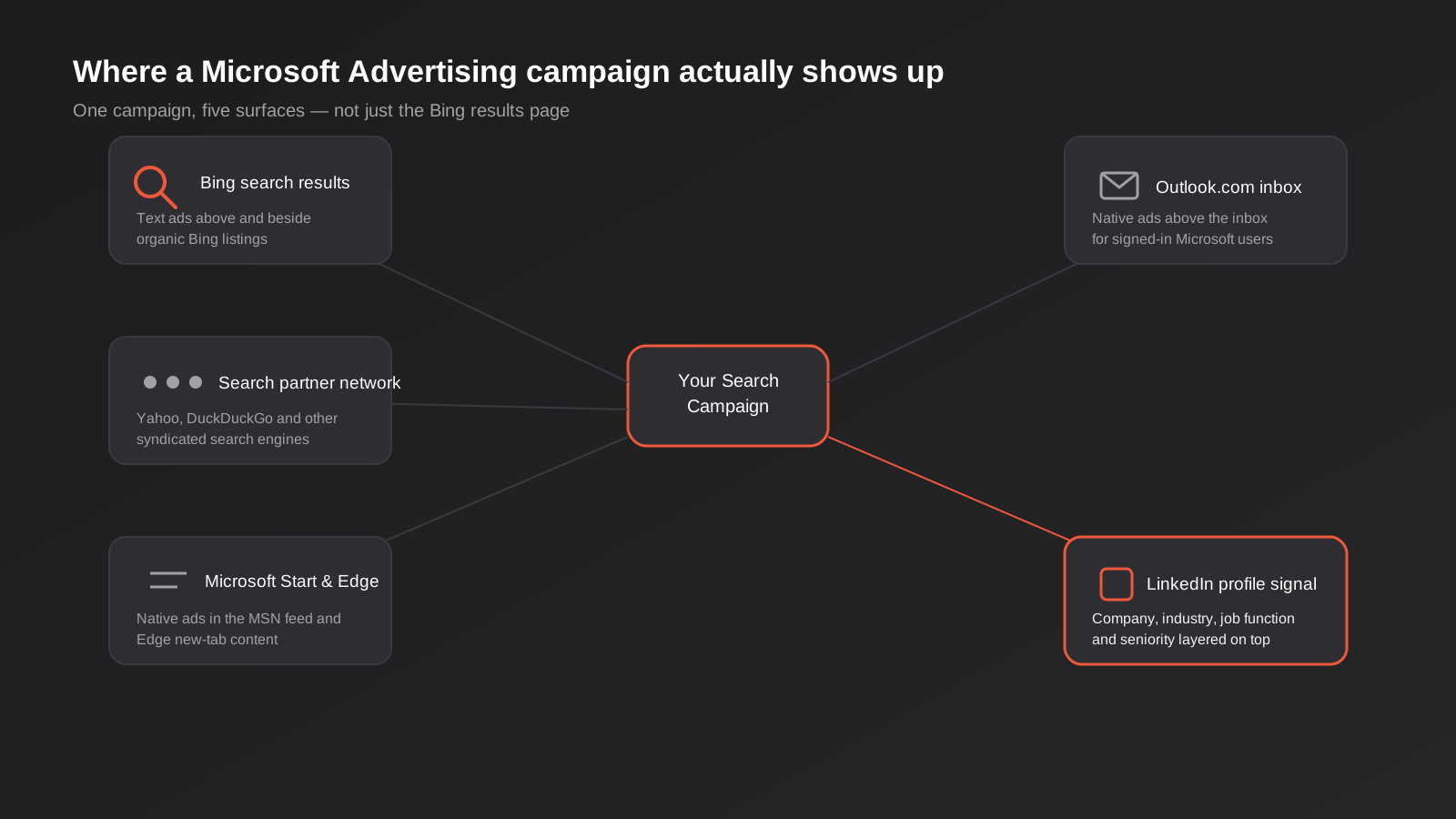
“Bing Ads” is the name everyone still uses, and it’s the reason most businesses underestimate the platform. Microsoft Advertising hasn’t been just Bing for years. When you run a search campaign through it, your ad can appear across five distinct surfaces: the Bing search results page itself, Microsoft’s search partner network (which includes Yahoo, DuckDuckGo and a handful of other syndicated search engines), the Microsoft Start content feed and Edge browser’s new-tab page, native ad placements inside Outlook.com for signed-in users, and — this is the part most people don’t know exists — audience targeting informed by LinkedIn profile data, because Microsoft owns LinkedIn.
That last point matters enough that it gets its own section further down. For now, the structural takeaway is that a single Microsoft Advertising search campaign reaches several placements that have nothing to do with how many people type queries into bing.com, which is usually the only data point people use to dismiss the platform.
Who you’re actually reaching in Australia
StatCounter’s desktop-only measurement puts Bing at roughly 15–16% of Australian desktop search as of mid-2026, with Google holding around 80% and Yahoo picking up most of the rest. Include mobile in the mix and Bing’s share drops sharply, since it isn’t the default search engine on Android or iOS the way Google is. Different measurement methodologies disagree on the exact figure — some third-party estimates put total Bing share in Australia closer to 4% once mobile is weighted in — but every source agrees on the shape of the audience, not just the size of it: older, more desktop-dependent, and more likely to be using a work or managed device.
That profile lines up with why the agencies who actually run Microsoft Advertising accounts report it working best for B2B software, financial services, healthcare, legal and other professional services — categories where the buyer is sitting at a desk during work hours, often on a Windows machine with Edge or Outlook open, rather than scrolling on a phone after dinner. It tends to underperform for lifestyle ecommerce, fashion and anything that depends on visual discovery rather than someone actively typing a query. If your Google Ads account already performs well for commercial-intent keywords and your customer is a desk-based professional, that same keyword list has a second, much less competitive audience waiting on Microsoft’s network.
What it actually costs to test
Microsoft Advertising runs on the same pay-per-click model as Google Ads — you set a daily budget, you bid on keywords (manually or through automated bidding strategies), and you pay only when someone clicks. There’s no minimum spend requirement to open an account, and you can start with a budget as small as a few dollars a day while you gather data.
We want to be straight with you about the cost claims floating around: a lot of agency content repeats a figure of “30% lower CPC than Google” as if it’s an established fact. We couldn’t find a credible, methodology-backed Australian benchmark for that number, and you should treat any specific percentage you read online the same way. What’s genuinely true, and agreed on by every serious source, is the underlying mechanic: lower advertiser competition on Microsoft’s network generally means lower cost-per-click for the same keyword, in the same way a less competitive Google Ads niche costs less than a crowded one. Whether that translates to a 10% saving or a 50% saving for your specific keywords and industry is something only a live test in your own account will tell you.
A sane way to size a test budget
If you already run Google Ads, the cheapest way to test Microsoft Advertising is to mirror a slice of your existing account rather than building something new from a blank page. Pick your highest-intent, best-converting keyword set — usually branded terms and your top 10–15 commercial keywords — and run them on Microsoft at roughly 10–20% of your Google Ads daily budget for that same keyword set. Give it four to six weeks before judging it; Microsoft’s algorithm needs time to learn, same as Google’s, and a smaller, less competitive network still needs a meaningful sample size before cost-per-conversion numbers mean anything. Our PPC formulas and metrics guide covers how to calculate true CPA and ROAS properly once you’ve got enough data to judge the channel on its own merits rather than vibes.
Bidding strategies worth knowing
Microsoft Advertising offers broadly the same bidding menu as Google Ads, which makes the transition easier than most new channels: manual CPC if you want full control while you’re learning the platform, enhanced CPC that adjusts manual bids up or down based on predicted conversion likelihood, and fully automated strategies — Maximise Clicks, Maximise Conversions, Target CPA and Target ROAS — once you’ve got enough conversion volume for the algorithm to optimise against. The common mistake is jumping straight to an automated strategy before the account has recorded enough conversions to support it. As a rough rule, automated bidding needs at least 15–30 conversions in the trailing 30 days before it has enough signal to bid sensibly; below that, manual or enhanced CPC will outperform it simply because the algorithm isn’t starved of data.
Campaign types and ad formats worth knowing
Search campaigns are where most businesses start, and they work the way you’d expect if you’ve run Google Ads: keywords, match types, responsive search ads built from headline and description assets that Microsoft’s system mixes and tests automatically. Beyond that baseline, a few other campaign types are worth knowing about before you assume Microsoft only does one thing.
- Dynamic Search Ads generate ads automatically from your website content rather than a manual keyword list, useful for catching long-tail queries you haven’t thought to target but risky without tight negative keywords, since it will match against anything your site’s crawled content suggests is relevant.
- Performance Max is Microsoft’s automated, cross-placement campaign type, functionally similar to Google’s version. It spans search, audience ads, Microsoft Start and Shopping inventory from a single campaign, optimising placement and creative mix automatically. Microsoft expanded the search themes available per campaign to 50 in a January 2026 update, giving you more control over the intent signals feeding the automation, and — as covered below — LinkedIn profile data can be layered in as an audience signal here too.
- Audience ads are native-style display ads shown inside Microsoft Start, Outlook.com and MSN, aimed at people who aren’t actively searching but match your audience criteria. These behave more like a content-feed placement than a search ad, and they’re where the Outlook.com and Microsoft Start placements from the diagram above actually come from.
- Shopping campaigns pull from a product feed the same way Google Shopping does, built through Microsoft Merchant Center. If you’re already maintaining a feed for Google Shopping or Performance Max, most of that structure carries across with modest reformatting rather than a rebuild from scratch.
For most of the B2B and professional services accounts we’re talking about in this guide, Search and Performance Max do the heavy lifting. Audience ads and Shopping matter more if you’re an ecommerce business layering Microsoft on top of an existing Shopify or WooCommerce product feed.
LinkedIn profile targeting: the one feature Google can’t touch
This is the actual reason to care about Microsoft Advertising if you sell to other businesses. Because Microsoft owns LinkedIn, Microsoft Advertising can layer LinkedIn profile data on top of a standard search campaign as an audience signal. No other search platform can do this — Google has no B2B professional graph to draw on, and LinkedIn’s own ad platform doesn’t let you target search intent the way a search engine does. Microsoft Advertising is the only place those two things meet.
In practice, LinkedIn Profile Targeting lets you layer four dimensions on top of your keyword targeting:
- Company — target or exclude specific named companies, useful for account-based marketing lists
- Industry — narrow to the verticals that actually convert for you
- Job function — reach the department that owns the buying decision (finance, IT, operations, marketing)
- Seniority — added as a targeting dimension more recently, letting you bias toward decision-makers rather than researchers
You can use this two ways. As a bid adjustment, you keep broad keyword targeting but bid more aggressively when the searcher’s LinkedIn profile matches your ideal customer profile. Or, inside Microsoft’s Performance Max campaigns, you can feed these dimensions in as an audience signal alongside your search themes (which Microsoft expanded to 50 per campaign in a January 2026 update) to help the automated bidding system learn who converts faster.
A realistic example: a mid-sized accounting software vendor selling to finance teams at companies with 50–500 staff could run a Microsoft Advertising campaign on generic terms like “expense management software” and “automate accounts payable”, then layer in job function = Finance and seniority = Manager or above. On Google, that same keyword would be competing against every search intent, including students, job seekers and curious researchers. On Microsoft, the LinkedIn signal lets the platform — and your manual bid adjustments — favour the profile that actually signs contracts. It won’t replace a properly run LinkedIn Ads campaign, which still does a better job of reaching people by role regardless of what they’re searching for, but as a layer on top of existing search intent, it’s a genuinely unique combination.
Worth noting honestly: the big performance claims attached to this feature in marketing content — 16% higher CTR, 64% higher conversion rates — trace back to Microsoft’s own case studies as cited by vendor blogs, and we couldn’t verify them against a primary published Microsoft source. Treat them as directional, not as a number you should expect to replicate exactly.
How this plays out inside Performance Max specifically
Standard search campaigns let you apply LinkedIn profile targeting as a bid adjustment — you’re still bidding on keywords, and the profile match just pushes the bid up or down. Performance Max uses it differently: the four LinkedIn dimensions sit alongside your search themes and any customer lists you’ve uploaded as one combined audience signal, which the automated bidding system treats as a hint about who’s likely to convert, not a hard include or exclude rule. That distinction matters when you’re troubleshooting a campaign that isn’t performing — in a standard search campaign you can isolate the LinkedIn bid adjustment and test it directly, but inside Performance Max it’s blended into a black box alongside every other signal, so isolating what’s actually driving (or hurting) performance takes longer. If you want granular control over the LinkedIn targeting specifically, a standard search campaign will show you cleaner data than Performance Max will, at least while you’re still learning whether the signal works for your audience.
Importing your Google Ads account: what actually survives
Microsoft Advertising has a one-click import tool that pulls campaigns straight from a connected Google Ads account, and it’s genuinely useful for getting the bones of an account built fast. The mistake is assuming it gives you a working account. It gives you a structural draft that still needs real work before you turn the budget on.
What carries over cleanly
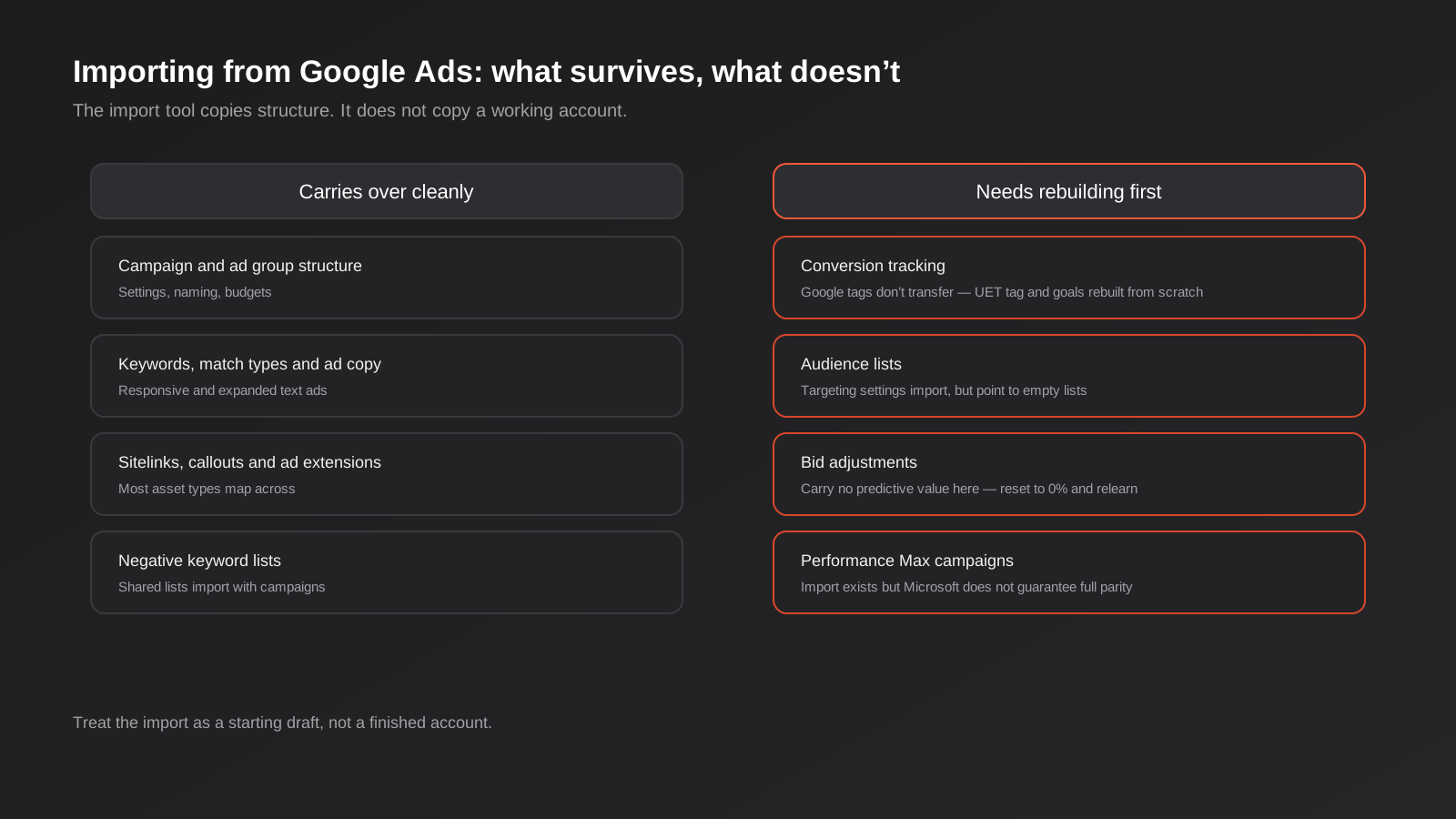
Campaign and ad group structure, budgets and naming import without issue. Keywords, match types and your existing ad copy — responsive and expanded text ads — map across in recognisable form. Most asset types, including sitelinks and callout extensions, transfer. Shared negative keyword lists import along with the campaigns that use them. If all you wanted was a head start on account architecture, the import genuinely saves hours.
What needs rebuilding before you spend a dollar
Four things consistently break, and all four matter more than the structure the import tool is good at copying:
- Conversion tracking doesn’t transfer. Microsoft uses its own tracking tag, called UET (Universal Event Tracking), and it is entirely separate from Google’s conversion tags. Nothing about your Google Ads conversion setup carries across — you need to install the UET tag on every page of your site and rebuild conversion goals from scratch inside Microsoft Advertising before you can trust a single reported conversion.
- Audience targeting settings import, but point at nothing. The import brings across the targeting mode, bid adjustments and exclusion settings you had configured for Google audience lists — but those settings reference lists that don’t exist on the Microsoft side. You need to rebuild the actual audience lists (and your LinkedIn profile targeting, which obviously has no Google Ads equivalent at all).
- Bid adjustments carry no predictive value. A device or location bid adjustment that your Google Ads account learned over months of performance data gets copied in as a raw number, but that number was calibrated against Google’s audience and auction dynamics, not Microsoft’s. The sensible move is resetting imported bid adjustments to 0% and letting Microsoft relearn against its own traffic.
- Performance Max import has no parity guarantee. Microsoft’s own documentation is explicit that importing a Performance Max campaign structure does not guarantee it will behave the same way on their platform. Treat an imported PMax campaign as a template to review line by line, not a finished asset.
The practical sequence we use: import for the structural head start, immediately rebuild the UET tag and conversion goals before anything goes live, zero out every imported bid adjustment, rebuild audience lists properly (adding LinkedIn profile targeting where it’s relevant), and review any imported Performance Max campaign as if you were setting it up from scratch. Budget half a day for this on a mid-sized account. Skipping it is how businesses end up convinced Microsoft Advertising “doesn’t convert” when what actually happened is they were optimising against conversion data that was never tracking correctly in the first place — the same trap we cover in more depth in our guide to why conversion tracking data is often wrong in the first place.
Setting up conversion tracking properly
Whether you import or build fresh, conversion tracking has to be right before the account means anything. The sequence is straightforward but each step has a failure point worth knowing about:
- Create the UET tag inside Microsoft Advertising under Tools, name it, and grab the generated script. You can enable Microsoft Clarity (free heatmap and session recording software) at the same step if you want it — there’s no reason not to.
- Install it on every page, not just the conversion page. UET works like a standard analytics tag: it needs to fire sitewide to build audience and remarketing lists, not just record the final conversion event. If you use Google Tag Manager, add it as a tag firing on all pages rather than hand-editing your theme.
- Verify it’s actually firing before building goals on top of it. The UET Tag Helper browser extension will confirm this in under a minute, and it’s worth the minute — a silently broken tag produces an account with zero recorded conversions that looks identical to an account with zero conversions because the campaigns genuinely aren’t working.
- Create the conversion goal under Tools > Conversion Goals, choosing a type (website action, app install, or offline conversion) and a category that matches what you’re measuring — purchase, lead, sign-up, contact.
- Set the trigger correctly. Destination URL goals need the exact confirmation page URL and a sensible match type. Custom event goals need a JavaScript event fired on the actual user action, which matters if your confirmation step is a modal or a single-page app transition rather than a new URL.
- Set your counting method and windows. Decide whether you’re counting every conversion or one per click, and set a conversion window that matches your actual sales cycle — 30 days for most lead-gen businesses, longer for considered B2B purchases.
- Give it 24 hours before judging whether it’s working. Microsoft’s reporting has a lag, and panicking at hour three because nothing’s showing yet is a waste of everyone’s time.
If you’re running Shopify, there’s an extra step: UET doesn’t automatically see checkout completions the way a native Shopify app would, so you’ll need to add it as a custom pixel through Shopify’s customer events settings rather than relying on the generic site-wide tag alone.
None of this is complicated on its own, but skipping any single step quietly poisons everything downstream. An account with a UET tag that fires but a conversion goal with the wrong match type will report real traffic and zero conversions, which looks exactly like a campaign that doesn’t convert. We’ve seen businesses pause a Microsoft Advertising account after three weeks convinced it was a dead channel, when the actual fault was a destination URL goal set to “exact match” against a confirmation page that redirected through a query parameter. Checking the basics before you judge the channel costs you twenty minutes. Judging it wrongly and walking away costs you the whole opportunity.
Who should actually test this channel
Based on the audience data and what we’ve seen work across client accounts, Microsoft Advertising Australia earns a test budget for:
- B2B SaaS and software companies, where LinkedIn Profile Targeting adds a genuine edge Google can’t offer
- Professional services — accounting, legal, financial advice, consulting — where the buyer searches from a desk during business hours
- Healthcare and allied health providers targeting referrers or administrators rather than general consumers
- Any business already running a mature, well-tracked Google Ads account, since the keyword research and conversion logic largely transfers once the tracking is rebuilt properly
It earns a lower priority, or a skip entirely, for:
- Visually driven ecommerce and fashion brands, where the audience and discovery behaviour don’t match Bing’s user base
- Businesses targeting a younger, mobile-first demographic almost exclusively
- Anyone without the analytics discipline to separate real signal from noise on a smaller-volume channel — Microsoft Advertising’s lower traffic volume means it’s easier to misread a short losing streak as proof the channel doesn’t work
A trades or construction business is a useful edge case here. Our digital marketing for trades and construction guide covers why Google Ads and local SEO carry most of the weight for that audience — tradies and their customers search on mobile, close to the point of need, which is exactly the behaviour Bing’s desktop-skewed audience doesn’t represent well. That’s not a knock on Microsoft Advertising; it’s just the wrong channel for that particular buyer. The same logic applies in reverse for an accounting firm or a B2B SaaS vendor, where the buyer genuinely is sitting at a desk running a search during business hours, often on the exact device mix — Windows, Edge, Outlook — that Microsoft’s placements are built around.
Common mistakes to avoid
- Judging performance before the algorithm has learned. Four weeks minimum, six is safer, especially for automated bidding strategies that need conversion volume to optimise against.
- Going live on imported campaigns without fixing tracking first. This is the single most common reason businesses write off the channel — they’re reading broken data, not real performance.
- Copying Google Ads bid strategies verbatim. Microsoft’s auction dynamics, competition level and audience behaviour are different enough that a bidding strategy tuned for Google needs its own learning period on Microsoft, not a direct port.
- Ignoring LinkedIn Profile Targeting entirely. If you sell B2B and skip this, you’re running Microsoft Advertising as a slightly cheaper, slightly smaller version of Google Ads instead of using the one feature that makes it genuinely different.
- Setting a test budget too small to generate a usable sample. A $5-a-day budget split across twenty keywords will take months to tell you anything useful. Narrow the keyword list and fund it properly, or don’t bother testing yet.
- Treating every imported Performance Max campaign as finished. Microsoft is explicit that import doesn’t guarantee parity — review the asset groups, audience signals and search themes manually.
Frequently Asked Questions
Is Microsoft Advertising the same thing as Bing Ads?
Bing Ads was the platform’s old name. It was rebranded Microsoft Advertising in 2019 to reflect that campaigns now run across Bing, the Microsoft search partner network, Microsoft Start, Edge, Outlook.com and LinkedIn profile-informed audience targeting — not just the Bing search results page. Most people still call it Bing Ads out of habit, which is part of why it’s underestimated.
How much market share does Bing actually have in Australia?
It depends on the measurement. Desktop-only data from StatCounter puts it around 15–16% as of mid-2026. Figures that weight in mobile traffic put total Bing share closer to single digits, since it isn’t the default search engine on most Australian phones. The gap between those numbers is exactly why it’s worth testing with your own tracking rather than trusting any single published benchmark.
Do I need a separate budget, or can I just move spend from Google Ads?
We’d recommend treating it as incremental test spend rather than reallocated budget, at least for the first few months. Moving existing Google Ads budget across assumes Microsoft will perform at least as well, which you can’t know yet. Start with 10–20% of what you’d spend on the equivalent Google Ads keyword set, prove it out, then decide whether to grow it or fold it back in.
Does LinkedIn Profile Targeting cost extra?
No, it’s a built-in audience signal and bid adjustment option inside standard Microsoft Advertising search and Performance Max campaigns, not a separate paid product. You don’t need a LinkedIn Ads account to use it — it draws on LinkedIn’s professional graph data through the ownership connection between the two platforms.
Can I just import my whole Google Ads account and turn it on?
You can, but you shouldn’t. The import copies campaign structure, keywords and ad copy reliably. It does not copy working conversion tracking, functioning audience lists or bid adjustments calibrated for Microsoft’s auction — all of which need to be rebuilt before the data coming out of the account is trustworthy. Treat the import as a time-saving first draft, not a finished account.
How long before I’ll know if Microsoft Advertising is worth keeping?
Give it four to six weeks minimum with properly working conversion tracking before judging it, and make sure the keyword set and budget are large enough to produce a usable sample in that window. Anything less and you’re reacting to noise rather than a real read on performance.
Where to Start
If you’re already running a solid Google Ads account and your customers are desk-based professionals — B2B, finance, healthcare, legal, SaaS — Microsoft Advertising is one of the lower-risk channel tests available to you right now, precisely because so few Australian competitors have bothered to set it up properly. The cost of finding out is a modest test budget and half a day spent getting conversion tracking right before you judge anything.
If you’d rather talk through whether it fits your specific account and customer profile before committing budget, our pricing page covers how we scope paid search work, or you’re welcome to get in touch and we’ll give you a straight answer on whether it’s worth testing for your business specifically.
Keep reading
Related posts
Performance Max for Lead Generation: A 2026 Guide for Australian Service Businesses
Performance Max for lead gen needs different conversion tracking and asset groups than ecommerce PMax. How Australian service businesses should set it…
Google Ad Grants for Australian Non-Profits: Eligibility, Application and the Rules That Keep It Alive (2026)
A practical guide to Google Ad Grants for Australian non-profits: who qualifies, how to apply, and the compliance rules that keep the…
Google Merchant Center Feed Optimisation: Why Australian Shopping Ads Get Disapproved (2026 Guide)
A practical guide to Google Merchant Center feed optimisation: GTINs, disapprovals, free listings vs Shopping ads, and Australian-specific traps.
Got a project you'd like to talk through?
Tell us what you're working on — we'll come back with a plan.
