
LinkedIn Ads Cost and Targeting in Australia: A 2026 Deep Dive for B2B
 Jignesh Vagadiya
10/09/2026
21 min read
Jignesh Vagadiya
10/09/2026
21 min read
Most Australian businesses that try LinkedIn Ads once and never come back share the same story. They set up a campaign, picked a broad job title, uploaded a generic banner, and watched $2,000 disappear in three weeks for four leads that never turned into a call. The platform gets blamed. Usually the setup deserves the blame instead.
LinkedIn Ads cost more per click than any other major ad platform, and it is not close. A click that costs $1–$3 on Google Search or Meta can cost $10–$25 on LinkedIn. That is not a pricing failure — it is the cost of reaching people by job title, seniority and company, which nobody else can do at the same precision. The problem is that most accounts pay LinkedIn prices while targeting like it is Facebook, and that combination is what actually burns budget.
We run LinkedIn accounts for B2B clients across professional services, SaaS, manufacturing and finance, and this guide is the cost and targeting breakdown we wish more people read before their first campaign. If you are trying to decide whether to run LinkedIn Ads at all or which agency should run them, our guide to choosing a LinkedIn Ads service covers that decision. This one assumes you are in, or about to be, and want to understand exactly what you are paying for and how to point it at the right people.
What LinkedIn Ads actually cost in Australia right now
Every LinkedIn cost figure you find online is a range, and the range is wide because LinkedIn’s auction prices on relevance and competition for a specific audience, not a flat rate card. Still, there are real bands worth anchoring to, based on what we see running accounts for Australian clients and what’s consistent across current industry benchmarking.
Cost per click (CPC)
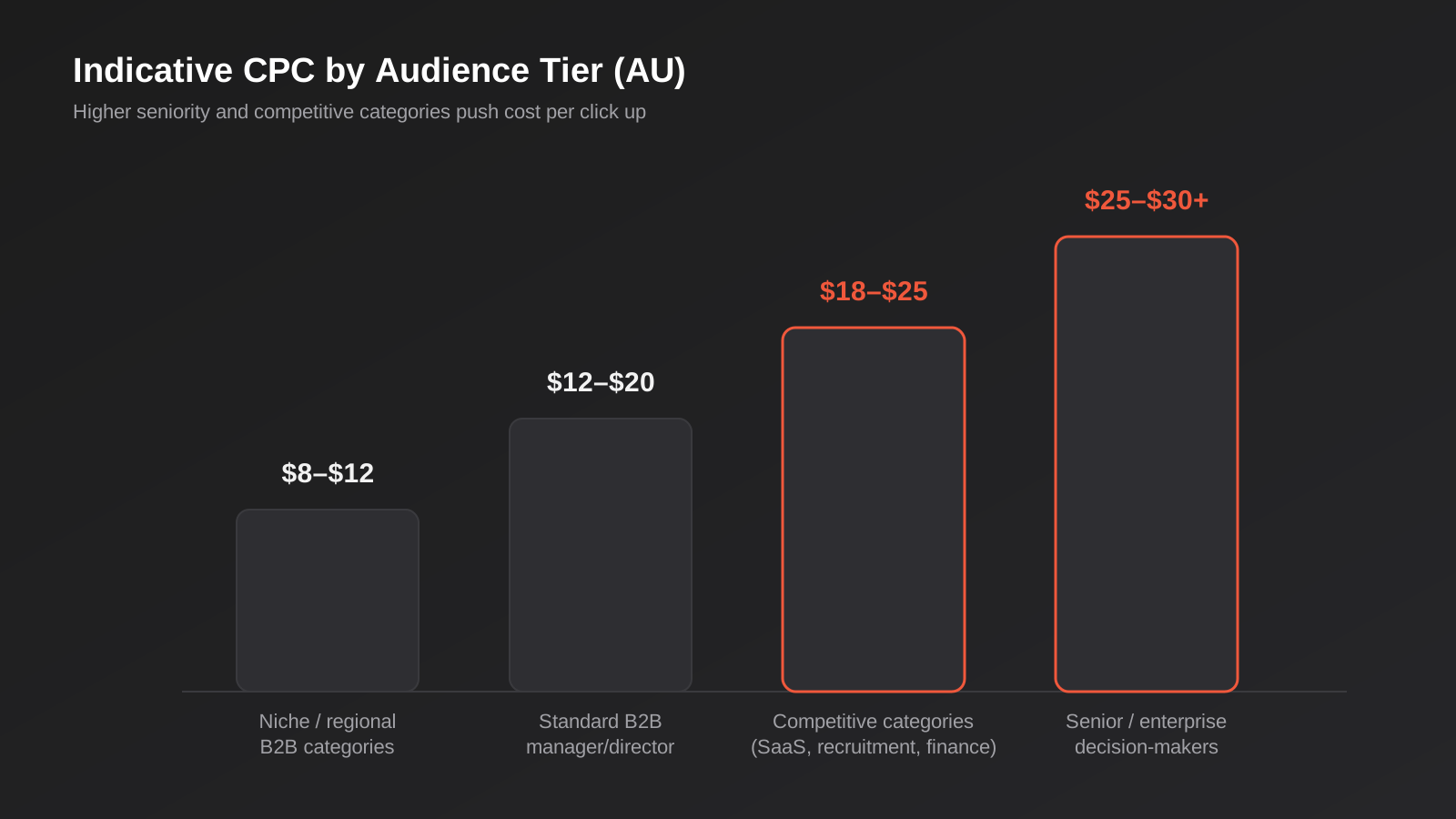
Most Australian B2B campaigns land between $8 and $18 per click. Niche audiences in less contested categories — trades software, regional professional services, specific manufacturing niches — can sit under $10. Campaigns targeting senior decision-makers at large enterprises, or anything competing in crowded categories like SaaS, recruitment or finance, regularly push past $20, and we have seen $25–$30 CPC on tightly filtered C-suite audiences.
Cost per thousand impressions (CPM)
CPM in Australia typically runs $28–$50, though we have seen it as high as $90 on very narrow, highly sought-after audiences (think: CFOs at ASX 200 companies) and as low as $20 on broader reach campaigns. CPM matters most for brand awareness and video view objectives, where you are paying for exposure rather than clicks.
Cost per lead (CPL)
This is the number that actually matters and the one most benchmarking articles gloss over, because it depends entirely on your offer and landing experience, not just the platform. Across Australian accounts we typically see $80–$300+ per lead. A well-targeted lead magnet offer to mid-level managers can land at $80–$120. A gated demo request aimed at director-level buyers in a competitive category can sit at $250–$400 and still be profitable, because the deal size justifies it. If you don’t know your break-even CPL before you launch, work it out first — our PPC formulas reference guide has the CAC and LTV:CAC calculations that make this a five-minute exercise rather than a guess.
Why cost varies so much by industry
The same $15 CPC quoted as an “average” hides enormous variation between categories, because LinkedIn’s auction is competing advertisers against each other for the same eyeballs, not setting a fixed price. Recruitment, SaaS and financial services are consistently among the most expensive categories to advertise in, because every competitor in those spaces is chasing the same relatively narrow pool of decision-makers with similar budgets. Professional services (accounting, legal, consulting) sit in the middle, with cost depending heavily on how senior the target buyer is. Manufacturing, trades-adjacent B2B and regional or niche industries tend to run cheaper, simply because fewer advertisers are competing for that audience. None of this means a “cheap” industry gets an easy result — it just means the CPC benchmark you should compare yourself against is your category’s benchmark, not a generic Australia-wide average pulled from a blog post that mixes every industry together.
The pattern across all three metrics: precision costs money on LinkedIn, but the alternative — wide targeting to keep CPC down — produces cheap clicks from people who were never going to buy, which is a worse outcome than an expensive click from someone who fits your ICP.
How the auction actually sets your price
LinkedIn runs a second-price auction, the same basic mechanism as Google Ads: you don’t pay your maximum bid, you pay roughly one cent above the next-highest competing bid, adjusted by relevance. Understanding the levers inside that auction explains most of the CPC variation you’ll see week to week.
Bid strategy options
LinkedIn gives you three bidding approaches. Maximum delivery (automated bidding) lets LinkedIn spend your full daily budget to get as many results as possible — it’s the default, it’s the fastest way to spend money, and it’s the easiest way to overpay in the first two weeks of a new campaign while the algorithm is still learning who converts. Cost cap bidding lets you set a target cost per result and LinkedIn tries to hold to it on average. Manual bidding (CPC or CPM) gives you direct control over the maximum you’ll pay per click or impression, at the cost of some delivery volume.
Our default for new accounts is manual bidding for the first three to four weeks. It costs some scale, but it stops LinkedIn’s automated system from spending unevenly while it’s still working out your audience, and it gives you clean data on what a click actually costs for each audience segment before you hand control back to automation.
Relevance and quality
LinkedIn factors expected engagement into the auction, similar to Google’s Quality Score. Ads with strong click-through and engagement rates win the auction at a lower effective bid than ads nobody is interacting with. This is why creative and copy quality directly reduce cost — a genuinely useful ad reaching the right audience gets cheaper over time, while a generic one gets more expensive as LinkedIn’s system deprioritises it. Creative fatigue is real on this platform too: expect engagement to drop off after three to four weeks on the same asset, which means budget for fresh creative as an ongoing cost, not a one-off.
Targeting that actually moves the needle
This is where LinkedIn earns its premium over every other platform, and where most accounts leave the most value on the table. LinkedIn’s targeting is built from real profile data — job title, function, seniority, company size, industry, skills, groups — rather than inferred interest signals, which is a fundamentally different and more reliable targeting base than what you get on Meta or TikTok.
Firmographic and demographic layering
The mistake we see constantly is choosing one targeting dimension — usually job title — and stopping there. Job title alone is unreliable: titles vary wildly between companies, and a “Marketing Manager” at a 15-person business has a completely different budget authority than one at a 2,000-person enterprise. Layer job function with seniority (which normalises for title inconsistency) and company size or industry, and you get a far tighter, more accurate audience. A useful starting stack: job function + seniority (manager, director, VP, C-suite) + company size band. Add industry only if your offer is genuinely industry-specific — LinkedIn’s industry categories are broad and frequently mis-assigned by the companies themselves, so treat it as a loose filter, not a precise one.
Picture the same pattern playing out for a mid-market compliance or finance platform: targeting the job title “Finance Manager” Australia-wide catches everyone from a sole-trader bookkeeper to an enterprise finance director, none of whom share a budget, a company size or a buying process. Rebuild that same audience as job function “Finance” plus seniority “Manager to Director” plus a company size band of roughly 50–1,000 employees, and the pool shrinks considerably — but almost everyone left in it can plausibly buy the product. That’s the trade worth making every time: a smaller, accurately layered audience beats a larger, loosely defined one on cost per qualified lead, even when the raw CPC on the narrower audience runs slightly higher.
Matched Audiences and account-based marketing
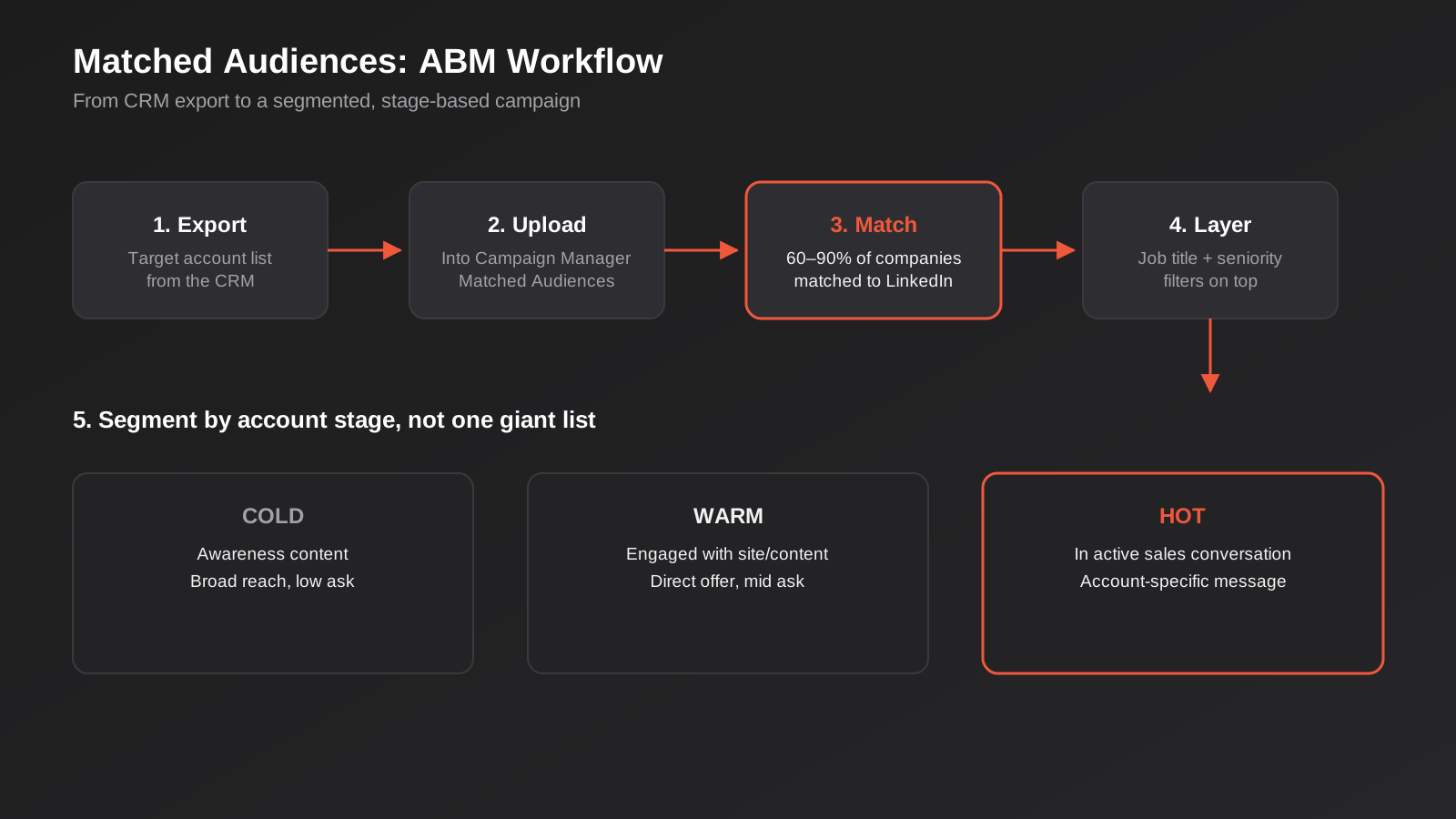
Matched Audiences is the feature that makes LinkedIn genuinely difficult to replicate on other platforms, and it works three ways. Website retargeting uses the LinkedIn Insight Tag to build audiences of people who visited specific pages on your site — pricing pages, case studies, demo request forms that didn’t convert. Contact list uploads let you target (or exclude) people from a CRM export by email address, typically matching 30–70% of a list depending on data quality. Company list uploads are the foundation of proper account-based marketing: export your target account list from the CRM, upload it, and LinkedIn matches 60–90% of companies to their LinkedIn presence, letting you run “employees of [account list]” campaigns layered with job title and seniority filters.
For ABM specifically, segment the account list by stage rather than running one undifferentiated list. Cold accounts get awareness content. Accounts that have engaged (visited the site, opened a sales email, attended a webinar) get warmer, more direct offers. Accounts already in a sales conversation get account-specific messaging, if the account is large enough to justify it. Dumping every target account into one campaign with one message is the single biggest reason ABM programs on LinkedIn underperform their cost.
Audience size and delivery
LinkedIn recommends audiences above 50,000 for sponsored content campaigns and at least 15,000 for Message Ads, and there’s a real reason beyond LinkedIn wanting to sell more impressions: audiences below that struggle to exit the delivery learning phase, spend inconsistently day to day, and give you too little data to judge performance. If your true ICP audience is smaller than that — which happens often in tight B2B niches — don’t force it wider with irrelevant filters. Instead, accept slower, more expensive delivery, extend the flight length, and judge results over a longer window rather than week to week.
Structuring campaigns around objectives
LinkedIn’s campaign objectives — awareness, consideration (website visits, engagement, video views) and conversion (lead generation, website conversions, job applicants) — aren’t just labels, they change how the auction optimises delivery and, as a result, what you pay. A lead generation objective optimises toward people likely to submit a form and will cost more per click than a website visits objective optimising for cheap traffic, even targeting the identical audience.
The structure we use for most B2B accounts runs three tiers inside one campaign group with a shared daily budget cap: a top-of-funnel awareness or engagement campaign to a broad ICP audience, a mid-funnel retargeting campaign to website visitors and content engagers using Matched Audiences, and a bottom-funnel conversion campaign — usually lead gen forms or demo requests — targeted at warm retargeting audiences and matched account lists. Budget skews roughly 40/30/30 across those three tiers for a new account, shifting toward the bottom of the funnel as retargeting pools build up over the first two months.
LinkedIn’s native lead gen forms deserve a specific mention: they pre-fill with the visitor’s LinkedIn profile data, which lifts form completion rates significantly compared to sending traffic to an external landing page, at the cost of a slightly lower-intent lead since the friction of typing details is removed. For high-value offers where lead quality matters more than volume, an external landing page with more friction — and better qualification questions — often converts to pipeline better even with a lower form completion rate. If you’re building or rebuilding that landing experience, this is a design and copy problem as much as a media one, and it’s worth treating separately from the ad account itself.
Ad formats and what they cost to run
Format choice affects cost almost as much as targeting does, because LinkedIn prices each format against its own engagement benchmarks rather than one flat market. Picking the right format for the objective is a cheaper lever than most people realise.
Single image and text ads
Single image sponsored content is the default and the cheapest to produce, and it’s a reasonable choice for top-of-funnel awareness where the goal is reach rather than a specific action. Text ads (the small sidebar units) are cheaper again on a per-click basis but carry much lower engagement, and we mostly use them for low-stakes retargeting rather than cold audiences, where a low-commitment nudge is enough.
Document ads
Document ads let someone preview and download a PDF — a guide, a whitepaper, a benchmark report — directly in the feed without leaving LinkedIn. They consistently produce some of the strongest engagement rates we see on the platform, because the value exchange is obvious and immediate. They’re a good fit for the middle of the funnel: enough commitment to indicate real interest, low enough friction that cost per engagement stays reasonable.
Conversation ads and Message Ads
These land in a prospect’s LinkedIn inbox rather than their feed, and they can be genuinely effective for high-value, highly targeted offers — event invitations, demo bookings for an enterprise product, anything where a semi-personal message beats a banner. They cost more per send than feed placements and need a much narrower, higher-intent audience to justify that cost, which is why LinkedIn’s 15,000-person minimum audience recommendation matters more here than anywhere else. Overuse them on a broad list and they read as spam, which damages sender reputation for future campaigns.
Event ads
Built specifically for promoting a LinkedIn Event (webinar, launch, panel), these tend to produce a lower cost per registration than sending the same audience to an external event landing page, simply because registering happens without leaving the platform. Worth testing for any business running regular webinars as part of a lead generation motion, since the format does some of the conversion-rate work that would otherwise fall to landing page design.
Measuring performance the right way
LinkedIn’s own reporting will make almost any campaign look better than it is if you take it at face value, and this is where a lot of Australian accounts quietly convince themselves a channel is working when the pipeline says otherwise.
The attribution window problem
By default, LinkedIn’s conversion reporting counts a conversion if it happens within 30 days of a click or a view of the ad — and “view” is doing a lot of work in that sentence. Someone who scrolled past your ad without clicking, then converted a week later after finding you through a completely different channel, can still get credited to LinkedIn under view-through attribution. That inflates the platform’s apparent contribution, sometimes substantially, especially for brand awareness campaigns run alongside other paid channels. We generally report LinkedIn’s own numbers alongside a separate, CRM-sourced view of pipeline that only counts leads actually tagged with a LinkedIn source at the point of form submission, and treat any gap between the two as the real number worth trusting.
UTM tracking and CRM tagging
Tag every LinkedIn destination URL with consistent UTM parameters down to the ad level, not just the campaign level, and make sure whatever CRM or form tool you use actually captures and stores that source data against the lead record rather than discarding it after the first touch. Without that, “how many of our actual customers came from LinkedIn” becomes a guess reconstructed months later from sales team memory, which is not a number anyone should be making budget decisions on.
Offline conversion imports
For longer B2B sales cycles, the conversion that matters — a closed deal — often happens weeks or months after the LinkedIn click, well outside any reporting window a dashboard shows by default. LinkedIn’s Conversions API and offline conversion import let you feed closed-deal data from the CRM back into the ad account after the fact, which both improves the platform’s own optimisation (it starts learning from actual revenue, not just form fills) and gives a genuine, if delayed, view of which campaigns produced customers rather than just leads. It takes some initial setup between the CRM and the ad account, but it’s the difference between optimising toward form submissions and optimising toward the outcome that actually matters to the business.
A realistic monthly budget framework
The most common budget mistake on LinkedIn isn’t spending too much. It’s spreading too little across too many campaigns. Splitting $1,500 a month across five campaigns gives each one roughly $10–$12 a day, which at $15 average CPC returns less than one click a day per campaign. After thirty days you have perhaps twenty clicks and one or two leads per campaign — not enough data in any of them to know if the targeting, creative or offer is the problem.
As a working minimum for a single well-targeted B2B campaign in Australia, budget for at least $50–$70 a day, or $1,500–$2,100 a month, concentrated rather than split. That generates roughly three to eight clicks a day depending on CPC, enough to gather a meaningful sample within four to six weeks. Below that, LinkedIn can still work, but expect a longer runway before you have enough data to optimise with any confidence, and be honest with stakeholders about that timeline up front rather than promising fast answers a small budget can’t deliver.
For businesses weighing LinkedIn against other channels at this budget level, it’s worth seeing the full cost picture across paid channels rather than pricing LinkedIn in isolation — our digital marketing pricing guide breaks down what Google Ads, Meta and LinkedIn management typically cost in Australia side by side, which is usually the more useful comparison than a LinkedIn number on its own.
Scaling once a campaign works
Once a campaign is producing a cost per lead you’re comfortable with, resist the urge to double the daily budget overnight. LinkedIn’s delivery system treats a large, sudden budget increase similarly to a brand-new campaign — it re-enters a shortened version of the learning phase and cost per result often climbs temporarily before settling. We increase working budgets in increments of roughly 20–30% every one to two weeks instead, which keeps delivery stable and makes it much easier to spot whether a cost increase is genuine audience fatigue or just the platform re-adjusting. The other lever worth pulling before increasing budget on the same audience is expanding to an adjacent one — a related job function, a neighbouring seniority band, a second industry vertical — since that new audience gives the auction a fresh, uncontested pool to work with rather than bidding against your own existing ads for the same limited group of people.
Common mistakes we see in Australian LinkedIn accounts
- Targeting by job title alone instead of layering function, seniority and company size, which lets the audience drift wide without anyone noticing until the cost-per-lead report lands.
- Leaving Audience Expansion switched on by default, which lets LinkedIn broaden delivery beyond your specified targeting criteria and quietly dilutes a carefully built audience.
- Running the same one or two ad creatives for months, well past the three-to-four-week point where engagement typically fatigues and cost per result climbs.
- Splitting a modest budget across too many campaigns, so none of them gather enough data to ever exit the learning phase.
- Sending high-value offers to LinkedIn’s native lead form when the offer needs qualification, then wondering why sales calls the leads “not a fit.”
- Ignoring day-parting: B2B engagement drops sharply on weekends, and campaigns left running 24/7 without adjustment burn a meaningful share of budget on low-intent weekend impressions.
- Never uploading a suppression list, so ads keep showing to existing customers or people already in an active sales conversation.
- Judging a new campaign’s performance in the first one to two weeks, before the algorithm has had time to learn and before sample size is large enough to mean anything.
- Doubling a working budget overnight instead of scaling gradually, which pushes the campaign back into a learning phase and temporarily inflates cost per result right when confidence in the channel is highest.
- Trusting LinkedIn’s own attribution numbers without a CRM-based cross-check, which usually overstates the platform’s real contribution to pipeline thanks to generous view-through attribution windows.
Frequently Asked Questions
Is LinkedIn Ads worth it for a small Australian business?
It depends on your average deal size and how clearly you can define your ideal buyer by job title or company. LinkedIn’s premium CPC only makes sense when the lifetime value of a customer comfortably covers a $100–$300 cost per lead. For high-ticket B2B services, software, or anything selling to a specific professional audience, it usually works. For low-margin, high-volume products aimed at consumers, it almost never does — that budget is better spent on Meta or Google.
What’s the minimum budget to get useful data from a LinkedIn campaign?
We’d budget at least $1,500 a month concentrated in one well-targeted campaign rather than split thin. Below that, LinkedIn can still deliver, but you’ll wait longer for a sample size large enough to draw real conclusions from, and short flights will look worse than they are simply due to low volume.
How is LinkedIn’s targeting different from Meta or Google?
LinkedIn targets on declared professional data — job title, function, seniority, employer, skills — that people maintain themselves on their profile. Meta and Google largely infer interest and intent from behaviour, which is powerful for consumer targeting but far less precise for reaching a specific role at a specific type of company. That precision is the entire reason LinkedIn’s CPC runs higher.
Should I use LinkedIn’s automated bidding or set bids manually?
We generally start new campaigns on manual bidding for the first three to four weeks to control cost while the audience and creative are still unproven, then move to automated (maximum delivery or cost cap) once we have a clear picture of what a good cost per result looks like. Handing a brand-new campaign straight to automated bidding tends to spend unevenly before the system has learned who actually converts.
What’s the difference between this and hiring an agency to run LinkedIn Ads?
This guide covers the mechanics — what things cost and how targeting actually works — so you can either run campaigns yourself with a clear picture of what good looks like, or hold an agency accountable to it. If you’re deciding whether to run LinkedIn in-house or bring in a specialist service, our guide to choosing a LinkedIn Ads agency covers that decision specifically, including pricing models and the questions worth asking before you sign anything.
How long before a LinkedIn campaign shows real results?
Give a new campaign four to six weeks of consistent spend before making structural changes. The first two weeks are mostly the algorithm learning and creative settling into its true cost per result; useful optimisation decisions usually only become possible once you’re past that and have enough clicks and leads to see a genuine pattern rather than noise.
Which LinkedIn ad format should I start with?
For a first campaign, a single image ad to a broad ICP audience for awareness, paired with a document ad (a genuinely useful guide or benchmark report) for the middle of the funnel, covers most of what a new account needs without the complexity or cost of conversation ads. Message-based formats and event ads are worth adding once you have a warmer, better-defined retargeting audience to point them at.
Where to start
If you’re weighing up LinkedIn Ads for the first time, start smaller and narrower than feels comfortable: one well-defined ICP audience, one clear offer, a budget concentrated enough to actually learn something in a month. Get the targeting stack and the bidding approach right before you worry about creative variations or scaling spend — most of the wasted budget we see in Australian accounts comes from getting those fundamentals wrong, not from the platform being inherently expensive.
If you’d rather have someone who runs these accounts daily set it up properly the first time, our LinkedIn Ads service covers strategy, targeting, creative and ongoing optimisation for Australian B2B businesses. Happy to have a look at your account or your plans and give you an honest read on whether LinkedIn is the right channel before you commit budget — get in touch and we’ll talk it through.
Keep reading
Related posts
Reddit Ads for Australian Businesses: Costs, Targeting and Whether It’s Worth Testing (2026)
What Reddit Ads actually cost in Australia, how subreddit and keyword targeting work, and a straight framework for deciding if it's worth…
TikTok Ads for Australian Businesses: Costs, Targeting and What Actually Works (2026)
What TikTok ads actually cost in Australia, how targeting and campaign structure work, and the mistakes that waste budget in the first…
How to Choose the Right LinkedIn Ads Service for Your Business (2026 Guide)
What makes LinkedIn Ads different from every other paid channel, and what that means for choosing the right service to run it…
Got a project you'd like to talk through?
Tell us what you're working on — we'll come back with a plan.
