
Pinterest Ads for Australian Businesses: Costs, Targeting and Whether It’s Worth Testing (2026)
 Jignesh Vagadiya
31/10/2026
21 min read
A homewares brand we spoke to last year had tried almost every paid channel going — Google Shopping, Meta catalogue ads, a short TikTok experiment that fizzled after three weeks. Nobody on the marketing side had ever opened a Pinterest Ads Manager account, because nobody had been told to. The assumption was that Pinterest was something people used personally, for wedding boards and recipe collections, not a place where an Australian business actually bought media. Six months later, Pinterest was the cheapest channel in their account by a wide margin, and it was driving traffic that converted at a noticeably higher rate than their Meta campaigns on the same products.
That story isn’t unusual, and it’s not really about Pinterest being secretly brilliant. It’s about almost nobody in Australia advertising on it, which keeps the auction quiet and the cost per click low, in a handful of categories where the platform’s actual mechanics line up unusually well with how people shop. Pinterest isn’t a social network in the way Meta or TikTok are social networks. It behaves more like a visual search engine that happens to have a feed, and that one distinction explains almost everything else in this guide — why the content lasts so much longer, why the targeting options look different, and why it’s a genuinely bad fit for some businesses and a quietly excellent one for others.
This Pinterest Ads Australia guide sets out what the platform actually costs to run, how the targeting and ad formats work, which kinds of businesses see a real return and which ones are wasting their time, and how to set a campaign up properly from the first dollar. We manage paid social across TikTok, Meta and LinkedIn for Australian clients, and Pinterest is the platform we get asked about least and are most often surprised by once a client actually tests it.
What Pinterest Actually Is for Advertisers
Pinterest calls itself a visual discovery engine, and that’s not just marketing language — it’s the single most useful thing to understand before spending a dollar on the platform. On Meta, Instagram or TikTok, people open the app to be entertained or to see what people they know are doing. On Pinterest, people open the app because they’re planning something: a kitchen reno, a wedding, a capsule wardrobe, next week’s dinners, a birthday party for a six-year-old. The intent is closer to a Google search than to scrolling a feed, except the query is a mood or a style rather than a specific product name.
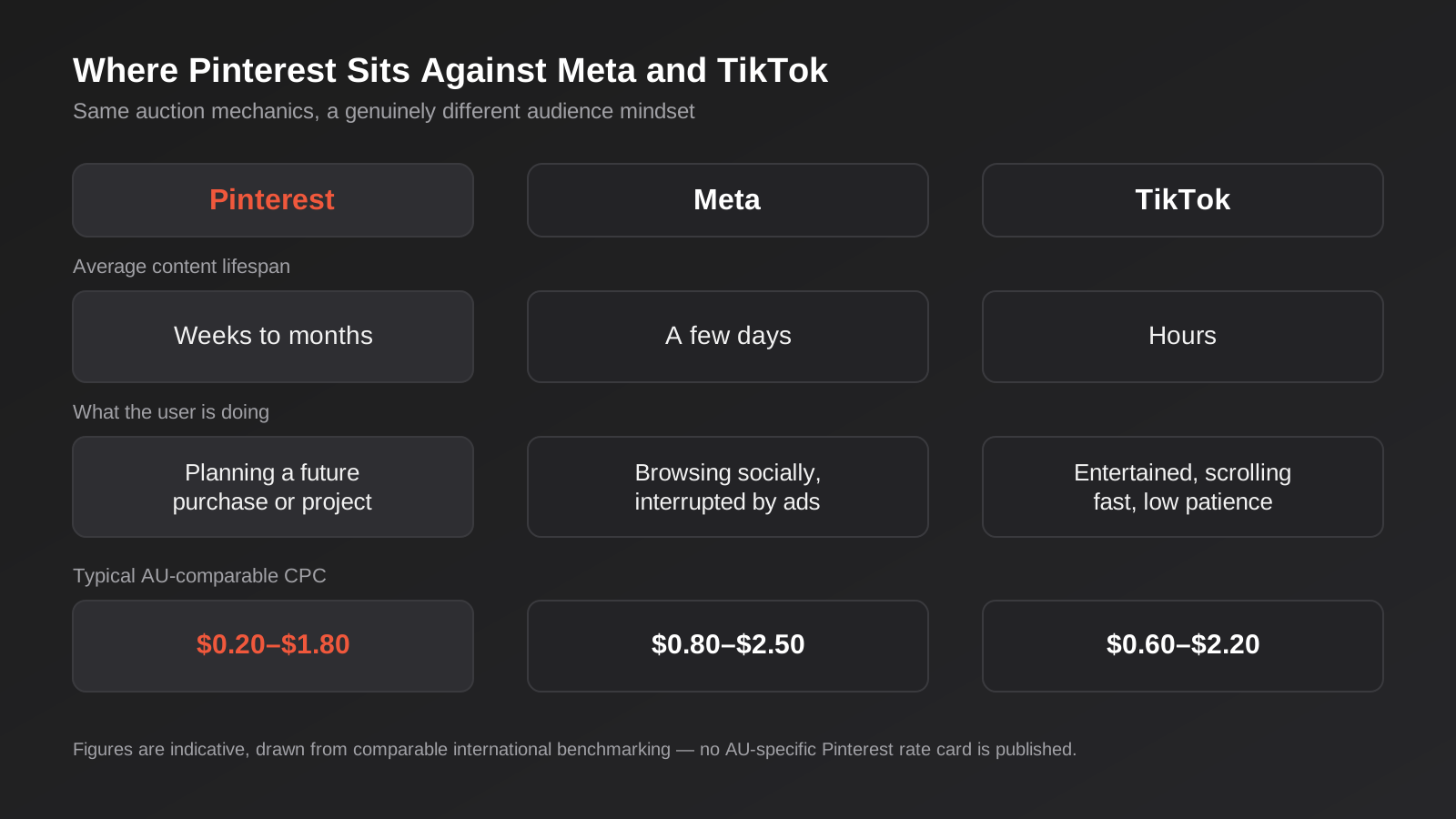
That changes how a pin behaves compared to a post on any other platform. A Facebook or Instagram post has a functional lifespan measured in hours before the algorithm moves on and engagement drops to nearly nothing. A TikTok video can pop for a day or two if it catches the For You page algorithm, then it’s effectively dead. A pin, by contrast, keeps surfacing in search results and recommended feeds for weeks or months after it’s published, because Pinterest’s system treats it more like evergreen content than a timestamped post. Paid pins inherit some of that same durability — a well-performing promoted pin doesn’t fatigue on the same punishing timeline as a Meta or TikTok ad, which changes how often you genuinely need fresh creative.
It’s closer to a search engine than a social feed
The practical consequence is that Pinterest’s targeting includes a keyword option that doesn’t really have an equivalent on Meta or TikTok, because those platforms target around inferred interests and behaviour rather than an explicit query. On Pinterest, someone searching “small bathroom renovation ideas” or “minimalist engagement rings” is showing the kind of explicit, bottom-of-funnel intent that on Google would cost a genuine premium in a Search campaign. Pinterest search volume for the same query is usually far less contested, because far fewer businesses are bidding on it there.
Where it sits against Meta and TikTok
None of this makes Pinterest a universal replacement for either platform — it’s a different tool for a different stage of attention. The comparison below is the one we walk new clients through before recommending a test budget, because the decision to add Pinterest to a media mix should come from where your audience’s intent actually sits, not from a platform being cheaper in isolation.
Who Pinterest Actually Works For in Australia
Pinterest’s own user base skews heavily toward visually-led planning categories, and advertising performance tends to follow that pattern closely. Before testing a budget, it’s worth being honest about whether your business genuinely sits in a category where people plan visually, because the platform punishes a mismatch here more clearly than Meta or Google tend to.
Categories that consistently perform
Home and renovation is the strongest fit we see, by a wide margin — furniture, soft furnishings, tiles, paint, landscaping, anything someone researches across a weeks-long renovation decision rather than buying on impulse. Fashion and apparel does well too, particularly brands with a distinct aesthetic rather than generic basics, because Pinterest users are actively curating a personal style rather than browsing a catalogue. Wedding and events is arguably Pinterest’s original home turf and remains one of its strongest categories — venues, florists, stationery, dresses, catering, anything tied to a long planning window with genuine emotional investment in getting the look right.
Food and beverage brands do well with recipe-style and product-in-use content, especially anything with a strong visual payoff. Beauty, particularly skincare routines and makeup looks rather than generic product shots, performs reliably. DIY, craft and parenting content — birthday parties, nursery design, school holiday activities — rounds out the categories we’d recommend testing first. If your product photographs well and solves a problem someone is actively planning around, Pinterest deserves a real test budget.
Categories that usually waste the spend
B2B software and services almost never work on Pinterest, for the obvious reason that nobody is pinning a mood board for procurement software. Low-consideration, impulse-driven consumer products — anything bought on price or convenience in the moment rather than planned ahead — tend to underperform here relative to Meta or TikTok, because Pinterest’s whole mechanism depends on a planning window that impulse categories don’t have. Local trades without a visual product (an electrician, a plumber doing emergency callouts) are also a poor fit; the planning-stage intent Pinterest captures well belongs to the home-renovation client searching for inspiration months out, not the homeowner with a burst pipe right now — that’s squarely Google Ads territory instead. If your category doesn’t naturally produce an aspirational, saveable image, it’s worth testing a small budget before committing real spend, rather than assuming Pinterest will behave like Meta with a different audience.
Pinterest Ads Cost in Australia: CPC, CPM and Budget Reality
Here’s the honest caveat before any numbers: there’s no published, Australia-specific Pinterest rate card, and most of the cost data circulating online comes from US and European benchmarking. Treat every figure in this section as a directional guide rather than a quote you’re owed, the same way we’d caveat any third-party benchmark on a platform without local reporting.
With that said, the consistent pattern across international benchmarking, and what we see in practice running accounts with an Australian audience selected, is that Pinterest’s cost per click typically runs somewhere between $0.20 and $1.80, with cost per thousand impressions (CPM) commonly sitting between $4 and $12. That’s meaningfully below typical Meta and TikTok benchmarks for a comparable awareness or consideration objective — sources we’ve reviewed put Pinterest’s CPC at roughly 30–50% below Meta’s for like-for-like campaigns, which tracks with what quieter auctions usually produce. Category matters more than platform-wide averages suggest: home decor and finance-adjacent categories tend to sit toward the higher end of that range, while food, retail and beauty sit cheaper.
Pinterest doesn’t enforce a platform-wide minimum daily spend the way some ad platforms effectively do through practical delivery thresholds, which makes it genuinely accessible to test with a modest budget. That doesn’t mean a tiny budget is a good idea — a campaign spending $5 a day will take a long time to gather enough data to mean anything — but there’s no hard floor stopping a small Australian business from running a real test for a few hundred dollars a month before deciding whether to commit further.
Budget reality for a first test
As a working starting point, we’d budget at least $500 to $800 a month for a genuine first test — enough to run two or three ad groups with distinct creative and targeting for four to six weeks, which is roughly the window needed to see whether a category and audience combination is actually working before scaling spend. Splitting a smaller amount across many campaigns is the same mistake it is on every auction-based platform: thin data in every campaign and a confident-sounding conclusion that’s really just noise.
Campaign Objectives and Ad Formats
Pinterest’s campaign objectives map roughly to the standard funnel every ad platform uses, though the naming and the exact list have been through some recent simplification. At the time of writing, the objectives available in Ads Manager are Brand Awareness, Video Completion, Consideration, Conversions and Catalogue Sales, with Pinterest’s own developer documentation flagging that Catalogue Sales and Web Conversion campaigns are being consolidated into the Sales and Consideration objectives, with older campaign structures archived from April 2027. If you’re setting up a longer-term catalogue strategy, it’s worth checking the current objective list in your own Ads Manager before building anything, since this is actively shifting.
The format lineup
Standard pins (a single image) remain the baseline format and the cheapest to produce, which makes them a reasonable starting point for testing a new category or audience before investing in video. Video pins autoplay in-feed and tend to earn stronger engagement for process-driven content — a renovation before-and-after, a recipe coming together, a styling transformation — than a static image can convey. Carousel pins let you show multiple images or product angles in one unit, useful for a range of similar products or a step-by-step sequence. Collections (sometimes called Idea Pins in organic content) combine a hero image or video with a grid of supporting product images, and perform well for ecommerce brands wanting to showcase a styled look alongside the individual items that make it up.
Matching format to objective
For a first campaign, we’d generally recommend standard pins for a Consideration objective to validate audience and creative cheaply, then layer in video for Awareness once you know which visual style is actually resonating, and move to Catalogue Sales with Collections once there’s a live, well-structured product feed to drive it. Jumping straight to video production and catalogue integration before validating the basic audience-and-creative fit is a common way to spend a lot of money finding out slowly what a cheap standard-pin test would have told you in a fortnight.
Targeting on Pinterest: Interest, Keyword and Audience
Pinterest’s targeting sits across three main categories, and the platform’s own guidance is that most of the real precision comes from combining them rather than relying on any single one in isolation.
Interest targeting
Interest targeting works off Pinterest’s own taxonomy of topics — home decor, vegetarian recipes, minimalist fashion, and thousands of narrower categories beneath those headings — built from what people save, search and engage with on the platform. It’s the closest equivalent to Meta’s interest targeting, though Pinterest’s interest graph tends to be more tightly tied to actual saving behaviour than Meta’s broader behavioural signals, which generally makes it a reasonably reliable starting point for a cold audience.
Keyword targeting
Keyword targeting is the feature that genuinely sets Pinterest apart from Meta and TikTok, because it lets you bid against an explicit search phrase rather than an inferred interest. Someone actively searching “scandi living room ideas” or “backyard deck design” is showing a different, more immediate kind of intent than someone whose profile simply suggests an interest in home decor broadly. Pinterest’s own shopping guidance notes that keyword and interest targeting aren’t strictly necessary for Catalogue Sales campaigns, where the system can rely more heavily on the product feed and automated optimisation — but for Consideration and Awareness objectives building a new audience, a tight keyword list built from genuine search research is usually the highest-leverage targeting work you can do on the platform.
Audience targeting
Audience targeting covers your own first-party data: customer lists uploaded and matched by email, visitors to your website captured through the Pinterest tag, people who’ve engaged with your organic or paid pins, and actalike audiences built from any of those seed lists. As with every platform running on first-party data, match rates depend on list quality and overlap with Pinterest’s own user base — expect a meaningful chunk of any uploaded list simply not to match, the same way it wouldn’t fully match on Meta or LinkedIn.
Performance+ and automated bidding
Pinterest’s automated bidding tools, bundled under its Performance+ suite, broaden targeting automatically once an account has enough conversion volume for the system to optimise against — third-party guidance pegs this at roughly 50 or more weekly conversions, a threshold that tracks closely with the similar learning-phase minimums Meta and TikTok both use. Below that volume, manual, more tightly defined targeting tends to give more predictable results than handing control to an algorithm that doesn’t yet have enough signal to work with.
Conversion Tracking: The Pinterest Tag and Conversions API
Pinterest, like every major ad platform now operating in a post-iOS-tracking-changes world, recommends installing both the Pinterest tag (the browser-side pixel) and the Conversions API (server-side event forwarding) rather than relying on the tag alone. The tag alone misses a growing share of conversions due to browser tracking restrictions and ad blockers, the same problem that’s pushed Meta and TikTok toward the same dual-tracking recommendation over the past few years. Setting up both properly, ideally through a tag management system or ecommerce platform’s native integration rather than hand-rolled code, is worth doing before spending real budget rather than after — retrofitting tracking onto a campaign that’s already run for a month means the first month’s optimisation data was working with an incomplete picture.
If you’re running Shopify, WooCommerce or a similar platform, Pinterest’s native integrations handle most of the tag and catalogue setup without custom development, which is the path we’d recommend for most businesses rather than building a bespoke integration for what’s ultimately a standard ecommerce tracking requirement.
Pinterest Shopping and Catalogue Ads for Ecommerce
For ecommerce businesses, Catalogue Sales campaigns connect your product feed directly to Pinterest, letting individual products be tagged and surfaced in shoppable pins without a manual ad build for every item. The mechanics are close to Meta’s dynamic product ads: Pinterest ingests a structured feed (via a direct integration, a feed URL, or a connected ecommerce platform), and the shopping ad formats and the Catalogue Sales objective simply aren’t available in Ads Manager until a live, properly ingested catalogue exists.
Feed health matters here exactly as much as it does for Meta’s dynamic ads, which we’ve written about in detail in our guide to Meta Ads cost and targeting. Accurate pricing, current stock levels, clear product imagery and complete category data all feed into how well Pinterest’s shopping formats perform, and a messy feed inherited from another channel’s setup usually needs real remediation work before Catalogue Sales campaigns are worth running at any scale. If your Shopify or WooCommerce catalogue is already feeding Google Shopping or Meta cleanly, extending it to Pinterest is usually a modest technical lift rather than a rebuild.
Measuring Whether Pinterest Is Actually Working
Pinterest’s own reporting, like every ad platform’s native dashboard, is built to make the platform look as effective as possible, and the attribution window is where that shows up most clearly. By default, Pinterest attributes a conversion to an ad if it happens within 30 days of an engagement (a close-up, save or click) and, depending on settings, within a shorter window of a simple view. Given how long a pin’s functional lifespan is compared to a Meta or TikTok post, that window can credit Pinterest for a purchase someone genuinely discovered weeks earlier through a completely different path — a Google search, a direct visit, a recommendation from a friend who saw the same pin.
The fix is the same one worth applying to any platform’s self-reported numbers: tag every Pinterest destination URL with consistent UTM parameters, make sure your analytics or CRM setup actually captures and stores that source against the resulting lead or sale, and treat the gap between Pinterest’s own dashboard and your independently tracked numbers as the real figure worth trusting. For a renovation, wedding or similarly long-consideration purchase, it’s also worth accepting that some of Pinterest’s value shows up as assisted conversions rather than last-click sales — someone saves a pin in week one of planning a kitchen and buys from the saved brand’s site in week six through a direct visit, with no further Pinterest click in between. A platform-only view of ROI will understate that kind of contribution every time, which is one more reason a short test window isn’t always long enough to judge a planning-heavy category fairly.
Building a Pinterest Strategy That Doesn’t Waste Budget
Plan around Pinterest’s own seasonality, not the calendar everyone else uses
Pinterest users genuinely plan ahead, and the platform’s own trend reporting (branded Pinterest Predicts) consistently shows search volume for seasonal categories — Christmas entertaining, wedding season, back to school, EOFY home projects — climbing weeks or months before the equivalent search spike on Google or purchase spike on Meta. A business running Pinterest campaigns on the same seasonal calendar it uses for Meta or Google Ads is consistently showing up too late to catch that early planning-stage search behaviour. If Christmas entertaining is a category for your business, the pinning and paid activity genuinely needs to start in the Australian spring, not in early December when the planning-stage audience has already made most of their decisions.
Content style: native and useful beats polished and promotional
Pinterest’s own best-practice guidance, and what we see borne out in account performance, favours pins that look like genuinely useful content rather than an obvious ad — vertical format (2:3 aspect ratio performs most reliably), clear text overlay describing what the pin actually offers, and a style that would look at home in someone’s own saved boards rather than interrupting them. This is a milder version of the same principle that governs TikTok’s native-content preference — a platform built around saving and discovery rewards content that earns a save on its own merits, not a repurposed banner ad resized to fit.
Where Pinterest fits in a broader paid social mix
Most Australian businesses testing Pinterest already run Meta, and often TikTok alongside it, which raises the obvious question of how much budget it deserves relative to those established channels. Our general view, covered in more depth in our social media marketing strategy guide, is that paid social works best as a connected mix matched to where your actual audience spends attention, rather than a single platform run in isolation. Pinterest earns its place as a lower-cost, planning-stage complement to Meta’s broader reach and TikTok’s trend-driven discovery — worth a genuine test budget in the categories covered earlier, not a wholesale replacement for either.
Repurposing content from other platforms
Static product photography and lifestyle imagery already produced for Meta or an ecommerce catalogue generally repurposes onto Pinterest with minimal rework — usually just a crop to the platform’s preferred vertical ratio and a text overlay added. Video built for TikTok’s fast-paced, sound-on style repurposes less cleanly, since Pinterest’s audience responds better to calmer, more instructional pacing than TikTok’s attention-grabbing opening seconds. Treat Pinterest as needing its own, smaller content allocation rather than a straight re-upload of whatever’s already running elsewhere.
Common Mistakes We See With Pinterest Ads
- Assuming Pinterest behaves like Meta with a cheaper CPC, and running the same creative and targeting approach rather than building around planning-stage search intent and keyword targeting.
- Launching seasonal campaigns on the same calendar as Meta or Google, missing the weeks-to-months head start Pinterest’s planning-stage audience actually needs.
- Testing a category with genuinely low visual appeal or impulse-driven purchase behaviour, then concluding the platform doesn’t work rather than that the category was never a fit.
- Skipping the Conversions API and relying on the Pinterest tag alone, then under-crediting the channel in reporting because a meaningful share of conversions go untracked.
- Launching Catalogue Sales campaigns on a messy or incomplete product feed inherited from another channel, without checking pricing, stock and imagery accuracy first.
- Spreading a modest test budget across too many ad groups and objectives at once, leaving no single campaign with enough data to draw a real conclusion from.
- Repurposing fast-paced, sound-on video built for TikTok directly onto Pinterest without adjusting pacing for a platform that rewards calmer, more instructional content.
Frequently Asked Questions
Is Pinterest Ads worth testing for a small Australian business?
It depends heavily on category more than business size. If your product is visual and bought after a planning period — home, fashion, weddings, food, beauty, DIY — a modest test budget of $500 to $800 a month for four to six weeks is a reasonable way to find out, especially given how quiet the Australian auction still is compared to Meta. For low-consideration or B2B categories, that same budget is usually better spent elsewhere first.
How does Pinterest Ads cost compare to Meta and TikTok in Australia?
International benchmarking consistently puts Pinterest’s cost per click 30 to 50% below Meta’s for comparable campaigns, with CPMs in a similar discount range. There’s no official Australia-specific rate card for any of the three platforms, so treat these as directional comparisons rather than guaranteed figures — actual cost depends heavily on your category and how contested it is within Australia’s smaller advertiser base on each platform.
Do I need a product catalogue to advertise on Pinterest?
No — standard, video and carousel pins all run without a connected catalogue, and are a reasonable way to test awareness or consideration objectives for a service business or a brand without live ecommerce. A catalogue is only required for Catalogue Sales campaigns and the shoppable pin formats that depend on it.
What’s the minimum budget to get useful data from a Pinterest campaign?
Pinterest doesn’t enforce a platform-wide minimum spend, but a genuinely useful test needs enough volume to draw a real conclusion from. We’d budget at least $500 to $800 a month concentrated across two or three ad groups for four to six weeks, rather than spreading a smaller amount thinly across many campaigns and objectives at once.
How is Pinterest’s targeting different from Meta’s?
Pinterest adds explicit keyword targeting on top of interest and audience targeting, which lets you bid against a search phrase the way you would on Google rather than relying purely on inferred interest, as Meta does. That search-style intent signal is Pinterest’s biggest structural advantage for planning-stage categories, and it’s worth building a proper keyword list for rather than relying on interest targeting alone.
How often do I need new creative on Pinterest compared to Meta or TikTok?
Less often. Because pins have a far longer functional lifespan — weeks to months rather than days — a well-performing pin doesn’t fatigue on the same aggressive timeline as a Meta or TikTok ad. That doesn’t mean a static creative set forever; seasonal categories especially need fresh pins ahead of each planning window, but the refresh cadence is noticeably lighter than on faster-moving feeds.
Where to Start
If your business sells something visual that people plan around — a renovation, a wardrobe, a wedding, a kitchen full of ingredients — Pinterest deserves a genuine test before you write it off as a platform for personal boards rather than business results. Start narrow: one or two categories, a real keyword list, standard pins before video, and enough budget concentrated in a short window to actually learn something, rather than a token spend spread too thin to mean anything.
We manage paid social across Meta, TikTok and LinkedIn for Australian businesses through our social media marketing service, and Pinterest is a channel we’ll scope into that mix when the category genuinely fits rather than adding it as an upsell. Because we run lean as a specialist agency rather than carrying a large account-management layer, our fixed quotes typically come in below the Australian averages covered in this guide. If you’ve already got a written quote from another agency for comparable scope, send it through and we’ll do our best to beat it.
Happy to look at your product range or current paid social accounts and give you an honest read on whether Pinterest is worth the test budget before you commit to anything — get in touch and we’ll talk it through.
Keep reading
Related posts

Snapchat Ads for Australian Businesses: Costs, Targeting and Whether It’s Worth Testing (2026)
What Snapchat Ads actually cost in Australia, how targeting and formats work, and which businesses should test it versus skip it in…
X Ads for Australian Businesses: Costs, Targeting and Whether It’s Worth Testing (2026)
What X (formerly Twitter) Ads cost in Australia, how targeting works, and whether it's actually worth testing for your business in 2026.
Reddit Ads for Australian Businesses: Costs, Targeting and Whether It’s Worth Testing (2026)
What Reddit Ads actually cost in Australia, how subreddit and keyword targeting work, and a straight framework for deciding if it's worth…
Got a project you'd like to talk through?
Tell us what you're working on — we'll come back with a plan.
