
Audit Logging for Custom Software and Automations: What to Record, What to Leave Out and How Long to Keep It
 Jignesh Vagadiya
12/11/2026
24 min read
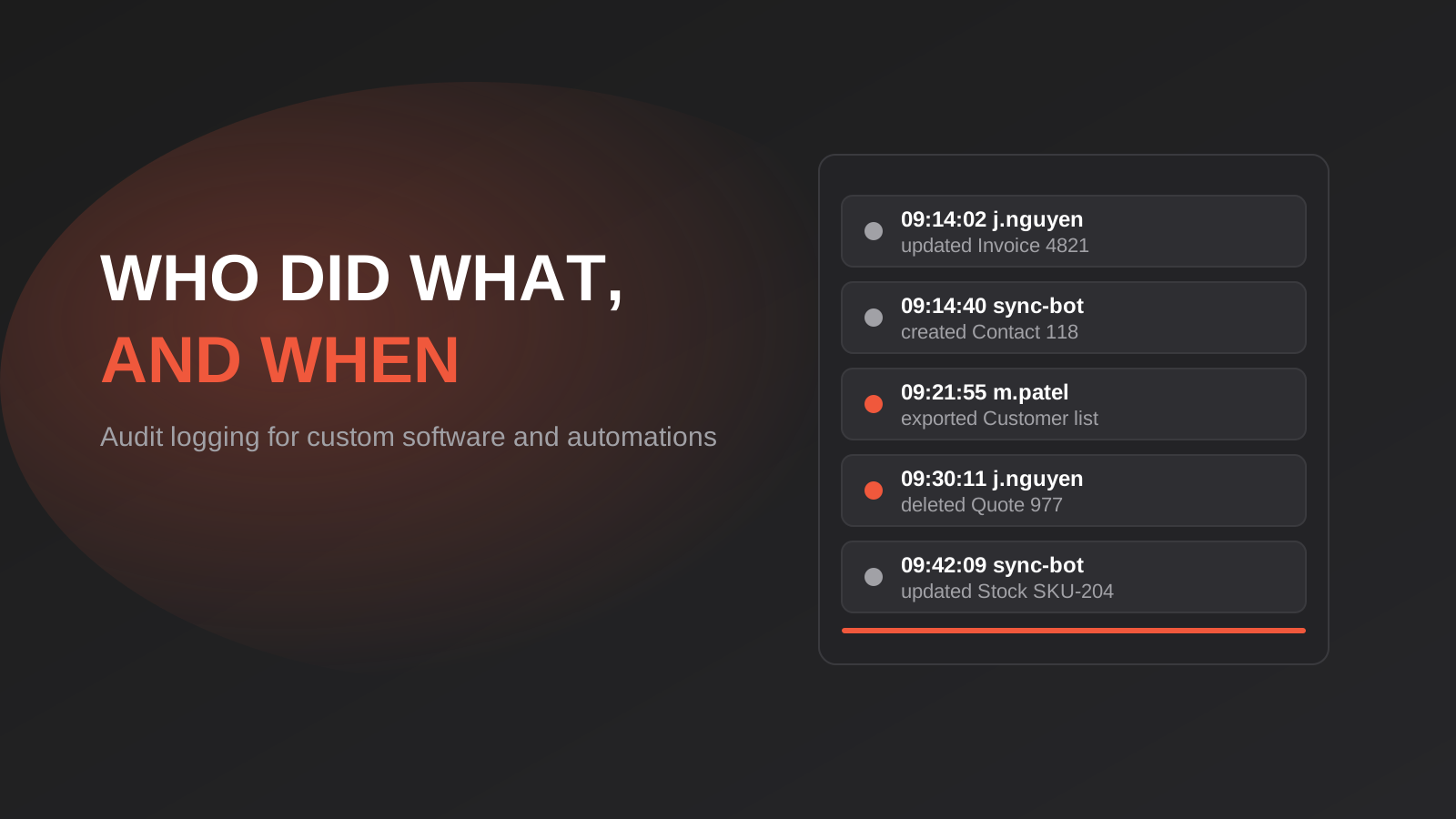
Sooner or later someone asks a question your software can’t answer. A customer says they never changed their bank details. A staff member insists the quote was approved before it was edited. An accountant wants to know why the same invoice number appears twice. A client wants to know exactly who at your company viewed their file last month. If the system only stores the current state of each record, the honest answer to all of these is “we don’t know”.
That gap is what an audit log closes. It’s a record of who did what, to which record, and when, kept separately from the data itself and protected from being edited. It’s one of the least exciting parts of a build, so it’s the first thing to get cut when a budget tightens, and the hardest thing to bolt on later because history you didn’t record is gone for good.
This guide is about doing it sensibly in custom software and in the automations that sit around it. We’ll cover what an audit log is (and isn’t), what to record, what to deliberately leave out, how to make a log trustworthy, how long to keep it under Australian obligations, and the specific problem of automations and AI agents acting in your systems with no human logged in.
Audit Log vs Application Log: They’re Not the Same Thing
Most software already writes logs, so teams often assume they have this covered. They usually don’t. An application log is written for developers. It tells you the server restarted, a request took four seconds, or an API call failed with a 500 error. It’s noisy, it’s rotated away after days or weeks, and it’s full of detail that has no business meaning.
An audit log is written for accountability. It records business-relevant actions by identifiable actors: Jess in accounts changed the supplier bank account on this vendor record at 2:14pm. It’s much quieter, it has to be complete, and it has to be kept far longer. The two serve different readers, and mixing them is how businesses end up with a log that is too noisy to search and too short-lived to prove anything.
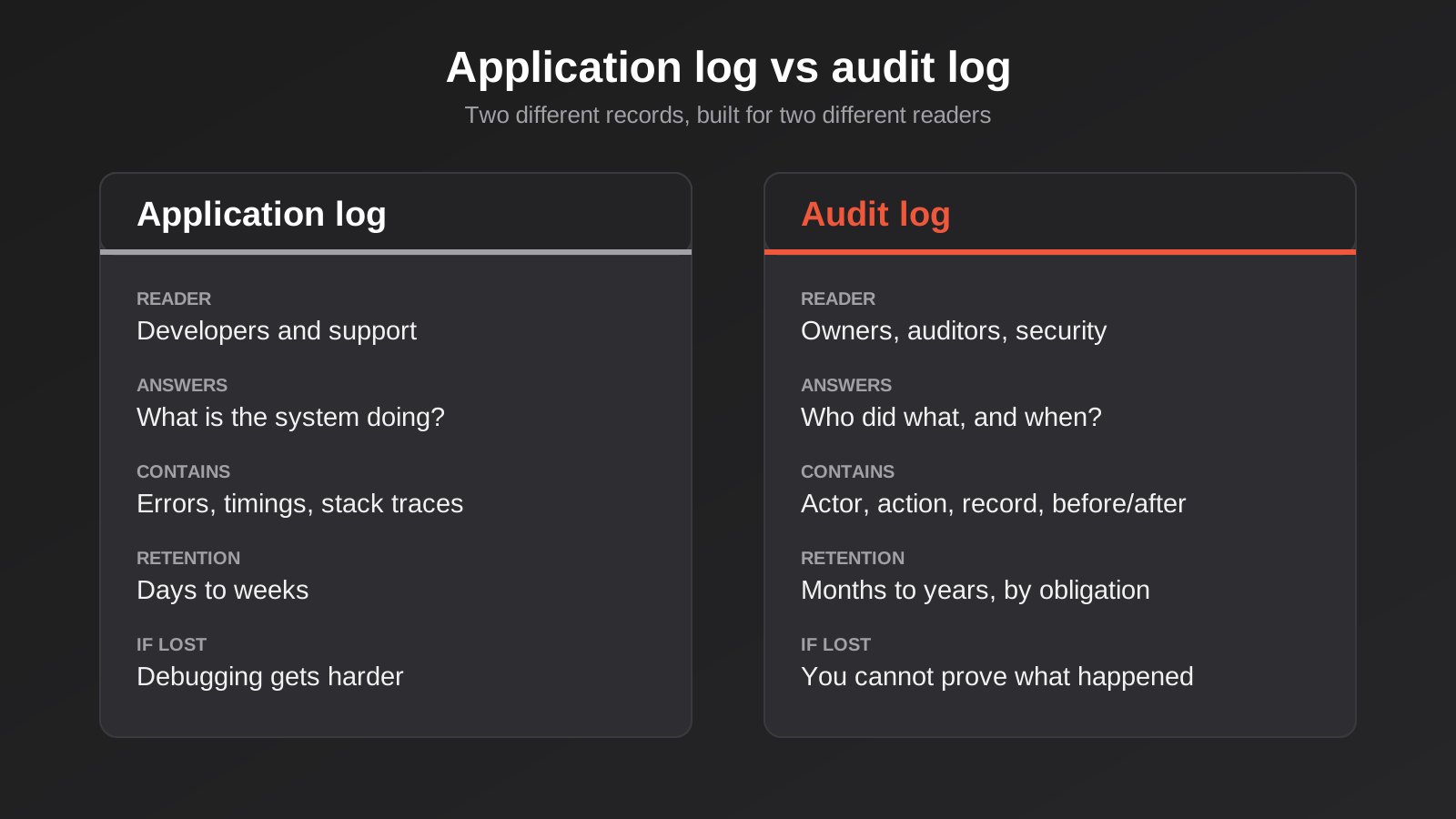
One practical test: if a log line would still matter to someone in six months who has no idea how the software works, it belongs in the audit log. If it only matters to the developer fixing a bug today, it’s an application log entry. You can write both from the same code, but they should land in different places with different retention and different access.
Audit logs are not version history
A second confusion is between an audit log and a version history or “undo” feature. Version history stores snapshots so a user can restore an earlier state. It’s a product feature. An audit log is an evidential record that you may never show to a user at all. They overlap (a good audit entry has before and after values) but they have different owners and different failure modes. If a user can delete their own version history, it isn’t an audit log.
When You Actually Need One
Not every tool needs a full audit trail. A brochure site doesn’t. A form that emails a sales team doesn’t. But the threshold is lower than most people expect, and it’s usually crossed by one of five things.
- Money moves or is approved. Quotes, invoices, refunds, credit notes, payment details, pricing overrides. Anything where someone could later dispute what was agreed.
- More than one person edits the same records. The moment there’s a team, there’s a “who changed this?” question coming.
- Personal or sensitive information is held. Customer contact details, health information, employee records, identity documents. You’ll want to show who accessed them, not just who changed them.
- Clients or partners log in. A portal exposes your data to people outside your control, and they will eventually ask what you can see and what they can.
- Automations or AI agents write data. A script that updates 4,000 records overnight is acting on your behalf with no human attached. If it gets something wrong, the audit log is how you find out what and how far it spread.
If none of those apply, a lightweight approach is fine. If two or more do, treat the audit log as core infrastructure and plan it into the first build. If you’re scoping something like a client portal or internal system, our web application development work includes this as a normal part of the design, because it’s cheap on day one and expensive in month eighteen.
What to Record: The Six Fields That Answer Most Questions
Audit logs go wrong in two opposite ways. Some record nothing useful (“record updated”) and some record everything, drowning the useful entries and creating a privacy problem of their own. The sweet spot is a consistent structure for every event, with six pieces of information.

1. Who: the actor
Store a stable identifier for the person or system that acted, plus the type of actor: staff user, customer, service account, or AI agent. Don’t store only a display name. People change their names, share nicknames, and leave. A user ID that still resolves after someone is offboarded is worth far more than a name string.
If a staff member acts on behalf of a customer (an admin impersonating a user to reproduce a problem, for example), record both. “Admin Priya, acting as customer 2231” tells a very different story to “customer 2231” alone, and impersonation without a trace is one of the more awkward things to explain after the fact.
2. What: the action
Use a small, fixed vocabulary of actions rather than free text: created, updated, deleted, viewed, exported, approved, rejected, logged in, permission changed. A fixed list makes the log searchable and countable. Free text turns into forty slightly different spellings of the same thing within a year.
3. Which record: the target
Record the type and ID of the thing that was affected, and which system it lives in if you have more than one. “Invoice 4821 in the billing app” is enough. Resist the urge to store the full record here. The ID lets you look up the current state, and the before-and-after values (below) capture what changed.
4. When: the timestamp
Store time in UTC, to the second at least, and format it for display in the viewer’s time zone. Australia makes this more interesting than it should be: we have multiple time zones, daylight saving that some states observe and others don’t, and a long history of automations that quietly misbehave on the changeover weekend. Storing UTC and converting on display avoids an entire class of “this log says 2:30am happened twice” arguments. Add a request ID or job run ID so you can tie together all the events caused by one action.
5. The change: before and after
For updates, store the old and new value of the fields that changed, not the entire record. If someone changes a phone number, the entry shows the old number and the new one. This is the part that makes the log useful in disputes, and it’s also the part that needs the most care around sensitive fields, which we’ll come back to.
For deletes, decide in advance what you keep. A soft delete (marking a record as deleted and hiding it) preserves the data and the history. A hard delete removes the data, so the audit entry may be the only remaining evidence the record existed. That tension is real, and it interacts with privacy rules we’ll cover shortly.
6. Where from: the source
Note how the action arrived: the web app, the mobile app, the public API, an admin tool, a Zapier or n8n workflow, a bulk import. IP address and device are useful for security events like logins, but for most business events the channel matters more. When a batch of 600 records changes at 3am, knowing it came from the nightly sync and not a person is the difference between a five-minute answer and a two-day investigation.
What to Deliberately Leave Out
A good audit log is as much about restraint as completeness. Every field you log is a field someone can read, and the log itself becomes a store of sensitive information that needs protecting. There are some things that should never go in.
- Passwords, tokens and secrets. Not even hashed or “masked” versions in error traces. If a request body is being logged wholesale, a password field is probably in there.
- Payment card numbers. Log that a payment was made and the gateway’s reference, never the card details.
- Full message or document contents. Log that a document was viewed, downloaded or shared. Don’t copy the document into the log.
- Sensitive values in before-and-after. For fields like health details, government identifiers or bank account numbers, record that the field changed, and perhaps a masked tail, rather than the full old and new values.
- Routine reads of low-risk data. Logging every page view of a public product catalogue is application-log territory. Log views for sensitive records and exports, not every list render.
The principle is simple: log enough to reconstruct what happened, not enough to reconstruct the data. A log that holds a second full copy of your customer information, with weaker access controls than the main database, is a breach waiting to happen. When someone eventually does an access request or a breach assessment, you don’t want to discover your logs hold more sensitive material than the system they describe.
Log access, not just change
Most teams instinctively log writes and forget reads. For anything sensitive (client files, health or HR records, financial summaries) the question “who looked at this?” is just as common as “who changed this?”. Snooping on records is a real, recurring problem in organisations of every size, and the only way to detect or deter it is to record views. You don’t need it everywhere. Apply it to the handful of record types where it matters, and make sure the access rules behind them are sound, which is covered in our guide to role-based access control for portals and internal tools.
Making the Log Trustworthy
A log nobody can trust is worse than useless, because it gives false confidence. Trustworthiness comes from a few design decisions that are easy to make early and painful to retrofit.
Make it append-only
Application code should be able to add entries and nothing else. No updates, no deletes. At the database level that means the application’s database user has insert permission on the audit table and no update or delete permission. If an entry is wrong, you add a correcting entry rather than editing history. This one rule rules out the most common weakness, which is an admin (or an attacker with an admin’s credentials) tidying up after themselves.
Keep it away from what it audits
The more separated the log is from the system it records, the harder it is to quietly alter. A separate table is the minimum. A separate database, or shipping entries to a separate logging service or storage bucket with its own credentials, is better. For most small and mid-sized systems, a separate table with strict permissions plus a copy shipped off to immutable storage strikes a reasonable balance. You don’t need a blockchain. You need to make tampering hard, visible and unrewarding.
Make tampering detectable
If you want a stronger guarantee, each entry can include a hash of the previous entry, so changing or removing any row breaks the chain from that point on. This is cheap to build and valuable where the log may be used as evidence. For most businesses it’s optional. We’d add it where money, regulated data or legal disputes are a realistic possibility.
Write the entry in the same transaction as the change
This is a subtle one. If the data change succeeds and the audit write fails (or the reverse), you get a hole or a phantom. Writing both inside one database transaction means either both happen or neither does. When the log lives in a separate system, use an outbox pattern: write the audit event to a table in the same transaction, and have a background process ship it onward and retry until it lands. The same thinking applies to retries and duplicate protection in automations, where a retried step can otherwise be recorded twice.
Restrict who can read it
The audit log contains a map of who did what across your business, often including sensitive references. Limit read access to a small set of roles, and log access to the log. It sounds circular, but the person with the most visibility into your systems is exactly the person whose activity is hardest to check.
Automations and AI Agents: The Actors With No Login
Everything above assumes a human is clicking buttons. A growing share of the changes in a modern business are made by something else: a nightly sync, a webhook handler, a Zapier or Make scenario, an AI assistant with write access to your CRM. These actors don’t have a name tag, and they often act in bulk.
The failure mode we see most often is the shared credential. An automation is set up using one person’s login or one shared API key, so every change it makes is logged as that person, or as “API”. When a bad run overwrites 900 contact records, the log says Sam did it. Sam was on leave. The fix is dull and effective: every automation gets its own service identity, named for what it does (“stock-sync”, “invoice-poster”), with only the permissions it needs. That identity appears as the actor in the log. The same principle comes up in our piece on who owns your automations.
Record the run, not just the row
For automations, a single actor ID isn’t enough. Add a run ID that groups all the changes made in one execution, and record the trigger that started it (a webhook from the shop, a schedule, a manual run). With that, you can answer “show me everything run 8812 touched” in one query, and, if you’ve designed for it, undo it in one go. Without it, you’re reconstructing a bad night from timestamps.
AI agents need richer entries
When an AI agent acts, you want everything above plus the context that explains the decision: which user or ticket prompted it, which tools it called, what it was asked to do, and what it returned. You don’t need to store the model’s full reasoning, but you do need enough to answer “why did it issue that refund?” a month later. If you give agents access to business systems through a protocol like MCP, the server is the natural place to enforce this. Every tool call passes through it, so it can write the audit entry consistently regardless of which model or client made the request. That’s one of the practical reasons to build a proper MCP server rather than handing an agent raw credentials. We cover the wider security picture in our guide to AI agent security, so we won’t repeat it here.
Also record the approval path. If a human approved an agent’s proposed action, log who, when, and what they saw at the time. If the action ran without approval because it fell under a threshold, log which rule allowed it. “Auto-approved under $200 limit” is a defensible entry. A blank is not.
Keeping It Under Australian Obligations
This section is general information, not legal advice. Your obligations depend on your industry, your size and the data you hold, so check specifics with your adviser. But a few Australian principles shape how audit logs should be designed.
Privacy: a log is also a record of personal information
If your audit log contains names, user IDs tied to individuals, or customer details, it holds personal information, and the Privacy Act and the Australian Privacy Principles apply to it like any other store. In practice that means three things. You need to protect it with reasonable security (APP 11). You need to destroy or de-identify personal information you no longer need, unless a law requires you to keep it. And the log may be in scope if someone requests access to the information you hold about them.
That last point catches people out. If a customer asks what you hold about them, you don’t necessarily have to produce every log line, but you shouldn’t assume the log is exempt. Another reason to keep personal content out of it and to reference people by ID.
Retention: the tension between keeping and deleting
Audit logs pull in two directions. Evidence value argues for keeping them long. Privacy principles argue for not holding personal information longer than you need. The resolution is to set retention by type of event, based on a real reason.
- Financial and tax-related events: business records supporting tax and financial reporting generally have to be kept for several years. The ATO’s guidance for most business records is five years, and the Corporations Act sets a seven-year period for company financial records.
- Employment events: the Fair Work rules require employers to keep certain employee records for seven years.
- Security events (logins, permission changes): often kept for a year or two, long enough to investigate an incident that is discovered late.
- Routine views and low-risk changes: a shorter window, such as 12 months, is usually easier to defend than keeping everything forever.
Check the periods against your own circumstances before you fix them in code. The point is that you choose them deliberately, write them down, and automate deletion or de-identification at the end. Our guide to data retention automation under APP 11 goes into how to build that clean-up safely, including what to do with backups.
When someone asks you to delete their data
A deletion request raises an awkward question: what happens to the audit entries that mention them? The usual approach is to keep the entry but strip the identifying content. The event stays (“a customer record was created and later deleted”), and the link to the individual is removed or replaced with an anonymous token. That preserves the integrity of the financial and security trail without retaining a person’s details for no reason. Decide this before the first request arrives, not during it.
Breaches: why logs decide how bad a bad day is
If you have an incident involving personal information, you’ll need to assess quickly whether it’s likely to result in serious harm and whether it must be reported under the Notifiable Data Breaches scheme. That assessment depends on knowing what was accessed, by whom, and over what period. Businesses without access logs often can’t rule anything out, so they end up assuming the worst and notifying broadly. Businesses with good logs can sometimes show that a suspicious login never reached the sensitive records. That’s a real, practical benefit, and it’s the strongest argument for logging reads on sensitive data.
Building It Without Over-Engineering
The good news is that an audit log doesn’t need to be a big project. The cost is mostly in deciding what matters, and that’s a conversation rather than a code problem. Here’s how we’d approach it in a typical custom build.
Start with a short list of events that matter
Sit down with the people who run the process, not just the developers, and list the ten to twenty events someone might one day ask about. Typical ones: login and failed login, user created or role changed, record created, approved or rejected, a price or bank detail changed, a record exported, a record deleted, a bulk import or sync run. Anything not on that list is application-log material. This list is the specification.
Centralise the writing
Don’t sprinkle ad hoc logging statements across the codebase. Put audit writing behind one small function or service that enforces the structure: actor, action, target, time, change, source. When every call goes through the same place, the six fields are always present, sensitive fields get masked in one spot, and changing the format later means changing one file. It also makes it much harder for a developer under deadline to forget.
Build a way to read it
A log nobody can search won’t get used. Provide, at minimum, a filtered view for authorised staff: by record, by user, by date range and by action. Seeing the history of a single invoice on its own page is often all a business needs day to day. Export to CSV helps when an accountant or investigator is involved. You don’t need dashboards on day one.
Test the awkward cases
Before launch, check the things that tend to break. Does a failed save leave an orphan audit entry? Does a bulk import write one entry per row or one per batch, and is that what you want? Does an impersonated session record both identities? What happens to entries when a user is deleted? Does an automation using a service account show up under the right name? Ten minutes with these questions in testing will save a lot of awkwardness in production.
Watch the volume
Audit tables grow. A busy system can produce millions of rows a year, so plan partitioning or archiving from the start: recent entries in the live table for fast searching, older ones moved to cheaper storage on a schedule. Index for the queries you’ll run (by record, by actor, by date) and nothing more. This is routine database work, but it’s the part that gets forgotten until searches start timing out.
Audit Logging in Systems You Didn’t Build
Not everything is custom. Most businesses run a mix of off-the-shelf tools, and the audit capability of each varies enormously. Some accounting, CRM and e-commerce platforms keep detailed histories. Others record only the last editor and a timestamp. A few keep nothing meaningful on the plan you’re paying for. It’s worth finding out before you rely on them.
Check what your key platforms actually log, how long they keep it, whether you can export it, and which plan tier it comes with. Audit history is often held back for higher tiers. If a platform’s own log is thin, you can sometimes compensate at the integration layer: a connector or middleware that records every change it pushes into the system. That doesn’t capture manual edits made inside the tool, so it only covers part of the picture, but it’s often enough for the automated side.
Where two systems sync, be especially careful. If the sync writes with a shared admin credential, every change made by the integration looks like the same person, and a data conflict becomes very hard to untangle. Give the integration its own user in each system, as above, so the audit trails on both sides identify it clearly.
Common Mistakes
- Treating the application log as the audit log. It rotates away in weeks, it’s full of noise, and it was never designed to be complete.
- Logging “updated” with no detail. An entry that doesn’t say what changed from what to what answers almost nothing.
- Shared logins and shared API keys. If five people and two automations use the same account, the log can’t tell them apart.
- Letting admins edit or delete log entries. If the people being audited can change the record, it isn’t an audit log.
- Logging sensitive values in full. The log becomes a second, less-protected copy of your most sensitive data.
- Only logging writes. When the question is “who looked at this?”, silence is the worst possible answer.
- Local time stamps. They look fine until daylight saving, a move across states, or a server in another region.
- No retention rule. Keeping everything forever creates a privacy problem. Keeping nothing creates an evidence problem. Choose a period per event type.
- Forgetting the automations. The bulk changes are the ones most likely to need investigating.
- Bolting it on after launch. You can add the code later, but you can never recover the history from before it existed.
Frequently Asked Questions
Is an audit log legally required for my Australian business?
There isn’t one general law that says every business must keep an audit log. What the law does require is that you keep certain records for set periods, protect personal information with reasonable security, and be able to assess data breaches. In practice an audit log is often the most practical way to meet those obligations, particularly for financial, employment and customer data. Your accountant or lawyer can tell you what applies to your sector.
How long should we keep audit logs?
It depends on the type of event. Financial and tax-related events usually follow your record-keeping periods (commonly five to seven years), employment events follow Fair Work requirements, and security events are typically kept for a year or two. Routine low-risk entries can be kept for a shorter window. The important part is to set a period per event type, write it down, and delete or de-identify automatically at the end.
Can we just use the logging our platform already provides?
Sometimes. Many SaaS tools have a decent built-in activity history, especially accounting and CRM platforms. But check how far back it goes, whether it records views as well as changes, whether you can export it, and which pricing tier includes it. For custom software and for your own automations, the platform won’t do it for you, so it needs to be designed in.
Will audit logging slow down our software?
Not noticeably, if it’s done properly. Writing one small row alongside a change is cheap. Problems come from logging far too much, doing heavy work synchronously, or letting the table grow unchecked with no indexes or archiving. Keep entries small, ship them to external storage in the background, and plan for growth, and users won’t notice it’s there.
What should an AI agent’s audit trail include?
Everything a human’s would (actor, action, record, time, before and after, source), plus the context that explains the decision: what prompted the action, which tools it used, whether a person approved it, and which rule allowed it to run unattended. You don’t need to store every token of the model’s reasoning, but you do need enough to explain the outcome later.
What happens to audit entries if a customer asks us to delete their data?
Usually you keep the event but remove the personal content. The entry that says a record was created and later deleted stays, so the financial and security trail is intact, while names and identifiers are removed or replaced with an anonymous token. Decide that approach in advance and document it, rather than improvising when the first request arrives.
Where to Start
If you already have a system running, start small. Pick the three record types where a dispute would hurt most (usually invoices, customer bank or contact details, and user permissions) and make sure you can answer who changed them, from what, to what, and when. Give every automation its own named service account. Write down a retention period for each category of event. That alone puts you well ahead of most small and mid-sized systems.
If you’re planning something new, put the audit requirements in the brief alongside the features. It costs very little at the start and a great deal later. We’re happy to talk through what’s reasonable for your situation, whether that’s adding an audit trail to an existing tool, designing it into a new build, or checking what your current automations would actually let you prove. There’s no pressure; a conversation about what you need is a good place to begin, and our web app development pricing page explains how we scope and quote this kind of work.
Because we run lean as a specialist agency rather than carrying a large account-management layer, our fixed quotes typically come in below the Australian averages for comparable scope. If you’ve already got a written quote from another agency for comparable scope, send it through and we’ll do our best to beat it.
Keep reading
Related posts
Security Testing for Custom Software: Pen Tests, Scanning and What to Check Before Launch (2026)
What security testing custom software needs before launch: scanning, permission tests and pen tests, what they cost in Australia, and how to…
Data Migration for Custom Software: Moving Off Spreadsheets and Legacy Systems Without Losing Records (2026)
How to plan a data migration to new custom software: cleaning, mapping, reconciliation, cutover strategy and rollback, so nothing goes missing on…
Custom Software Maintenance in Australia: What You Pay for After Launch (2026)
What custom software really costs after launch in Australia: maintenance types, the 15–20% budget rule, support agreements and the mistakes to avoid.
Got a project you'd like to talk through?
Tell us what you're working on — we'll come back with a plan.
