
Role-Based Access Control for Client Portals and Internal Tools: A Practical Guide
 Jignesh Vagadiya
17/10/2026
22 min read
Jignesh Vagadiya
17/10/2026
22 min read
A client portal looks simple from the outside — a login screen, a dashboard, maybe a few documents. What we actually spend most of the build time on, almost every time, is the part nobody asked for by name: who gets to see what, and who gets to change it. Get that wrong and you either lock staff out of work they need to do, or you let one client see another client’s invoices. We’ve seen both, usually within the same project.
This is a different problem to the one covered in our guide to single sign-on for Australian businesses. SSO answers “is this really the person they say they are?” Role-based access control, or RBAC, answers the next question: now that they’re in, what are they actually allowed to do? A business can have airtight SSO and still leak a client’s financial data to a subcontractor who logged in with a perfectly valid, perfectly authenticated account. Authentication and authorisation are two separate jobs, and most of the embarrassing data incidents we’ve been asked to clean up after came from getting the second one wrong, not the first.
We wrote about the broader decision to move off spreadsheets and into a proper client portal or internal tool in an earlier piece. This guide goes one level deeper, into the part of that build that determines whether the finished product is trustworthy: how you design roles, permissions and isolation so the system holds up as you add staff, clients and integrations, rather than becoming a pile of one-off exceptions six months in.
What RBAC Actually Means
Role-based access control is a model for deciding what a logged-in user can see and do, based on a role assigned to their account rather than permissions set individually, person by person. Instead of ticking boxes for every staff member every time something changes, you define a handful of roles — admin, account manager, team member, client — and assign each one a fixed set of capabilities. When someone joins or leaves, you change their role, not thirty individual settings.
That sounds obvious once it’s stated plainly, but a lot of internal tools and portals we inherit from other builds don’t actually work this way. They were built permission-by-permission, as requests came in: “can Sarah also see the Smith account,” “can contractors download invoices but not edit them.” Eighteen months later nobody can explain who can see what, and the only way to check is to log in as that person and look. That’s not a permissions system, it’s an archaeology project.
Roles, Permissions and Assignments
It helps to keep three things separate in your head, because conflating them is where most homegrown systems go wrong:
- A permission is a single allowed action — view invoice, edit project status, approve a quote, export a report.
- A role is a named bundle of permissions — “Account Lead” might bundle view, edit and approve; “Client” might bundle view only.
- An assignment is the link between a specific user and one or more roles.
Keeping these as three distinct layers is what lets the system scale. You can add a new permission (say, a new report type) and slot it into existing roles without redefining anyone’s account. You can add a new staff member and assign an existing role in seconds. Systems that skip this separation — where permissions are hard-coded against individual logins — are the ones that become unmanageable the moment headcount or client count passes a dozen or so.
Why This Gets Harder the Moment You Add a Portal
An internal staff tool is relatively forgiving. Everyone using it works for the same business, has signed the same employment contract, and a mistake usually means an awkward conversation rather than a breach notification. A client portal changes the stakes considerably, because now you’re deciding what one paying customer can see about another, and what a client can see about your own internal operations.
The Moment Everything Changes: Adding a Second User Type
The projects that go wrong are almost always the ones that started as a simple internal dashboard — one user type, one set of permissions, built fast — and then someone decided to give clients a login too. Suddenly the system needs to hide internal notes, cost prices, other clients’ jobs, and staff performance data from a login that’s sitting on the exact same pages as a staff login. Retrofitting that separation after the fact is far more expensive than designing for two user types from day one, which is one of the reasons we push clients to think this through before the first screen gets built, not after.
What Actually Breaks Without It
In practice, the failures we see fall into a short list:
- A client sees another client’s quote, job, or invoice because records were filtered in the interface but not in the underlying query.
- A junior staff member can approve their own expense claim because the “approve” permission wasn’t separated from the “submit” permission.
- A contractor’s access never gets revoked when the contract ends, because there was no central place to see what that one login could actually touch.
- Internal pricing or margin data shows up on a client-facing report because a field was added to a shared table without checking who could see that table.
None of these are exotic security failures. They’re ordinary consequences of building permissions reactively instead of designing them up front.
Three Models, and When Each One Fits
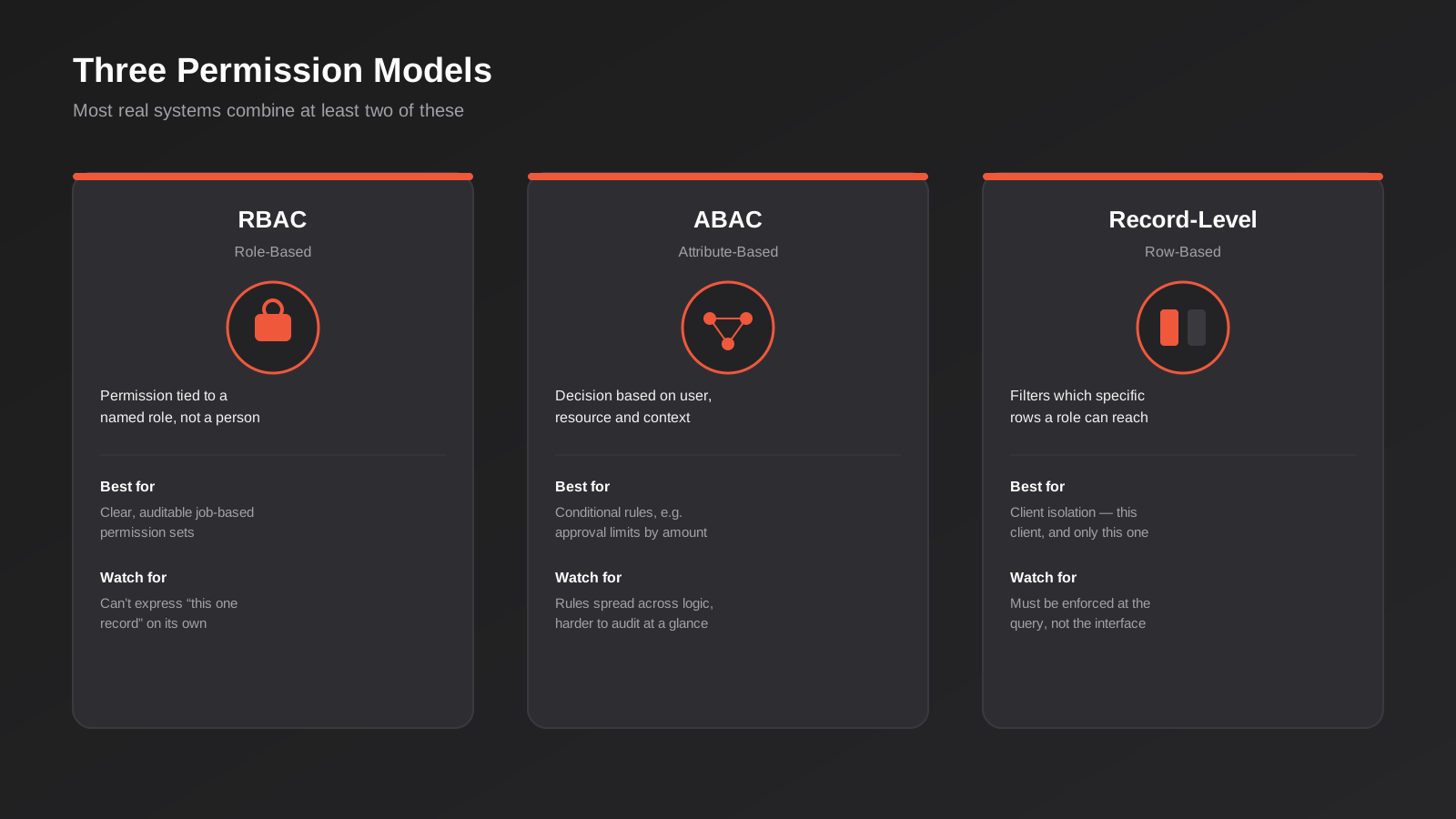
RBAC isn’t the only approach, and for some systems it isn’t even the right one on its own. We typically combine two or three of the following, depending on how the data needs to be sliced.
Role-Based Access Control (RBAC)
RBAC assigns permissions to a role, and a role to a user. It’s the easiest model to reason about and audit — you can look at a role definition and know exactly what every holder of that role can do, which makes it the right default starting point for most portals and internal tools. Its limitation is that it answers “what can this role do” well, but it doesn’t natively answer “can this specific person see this specific record.” For that, you need record-level rules layered on top.
Attribute-Based Access Control (ABAC)
ABAC makes decisions based on attributes of the user, the resource, and the context — department, time of day, location, the client a job belongs to — rather than a fixed role. It’s more flexible and can express rules RBAC can’t on its own, like “finance staff can approve invoices under $5,000 but need a second approver above that,” but it’s also harder to audit, because the rule logic is spread across conditions rather than sitting in one readable role definition. We reach for ABAC rules as an addition to a base RBAC structure, not as a wholesale replacement for it, because a pure ABAC system is genuinely difficult for a non-technical admin to reason about six months after launch.
Record-Level (Row-Level) Permissions
This is the piece that actually enforces client isolation. A role says a “Client” can view jobs; a record-level rule says which jobs — specifically, only the ones tied to that client’s account ID. Nearly every client portal we’ve built needed this layer, because role alone can never express “this client, and only this client.” The practical implication is that record-level filtering has to happen in the database query or API layer, not in what the interface chooses to display. We cover why that distinction matters so much in the next section, because it’s the single most common cause of cross-client data exposure.
Designing Roles That Actually Hold Up
Start From Jobs, Not Job Titles
The most reliable way to define roles is to map out the actual tasks people need to perform, then group tasks into roles — not to copy your org chart. “Office Manager” isn’t a role a permissions system can use; “can approve purchase orders, can edit staff rosters, cannot access payroll” is. We usually run this as a short workshop with whoever actually uses the system day to day, listing out each action someone needs to take (view job, edit job, approve quote, issue refund, export report, manage users) and then clustering those actions into the smallest number of roles that still covers every real use case.
The Minimum Viable Role Set
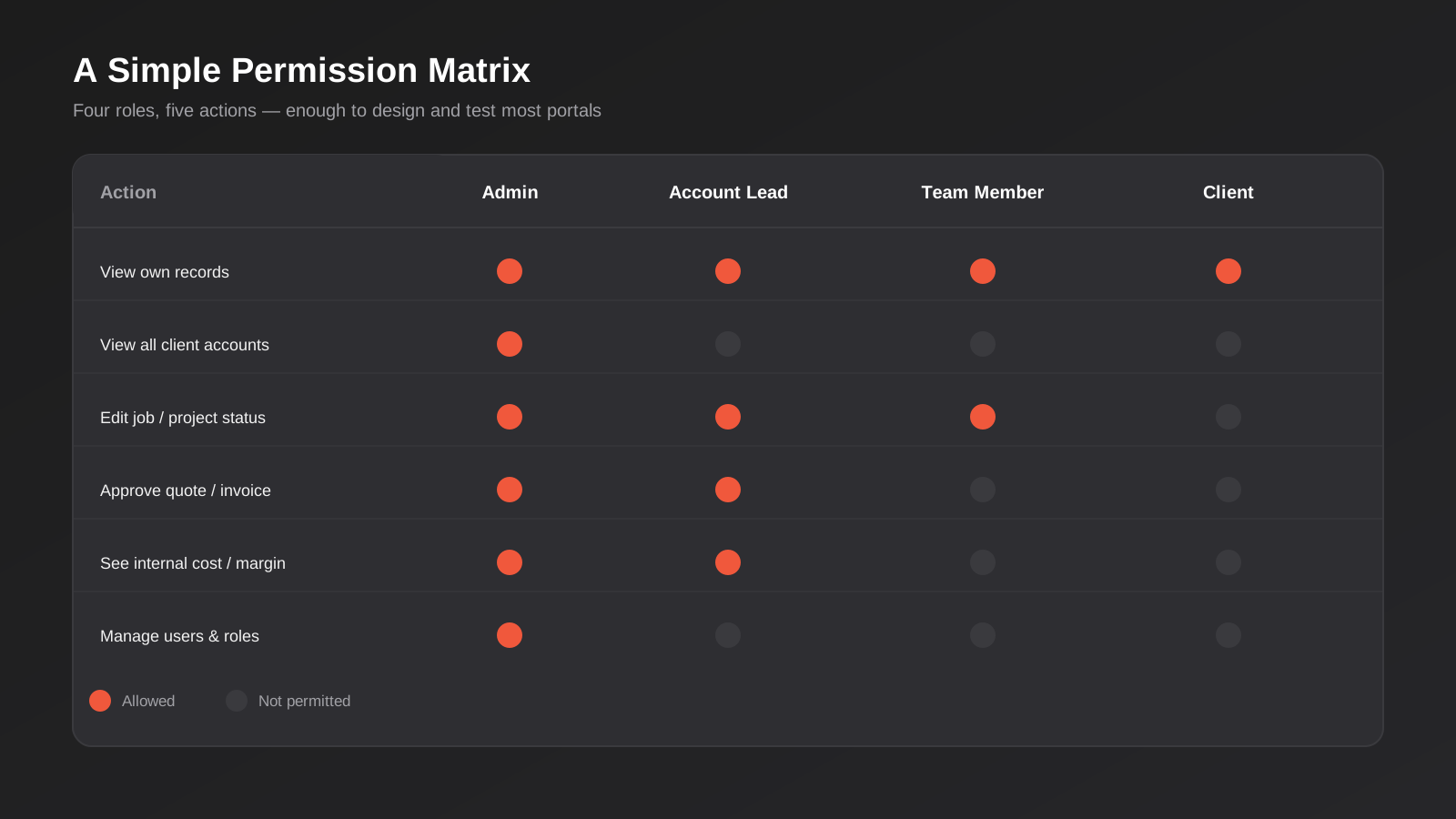
For a typical client portal plus internal tool build, four roles usually cover it, and we’d push back on a client who wanted to start with more than six or seven:
- Admin — manages users, roles and system settings; sees everything.
- Account Lead / Manager — full access to the accounts they own, including internal notes and pricing, but not system administration.
- Team Member — can view and update work assigned to them, without visibility into accounts they’re not staffed on.
- Client (external) — sees only their own records, and only the fields meant for clients — status, deliverables, invoices — never internal notes, costs, or other clients’ data.
Resist the pull to create a bespoke role for every exception that comes up in the first month. “Client, but they can also see the project timeline for their partner agency” is not a new role — it’s a record-level grant layered on the existing Client role. Confusing the two is exactly how systems end up with forty roles that no one can tell apart.
Field-Level vs Page-Level Permissions
Page-level permissions decide whether a user can open a screen at all. Field-level permissions decide which fields on that screen they can see, within the same record. A lot of off-the-shelf and no-code tools only do the first well, which forces an awkward workaround: building a separate “client view” page that duplicates a “staff view” page, just with fewer fields on it. That works initially, but every time the underlying data model changes, someone has to remember to update both versions — and in our experience, eventually someone forgets, and a field that should have been hidden from clients ends up visible on the duplicate page because it wasn’t removed when the staff version was updated. Where the platform supports genuine field-level permissions on a single underlying record, it’s worth the extra setup time, because it removes that entire class of maintenance risk.
Keeping Roles Current as the Business Grows
Roles aren’t a one-time decision. As the business adds services, hires a second layer of management, or starts handling a new kind of client, the original role set stops fitting cleanly. The businesses that keep their permissions model manageable tend to review it on a fixed schedule — every six or twelve months is usually enough — rather than waiting for a new requirement to force an ad-hoc change. That review is a short, practical exercise: list the current roles, check each one still maps to a real, current set of tasks, and look specifically for permissions that have drifted away from what the role name suggests, which happens more often than most admins expect once a system has been live for a year or two. It’s also the point to check for accounts still carrying a role they no longer need — someone promoted out of a Team Member position six months ago, still holding Team Member access on top of their new one, because nobody removed the old assignment when the new one was added.
Multi-Tenant Isolation: Keeping Client A From Ever Seeing Client B
This is the requirement that should worry you most, because it’s the one with the worst consequences when it fails and the easiest one to get subtly wrong. The rule is simple to state: every query that returns client data must be scoped to that client’s own records, enforced at the data layer, not just hidden in the interface.
Why “We Hide It in the UI” Isn’t Enough
A worrying number of portals we’ve audited filter data only in the front end — the app fetches every job record, then decides in the browser which ones to display. That’s a security hole, not a design shortcut, because the full dataset has already been sent to a browser the client controls. Opening developer tools, inspecting the network tab, or simply editing a URL parameter can be enough to see data that was never meant to leave the server. The fix is to enforce the client scope in the API or database query itself — the server should never fetch, let alone return, a record the logged-in user isn’t entitled to, regardless of what the interface later chooses to show.
Tenant ID on Every Table
The practical pattern is to attach a tenant or client identifier to every table that holds client-specific data, and to make every query that touches those tables filter on that identifier automatically, rather than trusting each individual developer to remember to add the filter by hand in every endpoint. Some databases support this natively through row-level security policies that apply the filter at the database engine level no matter how the query is written above it; where that’s available, it’s a meaningfully stronger guarantee than relying on application code discipline alone, because a missed check in one endpoint doesn’t become a data leak.
Shared Staff, Separate Clients
It gets more complex when staff legitimately need to see across multiple client accounts — an account manager running six client relationships, say — while clients themselves must never see past their own boundary. This is exactly the combination of role-based and record-level rules described above: the staff role carries a broader scope (several tenant IDs, or an “internal” flag that bypasses the per-tenant filter under audit), while the client role is hard-locked to one. Getting this combination right, and testing it properly with real test accounts for each role before launch, is one of the most important quality checks in any multi-client build.
Where RBAC Fits in Your Stack
Off-the-Shelf and No-Code Tools
Tools like Airtable, Softr and Notion have made basic client portals genuinely accessible without a developer, and for a straightforward one-role, low-stakes use case they’re a reasonable starting point. Where they tend to run out of road is exactly the territory covered above: field-level permissions within a shared record, genuine row-level tenant isolation enforced at the data layer rather than the interface, and approval workflows with more than one step. Several of these platforms require workarounds — duplicate views, separate bases per client, manual sharing links — that recreate the maintenance burden they were meant to remove. That’s usually the point at which it makes sense to move to a custom-built web application, where the permission model is designed into the data layer from the start rather than bolted onto a general-purpose tool.
Designing It Into an MVP, Not After It
If you’re scoping a new internal tool or client portal as an MVP, permissions architecture deserves to be one of the things decided before the first screen is built, even if only one or two roles exist on day one. The reason is that the tenant ID, the role table, and the pattern for scoping queries are structural decisions — they touch the database schema and every API endpoint. Adding a second role or a client-facing view later is straightforward if that structure was there from the start. Retrofitting row-level isolation into a system that was built assuming a single trusted user base is a much bigger job, and it’s one we get asked to do more often than we’d like, usually right after a business has signed its first few clients onto what was meant to be an internal-only tool.
When APIs and AI Agents Need Their Own Permission Tier
Roles aren’t only for humans logging in through a browser. Service accounts, integrations and increasingly AI agents also need defined, limited permissions — and in our experience, this is the category most commonly left wide open. An integration token created to sync one field between two systems often gets issued with broad read-write access to everything, because it’s faster to set up that way, and then nobody revisits it once the integration is working. The same discipline applies here as to human roles: define the narrowest set of permissions the integration or agent actually needs, and review it periodically rather than leaving it as a standing exception. We go into this in more depth, including how it changes once AI agents are acting inside your systems rather than just a static integration, in our guide to AI agent security.
Audit Logs and Why You’ll Need Them Sooner Than You Think
Permissions decide what someone can do. An audit log records what they actually did. The two get confused because they feel related, but they solve different problems, and skipping the second because the first is working well is a mistake we see often.
A usable audit log, at minimum, records who performed an action, what the action was, what record it touched, and when — for anything that changes data or exposes sensitive information: approvals, exports, deletions, permission changes, and logins to client-facing areas. It doesn’t need to be elaborate. A single append-only table with those four fields, queryable by date range and by record, answers almost every question that comes up after the fact: who approved this, who exported the client list, who changed Sarah’s role last Tuesday.
The value shows up in three situations specifically. First, when a client disputes an approval or a change — being able to show exactly who actioned it and when ends the conversation quickly. Second, when something goes wrong internally and you need to work out how, rather than guessing. Third, increasingly, for Australian businesses handling health, financial or other sensitive personal information, where the Australian Privacy Principles expect a business to be able to account for access to personal information it holds, not just to control it in theory. Building the log in from the start costs very little extra at build time; adding it retroactively means you have no history for the period before it existed, which is exactly the period someone usually wants to ask about.
Testing Permissions Properly Before Launch
The only reliable way to verify a permissions system works is to log in as each role, using a genuinely separate test account for each one, and try to do the things that role shouldn’t be able to do — not just confirm the things it should. Try to open another client’s record by changing an ID in the URL. Try to access an admin page directly by its address rather than through a menu that would normally hide it. Try to export a report that should be restricted. This kind of adversarial testing against your own permission boundaries, done deliberately before launch rather than discovered by a client afterwards, catches the overwhelming majority of the real-world failures described earlier in this guide. It’s a small amount of extra QA time measured against the cost of explaining a data exposure to a client after the fact.
This testing isn’t a one-off either. Every time a new feature touches the data model — a new field, a new table, a new report — it’s worth re-running the same adversarial checks against the roles that shouldn’t have access to it, rather than assuming the original permission rules will automatically extend to cover something that didn’t exist when they were written. In practice, the single most common cause of a permissions failure we’ve seen after launch wasn’t a flaw in the original design at all — it was a new field or table added later that nobody thought to add to the existing access rules, so it defaulted to visible everywhere.
Common Mistakes We See
- Filtering data in the interface instead of the query. If the server ever sends data the client shouldn’t see and relies on the front end to hide it, that data is already exposed.
- Creating a new role for every exception. A handful of roles plus record-level grants scales; thirty bespoke roles with overlapping permissions doesn’t, and nobody will be able to explain the difference between them a year later.
- Letting integration and API tokens carry far more access than they use. A sync job that only needs to read one field is often issued a key with full read-write access to everything, because it’s quicker to set up, and that key then sits unreviewed for years.
- No process for revoking access when someone leaves. Contractor and ex-staff accounts left active are one of the most common findings in access reviews we’ve run for clients, and the fix is a checklist item, not a technical one.
- Treating page-level permissions as if they were field-level. Hiding a menu item doesn’t stop someone reaching a page directly by its URL if the underlying permission check isn’t also enforced server-side.
- Skipping audit logging because “nothing’s gone wrong yet.” The log is worthless retroactively. It only has value for the period after it was switched on.
- Designing roles around job titles instead of actual tasks. Titles change, get reused, and vary between businesses; the underlying list of actions someone needs to perform is far more stable.
Frequently Asked Questions
What’s the difference between RBAC and SSO?
SSO (single sign-on) verifies who someone is — authentication. RBAC decides what that verified person is allowed to see and do once they’re logged in — authorisation. You need both, and they’re implemented separately: a business can have excellent SSO and still have a serious access control problem if roles and permissions behind it were never properly designed. Our SSO guide covers the authentication side in detail.
How many roles should a client portal actually have?
Most portals we build start with four: admin, account lead, team member, and client. That covers the majority of real-world needs when combined with record-level filtering for client isolation. Add a role only when a genuinely new bundle of permissions is needed for an ongoing group of users — not for a one-off exception, which should be handled as a record-level grant on an existing role instead.
Can no-code tools like Airtable or Softr handle this properly?
For a single role and low-stakes data, yes, reasonably well. Once you need field-level permissions within a shared record, genuine row-level tenant isolation enforced at the data layer, or multi-step approval logic, most no-code platforms require workarounds that recreate the maintenance problems they were meant to avoid. That’s usually the signal it’s time to move to a purpose-built application.
Do we need an audit log if we already have role-based permissions?
Yes — they answer different questions. Permissions control what can happen; an audit log records what did happen. You need the second to investigate a dispute, a data incident, or a question from a client about who accessed or changed something, and it only has value going forward from when it’s switched on, so it’s worth building in from launch rather than adding later.
How do AI agents and integrations fit into a permissions model built for humans?
The same role-and-permission model applies, but service accounts and AI agents tend to get over-provisioned because it’s faster to set up with broad access than to scope it narrowly. Treat an integration token or an AI agent’s credentials as their own role, define the minimum it actually needs, and review it periodically. Our guide to AI agent security covers this in more depth for agents specifically.
What does it cost to add proper RBAC to an existing internal tool?
It depends heavily on whether the current system was built with any separation between users and roles at all. If the data model already distinguishes users from a role table, adding new roles or record-level rules is usually a modest, well-scoped piece of work. If every permission check is currently hard-coded against individual accounts, or data isn’t currently scoped by client at the query level, it’s closer to a rebuild of the access layer than a feature addition — which is exactly why we recommend deciding this early rather than retrofitting it once clients are already relying on the system.
Where to Start
If you’re about to build a client portal or internal tool, the cheapest time to get permissions right is before the first screen exists — map the roles against real tasks, decide how client data will be isolated at the data layer, and build in audit logging from day one. If you already have a system that’s grown permission-by-permission and nobody can confidently say who can see what anymore, an access review is usually a faster and cheaper first step than a rebuild, and it tells you exactly how big the actual problem is before you commit to fixing it.
We’re happy to talk through where your current setup sits, whether that’s reviewing an existing portal or scoping permissions into a new build from the start. Get in touch and we’ll have an honest conversation about what’s actually needed for your situation.
Keep reading
Related posts
Who Owns Your Custom Software? Source Code, IP and Handover for Australian Businesses (2026)
Paying for custom software doesn't mean you own it. What Australian contracts must say about code ownership, licences, handover and escrow.
Single Sign-On for Australian Businesses: When SSO Is Worth the Setup
SSO for growing Australian businesses: SAML vs OAuth vs OIDC explained, how to pick an identity provider, costs, and rollout mistakes to…
Headless Commerce for Australian Ecommerce: When It’s Actually Worth the Cost (2026)
When headless or composable commerce actually pays off for Australian ecommerce businesses: real 2026 costs, warning signs, and when to simply wait.
Got a project you'd like to talk through?
Tell us what you're working on — we'll come back with a plan.
