
Performance Max for Lead Generation: A 2026 Guide for Australian Service Businesses
 Jignesh Vagadiya
25/10/2026
21 min read
Jignesh Vagadiya
25/10/2026
21 min read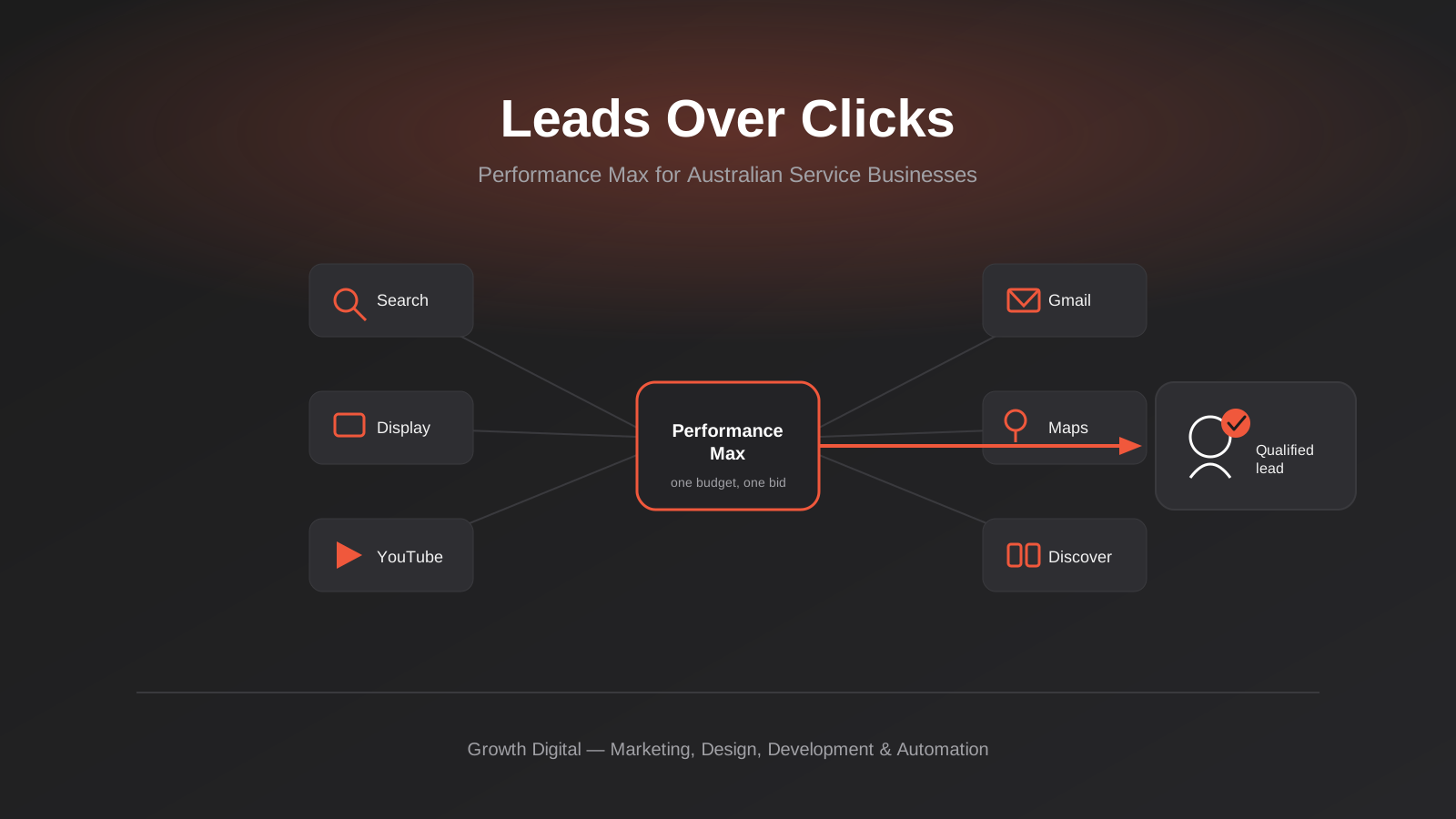
A trades client asked us last month why their brand-new Performance Max campaign was pulling in forty leads a week at a cost per lead that looked fantastic on the dashboard, while their sales team was closing almost none of them. The answer, once we pulled the account apart, was unremarkable: the campaign had been set up exactly the way you’d set up an ecommerce Performance Max campaign, because that’s the only version most setup guides and most agencies actually know. It was optimising beautifully toward a goal — form submissions — that had almost nothing to do with revenue.
That gap between “the campaign is performing” and “the business is growing” is the whole story with Performance Max for lead generation. Google built PMax for retailers with product feeds and instant purchase signals, and it shows. Search, Shopping, Display, YouTube, Gmail, Maps and Discover inventory all get folded into one automated campaign that Google’s systems optimise toward a conversion goal, using whatever creative assets and audience signals you feed it. For an online store, a sale closes in minutes and the algorithm learns fast. For a service business, a form fill is the start of a sales process that might take weeks to resolve into an actual customer, and most of what happens next never makes it back into Google Ads at all.
This guide is about running Performance Max properly for lead generation specifically — conversion tracking, asset groups, audience signals, the search cannibalisation problem, landing pages, and what a realistic timeline actually looks like. If you’re running ecommerce campaigns instead, our guide to Google Shopping Ads vs Performance Max covers that side of the product in more depth, including feed health and product-level bidding, which barely come up here.
What Performance Max Actually Is, and Why Lead Gen Plays a Different Game
Performance Max is a goal-based campaign type that runs across every Google ad surface from a single campaign: Search, Display, YouTube, Discover, Gmail and Maps, plus Shopping when there’s a product feed attached. Instead of you building separate campaigns for each channel and managing bids and budgets on each one, you hand Google a conversion goal, a budget, and a set of creative assets — headlines, descriptions, images, videos, logos — and its systems decide in real time which combination of asset and placement is most likely to produce that conversion, for that specific person, at that specific moment.
That’s a genuinely different mental model to Search campaigns, where you choose keywords and bids and can see exactly which query triggered which ad. With Performance Max, you’re setting the boundaries — themes, audiences, budget, creative — and trusting the automation to find the combinations inside those boundaries. Google’s own machine learning is reasonably good at this when the signal it’s optimising against is reliable. That’s the catch, and it’s where lead generation and ecommerce genuinely part ways.
One Campaign, Six Inventory Types, One Learning Problem
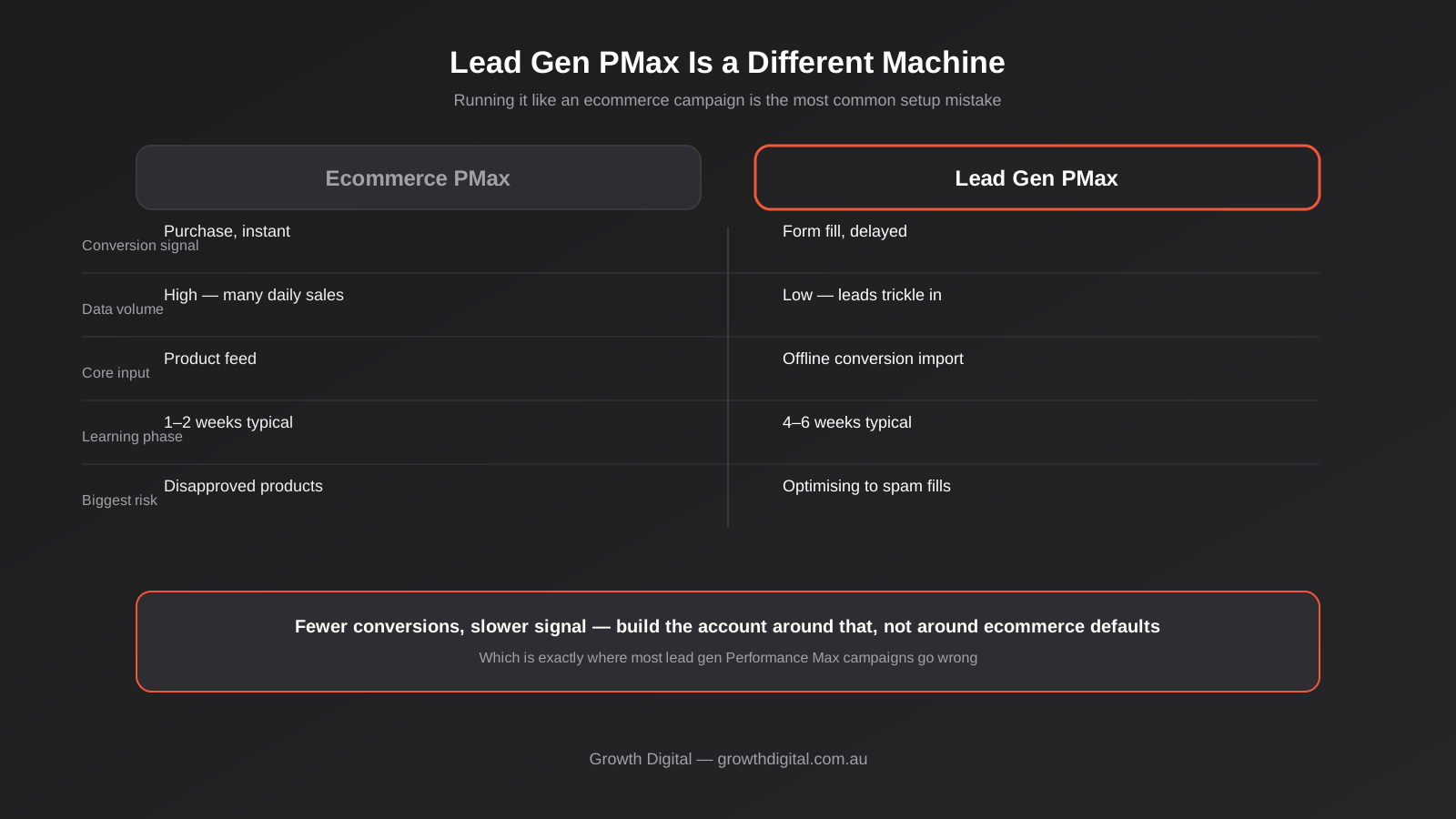
An ecommerce store running Performance Max usually has a product feed generating dozens or hundreds of purchase events a week, each one tied to a real dollar value, confirmed within minutes. That’s an enormous, fast, clean training signal. A service business running the same campaign type for lead generation typically has a trickle of form submissions, no product feed, and a conversion event — the form fill — that tells Google almost nothing about whether the person behind it was ever going to buy anything.
Google’s own best-practice guidance for lead generation Performance Max is explicit about this: it recommends choosing a conversion goal as close to an actual sale as your tracking allows, and warns that lead-specific goals also unlock protections against invalid lead activity that the generic “all conversions” goal doesn’t get. That’s a meaningful detail that a lot of lead gen PMax setups skip entirely, usually because nobody told the person building the campaign that the choice of conversion goal is doing more work than almost anything else in the account.
Why Google Built This for Ecommerce First
It’s worth being honest about where the product’s defaults actually point. Performance Max’s onboarding flow, its asset recommendations, and a lot of the automated suggestions you’ll see inside the interface are tuned toward retail behaviour — product feeds, dynamic remarketing, shopping-style creative. None of that is wrong for ecommerce. For a plumber, a law firm or a clinic running the exact same defaults, it’s a mismatch that shows up weeks later as a pile of cheap, low-quality leads and a sales team wondering why marketing keeps sending them tyre-kickers.
The Conversion Tracking Foundation You Need Before You Turn It On
If there’s one thing worth getting right before you launch a lead gen Performance Max campaign, it’s this section, not the next one. Asset groups and audience signals matter, but they’re tuning an engine that’s already pointed in the right or wrong direction, and the conversion goal is what sets that direction. Get this wrong and no amount of creative testing fixes it.
Why a Form Fill Is the Weakest Signal You Can Feed It
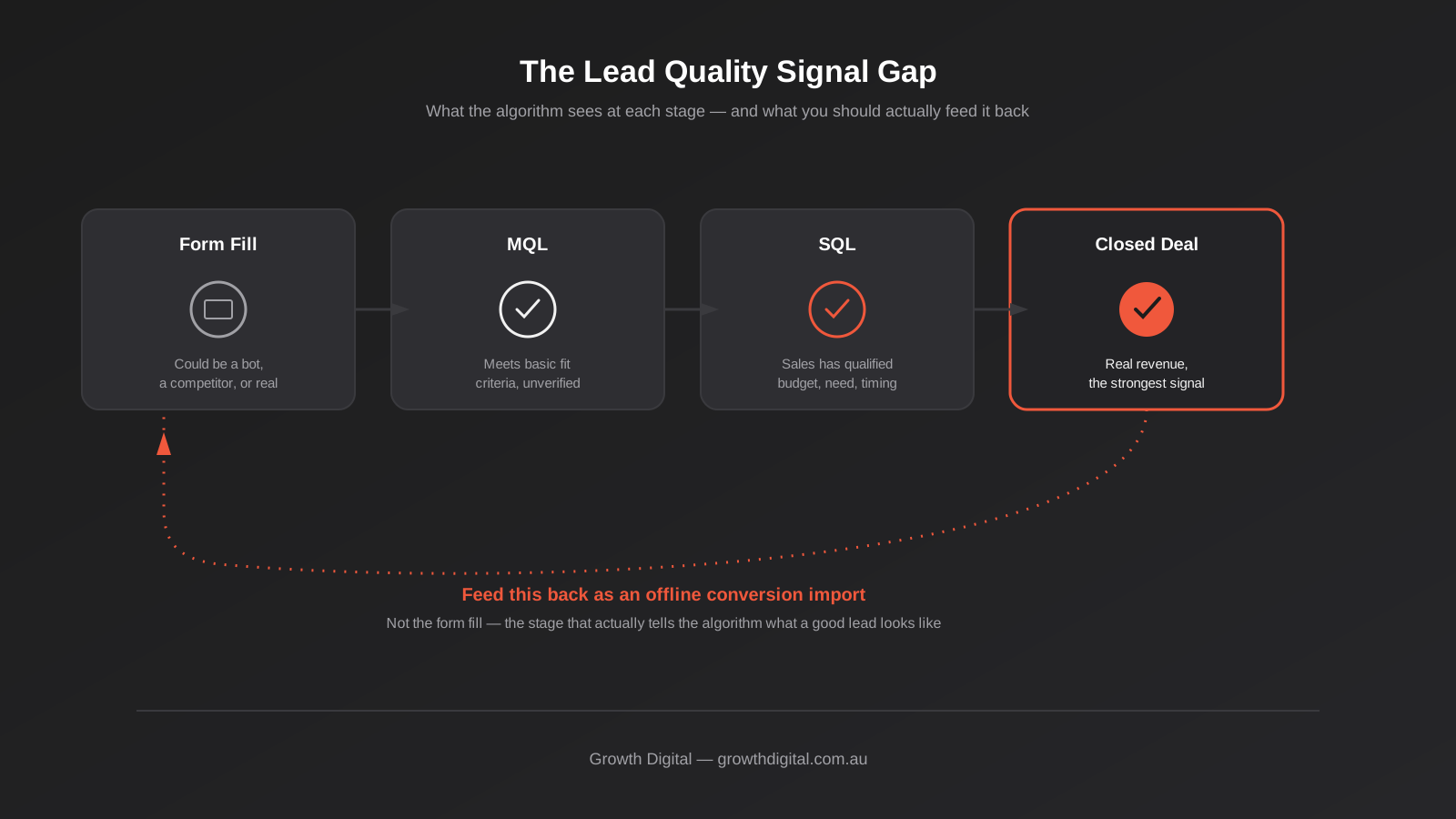
A form submission on its own can’t be told apart from a genuine enquiry, a competitor doing research, a bot, or someone who typed their email wrong and never saw the confirmation page. When “form submitted” is the only conversion event Performance Max is optimising toward, the algorithm has no way to distinguish a lead that closes for $8,000 from one that was never real in the first place. It will happily spend your budget finding more of whatever looks like the first one, including a steady supply of low-quality fills that technically match the pattern without matching the outcome you actually want.
This is the single most common reason lead gen Performance Max campaigns get a reputation for being unreliable. It’s rarely the targeting. It’s that the campaign was asked to optimise toward the wrong finish line and did exactly what it was told, very efficiently.
Setting Up Offline Conversion Import Properly
The fix is to get the outcome that actually matters — a qualified lead, an appointment that showed up, a closed deal — back into Google Ads as an offline conversion import, so the algorithm eventually learns which of the leads it’s generating resemble the ones that turned into revenue. In practice that means tagging leads with a unique identifier (a GCLID captured at form submission, or a click ID stored against the contact record), tracking that lead through your CRM or sales pipeline, and uploading the outcome — qualified, unqualified, closed-won, closed-lost, or a dollar value — back to Google on a regular cadence, typically weekly.
This is genuinely more setup work than most businesses expect from a “simple” ad campaign, and it’s also the part most agencies skip when they’re in a hurry to get a campaign live. It usually means a CRM field to capture the click identifier, a scheduled export, and either a manual upload process or an integration doing it automatically. If your sales cycle is long — weeks rather than days — you’re also choosing between waiting for closed-loop data (accurate but slow to start optimising) or using an earlier proxy like a sales-qualified lead flag (faster signal, slightly less precise). Most lead gen accounts end up using the earlier proxy to get the algorithm learning sooner, while still importing the final outcome for longer-term calibration.
A couple of smaller tracking details matter too. Set a conversion value wherever you can, even an estimated average deal value by lead type, because an unweighted goal treats every lead as equally valuable, which is rarely true. And add lead-form qualifying questions and basic spam protection such as reCAPTCHA to your forms before launch — it filters out a layer of junk before it ever reaches Google’s optimisation loop, rather than relying on the algorithm to figure out which fills are worthless after the fact.
Building Asset Groups That Actually Work for Lead Gen
One Theme Per Asset Group, Not One Big Bucket
An asset group is the unit Performance Max uses to assemble ads — headlines, descriptions, images, videos, logos, and (for lead gen) your lead form assets, all grouped together with a shared theme. The most common structural mistake is treating one asset group as the whole campaign: every service you offer, every headline you can think of, dumped into a single group and left to the algorithm to sort out.
It’s far more effective to build themed asset groups the way you’d build themed ad groups in a Search campaign — one for each genuinely distinct service or audience, each with its own headlines, descriptions and landing page. A law firm running family law, commercial litigation and conveyancing should run three asset groups, not one, because the person searching for a divorce lawyer and the person searching for a commercial lease dispute need different language, different trust signals and a different landing page entirely. Bundling them together dilutes the signal Google’s systems get about what’s actually working for each audience.
Search Themes vs the Keywords You’re Used To
Performance Max doesn’t use keywords in the traditional Search campaign sense. Instead, each asset group can carry search themes — phrases that tell Google the kind of query you want associated with that group, supplementing rather than replacing what the system already infers from your landing page and creative. Google’s own guidance is clear that search themes should add context the system can’t easily pick up on its own, not function as a keyword list you’re porting over wholesale from Search. Loading forty near-identical search themes into one asset group, treating it like exact-match keyword targeting, generally does less than a handful of well-chosen themes that cover genuinely different search intents.
Ad Strength Isn’t Just a Vanity Metric
Each asset group gets an Ad Strength rating — Poor through Excellent — based on how much variety and relevance your assets give the system to work with. It’s tempting to treat this as a cosmetic score, but Google’s own data associates an “Excellent” rating with a meaningful lift in conversions on average, because more genuinely distinct headline and description variations give the auction more combinations to test against different audiences. For lead gen specifically, that means writing headlines that speak to different buying stages and objections — not five rewordings of the same sentence, but genuinely different angles: urgency, credibility, price transparency, guarantee, local relevance.
Audience Signals: Giving It a Head Start, Not a Blindfold
Audience signals tell Performance Max where to start looking before it has enough of its own conversion data to find patterns independently. They’re a hint, not a hard restriction — the system can and will serve ads outside the signals you provide once it finds a better pattern, which is a frequent point of confusion for people used to Search campaign targeting, where the audience setting is a much firmer boundary.
For a service business, the strongest signals are usually your own first-party data: a Customer Match list built from past enquiries, won deals and, just as usefully, lost or unqualified ones, since excluding known poor-fit audiences is now supported alongside including good ones. Layer in custom segments based on search terms and websites genuinely relevant to your buyers — competitor product and service pages, industry publications, relevant how-to content — rather than broad demographic guesses, which tend to add noise rather than useful signal for most B2B and considered-purchase categories.
Resist the temptation to leave audience signals blank “to let the algorithm find its own way,” particularly in the first few weeks of a new account. Without any signal, Performance Max is starting cold, with nothing but your landing page and creative to infer intent from, which usually means a slower and noisier start than giving it a reasonable first guess to refine.
The Search Cannibalisation Problem
Why Your Existing Search Campaigns May Lose Conversions
Performance Max is eligible to compete for the same auctions as your existing Search campaigns, and Google’s own systems will sometimes let Performance Max win an auction that a dedicated Search campaign would have won more efficiently. Independent analysis of accounts running both campaign types side by side has found that, where the two overlap on the same search term, Search campaigns typically convert at a higher rate than Performance Max does on that same query. That’s a genuinely important thing to know before you launch Performance Max alongside a Search campaign that’s already working — you’re not necessarily adding incremental leads, you may partly be moving existing conversions from a channel that was converting them well to one that converts them slightly less well, at a similar or higher cost.
This matters most for branded search. If people are already searching your business name and converting reliably through a Search campaign, letting Performance Max loose on the same query pool rarely adds anything — it mostly reallocates budget away from a channel that was already doing the job.
Brand Exclusions and When to Use Them
Google’s own lead-gen best practices suggest adding brand exclusions at the campaign level if you don’t want Performance Max competing for your own branded terms, and reviewing search term insights regularly to catch overlap you didn’t intend. It’s also worth turning off Final URL Expansion if you notice Performance Max sending traffic to pages on your site that weren’t the ones you built the campaign around — that setting lets the system choose a landing page from your site automatically, which is useful for ecommerce catalogues and frequently unhelpful for a tightly scoped lead gen funnel. Review search term reports on a real cadence rather than once at launch, since there’s a reporting lag and new irrelevant queries do creep in as the algorithm explores.
Landing Pages: Where Most Lead Gen Performance Max Campaigns Actually Fail
A huge share of underperforming lead gen Performance Max campaigns we’ve reviewed have a perfectly reasonable account structure sitting on top of a landing page that’s quietly sabotaging the whole thing — a long form asking for more information than a cold visitor is willing to give, no credibility signals above the fold, a generic headline that doesn’t match the ad that brought the person there, and no clear single action for the visitor to take. Performance Max can only ever be as good as the page it’s sending people to, and a campaign with excellent Ad Strength and clean conversion tracking will still underperform against a page that doesn’t earn the click it just paid for.
The fix isn’t complicated, but it does need deliberate design rather than reusing whatever page already exists on the site. Match the headline to the ad’s promise specifically, not generically. Cut the form to the fields you genuinely need to qualify and follow up — name, phone, the one or two questions that actually change how you respond — and treat every additional field as a toll on conversion rate that needs to earn its place. Put trust signals (reviews, certifications, recognisable client logos, a clear local presence) where a first-time visitor will actually see them before they decide whether to fill in the form. If you’re building new landing pages specifically to support asset groups, our landing page development team builds exactly this — one well-targeted page per offer, built to convert a cold paid visitor rather than repurposed from an existing service page that was written for a different audience. On the design side, the structural choices that move a lead gen page’s conversion rate — layout, hierarchy, form friction, trust placement — are the same ones covered in our conversion-focused design work, which is worth a look if the page itself, not just the campaign around it, is the thing holding results back.
One structural point specific to Performance Max: each asset group should point to its own dedicated landing page wherever possible, matching its theme, rather than every asset group funnelling back to the same generic contact page. The algorithm is already working with a thinner signal than an ecommerce account gets; sending a family law enquiry and a conveyancing enquiry to the same undifferentiated “get in touch” page makes that signal thinner still, and makes it harder to tell which asset group’s creative is actually earning the conversion versus coasting on the page doing the work.
Budget, Timelines and the Learning Phase
Set expectations before launch, because this is where a lot of otherwise well-built lead gen Performance Max campaigns get killed early by an impatient monthly report. Smart Bidding strategies generally need somewhere between two and six weeks to exit the learning phase and stabilise, and lead generation accounts sit at the slower end of that range because conversion volume is inherently lower than ecommerce. A campaign generating fifteen leads a week simply gives the algorithm less to learn from per day than one generating fifteen sales a day, so it takes longer to find a reliable pattern, independent of how well the account is built.
Google’s conversion goal guidance recommends at least fifteen conversions in the last 30 days against whichever goal you’re optimising for, as a rough floor for the bidding algorithm to have enough signal to work with. If your qualified-lead volume sits below that, either widen the goal slightly (a well-chosen earlier-stage proxy, rather than closed deals, for the first month or two) or accept that the campaign will take longer than usual to find its feet, and plan your budget and your patience accordingly. Judging performance in week two against a target set for a fully learned account is one of the more avoidable ways businesses talk themselves out of a channel that just needed more runway.
On budget specifically: Performance Max tends to reward a budget that’s stable rather than one that gets adjusted every few days in response to short-term fluctuations, since each meaningful change can restart part of the learning process. If you’re deciding how much to commit, our broader guide to maximising Google Ads ROI covers budget-setting and bid strategy fundamentals that apply across campaign types, Performance Max included, and is worth reading alongside this one rather than instead of it.
Reporting on Lead Quality, Not Just Lead Volume
A report built around impressions, clicks and raw lead count will make almost any Performance Max campaign look reasonable, because those are the easiest numbers to generate and the least connected to whether the business is actually growing. The report that matters connects spend to qualified leads, cost per qualified lead rather than cost per fill, and ideally through to closed revenue once your sales cycle allows it. Channel-level reporting inside Performance Max — now available in the interface — lets you see roughly how much of your result came from Search-type inventory versus Display, YouTube or Discover, which is genuinely useful for understanding where the budget is actually working, even though you can’t bid independently by channel the way you can in a standalone campaign.
If your sales team’s CRM already tracks lead source and outcome, the simplest high-value habit is a monthly reconciliation: pull every lead Google Ads attributed to the campaign, check what your CRM says happened to each one, and feed the qualified/unqualified split back in as the offline conversion data discussed earlier. That one habit, done consistently, does more for a lead gen Performance Max account’s long-term performance than almost any single setting inside the campaign itself.
Common Mistakes We See in Lead Gen Performance Max Accounts
- Launching with “form submission” as the only conversion goal and no offline conversion import plan, which leaves the algorithm optimising toward volume rather than quality for months.
- Copying an ecommerce-style single asset group structure instead of building one themed group per genuinely distinct service or audience.
- Treating search themes as a keyword list and loading in dozens of near-duplicate phrases instead of a handful of genuinely different intents.
- Sending every asset group to the same generic contact page rather than a dedicated landing page matched to that group’s theme.
- Judging results inside the first two to three weeks, before Smart Bidding has had time to exit the learning phase on a naturally lower lead-gen conversion volume.
- Leaving branded search unprotected and letting Performance Max quietly cannibalise conversions that an existing Search campaign was already converting more efficiently.
Frequently Asked Questions
Is Performance Max good for lead generation?
It can work well, but it needs to be set up differently to an ecommerce campaign. The key requirements are a conversion goal that reflects lead quality rather than raw form fills, offline conversion data feeding back in once leads are qualified or closed, themed asset groups matched to dedicated landing pages, and a realistic four-to-six-week runway before judging results. Skip any of those and the campaign will usually still generate leads — just not necessarily the kind your sales team wants to receive.
How is lead gen Performance Max different from ecommerce Performance Max?
Ecommerce Performance Max optimises against a fast, high-volume, unambiguous signal — a purchase — usually tied to a product feed. Lead gen Performance Max optimises against a slower, lower-volume, ambiguous signal — a form fill — that needs additional data (offline conversion import, lead scoring) to actually mean something to the algorithm. The campaign type is the same; the setup, patience required and failure modes are genuinely different.
Will Performance Max replace my Search campaigns?
It doesn’t have to, and for most lead gen accounts it shouldn’t entirely. Performance Max is eligible to compete in the same auctions as Search campaigns, and on overlapping queries, Search campaigns often convert more efficiently. A common, sensible approach is running both: keep Search campaigns for your highest-intent, highest-converting terms (including your own brand), and let Performance Max extend reach into Display, YouTube, Discover and Gmail inventory that a Search-only strategy can’t reach.
How long before a lead gen Performance Max campaign actually works?
Budget four to six weeks for Smart Bidding to exit the learning phase on a typical lead gen conversion volume, longer if your qualified-lead count is genuinely low. Judging a campaign in the first two to three weeks, before it’s had enough conversions to calibrate against, is one of the most common reasons businesses abandon a channel that simply hadn’t finished learning yet.
Do I need offline conversion tracking to run Performance Max for lead gen?
You don’t need it to launch, but running without it for long is one of the more common ways these campaigns go wrong. Without a signal of actual lead quality feeding back in, the algorithm has no way to tell a genuine enquiry from a low-quality or fraudulent one, and tends to find more of whatever matches the pattern of your existing form fills — good or bad. It’s worth treating offline conversion import as part of the initial build, not a later optimisation.
What budget do I need to run Performance Max for lead generation in Australia?
There’s no fixed number, because it depends heavily on your cost per click and how many conversions you need to reach a meaningful sample. As a rough orientation, Google’s own guidance points to roughly fifteen conversions in a rolling 30-day window as a reasonable floor for Smart Bidding to work with reliably. Work backwards from your industry’s typical cost per lead and your sales cycle to estimate the spend that gets you to that volume, rather than picking a budget figure first and hoping the conversions follow.
Where to Start
If you’re already running a lead gen Performance Max campaign and the leads feel cheap but low-quality, the fastest diagnostic is checking exactly what conversion goal it’s optimising against and whether any outcome data has ever been fed back in. That one check explains more underperforming lead gen Performance Max accounts than targeting, creative or budget combined. If you’re starting from scratch, build the conversion tracking and the landing pages before you touch asset groups — the campaign structure is the easy part.
We run Performance Max as part of a broader Google Ads engagement rather than as a bolt-on, because it genuinely performs better alongside properly structured Search campaigns and a landing page built for the job, not in isolation. You can see what’s included at our Google Ads pricing page, and if a landing page is the piece that’s missing, that’s covered separately through our landing page development service.
Worth putting a number on it: our own Google Ads management starts from $550 a month plus a one-off setup fee — below the $800–$1,800 a month most small Australian businesses pay in management fees alone, which is roughly the band a single-channel lead gen Performance Max build sits in once it’s scoped properly. We keep our overheads lean as a specialist agency and pass that saving on. If you’ve already got a written quote from another agency for comparable scope, send it through and we’ll do our best to beat it.
Keep reading
Related posts
Microsoft Advertising (Bing Ads) for Australian Businesses: Cost, LinkedIn Profile Targeting and the Google Ads Import Trap (2026)
What Microsoft Advertising actually costs in Australia, how LinkedIn profile targeting works for B2B, and what breaks when you import from Google…

Google Ad Grants for Australian Non-Profits: Eligibility, Application and the Rules That Keep It Alive (2026)
A practical guide to Google Ad Grants for Australian non-profits: who qualifies, how to apply, and the compliance rules that keep the…
Google Merchant Center Feed Optimisation: Why Australian Shopping Ads Get Disapproved (2026 Guide)
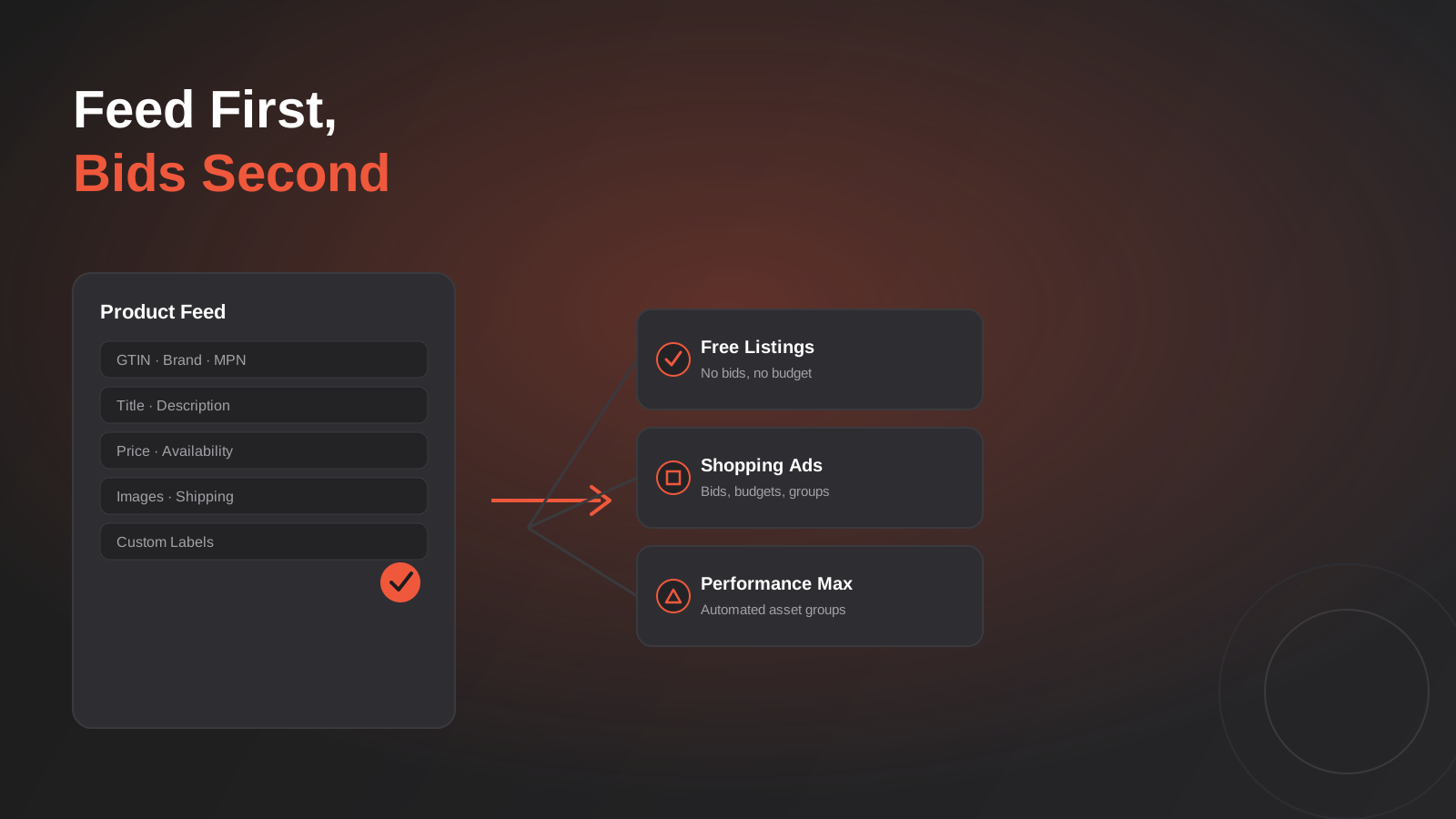
A practical guide to Google Merchant Center feed optimisation: GTINs, disapprovals, free listings vs Shopping ads, and Australian-specific traps.
Got a project you'd like to talk through?
Tell us what you're working on — we'll come back with a plan.
