
Google Shopping Ads vs Performance Max: A 2026 Guide for Australian Ecommerce Stores
 Jignesh Vagadiya
22/09/2026
21 min read
Jignesh Vagadiya
22/09/2026
21 min read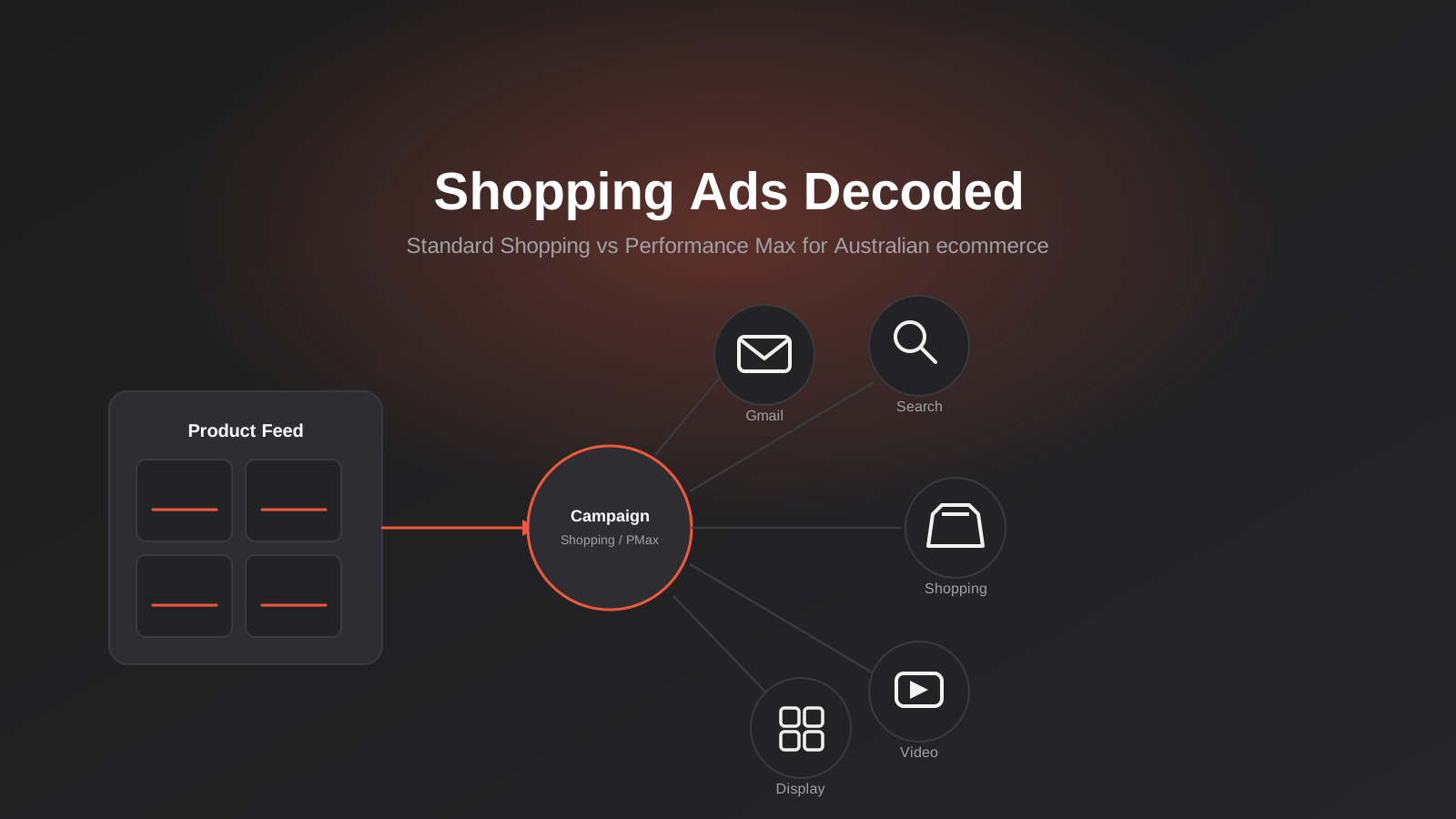
Every ecommerce merchant we talk to has heard some version of the same line from a well-meaning Google rep: switch everything to Performance Max, let the algorithm run, and stop worrying about the detail. For some stores that advice works out fine. For a lot of others it means handing a messy product feed to a fully automated system and wondering, three months later, why cost per acquisition crept up while nobody could say exactly why.
The honest answer is that Standard Shopping and Performance Max aren’t rivals so much as two different tools for two different stages of a store’s life. One gives you visibility and control while you’re still working out what converts. The other trades that visibility for automated reach across Search, Shopping, YouTube, Display and Gmail, and it only pays off once the inputs feeding it — the product feed, the conversion data, the creative assets — are actually good enough to automate.
This is a practical Google Shopping ads Australia guide for 2026 — how the two campaign types actually differ, how to decide which one (or both) your store should run, and the Google Merchant Center feed work that determines whether either of them performs at all. If you’re still deciding which platform to build the store on in the first place, our guide to Shopify for Australian ecommerce brands is a better starting point than this one.
How Google Shopping Ads Actually Work
Shopping ads look nothing like a standard text ad and that’s because they’re built differently under the hood. A Search ad is triggered by keywords you choose and bid on. A Shopping ad is triggered by matching a shopper’s query against the product data in your feed — the title, description, product type, and category fields you’ve submitted to Google Merchant Center. There’s no keyword list to write. Google decides which queries a product is relevant for based on what your feed says about it, which is exactly why feed quality carries so much more weight here than in a conventional Search campaign.
A Standard Shopping campaign is the more manual, more transparent version of this. You set bids at the product group or individual product level, you can see the search terms triggering your ads, and you can exclude specific queries or products that aren’t converting. It behaves, in other words, like a Search campaign that happens to be feed-driven rather than keyword-driven. For a merchant who wants to know exactly why a product is or isn’t showing, that transparency is worth a lot.
Google has been steadily narrowing that transparency, though. Standard Shopping is receiving fewer new features as Google prioritises Performance Max for anything shopping-related, and the roadmap makes it fairly clear which format the platform wants merchants to end up on eventually. That doesn’t mean Standard Shopping stops working today — it still runs, still reports properly, and still suits a specific set of stores well, which is exactly what the next section gets into.
Performance Max: What It Actually Is
Performance Max is a single campaign that can serve across every Google inventory type at once — Search, Shopping, Display, YouTube, Gmail, Maps and Discover — using one shared budget and one automated bidding strategy. Instead of building separate campaigns for each channel, you supply “asset groups”: bundles of headlines, descriptions, images and video that Google’s system assembles into whichever ad format suits a given placement and a given shopper.
For a store with a clean feed, decent creative assets and enough conversion history to give the bidding algorithm something to learn from, that automation genuinely finds incremental volume a human account manager wouldn’t have found manually. The trade-off is visibility. You get an aggregated view of performance by asset group and by channel type, but not the granular, placement-by-placement, query-by-query detail that Standard Shopping and Search campaigns give you. You’re trusting the system with decisions you used to make yourself, and for stores that haven’t built up the conversion volume to make that trust worthwhile yet, the results can be genuinely worse than a well-run Standard Shopping campaign.
Where Performance Max Wins
Once a store has enough conversion volume — generally somewhere in the 30 to 50 conversions a month range per campaign — Performance Max’s automated bidding has enough signal to work with, and it starts finding incremental reach across YouTube and Display placements that a Shopping-only campaign never touches. It also does well for catalogues with strong creative assets already in place: real product photography, lifestyle imagery, short video. PMax rewards stores that feed it good material and generally punishes stores that don’t.
Where Standard Shopping Still Wins
If you’re below that conversion threshold, launching a new store, or running a catalogue where margins are thin enough that a few points of CPA matter, Standard Shopping’s manual control is worth keeping. You can see the actual search terms, exclude the ones that don’t convert, and set bids product by product rather than trusting an aggregate. Benchmark data from early 2026 also shows Standard Shopping still delivering a noticeably lower cost per acquisition than Performance Max on comparable spend — the gap has narrowed but it hasn’t closed. For a store watching cash flow closely, that gap is real money.

The Merchant Center Feed Is the Real Foundation
We say this to every ecommerce client who asks us to “just turn on Performance Max”: the campaign type is the least important decision in this whole process. The feed is what actually determines whether either campaign performs, and it’s the part merchants underinvest in because it looks like data entry rather than strategy.
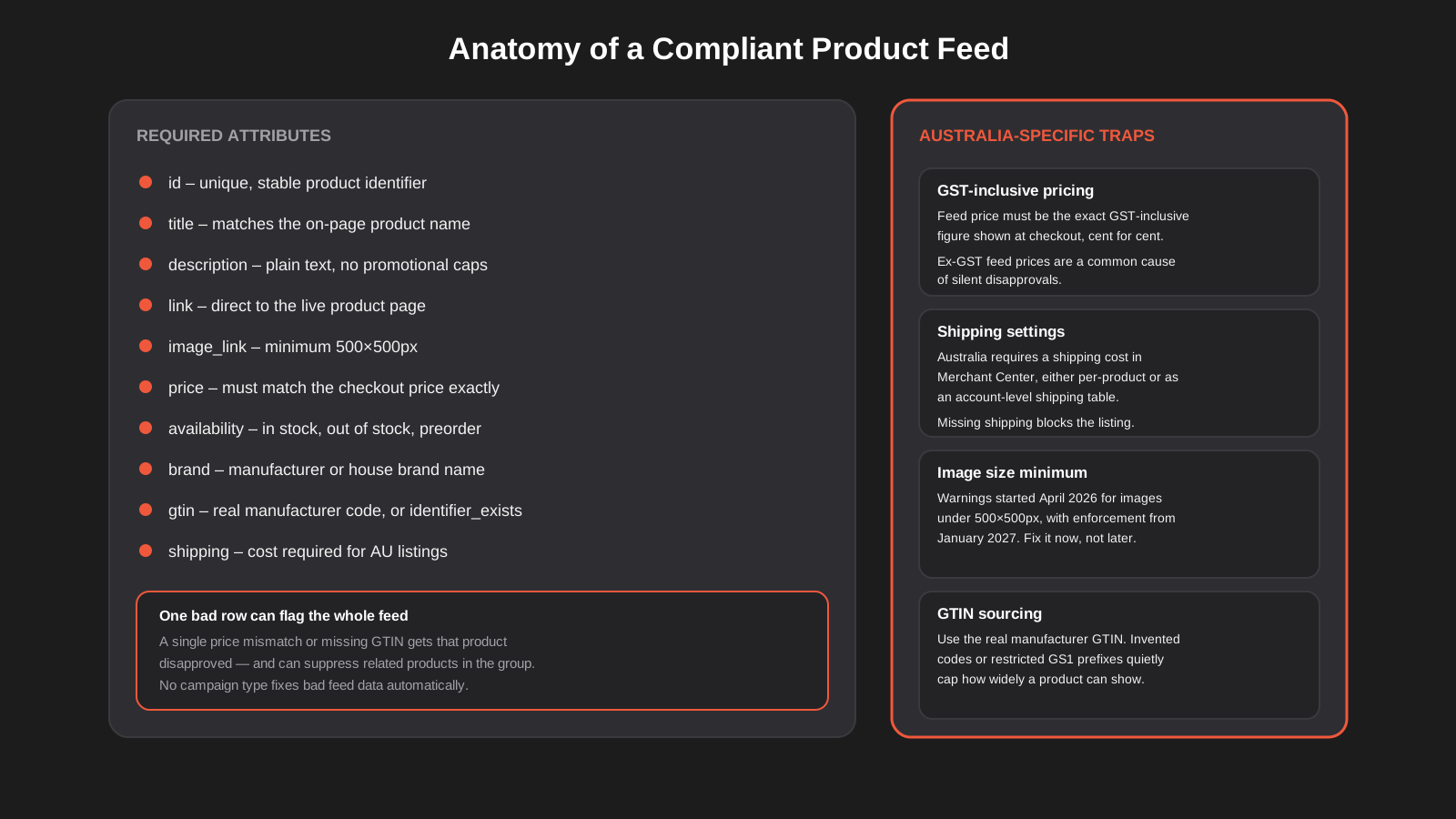
At minimum, Google requires id, title, description, link, image_link, price, availability, brand, and gtin (or identifier_exists where a genuine GTIN doesn’t apply) for most product categories. Each of those fields has failure modes that are specific to Australian stores and specific to 2026’s rules, and they’re worth going through individually rather than assuming your platform’s default feed export handles them correctly.
Price Has to Match, Exactly
The price in your feed needs to match the GST-inclusive price a shopper actually sees at checkout, to the cent. This trips up more Australian stores than any other single field, usually because the feed is generated from an ex-GST base price while the storefront displays the GST-inclusive figure. Google checks this by periodically crawling the linked product page, and a mismatch results in a disapproval that can take days to notice if nobody’s watching the diagnostics tab regularly.
GTINs Need to Be Real
Submit the actual manufacturer-issued GTIN wherever one exists. Some feed management tools will auto-generate a placeholder code when a real one isn’t available, and while the ad might still run, invented codes and restricted GS1 prefixes limit how widely Google is willing to show the product, according to Google’s own GTIN guidelines. If you sell house-brand or private-label goods without a GTIN, use identifier_exists set to false rather than fabricating one.
Shipping and Image Requirements Are Getting Stricter
Shipping cost is a mandatory field for Australian listings, set either per product or through an account-level shipping table in Merchant Center covering your delivery zones and rates. Google also added handling_cutoff_time and minimum_order_value attributes in April 2026, alongside a video_link field for product video — none are compulsory yet, but they’re worth adopting early if your platform supports them, since Google tends to favour more complete feeds in ranking. More pressingly, a universal minimum image size of 500×500 pixels started generating warnings in Merchant Center from April 2026 and becomes an enforced requirement from January 2027. If your product photography is older stock shot at lower resolution, this is the year to fix it, not next year when disapprovals start arriving with no warning period left.
Choosing Between Them: A Practical Framework
We run new ecommerce accounts through roughly the same set of questions before recommending a campaign structure, and none of them are about preference — they’re about what the account can actually support.
How much conversion history do you have?
Below 30 to 50 conversions a month, start with Standard Shopping and let it accumulate data. Performance Max’s bidding algorithm needs volume to learn from, and launching it cold on a low-volume account tends to produce erratic, expensive early performance while the system effectively experiments at your cost.
Is the feed actually clean?
If you’ve got disapprovals sitting in the diagnostics tab, fix those before touching campaign strategy at all. Automation amplifies a bad feed just as readily as it amplifies a good one.
Do you have creative assets to feed Performance Max?
PMax pulls from images, headlines, descriptions and video to build ads across Display and YouTube placements. If all you have is the bare product shots in your feed and no lifestyle imagery or video, the system has thin material to work with and the Display/YouTube portion of the campaign tends to underperform the Shopping portion by a wide margin.
Running both together
Most established stores end up running Standard Shopping and Performance Max simultaneously rather than choosing one permanently. When both target the same products, Google gives the Standard Shopping campaign priority for that inventory, and Performance Max fills in the remaining reach — YouTube, Display, Gmail placements, and Shopping impressions Standard Shopping didn’t win. This hybrid structure lets you keep manual control over your highest-margin or highest-volume products while letting Performance Max find incremental reach elsewhere. It isn’t a workaround; it’s roughly how Google expects larger accounts to be structured.
Building Asset Groups That Actually Perform
If you do run Performance Max, the single biggest lever you control is how the asset groups are structured, and the biggest mistake is treating it as one bucket. Segment asset groups by product category or margin tier rather than lumping the whole catalogue into a single group. A homewares store selling both $40 cushions and $800 outdoor furniture needs separate asset groups for each, because the headlines, descriptions and imagery that sell one don’t suit the other, and a single group forces Google to generalise across products that shouldn’t be generalised across.
Each asset group can hold up to 15 headlines, 5 descriptions, 20 images and 5 videos, and Google’s system tests combinations of these automatically across placements. Supply genuine variety rather than minor rewrites of the same line — different angles, different customer pain points, different product benefits — because the combinatorial testing only works if there’s meaningful variation to test.
Audience signals matter more than most merchants expect, even though PMax treats them as suggestions rather than hard targeting. Customer match lists, built from your own customer email data, are the strongest signal you can provide, and accounts using them tend to see meaningfully lower cost per acquisition in the first few weeks of a new asset group compared with demographic or interest-based signals alone. First-party visitor segments imported from GA4 are the next best option. If you haven’t connected GA4 audiences into Google Ads yet, that’s worth doing before you build out asset groups, not after — our guide to maximising Google Ads ROI covers the conversion tracking foundation this depends on in more detail.
One habit to avoid: creating near-duplicate asset groups targeting overlapping products with slightly different audience signals, on the theory that this gives Google more options. It doesn’t — it creates internal competition for the same auctions and muddies the performance data for both groups. One clean asset group per genuine product or audience segment beats several overlapping ones.
It’s worth reviewing asset group performance on a monthly cycle rather than setting it up once and leaving it. Google’s own reporting shows which combinations of headlines, images and descriptions are getting used most within a group, and swapping out the consistently low performers for fresh variations keeps the testing pool useful instead of stale. Treat it the same way you’d treat ad copy testing in a Search campaign — it needs periodic attention, not a set-and-forget approach, even though the campaign type is more automated overall.
Bidding and Budget: Target ROAS vs Maximize Conversion Value
Both campaign types ultimately run on Google’s automated bidding, and the choice is usually between Maximize Conversion Value and Target ROAS. Start with Maximize Conversion Value and no target while the campaign is new, because setting a Target ROAS before the algorithm has enough data to hit it reliably tends to throttle spend and volume unnecessarily. Once you’ve got a few weeks of stable conversion data, layer in a Target ROAS set close to your actual recent average rather than an aspirational number — a target set too aggressively above what the account is currently achieving will suppress impression volume as the algorithm tries and fails to hit it.
Budget pacing matters more with Performance Max than with a Standard Shopping campaign because a single budget is being split across every channel automatically. Sudden budget increases can send the algorithm into a fresh learning phase, so we generally recommend moving budget in increments of no more than 20 to 30 percent at a time, and avoiding changes during known high-variance periods like the lead-up to EOFY or Christmas trading, where you want the system already stable rather than relearning.
Negative Keywords and Brand Protection
Standard Shopping campaigns let you add negative keywords at the campaign level the same way you would in Search, which makes excluding irrelevant queries straightforward — block “free” or “cheap” or a competitor’s brand name from triggering your ads and move on. Performance Max historically didn’t support this at all, which was one of the format’s most common complaints from account managers who’d spent years relying on negative lists to keep spend clean. Google has since opened up account-level negative keyword lists that can be applied to Performance Max campaigns through a support request, and it’s worth setting these up if your account has known problem terms — misspellings that trigger the wrong product, generic informational queries that never convert, or competitor names you don’t want to show against.
Brand protection deserves separate attention. If you also run a Search campaign bidding on your own brand terms, check whether Performance Max is quietly picking up brand traffic that would have converted anyway at a much lower cost through the dedicated brand campaign. This shows up as inflated PMax performance that isn’t actually incremental — it’s cannibalising a cheaper channel and making the automated campaign look more effective than it is. Reviewing the search terms insights report periodically for your own brand name appearing as a top query is the simplest way to catch this early.
Seasonal Trading: EOFY, Christmas and Click Frenzy
Australian retail has its own trading calendar, and Shopping campaigns need to be prepared for it rather than adjusted on the day. End of financial year, Black Friday through Cyber Monday, Click Frenzy, and the Christmas peak each bring sharp swings in both competition and shopper intent, and a feed or campaign that isn’t ready in advance loses volume it can’t get back once the window closes.
Use the sale_price and sale_price_effective_date fields in your feed to schedule promotional pricing in advance rather than manually editing the base price field and forgetting to revert it, which is a common cause of a store accidentally running a permanent “sale” price for weeks after a promotion ends. Build in stock and shipping lead time honestly — if Christmas delivery cutoffs mean a product won’t arrive in time, either update availability or use the shipping label fields to communicate that, because a Shopping ad promising delivery a store can’t make creates the kind of customer complaint that’s entirely avoidable.
On the bidding side, increase budgets ahead of a known peak rather than on the day itself, giving Performance Max time to adjust rather than forcing a sudden reset right when competition and cost per click are both climbing. The 20 to 30 percent incremental change guidance from the bidding section above still applies during peak periods — it’s tempting to throw the whole quarter’s budget at Black Friday week, but a campaign that’s been stable and well-fed with data going in will generally outperform one that gets a shock budget increase on the morning of the sale.
Reporting Blind Spots You Need to Plan Around
The trade-off for Performance Max’s reach is reduced reporting granularity, and it’s worth being upfront with whoever signs off on ad spend about what you will and won’t be able to see. You get channel-level performance (how much of the result came from Search versus Shopping versus YouTube, broadly), asset group performance, and a limited search terms insights report that shows categories of queries rather than the full list you’d get from Standard Shopping. You do not get placement-by-placement Display reporting or a complete query list to build exclusions from.
This is where running a parallel Standard Shopping campaign earns its keep even for larger accounts — it gives you a transparency check on what’s actually converting that Performance Max alone won’t provide. If reporting on this properly matters to your board or your finance team, it’s worth building a dashboard that pulls Google Ads data alongside your actual sales figures rather than trusting the in-platform reporting at face value; we’ve written more on how to structure that kind of setup in our guide to the PPC formulas that actually matter, which covers the CPA, ROAS and true margin calculations worth tracking outside the ad platform itself.
Measuring Success Beyond ROAS
Straight ROAS is a blunt measure once you’re running Shopping ads across a catalogue with mixed margins, because it treats a $20 sale at 60 percent margin the same as a $20 sale at 15 percent margin. Conversion value rules let you adjust the value Google optimises for based on factors like new versus returning customer, device, or geography, which matters if a new customer is worth more to the business long-term than the immediate order value suggests. If you haven’t set these up, the bidding algorithm is optimising for revenue, not profit, and those two things drift apart quickly on a discounted or promotional catalogue.
Performance Max also supports a new customer acquisition goal, which lets you bid differently for shoppers who haven’t purchased from you before, using either a value-based approach (bid more for new customers, matched against your customer match list) or a straightforward on/off toggle. For a store where customer lifetime value matters more than a single order’s margin, this is worth setting up early rather than treating every conversion as equally valuable.
Whatever bidding goal you land on, track it against a blended customer acquisition cost across all channels, not just what Google Ads reports in isolation. A campaign can look excellent in-platform while quietly cannibalising organic or direct traffic that would have converted anyway, and the only way to catch that is by comparing period-over-period blended CAC rather than trusting a single channel’s self-reported numbers.
Common Mistakes We See
- Turning on Performance Max with a feed that still has disapproved products, missing GTINs, or price mismatches, then blaming the campaign type for poor results.
- Abandoning Standard Shopping the day Performance Max launches, losing the search terms visibility needed to diagnose problems later.
- Setting a Target ROAS before the account has enough conversion history for the bidding algorithm to hit it, which quietly throttles volume.
- Building one giant asset group covering the whole catalogue instead of segmenting by product category or margin.
- Submitting invented GTINs or leaving identifier_exists unset for products that genuinely don’t have one.
- Feeding GST-exclusive prices while the storefront checkout shows GST-inclusive pricing, causing silent product-level disapprovals.
- Ignoring the Merchant Center diagnostics tab for weeks at a time, so disapprovals go unnoticed until someone asks why traffic dropped.
- Making large, sudden budget jumps that reset Performance Max into a fresh learning phase right before a peak trading period.
Frequently Asked Questions
Do I need Performance Max if I’m already running Standard Shopping successfully?
Not necessarily, and not immediately. If Standard Shopping is delivering a CPA you’re happy with and you don’t need the additional YouTube and Display reach, there’s no rule that says you must migrate. Many stores run both in parallel rather than replacing one with the other, keeping Standard Shopping for their core, highest-margin products and letting Performance Max find incremental volume elsewhere.
How much do Google Shopping ads cost in Australia in 2026?
Early 2026 benchmarks put the median Australian Shopping click at somewhere around $0.90–$1.00, noticeably cheaper than the all-industry Search average of roughly $7–$8 a click. Performance Max tends to run slightly higher on cost per click than Standard Shopping once Display and YouTube placements are factored in, though actual figures vary a lot by category and competition, so treat any single benchmark as a rough guide rather than a guarantee for your account.
Can I run Shopping ads without using Performance Max at all?
Yes. Standard Shopping campaigns are still fully supported and still a legitimate, often better, choice for lower-volume or newer accounts. Google is investing more heavily in Performance Max going forward, but there’s no current requirement to migrate, and plenty of well-run accounts stay on Standard Shopping indefinitely because the transparency suits how they operate.
What’s the minimum conversion volume before Performance Max is worth trying?
A rough industry rule of thumb is 30 to 50 conversions a month for the bidding algorithm to have enough signal to work with. Below that, you’re more likely to see erratic performance as the system experiments rather than optimises. It’s not a hard cutoff, but it’s a reasonable point to wait for before shifting meaningful budget across.
Do I need video for Performance Max to work well?
Video isn’t compulsory, but its absence limits how well the YouTube portion of the campaign can perform, since Google will otherwise generate a basic video from your images automatically, which rarely performs as well as purpose-made footage. Even short, simple product-in-use clips shot on a phone tend to outperform an auto-generated slideshow.
Why does GST-inclusive pricing matter so much for the feed?
Google periodically checks the price in your feed against the price shown on the linked product page, and Australian storefronts display GST-inclusive prices at checkout. If your feed is generated from an ex-GST base price, or a different currency rounding rule, the two won’t match and the product gets disapproved without much warning. It’s one of the most common, and most avoidable, causes of Shopping ads underperforming for Australian merchants.
Should I run Performance Max and Standard Shopping on the same products, or split my catalogue between them?
Running both against the same catalogue is the more common approach and generally the safer one, since Google automatically prioritises the Standard Shopping campaign for shared inventory rather than letting the two compete against each other. Splitting the catalogue by product line — keeping hero, high-margin products on Standard Shopping for full control and letting Performance Max handle the long tail — is a reasonable alternative for larger catalogues, but it adds management overhead that isn’t worth it for a smaller store with a few hundred SKUs or fewer.
Where to Start
If you take one thing from this guide, make it the feed audit. Before you touch campaign structure, bidding strategy or asset groups, check the Merchant Center diagnostics tab for disapprovals, confirm your feed prices match checkout exactly, and make sure your GTINs and shipping settings are genuinely correct rather than assumed correct. That work alone fixes more underperforming Shopping accounts than any campaign-type decision does.
From there, the Standard Shopping versus Performance Max decision comes down to how much conversion history and creative material you actually have to work with, not which one sounds more modern. Neither campaign type is a fix for a store that hasn’t sorted out its checkout pricing, its shipping settings, or its product photography, and no amount of automated bidding compensates for a feed that’s actively working against you.
We help Australian ecommerce stores work through this properly — auditing the feed, structuring the campaigns, and setting up the reporting that tells you what’s actually working — through our Google Ads services. If you want a sense of what that looks like in practice, our Google Ads pricing page lays out how the engagements are structured, and we’re happy to look at your current feed and campaign setup and tell you honestly whether Performance Max is the right move yet.
Keep reading
Related posts
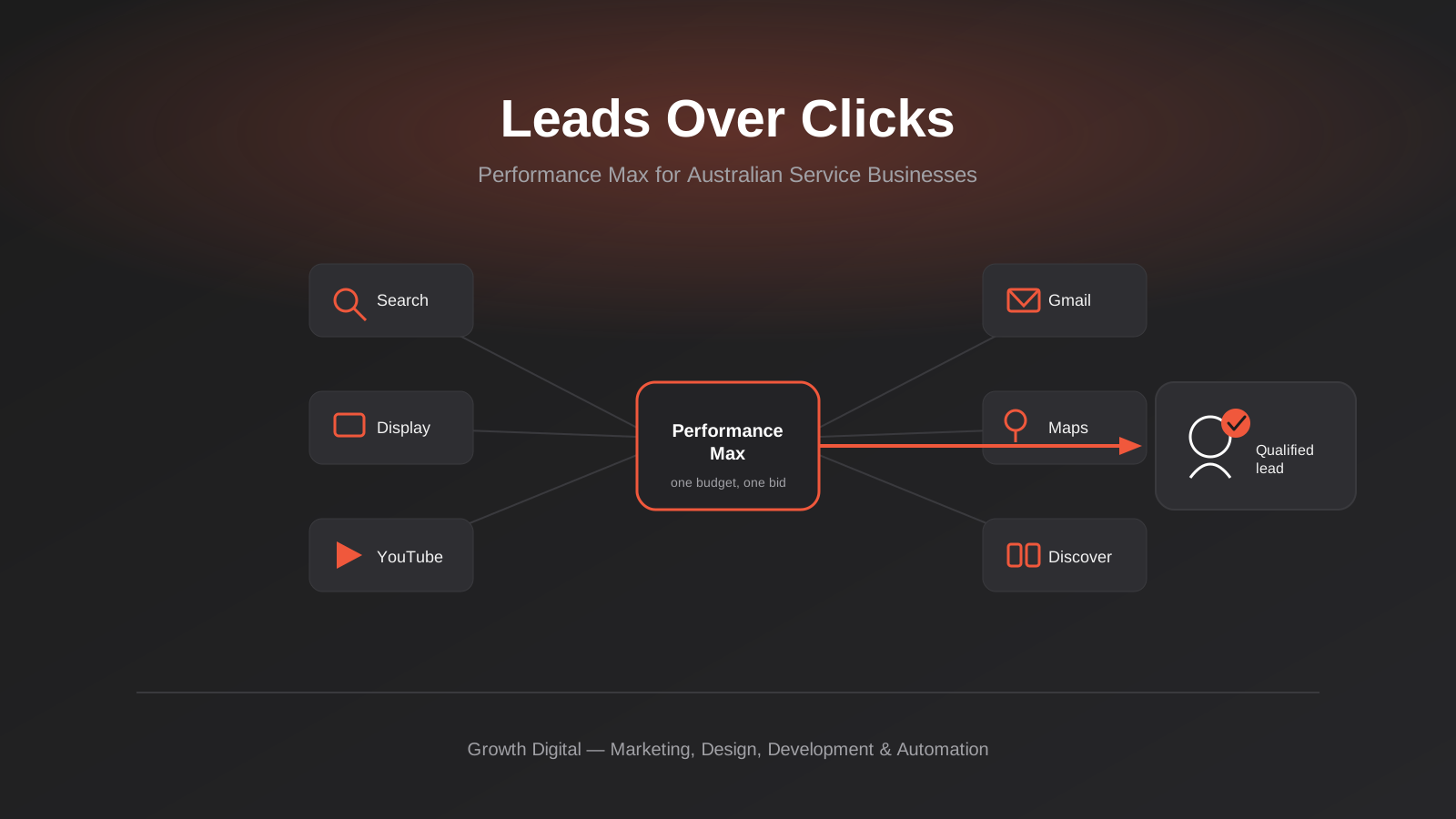
Performance Max for Lead Generation: A 2026 Guide for Australian Service Businesses
Performance Max for lead gen needs different conversion tracking and asset groups than ecommerce PMax. How Australian service businesses should set it…
Microsoft Advertising (Bing Ads) for Australian Businesses: Cost, LinkedIn Profile Targeting and the Google Ads Import Trap (2026)
What Microsoft Advertising actually costs in Australia, how LinkedIn profile targeting works for B2B, and what breaks when you import from Google…

Google Ad Grants for Australian Non-Profits: Eligibility, Application and the Rules That Keep It Alive (2026)
A practical guide to Google Ad Grants for Australian non-profits: who qualifies, how to apply, and the compliance rules that keep the…
Got a project you'd like to talk through?
Tell us what you're working on — we'll come back with a plan.
