
Shopify for Australian Ecommerce Brands: The Complete Guide (2026)
 Jignesh Vagadiya
19/08/2026
22 min read
Jignesh Vagadiya
19/08/2026
22 min read
We’ve built, migrated and optimised enough Shopify Australia stores now to know the pattern by heart. A brand launches on Shopify because it’s fast to set up, then six months later they’re asking us why their checkout abandonment rate sits above 75%, why freight to Perth costs more than the product, or why a platform that works brilliantly for a US merchant feels slightly wrong for an Australian one. None of that means Shopify is the wrong choice — it almost always isn’t — it means most stores are running a default configuration built for a different market. This guide is the one we wish every client read before their store went live: what to actually configure, which plan tier fits your volume, how to localise checkout and payments properly, how to handle shipping across a genuinely difficult geography, and where the real conversion wins are hiding. We’ll touch on dropshipping as one use case along the way, but this is written for any Australian Shopify merchant — fashion, homewares, food and beverage, B2B wholesale, subscription boxes — who wants their store to perform like a considered piece of infrastructure rather than a template with a logo dropped in.
Why Shopify Leads for Australian Ecommerce Brands
Shopify’s dominance in the Australian ecommerce market isn’t an accident of marketing spend. It’s a function of three things working together: a hosted infrastructure that removes an entire category of technical risk, a checkout that converts well out of the box, and an app ecosystem deep enough to plug almost any gap without custom development. For a market the size of Australia — roughly 27 million people, heavily concentrated in a handful of metro areas, with a long tail of regional and remote delivery addresses — that combination matters more than it does in denser markets. You don’t have the traffic volume to justify a large in-house engineering team maintaining a self-hosted platform, but you do need a platform that can handle Black Friday spikes, EOFY sales and Christmas peak without falling over.
We consistently recommend Shopify to Australian merchants for a simple reason: it lets a lean team run a store that looks and performs like it has a much bigger one behind it. The trade-off is that Shopify makes certain decisions for you — hosting, checkout structure, core architecture — and if you fight those decisions instead of working with them, you end up rebuilding things the platform already does well. The merchants who get the most out of Shopify Australia stores are the ones who spend their energy on the parts that are genuinely theirs to control: product, positioning, localisation and conversion — not on trying to reverse-engineer the checkout.
Shopify vs WooCommerce vs Magento for Australian Merchants
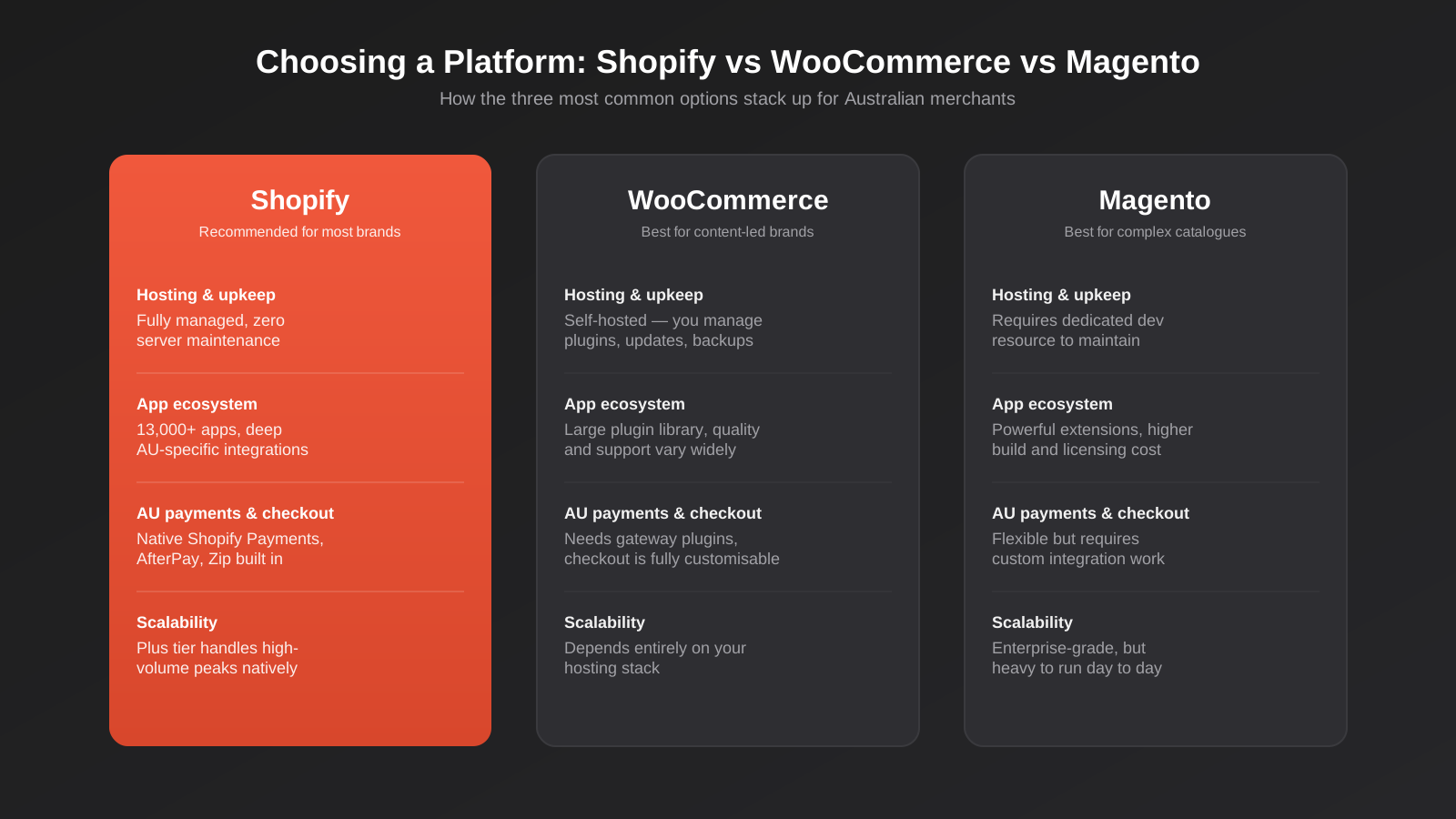
We get asked to compare these three constantly, usually by a founder who has read a forum thread arguing WooCommerce is “more flexible” or that Magento is “more powerful.” Both of those things are technically true and mostly irrelevant to a growing Australian ecommerce brand. Flexibility and power both cost you something: time, developer hours, hosting complexity, and ongoing maintenance risk. The question isn’t which platform can theoretically do the most — it’s which platform gets your team out of the way of running the business.
WooCommerce is a genuinely good option if you’re a content-first brand already deeply invested in WordPress — a publisher-turned-retailer, for instance, or a brand where the blog and the store need to share a single content system. But it’s self-hosted, which means you own hosting performance, security patching, plugin conflicts and PCI compliance scope, none of which is free even when the software itself is. Magento (now Adobe Commerce) is built for complex catalogues — multi-brand operations, B2B pricing tiers, huge SKU counts — and it can do things Shopify genuinely can’t out of the box. But it needs a dedicated development resource to run well, and for most Australian brands under eight figures in revenue, that overhead isn’t justified by the extra capability.
Shopify sits in the middle and, for the vast majority of Australian ecommerce brands, that middle ground is exactly right. It’s fully hosted, so uptime, PCI compliance and infrastructure scaling are Shopify’s problem, not yours. Its app ecosystem now covers the vast majority of edge cases that used to require custom builds. And critically for the Australian market, it has native support for the payment methods, tax handling and shipping integrations that AU shoppers expect, without you needing to source and stitch together third-party plugins the way you would on WooCommerce or Magento.
Shopify Plus vs Shopify Standard: Which Fits Your Growth Stage
This is the decision we see Australian merchants get wrong most often — in both directions. Some brands jump to Shopify Plus far too early because a sales rep made it sound like the “serious” option, and end up paying enterprise pricing for features they don’t use yet. Others stay on Standard (the regular Basic/Shopify/Advanced tier ladder) well past the point where Plus would have paid for itself in checkout customisation and automation alone.
The standard Shopify tiers — Basic, Shopify and Advanced — are genuinely excellent for stores doing up to roughly $2–3 million AUD in annual revenue, particularly if your operation is relatively straightforward: a handful of sales channels, no complex B2B pricing, no need for deep checkout customisation. You get the full app ecosystem, solid reporting, and a checkout that’s already well optimised for conversion. For most Australian direct-to-consumer brands starting out, this is the right starting point, and there’s no shame in staying here for years.
Shopify Plus becomes worth the jump when you hit specific operational pressure points, not just a revenue number. The signals we look for with clients: you need checkout.liquid-level customisation (now Checkout Extensibility) to build genuinely custom checkout flows — subscription bundling, wholesale terms, gift-with-purchase logic that Standard’s checkout can’t handle. You’re running multiple storefronts (say, a B2C store and a B2B wholesale portal, or separate storefronts for AU and international) and want them managed from one back end via Shopify Plus’s multi-store tooling. You need Shopify Flow’s automation engine to handle high-volume order routing, fraud flags or inventory logic that would otherwise eat a team member’s week. Or you’re processing enough transaction volume that Plus’s reduced payment processing rates and dedicated support genuinely move the needle on margin.
If none of those apply yet, Plus is usually premature. We’d rather see an Australian Shopify store invest that budget difference into paid media, content or CRO work on Standard than into a platform tier whose extra capability sits unused. The upgrade path from Standard to Plus is straightforward when the time comes — there’s little cost to waiting until the operational need is real.
Building an App Stack That Actually Moves the Needle
The Shopify App Store has more than 13,000 listings, and that number is both the platform’s greatest strength and its most common source of self-inflicted damage. We regularly audit stores running 25, 30, even 40 apps, most of which were installed to solve a problem once and never removed. Every app you install adds JavaScript to your storefront, and every unnecessary script is a direct hit to page speed — which, as we’ll get to, is one of the biggest levers on conversion you have.
Our approach with Shopify Australia clients is to build the stack in deliberate layers rather than adding apps reactively. The first layer is reviews and social proof — something like Judge.me or Loox, chosen for load performance as much as feature set, since review widgets are notorious for bloating page weight. The second layer is email and SMS marketing — Klaviyo is the standard here, and for Australian brands specifically, make sure SMS compliance is configured for the Spam Act 2003, which has stricter consent requirements than the US TCPA equivalent most SMS apps are built around by default. The third layer is post-purchase and retention: subscription tooling if relevant (Recharge or Shopify’s native subscriptions API), and loyalty if your average order frequency justifies it.
The fourth layer, and the one Australian merchants skip most often, is logistics and tax apps specific to this market — real-time carrier rate shopping across Australia Post, Sendle, StarTrack and regional couriers, and GST-aware tax apps if you sell into New Zealand or other markets with their own consumption tax rules. We’ll cover both in more depth below, but the principle holds across the whole stack: install an app because it solves a defined problem for your specific store, benchmark your page speed before and after, and audit the full list quarterly. An app stack is not a set-and-forget decision — it’s ongoing maintenance, the same as any other part of the store.
Localising Checkout and Payments for Australian Shoppers
This is where we see the single biggest gap between a Shopify store that’s technically live in Australia and one that’s actually built for Australian shoppers. Shopify’s default checkout is genuinely strong, but “strong by default” still assumes payment and pricing conventions that don’t always match local shopper expectations. Getting this layer right is one of the highest-leverage pieces of work you can do on a Shopify ecommerce store, because it sits at the exact moment a visitor has decided to buy and is deciding whether to follow through.
Payment Methods Australian Shoppers Expect
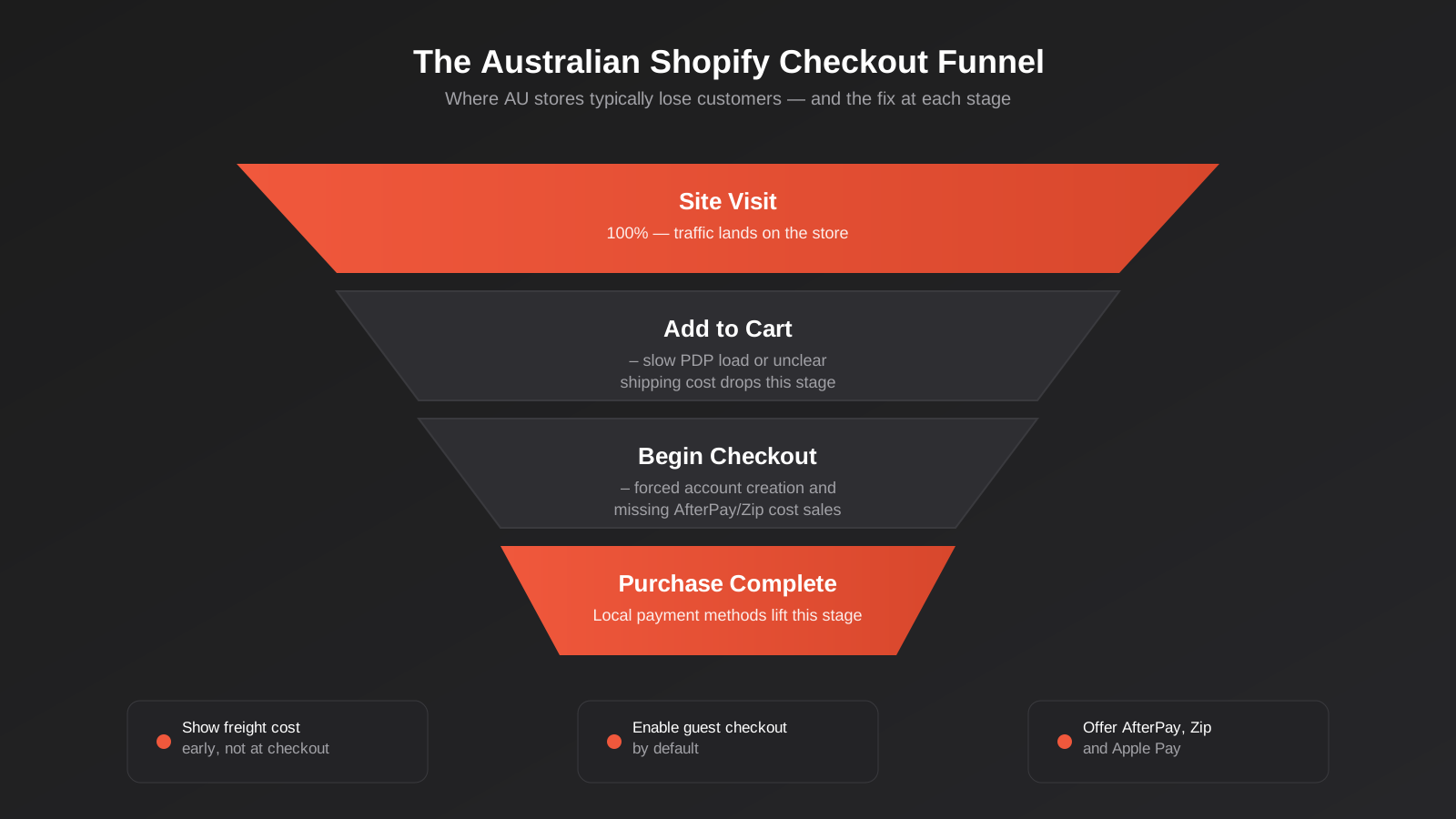
Card payments still dominate, but Australian shoppers have a much higher expectation of buy-now-pay-later availability than most other markets. AfterPay (which started here) and Zip both have deep penetration in the Australian market, particularly in fashion, beauty and homewares, and their absence at checkout is a measurable conversion drag for those categories — we’ve seen conversion lifts in the double digits simply from adding AfterPay to a store that previously offered card-only checkout. Apple Pay and Google Pay matter more here than in some markets too, given Australia’s high smartphone payment adoption; both are natively supported through Shopify Payments and should be enabled without exception.
Shopify Payments itself is available in Australia and is usually the right default gateway — it’s integrated natively, settles in AUD, and avoids the extra transaction fee Shopify charges when you use a third-party gateway instead. For merchants with existing banking relationships or specific processing needs, Stripe and a handful of other gateways are supported, but unless you have a concrete reason to move away from Shopify Payments, staying on it removes a layer of complexity and cost.
GST, Pricing Display and Tax Compliance
Australian consumers expect prices displayed inclusive of GST — this isn’t optional, it’s an Australian Consumer Law requirement for goods sold to consumers. Shopify handles this well through its tax settings once configured correctly, but we still find stores — particularly ones migrated from international templates or built by an overseas agency — showing GST-exclusive pricing by default, which is both a compliance issue and a trust issue at checkout when the price jumps at the last step.
If you sell internationally as well as domestically, Shopify Markets is worth setting up properly rather than running a single storefront with manual currency conversion. It lets you present GST-inclusive AUD pricing to Australian visitors and the correct local pricing and tax treatment to international ones, without maintaining separate stores. For a Shopify Australia store with any meaningful export volume — particularly to New Zealand, where low-value goods have their own GST registration threshold from Inland Revenue — getting this configured correctly avoids both compliance headaches and price-shock at checkout, which is one of the more common and entirely preventable sources of cart abandonment.
Shipping and Logistics Across Australian Geography
Australia is, geographically, one of the hardest markets in the world to build a shipping strategy for, and it’s the area where we see the most Shopify stores quietly losing money without realising it. The population is concentrated in five or six metro areas, but the customer base for most stores is national, and the freight cost difference between shipping to inner Melbourne and shipping to regional Western Australia can be substantial enough to erase your margin on a sale if it isn’t priced correctly.
Domestic Shipping Zones and Carrier Strategy
The mistake we see most is a single flat shipping rate applied nationally, calculated as an average that quietly overcharges Sydney and Melbourne customers while undercharging genuinely expensive-to-serve regional and remote deliveries. A better approach for most Shopify Australia stores is zone-based shipping, configured around Australia Post’s metro/regional/remote delivery zones or your specific carrier’s zone structure, so pricing reflects actual cost to serve rather than a national blend.
On carriers, we typically recommend running more than one option rather than defaulting entirely to Australia Post, even though it remains the most reliable default for genuinely remote delivery. Sendle has built a strong reputation among Australian ecommerce brands for cost-competitive parcel delivery in metro and regional areas, and StarTrack (part of the Australia Post group) handles heavier and B2B freight well. Rate-shopping apps that pull live rates from multiple carriers at checkout — rather than a static table you update manually — are worth the subscription cost once your order volume is high enough that manual rate maintenance becomes a real time cost.
Freight to Regional and Remote Australia
This is the piece most templates and most overseas-built stores get wrong entirely. If a meaningful share of your customer base is in regional Queensland, the Northern Territory, remote Western Australia or Tasmania, your freight costs to those addresses can be genuinely multiples of a metro delivery, and if your shipping rates don’t reflect that, you’re either eating the loss silently or overcharging every other customer to subsidise it. Neither is a good long-term strategy.
The fix isn’t complicated, but it does require deliberate configuration rather than accepting Shopify’s shipping defaults: set up genuinely accurate zone-based rates, be transparent with customers about extended delivery windows for remote postcodes rather than letting them find out after ordering, and consider a minimum order threshold for free shipping that’s calculated with your actual average remote delivery cost in mind, not just your metro average. For dropshipping operations specifically — where margin is often already thin — this is not an area to leave on autopilot; a handful of remote-postcode orders shipped at a metro-calculated flat rate can wipe out the profit from several profitable metro orders.
Conversion Rate Optimisation for Shopify Australia Stores
Traffic is expensive and getting more expensive every year, which is exactly why CRO work on an existing Shopify ecommerce store is consistently one of the highest-return activities available to a merchant, well ahead of most incremental spend on new acquisition channels. The good news is that Shopify’s checkout is already well optimised at a platform level — the wins available to you sit almost entirely upstream of it, in site speed, product page structure and the path to checkout.
Site Speed and Core Web Vitals
Every app, every high-resolution unoptimised image, every third-party tracking script you add to a Shopify store has a cost, and that cost compounds. We regularly find stores where a single review app or a poorly configured upsell widget is adding a full second or more to page load time, and that has a direct, measurable relationship to both conversion rate and Google’s Core Web Vitals ranking signals. For a market like Australia, where a meaningful share of ecommerce traffic still comes from mobile connections outside the major metro areas with less consistent bandwidth, speed matters even more than the global average would suggest.
The practical fixes are unglamorous but effective: compress and correctly size product images rather than relying on the browser to scale them down, audit your app list quarterly and remove anything not earning its keep, lazy-load below-the-fold content, and choose a theme built with performance as a first-class concern rather than one loaded with animation and carousel features you’ll never use. We treat page speed as a standing line item in every Shopify Australia engagement, not a one-off audit, because new apps and new content erode it steadily over time if nobody’s watching.
Mobile Checkout Optimisation
The majority of Australian ecommerce traffic is now mobile, and mobile conversion rates still lag desktop across almost every store we audit, which tells you there’s real headroom here. Shopify’s native checkout is mobile-responsive by default, but the product and cart pages leading into it are where most of the friction actually lives. Sticky add-to-cart buttons, autofill-friendly form fields, a genuinely fast mobile page load, and one-click express payment options (Apple Pay and Google Pay again, plus Shop Pay) all reduce the number of taps between a decision to buy and a completed order.
Guest checkout deserves a specific mention because we still see it disabled or de-emphasised on stores that assume account creation drives loyalty. It doesn’t — it drives abandonment. Let people check out as a guest by default, and offer account creation as a lightweight, optional step after the order is placed, when they’ve already got a reason to want one (order tracking, faster future checkout) rather than before, when it’s just an obstacle.
Migrating to Shopify Without Losing Revenue or Rankings
We handle enough platform migrations to know the two things that actually put revenue at risk during a move to Shopify: broken SEO equity and payment or fulfilment gaps during cutover. Neither is inevitable, but both require deliberate planning rather than a rushed weekend switchover.
On the SEO side, the single most important step is a complete 301 redirect map from every indexed URL on your old platform to its equivalent on Shopify, built before launch, not patched together afterwards once rankings have already dropped. Shopify’s URL structure has fixed conventions — /products/, /collections/, /pages/, /blogs/ — that rarely match a WooCommerce or Magento store’s existing structure exactly, so this mapping work is almost always more involved than merchants expect. Alongside the redirect map, make sure metadata, structured data (product schema, review schema) and your XML sitemap are fully rebuilt and submitted to Google Search Console before and immediately after launch, and keep a close eye on crawl errors and ranking movement for the first four to six weeks post-migration, since that’s the window where recoverable issues are still cheap to fix and unrecoverable ones start to compound. If you’re migrating off WordPress specifically, our WordPress SEO guide covers the sitemap, redirect and structured data groundwork that needs to carry across cleanly to whichever platform you land on.
On the operational side, run both platforms in parallel where possible during a defined cutover window rather than an instant full switch, migrate customer and order history completely (Shopify has solid native tooling for this, but product variants, metafields and historical order data all need explicit checking, not just an assumption the import worked cleanly), and test the full payment and fulfilment path end to end — including AfterPay, Zip and any freight integrations — before sending real traffic to the new store. A migration that protects both search rankings and operational continuity takes real planning time up front, but it’s dramatically cheaper than recovering lost rankings or lost customer trust after a rocky launch.
Common Mistakes Australian Shopify Merchants Make
- Running a single flat shipping rate nationally. It quietly overcharges metro customers and undercharges remote ones, and it’s one of the fastest ways to erode margin without noticing.
- Skipping GST-inclusive pricing display. It’s both a compliance issue under Australian Consumer Law and a checkout trust issue when the price changes at the last step.
- Leaving AfterPay, Zip and Apple Pay off checkout. These aren’t nice-to-haves in the Australian market — their absence is a measurable conversion cost in fashion, beauty and homewares specifically.
- Installing apps and never auditing them. Every unused app is dead weight on page speed, and page speed is directly tied to conversion and search ranking.
- Jumping to Shopify Plus before there’s an operational reason to. Plus solves specific problems — checkout customisation, multi-store management, high-volume automation — not a general sense of “being serious.”
- Forcing account creation before checkout. It drives abandonment, not loyalty. Offer it as an optional step after the order is placed.
- Migrating without a full redirect map. Losing organic rankings during a platform move is almost always a planning failure, not an unavoidable cost of migration.
- Ignoring remote and regional delivery timelines. Surprise delivery delays to regional postcodes are one of the most preventable sources of negative reviews and support tickets.
Frequently Asked Questions
Is Shopify actually the best platform for an Australian ecommerce store?
For most Australian merchants, yes — particularly if you don’t have a large in-house development team. Shopify’s hosted infrastructure, native support for AU payment methods like AfterPay and Zip, and mature app ecosystem cover the vast majority of what a growing Shopify Australia store needs without custom development. WooCommerce and Magento both have valid use cases — content-heavy brands and complex multi-catalogue operations respectively — but for a typical direct-to-consumer or wholesale brand, Shopify gets you further with less ongoing overhead.
When should a store upgrade from Shopify Standard to Shopify Plus?
When there’s a concrete operational need, not just a revenue milestone. The clearest signals are needing deep checkout customisation through Checkout Extensibility, running multiple storefronts from one back end, needing Shopify Flow for high-volume automation, or processing enough transaction volume that Plus’s reduced payment rates offset its higher subscription cost. If none of those apply, staying on Standard and investing the difference into marketing or CRO work is usually the better call.
How do I set up shipping so I’m not losing money on regional and remote orders?
Move away from a single flat national shipping rate and set up zone-based shipping instead, reflecting the real cost difference between metro, regional and remote delivery — Australia Post’s zone structure is a reasonable starting point. Be upfront about extended delivery windows for remote postcodes, and if you offer free shipping thresholds, calculate them against your actual average delivery cost rather than just your metro cost, or remote orders will consistently erode your margin.
Do I need to display prices inclusive of GST on my Shopify store?
Yes, for goods and services sold to Australian consumers, displaying GST-inclusive pricing is a requirement under Australian Consumer Law, not an optional configuration choice. Shopify supports this correctly once your tax settings are configured for the Australian market, and if you sell internationally as well, Shopify Markets lets you show the correct inclusive pricing to AU shoppers and appropriate local pricing elsewhere without running separate stores.
Will migrating to Shopify hurt my SEO rankings?
It doesn’t have to, but it will if the migration isn’t planned properly. The main risk is losing accumulated search equity because URLs change without redirects in place. A complete 301 redirect map from your old URLs to their new Shopify equivalents, rebuilt metadata and structured data, and close monitoring of Google Search Console for the first four to six weeks after launch will protect the vast majority of your existing rankings through the transition. Our SEO for Australian Businesses guide covers the broader technical fundamentals if you want the full picture beyond migration specifically.
Is Shopify still a good platform for dropshipping in Australia?
Yes, and it remains one of the most common and effective use cases on the platform, but it’s worth treating as one strategy within a broader ecommerce approach rather than a separate category of store. The same fundamentals covered in this guide — accurate zone-based shipping, GST-compliant pricing, AU-relevant payment methods and disciplined app stack management — matter just as much for a dropshipping operation, and arguably more, since dropshipping margins are typically thinner and less able to absorb the cost of a misconfigured shipping rate or a bloated, slow-loading app stack.
Where to Start
If you’re reading this because your Shopify Australia store already exists and something in here sounded familiar — a flat shipping rate you know isn’t quite right, an app list you haven’t audited in a year, a checkout that’s missing AfterPay — the good news is that none of it requires a rebuild. Most of what separates a default Shopify setup from one genuinely built for Australian shoppers is configuration and discipline, not a platform limitation. Start with whichever gap is costing you the most: if you’re losing margin on remote orders, fix shipping zones first; if your mobile conversion rate is lagging desktop, start with site speed and checkout friction; if you’re mid-planning a migration, get the redirect map built before anything else moves. And if you’re weighing up what a build, migration or ongoing optimisation engagement actually costs, our Shopify pricing page breaks it down.
We’ve built and rebuilt enough Shopify stores for Australian brands to know where the real leverage sits, and it’s rarely where merchants expect it to be. If you want a second set of eyes on your current setup — or you’re weighing up a platform move and want to know what it would actually take — we’re happy to have a conversation about it. No pressure, just a straight look at what’s working, what isn’t, and what would move the needle fastest for your store.
Keep reading
Related posts
Best Ecommerce Platforms for Australian Retailers in 2026: Six Options Compared
Six ecommerce platforms for Australian retailers compared honestly: real fees, GST and payments, drawbacks and who each one actually suits.
How to Bulk Update Shopify Prices From a Supplier Price List (Without Breaking Your Catalogue) (2026)
How to update Shopify prices in bulk from a supplier spreadsheet: SKU matching, cost vs sell price, GST, compare-at prices, and a…
How to Update Shopify Inventory in Bulk by SKU: A Spreadsheet Workflow for Multiple Locations (2026)
A practical spreadsheet workflow for updating Shopify stock in bulk by SKU across multiple locations, with the traps that corrupt inventory and…
Got a project you'd like to talk through?
Tell us what you're working on — we'll come back with a plan.
