
Best Job Management Software for Australian Trade Businesses (2026)
 Jignesh Vagadiya
15/11/2026
21 min read
If you run a trade business, the job management software decision tends to get made badly. Someone sees a mate using an app on site, signs up for a free trial on a Sunday night, and six months later the whole crew is locked into a tool that was never quite right for how the business actually works. Switching later means re-entering customers, rebuilding price lists and retraining people who have already decided the new app is a nuisance.
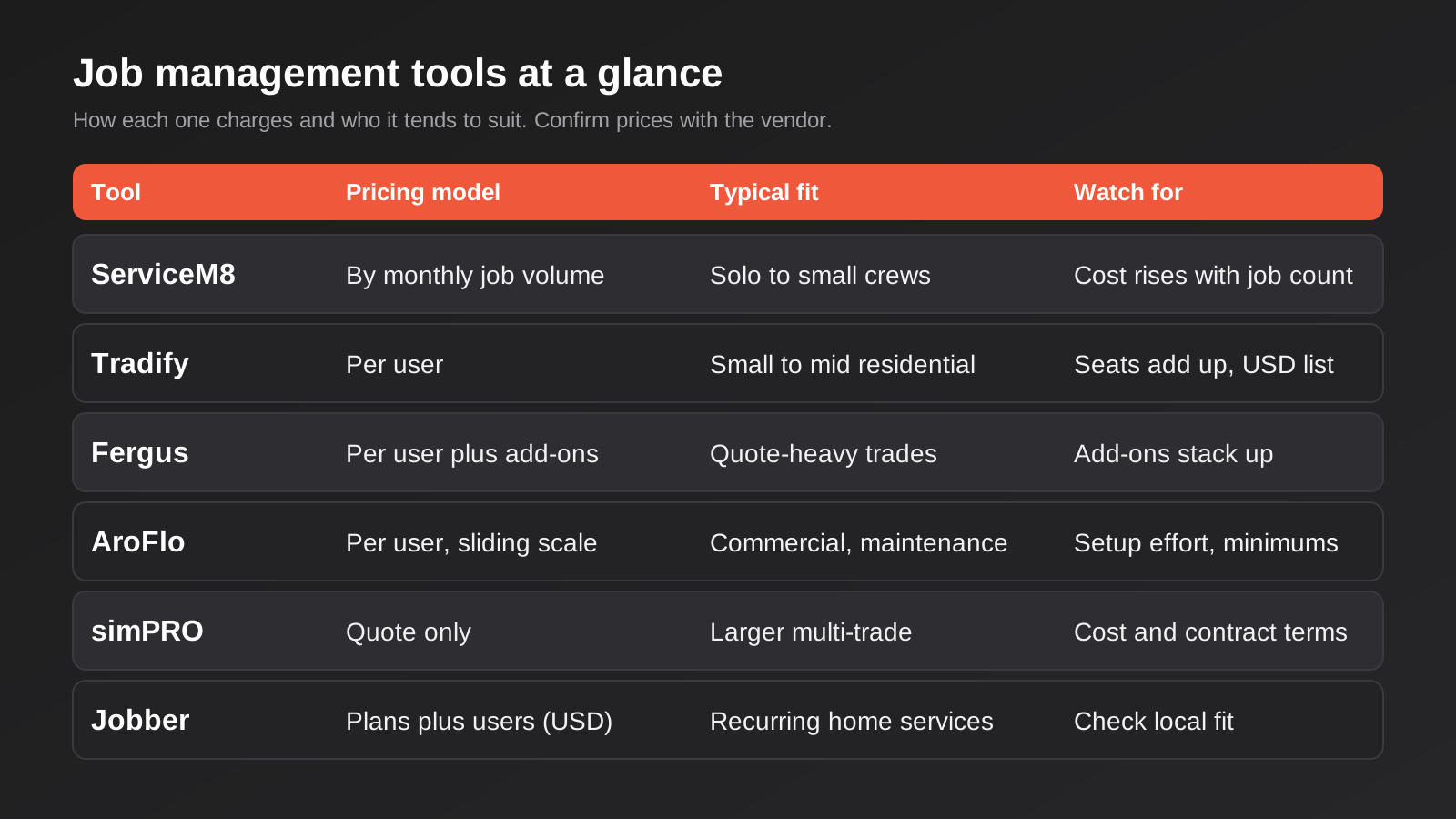
This guide compares six platforms that Australian electricians, plumbers, HVAC techs, landscapers and other service businesses actually use: ServiceM8, Tradify, Fergus, AroFlo, simPRO and Jobber. They are not interchangeable. One prices by how many jobs you run, three charge per person with a login, one is tiered and priced in US dollars, and one does not publish a price at all. The right choice depends on crew size, whether your work is residential or commercial, and how your books are kept.
Here is how we picked and judged them. Each tool had to be sold and supported in Australia, handle GST properly, and connect to Xero or MYOB, because job software that does not feed your accounts just creates double entry. We looked at quoting, scheduling, mobile use on site, invoicing, and how each one scales when you add staff. Every tool gets a real weakness below, because a round-up where everything is great is not much use. One caution on prices: they were pulled from vendor and directory listings in November 2026, the sources disagree in places, and several vendors price in US dollars or quote GST-exclusive figures. Treat every number here as a ballpark and confirm it on the vendor’s own page before you commit.
ServiceM8
What it is
ServiceM8 is a job-card app built around the phone. Every enquiry, quote, booking and invoice hangs off a job card, and the office and the field staff see the same card in real time. It was built for small service businesses, and its strongest following is among sole traders and crews of a few people, particularly on iPhones, although it also has an Android app.
What it does well
Speed of setup is the headline. A one-person plumber can be quoting, booking and invoicing within an afternoon, with no consultant involved. Job cards are simple to understand, which matters when you are trying to get a reluctant apprentice or a part-time admin to actually use the thing. The add-on marketplace is large, so things like SMS, call handling, job-site check-in and extra forms can be bolted on as you need them rather than paying for them up front.
It also connects to Xero, which is where most of its Australian customers keep their books. Invoices created on site flow into the accounts without anyone retyping them, which is the single biggest time saver in this whole category.
Where it falls short
The pricing model rewards small volume and punishes growth. Plans are tiered by how many new jobs you create each month rather than by headcount, so a busy business with a small team can climb tiers quickly. Reporting and job costing are lighter than the heavier platforms, so if you want to know the true margin on a fit-out spread across eight weeks and five trades, you will be exporting to a spreadsheet. MYOB support is a point where the sources we checked contradicted each other, so if you use MYOB, ask the vendor directly and get the answer in writing.
What it costs
Directory listings show a free tier for very low volume, then paid plans stepping up from roughly $30 a month to a few hundred a month as monthly job volume rises, with unlimited users on the paid plans and add-ons such as SMS and phone billed on top. Because the tiers are based on job counts, work out your real monthly job volume (including small call-outs and quotes you create but do not win) before you pick a plan.
Who it suits
Sole traders and small crews who want to be running this week, mostly residential and light commercial work, with Xero as the accounting package. If you expect to double the team in the next year, plan for the day you outgrow its reporting.
Tradify
What it is
Tradify is a per-user job management platform founded in New Zealand and widely used across Australia. It covers quoting, job tracking, scheduling, timesheets and invoicing in a single package, with a mobile app for the crew and a web dashboard for the office.
What it does well
Quoting is the strongest part. You can build quotes from your own price lists, convert accepted quotes into jobs, and invoice in stages, which matters on any job that takes longer than a few days. Because it charges per user rather than per job, there is no incentive to avoid creating small jobs or call-backs, and your records stay complete. The feature set is broad enough that most small residential trade businesses never need to look elsewhere.
Accounting connections include Xero and QuickBooks, and some sources say MYOB is now supported natively as well. If MYOB is what your bookkeeper uses, verify the current state of that integration before signing up, because this is exactly the kind of detail that changes between versions.
Where it falls short
Per-user pricing is great for a three-person business and expensive for a fifteen-person one, especially if you need seats for people who only occasionally touch the system. The published list prices are in US dollars, so what you pay in Australian dollars moves with the exchange rate and may carry GST on top. It is also less suited to commercial maintenance contracts, asset registers and compliance-heavy work than the tools aimed at that end of the market.
What it costs
List prices run in the region of US$47 to US$61 per user per month depending on the plan (Lite, Pro and Plus), with a custom tier above that and a 14-day free trial. Third-party Australian listings show similar figures in Australian dollars, which suggests the local price is close to the US one. Add the seats you need, then add GST if the quote is exclusive.
Who it suits
Small to mid-sized residential trade businesses, roughly two to fifteen people, that quote a lot of work and want staged invoicing and a clean quote-to-job-to-invoice flow without a long implementation.
Fergus
What it is
Fergus is another New Zealand-founded job management platform with a strong Australian customer base, built around quoting, job scheduling, costing and invoicing for trade and service businesses. It is sold per user, billed monthly in Australian dollars on its Australian site.
What it does well
Costing is where Fergus earns its place. It lets you track what a job is costing as it goes, including materials and labour, rather than finding out on invoice day. Price books linked to supplier catalogues cut the time it takes to build an accurate quote, which is a real gain for plumbers and electricians who quote from a wholesaler’s price list. The per-user model includes cheaper timesheet-only seats for people who just need to log hours, which suits businesses with a mix of tradespeople and labourers.
There is also a certificate management add-on for the compliance paperwork many Australian trades have to produce, such as electrical and plumbing certificates. That is exactly the type of local detail that US-built tools tend to skip.
Where it falls short
The add-ons add up. Certificates, SMS credits, contractor day passes and extra seat types are all priced separately, so the headline per-user figure is a floor, not what you will pay. Larger teams (the vendor points ten or more staff to custom pricing) lose the simple published price. And as with any job costing system, the numbers are only as good as the time and materials your crew actually enters on site, so a team that does not log hours properly will see little benefit.
What it costs
The Australian pricing page lists two main plans, Essentials from about $53 per user per month and Pro from about $77, with timesheet-only users cheaper and monthly billing. Third-party reviews show slightly lower figures that appear to be GST-exclusive. Confirm whether your quote includes GST and which add-ons you need before comparing it to anything else.
Who it suits
Plumbers, electricians and similar trades who quote from supplier price lists, care about job profitability, and need compliance certificates built into the same system as the job.
AroFlo
What it is
AroFlo is an Australian-developed field service management platform aimed at businesses that do more than ad hoc residential call-outs: planned maintenance, contractor management, asset-linked work and larger crews. It handles scheduling, dispatch, quoting, purchasing and invoicing, with different user types depending on who needs what level of access.
What it does well
It handles complexity. Different licence types for office staff, field staff, contractors and timesheet-only users mean you are not paying full price for everyone. Scheduling and dispatch are built for several technicians across several sites, and the purchasing side lets you raise purchase orders and match supplier invoices, which small-business tools often leave to your accounting package. For maintenance contracts with recurring visits, this is the sort of structure you want.
Where it falls short
There is more to configure, and that takes time. A sole trader would find it heavier than they need, and the minimum user requirements and sliding scale pricing make the smallest businesses a poor fit. Pricing is also described inconsistently across sources, which is itself a warning sign: get the quote in writing and check what is included in the base fee versus what is an add-on module. Plan for a proper onboarding period rather than a one-afternoon setup.
What it costs
Figures we found range from about $55 to about $80 per user per month in Australian dollars, GST-exclusive, with a sliding scale that gets cheaper per user as the user count rises, and a minimum of around three users. Different pages and directories list different numbers, so request a written quote with your actual user mix (office, field, contractors, timesheet-only) rather than relying on any published figure.
Who it suits
Commercial and maintenance-focused trade businesses with several technicians, multiple job types and a need for purchasing and contractor control. A good fit when you have outgrown the simpler tools but do not want an enterprise rollout.
simPRO
What it is
simPRO is the heavyweight of this list: an Australian-developed platform for larger trade, plumbing, electrical, HVAC and fire protection businesses. It combines job management, estimating, job costing, asset and maintenance management, inventory and reporting, and is usually implemented with the vendor’s help rather than self-served.
What it does well
Depth. Multi-stage projects with detailed cost tracking, service and maintenance schedules, asset records, inventory across vans and warehouses, and reporting you can actually run a larger business on. If you tender for work, run recurring service contracts and need to know your margin by job, customer and technician, it covers ground the lighter tools do not.
Where it falls short
Cost and commitment. The vendor does not publish a price list, so you cannot compare it on a page, and reviewers describe separate office and mobile licences and multi-year terms. Implementation takes real time and often internal staff effort, so a smaller business can spend months getting value out of a tool that a lighter product would have had running in a week. It is overkill for a crew of five.
What it costs
Quote-only. Reviewer comments in directories suggest the per-user licence cost is well above the small-business tools, but those are anecdotes, not rates, so we are not going to give you a number. Ask for a written quote that itemises licences, implementation, training, data migration and any lock-in term.
Who it suits
Larger and multi-trade businesses, typically with a dedicated office team, that run service contracts and projects and have the budget for a proper implementation.
Jobber
What it is
Jobber is a Canadian job management platform used by home service businesses such as cleaning, lawn care, landscaping and general maintenance. It is available to Australian customers, but it was built for North American workflows and is priced primarily in US dollars.
What it does well
The customer-facing experience is polished. Online booking, client hubs where customers can approve quotes and pay invoices, automated reminders and follow-ups make a small service business look professional with little effort. If your work is repeat or recurring (fortnightly cleans, regular lawn mowing) its recurring job handling is a good fit.
Where it falls short
Local fit is the issue. GST handling, Australian supplier price books, trade compliance certificates and the depth of Xero and MYOB integration are where a US-first product tends to lag the Australian-built ones, so check each of those against your own workflow in a trial. Pricing sources conflicted widely on the plan amounts, and extra users and add-ons are charged separately, which makes the real monthly cost harder to predict than a flat per-user rate.
What it costs
There is no permanent free plan, only a trial. Published plan prices we found range from roughly US$49 a month at the entry level to several hundred US dollars for the top plan, with extra users billed on top, but sources disagreed. Ask for current Australian-dollar pricing including GST.
Who it suits
Recurring-service businesses such as cleaning, lawn care and landscaping that care more about booking, reminders and getting paid than about trade-specific compliance or supplier price books.
The Australian details that separate these tools
The reason to read an Australian round-up instead of a generic US one is a handful of unglamorous details. They are the things that cause problems three months in, and they are worth checking one by one in every trial.
- GST and BAS. Check that tax codes, GST-inclusive and GST-exclusive pricing, and invoice formatting match what your accountant expects, and that they carry correctly into Xero or MYOB. A tool that treats tax as an afterthought creates work at every BAS lodgement.
- Compliance paperwork. Many trades have to issue certificates or safety documentation after a job. Some of these platforms build that in or offer it as an add-on, and others expect you to attach a PDF. Ask how it works for your specific trade and state, because requirements differ.
- Supplier price books. If you quote from wholesaler price lists, ask which catalogues the tool supports and how often they update. Stale prices turn into margin you never knew you gave away.
- SMS and phone. Appointment reminders and on-my-way messages cut no-shows, but check that SMS sends to Australian mobile numbers, what it costs per message, and whether credits are bundled or billed separately.
- Support hours and location. A tool whose support team starts work when your first job is already underway is a real cost. Find out when you can get a human on the line, not just a help article.
- Where the data lives. Customer names, addresses and job photos are personal information. Ask where the data is stored and who the vendor shares it with, and put the answer on file in case a customer ever asks.
None of this appears on a comparison table, and all of it affects whether the software saves time or creates a second job for whoever does the admin. A US-built tool can still be the right choice, but you should know which of these boxes it does not tick before you start, not after.
How to choose the best job management software for Australian trades
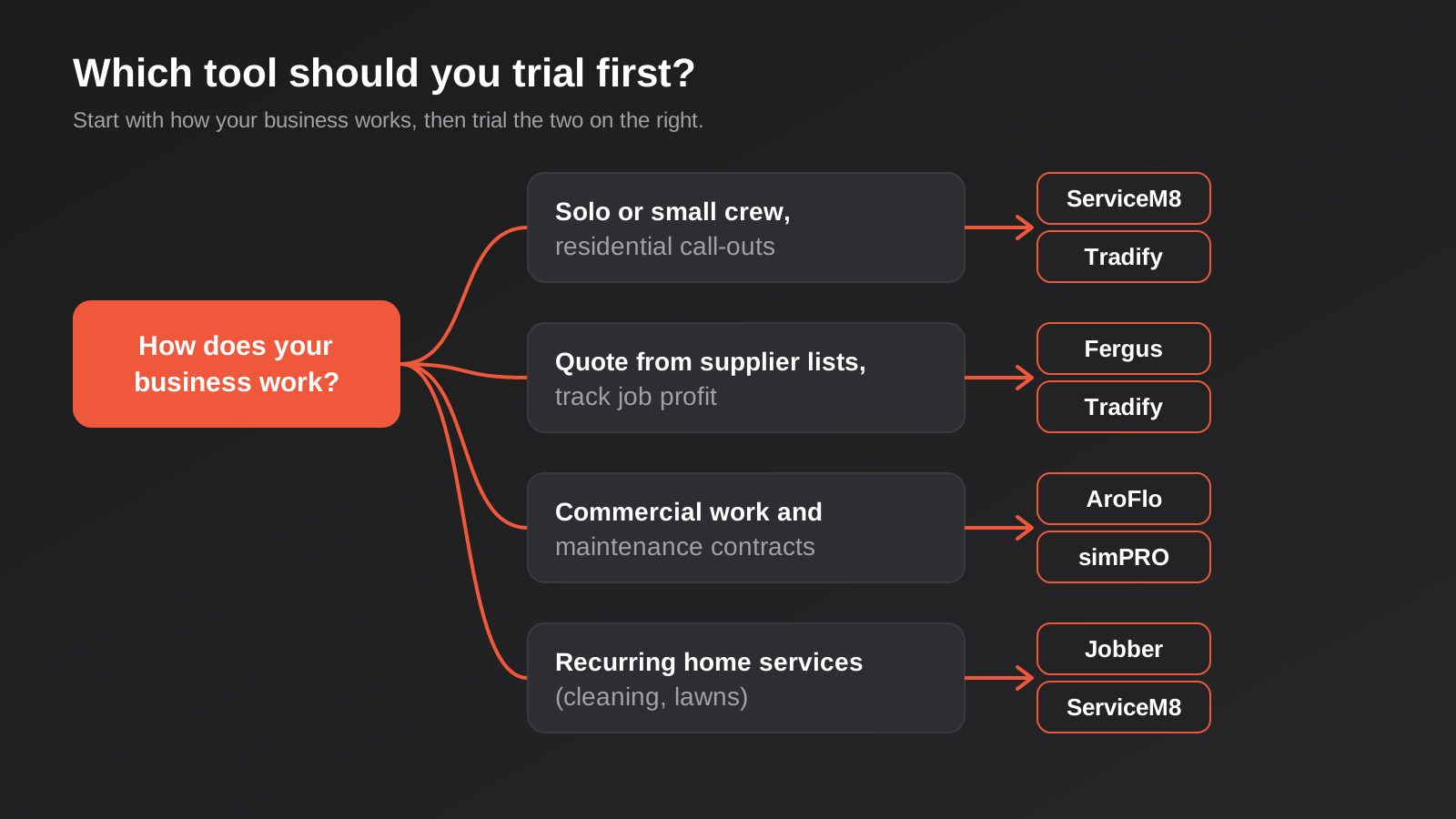
Start with headcount and job type, not features. Most of the tools above can quote, schedule and invoice. What differs is how they charge and what happens when the business changes shape. Work through the questions below in order and you will usually end up with two candidates, which is exactly the number you want to trial side by side.
Count the people, then the jobs
If you are a sole trader or a crew of two or three, the question is whether you pay per user or per job volume. A busy two-person business that creates fifty small jobs a month may find job-based tiers more expensive than two seats. A quiet three-person business doing fewer, bigger jobs may find the opposite. Write down your real numbers from the last three months, including quotes you did not win, and price each option against them rather than guessing.
Be honest about your work type
Residential call-outs, quoted projects, planned maintenance and recurring services all need different things from the software. Call-outs need speed. Projects need staged invoicing and costing. Maintenance needs recurring schedules and asset records. A tool built for one tends to be awkward for another, and the awkwardness shows up as workarounds your crew quietly stops following.
Check the accounting connection first
Whatever else you decide, the connection to your accounting package is the make-or-break item. Ask exactly what syncs: customers, invoices, payments, tax codes, job costs? Does it sync both ways? What happens when someone edits an invoice in Xero after it has been synced? If you are still choosing between accounting packages as well, our guide to the best accounting software for Australian small businesses covers that decision, and it is worth making it before you commit to a job management tool rather than after.
Trial it with a real job
Free trials are only useful if you use them properly. Set up three real customers, quote one real job, schedule it, send it to a phone on site, and invoice it into your accounting package. If any step needs a workaround on day one, it will need the same workaround every day afterwards. Get the apprentice to do part of it, because the tool that the least enthusiastic person on the crew can use without help is usually the right one.
Ask about getting your data out
Before you sign anything, ask how you export customers, jobs, price lists and history if you leave. Per-user tools and multi-year contracts make this question more important, not less. A vendor that answers it plainly is telling you something good about how they treat customers.
What to watch out for when you connect it to everything else
Job management software rarely lives alone. It talks to accounting, sometimes to a CRM, a payments provider, a supplier catalogue or a website enquiry form, and every one of those connections is a place where data can go wrong. Many of the problems sit not in the software itself but in the join between two systems: a customer created twice, a tax code that maps to the wrong account, a payment that posts against the wrong invoice.
If your accounting is in Xero and the off-the-shelf connector does not cover your workflow, a purpose-built Xero integration can fix the specific gaps without replacing the tool. If the business has grown to the point where job software, inventory, purchasing and finance all need to agree with each other, that starts to look more like an ERP integration project, and it is worth scoping that deliberately instead of piling on more spreadsheets.
A lot of the manual work around a job (confirming bookings, chasing quotes, sending review requests, flagging overdue invoices) can be automated on top of whichever tool you pick. We cover the practical options in our guide to field service automation for Australian trades, and it is worth reading before you pay for add-ons that do what a simple workflow could do for free.
Common mistakes when choosing job management software
- Buying for the business you want in three years rather than the one you have now. A heavyweight system with a long contract is a poor bet for a crew of four, and a lightweight one is a poor bet for a growing commercial operation. Choose for the next twelve to eighteen months and keep your data portable.
- Comparing headline prices without adding GST, add-ons and exchange rate. A listing in US dollars, a quote excluding GST and a plan that charges extra for SMS, certificates and contractor seats can look half the price of another tool and end up costing more.
- Ignoring the people who will use it every day. The owner picks the software, but the technicians, apprentices and office admin live in it. If it is slow on a phone in a ceiling cavity with one bar of reception, the data will not be entered, and then the whole point is lost.
- Skipping the data clean-up. Migrating five years of duplicate customers, half-typed addresses and abandoned price lists into a new system just gives you a new system with the same mess. Spend a few hours cleaning before you import.
- Assuming the integration just works. Connect it to a test file or a sandbox first and check tax codes, account mappings and what happens to edits after sync. Finding out at BAS time is expensive.
- Letting it become one person’s secret. If only one staff member understands how the quoting templates, price books and automations are set up, you have a single point of failure. Write down the basics and make sure the owner has admin access.
- Not asking what happens at exit. Check cancellation terms, notice periods, minimum seats and data export before you start, not when you are leaving.
Frequently Asked Questions
What is the best job management software for a sole trader in Australia?
For a sole trader the realistic shortlist is ServiceM8 and Tradify. ServiceM8 is quicker to get running and its job-based tiers keep the cost low at small volume, while Tradify’s per-user pricing and quoting tools suit someone who does larger quoted jobs with staged invoicing. Try both with a real job before deciding.
Is job management software tax deductible?
Software subscriptions used for running a business are generally claimable as a business expense, but the specifics depend on your structure and circumstances. Check with your accountant or the ATO’s guidance rather than relying on a general answer, and keep the invoices, including the GST component, for your records.
Does it need to integrate with Xero or MYOB?
In practice, yes. If the job software does not feed your accounting package, someone retypes every invoice, which wastes time and creates errors. Ask each vendor exactly what syncs and in which direction, and confirm that your accounting package is supported in its current version, not just in marketing copy.
Per-user or per-job pricing: which is cheaper?
It depends on your numbers. Per-job tiers tend to win for small teams with modest job volume, and per-user pricing tends to win for busy crews with many jobs per person. Add up your jobs and your headcount over the last quarter and price both models against them.
How long does it take to switch to a new system?
A small business on a lightweight tool can be running in days. A larger business moving to a heavier platform should plan for weeks to months, including data migration, training and a parallel run period. The more custom your price lists, templates and reporting, the longer it takes.
Can I connect job management software to other systems?
Usually, yes. Most of these tools have an API or a marketplace of integrations, and workflow tools can link them to email, SMS, CRMs and accounting. The key questions are which data moves in which direction, who owns each field, and what happens when the same record is edited in two places.
Where to Start
Pick two candidates using the questions above, run both through a real week of work, and make the final call on what your crew will actually use rather than on a feature list. If you are unsure which type of work you should be optimising for, write down how many jobs you ran last month, how many people touched them and where the time went. The answer is usually obvious once it is on paper.
It is also worth being realistic about change. Even a good tool will feel slower for the first few weeks, because your crew already has habits, and the temptation is to blame the software. Pick a start date away from your busiest period, run the old and new process side by side for a short time, and nominate one person who owns the rollout. Failed rollouts are rarely about the software. They are usually rollouts with no owner.
If you want a hand connecting whichever tool you choose to Xero, your CRM or the rest of your systems, we scope that kind of work as a fixed quote. You can see how our approach works on the automation pricing page, and then tell us what you are trying to connect and we will tell you honestly whether it needs custom work or whether the built-in connector will do the job.
Keep reading
Related posts
Best CRM for Australian Small Business (2026): 6 Compared
Six CRMs compared for Australian small businesses: free plans, AU data hosting, real costs, Xero fit and the drawbacks vendors skip.
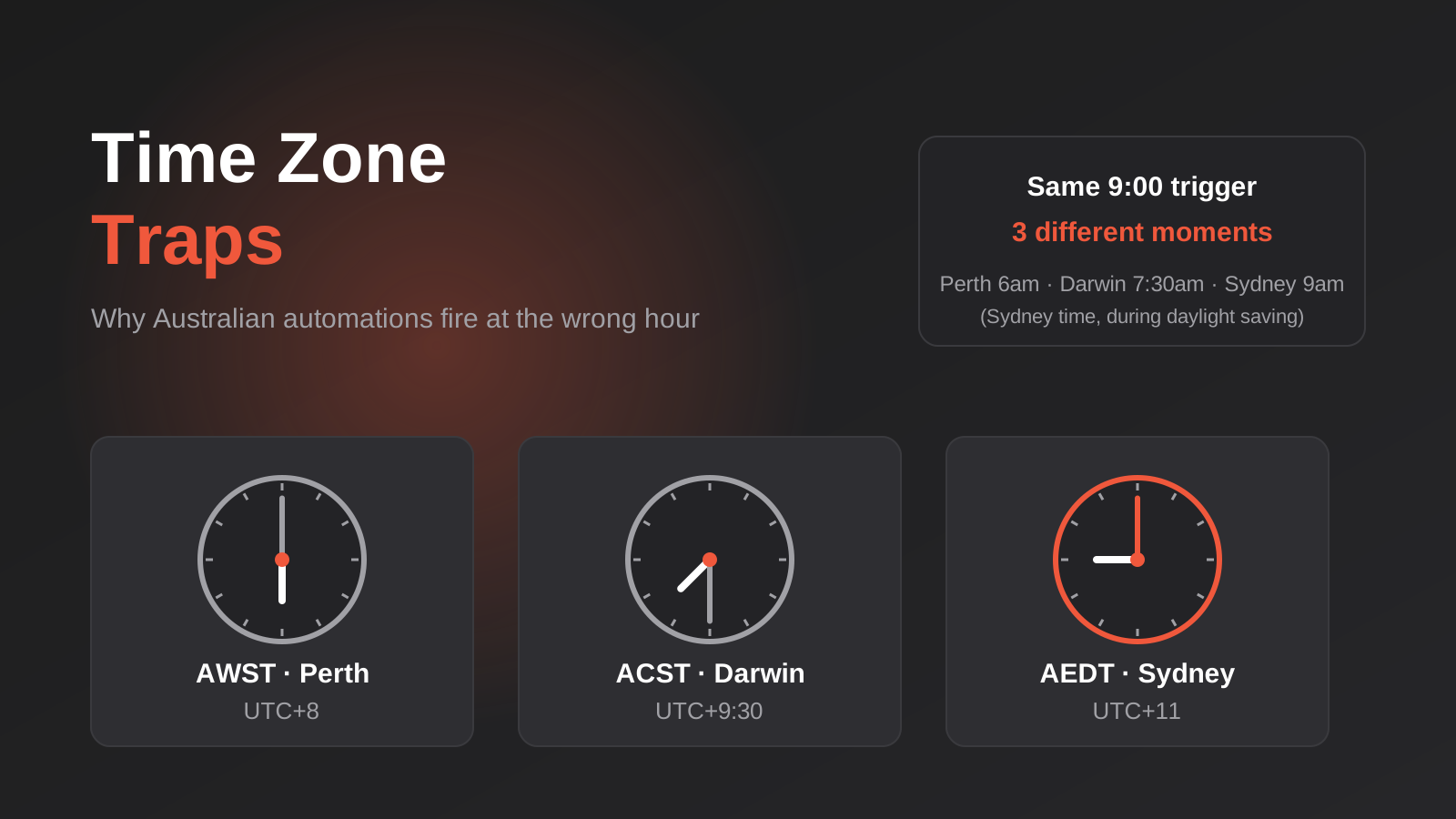
Time Zones, Daylight Saving and Public Holidays: Why Australian Automations Fire at the Wrong Time (2026)
How a 9am automation fires at the wrong time across Australian time zones, daylight saving and state public holidays, and how to…
Best CRM for Australian Small Business (2026): 6 Compared
Six CRMs for Australian small business compared: HubSpot, Zoho, Pipedrive, Capsule, Salesforce and monday. Pricing, Sydney hosting and real drawbacks.
Got a project you'd like to talk through?
Tell us what you're working on — we'll come back with a plan.
