
Field Service Automation for Australian Trades: Where Simpro, ServiceM8 and Fergus Integrations Stop (2026)
 Jignesh Vagadiya
21/09/2026
21 min read
Jignesh Vagadiya
21/09/2026
21 min read
Ask a plumbing or electrical business owner if their operations are automated and most will say yes, pointing to ServiceM8, Simpro or Fergus running on every technician’s phone. And they are half right. Quoting, scheduling and invoicing genuinely do flow through those platforms with very little manual re-entry. The invoice raised in the field lands in Xero within minutes. Payments reconcile themselves. It looks like automation because, for that slice of the job, it is.
The trouble is that a job doesn’t start when a quote is created and it doesn’t end when an invoice is paid. It starts when a website enquiry or missed call comes in, and it should end with a review request, a maintenance reminder, and a number that rolls up into next month’s reporting. Those pieces sit outside what ServiceM8, Simpro and Fergus were built to do, and outside what their native Xero or MYOB connectors were built to sync. That’s not a criticism of the software — it’s simply not their job. It’s the gap between “we run job software” and “we run field service automation,” and it’s where we spend a lot of our time with trades and field service clients.
This isn’t a guide to choosing between Simpro, ServiceM8 and Fergus — there’s plenty written about that already, and the honest answer is that all three do a competent job of the core field service loop. This is about what happens on either side of that loop: the systems most trades businesses still run by hand, spreadsheet or memory, and what it actually takes to close those gaps without ripping out software that already works.
We’re writing this from the automation side of the fence, not the field service software side. We don’t build or sell job management platforms, and we’re not trying to talk you into replacing one. What we do build is the layer of automation around whatever platform you’ve already committed to — and after enough of these projects, the same handful of gaps show up in almost every trades business we look at, regardless of which job software they’ve chosen.
What Field Service Automation Already Covers
It’s worth being specific about what’s already handled, because a lot of the automation conversations we have with trades clients start from an inflated sense of the gap, or an underestimate of it. Neither helps.
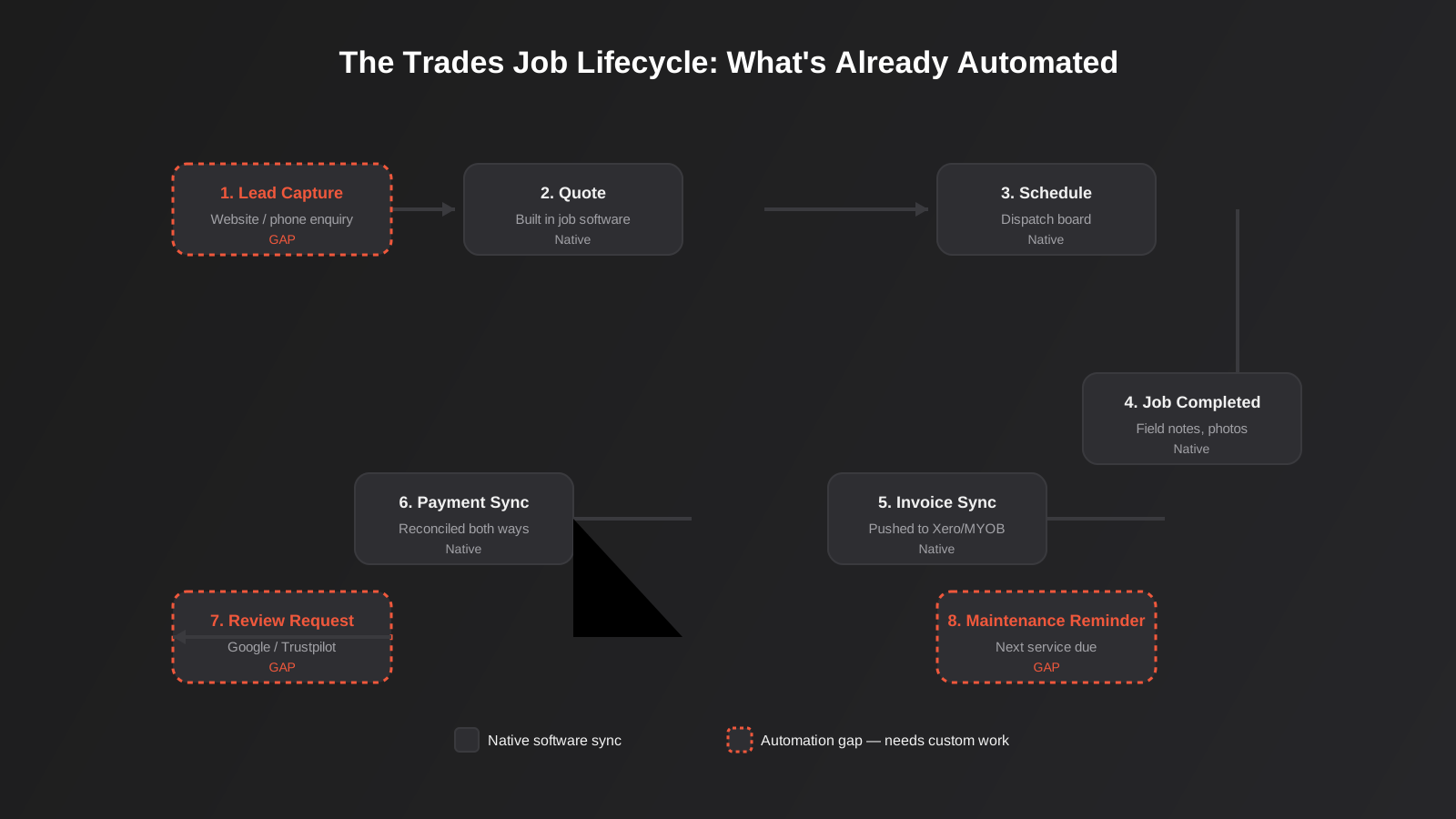
ServiceM8’s own Xero and MYOB integration documentation sets out exactly what syncs: an approved invoice pushes straight into Xero, clients and line items match between the two systems, and payments sync in both directions so a payment recorded against an invoice in the field also clears it in the accounting system. The MYOB connector does the same job for businesses on MYOB instead of Xero. Simpro and Fergus have equivalent native connectors. Tax rates and income account codes are pulled in from the accounting platform automatically, so a technician marking a job complete on-site doesn’t need to think about GST codes or chart of accounts mapping at all.
That’s genuine field service automation, and it covers the core financial loop reasonably well: quote → schedule → job → invoice → payment. For a single-trade, single-location business with one accounting platform, that native integration is often genuinely enough. If that describes your business and everything downstream of invoicing is already working for you, you may not need anything else in this article — and we’d rather tell you that than sell you automation you don’t need.
Some platforms go a step further within their own walls. Simpro, for instance, ties inventory and parts costing into the job itself, so a technician using stock from a van or warehouse can have that cost flow through to the job’s margin without a separate stocktake. Fergus does something similar with timesheets and labour costing feeding directly into job profitability reporting. These are genuinely useful, but they’re still confined to the one platform — they tell you the margin on a job, not whether that job came from a Google ad, a referral, or a maintenance contract, and not what happened to that customer six months later.
Where it stops being enough is everywhere the job touches something the field service platform was never built to manage: where the lead came from, what happens after the invoice is paid, how five different trades or three different branches roll up into one set of numbers, and what a customer sees and receives outside the invoice itself.
The Gaps Native Integrations Don’t Close
Lead capture to job booking
A website enquiry form, a missed call, a Google Business Profile message and a referral text all arrive through completely different channels, and none of them land inside ServiceM8, Simpro or Fergus automatically. In most businesses we work with, someone — often the owner, at night, after the tools are down — manually copies the enquiry details into the job software to create the client and the first quote. That’s not a training problem or a discipline problem. It’s a genuine software gap: the job platform has no native concept of “a lead,” only of “a client with a job.”
Left alone, this delay is where jobs are lost. Industry response-time data across service categories consistently shows conversion dropping off sharply once a lead goes more than a few hours without a reply, and a next-day callback on a burst pipe or an aircon failure usually means the job has already gone to whoever answered first. Automating this step means the enquiry, wherever it comes from, creates a client and a draft quote in the job platform within minutes, with a notification to whoever’s on call, rather than waiting for the next quiet moment in someone’s day.
The other cost of manual lead entry is quieter but adds up over a year: every enquiry that gets typed up by hand loses whatever source data came with it. A form submission knows which ad or page it came from; a phone call knows nothing unless someone writes it down accurately. Once lead source gets flattened to “phone enquiry” for every job regardless of where it actually originated, any attempt to work out which marketing channel is actually producing paying customers is working from bad data before it even starts.
CRM and marketing running as a separate system
Most field service platforms have a client record, but it’s a job record wearing a CRM’s clothes. It’s fine for “has this person had a job with us before,” and hopeless for “which of our past customers haven’t booked a service in 18 months,” “who clicked the last EDM,” or “which suburb should the next letterbox drop target.” Once a trades business wants to run any kind of retention or repeat-business marketing, the client list needs to exist somewhere that’s actually built for segmentation and campaigns, kept in sync with the job platform rather than duplicated by hand.
This is squarely CRM and sales automation territory, and it’s a different problem to job scheduling — worth reading in more depth on our CRM & sales automation page if this is the gap that’s costing you the most.
Multi-tool stacks across service lines
Trades businesses that grow past a single service line often end up running more than one system: Simpro for the electrical division, a separate scheduling tool the plumbing side picked up years earlier, or a franchise structure where each location chose its own software before head office had a say. Each platform syncs cleanly to its own accounting connection, but nothing connects the platforms to each other. A customer who’s had both an electrical and a plumbing job looks like two unrelated strangers to the business, and consolidated reporting across the two service lines means someone exporting two spreadsheets and pasting them together every month.
Recurring maintenance and asset servicing
Fire safety inspections, HVAC servicing, backflow testing, pool servicing — anything with a mandated or sensible re-service interval is recurring revenue sitting inside your existing customer base. Job platforms can store the next-due date on a job or an asset record, but very few will proactively generate the next quote, notify the customer and book the technician on their own. That step almost always still depends on someone running a report and manually creating jobs, which means it depends on someone remembering to run the report.
Review requests and referral follow-up
The single highest-conversion moment to ask a happy customer for a Google review is within a few hours of the job being marked complete, while the tradie’s still fresh in their mind and the problem is actually fixed. Almost no trades business we’ve reviewed does this consistently, because it depends on a human remembering to do it on every single job, every single day. It’s one of the simplest gaps to close and one of the ones with the clearest return, because review volume and recency both feed directly into local search visibility.
Reporting that spans job software, accounting and marketing
Job software reports on jobs. Accounting software reports on money. Ad platforms report on spend and leads. None of them report on cost per booked job, technician utilisation against marketing spend, or which lead source actually produces customers who rebook. Building that view means pulling data out of each system on a schedule and landing it somewhere it can be compared side by side — which is a data automation problem, not a job-software problem, and one most trades businesses only solve once someone gets tired of stitching spreadsheets together every Friday.
Inconsistent or duplicate customer records
This one isn’t a missing automation so much as a reason automations fail once you try to build them. A customer who calls in, then submits a website form for a different job eight months later, then gets added again by a technician who didn’t check first, often ends up as three separate client records with three phone number formats and two spelling variations of the same street name. None of that matters much while the job platform is the only place that data lives. It matters a lot once you’re trying to automate review requests, maintenance reminders or CRM syncing, because the automation can only be as reliable as the record it’s matching against. Any automation project involving customer data is worth pairing with a basic data-cleaning pass first — deduplicating on phone number and address rather than assuming names are typed consistently.
How to Actually Automate the Full Job Lifecycle
Map the lifecycle before you build anything
The mistake we see most often is starting with a tool — “we should get Zapier” or “we need an API integration” — before anyone has written down what actually happens between a lead coming in and a customer rebooking eighteen months later. Every business’s version of this map looks slightly different depending on how many service lines, locations and systems are involved, but the exercise is always the same: list every step, note what system currently owns it, and mark whether a human currently has to manually move information between two systems to make that step happen. Those manual handoffs are your automation backlog, in priority order of how often they happen and how much they cost when they’re missed.
Two numbers are worth attaching to each step on that list before you decide what to build: how often it happens (a handoff on every single job is worth more attention than one that happens quarterly) and what it costs when it’s missed rather than just when it’s slow. A missed review request costs you a bit of local search visibility. A missed lead callback can cost you the job outright. Ranking your gaps by that second number, not just by which one is most annoying day-to-day, usually reorders the priority list more than people expect.
Off-the-shelf connectors vs custom API integration
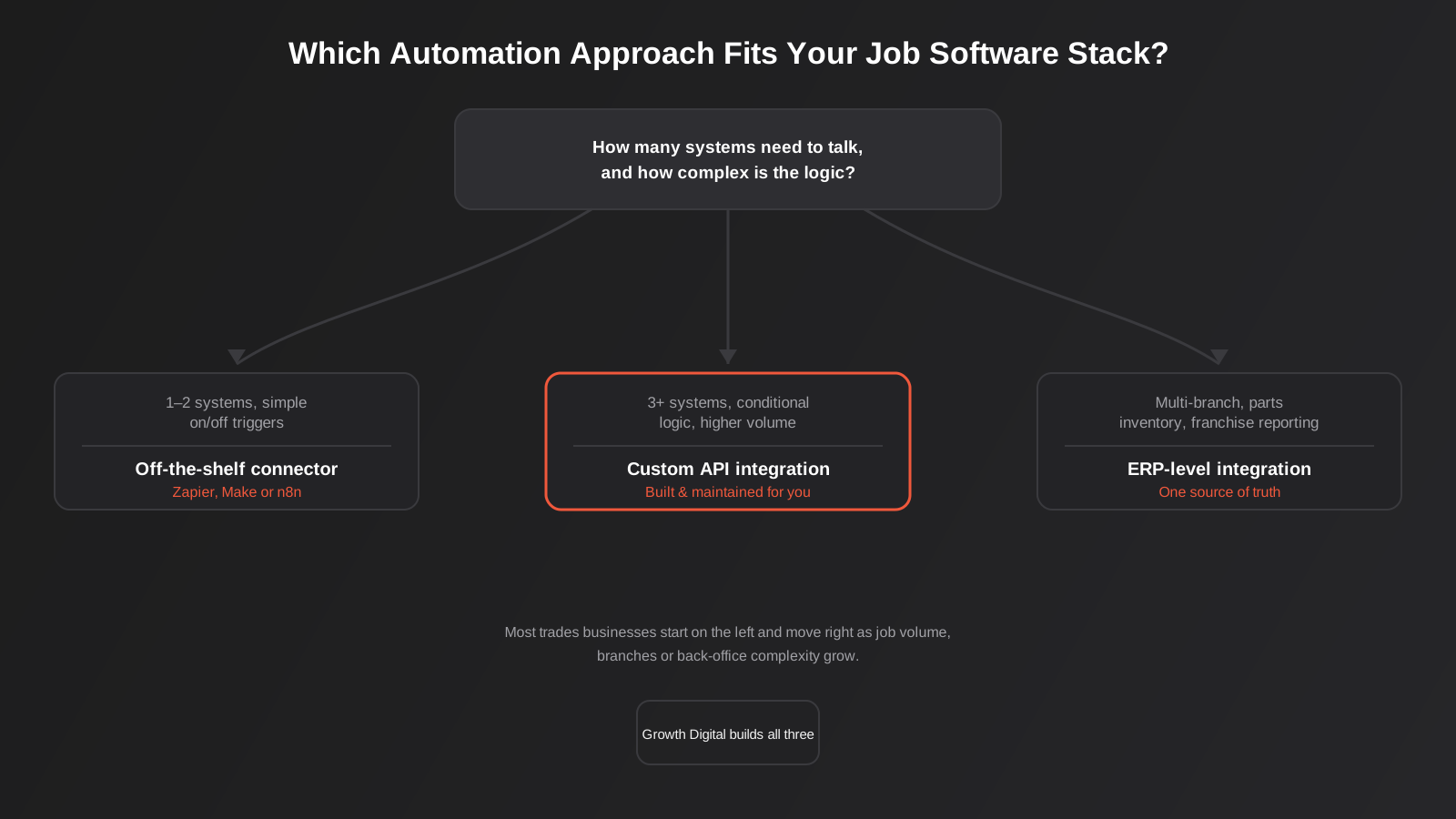
Once you know where the gaps are, the next decision is how to close them. Tools like Zapier, Make and n8n can handle a genuinely large share of trades automation needs — a new form submission creating a lead record, a job status change triggering an SMS, a completed job triggering a review request email a few hours later. They’re quick to set up, don’t need a developer for every change, and are the right starting point for one-to-one connections between two systems with fairly simple logic. We’ve written a full comparison of the three if you’re choosing between them for workflow automation more broadly.
Where they start to strain is conditional logic across three or more systems, high job volumes where per-task pricing on the automation platform adds up, or anything that needs to run reliably without a human checking a dashboard for failed runs. That’s where custom API integration earns its keep — built directly against the job platform, accounting system and CRM’s APIs, with proper error handling and monitoring, rather than assembled from generic triggers. If your stack has grown past what a no-code connector can hold together cleanly, our ERP integration work covers exactly this kind of multi-system connection for businesses that have outgrown point-to-point automation. We’ve also covered the broader decision in more detail in our guide to API integrations for growing businesses, which walks through the same off-the-shelf-versus-custom trade-off outside the trades context specifically.
When native integration really is enough
It’s worth saying plainly: if you’re a single-trade business running one job platform connected to one accounting system, with a manageable job volume and no ambition to run retention marketing or multi-location reporting, you may genuinely not need anything beyond what ServiceM8, Simpro or Fergus already give you for free. The goal isn’t to automate for its own sake. It’s to remove the specific manual steps that are actually costing you leads, reviews or hours every week — and for some businesses, that list is genuinely short.
Real-World Automation Workflows for Trades Businesses
These are the shapes of automation we build most often once a business has mapped its own lifecycle and picked its gaps. None of them require replacing existing job software.
Lead-to-quote in minutes, not hours
A website form submission or a missed-call text-back triggers a workflow that creates a client and draft job in the field service platform, sends a Slack or SMS alert to whoever’s on the roster, and logs the enquiry source in a CRM for later reporting. The technician still does the actual quoting, but the fifteen-minute manual data entry step and the overnight delay both disappear.
Job complete to review request
When a job is marked complete in the field platform, a short delay (usually two to four hours, tuned by service type) triggers an SMS or email asking for a Google review, with a direct link to the review form. Jobs flagged with any complaint or callback are automatically excluded from the review request and routed to a follow-up task instead, so you’re never asking an unhappy customer for a public review.
Recurring maintenance, generated automatically
For businesses with service contracts — fire safety, HVAC, backflow, pool servicing — a scheduled automation checks upcoming due dates weekly, generates the next job or quote automatically, and notifies the customer that their service is due. The business still confirms the booking, but nobody has to remember to run a report and build the jobs manually.
Multi-branch or multi-trade reporting rollup
For businesses running more than one job platform or location, a scheduled data pull extracts job, revenue and lead-source data from each system on a set interval and lands it in a single reporting dashboard, giving ownership one number for “jobs booked this week across the business” instead of three separate exports pasted together by hand. This is the same underlying pattern as our workflow automation work for other multi-system businesses — the trades-specific part is just which systems are involved.
Complaint and callback detection
A job flagged as a callback, warranty return or complaint in the field platform routes to a manager alert instead of the standard review request, and separately triggers a follow-up task to confirm the customer’s issue was actually resolved. This is a small addition on top of the review-request automation above, but it’s the difference between an automation that quietly protects your review score and one that occasionally embarrasses you in front of an unhappy customer.
Cross-platform customer recognition
For a multi-trade business running separate systems per service line, a matching automation checks new client records against existing ones across both platforms by phone number and address, flagging likely duplicates and tagging genuine repeat customers so they can be recognised and offered a loyalty or bundled-service rate, rather than being quoted from scratch as if they’d never called before.
Keeping Automations Reliable Once They’re Running
The part of automation that gets the least attention is what happens after launch. An automation that runs perfectly for four months and then silently fails when an API key expires or a field gets renamed in the job platform isn’t actually saving anyone time — it’s just moved the manual work to a point where nobody’s looking for it.
Monitoring and error handling
Every automation should have a way of surfacing failure, not just success. On no-code platforms this can be as simple as a notification when a scenario or zap errors out. On custom-built integrations it means proper logging and an alert to a real person, not just a line in a log file nobody reads. The businesses that get burned by automation are almost always the ones where a workflow failed weeks ago and nobody noticed until a customer complained about a missing invoice or an un-asked review request.
Someone has to own it
Automations need an owner inside the business, even if an agency built them. That doesn’t mean someone needs to understand the underlying API calls, just that one person knows the automations exist, roughly what they do, and who to call when something looks off. Automation built and handed over with no internal owner tends to degrade quietly as the business changes — a new job status gets added, a form field gets renamed, and the workflow that depended on the old version stops matching without anyone connecting the dots.
Test the edge cases, not just the happy path
A review request automation that’s only ever been tested on a straightforward completed job will usually work fine — until a job gets marked complete and then reopened, or a customer has two jobs on the same day and gets two review requests within an hour of each other. Before any automation goes live, it’s worth deliberately running it through the messy scenarios: cancelled jobs, duplicate customers, jobs completed out of order, partial payments. These are the cases that actually break automations in production, not the clean example used to build and demo them.
Common Mistakes
- Buying a second piece of software to fix a gap that a simple automation between existing tools would have closed for a fraction of the cost.
- Automating review requests without excluding jobs that had a complaint, callback or negative interaction — which turns a good idea into an unhappy customer being asked to leave a public review.
- Building automations on a no-code platform with nobody checking for failed runs, so a broken Zap or scenario quietly stops working for weeks before anyone notices leads have gone missing.
- Treating the job platform’s client list as a CRM and then wondering why retention marketing campaigns can’t be segmented properly.
- Skipping the lifecycle mapping step and jumping straight to “we need an integration,” which usually means solving the loudest complaint rather than the costliest gap.
- Assuming every gap needs custom development when a five-minute Zapier or Make scenario would have solved it just as reliably.
Frequently Asked Questions
Do we need to replace ServiceM8, Simpro or Fergus to automate the rest of the job lifecycle?
No. In almost every case we work on, the field service platform stays exactly as it is and the automation sits around it — pulling data in from lead sources, pushing review requests out after job completion, or syncing client records into a CRM. Replacing job software is expensive, disruptive to technicians who already know the tool, and almost never actually necessary to close these gaps.
How much does it cost to automate lead capture or review requests for a trades business?
A single, well-defined automation on a no-code platform like Zapier or Make — lead capture into your job software, or a review request after job completion — is usually one of the cheaper automation projects we quote, because the logic is simple and the systems involved already have documented integrations. Costs rise with the number of systems involved and how much conditional logic and error handling the workflow needs to run unattended.
Can Zapier or Make handle everything, or do we eventually need custom development?
No-code platforms handle a genuinely large share of trades automation well, particularly one-to-one connections with straightforward triggers. Custom API integration becomes worthwhile once you’re connecting three or more systems with conditional logic, running high job volumes where per-task platform costs add up, or need guaranteed reliability without someone checking a dashboard for failed runs.
We run more than one job platform across different branches or trades — can these be connected?
Yes, though it depends on what each platform’s API exposes. Most modern field service software has a documented API that can be connected via custom integration, even without a native connector between the two platforms themselves. The usual approach is to build a middle layer that pulls from each platform and consolidates the data centrally, rather than trying to force the two systems to talk to each other directly.
Is automating recurring maintenance reminders worth it for a small trades business?
If you have any customers on a service interval — fire safety, HVAC, backflow testing, pool servicing — it’s usually one of the higher-return automations available, because it’s converting work you’ve already got a relationship for rather than chasing new leads. Even a small business with a few hundred serviced assets can lose a meaningful chunk of that recurring revenue simply because nobody ran the report that week.
How long does it typically take to set up these kinds of automations?
A single no-code automation, like a review request workflow, can often be built and tested within a week once access to the relevant systems is sorted. Custom API integrations connecting multiple systems with proper error handling typically take longer, from a few weeks to a couple of months depending on how many systems are involved and how much historical data needs to be reconciled.
Where to Start
If you already know exactly which step in your job lifecycle is costing you the most — leads going stale overnight, reviews nobody asks for, maintenance contracts nobody’s chasing — that’s usually the right place to start, rather than trying to automate everything in one project. Pick the single gap with the biggest cost when it’s missed, not the one that’s most annoying day to day, and build that one properly before moving to the next.
If you’re not sure where your biggest gap actually is, the lifecycle mapping exercise described above is worth doing on paper before you talk to anyone, including us, because it’ll tell you more about where the real gaps are than any software demo will. Walk through a real job from first enquiry to six months later, write down every point where someone had to manually move information between two systems, and you’ll usually find the priority list writes itself.
We work with Australian trades and field service businesses on exactly this kind of field service automation, from a single Zapier workflow through to custom API integrations across multiple systems and locations. Some projects start small — a review request workflow, a lead-capture fix — and grow as the return becomes obvious. Others start with a full lifecycle map and a staged rollout across several gaps at once. Either way, if you want a second opinion on where your job lifecycle has the biggest gap, we’re happy to have a look and talk it through — no pressure to sign up for anything bigger than the conversation.
Keep reading
Related posts

Changing Live Automations Safely: Staging, Version Control and Rollback for Zapier, Make and n8n (2026)
How to draft, test, release and roll back changes to live Zapier, Make and n8n automations without breaking invoices, orders or customer…

Peppol E-Invoicing for Australian Businesses: Automating Accounts Payable From Structured Invoices (2026)
Peppol e-invoicing in Australia: what is and isn't mandatory, how to pick an access point, and how to automate accounts payable once…

Clean Your Data Before You Automate: A Practical Guide to CRM Data Cleanup for Australian Businesses (2026)
Connecting systems on messy data copies the mess everywhere. Here's how to clean, match and merge records before you automate or integrate.
Got a project you'd like to talk through?
Tell us what you're working on — we'll come back with a plan.
