
API Integrations for Growing Australian Businesses: Connecting CRM, ERP, Payments and Inventory (2026)
 Jignesh Vagadiya
13/09/2026
21 min read
Jignesh Vagadiya
13/09/2026
21 min read
Most businesses don’t set out to build a tangle of duct-taped connections between their systems. It happens one integration at a time. Someone connects the CRM to the accounting platform because chasing invoices manually got embarrassing. A year later someone else bolts the ecommerce store onto the warehouse system because stock counts kept going wrong. Eighteen months on, nobody remembers exactly how data gets from the website to the accountant’s desk, and the one person who does is on leave.
That’s API integration in practice for most growing Australian businesses — not a grand architecture diagram, but a series of pragmatic decisions that either compound into something maintainable or slowly calcify into a mess nobody wants to touch. We build these connections for clients across CRM, ERP, payment gateways and inventory systems, and the businesses that get it right aren’t the ones with the biggest budget. They’re the ones who understood a handful of architectural basics before they started wiring systems together.
This guide covers what API integration actually means beyond the marketing language, the patterns that hold up as you add more systems, and the decisions — iPaaS or custom build, real-time or batch, point-to-point or hub-and-spoke — that determine whether your integration layer is still serving you in three years or has become the thing everyone’s afraid to touch.
What API integration actually means
An API integration is any connection where one piece of software reads or writes data in another through a defined interface, rather than a person doing it by hand. That’s a broad definition on purpose, because “integration” gets used loosely to describe several genuinely different things, and mixing them up is where a lot of projects go wrong before they start.
APIs, webhooks and the difference that matters
A REST API (the type you’ll deal with almost universally) works on request and response. Your system asks “what’s the current stock level for SKU 4021?” and the other system answers. This is pull-based: you decide when to ask, and you get an answer immediately, or an error telling you why not.
A webhook flips that around. Instead of asking, you register a URL with the other system and say “tell me whenever an order is placed.” The moment it happens, that system pushes a payload to your endpoint without you asking. This is push-based and event-driven, and it’s the difference between polling your accounting system every five minutes to check if an invoice got paid, versus being told the instant it happens.
In practice, working integrations use both. Webhooks handle the “something just happened” events — new order, payment cleared, stock level crossed a threshold. APIs handle the on-demand lookups and the bulk operations webhooks aren’t built for, like pulling a full product catalogue or reconciling a batch of records at the end of the day. If you only build with one, you’ll eventually hit a wall: pure polling wastes API calls and introduces delay, pure webhooks give you no way to recover data you missed if your endpoint was down when the event fired.
Where iPaaS tools and MCP fit in
Tools like Zapier, Make and n8n (which we cover in detail in our comparison of workflow automation platforms) are integration Platform as a Service, or iPaaS. They sit on top of APIs and webhooks and give you a visual way to wire triggers to actions without writing code. They’re genuinely the right answer for a large share of business integrations, and we’ll cover exactly when in a moment.
MCP (Model Context Protocol) is a newer and different thing again — it’s a standard for letting an AI agent call your systems’ APIs directly during a conversation, rather than a human triggering a fixed workflow. If you’re exploring how AI agents can query or act on your business data, that’s worth reading separately in our guide to MCP servers — it’s a layer on top of the same underlying APIs this guide is about, built for a different kind of consumer.
The systems businesses actually need to connect
Almost every integration request we get falls into one of four categories. Knowing which one you’re dealing with tells you a lot about how urgent, how risky and how complex the build is going to be.
CRM to accounting and ERP
Sales data created in a CRM — a won deal, a new customer, a signed quote — needs to become an invoice, a customer record and eventually a job in the system that runs operations and finance. Get this wrong and you get the classic symptom: sales thinks a deal is closed, finance has no record of it, and the customer gets chased for an invoice that was never actually raised correctly. If you’re running a larger ERP rather than just Xero or MYOB, our ERP integration service goes deeper into what that connection specifically involves, since ERP systems bring their own complexity around chart of accounts mapping, tax codes and inventory valuation that a simple CRM-to-accounting sync doesn’t.
Ecommerce to inventory and fulfilment
An order placed on the website needs to decrement stock somewhere, trigger a pick-and-pack process, and eventually generate a shipping label and a tracking number that flows back to the customer. This is one of the highest-stakes integration categories because errors are visible to customers immediately — overselling a product that’s actually out of stock is a worse experience than almost anything else on this list.
Payment gateways to accounting
Stripe, Square, PayPal and the bank feeds behind them generate a payment event that needs to be matched against an invoice, have fees deducted correctly, and land in the right ledger account. This is deceptively fiddly because payment gateways charge fees that need separate accounting treatment, and partial refunds, chargebacks and currency conversion all need handling explicitly — they don’t just disappear if you ignore them in your integration logic.
Marketing, analytics and reporting data
Getting customer and transaction data out of operational systems and into wherever it’s analysed — a data warehouse, a BI tool, a simple dashboard — so that decisions aren’t made on stale exports. This is its own build-vs-buy question with its own set of trade-offs around freshness, cost and who maintains the pipeline.
Integration patterns: how the data actually moves
Once you know which systems need to talk, the pattern you choose determines how reliable and maintainable the result is. Three decisions matter more than any specific tool choice.
Real-time versus batch
Real-time sync (via webhooks or frequent polling) means data is current within seconds. Batch sync runs on a schedule — every fifteen minutes, hourly, or overnight — and processes everything that changed since the last run. Real-time feels better and is necessary for things customers see immediately, like stock availability or order confirmation. But it’s also more fragile: if the receiving system is briefly unavailable, you need a retry strategy, or the event is lost.
Batch is underrated. For financial reconciliation, reporting, and anything where a fifteen-minute delay genuinely doesn’t matter, batch sync is simpler to build, easier to debug (you can re-run last night’s batch if something looked wrong), and puts far less load on both systems. The mistake we see most often is defaulting to real-time for everything because it sounds more impressive, when half of those flows would be more robust and easier to maintain as a batch job running every hour.
Point-to-point versus hub-and-spoke
When you connect system A directly to system B, then B directly to C, then A directly to C, you get point-to-point integration. It’s the fastest way to ship the first connection. The problem shows up at the fourth or fifth system, when you realise every new system needs its own direct connection to every existing one it needs data from, and a change to any one system’s API can break several other connections you’d forgotten were dependent on it.
A hub-and-spoke architecture routes everything through a single integration layer (sometimes called a middleware layer, an integration hub, or in more advanced setups, an internal API). Each system connects once, to the hub, and the hub handles translating and routing data between them. Adding a sixth system means one new connection, not five.
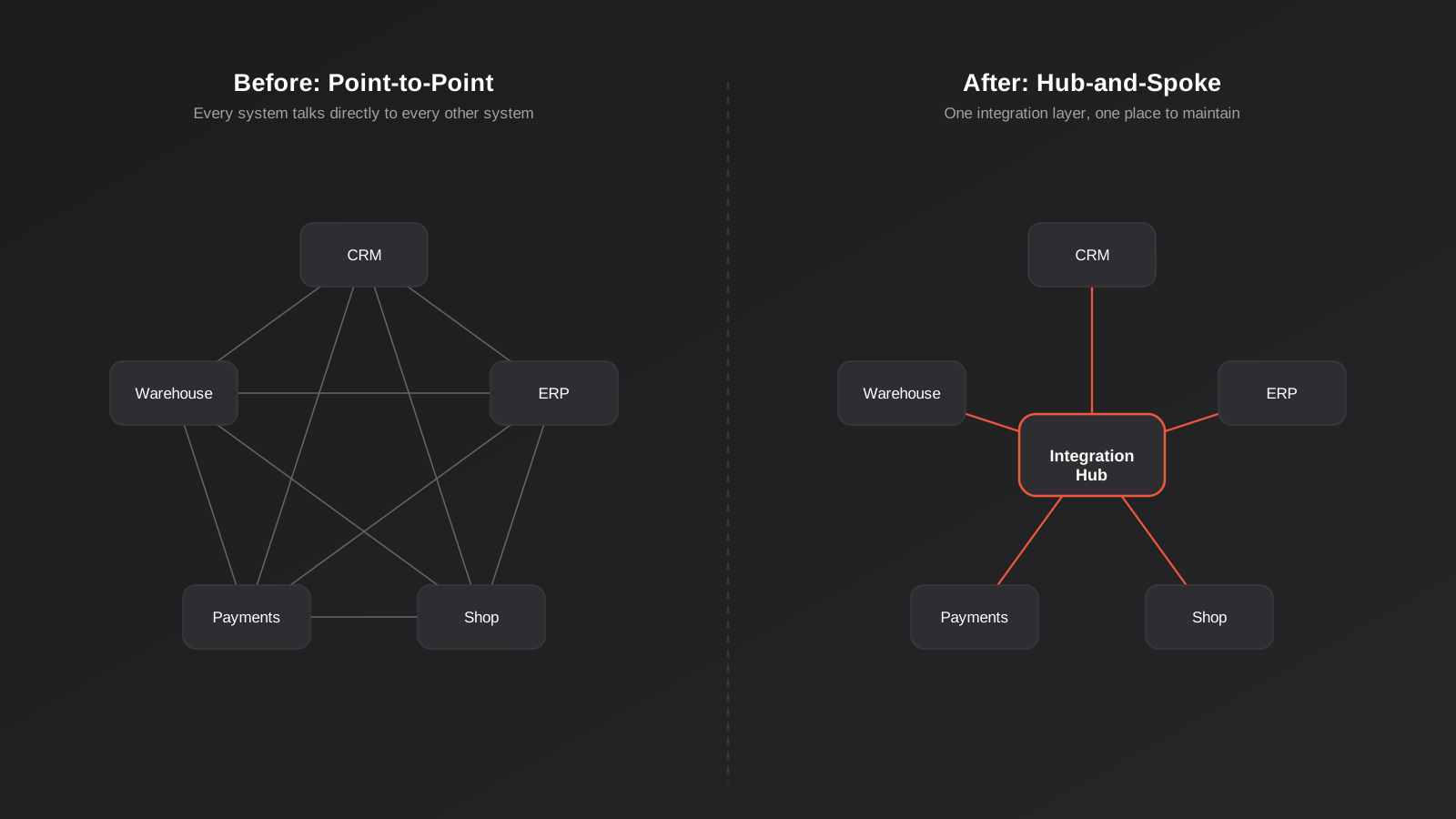
The honest trade-off: hub-and-spoke costs more to build up front because you’re building an extra layer rather than a direct wire. For two or three systems that rarely change, point-to-point is perfectly reasonable and we’d talk a client out of over-engineering it. Past four or five systems, or in any business that adds new tools regularly, the hub earns its cost back the first time you swap out a CRM or ecommerce platform and only have to touch one connection instead of rewriting three.
Authentication: the part everyone underestimates
Every API integration needs to prove it’s allowed to access the data it’s requesting, and this is where a surprising amount of integration time actually goes. The three patterns you’ll encounter:
- API keys — a static secret string sent with every request. Simple, but if it leaks, whoever has it has full access until you rotate it, so it needs to be stored properly (never in code that ends up in a public repository) and rotated periodically.
- OAuth 2.0 — the standard behind “Connect your Xero account” buttons. It issues a token that expires and needs refreshing, scoped to specific permissions rather than blanket access. More secure, more moving parts, and the refresh logic is a common source of integrations that quietly stop working after a few months when a refresh token expires and nobody built the renewal handling.
- Service accounts and IP allowlisting — common for ERP and enterprise systems, where access is granted to a dedicated non-human account, sometimes combined with restricting which server IP addresses are allowed to connect at all.
Punchout integrations for B2B procurement — where a buyer’s Ariba or Coupa system needs to authenticate into your catalogue directly — take this further with cXML and OCI-specific authentication handshakes. If that’s your situation, we’ve written a dedicated guide to punchout catalog integration covering that specific protocol.
iPaaS or custom build: how to actually decide
This is the question that determines cost, timeline and who maintains the result for years afterward, so it deserves a straight answer rather than “it depends.”
Use an iPaaS tool (Zapier, Make, n8n, or a vertical-specific connector) when: the systems involved both have well-supported existing connectors, the logic is fairly standard (new lead in CRM triggers a welcome email, new order triggers a Slack notification), and volume is moderate. You’ll be live in days, the monthly cost is predictable and low, and you don’t need a developer on standby for routine changes.
Build custom when: your logic doesn’t fit a standard trigger-action model, you’re processing high transaction volumes where per-task iPaaS pricing gets expensive fast, you need to connect a system with no existing connector (common with older ERPs, industry-specific software, or in-house tools), or owning the data path matters for compliance or security reasons. The upfront cost is higher and the timeline is longer, but a well-built custom integration’s ongoing cost is close to zero — just hosting — while an iPaaS subscription keeps charging every month for as long as you use it.
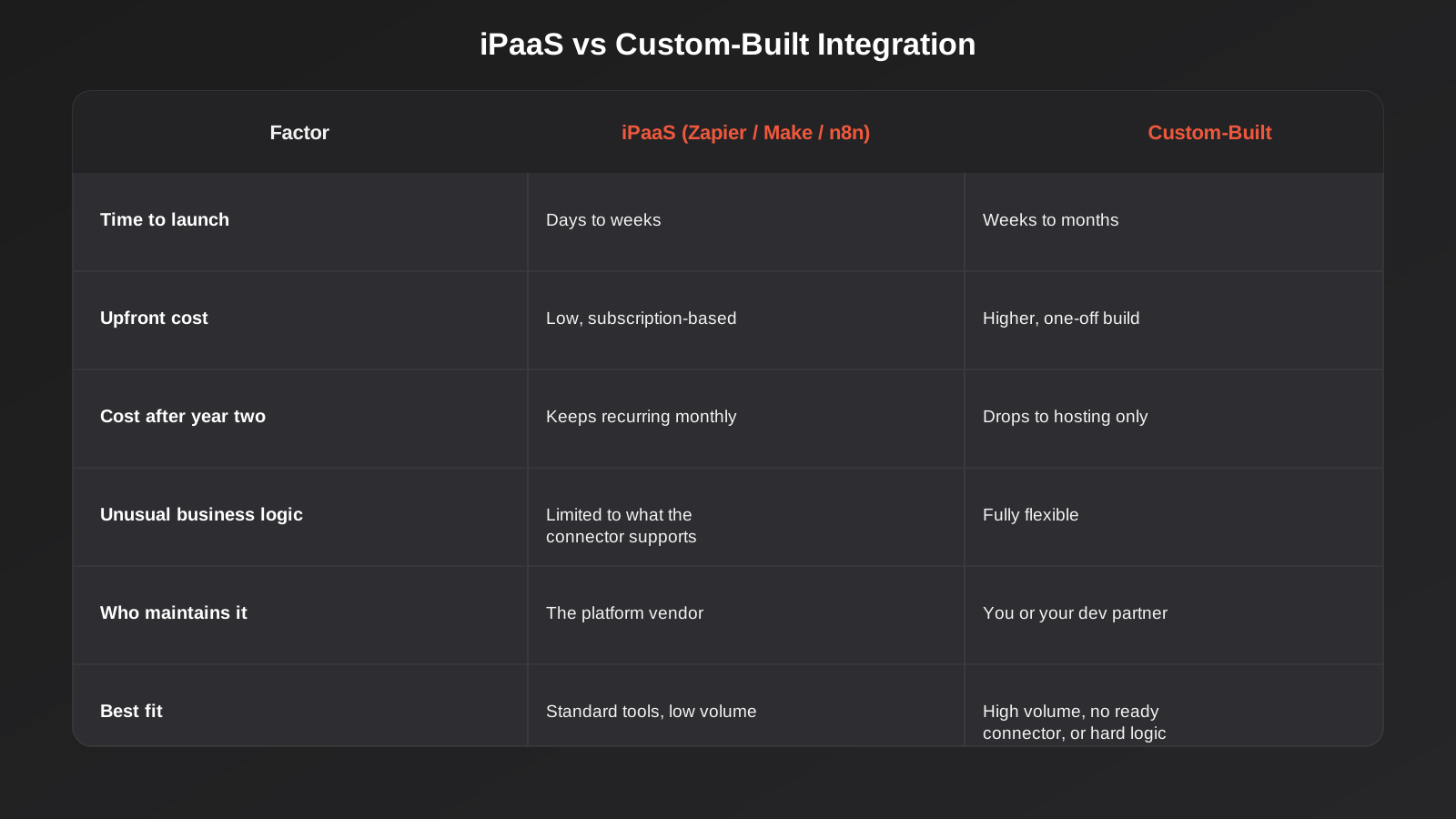
The break-even point in our experience lands somewhere around the second or third year for a moderately complex integration. If you’re not sure which side of that line you’re on, start with iPaaS. It’s far cheaper to migrate a proven, well-understood workflow from Zapier to a custom build later than to have over-engineered a custom system for a workflow that turned out to be simple and short-lived. Our API and integrations team gets asked to rescue over-built integrations almost as often as we get asked to build new ones.
What good integration engineering actually looks like
Whether you build custom or configure an iPaaS workflow, the difference between an integration that runs quietly for years and one that generates a support ticket every fortnight comes down to a handful of engineering habits that are easy to skip when you’re focused on getting the happy path working.
Idempotency
If a webhook fires twice for the same event — which happens more often than you’d expect, because most systems retry deliveries that don’t get acknowledged fast enough — your integration needs to recognise the duplicate and not create two invoices for one order. This means every incoming event needs a unique identifier your system checks against before acting on it. Skip this and you’ll eventually get double-billed customers or duplicated stock adjustments, usually discovered by an annoyed customer rather than by testing.
Retries and error handling
APIs fail. Servers time out, rate limits get hit, a field that used to always be populated is suddenly blank. A production-grade integration retries transient failures automatically (usually with an increasing delay between attempts, known as exponential backoff), and routes genuine failures — bad data, permission errors, anything that won’t fix itself on retry — to somewhere a human will actually see them, rather than silently dropping the record.
Rate limits and versioning
Every API you’ll connect to enforces a limit on how many requests you can make per minute or per day. Building without accounting for this works fine at low volume and breaks the moment a busy sales period pushes more orders through than the API allows. Similarly, APIs get versioned and old versions eventually get deprecated — an integration built against a specific API version needs someone watching for deprecation notices, or it will simply stop working on a date you didn’t choose.
Logging and monitoring
The single biggest difference between integrations that get fixed in minutes and ones that cause a week of confusion is whether anyone can see what happened. A basic log of every sync attempt — what ran, when, what succeeded, what failed and why — turns “the orders stopped syncing sometime yesterday” into a five-minute diagnosis instead of a guessing game.
Mapping data between systems
This is the unglamorous work that eats more integration time than the API calls themselves. Two systems rarely represent the same thing the same way. One stores prices tax-inclusive, the other tax-exclusive. One uses DD/MM/YYYY, the other ISO 8601 timestamps in UTC. One has a single “name” field, the other splits first and last name and rejects a record without both. Addresses are their own recurring headache — state abbreviations, unit-before-street-number formatting, and postcodes stored as text in one system and as integers in another that silently drops a leading zero.
None of this is difficult in isolation, but it needs to be worked out explicitly and documented, field by field, before a single line of integration code gets written. The projects that run over budget are rarely stuck on authentication or API limits — they’re stuck re-discovering, one support ticket at a time, that the two systems never agreed on what a valid phone number looks like.
Testing and going live safely
Most mainstream APIs (Xero, Shopify, HubSpot, Stripe and similar) provide a sandbox or test environment that behaves like production without touching real data. Build and test against that first, including deliberately triggering failure cases — a duplicate webhook, a missing required field, an expired token — rather than only testing the happy path where everything arrives exactly as expected.
For anything touching money or stock levels, running the integration in parallel with the existing manual process for a short period before fully cutting over is worth the extra week it costs. It gives you a real dataset to compare against and catches mismatches while there’s still a manual fallback, rather than after the manual process has already been switched off and nobody’s checking the numbers against anything.
Security and data handling
Moving customer, payment and business data between systems means an integration is, by definition, another place that data passes through and another set of credentials that could be compromised. This deserves more attention than it usually gets, particularly once payment details or personal information are involved.
Encryption and credential storage
Data should be encrypted in transit (standard HTTPS/TLS, which virtually every modern API enforces by default) and, for anything persisted along the way — a queue, a log, a staging database — encrypted at rest as well. API keys, OAuth tokens and any other credentials belong in a proper secrets manager or environment configuration, never hard-coded into integration scripts or committed to a code repository. This sounds obvious written down; it’s also one of the most common findings when we’re asked to review an existing integration someone else built under time pressure.
Least-privilege access
Most OAuth integrations let you request a specific set of scopes rather than blanket account access — read-only access to contacts, for instance, without write access to invoicing. Request only what the integration actually needs. It’s tempting to grant broad access up front so you never have to come back and ask for more later, but that broad access is exactly what turns a minor credential leak into a major one.
Handling personal information carefully
Under the Australian Privacy Principles, personal information moving between systems — even internal ones — still needs to be handled consistently with what customers were told when it was collected. In practice for integration work, that means being deliberate about what actually needs to flow through the integration layer (a customer’s order history probably doesn’t need to sit in a marketing automation tool if all that tool needs is an email address and a name), and making sure logs don’t casually capture full payment details or other sensitive fields just because they happened to be present in the API payload. Redacting sensitive fields from logs before they’re written is a small habit that prevents a much bigger problem if those logs are ever exposed or reviewed by someone who shouldn’t see raw customer data.
Cost and timeline in Australia
Pricing for integration work is quoted per engagement rather than as a fixed product price, because the honest cost driver is how many systems you’re connecting and how unusual the logic is, not a flat licence fee. As a rough guide for the Australian market in 2026:
- A single, well-scoped integration between two mainstream systems with existing API support (say, CRM to accounting) typically runs from a few thousand dollars for an iPaaS-based build up to the low five figures for a custom point-to-point connection, over roughly two to six weeks.
- A broader integration program connecting three or more systems, including a proper hub-and-spoke layer, error handling and monitoring, generally runs three to six months and scales in cost with the number of systems and the complexity of the business logic between them.
- Ongoing maintenance for a custom build is usually modest — mostly monitoring and occasional updates when a connected system changes its API — unless the underlying systems change significantly, in which case it becomes closer to a re-build.
A well-scoped integration project pays for itself surprisingly quickly through recovered staff hours, particularly when it’s replacing manual re-keying of the same data across two or three systems. The same payback maths that applies to workflow automation projects applies just as directly here — baseline the hours currently spent on manual data entry, and weigh that against the build and maintenance cost.
Common mistakes
- Building point-to-point past the point it makes sense. Three or four direct connections between systems seems manageable until someone needs to change one of the connected systems and discovers how many other things quietly depend on it.
- Treating webhooks as guaranteed delivery. Webhooks can fail to arrive — your server could be down, a deployment could be mid-restart. Without a periodic reconciliation job that checks for anything missed, small gaps accumulate silently.
- No monitoring until something breaks. Integrations that run fine for months with zero visibility tend to fail quietly, and the first sign of trouble is a customer complaint or a finance team member noticing numbers don’t add up.
- Ignoring rate limits until a peak period hits. An integration that’s never been tested under real load is a bet that your busiest day won’t be the day it falls over.
- Hard-coding business logic that changes often. If pricing rules, tax logic or approval thresholds live buried inside integration code rather than somewhere configurable, every small policy change becomes a developer ticket.
- Skipping authentication renewal handling. OAuth tokens expire. An integration that isn’t built to refresh them automatically will work perfectly for months and then stop overnight with no clear error message.
- Choosing custom build out of preference rather than need. Building bespoke because it feels more “proper” than an iPaaS workflow, when the actual logic was simple enough for Zapier, wastes budget that would have been better spent elsewhere.
Frequently Asked Questions
What’s the difference between API integration and workflow automation?
Workflow automation (using tools like Zapier, Make or n8n) is one way of building an API integration — a no-code layer sitting on top of the same APIs. “API integration” more broadly also covers custom-coded connections, middleware platforms and direct system-to-system links that don’t go through a workflow automation tool at all. Every workflow automation is an integration; not every integration is workflow automation.
Do I need a developer to set up API integrations?
Not always. If you’re connecting mainstream tools with existing iPaaS connectors and standard logic, a technically confident team member can often configure this without writing code. You need a developer once you’re dealing with a system that has no existing connector, logic too complex for a visual workflow builder, high transaction volumes, or a requirement to own the integration code outright.
How long does a typical API integration take to build?
A single integration between two systems with existing API support typically takes two to six weeks from scoping to going live, depending on how much error handling and testing it needs. A broader program connecting several systems with a proper integration layer usually runs three to six months, staged so early value shows up well before the whole program is finished.
What happens if a connected system changes its API?
Most API providers version their interfaces and give advance notice before deprecating an old version, but that notice is only useful if someone is watching for it. A properly maintained integration includes monitoring that flags failures early and a process for reviewing vendor changelog and deprecation announcements, rather than discovering the break when data stops flowing.
Can API integrations work with older or legacy systems?
Often yes, though it depends on what the legacy system exposes. Some older ERPs and line-of-business systems only offer file-based exports (CSV, XML dumps) rather than a modern REST API, which means the integration needs a scheduled batch process reading and writing those files rather than real-time API calls. It’s more limited than a native API connection but still removes the manual re-keying step, which is usually the actual goal.
Is it cheaper to use Zapier forever instead of building custom?
For low-volume, simple workflows, often yes — the monthly cost stays low and there’s no upfront build cost to recover. For anything running at meaningful volume over several years, the recurring iPaaS subscription usually ends up costing more than a custom build would have, because a custom integration’s ongoing cost drops to close to zero (just hosting) once it’s built, while the iPaaS bill keeps arriving every month for as long as you use it.
Where to start
Before choosing a tool or a developer, map out exactly which systems need to talk to each other and what specifically needs to move between them — not “connect the CRM to everything,” but the actual fields, the actual triggers, and how urgently the data needs to arrive. That single exercise usually reveals whether you’re looking at a quick iPaaS workflow or a genuine integration project, and it’s the same exercise whether you end up building it yourself, hiring a freelancer, or working with an agency.
If you’d rather talk it through than map it out alone, we’re happy to have a conversation about what you’re trying to connect and what that would actually involve — no pressure to sign up for anything, just a second opinion on scope before you commit budget either way.
Keep reading
Related posts
POS Integration for Australian Retail and Hospitality: Stock, Sales, Settlements and Getting the Books to Agree (2026)
How point-of-sale integration works for Australian retailers and hospitality venues: stock sync, daily sales posting, settlements and fees, and keeping the books…
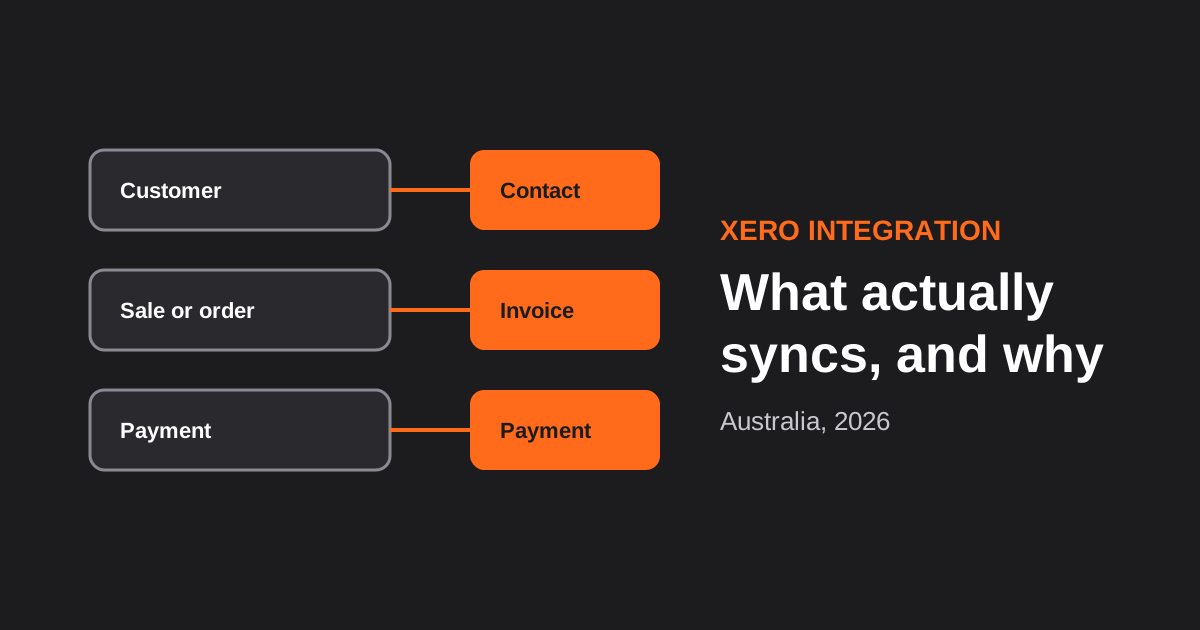
Xero Integration for Australian Businesses: What Actually Syncs, GST Mapping and the Mistakes That Break Reconciliation (2026)
How a Xero integration really works in Australia: what to sync, how to map invoices, payments, refunds and GST, and the mistakes…
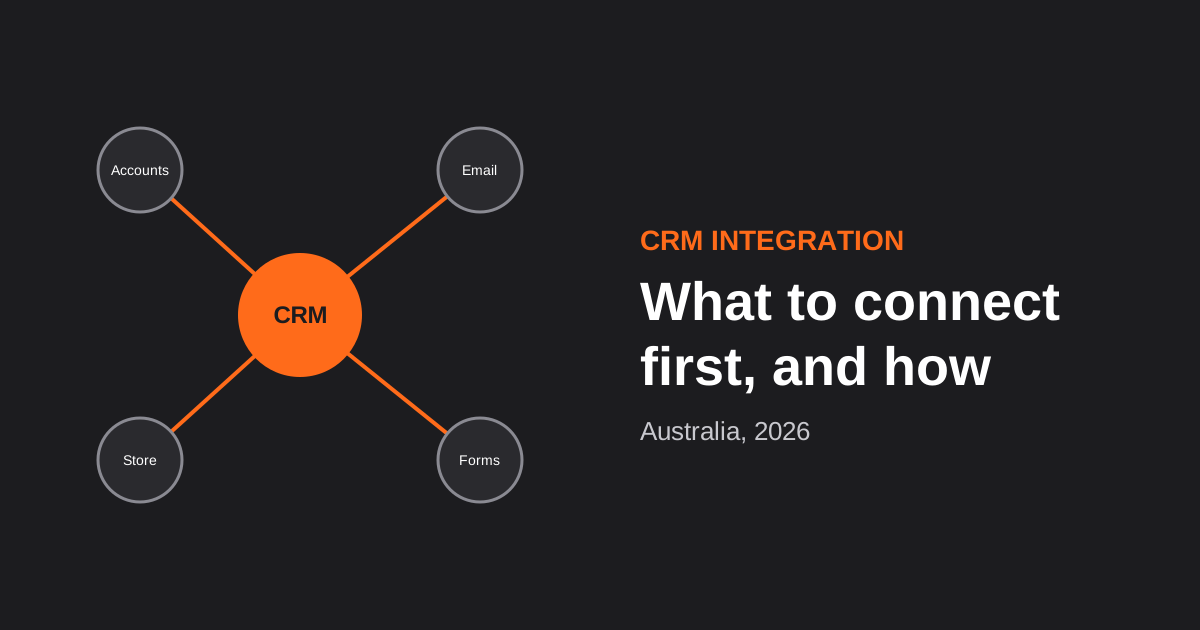
CRM Integration for Australian Businesses: What to Connect First and How to Do It Properly (2026)
A practical guide to CRM integration for Australian businesses: what to connect first, which way data should flow, native vs middleware vs…
Got a project you'd like to talk through?
Tell us what you're working on — we'll come back with a plan.
