
MCP Servers Explained: How AI Agents Get Real Access to Your Business Systems (2026)
 Jignesh Vagadiya
30/08/2026
20 min read
Jignesh Vagadiya
30/08/2026
20 min read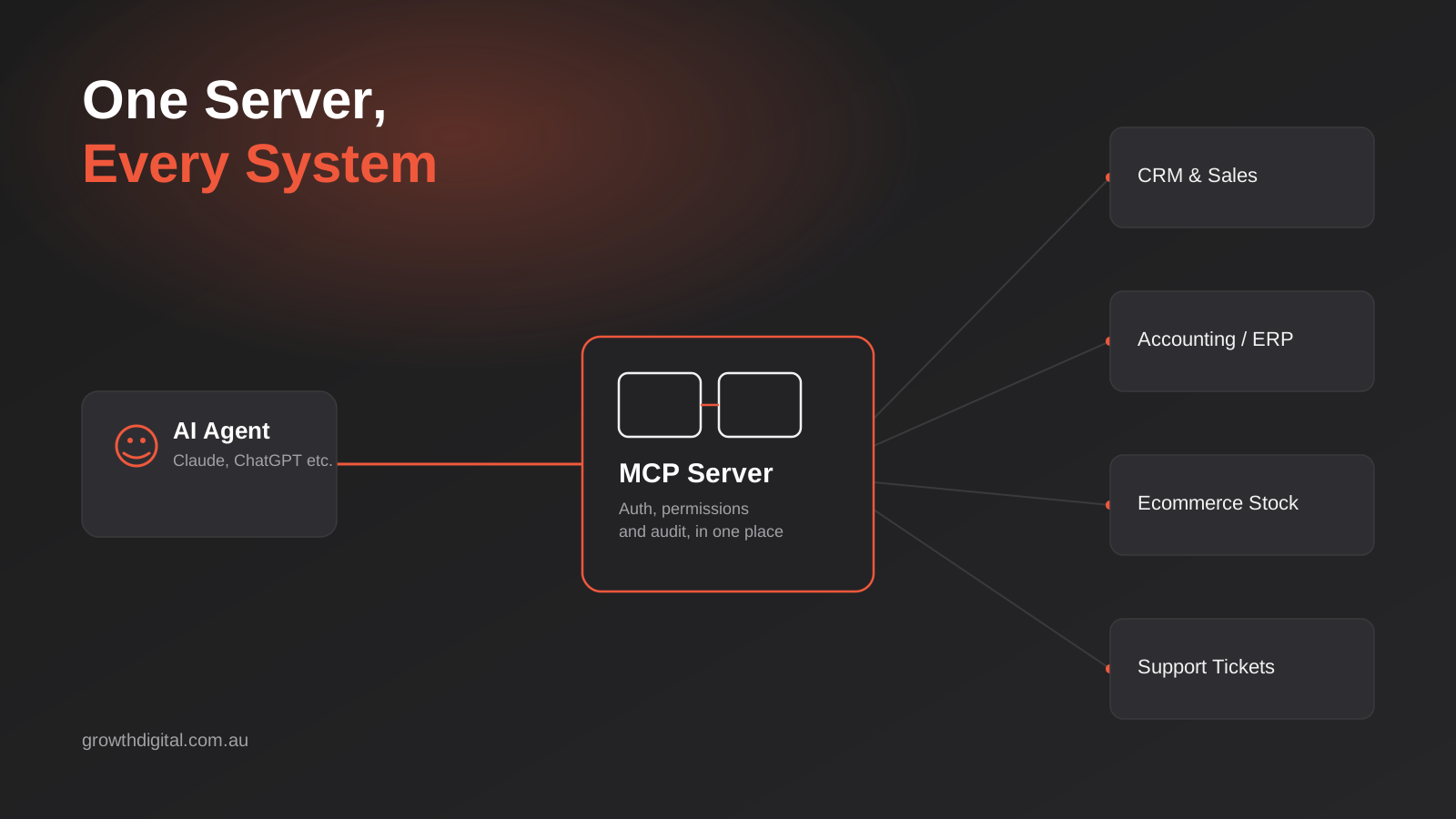
A client asked us recently whether their team could just tell ChatGPT to “check the CRM and follow up with anyone who hasn’t paid.” Simple enough request. The honest answer was no — not without someone building a bridge between that chat window and their CRM first, and building it in a way that didn’t let the AI delete records or email the wrong customer by accident. That bridge has a name now: an MCP server. It’s quietly become one of the more useful pieces of infrastructure a business can build in 2026, and almost nobody outside software teams has heard of it yet.
MCP stands for Model Context Protocol, an open standard Anthropic released in late 2024 for connecting AI models to the tools and data they need to actually be useful. Since then it’s been adopted, in some form, by OpenAI, Google, Microsoft and a long list of the software vendors your business already pays for — Shopify, Xero (via a developer-maintained server), HubSpot, and dozens more. What used to take a custom integration for every AI-tool-to-business-system pairing can now be built once, per system, and reused by any AI client that speaks the protocol.
This isn’t a Zapier replacement, and it isn’t the same conversation as choosing between automation platforms — we covered that ground in our comparison of Zapier, Make and n8n, which is about no-code, trigger-based workflows. MCP sits a level deeper: it’s about giving an AI agent or assistant safe, structured, live access to the systems those workflows already run on. If you’ve wondered how a business actually lets an AI “see” its CRM, its inventory or its accounting data without emailing someone a spreadsheet export, this is the piece you’re missing.
What an MCP server actually is
Strip away the jargon and an MCP server is a small, purpose-built piece of software that sits between an AI model and one of your business systems — your CRM, your ERP, your ecommerce platform, your support desk. It exposes a defined set of “tools” the AI is allowed to call: look up a customer, check stock on hand, create a draft invoice, summarise this week’s support tickets. The AI doesn’t get raw database access. It gets exactly the actions you’ve decided to expose, nothing more.
That distinction matters more than it sounds. Before MCP, giving an AI model access to a business system meant one of two things: exporting data manually and pasting it into a chat window, or a developer writing a bespoke integration against that system’s API, tailored to that one AI tool. Neither scales. The manual approach is slow and error-prone and the data is stale the moment you paste it. The bespoke integration works, but you’re paying to build it again for every AI tool you want to use it with, and again when that tool changes its interface.
It also helps to be clear about what MCP is not. It isn’t a specific AI model, and it isn’t a piece of software you install once and forget about — it’s a protocol, a shared set of rules for how a client and a server talk to each other, in the same spirit as how HTTP standardised how browsers and websites communicate. Anthropic wrote the initial specification, but it’s genuinely open: anyone can build a server, and any AI vendor can build a client that speaks it. That openness is exactly why it’s spread as fast as it has, rather than staying a Claude-only feature.
The problem MCP was built to solve
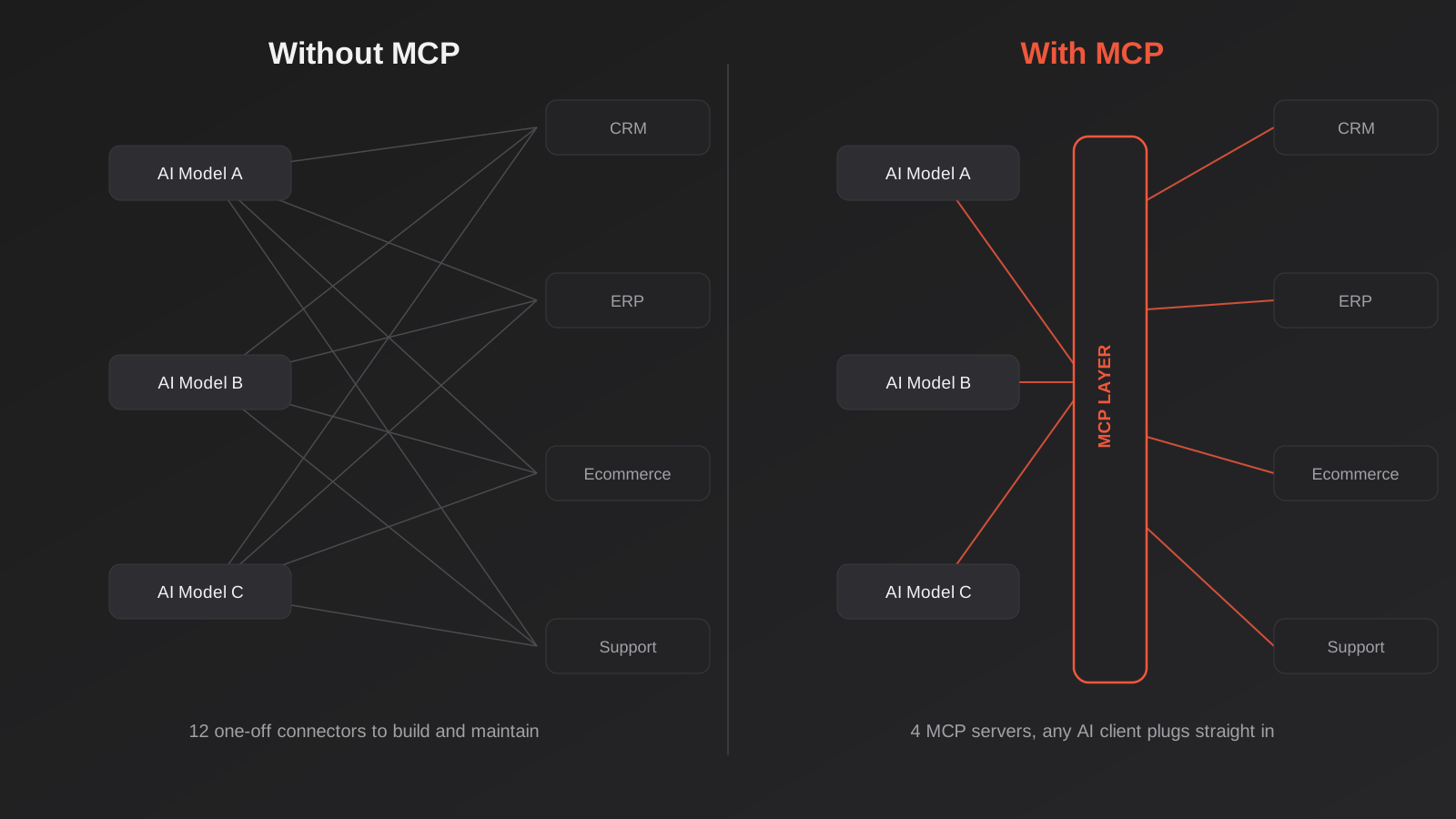
Think about the maths. Say your business wants three different AI tools — a chat assistant for staff, an agent embedded in your website, and something like Claude or ChatGPT for the ops team — to be able to work with four systems: your CRM, your accounting platform, your ecommerce store and your support desk. Built the old way, that’s potentially twelve separate integrations, each with its own authentication, its own quirks, its own maintenance burden when an API changes. Add a fifth system or a fourth AI tool and the number climbs fast.
MCP turns that multiplication into addition. Build one MCP server per system — one for the CRM, one for the accounting platform, and so on — and any MCP-compatible AI client can connect to all of them without a separate integration for each pairing. Four systems means four servers, not twelve connectors. Add a new AI tool later and it can use the servers that already exist. The image below shows the difference in shape: a tangle of one-off wiring on one side, a shared layer on the other.
How this is different from an API integration or a Zapier-style connector
People who’ve built or bought integrations before reasonably ask what’s actually new here — isn’t this just an API wrapper? Partly, yes. An MCP server is built on top of your system’s existing API in most cases. What’s different is who’s on the other end of it and what they’re doing with it.
A Zapier, Make or n8n workflow is trigger-and-action: when X happens, do Y, in a sequence someone designed in advance. It’s deterministic and repeatable, which is exactly what you want for “new order comes in, add it to the spreadsheet and notify the warehouse.” An MCP server, by contrast, is built for a reasoning model that decides in the moment which tools to call and in what order, based on a natural-language request. Ask an AI agent connected to an MCP server “which customers in Queensland haven’t ordered in 90 days and had a support ticket last month,” and it can chain multiple tool calls together to answer that — something a fixed automation workflow can’t do without someone building that exact path ahead of time. The trade-off is that you’re handing more judgement to the model, which is precisely why the access controls covered later in this piece aren’t optional extras.
In practice, the two approaches sit side by side rather than compete. A lot of businesses we work with run Make or n8n for the predictable, high-volume plumbing — order sync, lead routing, notification chains — and add an MCP server where they want a person or an agent to be able to ask an open-ended question or take a judgement-based action against live data. If you’re not sure which one your business actually needs first, that’s a scoping conversation, not a technology one.
What this looks like in a real business
The concept is abstract until you see it against something concrete. Here’s how the businesses we talk to are actually using MCP servers once they’re built — not hypothetical future use cases, but the requests coming through right now.
An assistant that can actually work your CRM
This is the most common starting point, and it’s usually where CRM and sales automation work starts overlapping with AI. Instead of a sales rep switching between a chat tool and the CRM tab to look something up, an MCP server connected to the CRM lets them ask directly: “pull up every deal over $10k that’s gone quiet in the last two weeks” or “draft a follow-up email to the three leads from last Thursday’s webinar, referencing what they downloaded.” The model can read live pipeline data, cross-reference it, and either draft the output for a human to send or — with the right guardrails, discussed below — take the action itself.
The genuinely useful part isn’t the drafting. It’s that the AI is working from the actual current state of the CRM, not a stale export someone pulled last Tuesday. That’s the difference between an AI tool that produces plausible-sounding text and one that produces something a salesperson can act on immediately.
Inventory, orders and fulfilment
Ecommerce businesses are moving fastest here, partly because platforms like Shopify have started shipping their own official MCP connectors, which lowers the bar considerably. A store owner or ops manager can ask an AI assistant to check stock levels across variants, flag which SKUs are trending toward a stockout given current sell-through, or pull a summary of orders stuck in a particular fulfilment status — all without opening the admin dashboard. Where it gets more interesting is combining systems: an MCP server that can see both the ecommerce platform and the accounting system can answer questions that span the two, like which high-margin products are also sitting on aged stock.
This is a natural extension of the work we already do in ecommerce automation, and it’s worth being clear about the boundary: automating “when stock hits zero, disable the listing” is a rules-based workflow that doesn’t need an AI model in the loop at all. MCP earns its place when the question is open-ended and needs judgement — “what should I reorder this month given current trends” — rather than a fixed trigger.
A conversational front end on your reporting and finance data
This is the one that tends to land hardest with business owners, because it’s the question they ask most often and the one that’s most annoying to answer manually: “how are we tracking this month.” An MCP server connected to accounting or reporting data means that question can be asked directly, in plain language, and answered against real numbers — revenue by channel, outstanding invoices, cash position — rather than waiting for someone to build a report or update a dashboard. It’s a genuinely different experience from a static dashboard, because you can follow up with “why is that category down” and get a real answer instead of having to go build a second chart.
Xero doesn’t currently ship an official MCP server of its own, though developer-maintained ones exist and connect through Xero’s standard API, authenticated the same way any other integration would be. MYOB’s ecosystem is earlier in this respect. The practical implication is that “connect my AI assistant to my accounting platform” is achievable today for most Australian businesses, but the exact build depends on which platform you’re on and whether an existing server covers what you need or a custom one has to be written against the API directly — which is exactly the kind of gap our ERP integration work exists to close.
Support tickets and internal knowledge
Support teams are a quieter but genuinely useful case. An MCP server connected to a help desk platform lets an AI assistant pull up a customer’s full ticket history, summarise a long back-and-forth thread before a call, or draft a response grounded in the actual conversation rather than a generic template. The value here isn’t replacing a support person — it’s cutting the five minutes they spend re-reading a thread before they can respond usefully, multiplied across every ticket that comes in on a busy day.
Where this gets more ambitious is connecting the support desk to other systems at the same time — the CRM, so the agent knows this customer’s order and account history, or the ecommerce platform, so it can check whether a delivery is genuinely late before promising a refund. That kind of cross-system context is exactly what a single MCP server per system, all reachable by the same AI client, is built to make possible. It’s also exactly where things go wrong if the permissions aren’t scoped properly, which is the next thing worth taking seriously.
Building or buying: off-the-shelf servers vs a custom build
Not every business needs a bespoke MCP server built from scratch, and it’s worth being upfront about that before anyone starts scoping a project. The right answer depends entirely on what system you’re connecting to and how standard your use case is.
When an existing server is enough
If you’re on a major platform — Shopify, GitHub, Slack, several of the big CRMs — there’s a reasonable chance an official or well-maintained community MCP server already exists and covers the standard actions you’d want: read records, create records, update status. For a lot of small businesses, connecting an existing server and setting up sensible permissions is a days-not-weeks piece of work, not a development project. The main things to check before trusting one are who maintains it, whether it’s had a security review, and whether it only exposes the scopes you actually want exposed — some off-the-shelf servers are built for developers and default to far more access than a business would want to hand an AI model.
When you need something built
A custom-built MCP server earns its cost in three situations. First, when the system in question is niche, older, or internally built — a lot of Australian ERPs and industry-specific platforms have an API but no MCP server yet, and someone has to write the translation layer. Second, when the “standard” actions an off-the-shelf server exposes aren’t the ones your business actually needs, and you want to define a narrower, more specific set of tools that map to how your team actually works. Third, and most commonly for the businesses we talk to, when a request spans more than one system and needs custom logic to combine them sensibly — matching a customer record across a CRM and an ecommerce platform isn’t something a generic server does out of the box.
This is the kind of work our MCP development service is built around: scoping exactly which tools an agent should be able to call against your systems, building the server against the relevant APIs, and setting up the authentication and permission layer properly rather than bolting AI access on top of an existing integration and hoping for the best.
A practical middle ground exists too, and it’s the one we recommend most often for businesses without a large existing budget for this: start with whatever off-the-shelf server covers 70–80% of what you want, and treat a custom extension as a second phase once you’ve confirmed the underlying idea earns its keep. Building the most ambitious version first, before anyone in the business has actually used a simpler one, is how these projects end up expensive and under-used.
Security and governance — the part most guides skip
This is where we’d push back on some of the enthusiasm around MCP if we didn’t say it plainly: giving an AI model the ability to take actions in your business systems is a meaningfully different risk than giving it the ability to read and summarise text. A model that can query your CRM is useful. A model that can also delete records, send emails, or issue refunds, with no human checking first, is a genuine liability if something goes wrong — a bad prompt, a manipulated input, or simply the model misjudging what you actually asked for.
There have already been real incidents in the wild involving poorly secured MCP servers — researchers have demonstrated attacks where a malicious or compromised MCP connection was used to exfiltrate data by hiding instructions inside content the model was asked to process. None of this means MCP is unsafe to use. It means it needs to be built with the same discipline you’d apply to any system with write access to your business data, because that’s exactly what it is.
Authenticate properly and scope access tightly
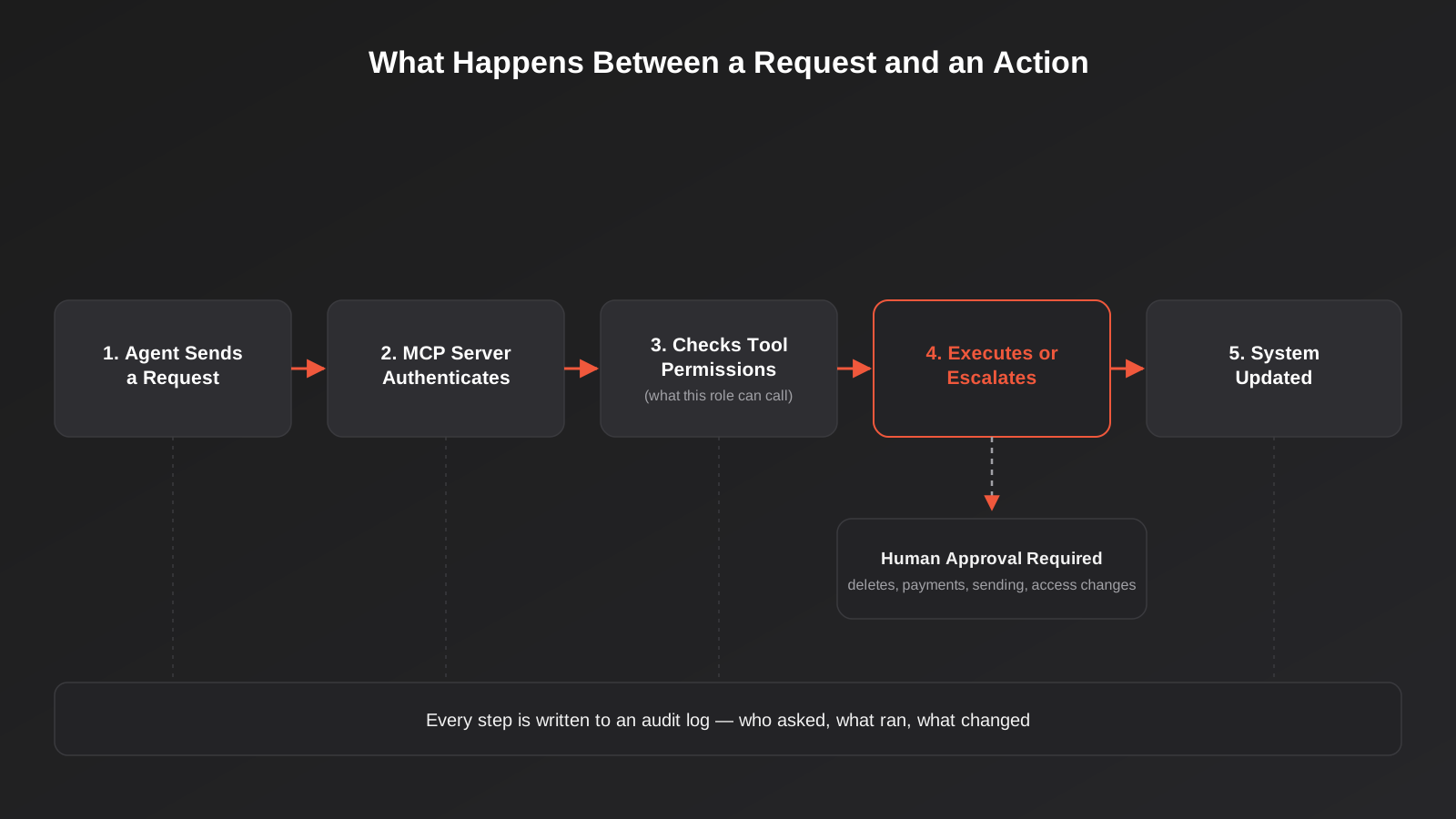
The AI should never be connecting with the same broad service account a developer uses for admin work. Every connection should be authenticated against a specific identity, with access scoped to only the tools and data that role genuinely needs. If the assistant only ever needs to look up order status, it shouldn’t technically be capable of issuing a refund, even if nobody intends to ask it to. Least privilege isn’t a nice-to-have here — it’s the entire point of the permission layer.
Keep a human in the loop for anything destructive
Reading data and drafting a response are low-risk. Deleting a record, sending an external email, processing a payment, or changing someone’s access are not, and none of them should happen without a person confirming first, no matter how capable the model is on a good day. A well-scoped MCP server treats these as two different tiers of action from the start, not something bolted on after a near-miss.
Log everything
Every tool call an AI agent makes through an MCP server should be logged — who or what triggered it, what was requested, what ran, and what changed. Without this, you find out about a problem from a customer complaint instead of a log entry, and you have no way to work out what happened or undo it cleanly. It’s the same standard you’d expect of any system with write access to customer or financial data; AI access doesn’t get a pass on it.
What it costs and how to scope a first project
Cost depends almost entirely on the answer to one question: does a usable server already exist for your system, or does one need to be built. Connecting to an existing, well-maintained MCP server and setting up scoped access properly is the cheaper end — closer to a focused integration project than a full build. A custom server against a system with no existing option, especially one that needs to combine two or three systems intelligently, is a proper development project, and the cost reflects that. We’ve laid out real, current pricing ranges across automation and custom development work in our Australian pricing guide, which is a useful starting point before any scoping conversation.
The scoping mistake we see most often is businesses trying to work out “what could an AI agent do for us” in the abstract, which tends to produce either an overwhelming wishlist or nothing at all. A tighter starting question works better: pick the one query or task your team asks a person to do manually, over and over, that requires pulling from a system you already have. Scope the MCP server around that single job first, get it working with proper permissions, and expand from there once you can see how it actually gets used. Most of the value shows up in the first narrow use case, not in trying to expose everything at once.
On timeline, budget for a discovery step before any build work starts — mapping exactly which systems, which tools, and which permission boundaries the project needs. Skipping straight to development without that step is the single biggest reason these projects blow out in scope. On measuring whether it’s worked, the same principle applies as any automation or AI investment: define what you’d expect to see change before you build it — hours saved on a specific task, faster response times, fewer manual lookups — rather than trying to retrofit a justification afterwards.
Common mistakes businesses make with MCP and AI agent access
- Exposing far more tools than the use case needs, “just in case” — every extra capability the AI can technically call is a bigger attack surface and a bigger blast radius if it gets something wrong.
- Connecting an AI assistant with the same admin-level credentials a developer uses, instead of a scoped identity built for that purpose.
- Letting the model take destructive actions — deletions, payments, sends — without a human confirmation step, because it worked fine in testing.
- Treating an MCP server as a one-off project with no owner, so nobody notices when the underlying system’s API changes and the connection quietly breaks.
- Skipping audit logging to save time on the build, then having no way to reconstruct what happened when something goes wrong.
- Assuming MCP replaces existing automation instead of sitting alongside it — rebuilding reliable, rules-based Zapier or Make workflows as AI agent tool calls for no reason other than novelty.
- Building the broadest possible server before proving out a single real use case, which burns budget before anyone in the business has learned how they’ll actually use it.
Frequently Asked Questions
Do I need an MCP server if I already use Zapier or Make?
Not necessarily, and the two aren’t in competition. Zapier, Make and n8n are excellent for predictable, trigger-based workflows where you know in advance what should happen and when. An MCP server is for situations where you want an AI agent to answer open-ended questions or take judgement-based actions against live data in the moment. Most businesses that adopt MCP keep their existing automation platform running for the plumbing and add an MCP server where a person needs to ask something a fixed workflow can’t handle.
Is MCP only relevant for developers, or can a non-technical business actually use it?
Building an MCP server is a technical task, but using one isn’t. Once it’s built and connected, a non-technical staff member interacts with it by simply asking their AI assistant a question in plain language — “what’s our stock position on this product” — the same way they’d ask a colleague. The technical work happens once, up front, and mostly stays invisible after that.
Which business systems can be connected via MCP?
In principle, any system with an API can have an MCP server built for it, and a growing number of major platforms — Shopify, GitHub, Slack, several CRMs — already have official or well-maintained community servers available. Australian-specific platforms and older or internally built systems are less likely to have one ready-made, which usually means a custom build against the existing API rather than starting from nothing. Worth checking before assuming a custom build is needed: some vendors have shipped an official server in the last six to twelve months that didn’t exist when you last looked, so it’s worth a fresh check rather than relying on what was true a year ago.
Is it safe to let an AI agent take actions in my CRM or accounting system?
It’s safe when it’s built properly, with scoped permissions, a human-approval step for anything destructive, and full logging of every action taken. It’s genuinely risky when those controls are skipped, which unfortunately happens with some quickly assembled implementations. The security work isn’t optional extra polish — it’s the difference between a useful tool and a real liability.
How long does it take to build a custom MCP server?
It depends heavily on how many systems are involved and how much custom logic is needed to combine them sensibly, but a single-system server with a well-scoped set of tools is typically a matter of weeks rather than months. Connecting to an existing, already-built server is faster again — often closer to a standard integration project.
What’s the difference between MCP and a custom AI integration?
MCP is a standard way of building that integration so it works with any compatible AI client, rather than being locked to one specific AI tool. A custom AI integration built outside that standard might work well for the tool it was built for, but has to be rebuilt if you switch AI providers or add a second one. That reusability is the main practical advantage MCP has over a one-off integration built the old way.
Where to start
If you’re weighing this up for your own business, the honest starting point isn’t “build an MCP server” — it’s working out whether an existing one already covers what you need, and if not, what the single most useful thing an AI agent could actually do with access to your systems would be. That’s a scoping conversation more than a technical one, and it’s worth having before any code gets written.
If you want to talk through what this would look like for your systems — what already exists, what would need building, and what a sensible, secure first version actually costs — we’re happy to have that conversation. No pressure to commit to anything; it’s usually just useful to know what’s realistic before deciding whether it’s worth doing now or later.
Keep reading
Related posts
How to Test an AI Chatbot Before Launch: Evals, Test Sets and Release Gates for Australian Businesses (2026)
How to test an AI chatbot before launch: build a test set from real questions, score answers properly, set release gates, and…
Automated Decision-Making and the Privacy Act: What Your Automations Must Disclose From 10 December 2026
From 10 December 2026, Australian businesses must disclose automated decisions in their privacy policy. How to find, assess and disclose yours.
AI Data Residency for Australian Businesses: Where Does Your Data Actually Go? (2026)
Where does your data actually go when staff use AI tools? A practical 2026 guide to AI data residency, APP 8 and…
Got a project you'd like to talk through?
Tell us what you're working on — we'll come back with a plan.
