
Controlling AI Running Costs: Caching, Model Routing and Spend Caps for Australian Businesses (2026)
 Jignesh Vagadiya
28/10/2026
26 min read
Jignesh Vagadiya
28/10/2026
26 min read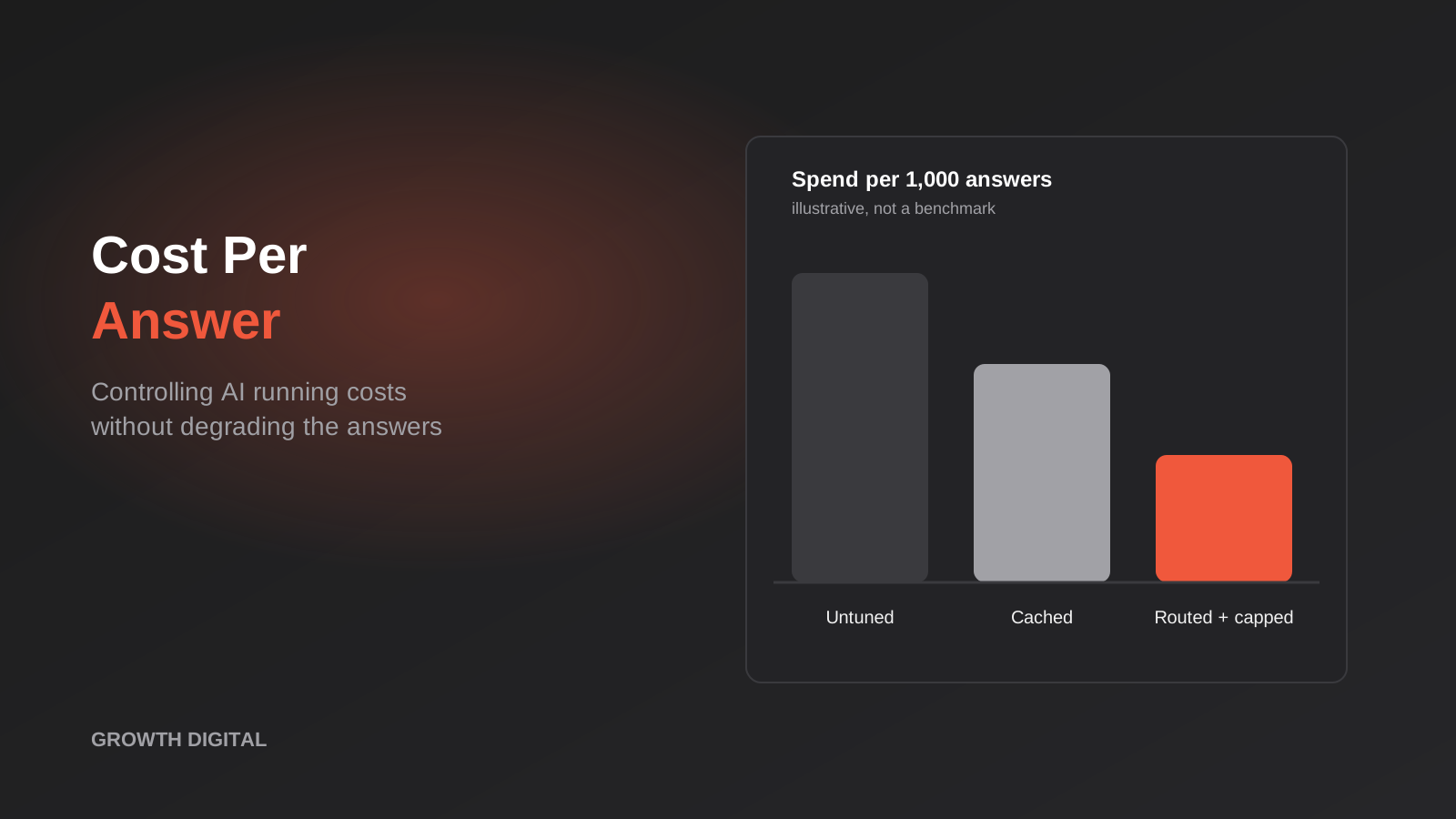
The first month’s bill for an AI feature is almost never the one anyone budgeted for. A business launches a support assistant or an internal document search, usage is modest, the invoice is a few dozen dollars, and everybody relaxes. Six months later the assistant is embedded on three pages, staff have found it, and the line item has grown into something finance wants to talk about. Nothing broke. The feature simply got used, and every use costs money in a way that a traditional software licence never did.
That’s the part that catches people out. Most business software is priced per seat or per month, so cost is predictable and largely independent of how hard you lean on it. AI features built on a model API are metered. You pay for the text that goes in and the text that comes out, on every single request, and the amount of text is partly under your control and partly not. The good news is that the controllable part is large. In our experience, most AI features carry a lot of avoidable spend, and most of it comes from a handful of design decisions that are cheap to fix once you can see them.
This guide is about running costs rather than build costs. If you’re still working out what an AI chatbot costs to get off the ground, we covered the build side in our AI chatbot pricing guide. Here we’re looking at what happens after launch: where the per-request money goes, how to measure it, and the specific levers that reduce AI API costs without making the answers worse. We’ll use illustrative numbers throughout so the arithmetic is easy to follow, and we’ll say clearly when a figure is an example rather than a quote.
Where the money actually goes
Before touching any setting, it helps to understand what you’re being billed for. Model APIs charge by the token, which is a chunk of text roughly three-quarters of a word long in English. There are two meters running on every request: input tokens (everything you send to the model) and output tokens (everything it writes back). The two have different prices, and the rates differ between models, so the same feature can cost very different amounts depending on how it’s built.
Input tokens are more than the customer’s question
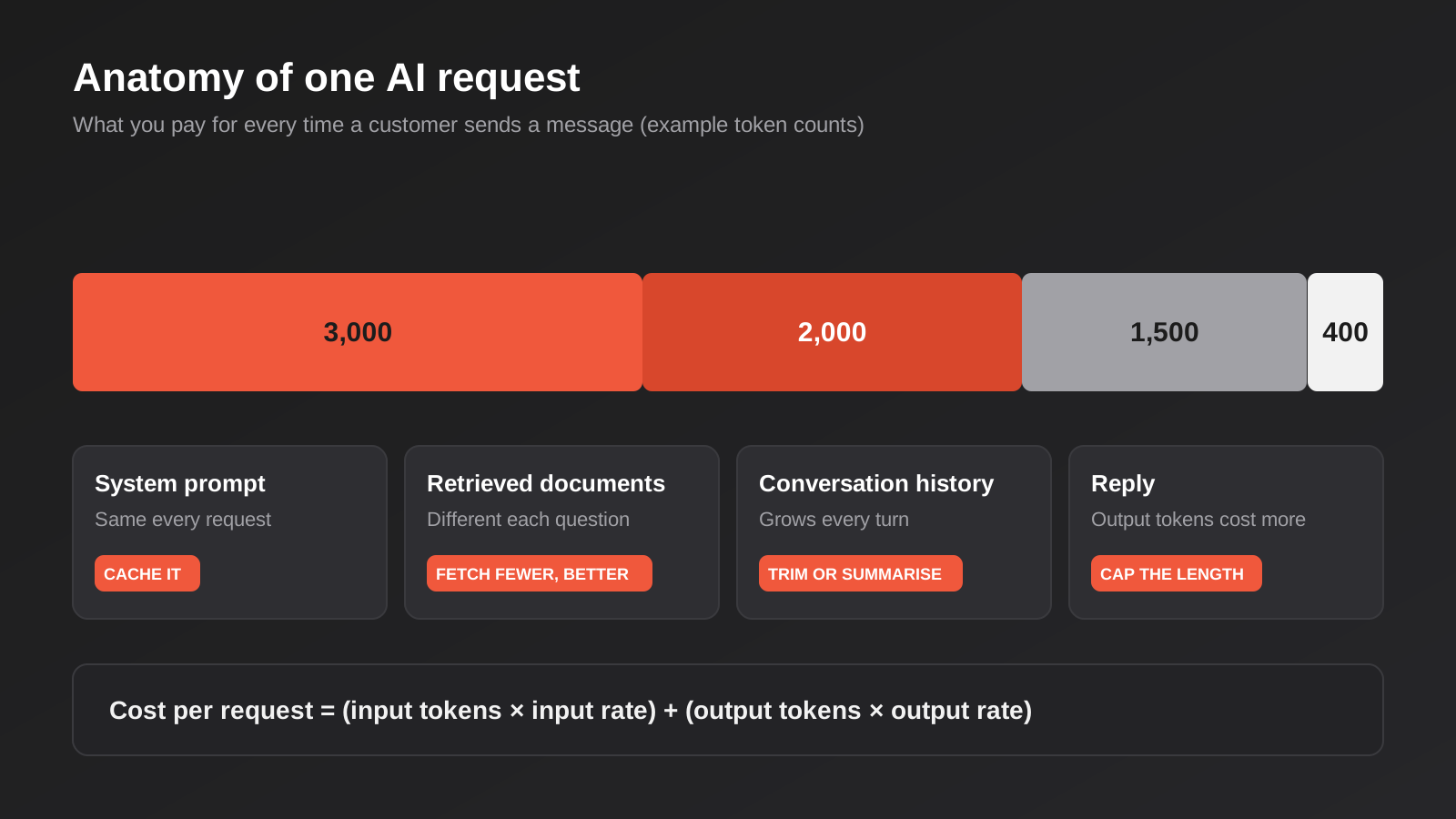
When a customer types “do you deliver to Hobart?”, it feels like a ten-word request. The model never sees ten words. It sees your system prompt (the standing instructions that define tone, rules and boundaries), any documents your system retrieved to help answer, the earlier turns of the conversation, tool definitions if the assistant can call functions, and finally the customer’s message. The question is often the smallest part of what you pay to send.
That’s why input spend surprises people. A system prompt that grew from a paragraph to three pages during testing gets billed on every request, forever. A retrieval step that pulls back ten document chunks when two would do pays for the other eight each time. None of this is visible in the chat window, which is why it goes unexamined.
Output tokens cost more per token
Output is typically priced at a multiple of input, often several times higher per token. A reply is usually shorter than the input, so output may still be the smaller share of the bill, but it punishes verbosity. An assistant tuned to be chatty, restating the question and adding three caveats before it answers, spends money on every one of those words. Anthropic’s published pricing, for example, lists output tokens at a multiple of the base input rate, and other providers follow the same pattern. Check your own provider’s current rate card rather than relying on a rule of thumb, because both the rates and the ratios change.
Conversation history is the hidden multiplier
Models don’t remember anything between requests. To hold a conversation, your application re-sends the earlier turns each time. Turn one carries one exchange of history. Turn eight carries seven. The cost of a conversation therefore grows faster than its length, because each new message drags the whole transcript along with it.
For a short support exchange this barely matters. For an assistant that people use for twenty minutes, or an agent that makes a dozen tool calls to complete one task, history can end up being the largest component of input. If you only fix one thing in a long-running assistant, fixing how history is carried is often the most valuable change.
A worked example
The numbers below are illustrative. The rates are round figures chosen to make the maths readable, not any provider’s actual price, and the traffic volume is hypothetical. The point is the shape of the result.
Say each request sends 3,000 tokens of system prompt, 2,000 tokens of retrieved documents and 1,500 tokens of conversation history, for 6,500 input tokens. The model writes back 400 tokens. Suppose input costs $3 per million tokens and output costs $15 per million.
Input is 6,500 × $3 ÷ 1,000,000 = $0.0195. Output is 400 × $15 ÷ 1,000,000 = $0.006. Total per request: $0.0255, or about two and a half cents. At 20,000 requests a month, that’s $510 USD.
That doesn’t sound alarming, and for a modest assistant it isn’t. But notice that input is more than three-quarters of the cost, and that the 3,000-token system prompt is identical on every request. Those two facts are where we’ll find the savings.
Measure before you optimise
It’s tempting to jump straight to the clever techniques. Resist that for one afternoon, because optimising without measurements usually means optimising the wrong thing. We’ve seen teams spend a week on model switching when a single oversized retrieval step was responsible for most of their bill.
Log tokens per request, tagged by feature
Every major provider returns token counts in the API response. Record them. For each request, store the feature or workflow it belongs to, the model used, input tokens, output tokens, any cached tokens, latency, and whether the outcome was a success. This is a few lines of code or one node in an n8n or Make scenario, and it turns an opaque monthly invoice into something you can query.
Tagging by feature matters more than people expect. A business with an internal assistant, a customer chatbot and an email-triage workflow all calling the same provider will see one combined invoice. Without tags you can’t tell which of the three is eating the budget, and you’ll cut the wrong one. If you use a gateway or proxy layer, many of them can attach tags or keys per application, which achieves the same thing with less custom work.
Cost per resolved task beats cost per token
Token price is a unit cost. What the business cares about is the cost of getting something done: a support question resolved without a human, an invoice coded correctly, a lead qualified. Divide your monthly AI spend for a feature by the number of successful outcomes it produced. That figure is what you compare against the human time it replaces, and it’s the number that belongs in any ROI conversation. We cover that side in more depth in our framework for measuring AI and automation ROI, but the short version is that a cheaper model that fails more often can easily cost more per resolved task than a pricier model that gets it right.
This is also why cost work and quality work have to travel together. Before changing anything that could affect answers, you need a way of knowing whether answers got worse. If you haven’t built that yet, our guide to testing an AI chatbot with evals and release gates describes a practical approach, and it’s worth doing before you start trimming.
Find the top spenders first
Once you have a few weeks of tagged data, sort by total cost, not by cost per request. A feature that costs two cents a request and runs fifty thousand times a month beats a ten-cent feature that runs a few hundred. Within the top spender, look at the distribution. Is the average request cheap with a handful of enormous outliers? Outliers usually point to runaway conversations, pasted documents, or a loop in an agent. Is every request uniformly heavy? That points to prompt size or retrieval. The pattern tells you which lever to reach for.
Trim the prompt first to reduce AI API costs
The cheapest token is the one you never send. Prompt trimming is unglamorous, risk-free if you test it, and often yields more than any technique that sounds more sophisticated.
Audit the system prompt line by line
System prompts accrete. Someone adds a rule after an embarrassing answer. Someone else pastes in the company’s full brand guidelines. A year on, the prompt contains duplicate instructions, rules for scenarios that no longer exist, and examples that made sense for an older model. Read it with fresh eyes and ask of each paragraph: if I deleted this, would an answer in the test set get worse? If the honest answer is no, delete it.
Be specific rather than exhaustive. “Answer in two or three sentences unless the customer asks for detail” does more for both cost and quality than a page of tone guidance. Long prompts also tend to make models less reliable at following any individual instruction, so shorter often means better as well as cheaper.
Send fewer, better documents
If your assistant retrieves documents to ground its answers, the number and size of the retrieved chunks drives input cost directly. Many setups default to pulling back a generous number of passages and hoping the model sorts it out. Test how few you can send before accuracy drops. Frequently two or three good chunks outperform ten mediocre ones, partly because irrelevant material distracts the model. If answers are poor because retrieval is returning the wrong things, sending more of them is an expensive way of masking the problem; fixing parsing, chunking and search is the better route, and we walked through it in our piece on why RAG assistants give wrong answers.
Stop re-sending the whole transcript
For conversation history, you have three sensible options. Keep only the last few turns, since earlier ones rarely matter. Summarise older turns into a short running note and send that instead of the raw transcript. Or store the facts the assistant needs (the customer’s order number, their stated goal) in a small structured block and drop the chatter. The summarising approach costs a small extra model call every few turns, which is usually repaid many times over on a long conversation. Test it on realistic long conversations, because summaries can drop a detail that turns out to matter.
Trim tool definitions and outputs
Agents that call tools carry the definitions of every tool in every request. If you’ve given an assistant thirty tools and it typically uses three, you’re paying to describe twenty-seven of them each time. Group tools by task and expose only the relevant set. Equally, tool results are pasted back into the conversation. A lookup that returns an entire customer record when the model needs one field wastes tokens on every subsequent turn. Return the minimum. If you’re building tools through the Model Context Protocol, the same discipline applies to what each server exposes, and our MCP development service is built around giving AI agents narrow, well-defined access rather than everything at once.
Prompt caching: pay less for the part that never changes
Once the prompt is lean, look at what remains. In most deployments a large block at the start of every request is identical every time: the system prompt, the tool definitions, perhaps a reference document the assistant always consults. Prompt caching lets the provider remember that block so you aren’t charged the full input rate to re-process it on each call.
How it works in practice
The provider stores a processed version of your repeated prefix for a short time. When the next request begins with exactly the same content, it reuses the stored version and bills those tokens at a steep discount. Anthropic’s pricing documentation, for instance, lists reads from the cache at a small fraction of the normal input price (around a tenth for most models, lower for some newer ones), with a modest premium for the initial write into the cache and a choice of short and longer cache lifetimes. Other providers offer their own versions, some automatic and some requiring you to mark what to cache. The details differ, so read your provider’s current documentation, but the principle is the same everywhere.
Back to our worked example. Cache the 3,000-token system prompt and bill cache reads at a tenth of the input rate. The cached portion costs 3,000 × $0.30 ÷ 1,000,000 = $0.0009 instead of $0.009. The remaining 3,500 input tokens cost $0.0105, and output is still $0.006. New total: $0.0174 per request, or $348 a month against $510. That’s roughly a 32 per cent reduction from one change, ignoring the small cost of cache writes, and it didn’t touch the answers at all.
What breaks a cache
Caches match on an exact prefix. Anything that changes the start of the request invalidates everything after it. The classic mistake is putting something that varies at the top of the prompt: the current date and time, the customer’s name, a request ID. Put the stable material first and the variable material last. Static instructions and reference content go at the top; the retrieved documents, history and the customer’s message go at the bottom.
Other things that quietly defeat caching: reordering tools between requests, injecting timestamps into the system prompt, A/B testing prompt variants without realising each variant has its own cache, and traffic that’s too sparse for the cache to still be warm. If your assistant gets one request an hour and the cache lifetime is five minutes, you’ll pay for cache writes and rarely enjoy a read. Check the provider’s response, which normally reports how many tokens were read from cache, and make the cache hit rate one of the numbers you track.
When caching isn’t worth it
Caching pays off when a large prefix repeats across many requests within the cache window. It does little for a feature with a tiny prompt, or for one where every request has a completely different context, such as summarising a different long document each time. In those cases, look at other levers.
Model routing: not every question needs the biggest model
The most expensive habit in AI development is choosing one model for everything, usually the most capable one, because it was the one that worked during the demo. Models come in tiers. Smaller, cheaper models are fast and perfectly capable at a large share of business tasks: classifying an enquiry, extracting fields from an email, answering a question from a clear paragraph of text. Larger models earn their price on ambiguous, multi-step or high-stakes work.
Routing means sending each request to the cheapest option that can handle it well. Done properly it’s often the single biggest lever on cost, though it also carries the most risk to quality, so it deserves the most care.
Rules first, then a small model, then escalation
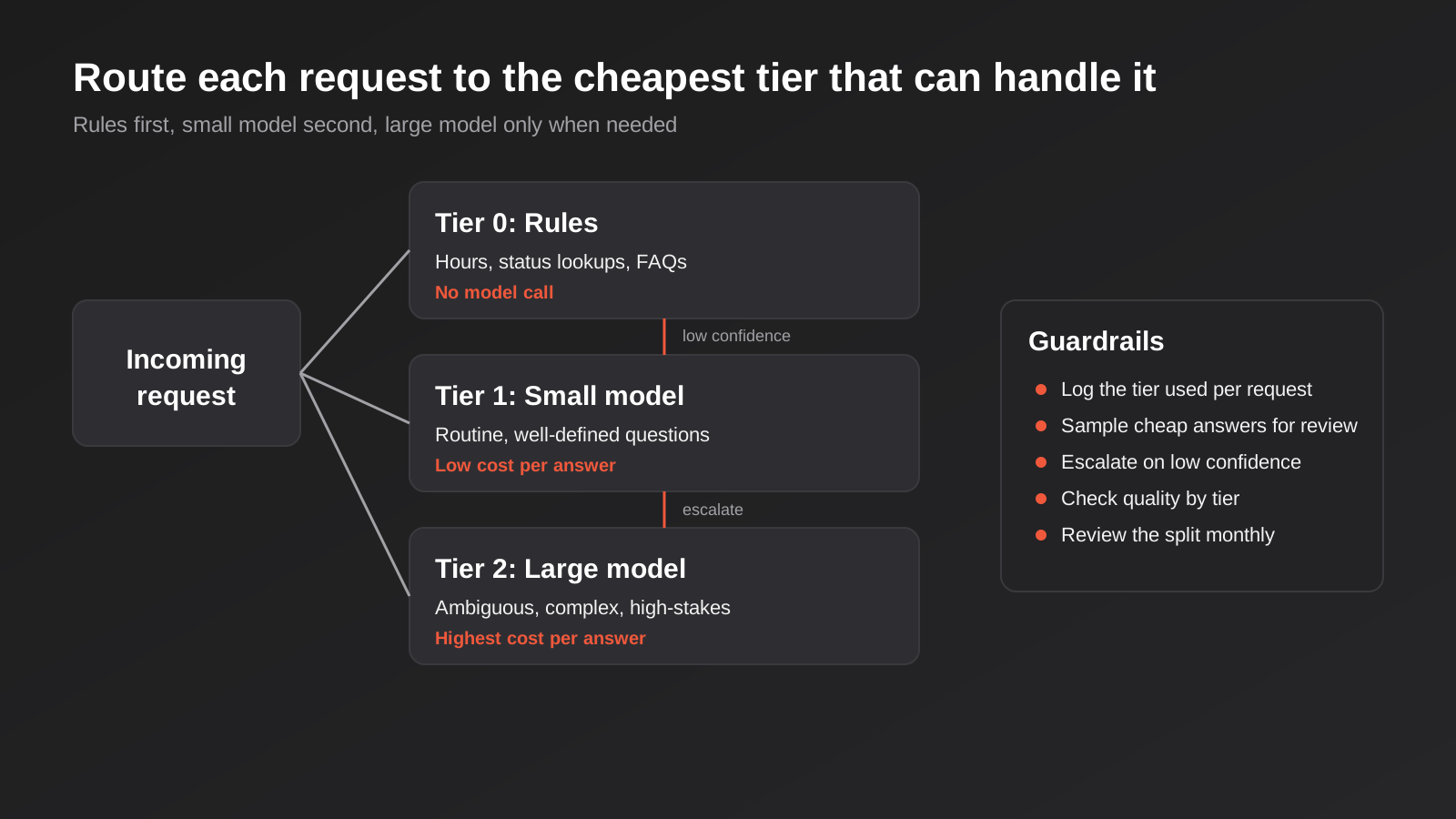
Start with tier zero: no model at all. A surprising amount of customer traffic is questions your system can answer deterministically. Opening hours, order status lookups, whether a product is in stock, returns policy links. These can be handled by rules, a database query or a canned answer, at essentially no cost and with no risk of the model inventing something. If your assistant is spending tokens on “what time do you close?”, that’s money going out the door for no benefit.
Tier one is a smaller model for routine requests that need language understanding but not deep reasoning. Tier two is the larger model, reserved for what the smaller one can’t handle confidently. The hand-off between tiers is the part that needs thought. Two common approaches work well. In the first, a quick classification step (itself run on the small model) labels the request by type and difficulty, and the label decides the route. In the second, you try the small model first, ask it to report its own confidence or check its answer against a simple rule, and escalate when confidence is low or a check fails.
Neither approach is perfect, which is why the guardrails in the diagram matter. Log which tier handled each request. Sample a slice of the cheap tier’s answers and check them against the larger model or a human. Review the proportion routed to each tier monthly, because as your product and customers change, the right split changes too.
What the saving looks like
Continue the worked example. After caching, trimming retrieval and history, and capping replies (covered below), suppose our per-request cost has fallen to about $0.01. Now imagine 60 per cent of requests are routine enough to go to a model priced at a fifth of the rate. The blended cost per request drops to roughly half a cent. Across 20,000 requests, the monthly figure goes from $510 to somewhere near $108 in this hypothetical. Real results depend entirely on your traffic mix, your quality bar and the actual model prices, so treat that as an illustration of how the levers compound, not a forecast.
The quality risk
Routing’s danger is invisible failure. A smaller model that answers confidently but wrongly produces no error message and no alert; it produces a customer who got bad information. Before you route anything, define what “good enough” means for each request type and test the cheaper path against that standard using real examples. For anything touching money, legal commitments, health or safety, keep a human or the stronger model in the loop. Cost savings that create a compliance problem aren’t savings.
Batch the work that can wait
Not everything an AI does needs an answer within two seconds. Overnight classification of the day’s support tickets, enriching a CRM export, summarising a backlog of documents, generating product descriptions for a catalogue: all of this can wait for hours. Major providers offer batch interfaces for exactly this. Anthropic’s Batch API, for example, is priced at a 50 per cent discount on both input and output tokens in exchange for asynchronous processing, and the discount can be combined with prompt caching. OpenAI and others offer comparable batch options.
The trade is latency for price. You submit a file of requests, and results come back within a window rather than instantly. That’s fine for reporting workflows, back-office enrichment and anything triggered by a schedule rather than a person waiting on a screen. If you’ve built automations that run nightly, check how many of their model calls are being made on the synchronous, full-price path out of habit.
Batching also changes how you think about design. A workflow that classifies each incoming email the moment it arrives pays full price per call. One that collects the day’s emails and processes them together in the evening may be perfectly acceptable to the business and half the cost. It’s worth asking the people who use the output whether they need it in seconds or by morning. The answer is often by morning.
Cap the output
Because output tokens cost more, controlling reply length is a cheap and underused lever. Three mechanisms help, and they work best together.
First, set a maximum output length in the API call. This is a hard ceiling that stops runaway generation, and it protects you from a model that gets stuck repeating itself. Set it generously enough that legitimate answers aren’t cut off mid-sentence, and test the edge cases.
Second, instruct the model on length in the prompt. A line like “keep answers under 120 words unless the customer asks for more detail” shapes typical behaviour, and typical behaviour is where most of the spend lives. The ceiling handles the exceptions; the instruction handles the average.
Third, ask for structured output where the result feeds another system. If an automation needs a category and a one-line summary, request exactly that as a small JSON object rather than a paragraph the next step has to parse. It’s shorter, cheaper and far less likely to break the downstream step. In our worked example, trimming the average reply from 400 to 250 tokens takes another slice off the per-request cost while making the assistant read better.
Put spend caps and limits around everything
Everything above reduces the cost of normal use. Caps protect you from abnormal use, which is where nasty surprises live.
Budgets and alerts at the provider
Most providers let you set monthly spend limits and usage alerts on an account or project. Set them. A soft alert at, say, 50 and 80 per cent of the expected monthly budget gives you time to investigate; a hard limit stops a runaway loop from burning through a month of budget overnight. Use separate keys or projects for separate features and environments, so a developer’s test script can’t spend the production budget and so you can see and cap each feature independently.
Per-user and per-session limits
If your assistant is public-facing, someone will eventually test it, abuse it, or point a script at it. Without limits, a single bad actor can generate thousands of long requests. Rate-limit per IP address and per session, cap the number of turns in a conversation, and cap the length of the input you’ll accept from a user. Cutting off a conversation after a sensible number of turns and offering a handoff to a person is usually better for everyone than letting one session run up an unbounded bill. These controls overlap with the security work in our guide to AI agent security, because the same limits that contain cost also contain misuse.
Loop protection for agents
Agents that decide their own next step can get stuck. A tool call fails, the agent retries, the retry fails differently, and the loop continues, with the conversation history growing and every turn getting more expensive. Give agents a maximum number of steps and a maximum token budget per task, and have them stop and escalate to a human when either is hit. A task that exceeds twice its normal budget is almost always a sign of something wrong, not something worth finishing.
SaaS chatbot fees versus metered API usage
Not every business is calling a model API directly. Many run on a chatbot platform or an AI feature inside a tool they already use, and the pricing model there is different. Platforms typically charge a monthly subscription that includes some volume of conversations or “credits”, with overage fees beyond it. That makes costs more predictable at low volume and sometimes much less predictable at high volume.
When comparing, look at what an extra conversation or credit costs once you’re past the included allowance, whether credits roll over, whether different features consume credits at different rates, and what happens when you hit the cap (service stops, or you’re billed for overage automatically). Platforms bundle a lot of convenience, including hosting, interfaces and analytics, and for a small business that’s usually the right trade. For high, steady volume, or when you need control over caching, routing and prompts, building directly on an API can come out cheaper. There’s no universal answer, and the crossover point depends on your volume. We compare the platform options in our review of AI chatbots and assistants and the practical side of those choices, and the build-versus-buy question is a good one to put in front of someone who has done both.
For a sense of scale, published Australian figures are thin on the ground and mostly come from vendors and consultancies, so treat them with caution. One Australian AI consultancy’s guide to custom chatbot costs lists model API usage for a lower-tier build at roughly $200–$1,000 a month, hosting at $100–$300 and monitoring and maintenance at $500–$1,500, without making clear which currency it quotes in. The spread alone tells you that ongoing cost depends heavily on volume and on how actively the system is looked after, which is another reason to measure your own usage rather than rely on anyone’s average.
Currency, GST and the other things on the invoice
AI providers mostly bill in US dollars. For an Australian business, that adds exchange rate movement to your cost variability: a budget set when the dollar was strong can quietly drift. Check whether your provider bills in USD and whether your card or accounting system converts at billing time, and build a little headroom into the monthly budget. If the spend is material, ask your accountant how GST and any foreign-currency treatment apply to your setup, since that depends on the supplier and your registration.
Region choices can also affect price. Some providers charge a premium to guarantee that processing stays in a particular region. Anthropic’s pricing page documents a multiplier on tokens for US-only inference, for example. If data residency matters to your business, factor that in when you cost the feature rather than finding out on the invoice. We cover where data actually goes, and why it matters for compliance, in our guide to AI data residency for Australian businesses.
Common mistakes
These are the patterns we see most often when we’re asked to look at an AI feature whose costs have drifted.
- Optimising before measuring. Changing models or rewriting prompts without per-feature token logs means you can’t tell what worked, and you often attack a minor cost while the real one sits untouched.
- Putting variable content at the top of the prompt. A timestamp or customer name at the start breaks caching for the whole request, silently, and the bill never explains why.
- Using the largest model everywhere. It’s the safe choice during a demo and the expensive one in production, particularly for classification and extraction work a smaller model handles fine.
- Re-sending full conversation history forever. Costs grow faster than conversations do, and long sessions or agent runs get quietly expensive.
- Cutting cost without a quality check. A cheaper path that produces worse answers shows up later as complaints and rework, not as a line on the invoice.
- Retrieving too much. Pulling ten passages when two would do inflates every request and often lowers accuracy.
- No spend caps or rate limits. A single script, loop or curious visitor can turn a predictable budget into an unpleasant surprise.
- Running everything synchronously. Work nobody is waiting on can usually go through a discounted batch path.
- Ignoring output length. Verbose answers cost more and read worse. A length instruction and a hard ceiling fix both.
- Treating the provider invoice as the whole cost. Hosting, monitoring, maintenance and the time to review answers all count toward the real price of running the feature.
Frequently Asked Questions
How much does it cost to run an AI chatbot each month in Australia?
It depends on volume, model choice and how well the prompts are designed, so any single figure is a guess. Simple platform-based chatbots for small businesses often sit in the tens to a few hundred dollars a month, while custom builds on a model API scale with usage and can range far higher, plus hosting and maintenance. The reliable way to know is to log tokens per request for a couple of weeks and multiply by your expected volume. Our AI chatbot cost guide covers build and ongoing ranges in more detail.
What’s the easiest way to cut AI API costs without hurting answer quality?
Check your prompts first. Trim the system prompt, send fewer retrieved documents, stop re-sending the whole conversation, and put stable content at the start so caching works. These changes reduce what you send without changing what the model is asked to do, so quality usually holds. Test against a set of real example questions before and after to confirm.
Is prompt caching worth setting up?
If a large block at the start of your requests repeats across many calls within the cache lifetime, yes, because cached tokens are billed at a fraction of the normal rate. It’s less useful for tiny prompts or very sparse traffic. Check your provider’s cache read and write pricing, structure the prompt with stable content first, and monitor the cache hit rate to confirm it’s working.
Will using a cheaper model make my assistant worse?
For some tasks, yes, and for many routine ones, no. Smaller models handle classification, extraction and simple question answering well, but struggle more with ambiguity and multi-step reasoning. Route by task type, test the cheaper model on real examples against a quality standard, and escalate hard or high-stakes requests to a stronger model. Keep sampling the cheap tier’s answers after launch.
How do I stop an AI feature running up an unexpected bill?
Use layers. Set budgets and alerts with the provider, use separate API keys per feature, rate-limit users and sessions, cap conversation length, and give agents a maximum number of steps and a token budget per task. None of these is complicated, and together they turn a possible runaway into a capped, predictable cost.
Should we use a chatbot platform or call a model API directly?
For most small and mid-sized businesses, a platform is the sensible starting point because it bundles hosting, interfaces and analytics, and the monthly fee is predictable. Building on an API directly makes more sense at high steady volume or when you need control over caching, routing and prompts. Compare overage charges at your expected volume, not just the headline subscription price.
Where to Start
If you already have an AI feature running, start with measurement. Add token logging tagged by feature, let it collect for two or three weeks, and look at where the cost actually sits. In most cases the first round of fixes is prompt trimming and cache-friendly prompt structure, which carry the least risk. Routing and batching come next, and they’re worth doing once you have a quality test in place to catch regressions.
If you’re planning something new, it’s much cheaper to design for cost from the beginning than to retrofit it. Decide which requests need a model at all, which can use a smaller one, and which can run in batch, and set spend limits before launch rather than after the first surprising invoice. We build these features as part of our AI-powered development and custom AI integration work, and we’re happy to look at an existing setup and tell you where the spend is going. Every project is scoped individually, and you can see how we approach quoting on our automation pricing page.
Because we run lean as a specialist agency rather than carrying a large account-management layer, our fixed quotes typically come in below the Australian averages covered in this guide. If you’ve already got a written quote from another agency for comparable scope, send it through and we’ll do our best to beat it.
Keep reading
Related posts
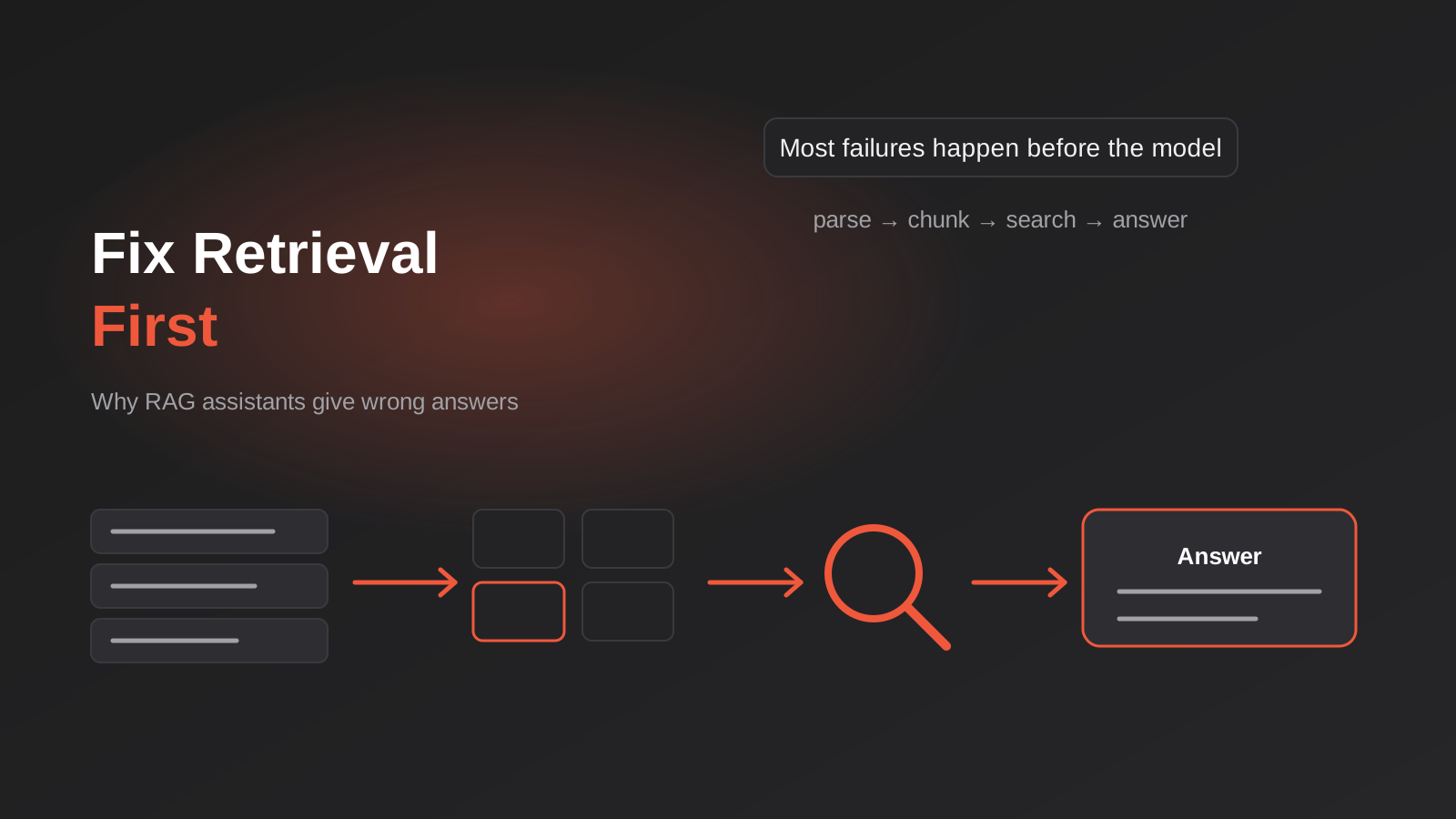
Why Your RAG Assistant Gives Wrong Answers: Fixing Parsing, Chunking and Search Before Blaming the Model (2026)
Why RAG assistants give wrong answers and how to fix them: parsing, chunking, hybrid search, reranking and freshness, checked in the order…
How to Test an AI Chatbot Before Launch: Evals, Test Sets and Release Gates for Australian Businesses (2026)
How to test an AI chatbot before launch: build a test set from real questions, score answers properly, set release gates, and…
Automated Decision-Making and the Privacy Act: What Your Automations Must Disclose From 10 December 2026
From 10 December 2026, Australian businesses must disclose automated decisions in their privacy policy. How to find, assess and disclose yours.
Got a project you'd like to talk through?
Tell us what you're working on — we'll come back with a plan.
