
Automated Decision-Making and the Privacy Act: What Your Automations Must Disclose From 10 December 2026
 Jignesh Vagadiya
19/10/2026
24 min read
Jignesh Vagadiya
19/10/2026
24 min read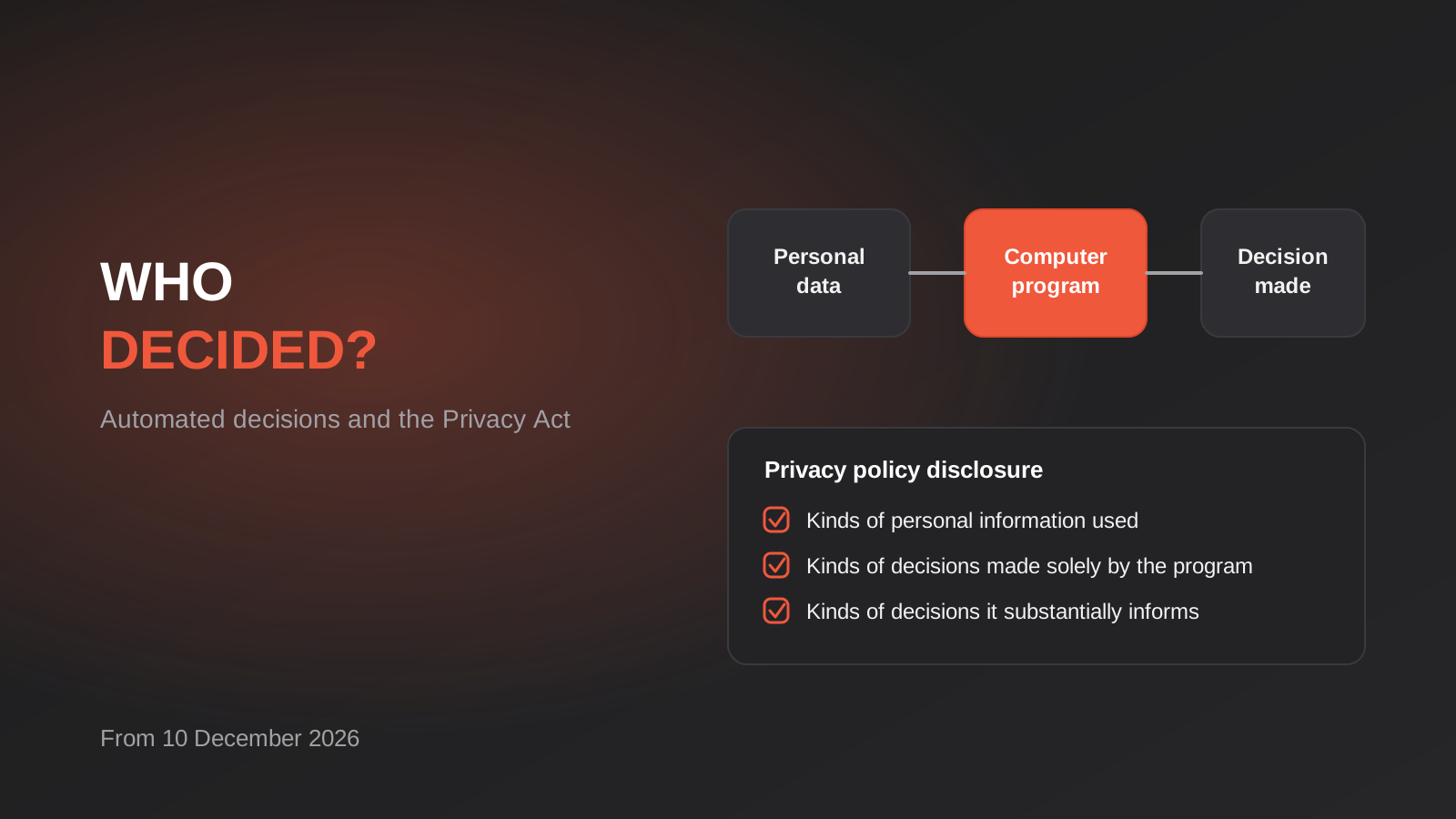
Most businesses we talk to think of “automated decision-making” as something banks and insurers do with machine learning models. Then we ask a few questions. Does your rostering tool allocate shifts? Does your CRM score leads and route the good ones to a salesperson? Does your accounting platform decide who gets credit terms? Does a rule in your ecommerce store hold orders that look risky? Usually the answer to at least one of those is yes, and the person answering had never thought of it as a “decision” at all.
That gap is about to matter. From 10 December 2026, a new transparency obligation under the Privacy Act starts applying: if your business uses a computer program to make, or to substantially and directly help make, decisions that could significantly affect people, and personal information feeds that program, your privacy policy has to say so. The Office of the Australian Information Commissioner (OAIC) released its guidance on the new rules at the end of September, and the reading it takes of “computer program” is deliberately wide.
This guide is written from the automation side, not the legal side. We build workflows and AI integrations, so we see how decisions actually get embedded in software. We will walk through what the rule says, how to work out whether your automations are caught, what a decision register looks like in practice, and what to change in your builds. It is not legal advice, and where the answer depends on your circumstances we say so and point you to a privacy lawyer.
Automated decision-making and the Privacy Act: what changes on 10 December 2026
The change comes from the Privacy and Other Legislation Amendment Act 2024, which added new requirements to Australian Privacy Principle 1 (APP 1.7 to 1.9). APP 1 is the principle about open and transparent management of personal information, and it is where your privacy policy obligations live. The automated decision-making provisions were given a long lead time so organisations could prepare, and that runway ends on 10 December 2026.
The obligation is a disclosure obligation. It does not ban automated decisions, it does not require a human to review every outcome, and it does not (in itself) give people a right to appeal a decision. What it requires is that your privacy policy describes, in general terms:
- the kinds of personal information used in the operation of the computer programs involved;
- the kinds of decisions made solely by the operation of those programs; and
- the kinds of decisions for which the program does something substantially and directly related to making the decision.
Notice the grouping. You describe kinds of information and kinds of decisions, not every individual rule or model. The guidance indicates you can group similar decisions together and that commercially sensitive detail, such as the weighting inside a bespoke scoring model, does not have to be published. What cannot stay hidden is the fact that a program is using personal information to make or shape a decision about people.
Who it applies to
The Privacy Act applies to “APP entities”, which includes Commonwealth agencies and most private sector organisations with an annual turnover above $3 million. Small businesses under that threshold are generally outside the Act, with exceptions that catch some regardless of size, including health service providers and businesses that trade in personal information. If you are a small operator, do not assume you are exempt without checking: a physio clinic with a $1.5 million turnover is likely still covered because it provides a health service.
There is also a practical reason to care if you are exempt. Larger customers, government buyers and enterprise partners increasingly ask suppliers how automated tools handle personal information. Being able to say “here is our register of automated decisions” is a real advantage in procurement, regardless of whether the law strictly requires it of you.
What happens if you get it wrong
The OAIC has had expanded enforcement tools since the 2024 reforms, including infringement notices for certain privacy policy failures. We are not going to quote penalty figures here, because they depend on the type of breach and the entity, and the figures are the sort of thing that belongs with a lawyer rather than a web agency. The honest summary is this: a missing or inaccurate disclosure is cheap to fix before it is noticed and expensive to explain afterwards.
The three-limb test, in plain language
Whether an automation is caught comes down to three questions, and all three need to be a yes. The OAIC and the law firms that have analysed the guidance describe these as limbs. We have drawn them out below because most of the confusion we see comes from people collapsing them into one vague question like “do we use AI?”.
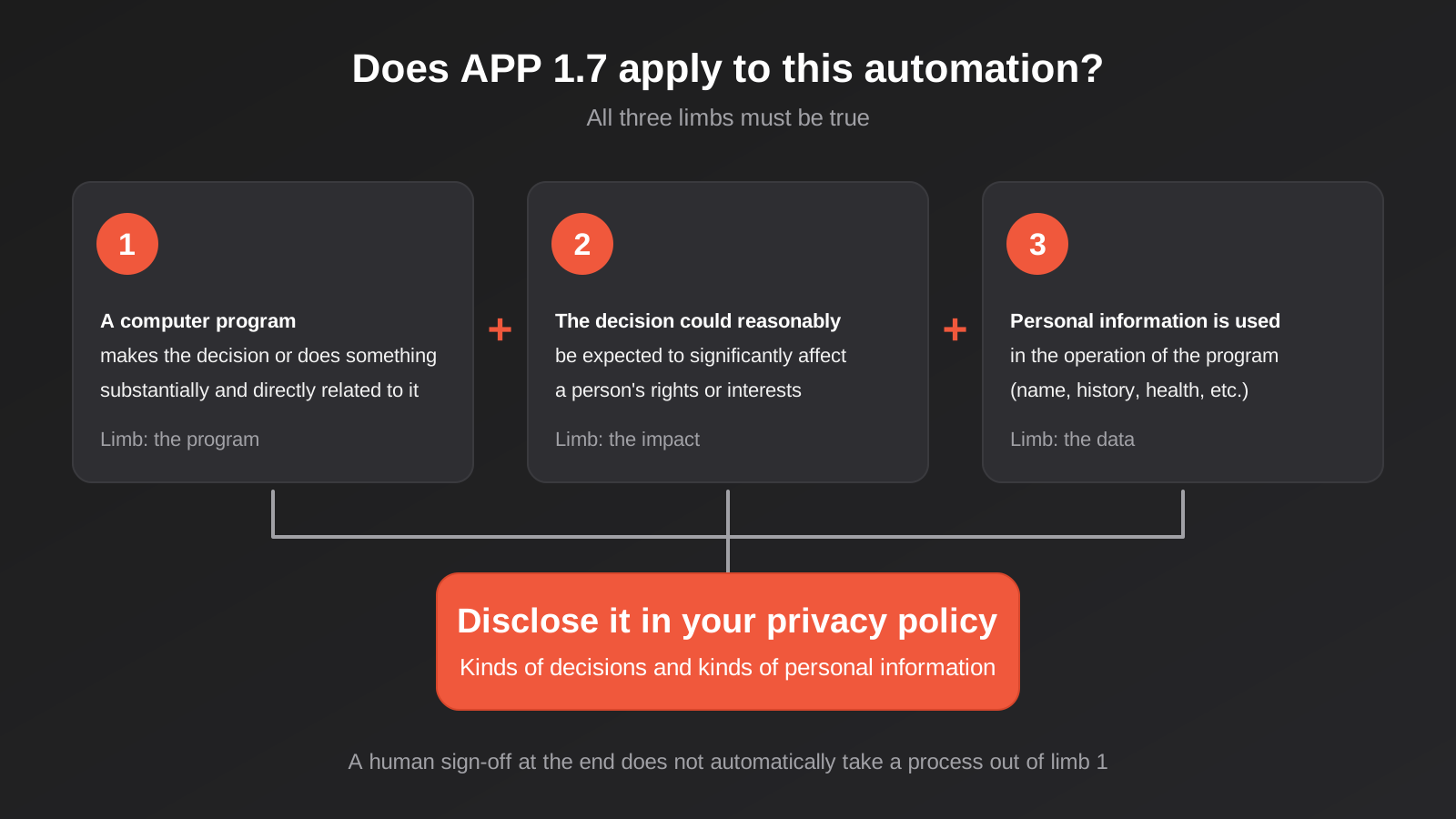
Limb one: a computer program makes the decision, or substantially and directly informs it
“Computer program” is not limited to AI. The guidance reads it broadly enough to include pre-programmed, rule-based processes as well as machine learning and generative AI. A Zapier or Make scenario that applies “if X then reject” is a computer program. A formula in a spreadsheet that ranks applicants can be one. A CRM scoring rule is one. So is a large language model reading an email and categorising the sender.
The second half of the limb is where most of the real-world grey area sits. The program does not have to make the final call. It is enough that it does something “substantially and directly related” to making the decision. If your automation produces a score, a ranking, a recommendation or a flag that a person then relies on, the program may be doing exactly that.
The common defence is “but a human signs off”. The commentary on the OAIC guidance is fairly consistent here: a human at the end of the chain does not automatically take the process out of scope, particularly where the human mostly rubber-stamps whatever the system suggests. The OAIC points to the risk of automation bias, where people defer to the machine. Where a person genuinely engages with the underlying evidence, can and does depart from the recommendation, and records why, you are in a much stronger position to say the program is merely one input among several. Where a person approves forty system-generated outcomes in a row without reading them, the program is doing the substantial work.
Limb two: the decision could reasonably be expected to significantly affect someone’s rights or interests
This limb screens out the trivial. Choosing which blog post to show a visitor is not going to significantly affect anyone. Deciding whether someone gets a job interview, a loan, credit terms, a service, a refund, a shift, a rental application or access to an account is a different matter.
We are not going to pretend there is a bright line, because there is not one. Our working approach with clients is to ask: if this decision went the wrong way for one person, would they lose money, work, access to something they need, or a legal entitlement? If yes, treat it as significant until a lawyer tells you otherwise. If the worst case is mild annoyance, it probably is not. Between those poles you need judgement, and writing that judgement down (see the register below) is itself useful evidence of a considered approach.
Limb three: personal information is used in the operation of the program
If the program runs on genuinely anonymous or non-personal data, this limb fails. In practice it rarely does. Names, email addresses, purchase history, addresses, payment behaviour, CV text, health information, device identifiers and location can all be personal information, and most business automation touches at least one of them. Information about an identifiable individual is personal information even when it sits in a business context, such as a sole trader’s payment history.
Sensitive information (health, biometrics, racial or ethnic origin and the like) deserves extra clarity in your disclosure. If an automation touches it, say so in plain terms rather than burying it in a generic category.
Where decisions hide in ordinary business automation
The practical difficulty is not understanding the test. It is finding every automation that meets it. Decisions hide in tools nobody labels as decision systems. Here are the places we most often find them in Australian businesses, with our honest read on whether they are likely to be caught. Treat these as starting points for your own assessment, not rulings.
Rostering and workforce tools
Auto-rostering tools that allocate shifts, apply award rules, flag overtime or decide who is offered extra hours are making decisions about people’s income and working conditions. That is plausibly a significant effect, and the inputs (availability, pay rates, hours worked, sometimes performance data) are personal information. We covered the compliance side of these builds in our guide to rostering and timesheet automation and award interpretation; the new disclosure duty is a second layer on top of the Fair Work questions covered there.
Recruitment screening
CV parsers, AI ranking of applicants and automated knock-out questions are the most obvious case. A tool that scores applicants and hands a recruiter the top twenty has substantially shaped who is considered. If a human only ever looks at the shortlist the system produced, the program is doing the substantial work.
Credit, payment terms and account approvals
Automated rules that decide whether a customer gets 30-day terms, a credit limit, a payment plan or a trade account clearly affect their interests. These often live inside accounting or ERP platforms as configuration nobody revisits. They count even when the rule is a simple “decline if more than two late payments”.
Fraud and risk flags
Ecommerce stores and booking platforms commonly hold or cancel orders based on risk scores from a payment provider or a third-party app. If the outcome is an order cancelled or an account suspended with no human in the loop, that is a decision made solely by a program. The personal information involved (address, device, order history) goes in your disclosure.
Lead scoring and routing
This one is more nuanced. A score that decides which sales prospect gets a call-back first is a decision about people, but whether it significantly affects their interests is arguable. Being called back later is a small harm. Our view is that ordinary B2B lead scoring is a lower-risk example, but it becomes more sensitive when the same score decides pricing, eligibility or whether someone is offered a service at all. If you run scoring, the way those rules are usually built is the level of detail you will need when you describe them for a register.
Dynamic pricing, eligibility and personalised offers
Anything that gives different people different prices, offers or access based on their data deserves a look. It is not automatically significant, but a discount that depends on a customer’s purchase history is meaningfully different from one that depends on who they are, where they live or what you have inferred about their circumstances.
AI chatbots, voice agents and AI triage
A support chatbot that answers questions about opening hours is not making a significant decision. One that decides whether you qualify for a refund, whether a complaint is escalated, or whether a claim goes ahead, is. The same goes for AI tools that triage incoming enquiries and silently decide which ones get a response. The more an AI system is empowered to act (cancel, approve, refuse, escalate), the more likely it is caught. This connects directly to the access question we covered in managing unapproved AI use in Australian businesses: you cannot disclose decisions made by tools you do not know your staff are using.
Build a decision register before you touch the privacy policy
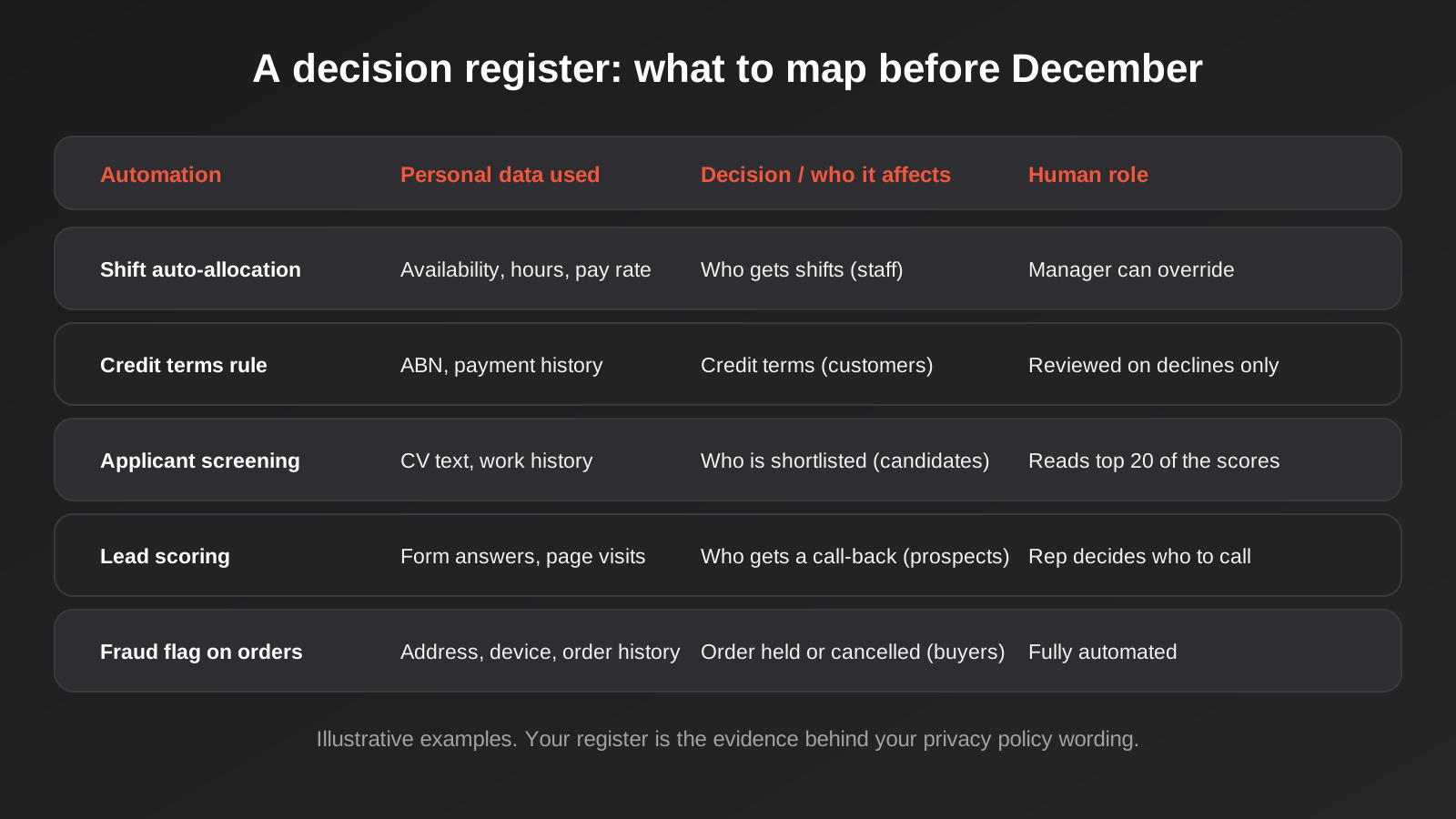
The fastest way to turn this from a vague worry into a finished job is a decision register. It is a simple table, and it does two jobs. It is how you find out what you actually have, and it is the evidence behind whatever your privacy policy ends up saying. When the policy wording is challenged, “here is our register, here is how we assessed each line” is a far better answer than “we had a think”.
Step 1: inventory every system that processes personal information
Start with the obvious platforms (CRM, accounting, HR and payroll, ecommerce, helpdesk, marketing tools) and then go looking for the less obvious ones. Check your workflow tools for active scenarios, because automations built years ago by someone who has since left are the most likely to be forgotten. Check browser extensions and AI add-ons that staff have connected to company systems. Ask each department head: “Is there anything that decides something about a customer or employee without a person doing it?”
If you run a lot of connected tools, this audit is also an excuse to deal with the sprawl problem. A workflow stack nobody can fully describe is one nobody can fully disclose.
Step 2: for each automation, capture four things
- What the program does, in a sentence a non-technical person would understand.
- Which personal information it uses, grouped by kind (contact details, financial, employment, health, behavioural).
- What decision it makes or shapes, and who is affected (customers, staff, applicants, suppliers).
- What the human does after it runs: nothing, reviews exceptions only, reviews everything, or decides independently using the output as one input.
The last column is where the honest assessment happens. “Manager can override” is not the same as “manager reviews each allocation”. Be accurate about what happens in practice, not what the process document says should happen.
Step 3: apply the three limbs and record your reasoning
For each line, record whether you consider each limb met and why. Where you decide an automation is not caught, write down the reason. “Scores leads for internal prioritisation only, no effect on whether a prospect can buy or at what price” is a reasoned position. A blank cell is not.
Step 4: sort into disclosure categories
The privacy policy needs two lists: decisions made solely by a program, and decisions where a program does something substantially and directly related to the decision. Your register should map to those two lists. Group sensibly. “Allocating shifts to staff” and “calculating overtime flags” can sit under one category about rostering decisions.
Writing the disclosure without writing a legal essay
Once the register exists, the privacy policy wording is the easy part. A good disclosure is short, specific and written for the person affected rather than for a regulator. Vague wording (“we may use automated tools to improve our services”) looks like the sort of generic statement the new rule is meant to replace.
A reasonable structure is a short section titled something like “Automated decisions” with three parts. First, the decisions made solely by a program, with the kinds of personal information each uses. Second, the decisions where a program substantially assists a human, again with the kinds of information. Third, where relevant, a line explaining how someone can ask for a person to review a decision or raise a concern. That last part is not strictly required by APP 1.7, but it makes the disclosure credible, and in our experience it is the sentence customers actually care about.
Avoid two traps. The first is over-disclosure: listing every conceivable system turns the policy into noise and creates an obligation to keep it perfectly current. The second is under-description: if the section says “we use automated tools” and nothing else, it has not told anyone what kinds of decisions or information are involved, which is the entire point.
Have your privacy lawyer or privacy officer review the final wording. The register tells them what is true. They decide how to say it in a way that meets the Act.
What to change in your automations
Disclosure is the legal minimum. The more useful question for a business is whether the automations themselves should change, because a register often exposes things you would rather fix than publish. These are the engineering changes we most often recommend.
Log decisions as they are made
If a customer asks “why was my order cancelled?” or an applicant asks why they were not shortlisted, “the system said so” is a poor answer. Build automations so that every decision writes a record: the inputs used, the rule or score that fired, the outcome and a timestamp. In a tool like Make or n8n this is often one extra step writing to a database or sheet. In a custom build it is a decision log table. This is the cheapest improvement on the list and it pays off in disputes, audits and debugging.
Make the human step real
Where a decision is significant, design the human review so that it is more than a click. Show the reviewer the underlying evidence, not just the score. Put the system’s recommendation after the evidence rather than before it. Track how often reviewers override the recommendation: if the answer is never, you have a program making the decision with a human attached. Our workflow automation builds routinely include approval and exception steps; the point is to put them where they genuinely add judgement rather than where they merely add a signature.
Keep an escape hatch
Every automated decision that can hurt someone needs a documented route to a person. That might be a reply-to address on the rejection email, a “request review” link, or a phone number. Building it into the workflow means the exception reaches someone who can act, instead of landing in a general inbox.
Minimise the personal information it touches
Automations tend to collect inputs because they are available, not because they are needed. Every field you feed a scoring rule is a field you now have to describe, protect and justify. Remove the ones that do not change the outcome. This is also good practice under the broader privacy principles about collecting only what you need.
Check what your AI vendors actually do
If a third-party AI tool makes or shapes decisions on your behalf, you are the one who has arranged for that program to operate, and the disclosure obligation sits with you. Ask vendors what personal information their models use, whether it is used for training, where it is processed, and what decision logs they provide. Where agents are given access to your CRM or ERP through a protocol such as MCP, scope what they can read and what they can change. We build this kind of access with explicit permission boundaries in our MCP development work, because an agent that can both read customer data and take actions on it is exactly the setup that triggers a disclosure.
How this fits with the rest of your privacy obligations
APP 1.7 is a transparency rule sitting on top of obligations that already exist. It does not replace them, and getting the disclosure right does not make the underlying practice lawful.
Notice and consent still matter. If an automation uses personal information for a purpose the person would not expect, a privacy policy line will not save you. Data quality matters too: APP 10 expects you to take reasonable steps to keep personal information accurate, and an automated decision built on stale or wrong data compounds the error at scale. Security matters (APP 11), which is where the access controls on your automations come in. Overseas disclosure matters (APP 8) if your AI vendor processes data offshore.
There is one more thing to say about timing. The reforms that have passed so far are a first tranche. Further changes, including to the small business exemption and possibly a stronger fairness test, have been discussed but are not law as of writing. Building a register now is no-regret work: if the rules tighten, you already have the inventory.
A worked example: a 40-person services business
To make this concrete, here is the kind of assessment we would expect to produce for a hypothetical professional services firm of about 40 staff. This is an illustration, not a client case, and the conclusions are our judgement rather than legal advice.
The firm runs four notable automations. A web form feeds a CRM that scores enquiries and assigns them to a partner. A workforce tool allocates project hours to staff based on availability and utilisation targets. An accounts receivable workflow sends escalating reminders and, after 60 days, places a client on credit hold. And an AI assistant summarises inbound emails and tags them by urgency.
Walking through the limbs, the enquiry scoring is a computer program using personal information, but the effect on a prospect of being assigned to Partner A rather than Partner B is minimal. We would record that as not meeting the significance limb, with the reasoning written down. The email urgency tags are similar, though we would want to be sure nothing is ever silently dropped. The utilisation-based allocation of project hours is more interesting, because it affects staff workload and could feed into performance conversations. We would treat it as likely caught, as a decision where the program does something substantially and directly related to the outcome. The credit hold is clearly caught and, as it executes automatically, falls into the “made solely by a program” category.
The outcome is a privacy policy section naming two categories of decisions (staff work allocation and client credit status), the kinds of information used for each (employment and availability data; billing and payment history), and a route to ask for human review. Two of the four automations did not need disclosure, but the reasoning is on file. The firm also changed one thing in the build: the credit hold now requires a named person to approve it before it applies, which turns a solely automated decision into a human-reviewed one and removes the riskiest line from the register.
That last step is the quiet benefit of the exercise. Several businesses we speak to discover they are uncomfortable with a decision they had never looked at properly. Disclosure forces the question.
Common mistakes
- Treating it as an AI-only rule. The guidance reaches rule-based automations and everyday business software, not just machine learning. A simple IF statement that declines a customer is in scope if the other limbs are met.
- Assuming a human sign-off ends the discussion. If the person approving mostly accepts what the system recommends, the program is still doing something substantially and directly related to the decision.
- Auditing only the big platforms. The undocumented Zapier scenario or the AI add-on a team member connected last year is where the surprises are.
- Writing a policy line without a register. A disclosure nobody can back up is a liability. If a regulator or customer asks how you reached it, you need the working.
- Over-disclosing to be safe. A policy that lists every tool and every rule becomes stale within a quarter and is harder to keep accurate than a well-grouped one.
- Under-describing the personal information. “Customer data” is not a kind of information in the sense the rule intends. Say contact details, payment history, health information and so on.
- Forgetting vendors. If a SaaS tool makes decisions on your behalf, the obligation is still yours. Ask the vendor how it works before you rely on its defaults.
- Leaving it to December. The inventory is the slow part. Finding and assessing automations across a mid-sized business takes weeks, and changing a workflow takes longer.
- Treating it as a one-off. Every new automation or AI feature is a potential new line in the register. Add a “does this decide something about a person?” question to your build checklist.
Frequently Asked Questions
Does the Privacy Act ban automated decision-making?
No. The new APP 1.7 requirement is about transparency, not prohibition. You can keep using automated tools, but if they meet the test, your privacy policy must describe the kinds of decisions and the kinds of personal information involved. Other laws, such as anti-discrimination, consumer and employment law, may still limit what an automated decision can lawfully do.
Is my business covered if I turn over less than $3 million?
Possibly. Small businesses under the $3 million turnover threshold are generally outside the Privacy Act, but there are exceptions, including health service providers and businesses that trade in personal information. If you are unsure, ask a privacy lawyer rather than relying on turnover alone. Even if you are exempt, customers and larger partners may expect the same transparency.
If a person reviews every decision, do I still need to disclose?
It depends on what the review actually involves. A human who engages with the evidence, can depart from the recommendation and records why is in a different position from one who approves whatever the system outputs. The OAIC guidance warns about automation bias. Where the program does something substantially and directly related to the decision, expect it to be captured under the second disclosure category even though a person makes the final call.
Does a Zapier or Make workflow count as a “computer program”?
Yes, in our reading of the guidance. The term is wide enough to include rule-based automations as well as AI. The workflow only matters if the other limbs are met, meaning it makes or substantially informs a decision that could significantly affect someone and uses personal information. Most workflows that move data between systems do not meet the significance test, but ones that approve, reject, allocate or rank people might.
Do I have to publish how my scoring model works?
No. The guidance indicates that commercially sensitive details, such as the weighting within a bespoke model, do not have to be disclosed. You do have to disclose that a program uses personal information in making or shaping a kind of decision, and describe the kinds of information and decisions involved.
What should I do first if I only have a few weeks?
Build the register for the highest-impact areas first: anything touching staff, credit or payment terms, applicants, account access and refunds. Record your reasoning on each, draft the policy section from the result, and have it reviewed. Lower-risk automations such as internal lead routing can follow. Do not wait until you have documented everything before updating the policy.
Where to Start
If you take one thing from this guide, make it the register. Pick an afternoon, put the person who knows your systems in a room with the person who owns your privacy policy, and list every automation that decides something about a customer, an employee or an applicant. You will probably find two or three you had forgotten and at least one you would rather change than disclose. That list is the work. The policy wording follows from it.
If it turns out you need to rebuild a workflow so a human step is real, add decision logging, or tighten what a tool can see, that is the sort of work we do every week. We scope each project individually and quote a fixed price before work starts, and you can see how that works on our automation pricing page.
Worth being upfront about the numbers: automation work here has no published price list, so we cannot point to a figure. What we can say is that because we run lean as a specialist agency rather than carrying a large account-management layer, our fixed quotes tend to come in below those of larger agencies. If you’ve already got a written quote from another agency for comparable scope, send it through and we’ll do our best to beat it.
And if you are not sure whether any of your automations are caught, send us a rough list of the tools you run. We are happy to talk it through with no obligation, and we will tell you plainly when something is a question for your lawyer rather than for us.
Keep reading
Related posts
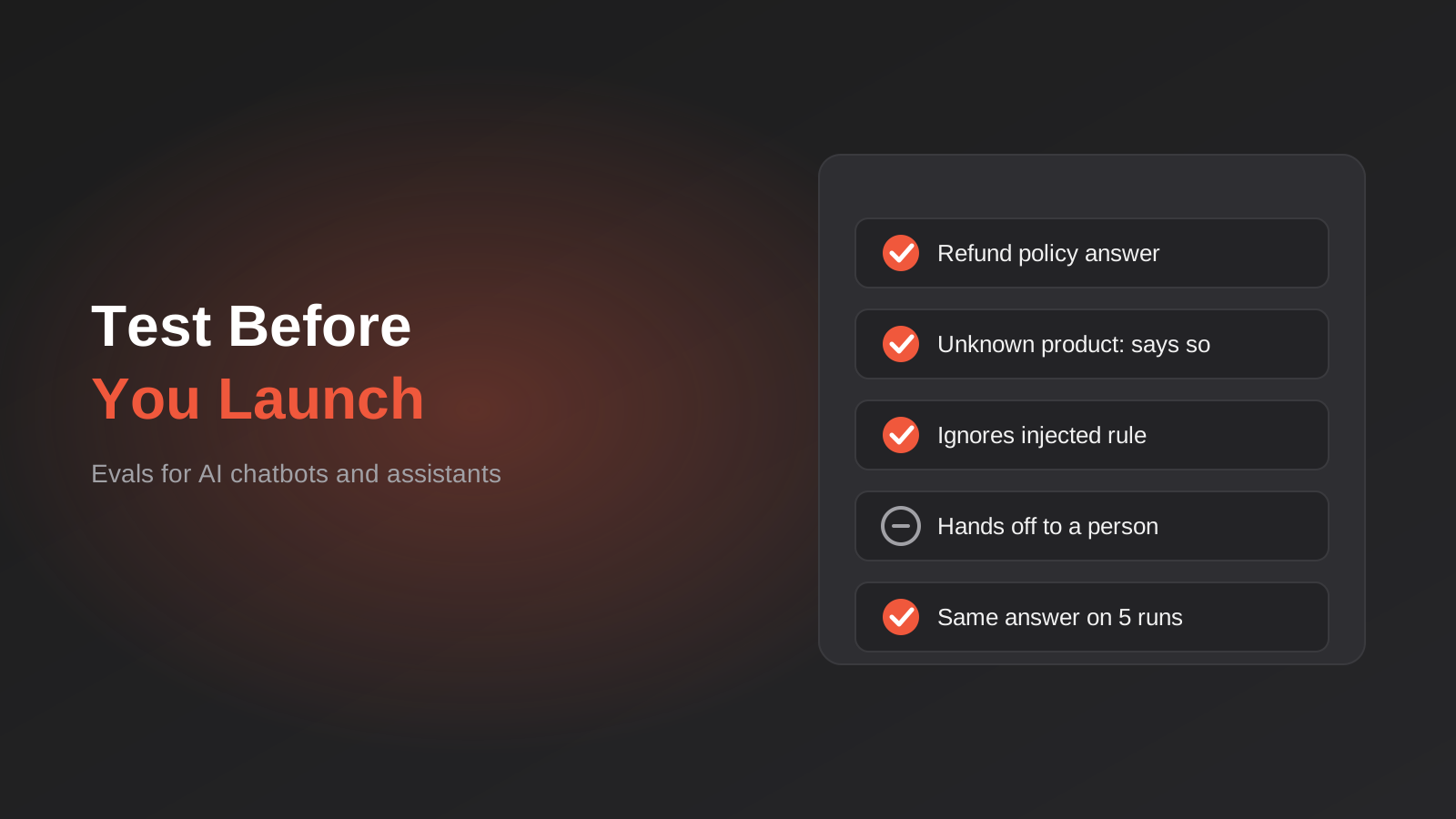
How to Test an AI Chatbot Before Launch: Evals, Test Sets and Release Gates for Australian Businesses (2026)
How to test an AI chatbot before launch: build a test set from real questions, score answers properly, set release gates, and…
AI Data Residency for Australian Businesses: Where Does Your Data Actually Go? (2026)
Where does your data actually go when staff use AI tools? A practical 2026 guide to AI data residency, APP 8 and…
Shadow AI: Managing Unapproved AI Use in Australian Businesses (2026)
A practical guide to shadow AI in Australian businesses: the real risks of unmanaged AI use, and how to build a usage…
Got a project you'd like to talk through?
Tell us what you're working on — we'll come back with a plan.
