
Rostering and Timesheet Automation for Australian Businesses: Award Interpretation, Payroll Sync and Fair Work Compliance (2026)
 Jignesh Vagadiya
15/10/2026
21 min read
Jignesh Vagadiya
15/10/2026
21 min read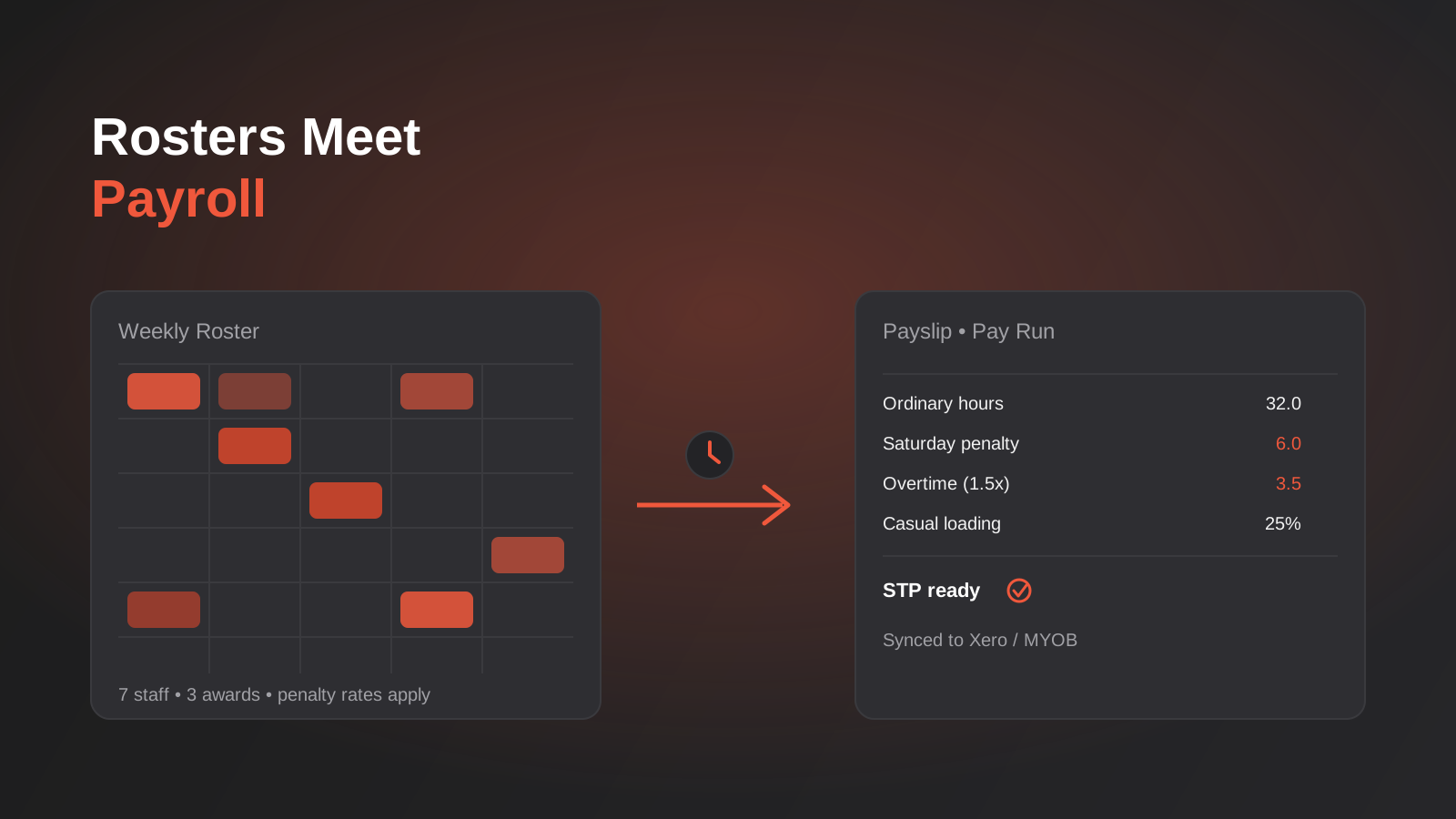
Most Australian businesses that run shift-based teams still build the roster in a spreadsheet, print the timesheets, and work out penalty rates by hand or by gut feel at the end of the week. It holds together at five staff. By fifteen, someone is quietly getting the Saturday rate wrong, the bookkeeper is re-keying hours into Xero on a Monday night, and nobody is entirely sure which award actually covers the new casual who started last month.
We get asked to automate a lot of back-office processes — invoicing, lead routing, reporting — but rostering and timesheet automation is a different animal. The automation isn’t just about saving time. It’s sitting directly on top of the Fair Work system, Modern Awards, Single Touch Payroll and seven years of record-keeping obligations. Get the workflow wrong and you’re not just inefficient, you’re underpaying staff without knowing it, which is exactly how several well-known Australian hospitality and retail employers ended up self-reporting large back-payment bills over the past few years.
This guide is about what actually happens between a shift being rostered and a correct payslip landing in someone’s account, where that chain breaks down in practice, and how to decide between a spreadsheet, a dedicated platform and a custom-integrated stack. We’ll leave the generic “automation saves time” framing to the vendors — this is the compliance-first version, written from the integration side rather than the payroll-vendor side, since that’s the angle we actually get asked about.
Why rostering and timesheet automation matters
Rostering looks like a scheduling problem. It isn’t, really — the scheduling part is the easy bit. The hard part is that every hour on that roster has to be translated into the right rate under a Modern Award, and Australia currently has around 121 of them, each with its own classifications, overtime rules, penalty rates, allowances and minimum engagement periods. A hospitality business running under the Hospitality Industry (General) Award and a retail business under the General Retail Industry Award are applying genuinely different rulebooks to what looks like the same Tuesday night shift.
That complexity is exactly why “just automate the roster” undersells the problem. The roster is the easy half. The half that actually needs automating is the translation from rostered and worked hours into an award-correct, auditable pay run — and that’s a narrower, more specific job than general workflow automation tools are built for.
What “award interpretation” automation actually does
Award interpretation is the step where hours worked get matched against award rules to produce a correct rate for every portion of a shift, and it’s the part of this whole chain that actually requires specialist logic rather than general-purpose workflow connectivity. A single eight-hour Saturday shift might include ordinary hours, a weekend penalty loading, a meal allowance because the shift ran past a break threshold, and overtime on the last hour because the roster ran long. Done by hand, someone has to know the award, remember the current rates, and apply all of it correctly every single pay cycle, for every staff member, under whichever award and classification applies to them.
Software that does this properly ingests the rostered and actual hours, applies the relevant award rules (including any enterprise agreement variations that sit on top of or replace parts of the award), and outputs a breakdown ready for payroll — not just a total. That breakdown matters because it’s what you show a Fair Work inspector, an underpayment auditor, or a new bookkeeper trying to understand why last week’s pay run looked the way it did.
Where manual processes actually break down
In practice we see the same three failure points across businesses that haven’t automated this:
- Rostered hours and actual worked hours drift apart, and nobody reconciles the difference before payroll runs — so the roster becomes fiction and the timesheet becomes the real (unverified) source of truth.
- Award rates get applied from memory or an old printed rate card, so wage increases from the Fair Work Commission’s annual wage review quietly go unapplied for months.
- Casual loading, overtime and allowances get bundled into a single “hours worked × base rate” calculation because breaking it out properly in a spreadsheet is tedious, which leaves no auditable breakdown if anyone ever asks.
None of these are automation failures in the n8n or Zapier sense — they’re process failures that a general-purpose workflow automation build won’t fix on its own, because the missing piece is award logic, not connectivity.
There’s a second layer of complexity that rarely gets mentioned until it bites: classification drift. A staff member hired as a Level 1 retail assistant who picks up supervisory shifts six months later should move to a Level 2 or 3 classification with a different base rate, but nobody updates the system unless there’s a process forcing the review. Split shifts, broken shifts, minimum engagement periods (many awards require a minimum three or four-hour shift even if the business only needed two hours of labour) and higher duties allowances all add rules that a roster built purely around “who’s free when” will quietly ignore.
The compliance layer you can’t automate around
Before getting into tools, it’s worth being specific about what you’re actually obligated to get right, because this is the part that turns a rostering project from “nice efficiency win” into something the business owner needs to sign off on properly.
Fair Work record-keeping requirements
Under the Fair Work Act, employers have to keep time and wage records for seven years, and those records need to be accurate, legible and not false or misleading. That covers hours worked, pay rates, loadings, allowances, leave accruals and deductions — for every employee, every pay cycle. A spreadsheet that gets overwritten each fortnight, or a roster app that doesn’t retain historical versions once a shift is edited, isn’t meeting that obligation even if the current pay run looks fine. This is one of the more overlooked parts of rostering automation: the audit trail matters as much as the final number.
Single Touch Payroll Phase 2
STP Phase 2 requires payroll reporting to the ATO to break income down into specific categories — gross, overtime, bonuses, allowances, paid leave and salary sacrifice all reported separately, rather than as one lump figure. That level of disaggregation is very hard to produce reliably by hand once you have more than a handful of staff on different awards, because it means every pay run needs the same granular breakdown that proper award interpretation already produces. If your rostering and timesheet process doesn’t naturally generate that breakdown, your bookkeeper is rebuilding it manually before every STP lodgement, which is exactly the kind of repetitive, error-prone work automation should be removing.
Why underpayment keeps happening even to careful employers
The pattern behind most publicised underpayment cases in hospitality and retail isn’t fraud — it’s a payroll system that was never built to apply award complexity correctly, running quietly wrong for years before anyone checks. Annual wage reviews change minimum rates. Awards get varied. Staff move between classifications. A system (or a person) that got the setup right in year one can be wrong by year three without anyone noticing, because nothing about the process forces a re-check. That’s the real argument for automating this specific workflow: not speed, but a system that stays correct as the rules underneath it change, and that can produce a clean, defensible record the moment anyone asks for one.
What this looks like across different kinds of businesses
The underlying five-stage chain is the same everywhere, but the pressure points shift depending on what you run. A hospitality business with casual staff across split lunch and dinner shifts lives and dies by penalty rate and broken-shift allowance accuracy — get a Saturday night rate wrong across a venue with thirty casuals and the error compounds fast. Multi-site retail has a different problem: the same role can sit under slightly different enterprise arrangements store to store, and head office needs a consolidated labour-cost view across all of them without losing site-level accuracy in the roll-up.
Allied health and healthcare practices tend to run smaller, more senior teams where the award complexity is lower but the scheduling complexity is higher — practitioners with specific qualifications need to be rostered against specific appointment types, and a gap in coverage isn’t just a labour cost problem, it’s a patient access problem. Trades and field service businesses sit closest to what we cover in our field service automation guide, where the roster is really a job schedule and the award complexity (travel time, tool allowances, call-out rates) gets layered on top of job management software like Simpro or ServiceM8 rather than replacing it. None of these need a different five-stage model — they need the award rules and the integrations around that model configured for how their specific business actually runs.
How the automation stack actually fits together
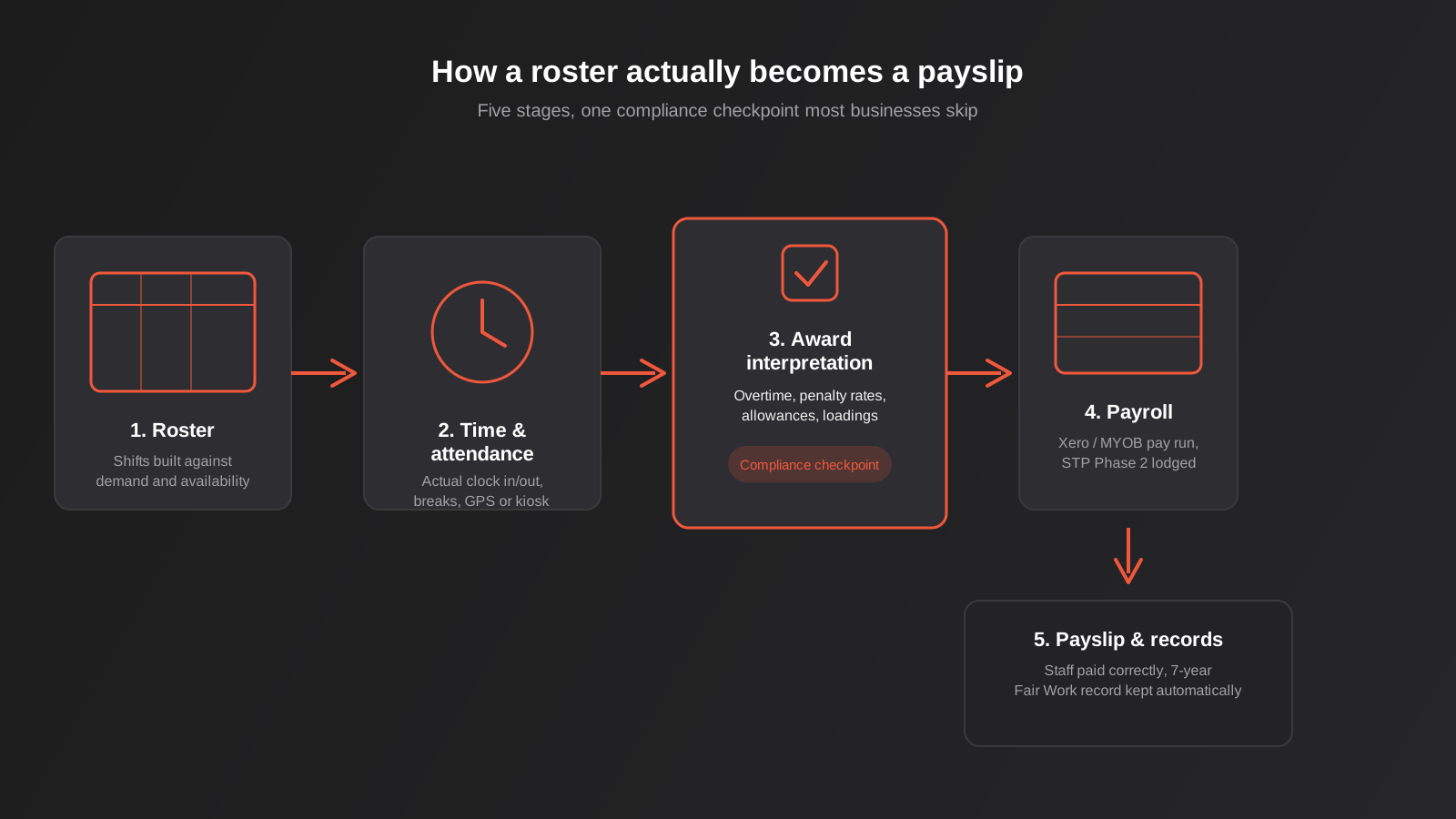
A working rostering-to-payroll automation is five stages, not one tool. Understanding them separately matters because most of the actual decisions — which platform, what to build custom, where general automation tools still help — happen at the boundaries between these stages, not inside any single one of them.
The five stages
Rostering comes first: shifts get built against demand, availability and (ideally) each staff member’s award and classification, so the system already knows which rules will apply before a single hour is worked. Time and attendance is next — the actual clock-in and clock-out data, whether that’s a mobile app with geofencing, a physical kiosk, or facial recognition clock at a single site. This is where rostered hours and actual hours start to diverge, and a good system flags the gap rather than silently accepting whichever number arrives last.
Award interpretation sits in the middle and does the heavy lifting described above. Payroll and accounting come next — the interpreted hours flow into a pay run inside Xero, MYOB or a dedicated payroll platform, which calculates tax, superannuation and net pay and lodges the STP Phase 2 report. Finally, payslips and records: the staff member gets paid, and the detailed breakdown is retained for the seven-year compliance window, searchable if anyone ever needs to produce it.
Where Make, n8n or Zapier still earn their place
General automation platforms aren’t the right tool for award interpretation itself — that logic genuinely needs a purpose-built engine that’s kept current with Fair Work Commission decisions. But they’re still useful at the edges of this stack: alerting a manager when a roster has an unfilled shift inside 48 hours, pushing a weekly labour-cost summary into Slack before it hits payroll so someone can sanity-check it, or syncing new-starter data from an onboarding workflow into the rostering platform so nobody re-keys the same person’s details twice. If you’ve already built onboarding automation, this is a natural extension — our guide to automating employee onboarding covers the handoff point where a new starter’s details should flow straight into the rostering system rather than being typed in a second time.
The mistake we see is businesses trying to build award interpretation itself inside a general automation tool — a string of conditional logic in Make or n8n trying to replicate penalty rate rules. It can sort of work for one simple award, until the Fair Work Commission varies a rate or the business takes on a casual under a different award, and then someone has to go back in and manually patch the logic. That’s a maintenance burden a dedicated award engine is built to absorb and a generic workflow tool isn’t.
Choosing a platform: dedicated tools vs custom build
For the vast majority of Australian businesses running shift-based teams, this is a buy decision, not a build decision. Platforms like Deputy, Tanda, RosterElf, Employment Hero and Humanforce exist specifically to solve award interpretation, time and attendance, and payroll integration as one connected problem, and they stay updated as awards change — which is the part that’s genuinely hard to maintain yourself. Pricing across this category typically runs from around $4 up to $25 or more per user per month depending on which modules you need (rostering alone is cheaper than rostering plus full award interpretation plus payroll), so it’s worth pricing out the actual modules you need rather than comparing headline rates.
The platforms in this space tend to differentiate on where they put their effort rather than on being wildly different products. Some position themselves around purpose-built Australian award interpretation as the core selling point, with time and attendance and rostering built around that engine. Others started as rostering and workforce management tools and have added payroll or deeper award logic over time, which can mean more configuration on your end to get the same result. A few bundle payroll processing directly into the platform rather than treating it as a sync into Xero or MYOB, which suits a business happy to run payroll inside one system but adds switching cost if you’re attached to your existing accounting software. None of this is a reason to pick one vendor over another in the abstract — it’s a reason to ask each vendor directly how their award interpretation was built and tested, rather than taking the marketing page at face value, since that same marketing language (“award compliant,” “Fair Work ready”) gets used fairly loosely across the category.
What to actually check before committing
Award coverage is the first filter — confirm the platform genuinely interprets the specific award (or awards, if you span more than one) your business operates under, not just a generic overtime rule. Ask vendors directly whether their award interpretation is purpose-built or whether it needs manual rule configuration on your end; some platforms market “award compliance” but still require you to set up the specific rate logic yourself, which defeats a lot of the point. Payroll integration is the second filter: confirm a clean, two-way sync with Xero or MYOB (or whichever accounting platform runs your business) rather than a CSV export you still have to import by hand. Multi-site and multi-award support matters if you operate across more than one location or industry classification — not every platform handles staff who move between awards or locations cleanly. And check what happens when an award changes: does the vendor update the rules centrally, or does that update land on your desk as a configuration task?
When a custom-integrated stack actually makes sense
Custom development earns its place here in a narrower set of cases than most “no-code vs custom” content suggests. It’s the right call when a business is running multiple systems that none of the off-the-shelf rostering platforms integrate with cleanly — a legacy ERP, an industry-specific job management system, or a franchise reporting structure that needs labour cost data shaped in a particular way. In those cases, the roster and award interpretation still usually comes from a dedicated platform via its API, but the glue connecting it to your other systems, and the reporting layer built on top, gets custom-built. That’s squarely API integration work rather than a rostering project in its own right, and it’s worth scoping separately from the rostering platform decision so you’re not paying a workforce vendor to half-solve a systems integration problem.
If you’re already running a sprawl of automations that have grown without a plan — roster data flowing one way, payroll adjustments patched in manually, reporting cobbled together after the fact — it’s worth auditing and consolidating that stack before adding another system on top. Rostering and payroll are exactly the kind of workflow that ends up duct-taped together across three tools if nobody steps back and maps it properly first.

A quick note on cost beyond the licence fee
The per-user monthly fee is the visible cost, but it’s rarely the biggest one in year one. Award configuration — mapping every classification, allowance and agreement variation your business actually uses — takes real hours, either from your team or billed by the vendor’s implementation partner. Data migration from whatever you’re replacing takes more again if you’re bringing across leave balances and classification histories rather than starting fresh. And staff training, even for something as simple as a new clock-in method, needs to be budgeted as actual rostered time rather than assumed to happen for free between shifts. None of this is a reason to avoid automating the process — it’s a reason to ask a vendor for an implementation estimate up front rather than being surprised by it three months in.
Migrating without losing your history
Whichever path you choose, the migration itself deserves more care than it usually gets. You’re not just moving a contact list — you’re moving leave accrual balances, classification histories, pay rate agreements and (if you want to keep your seven-year record-keeping obligation intact) ideally the historical timesheet data too, or at minimum an exported archive of it that stays retrievable. Run the new system in parallel against your existing process for at least one full pay cycle before switching over completely, reconciling every staff member’s pay to the cent against what the old process would have produced. It’s slower than a clean cutover, but it’s the only way to catch a configuration error — a misassigned classification, a missed allowance — before it’s running live across real pay runs.
Common mistakes we see
- Buying a rostering tool and assuming award interpretation is included. Some platforms sell scheduling and leave the actual award rate logic as a configuration exercise you have to do yourself — confirm this before signing, not after your first incorrect pay run.
- Letting rostered hours and actual clocked hours stay unreconciled. If the system doesn’t flag the gap between what was rostered and what was actually worked, payroll ends up running on whichever number arrived last, with no one checking either was right.
- Treating the migration from spreadsheets as a weekend project. Moving years of staff, classification and leave accrual data into a new platform properly takes real mapping and testing — rushed migrations are where opening balances quietly come out wrong.
- Not budgeting for the payroll integration separately from the rostering licence. Rostering and full payroll sync are often priced as separate modules; businesses that only budget for the roster find the payroll add-on is where the real cost (and the real compliance value) sits.
- Letting a manager override award rules “just this once.” Most platforms allow manual overrides of a calculated rate for edge cases, which is sometimes genuinely necessary — but if overrides aren’t logged and periodically reviewed, that override function quietly becomes the way the system gets worked around whenever it’s inconvenient, which defeats the entire point of automating the interpretation in the first place.
- Assuming a “set and forget” rollout. Award rates change at least annually via the Fair Work Commission’s wage review, and enterprise agreements vary on their own schedule. Someone needs to own checking that the platform’s rules have actually been updated, not just trust that they have.
- Skipping staff training on the time and attendance side. Even the best award engine produces wrong numbers if staff are clocking on under the wrong role, site or classification because nobody explained how the new system works.
Frequently Asked Questions
Do I need a dedicated rostering platform if I only have a handful of staff?
If you’re under about five staff on one simple award with predictable shifts, a well-built spreadsheet template and careful manual checking can genuinely hold up, provided someone is actually re-checking award rates against the current Fair Work Commission figures each year. The calculation changes once you add a second award, casual and part-time staff on different loadings, or enough headcount that manual cross-checking stops being realistic — that’s usually somewhere between five and fifteen staff, depending on how many different shift patterns you’re running.
Can Xero or MYOB handle award interpretation on their own?
Both handle payroll processing, STP lodgement and standard pay items well, but neither is built to interpret Modern Award rules against rostered and worked hours the way a dedicated rostering and workforce platform is. Most businesses run a rostering platform that does the award interpretation and then syncs the finished, broken-down figures into Xero or MYOB for the actual pay run and reporting.
How long does it take to implement a rostering and payroll automation properly?
For a single-site business moving from spreadsheets to a dedicated platform, a realistic timeline is four to eight weeks, including award configuration, a parallel run against the old process for at least one full pay cycle, and staff training on time and attendance. Multi-site or multi-award businesses, or anything involving a custom integration into another system, typically runs longer because the testing burden scales with the number of award and location combinations involved.
What happens if an award changes after we’ve set everything up?
With a dedicated platform, the vendor typically updates the underlying award rules centrally and the change flows through automatically, though it’s worth confirming this directly with any vendor you’re evaluating rather than assuming it. With a custom or spreadsheet-based approach, someone in the business needs to actively monitor Fair Work Commission wage reviews and award variations and update the logic manually, which is one of the main hidden costs of going the manual or fully custom route.
Is this the same thing as the field service automation you do for trades businesses?
Related but different. Our field service automation guide covers job scheduling, quoting and invoicing for trades using tools like Simpro, ServiceM8 and Fergus — it touches rostering but focuses on the job workflow. This guide is specifically about the award interpretation and payroll compliance layer, which applies just as much to hospitality, retail and healthcare businesses that have nothing to do with field jobs.
How do we know if the automation is actually paying off?
Track it against a baseline from before the change, not against a vague sense that things feel smoother. The clearest numbers are hours spent on manual timesheet reconciliation and payroll prep each pay cycle, the number of pay corrections or off-cycle adjustments issued per month, and whether wage increases from annual award reviews are actually being applied on time. Our general framework for measuring ROI on automation projects applies here too — the payback period on rostering automation usually shows up faster than most automation projects, because the labour-hour savings are easy to isolate and the compliance risk reduction, while harder to put a number on, is the part that actually protects the business.
Where to start
Start by mapping your current process exactly as it actually runs today — not how it’s supposed to run. Which award or awards apply, how rostered hours get turned into a pay run right now, and where the manual re-keying and guesswork actually happen. Pull a handful of recent pay runs and manually re-check them against the award yourself, even roughly — it’s a confronting exercise for a lot of businesses, and it’s usually what actually triggers the decision to fix the process properly rather than keep patching it. That map tells you more about whether you need a dedicated platform, a lighter workflow fix, or a custom integration than any vendor comparison will.
If you’re weighing up platforms, already running into the limits of a system that doesn’t talk to your accounting software properly, or trying to work out whether this is a rostering project or a systems integration project in disguise, we’re happy to have that conversation. We build the workflow automation that sits around platforms like this rather than selling the platform itself, so we’ll tell you honestly when the answer is “buy the SaaS tool” rather than pitching you a custom build you don’t need.
Keep reading
Related posts

Changing Live Automations Safely: Staging, Version Control and Rollback for Zapier, Make and n8n (2026)
How to draft, test, release and roll back changes to live Zapier, Make and n8n automations without breaking invoices, orders or customer…

Peppol E-Invoicing for Australian Businesses: Automating Accounts Payable From Structured Invoices (2026)
Peppol e-invoicing in Australia: what is and isn't mandatory, how to pick an access point, and how to automate accounts payable once…

Clean Your Data Before You Automate: A Practical Guide to CRM Data Cleanup for Australian Businesses (2026)
Connecting systems on messy data copies the mess everywhere. Here's how to clean, match and merge records before you automate or integrate.
Got a project you'd like to talk through?
Tell us what you're working on — we'll come back with a plan.
