
How to Measure ROI on AI and Automation Projects: A Practical Framework for Australian Businesses (2026)
 Jignesh Vagadiya
09/09/2026
21 min read
Jignesh Vagadiya
09/09/2026
21 min read
Ask ten business owners running an AI chatbot, a Zapier workflow or a new CRM automation whether it’s paying for itself, and most will tell you it “feels” faster or “seems” to be helping. Ask them for a number and the conversation usually stalls. That gap between feeling and knowing is where most automation and AI projects quietly die — not because the technology failed, but because nobody wrote down what things looked like before it started.
A widely cited MIT study from 2025 found that 95% of generative AI pilots inside large companies weren’t delivering a measurable return. The number gets thrown around a lot, usually as proof that AI is overhyped. Read past the headline and the more useful finding is buried in the detail: most of that 95% wasn’t really a technology problem. Projects were approved on a projected return that was never checked again after launch, spend concentrated in the visible, easy-to-demo areas like sales and marketing tools, and the quieter back-office automation that actually produces savings stayed chronically underfunded. Australian small and mid-sized businesses aren’t running multi-million-dollar enterprise AI programmes, but the same pattern turns up constantly at a smaller scale: a workflow gets built, everyone likes it, and eighteen months later nobody can say whether it saved money or just moved the same problem somewhere less visible.
This isn’t a pitch for a fancier dashboard. It’s the actual framework we use with clients to measure AI automation ROI before, during and after a build — what to measure before you start, the formula that turns “feels faster” into a dollar figure, and why the metrics that matter for a customer-facing chatbot are different from the ones that matter for a back-office integration.
Why “It’s Not Working” Usually Means “We Never Measured It”
One of the more uncomfortable findings from the research into AI project failure is how many of them were never actually assessed against a real number in the first place. Roughly six in ten AI projects get approved on an ROI projection that’s never checked again after launch. Separately, fewer than four in ten organisations can point to any measurable bottom-line impact from their AI investment at all, and only a small fraction are extracting anything that shows up cleanly in a profit and loss statement. That’s not a story about bad models. It’s a story about nobody owning the follow-up.
We see the small-business version of this constantly. A workflow automation gets scoped, quoted and built. The justification at the start is usually something like “this will save us time” or “we’re drowning in manual data entry.” True enough, and reason enough to build it. But that sentence is not a baseline. Nobody wrote down how many hours a week the manual process actually took, what the error rate was, or what it cost per unit — per invoice processed, per lead followed up, per support ticket closed. Once the automation goes live, the team is busy, the old process is gone, and there’s no “before” number left to compare against. Six months later, when someone in finance asks whether the automation spend was worth it, the honest answer is a shrug.
The fix isn’t complicated, but it has to happen at the start, not after. Before we scope any automation or AI build for a client, we ask for the baseline numbers first — and if they don’t exist, we help capture two to four weeks of them before writing a single line of workflow logic. It adds a little time up front. It’s the only way anyone can honestly answer the question six months later.
Hard ROI vs Soft ROI
Every automation or AI project produces two kinds of return, and conflating them is where a lot of business cases fall apart. Hard ROI is the number you can put in a spreadsheet and defend in a budget meeting. Soft ROI is real, matters to the business, and should never be the only justification for spend.
Hard ROI: what you can actually count
Hard ROI covers anything you can measure directly in hours, dollars or units. The main categories are:
- Labour hours saved, converted to a fully loaded hourly cost (wages plus super, leave loading and overheads — not just the award rate)
- Reduction in errors or rework, each costed at what it actually takes to fix — a mis-keyed order, a duplicate invoice, a missed follow-up
- Revenue captured because something happened faster — a lead responded to in minutes instead of two days, a quote sent same-day instead of end-of-week
- Direct cost reduction from retiring a tool, a subscription or an outsourced task the automation replaces
These are the numbers that go in a business case, because they survive scrutiny. If someone challenges the figure, you can show your working.
Soft ROI: real, but harder to defend on its own
Soft ROI covers things like more consistent output regardless of who’s rostered on, staff not spending their day on work that makes them miserable, capacity to take on more customers without hiring, a cleaner audit trail for compliance, or a better customer experience that doesn’t show up as a line item anywhere. All of this is legitimate value. None of it should be the headline number in a proposal, because it can’t be independently verified and it tends to get dismissed the first time budgets get tight. Use soft ROI to round out the story after the hard numbers have already justified the spend, not instead of them.
Set the Baseline Before You Touch Anything
A baseline is just a snapshot of how things work today, taken before anything changes. It sounds obvious. It’s the single most skipped step in every automation project we’ve seen go sideways, including ones that were otherwise built well.
What to capture before switch-on
- Volume: how many tasks, tickets, orders or leads pass through this process per week, on an average week and a busy one
- Time: average handling time per unit, measured across a few different staff members, not just your fastest person
- Error and rework rate: how often does the current process produce a mistake that needs fixing, and how long does the fix take
- Current cost: what you’re already paying for any tool, subscription or outsourced labour the new system will replace
- Adoption starting point: if this touches a customer-facing metric like response time or satisfaction, capture the current figure from whatever system already tracks it
The baseline mistakes we see most often
Measuring during an unusually quiet or unusually busy period and treating it as typical is the most common one — a baseline taken in the week before Christmas or during a product launch will make almost any automation look either miraculous or pointless. Second is only counting the time of the person who asked for the automation, when the process actually touches three teams and the other two never get asked how long it takes them. Third, and this one is sneaky: confusing “we deployed it” with “the team actually uses it.” A CRM automation that goes live but that half the sales team routes around because it doesn’t fit how they actually work isn’t saving anyone anything, no matter how well it was built. Track usage, not just go-live date.
The AI Automation ROI Formula, and How to Adapt It to Real Projects
Once you have a baseline, calculating AI automation ROI is straightforward. The complexity isn’t the maths — it’s getting honest inputs.
The core calculation
The standard formula most businesses use, adapted for automation and AI projects, breaks into three parts:
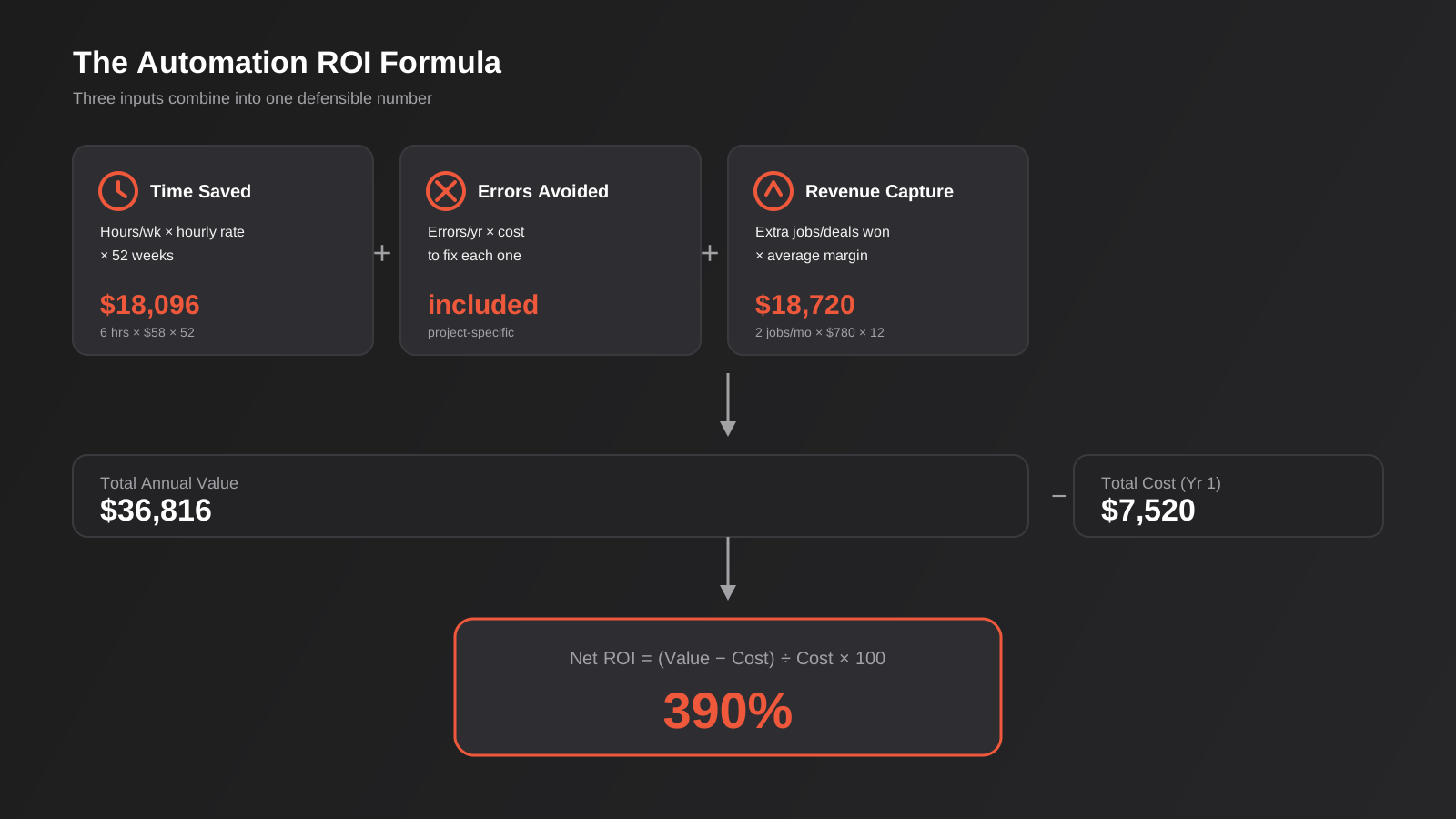
- Annual value from time saved = hours saved per week × fully loaded hourly rate × 52
- Annual value from error reduction = number of errors avoided per year × average cost to fix one
- Annual value from revenue capture = any additional revenue attributable to faster or more consistent response, estimated conservatively
Add those three together for total annual value. Then: Net ROI (%) = (Total Annual Value − Total Cost) ÷ Total Cost × 100, where total cost includes the build cost plus the first year of hosting, licensing and maintenance — not just the invoice from whoever built it.
A worked example
Say a trades business automates its quote follow-up process — the point where a job estimator sends a quote and someone has to remember to chase it up. Before automation, the office manager spent roughly six hours a week manually tracking and following up outstanding quotes, at a fully loaded rate of $58 an hour. That’s $18,096 a year in time. The business also estimates that faster, more consistent follow-up converts an extra two jobs a month that would otherwise have gone cold, at an average margin of $780 per job — another $18,720 a year. Total annual value: $36,816. The automation cost $6,200 to build and $110 a month to run, or $7,520 in year one. Net ROI: ($36,816 − $7,520) ÷ $7,520 × 100 = roughly 390% in year one, with the ongoing cost dropping to just the $1,320 annual running fee from year two.
What the formula misses
Two things the spreadsheet won’t catch on its own. First, there’s almost always a temporary productivity dip in the first few weeks while people learn a new system, and pretending that dip doesn’t exist makes your year-one number too optimistic. Second, and more important: hours “saved” only turn into value if they get redirected to something that generates revenue or reduces other cost. If the office manager in the example above still spends those six hours a week on other admin that doesn’t move the needle, you’ve improved the process but you haven’t actually banked the money. Decide up front what that reclaimed time will be spent on, or the labour-saving half of your ROI calculation is theoretical.
Isolating the Automation’s Actual Contribution
One thing the formula above doesn’t handle well on its own: other things move at the same time as your automation, and it’s easy to hand it credit that belongs somewhere else. A CRM automation goes live the same quarter you hire a new salesperson, run a seasonal promotion, or the broader market picks up — and win rate improves. All three of those could be genuinely true at once. Attribute the entire lift to the automation and the next budget conversation is built on a number that won’t survive the first hard question from whoever controls the purse strings.
The simplest way we handle this with clients is a control-period comparison rather than a single before-and-after snapshot. Instead of comparing the month before launch to the month after, compare the same period a year earlier if the business has reasonably stable seasonality, or compare a team or location running the new process against one that hasn’t rolled it out yet, if that’s practical. A business with two locations gains a genuine comparison group by running the automation in one location for six to eight weeks before rolling it out everywhere — not a guess, an actual side-by-side.
Where a true control group isn’t practical — and for most small businesses it isn’t, because there’s only one of everything — the more honest approach is to separate what you can attribute directly from what merely correlates. Time no longer spent on the manual task is direct: the automation clearly caused that, and you can claim it with confidence. A broader revenue or conversion lift that happened around the same time as the rollout is correlation until proven otherwise. Report the two figures separately in whatever business case or board update you’re building. Lead with the direct savings, because that’s the number that survives an audit. Note the broader lift as a likely but unproven contributor, and don’t build a case that depends entirely on the second number holding up under questioning.
Different Projects, Different Metrics
The formula above is the skeleton. What you plug into it changes a lot depending on what you actually built.
Workflow automation (Zapier, Make, n8n)
For tool-based workflow automation — the kind we cover in our comparison of Zapier, Make and n8n — the metrics that matter most are volume of tasks handled without human intervention, the error rate on handoffs between systems, and time-to-completion for the end-to-end process, not just one step of it. A workflow that automates data entry but still needs someone to manually check the output every time hasn’t actually removed the labour, it’s just moved it from typing to checking.
AI chatbots and customer support
Chatbot ROI, which we go into in more depth in our guide to AI chatbots for customer support, needs a different set of numbers: deflection rate (queries resolved without a human), containment rate (queries that don’t bounce back to a human after the bot attempts them), the change in customer satisfaction score, and cost per conversation compared with a human-handled one. A chatbot with a high deflection rate but a low containment rate is quietly generating complaints faster than it’s generating savings — it looks efficient in the deflection number and terrible in the escalation logs, so you need both figures side by side, not just one.
As a rough illustration: a business handling 800 support conversations a month at an average fully loaded cost of $9.50 per conversation when a person handles it end to end, running a chatbot that genuinely contains 40% of volume without any human follow-up, is looking at roughly 320 conversations × $9.50, or about $3,040 a month in direct labour cost avoided — before subtracting the bot’s own running cost and before accounting for the conversations it attempts but still has to hand off, which cost the same as if the bot had never touched them plus a small delay.
CRM and sales automation
For CRM automation, covered in detail in our CRM automation guide, the metrics that actually correlate with revenue are lead response time, the percentage of leads that get a scheduled follow-up at all (a shockingly large number of businesses lose leads simply by forgetting them), pipeline velocity, and win rate before and after. Activity metrics like “number of automated emails sent” are easy to report and mean almost nothing on their own — they tell you the automation is running, not that it’s working.
Custom AI integrations and agent access
This is the hardest category to measure and the one most businesses get wrong first. Whether it’s a straightforward custom AI integration built directly into an existing CRM or ERP, or a more advanced setup using MCP-based agent access to let an AI system query and act on business data directly, the temptation is to measure “AI adoption” broadly. Don’t. Measure the narrow task the integration was built to do: documents classified correctly without human review, queries answered without needing escalation to a person, records updated accurately without a manual check. A custom AI build that isn’t bounded to a specific, measurable task is exactly the kind of project that ends up in the 95% that can’t show a number six months later.
Where the Returns Actually Show Up (and Where the Money Gets Spent)
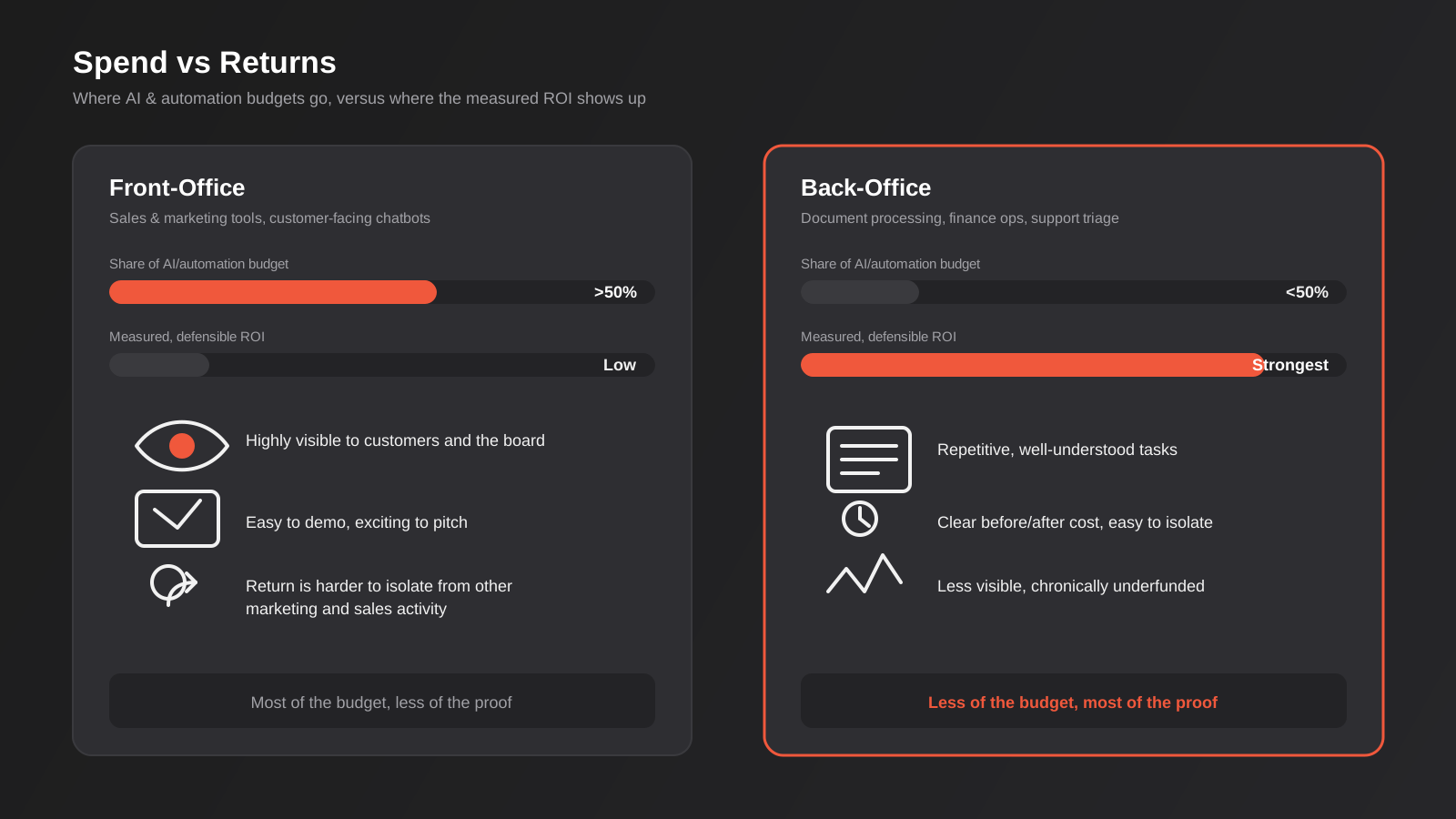
One of the more useful and least reported findings from the MIT research is where enterprise AI budgets actually go versus where the measurable return actually turns up. More than half of enterprise generative AI spending flows into visible, easy-to-demo areas like sales and marketing tooling. The back-office functions — document processing, finance operations, support ticket triage, data reconciliation — get a fraction of the budget, despite producing the case studies with the clearest, most defensible savings.
The reason is obvious once you say it out loud: a customer-facing AI chatbot is exciting to show a board. An automation that quietly reconciles supplier invoices against purchase orders every night is not. But the boring one is usually where the money actually is, because it replaces a specific, repetitive, well-understood task with a clear before-and-after cost. We see the same pattern at Australian small-business scale. A polished customer-facing AI feature gets prioritised because it’s visible to customers and feels like the “innovative” project, while the unglamorous internal workflow — the one that would save more per dollar spent — gets pushed to next quarter indefinitely.
This doesn’t mean customer-facing AI is a bad investment — it can be a very good one, particularly for support-heavy businesses. It means the decision about what to build first shouldn’t be driven purely by what looks most impressive in a pitch. Before greenlighting the visible project, it’s worth costing the boring one too and comparing the two ROI estimates side by side.
Payback Period: How Long Before You Should Expect Something
Payback period — how long until the cumulative value equals the cost — should be estimated at the scoping stage, before build starts, not calculated retrospectively as an excuse if the project underperforms. As a rough guide from projects we’ve scoped and built:
- Simple, single-tool workflow automation (a Zapier or Make workflow connecting two or three systems): typically 1–3 months to payback, because build cost is low and the time saving is usually immediate and easy to measure
- CRM automation or a moderately complex AI chatbot: usually 3–6 months, because there’s an adoption ramp — staff need to trust and actually use the new process before the savings show up fully
- Custom AI integrations, agent-based systems, or anything requiring iteration against real data: 6–12 months is realistic, because these projects usually need at least one round of adjustment after they meet real-world data quality problems
If a project is quoted with a payback period wildly outside these ranges — either suspiciously fast or vaguely open-ended — that’s worth questioning before you sign off, not after.
Turning This Into an Actual Dashboard
None of this needs to live in a spreadsheet someone updates once and forgets. Once a baseline and a formula exist, the same numbers that justified the build in the first place should get pulled into an ongoing report — something we build as part of reporting and data automation work for clients, so the numbers update automatically rather than depending on someone remembering to check a system manually.
A useful automation ROI dashboard doesn’t need to track everything. Three to five metrics, reviewed monthly for the first two quarters and quarterly after that, is usually enough: hours saved (or task volume automated), error or escalation rate, cost per unit processed, and adoption or usage rate if the tool depends on people actually using it. The point of the dashboard isn’t to produce a pretty chart for a board pack. It’s to catch the moment a workflow starts drifting — usage dropping off, errors creeping back up — early enough to fix it before six months of silent underperformance turns into a project nobody can defend.
In practice this doesn’t require new infrastructure. Most workflow platforms already log run counts and failure rates natively, most CRMs already report on response time and pipeline movement, and a simple connected dashboard pulling those existing numbers into one place is usually enough for the first six months. It only becomes worth building something more purpose-built once you’re tracking ROI across several automations at once and the manual pull-together starts costing more time than the tracking is worth — at which point it’s the same reporting automation logic applied to your own operations.
Common Mistakes We See
- No baseline captured before build. Without a “before” number, every ROI claim after launch is a guess dressed up as a measurement.
- Measuring activity instead of outcomes. Emails sent, workflows triggered and tickets touched are easy to count and tell you almost nothing about whether the business is actually better off.
- Using award rates instead of fully loaded cost. Leaving out super, leave loading and overheads understates the real value of time saved, sometimes by 20–30%.
- No owner assigned after go-live. The person who scoped the project moves on to the next one, and tracking quietly stops the day the build is finished.
- Chasing the visible project over the valuable one. Prioritising a customer-facing AI feature because it’s exciting, while a duller back-office automation with a stronger ROI case sits unscoped.
- Treating deployment as adoption. A tool that’s live but that staff route around isn’t producing any of the savings it was built to produce, and the go-live date isn’t evidence otherwise.
- Ignoring the productivity dip. Every rollout has a learning curve. Projecting year-one savings as if the tool ran at full efficiency from day one sets an unrealistic bar and makes a genuinely good project look like it’s underperforming.
- No plan for the reclaimed time. Hours saved only become real value if they’re redirected somewhere productive — otherwise the labour saving is theoretical, not banked.
Frequently Asked Questions
How long does it actually take to see ROI from an AI or automation project?
It depends heavily on complexity. A simple single-tool workflow automation typically pays for itself in one to three months because the build cost is low and the time saving is immediate. A CRM automation or AI chatbot usually takes three to six months once you account for the adoption ramp. Custom AI integrations or agent-based systems that need to be tuned against real business data realistically take six to twelve months. Any quote that promises payback well outside these ranges is worth questioning before you commit, not after.
What’s a realistic ROI percentage for an automation project?
There’s no single universal benchmark, because it depends entirely on the labour cost being replaced and the volume of work going through the process. That said, straightforward workflow automations that remove a genuinely repetitive manual task often show returns in the 200–400% range in year one once the build cost is spread over the annual value of time and errors saved, dropping the build cost out entirely from year two onward. Customer-facing AI projects with a longer adoption curve tend to show more modest first-year numbers that improve over time as usage climbs.
Should we measure ROI differently for AI projects versus traditional automation?
The underlying formula is the same — time saved, errors reduced, revenue captured, weighed against cost. What changes is the confidence you can have in the inputs. Rules-based automation (a Zapier workflow, a CRM trigger) behaves predictably, so your projected numbers tend to hold up. AI-based systems, particularly ones handling unstructured input like customer messages or documents, need a settling-in period where accuracy and containment rates are checked and tuned, so build in a review point at 60 and 120 days rather than assuming the launch-week numbers are the steady state.
What if the biggest benefit is something we can’t put a number on, like staff happiness?
That’s soft ROI, and it’s real, but it shouldn’t be the headline justification for spend. Use the hard numbers — time, errors, revenue — to build the actual business case, then note the soft benefits alongside it. If the hard numbers alone don’t justify the cost, that’s useful information too: it might mean the project should be scoped smaller, or that the soft benefit needs to be weighed honestly against the price rather than used to paper over a weak financial case.
Do we need special software to track automation ROI?
No. A baseline and a formula matter far more than the tool used to display them. Many of our clients start with a simple spreadsheet tracking the three or four numbers that matter for their specific project. Once the process is proven, it’s worth automating the reporting itself so the figures update without manual effort — but that’s a refinement, not a prerequisite for starting to measure properly.
Who should be responsible for tracking ROI after a project goes live?
Someone specific, named at the scoping stage, before the project is signed off — not “the team” in general, which in practice means nobody. It doesn’t need to be a senior role. It needs to be someone who already touches the process daily and can flag early if usage drops or errors creep back in. Assign it before launch, put a date in the calendar for a 90-day review, and the follow-through actually happens.
Where to Start
If you’re weighing up an automation or AI project and don’t yet have a way to answer “is this actually working” six months from now, that’s the first thing worth fixing — before a single workflow gets built. It’s a short conversation: what does the current process cost today, what would a realistic version of “better” look like, and what would you need to see at the 90-day mark to call it a win. We have that conversation with Australian businesses regularly, across everything from a single Zapier workflow to a full custom AI integration, and we’re always happy to talk through what a sensible baseline and AI automation ROI framework would look like for your specific project before you spend a dollar on the build.
Keep reading
Related posts

Changing Live Automations Safely: Staging, Version Control and Rollback for Zapier, Make and n8n (2026)
How to draft, test, release and roll back changes to live Zapier, Make and n8n automations without breaking invoices, orders or customer…

Peppol E-Invoicing for Australian Businesses: Automating Accounts Payable From Structured Invoices (2026)
Peppol e-invoicing in Australia: what is and isn't mandatory, how to pick an access point, and how to automate accounts payable once…

Clean Your Data Before You Automate: A Practical Guide to CRM Data Cleanup for Australian Businesses (2026)
Connecting systems on messy data copies the mess everywhere. Here's how to clean, match and merge records before you automate or integrate.
Got a project you'd like to talk through?
Tell us what you're working on — we'll come back with a plan.
