
AI Chatbots for Customer Support: What Actually Works for Australian Businesses (2026)
 Jignesh Vagadiya
31/08/2026
21 min read
Jignesh Vagadiya
31/08/2026
21 min read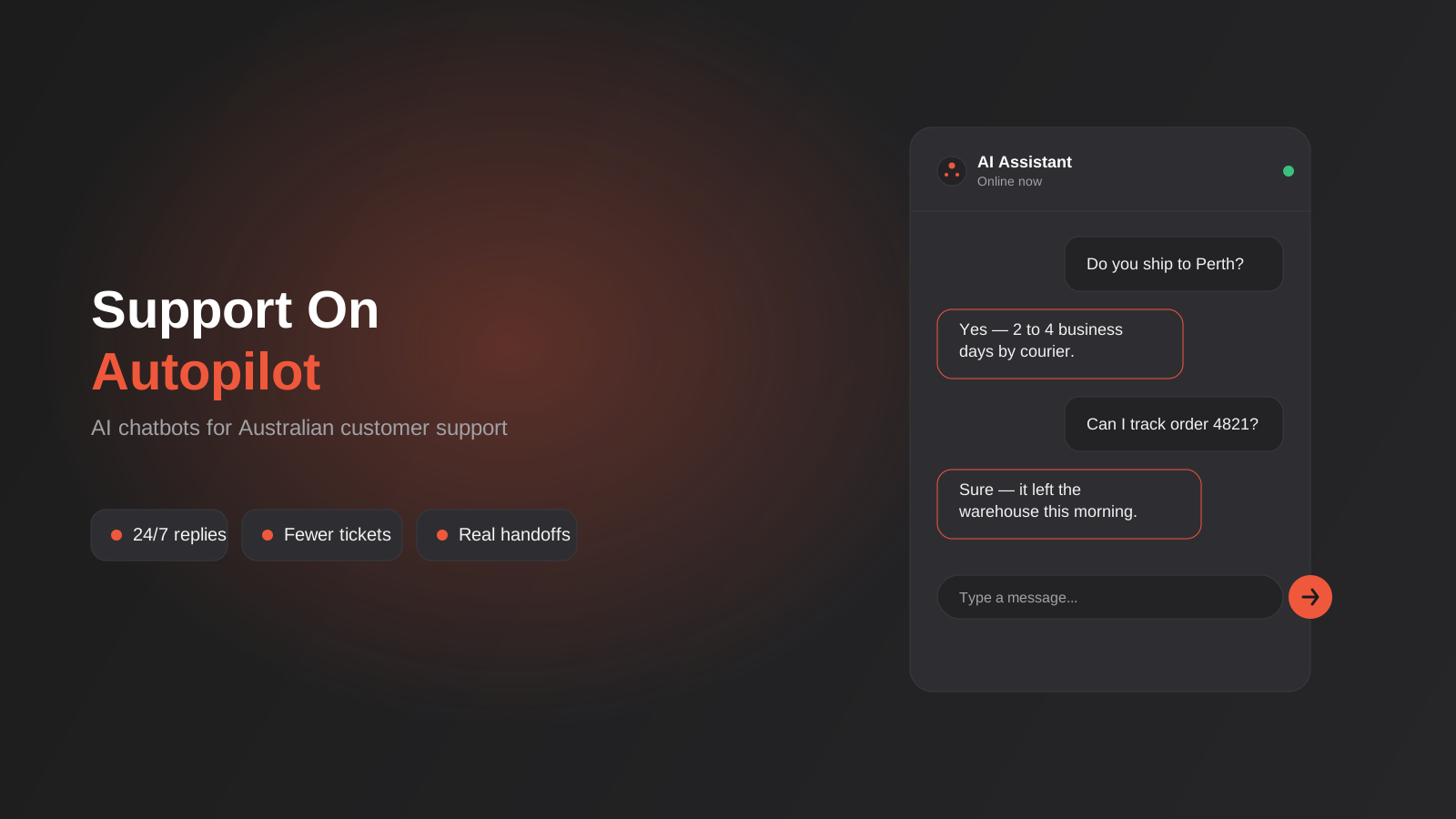
Somewhere between “we should probably get one of those chatbots” and actually shipping one, most Australian businesses stall out. Not because the technology is hard to find — every second SaaS tool now bolts an AI widget onto its pricing page — but because nobody’s quite sure what it’s meant to do, what it should never be allowed to say, and whether it’s going to make customer service better or just move the frustration somewhere else.
We get asked about this constantly, usually by businesses who’ve had one of two experiences: they tried a free chatbot plugin years ago that gave robotic, useless answers and wrote the whole category off, or they’ve just watched a competitor roll one out and are worried about being left behind. Both reactions are understandable. The category has genuinely changed in the last two years — the shift from rigid, decision-tree “click a button” bots to large language model assistants that can read your actual content and hold a real conversation is not a marginal upgrade, it’s a different tool. But that doesn’t mean every business needs one, or needs the same kind.
This is a practical guide to what AI chatbots for customer support actually do well in 2026, what they still can’t be trusted with, what they cost in Australia, and how to build one without creating a new source of complaints. We’re not going to tell you a chatbot will replace your support team or transform your conversion rate overnight, because for most businesses it won’t do either. What it can do, built properly, is take a real chunk of repetitive volume off your team’s plate and give customers faster answers outside business hours — and that’s worth doing right.
What “AI chatbot” actually means now
The term gets used loosely enough that it’s worth being precise before anything else, because the two things people picture when they hear “chatbot” behave completely differently.
Rule-based bots vs LLM-powered assistants
The older generation — and a lot of what’s still bundled free into helpdesk tools — is rule-based. You build a decision tree: if the customer clicks “Track my order,” show a form; if they click “Returns,” show the returns policy. It works, but only inside the exact paths you’ve built. Type a question slightly off-script and you get “Sorry, I didn’t understand that” or a menu of buttons that don’t match what was asked. This is the version of a chatbot most people have a bad memory of, and fairly so.
The current generation is built on large language models — the same underlying technology as ChatGPT or Claude, but scoped down and grounded in your business’s own content. Instead of matching keywords to a decision tree, it reads the actual question, checks it against a knowledge base you’ve given it (your FAQ page, product catalogue, policies, order data), and generates a specific answer in normal sentences. It can handle “hey do you guys ship to WA and how long does that usually take” without choking on the phrasing, because it’s not pattern-matching against a script — it’s actually parsing the question.
This distinction matters more than any other decision in the whole project. A lot of the disappointment businesses report with chatbots comes from deploying a rule-based tool and expecting LLM-level flexibility, or deploying an LLM-based one with no guardrails and being surprised when it improvises an answer it shouldn’t have. Know which one you’re buying, because the setup, cost and risk profile are genuinely different products wearing the same label.
Where a chatbot actually plugs in
“Chatbot” also gets used as shorthand for a website widget, but the channel matters. Most Australian businesses we work with end up running one of, or a combination of:
- A website chat widget, usually bottom-right corner, that greets visitors and answers pre-purchase or support questions
- WhatsApp or Facebook Messenger, which suits businesses whose customers already message them there rather than emailing
- SMS, less common but relevant for trades and services where customers text more than they browse
- Inside a help centre or knowledge base as a search-and-answer layer rather than a pop-up widget
The right channel is wherever your customers are already trying to reach you and not getting a fast answer — check your support inbox, your Instagram DMs and your missed call log before assuming it’s the website. A retailer whose customers mostly message on Instagram gets very little value from a beautifully built website widget nobody uses.
What it can actually handle for a small or mid-sized Australian business
This is the part worth being honest about, because the marketing around AI chatbots leans hard into “resolves everything automatically” language that doesn’t match what happens in a real support inbox.
The tasks that genuinely deflect volume
Support tickets cluster far more than most business owners expect. Pull three months of your support inbox or live chat transcripts and you’ll usually find that a small number of question types account for most of the volume: where’s my order, what are your hours, do you deliver to my area, how do I book, what’s included in this package, can I get a refund, is this in stock. These are exactly the questions a well-trained assistant handles well, because the answer is stable, factual, and already written down somewhere — the bot just needs to find it and phrase it naturally.
Booking and quoting flows also work well when the logic is simple: checking availability against a calendar, capturing details for a callback, or walking someone through a standard quote based on a few inputs (property size, service type, location). What makes these work is that the outcome is a handoff, not a final decision — the bot collects information and a person or system acts on it.
Where it should hand off, every time
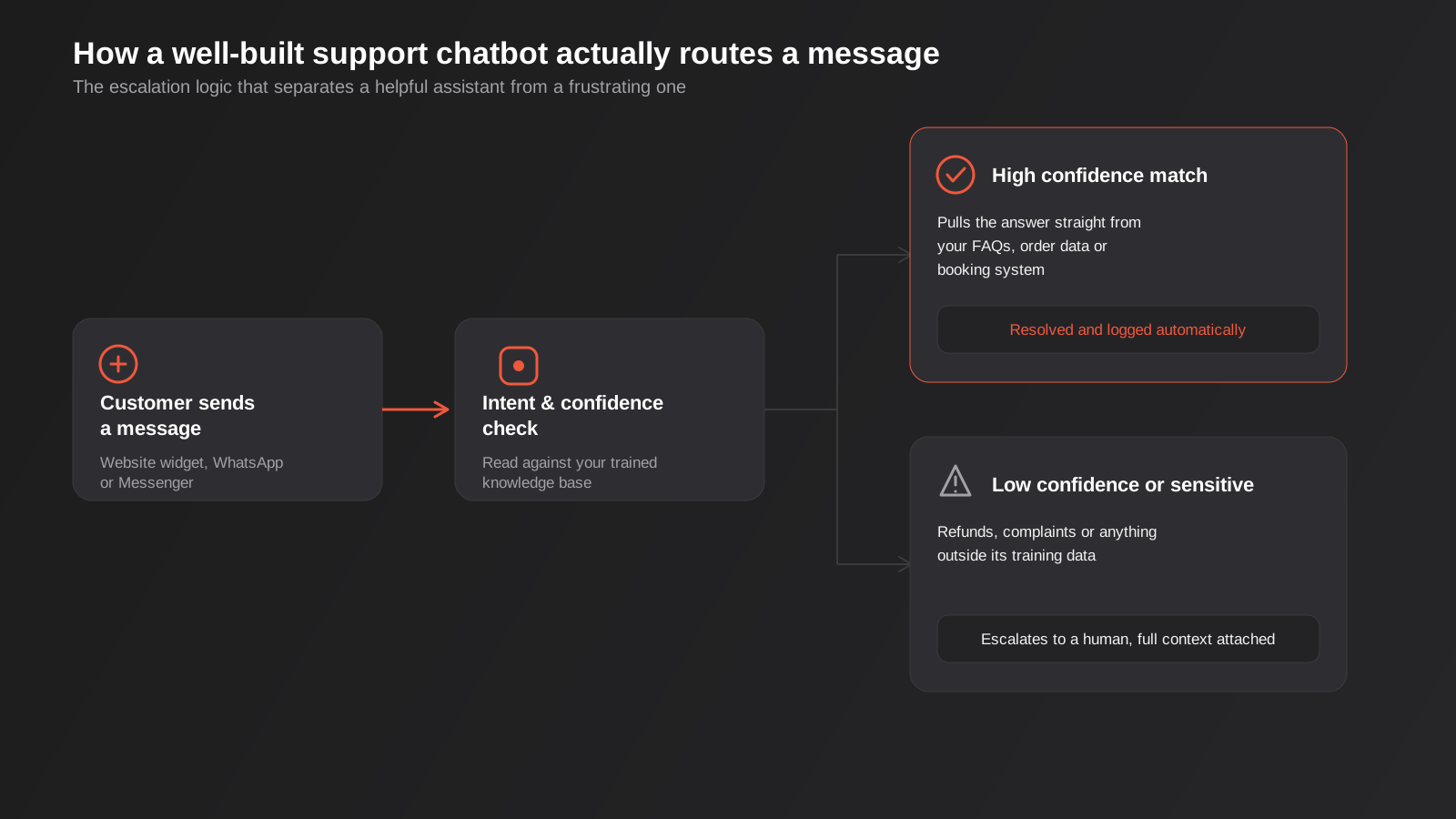
Anything involving money leaving your account, a legal or medical judgement call, an angry customer, or a genuinely unusual situation should route to a person. That’s not a limitation to apologise for — it’s the correct design. A chatbot that tries to adjudicate a refund dispute or give health advice is a liability, not a feature. The businesses who get the most value from AI chatbots are the ones who are ruthless about scoping what it’s allowed to touch, rather than trying to make it handle everything so they can claim full automation.
A rough but useful test: if a wrong answer would just be mildly annoying (wrong opening hours), the bot can own it. If a wrong answer could cost the customer money, damage trust, or create a compliance problem (an incorrect statement about a refund policy, a firm commitment on price or timeline that isn’t accurate), a human needs to be in the loop before anything is confirmed.
Getting the tone right matters more than people expect
A chatbot that answers correctly but sounds like a legal disclaimer will still frustrate customers, and one that’s dialled too casual can undercut trust for a business that needs to sound credible — an accounting firm and a surf shop should not sound the same in chat. This is a setup step that’s easy to skip and expensive to skip, because it’s the difference between an assistant that feels like a genuine extension of the business and one that feels bolted on. Give it explicit tone instructions the same way you’d brief a new staff member: how formal, how much personality, whether it uses the customer’s first name, how it handles being told something it got wrong. A few example conversations showing the tone you want, written by someone who actually knows how the business talks to customers, does more for quality than any amount of platform configuration.
What it costs in Australia, and how the pricing models actually work
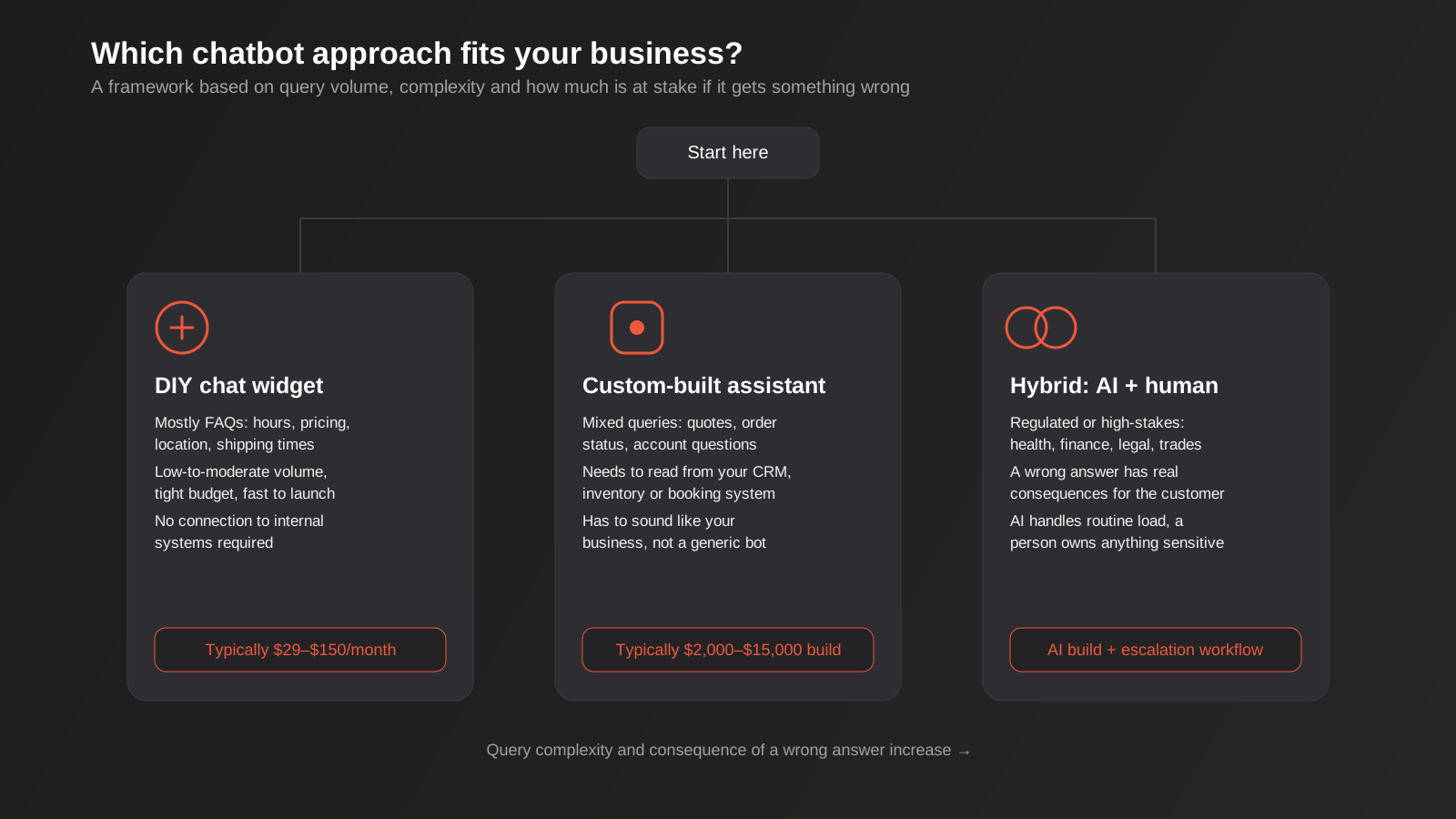
Chatbot pricing is genuinely confusing because vendors use three different billing models, and comparing a quote from one against a quote from another without adjusting for the model is comparing apples to invoices.
Subscription (per seat or per site)
Most DIY platforms charge a flat monthly fee, often scaled by number of conversations or “agents” (seats). Entry-level plans sit in the tens of dollars a month; mid-tier plans with more AI features, integrations and higher conversation caps climb into the low hundreds. This suits low-to-moderate volume, predictable spend, and businesses who want to self-manage the setup.
Per-resolution pricing
A newer model, increasingly common among the bigger platforms, charges per conversation the AI actually resolves rather than a flat fee. It sounds fair — you only pay for value delivered — but it can get expensive fast for a business with genuinely high support volume, and it creates an odd incentive where the vendor’s definition of “resolved” doesn’t always match the customer’s experience of being helped. Read the fine print on how a resolution is counted before committing to this model at scale.
Custom build
For a chatbot that needs to read live data from your CRM, booking system or inventory rather than just a static FAQ, a custom build makes more sense than forcing a DIY platform’s limited integrations to do something they weren’t built for. This is a one-off development cost rather than a subscription, and the number moves a lot depending on how many systems it needs to connect to and how much conversation logic it needs. A single-purpose assistant answering from a well-organised knowledge base is a modest project; one that needs to check real-time stock, pull a customer’s order history and trigger actions in your CRM is a considerably larger scope. Our automation pricing guide gives a sense of where different build sizes tend to land.
There’s also an ongoing cost that quotes often leave out: someone needs to own the knowledge base after launch. Prices change, policies get updated, new products get added, and if nobody is responsible for keeping the bot’s source content current, its answers quietly go stale within a few months regardless of how good the underlying model is. Budget a small amount of ongoing time for this the same way you’d budget for keeping a website’s content up to date, because an unmaintained chatbot degrades faster and more invisibly than an unmaintained webpage — nobody notices until a customer gets a wrong answer and complains.
Whichever model you’re quoted, ask what happens as volume grows. A DIY subscription that looked cheap at 200 conversations a month can become the most expensive option at 5,000. A custom build has a higher upfront cost but a flatter ongoing one, which usually favours it for businesses that already have consistent support volume rather than sporadic enquiries.
How it fits with live chat, email and phone
A chatbot isn’t a replacement for your other support channels, and treating it as one is how businesses end up worse off than before they had it. The useful framing is a filter, not a substitute: the bot sits in front of your existing channels and absorbs the repetitive volume, so the humans behind live chat, your support inbox and the phone are dealing with a higher proportion of things that actually need a person.
When live chat with a real person still wins
For businesses selling something considered or expensive — a custom quote, a B2B service, anything where a prospect has genuine pre-purchase questions that shape a buying decision — a real person on live chat during business hours often converts noticeably better than a bot, because the questions are exactly the kind that benefit from judgement and a bit of persuasion. The pattern we see work well is a bot covering after-hours and the obvious repetitive questions, with a clean handoff to a live person during business hours for anything that looks like a genuine sales conversation.
Phone and email don’t disappear
Some customers, particularly in trades, healthcare and older demographics generally, will always prefer to ring rather than type a question into a website widget. A chatbot on your site does nothing for that caller, and trying to force every customer onto chat is a fast way to frustrate the ones who’d rather just talk to someone. The businesses who get the best return treat the chatbot as one more channel added to the mix, sized to where the repetitive volume actually is, rather than a strategy to eliminate phone and email support altogether.
Connecting it to the rest of your stack
A chatbot that only knows what’s written on your FAQ page is useful. One that can actually check your systems — real order status, real stock levels, a real calendar — is a different level of useful, and it’s also where projects most often blow their budget and timeline if the scope isn’t controlled from the start.
Start with read access before write access
The safest and usually most valuable first integration is read-only: letting the bot look up an order status, check whether a product is in stock, or confirm a booking time, without giving it any ability to change those systems. This covers a huge share of the “where’s my order” and “is this available” volume with comparatively low risk, because a wrong answer here is embarrassing rather than costly. Write access — letting the bot actually cancel an order, issue a credit, or rebook an appointment — is a meaningfully bigger step, and it’s worth having several months of clean read-only operation before extending that far.
Your helpdesk and CRM still need to see everything
Every conversation the bot has, resolved or escalated, should land in whatever system your team already uses to track customers — your helpdesk, your CRM, or both. Without this, you end up with a second, invisible support history that nobody on the team can see, which defeats a lot of the point. This is also where a chatbot project overlaps with broader workflow automation: the same logic that routes a chat escalation into your CRM is often built using the same tools covered in our Zapier vs Make vs n8n comparison, and for businesses whose systems don’t have an off-the-shelf connector, a custom integration is sometimes the more reliable path than forcing a generic automation tool to bridge the gap.
Be realistic about which of your existing tools have good APIs and which don’t. A modern platform like Shopify, Xero or HubSpot connects cleanly. An older, heavily customised internal system might not, and finding that out before scoping the project — not after development has started — saves a lot of wasted budget.
Building and launching one without embarrassing yourself
The single biggest predictor of whether a chatbot succeeds or gets quietly switched off after three months isn’t which platform you pick. It’s how much real content it was trained on and how carefully the guardrails were set.
Give it a real knowledge base, not a vibe
An LLM-based assistant is only as good as what you feed it. If your FAQ page is three questions old and your actual policies live in someone’s head, the bot will either hallucinate an answer or refuse to answer at all — both bad outcomes. Before building anything, write down the actual answers to your twenty most common questions in plain language: exact shipping timeframes, exact return windows, what’s included in each service tier, how bookings actually work. This document does double duty — it trains the bot and it’s usually the FAQ content your website was missing anyway.
Pull this from your support inbox, not from what you assume customers ask. We consistently find a gap between what a business thinks its top questions are and what the actual transcripts show, and that gap is exactly where a poorly trained bot falls down in its first week live.
Set the guardrails before launch, not after a complaint
A well-built assistant needs explicit instructions about what it’s not allowed to do: no discounts it isn’t authorised to offer, no firm delivery promises outside documented ranges, no medical, legal or financial advice, no engaging with abusive messages beyond a polite deflection to a human. This isn’t a one-line setting — it’s a written policy that gets built into the system prompt and tested against edge cases before anything goes live.
Confidence thresholds matter here too. A good assistant should know when it doesn’t know, and hand off cleanly rather than guessing. That’s the single biggest difference between a chatbot people trust and one that generates complaints — not raw intelligence, but knowing its own limits.
Test it like a customer who’s trying to break it
Before launch, run it through deliberately awkward inputs: misspelt questions, questions in a different order than your FAQ expects, someone trying to get a discount by pretending to be a returning customer, a question with no good answer at all. Watch what it does when it genuinely doesn’t know — that failure mode is the one that will happen in production, so it’s worth seeing on purpose first. A short pilot with real staff or a small segment of live traffic before a full rollout catches problems a demo environment never will.
Give it a human fallback that actually works
Nothing erodes trust in a support chatbot faster than an escalation path that goes nowhere — a “talk to a human” button that just repeats the bot’s own answer, or a handoff that loses the conversation history so the customer has to explain everything again. If a person is picking up the escalated conversation, they need the full transcript and context, not a cold start. This is where the automation genuinely earns its keep or genuinely loses goodwill, and it’s worth investing more setup time here than in the bot’s personality.
Measuring whether it’s actually working
Once it’s live, resist the temptation to judge it purely on “number of conversations handled.” That number goes up regardless of whether the bot is actually helping. A handful of numbers give a much more honest read:
- Containment rate — the share of conversations resolved without a human, but read alongside customer satisfaction, not instead of it
- Escalation quality — how often a handoff to a person happens with full context versus the customer having to repeat themselves
- Deflection accuracy — spot-check a sample of “resolved” conversations weekly in the first month to catch confidently wrong answers before they compound
- Time to first response outside business hours, which is usually where the clearest win shows up
- Repeat contact rate — if the same customer comes back to a human shortly after a bot conversation, the bot didn’t actually resolve it, whatever the transcript says
Conversation logs are also a genuinely useful, ongoing source of product and content feedback — they show you exactly what customers are confused about, in their own words, which is more reliable than any survey. Treat the first month as a tuning period rather than a set-and-forget deployment, and the assistant will keep improving as gaps in its knowledge base get filled.
Common mistakes
- Launching with no real knowledge base — feeding the bot a thin, outdated FAQ and expecting it to fill in the gaps accurately. It will guess, and the guesses sound confident even when they’re wrong.
- No clear escalation path — trapping a frustrated customer in a loop with no visible way to reach a person, which turns a minor issue into a genuine complaint.
- Treating it as set-and-forget — deploying once and never reviewing conversation logs, so a knowledge gap that appeared in week one is still causing bad answers six months later.
- Ignoring Australian specifics in the training content — shipping timeframes, public holidays, GST treatment and regional service areas that a generic template won’t get right without being told explicitly.
- Letting it make commitments it can’t back — discounts, firm delivery dates or exceptions to policy that a human would normally have discretion over.
- Deploying on every channel at once — launching to website, WhatsApp and Messenger simultaneously with no pilot, instead of validating on the channel with the most volume first and expanding once it’s proven.
- Over-selling it internally — telling the support team it will “handle everything” rather than framing it as taking the repetitive load off them, which is what actually happens and what actually gets team buy-in.
Frequently Asked Questions
Do I need a custom-built chatbot, or is an off-the-shelf tool enough?
If your questions are mostly stable FAQs — hours, shipping, returns, general product info — a DIY platform is usually the right starting point and can be live within a week or two. Custom development earns its cost when the bot needs to read live data from your systems (real order status, real-time stock, live booking availability) or needs conversation logic more complex than a knowledge base lookup. Start with the simpler option and only move to custom development once you’ve proven the demand and hit the limits of what the off-the-shelf tool can connect to.
How much does an AI chatbot actually cost for a small Australian business?
DIY platforms typically run from around $30 to a few hundred dollars a month depending on conversation volume and features. A custom-built assistant connected to your own systems is a project cost rather than a subscription, and scales with how many systems it needs to integrate with and how much logic it needs — a single-purpose FAQ assistant is a modest build, while one wired into your CRM and booking system is considerably larger. Whatever you’re quoted, ask how the price changes as volume grows, since some pricing models get expensive fast at scale.
Will it understand Australian customers, spelling and slang?
Modern LLM-based assistants handle Australian English and casual phrasing well — they’re not thrown by “arvo,” abbreviated questions or typos the way older rule-based bots were. What needs deliberate attention is the content it’s trained on: Australian shipping zones, GST-inclusive pricing, public holiday hours and any region-specific service areas need to be explicitly written into its knowledge base, because a generic template won’t include them by default.
Can a chatbot handle refunds, cancellations or account changes?
It can start the process — collecting the order number, reason and details — but the actual decision and action should generally sit with a person or a controlled system workflow, particularly where money is involved. Businesses that let a chatbot autonomously approve refunds or account changes without any check tend to run into abuse or costly errors quickly. Scope it to information-gathering and handoff for anything financial, and let it fully own only the genuinely low-stakes queries.
How long does it take to launch a support chatbot?
A DIY platform with a solid knowledge base behind it can be live in one to two weeks, most of which is spent writing and organising the content rather than configuring the tool itself. A custom build connected to internal systems is a longer project, typically several weeks to a couple of months depending on how many integrations and how much escalation logic is involved. In both cases, the content and guardrail work takes longer than the technical setup, and it’s the part that shouldn’t be rushed.
What happens when the chatbot gets something wrong?
Even a well-trained assistant will occasionally give an answer that’s off, which is exactly why confidence thresholds and a working human escalation path matter more than raw accuracy. Reviewing a sample of conversations regularly, especially in the first month, catches confidently wrong answers before they cause real problems. If a mistake does reach a customer, having a person able to step in with full conversation context to correct it quickly is what determines whether it’s a minor hiccup or a lost customer.
Where to start
The businesses who get real value from a support chatbot are almost never the ones chasing the flashiest AI feature set. They’re the ones who did the unglamorous work first: pulled their actual support transcripts, worked out what’s genuinely repetitive, wrote honest answers to those questions, and were deliberate about what the bot should never be allowed to decide on its own. Get that right and the platform choice becomes a much smaller decision than it feels like at the start.
If you’re weighing up whether a DIY widget is enough or your business needs something wired into your CRM and booking systems, that’s exactly the kind of scoping conversation we have with businesses regularly — have a look at our AI chatbots and assistants service, or see how a chatbot fits alongside broader CRM and sales automation if the goal is a more connected support and sales workflow. If you’re curious how AI agents more broadly connect to business systems beyond chat, we cover that in our guide to MCP servers. Otherwise, the simplest next step is a conversation about what your support inbox actually looks like — get in touch and we’ll help you work out whether a chatbot is the right fix, and if so, which kind.
Keep reading
Related posts

Changing Live Automations Safely: Staging, Version Control and Rollback for Zapier, Make and n8n (2026)
How to draft, test, release and roll back changes to live Zapier, Make and n8n automations without breaking invoices, orders or customer…

Peppol E-Invoicing for Australian Businesses: Automating Accounts Payable From Structured Invoices (2026)
Peppol e-invoicing in Australia: what is and isn't mandatory, how to pick an access point, and how to automate accounts payable once…

Clean Your Data Before You Automate: A Practical Guide to CRM Data Cleanup for Australian Businesses (2026)
Connecting systems on messy data copies the mess everywhere. Here's how to clean, match and merge records before you automate or integrate.
Got a project you'd like to talk through?
Tell us what you're working on — we'll come back with a plan.
