
Helpdesk Automation for Australian Businesses: Ticket Routing, SLAs and Escalations (2026)
 Jignesh Vagadiya
29/09/2026
21 min read
Jignesh Vagadiya
29/09/2026
21 min read
A customer emails at 4:47pm on a Friday. It sits in a shared inbox until Monday morning, gets forwarded twice, and by the time someone actually replies the customer has already left a review about being ignored. Nobody dropped the ball on purpose — there just wasn’t a system deciding who should own that ticket, how urgent it was, or what should happen if nobody touched it in time.
Most Australian businesses we talk to already have a helpdesk tool. Zendesk, Freshdesk, HubSpot Service Hub, Intercom, or just a very organised shared inbox. What they don’t have is real helpdesk automation underneath it: the routing rules, SLA timers and escalation paths that decide what happens to a ticket the moment it lands, without a human having to triage it first. That gap is what actually causes missed replies and blown promises, not a lack of software.
This is a companion piece to our guide on AI chatbots for customer support, but it’s a different problem. A chatbot answers questions before a ticket exists. This is about what happens once a ticket does exist — how it gets to the right person, how long they’ve got, and what happens if it stalls. You can run one without the other, and most businesses should build this layer first.
What helpdesk automation actually is (and isn’t)
Support ticket automation is rule-based logic that acts on a ticket without a person deciding case by case. It’s not artificial intelligence in the generative sense — there’s no model writing replies or holding a conversation. It’s closer to the automation in an accounting system: if this condition is true, do that action, every time, consistently, at 2am on a public holiday just as reliably as at 10am on a Tuesday.
Three things tend to get lumped together under “support automation” and they solve different problems:
- AI chatbots and virtual agents, which handle the conversation itself — answering FAQs, collecting information, sometimes resolving simple requests without a ticket ever being raised, a topic we’ve covered in depth elsewhere.
- Ticket routing and SLA automation, which is what this article is about — deciding who owns a ticket, how urgent it is, and what happens if it’s ignored.
- Knowledge base and self-service deflection, which stops tickets being created in the first place by answering the question before someone reaches for the contact form.
A lot of businesses buy a chatbot when the actual problem is that tickets which do land have no routing logic behind them. If your team can answer most questions fine once they see them, but tickets sit in a queue for days before anyone does, you have a routing problem, not a conversation problem. Fix that first — it’s cheaper, faster to build, and it’s usually where the real damage is happening.
The anatomy of a ticket routing rule
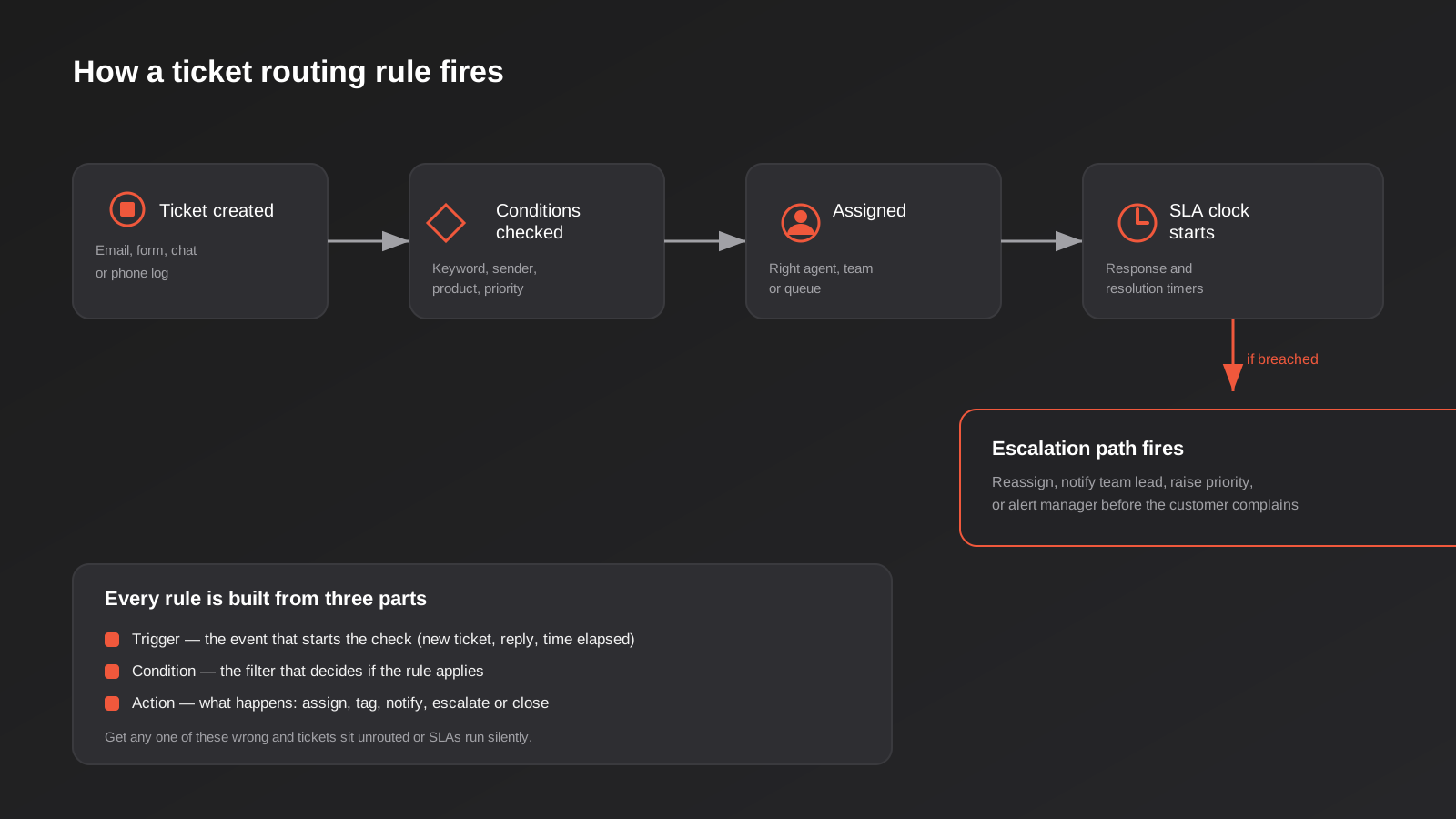
Every routing rule, in every helpdesk platform we’ve worked in, is built from the same three parts. Understand these and the rest of the platform-specific terminology (Freshdesk calls it a Dispatch’r, Zendesk calls it a Trigger, HubSpot calls it a Workflow) stops mattering much.
Trigger
The event that causes the rule to run. Usually a new ticket being created, but it can also be a reply being added, a ticket being reopened, or simply time passing — “every 30 minutes, check for tickets that haven’t been updated.” That last type, a time-based trigger, is what makes SLA escalation possible. Without it, a rule only ever fires once, at creation, and can’t notice that a ticket has gone quiet.
Condition
The filter that decides whether the rule should apply to this specific ticket. Sender domain, subject line keywords, the product or plan the customer is on, the channel it came in through, priority already set by a form field. Conditions can stack — “if the sender is on our Enterprise plan AND the subject contains ‘down’ or ‘outage’” is a perfectly normal condition once you’ve got a few months of ticket history to know what actually predicts urgency.
Action
What actually happens: assign to an agent or a team, set a priority, apply a tag, send an internal notification, reply with a macro, or escalate. Most helpdesk platforms let a single rule fire several actions at once — assign AND tag AND notify, in one pass.
Get any one of these three wrong and the failure mode is predictable. A trigger that’s too narrow means tickets slip through untouched. A condition that’s too broad means everything gets routed to one overloaded queue. An action that’s incomplete — assigning without notifying, say — means a ticket technically has an owner who has no idea it exists.
Put together, a single working rule reads something like: “When a ticket is created (trigger), and the sender’s email domain matches a known Enterprise account and the subject or body contains a word from our outage list (condition), assign it to the senior support queue, set priority to Urgent, and post an alert to the on-call Slack channel (action).” That’s the whole shape of it. Every more complicated rule you’ll ever build is a variation on that same trigger-condition-action sentence, just with more conditions stacked on or more actions fired at once.
Building an SLA that actually holds
An SLA (service level agreement) sounds like a legal document but functionally it’s just two clocks: how long before someone responds, and how long before the issue is resolved. The automation’s job is to start those clocks at the right moment, pause them when they should pause, and do something useful when they run out.
Response SLA vs resolution SLA
These get confused constantly. First response time is how long until a human (or a qualifying automated reply) acknowledges the ticket. Resolution time is how long until the issue is actually fixed. A fast first response buys goodwill even when the fix takes days — “we’re on it, expect an update by Thursday” genuinely changes how a customer experiences a slow resolution. Most helpdesk automation should be weighted more heavily toward guaranteeing the first response clock never breaches, because that’s the one customers actually notice in the moment.
Priority tiers
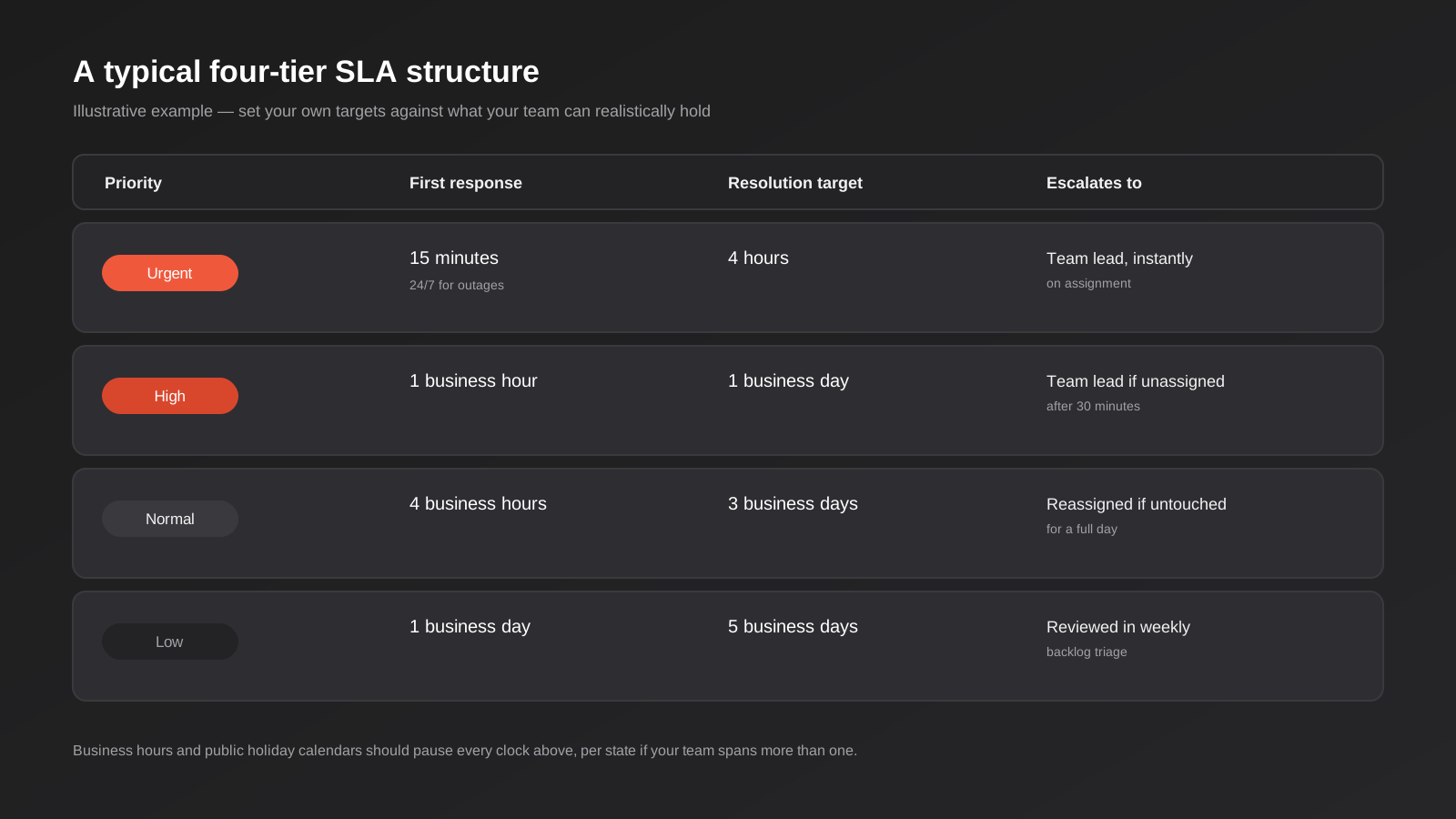
Not every ticket deserves the same clock. A four-tier structure — Urgent, High, Normal, Low — covers most small and mid-sized teams without becoming its own admin burden. The point isn’t to copy exact numbers from somewhere else; it’s to pick targets your team can actually hold consistently, then automate against those targets rather than hoping people remember them.
Escalation paths
The escalation path is the part most businesses skip, and it’s the part that actually protects the SLA. A rule that just sets a due date and does nothing when that date passes isn’t automation, it’s a label. A real escalation path reassigns the ticket, raises its priority, and notifies a team lead or manager, in that order, before the customer has to chase. The best version of this notifies internally well before the SLA actually breaches — at 75% of the clock, not at 100% — so there’s still time to act rather than just a record of failure.
Business hours and holiday calendars
This is the detail that quietly breaks more SLA automations than anything else. If your clock runs 24/7 but your team works 9 to 5, every ticket that lands at 6pm shows as breaching by the time anyone’s back at their desk, whether or not it actually was. Every serious helpdesk platform lets you define business hours and holiday calendars, and if you operate across more than one Australian state, you need more than one calendar — a ticket logged on Melbourne Cup Day breaches nothing in Perth. Set this up before you set up anything else. An SLA measured against the wrong clock is worse than no SLA, because it tells you things are fine when they aren’t, or that they’ve failed when they haven’t.
What happens when a customer replies after the ticket’s closed
This is a smaller detail with a habit of causing real disagreements internally. If a ticket is marked resolved and the customer replies two days later saying it’s not actually fixed, does the clock restart from zero, or does it treat the reply as a continuation of the original ticket with the original SLA already blown? Most platforms let you configure this, and the honest answer is it depends on what you’re trying to measure. If you want your reported SLA performance to reflect genuine first-contact resolution, a reopened ticket should carry its original timestamps forward, not reset the clock and quietly launder a missed deadline into a fresh one. Decide this deliberately rather than accepting whatever the platform defaults to, because the default is often the one that makes your reporting look better rather than the one that’s actually honest.
Connecting the helpdesk to the rest of the business
A ticket rarely lives in isolation. The agent picking it up usually needs to know who the customer is, what they’ve bought, whether they’re already mid-negotiation with sales, or whether there’s an open invoice dispute. When the helpdesk and the CRM don’t talk to each other, agents waste the first five minutes of every ticket just gathering context that already exists somewhere else in the business — flicking between three tabs to confirm what plan someone’s on before they can even start solving the actual problem.
The fix is usually a two-way sync between the helpdesk and whatever holds customer and order data — the CRM, the ecommerce platform, sometimes the accounting system. A few patterns come up again and again once businesses start connecting the two properly. A new ticket automatically creates or updates a CRM activity, so account managers see support history without asking. A customer opening a ticket while they’re mid-negotiation with sales flags the deal owner automatically, rather than sales finding out by accident three weeks later that the account has been unhappy the whole time. An order or subscription lookup gets pulled into the ticket sidebar automatically, so the agent isn’t asking the customer for an order number they already typed into the contact form. A resolved ticket can trigger a satisfaction survey through whatever email tool you run, closing the loop without anyone remembering to send it manually.
None of this needs custom development in most cases — Zapier, Make or n8n sit comfortably between almost any helpdesk and almost any CRM, and we’ve covered picking between those three in our Zapier vs Make vs n8n guide. Where the connection needs to be more robust — high ticket volume, financial data changing hands, or a requirement that nothing gets missed even if an API call fails — that’s when a properly built integration earns its cost over stacking more no-code steps onto an already fragile chain.
If you’re building this from scratch, our CRM and sales automation page is the right next stop — get the CRM side sorted first and the helpdesk side has something worth syncing into once the routing rules are in place.
Choosing the right tool for the job
The platform matters less than the discipline behind it, but it does matter. A rough guide to where each type of tool tends to fit:
- Native helpdesk automation (Freshdesk’s Dispatch’r/Observer/Supervisor rules, Zendesk Triggers and Automations, HubSpot Service Hub workflows) handles the vast majority of routing and SLA logic without leaving the platform. Start here. It’s built for exactly this job and doesn’t add another system to maintain.
- Zapier, Make or n8n come in when the helpdesk needs to talk to something outside itself — the CRM, a Slack channel, an internal database, an SMS gateway for after-hours alerts. These tools are the connective tissue, not the routing engine itself.
- A dedicated workflow automation build (what we’d scope as a proper workflow automation project) makes sense once the logic gets genuinely complex — multi-step approval chains, routing that depends on real-time inventory or account data, or SLA rules that vary by contract terms stored somewhere the helpdesk can’t see natively.
It’s worth being specific about where the native tools actually differ, because “they all have automation” undersells how differently they behave in practice. Freshdesk splits its rules into three types — Dispatch’r for new tickets, Observer for updates, Supervisor for time-based checks — which forces you to think about trigger type early, and that’s a genuinely useful discipline even if it feels fiddly at first. Zendesk collapses this into Triggers (event-based) and Automations (time-based), which is slightly more flexible but easier to build something that quietly conflicts with another rule, since there’s less structural separation forcing clarity. HubSpot Service Hub leans on the same workflow builder that runs its marketing and sales automation, which is a real advantage if you’re already living in HubSpot for CRM, because ticket routing and deal routing can share the same underlying logic and data. Intercom sits a little apart from all three — it’s built chat-first, so its automation is strongest around in-conversation routing and weakest around the kind of async, multi-day SLA tracking that email-heavy support teams need.
None of this means the platform choice should come before the rules design. Every one of these tools can support a solid four-tier SLA structure with proper escalation. The platform decision usually comes down to what you already run for CRM or live chat, and switching helpdesk platforms purely to get marginally better automation is rarely worth the migration cost and the retraining involved — get more out of the rules engine you’ve already got before you conclude the tool itself is the problem.
Whatever you land on, treat it as production infrastructure, not a set-and-forget config screen. Automations silently break — an API key expires, a field gets renamed, a Zapier plan hits its task limit mid-month — and a broken routing rule fails quietly. Tickets don’t error out, they just sit unassigned. We wrote a full guide on catching this before it costs you a client in automation monitoring for Zapier, Make and n8n, and the short version applies here directly: monitor the automation itself, not just the metric it’s supposed to protect.
Measuring whether it’s actually working
Setting up rules and walking away is how a routing system quietly drifts out of date. A handful of numbers, checked regularly rather than glanced at once during setup, tell you whether the automation is still doing its job.
SLA compliance rate
The percentage of tickets that met their first response and resolution targets, broken down by priority tier rather than as one blended number. A blended compliance rate can look healthy while your Urgent tier is quietly failing every week, because it’s getting averaged against a Low tier that’s trivial to hit. Track tiers separately or the number will actively mislead you.
First response time trend
Not just whether you hit the target, but which direction the actual time is moving, week over week. A team can be technically compliant while response times creep upward inside the target the whole time, which is usually an early signal that ticket volume is outgrowing headcount well before anyone misses an SLA outright.
Reopen rate
The share of resolved tickets that get reopened within a set window, say seven days. A rising reopen rate usually means tickets are being closed to hit a resolution SLA rather than because the issue is actually fixed, which is exactly the kind of gaming an SLA-driven team can slide into without anyone deciding to do it deliberately.
Backlog age
How old the oldest untouched ticket in each queue actually is, not just the total ticket count. A queue can have a perfectly normal-looking number of open tickets while one has been sitting untouched for three weeks because a routing rule sent it somewhere nobody checks. This is usually the single easiest metric to automate an alert on, and one of the more commonly skipped ones.
If you’re already pulling reports by hand from your helpdesk platform to track these, that’s exactly the kind of manual reporting work worth automating into a live dashboard rather than a weekly export, and it’s usually designed alongside the routing rules themselves rather than bolted on separately.
Where AI genuinely helps — and where it doesn’t
Most modern helpdesk platforms now bundle some AI into the ticket pipeline, and it’s worth being precise about what it actually does well, because the marketing tends to blur it with full conversational chatbots.
Sentiment and intent detection on incoming tickets is genuinely useful and sits comfortably inside a rules-based system — it’s just another condition a routing rule can check, alongside keyword and sender. A ticket that reads as frustrated or urgent can be bumped in priority automatically, which is something keyword matching alone does badly (customers don’t always say “urgent,” they just write in all caps or say they’re cancelling). Suggested replies and macro recommendations for agents speed up response time without removing a human from the loop, which keeps quality control intact.
What we’d be cautious about is fully automated resolution — letting AI close tickets without a human ever reviewing the outcome. It works for a narrow band of genuinely simple, repetitive requests (password resets, order status lookups) and works badly for anything with nuance, which in most support queues is most of the ticket volume. If you want AI actually holding a conversation with customers rather than assisting the routing layer, that’s the chatbot conversation, and it deserves its own build and its own evaluation — see the AI chatbots for customer support guide for how to think about where that genuinely pays off versus where it just frustrates people faster.
Common mistakes
- Building rules around how the org chart looks, not how tickets actually arrive. Routing by internal team structure instead of by what the customer is actually asking about means tickets bounce between queues before landing anywhere useful.
- No escalation path, just a due date. A ticket that’s overdue and does nothing about it isn’t automated, it’s just tracked. Tracking isn’t protection.
- One SLA for every priority level. Treating a typo report and a total outage the same way either makes urgent issues too slow or makes your reported SLA compliance meaningless because it’s being hit on easy tickets only.
- Ignoring business hours entirely. A 24/7 clock against a 9-to-5 team manufactures false breaches every single night, which trains everyone to stop trusting the SLA dashboard.
- Nobody owns the rules after they’re built. Teams change, products change, new ticket types appear, and routing rules built eighteen months ago quietly stop matching how the business actually operates. Someone needs to own a quarterly review.
- Over-automating the reply, under-automating the routing. Businesses often invest in canned responses and AI-suggested replies before they’ve fixed who gets the ticket in the first place. A fast, well-written reply to the wrong agent’s inbox still doesn’t help the customer.
- No monitoring on the automation itself. If the rule silently stops firing — a renamed field, an expired API token — nothing alerts anyone, because the alerting was supposed to come from the same broken system.
Frequently Asked Questions
What’s the difference between helpdesk automation and an AI chatbot?
Helpdesk automation is rule-based logic that decides how an existing ticket gets handled — who it’s assigned to, how urgent it is, what happens if it stalls. An AI chatbot handles the conversation itself, often before a ticket is even created, answering questions or collecting information directly. They’re complementary rather than competing: a chatbot can reduce how many tickets get created, while routing and SLA automation makes sure the ones that do get created are handled properly. Most businesses get more value fixing routing first, since it’s cheaper to build and usually where the visible failures are happening.
Do we need a dedicated helpdesk platform, or can we automate a shared inbox?
You can build basic routing on top of a shared inbox using tools like Gmail filters plus Zapier or Make, and for a very small volume of tickets that’s sometimes enough. It breaks down once you need SLA timers, escalation paths, reporting on response times, or more than one or two people working the same queue — a shared inbox has no concept of ticket state, so you lose track of what’s been actioned versus what just hasn’t been replied to yet. Once you’re past a handful of tickets a day, a dedicated helpdesk platform (even an entry-level Freshdesk or Zendesk plan) usually pays for itself in avoided confusion alone.
How long does it take to set up proper ticket routing and SLA automation?
Basic routing rules and a single SLA tier can be configured natively inside most helpdesk platforms in a day or two once you know what conditions actually predict priority in your ticket history. A full multi-tier SLA structure with escalation paths, business-hours calendars across states, and integration into a CRM or internal tool typically takes a few weeks, most of which goes into agreeing the actual targets and escalation ownership internally rather than the technical configuration itself. The technical build is rarely the slow part — getting agreement on who owns an escalated ticket usually is.
Can we automate ticket routing without buying a new helpdesk platform?
In most cases yes. Every mainstream helpdesk platform we work with — Zendesk, Freshdesk, HubSpot Service Hub, Intercom — already has native rule-based automation included in its standard plans, so the work is usually configuration rather than a new purchase. Where a new tool does make sense is if your current platform genuinely lacks time-based triggers or business-hours calendars, which are the two features an SLA automation can’t really work without.
What should our first response SLA target actually be?
There’s no universal number, and we’d be sceptical of anyone who gives you one without asking about your team size and ticket volume first. What matters more than the specific figure is that the target is one your team can hold consistently across a bad week, not just an average one, and that it’s tiered by genuine urgency rather than applied flat across every ticket. A target you hit 60% of the time isn’t a working SLA, it’s a source of ongoing internal disagreement about whether the number even means anything.
How do we handle SLAs for a support team that spans multiple Australian states?
Set up a separate business-hours calendar for each state or region your support team operates in, including the relevant public holidays, and route tickets against the calendar that matches either the customer’s location or the assigned agent’s location depending on which better reflects when the work can actually happen. Most helpdesk platforms support multiple calendars natively, but it’s a setting people forget to configure until a Melbourne Cup Day or a Labour Day ends up recorded as a breach that never should have counted.
Where to start
If you’re running support out of a shared inbox with no routing logic behind it, start by mapping your last month of tickets against four questions: who should have owned each one, how urgent was it really, how long did it actually take, and where did it stall. That exercise alone usually tells you which conditions matter and where your priority tiers should sit, before a single rule gets built.
If you’ve already got a helpdesk platform but the automation inside it is thin or nonexistent, that’s usually a faster and cheaper fix than it sounds — most of the logic in this article lives natively inside tools you’re probably already paying for. Where it gets more involved is connecting the helpdesk properly to your CRM or internal systems, or building escalation logic that reflects genuinely complex account terms.
We help Australian businesses set this up as part of our broader workflow automation work, whether that’s a day configuring native rules or a full integration between your helpdesk and the rest of your stack. If you want a second opinion on what’s actually broken in your current setup, happy to have a look and talk through it — no pressure, just a conversation about where the routing is actually failing.
Keep reading
Related posts

Changing Live Automations Safely: Staging, Version Control and Rollback for Zapier, Make and n8n (2026)
How to draft, test, release and roll back changes to live Zapier, Make and n8n automations without breaking invoices, orders or customer…

Peppol E-Invoicing for Australian Businesses: Automating Accounts Payable From Structured Invoices (2026)
Peppol e-invoicing in Australia: what is and isn't mandatory, how to pick an access point, and how to automate accounts payable once…

Clean Your Data Before You Automate: A Practical Guide to CRM Data Cleanup for Australian Businesses (2026)
Connecting systems on messy data copies the mess everywhere. Here's how to clean, match and merge records before you automate or integrate.
Got a project you'd like to talk through?
Tell us what you're working on — we'll come back with a plan.
