
CRM Automation for Growing Australian Businesses: Choosing a System and Building Workflows That Get Used (2026)
 Jignesh Vagadiya
05/09/2026
21 min read
Jignesh Vagadiya
05/09/2026
21 min read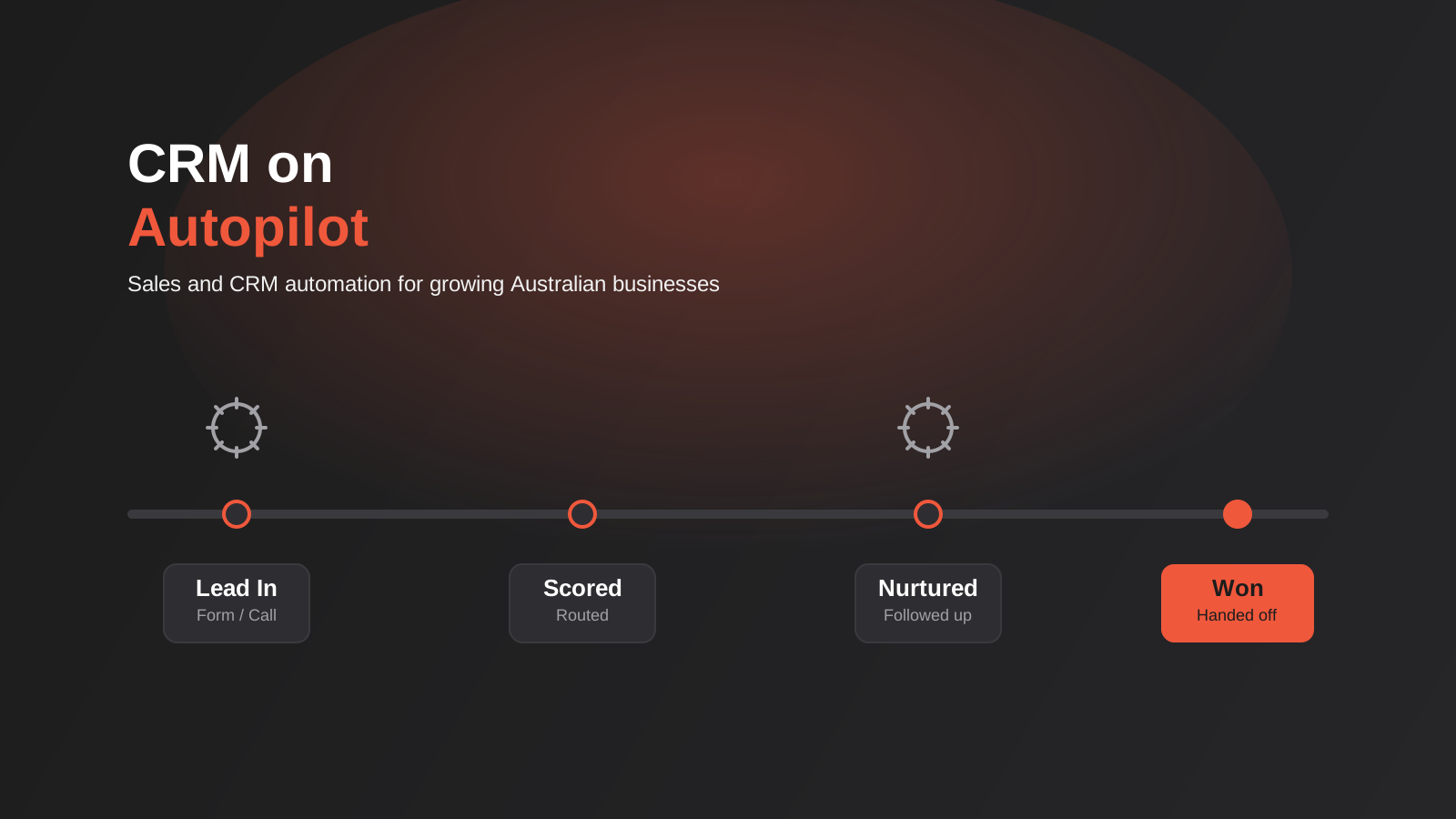
We had a client last year with four sales reps, a shared inbox and a CRM that half the team had quietly stopped opening. Leads were coming in from the website, from referrals, from a couple of paid campaigns, and every single one of them was being logged, followed up and moved through the pipeline by hand. Nobody had decided to build it that way. It just accumulated, one workaround at a time, until the CRM was really a filing cabinet with a login screen, and the actual selling happened in someone’s inbox and a mental list of “people I should call back.”
That is the normal starting point for CRM automation, not the exception. Most growing Australian businesses don’t sit down and design a sales process from scratch. They buy a CRM because someone told them to, import a spreadsheet, and then spend the next two years bolting manual habits onto a system that was supposed to remove them. Automation, done properly, isn’t about replacing the sales team with software. It’s about making sure a lead never sits untouched for three days because the rep who should have called them was busy with something else, and making sure the fortieth deal this month gets exactly the same follow-up discipline as the first one did.
This guide covers what CRM automation actually means beyond the buzzword, how to tell whether you’re ready for it, how to choose a CRM as the foundation rather than the whole solution, the specific workflows worth building first, and what it realistically costs to set up properly. We work on this as part of our CRM and sales automation service, so this is close to the conversation we’d have with you before scoping anything.
What CRM Automation Actually Means
A CRM on its own is a database. It stores contacts, deals and notes, and it will happily let a human do every single step of moving a lead from “just enquired” to “signed the contract” manually, one click at a time. Buying HubSpot or Pipedrive doesn’t automate anything by itself — it just gives you a nicer place to do the same manual work you were doing in a spreadsheet.
Automation is the layer on top: rules that trigger actions without a human deciding to do them in the moment. A lead fills out a form and gets assigned to the right rep automatically, based on territory or the product they enquired about. A deal sits untouched for eight days and a task appears on the rep’s list to follow up, rather than the lead quietly going cold. A deal moves to “won” and it automatically creates the customer record in accounting software instead of someone re-typing the same details a second time. None of these are exotic. They’re the unglamorous mechanics that determine whether a sales process runs the same way on a Tuesday as it does on the Friday before a public holiday when everyone’s attention is somewhere else.
It’s worth being honest about where automation stops helping, too. The actual conversation with a prospect, the judgement call about whether to discount, the read on whether someone’s stalling because of budget or because of a competitor — that’s still a human job, and it should stay one. Automation exists to make sure the right lead reaches the right person with the right information at the right time, not to replace the conversation itself. Businesses that try to automate the sales conversation, rather than the process around it, end up with sequences that feel robotic and prospects who can tell.
How to Tell You’re Actually Ready for CRM Automation
Not every business needs this yet, and building automation on top of a process nobody’s actually agreed on tends to just automate the chaos faster. A few signals are worth checking against your own situation before you invest time or budget:
- Leads are sitting in an inbox, a spreadsheet, or a CRM for more than a day before anyone follows up, simply because nobody’s specifically responsible for triggering that first touch.
- Different reps follow up differently — some call within the hour, some check email once a day, and there’s no consistent standard, so response time depends entirely on who happened to catch the lead.
- You genuinely don’t know how many leads came in last month, what percentage turned into a conversation, or where deals are getting stuck, because that information lives in people’s heads rather than in reportable data.
- The same manual data entry happens more than once — a lead gets typed into the CRM, then re-typed into accounting software once they sign, then re-typed again into a project management tool for delivery.
- You’re growing headcount specifically to keep up with follow-up volume, rather than because the sales conversations themselves need more people.
If two or three of those sound familiar, automation will save real time. If none of them do — if you’re a two-person business closing five deals a month and you already know every prospect by name — you probably don’t need a workflow engine yet. A clean, consistently-used CRM with good habits will outperform a poorly-built automation system every time, and it’s worth getting the habits right before you start automating them.
Choosing a CRM as the Automation Foundation
The platform matters less than most CRM comparison content suggests, but it’s not irrelevant — it sets the ceiling on what you can automate later and how much that automation costs to build and maintain. For growing Australian businesses, three platforms come up in almost every conversation we have on this.
HubSpot
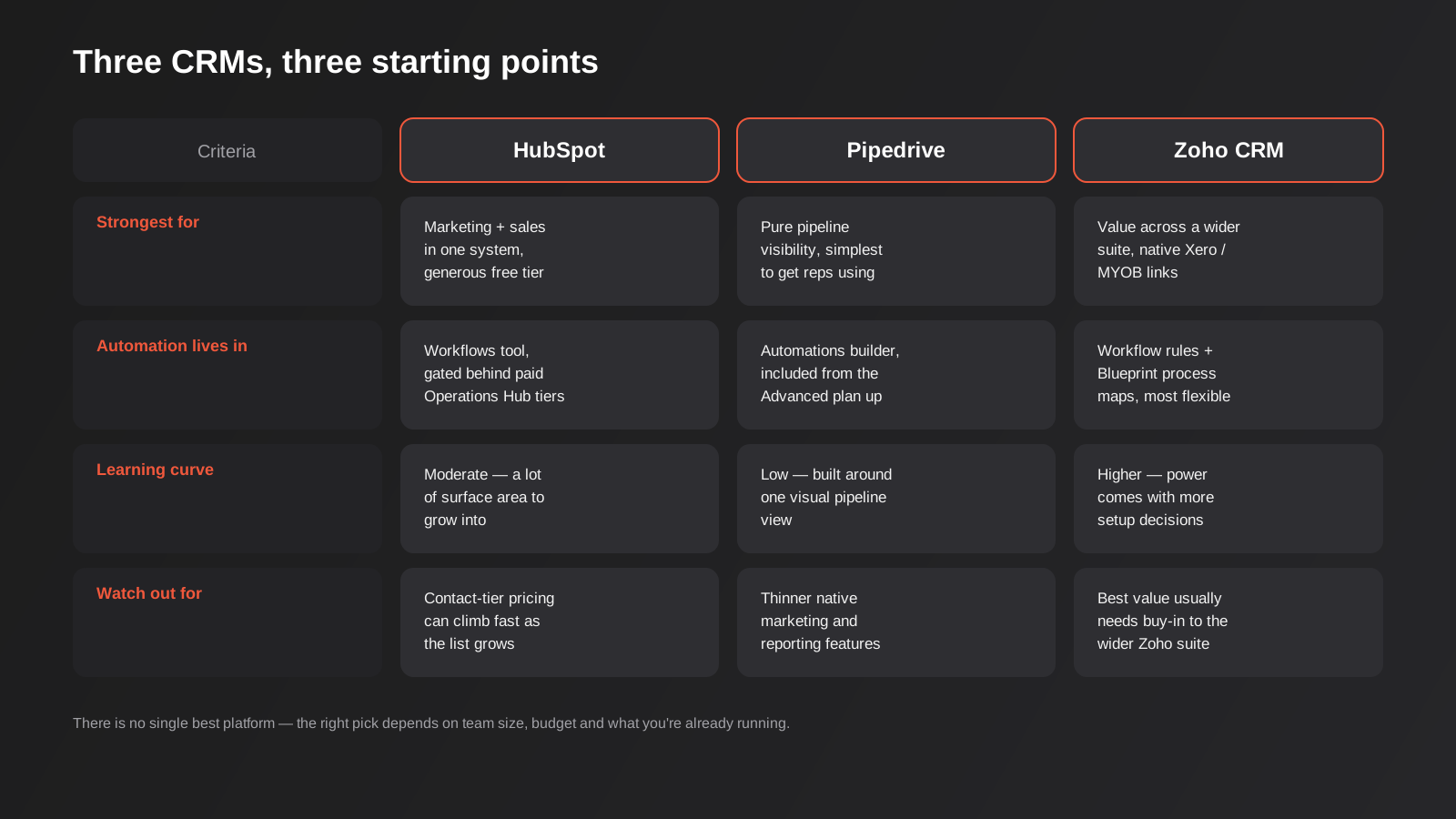
HubSpot’s genuine strength is that it was built as one platform spanning marketing, sales and customer service, so a lead’s entire history — every email open, form fill, website visit and support ticket — sits in one timeline. The free tier is unusually generous for a basic CRM with unlimited contacts and a visual pipeline, which makes it a low-risk way to trial the platform. The catch is that meaningful automation (multi-step workflows, lead scoring, more advanced branching logic) lives behind the paid Marketing Hub and Operations Hub tiers, and pricing scales with the number of marketing contacts in your database, which can climb faster than businesses expect once a list starts growing.
Pipedrive
Pipedrive was built specifically around the sales pipeline as the organising idea, and it shows — the visual, drag-and-drop deal view is the easiest of the three to get a sales team actually using from day one, which matters enormously given how many CRM rollouts fail purely on adoption. Its automation builder is included from the Advanced plan and up, and it’s genuinely good for the core sales workflows: task creation, email sequences, deal-stage triggers. Where it’s thinner is marketing automation and native reporting depth, so businesses that need heavy email marketing or complex dashboards alongside sales automation often end up pairing Pipedrive with a separate tool for that side.
Zoho CRM
Zoho’s case is breadth and value, particularly for Australian businesses already on Xero or MYOB — the native accounting integrations are a genuine time-saver, and Zoho offers an Australian data residency option that matters for regulated industries. Automation runs deep here: workflow rules, Blueprint (which maps out multi-step business processes with required fields at each stage) and an AI assistant called Zia that handles predictive lead scoring. The trade-off is a steeper learning curve — the platform’s power comes from a lot of configuration surface, and the best value usually comes from buying into the wider Zoho One suite rather than CRM alone, which is either a strength or a complication depending on what else you’re already running.
Process before platform
Every one of those platforms can be configured to do roughly the same core automation. The bigger driver of success isn’t which logo is on the login screen, it’s whether someone maps the actual sales process before configuration starts. What counts as a qualified lead? What has to happen before a deal moves from “contacted” to “proposal sent”? Who gets notified when a deal stalls, and after how many days? Skip that mapping step and you’ll spend implementation time reproducing whatever ad hoc process already existed, automation included, rather than fixing the parts of it that weren’t working. Industry research puts CRM implementation failure rates well above 50%, and the consistent finding across that research is that it’s rarely the software — it’s unclear ownership, poor training and a process nobody agreed on before the system went live.
The Five Workflows Worth Building First
Once the platform’s chosen, the temptation is to automate everything at once. Don’t. A handful of workflows cover the vast majority of the value, and building them properly, one at a time, beats a sprawling system nobody fully understands six months later.

1. Lead capture and routing
This is the foundation everything else sits on. Every lead source — website forms, phone enquiries logged by whoever answers, live chat, referral emails — needs to land in the CRM automatically rather than depending on someone remembering to enter it. Routing rules then send each lead to the right person based on whatever actually matters for your business: territory, product line, deal size, or simple round-robin if the team’s undifferentiated. The goal is a lead never waiting on a human to notice it exists. Response time is one of the most well-documented levers in sales — the difference between calling a lead within five minutes versus half a day is consistently one of the biggest single factors in whether that lead converts at all.
2. Lead scoring
Not every lead deserves the same amount of attention, and lead scoring is how you make that explicit rather than leaving it to gut feel. A basic score combines fit signals (job title, company size, industry, whether they match your ideal customer profile) with behaviour signals (pages visited, emails opened, a pricing page view, a demo request). Add the numbers up and leads above a threshold get flagged for immediate rep attention, while lower scores route into a longer nurture sequence instead. This doesn’t need to be sophisticated to be useful — a simple points system beats no system — though AI-assisted scoring has moved fast in this space recently, with adoption of automated lead scoring among B2B sales teams roughly tripling over the past couple of years as the models have gotten better at reading behavioural signals that used to require a human to notice.
3. Nurture sequences
Most leads aren’t ready to buy the moment they fill in a form. Nurture sequences — timed emails, occasionally paired with a task for a rep to check in manually at a key point — keep a lead warm without demanding constant manual attention. The mistake we see most often here is treating nurture as a generic drip that fires the same five emails at everyone regardless of what they actually asked about. A lead who downloaded a pricing guide and a lead who read a blog post about a specific service should get different sequences, because they’re at different points in the decision. If you haven’t built email automation before, our guide to email marketing automation covers welcome flows, segmentation and the mechanics of sequencing in more depth than we’ll go into here — most of it applies directly to CRM-based nurture, just triggered from deal or contact properties instead of an ecommerce cart.
4. Pipeline hygiene and deal-stage automation
A pipeline full of deals that haven’t moved in six weeks isn’t a pipeline, it’s a graveyard, and it makes every forecast built from it unreliable. Automation here does two things: it flags deals that have been sitting in a stage too long so someone actively decides to push, park or close them, and it triggers the next action automatically when a deal does move — a task for the rep, a notification to a manager on larger deals, an email to the prospect confirming next steps. The specific thresholds matter less than having any threshold at all. A deal stuck in “proposal sent” for three weeks with nobody flagged to follow up is money left on the table for no reason other than nobody built the trigger.
5. Post-sale handoff
This is the workflow businesses build last, if they build it at all, and it’s usually the one with the most obvious manual waste sitting behind it. A deal marked “won” should trigger what happens next without someone re-typing the same customer details into a second or third system: creating the customer record in accounting software, kicking off an onboarding checklist, notifying delivery or account management. We cover the mechanics of connecting sales to the rest of the business in more detail in the next section, but the short version is that this handoff is where CRM automation stops being a sales tool and starts being a genuine operational one.
Connecting the CRM to the Rest of the Business
A CRM that only talks to itself captures maybe half the value it’s capable of. The real gains show up when it’s connected to the systems on either side of it — the website and marketing tools feeding leads in, and the accounting and delivery systems that need customer data once a deal closes.
On the accounting side, this usually means a native or API-based integration with Xero or MYOB so a won deal creates the customer and, ideally, the first invoice without manual re-entry. On the marketing side, it means your website forms, ad platform lead forms and email tool all write directly into the CRM rather than into three separate spreadsheets that someone reconciles at the end of the week. If you’re already using general-purpose automation tools to stitch systems together, our comparison of Zapier, Make and n8n is a useful next read — CRM-to-accounting and CRM-to-marketing-tool connections are exactly the kind of workflow those platforms handle well when a CRM’s native integrations don’t cover the specific systems you use.
Where the connection needs to be more robust than a no-code automation tool can comfortably handle — high volume, custom business logic, or a system that doesn’t have a clean native connector — that’s a case for proper API integration work rather than stacking automation platform triggers on top of each other. There’s a real cost to over-engineering this: plenty of businesses build a fragile chain of five connected automation tools when two purpose-built integrations would have been more reliable and easier to maintain. The right level of engineering here depends on volume and how business-critical the connection is, not on what looks impressive in a demo.
One thing that’s easy to overlook once nurture sequences and lead scoring are running automatically: the Spam Act 2003 and the Australian Privacy Principles still apply to every automated email a CRM sends. Consent needs to be genuine and recorded, not assumed because someone filled in a contact form for an unrelated reason, and every automated email needs a working unsubscribe that’s actually honoured immediately, not just accepted and ignored by the workflow. This is worth checking explicitly during setup rather than after the first complaint, because “the automation did it” isn’t a defence the regulator accepts, and it isn’t one your customers accept either.
How to Tell Whether It’s Actually Working
Automation that isn’t measured tends to quietly stop mattering to anyone. A handful of numbers tell you whether the system is earning its keep, and they’re worth checking monthly rather than assuming everything’s fine because nobody’s complained.
- Speed to first contact. The time between a lead landing in the CRM and a rep’s first genuine touch. This is the single clearest sign automation is doing its job — if leads are still sitting for a day or more, the routing rules aren’t working the way they were designed to.
- Conversion rate by stage. Not just overall win rate, but the percentage of deals that move from each stage to the next. A pipeline where deals reliably die at “proposal sent” points at a specific, fixable problem rather than a vague sense that sales “could be better.”
- Pipeline velocity. How long deals take to move from first contact to close, on average, and whether that’s trending up or down. Automation should shorten this over time by removing administrative delay — if it isn’t, something in the workflow is adding friction rather than removing it.
- Forecast accuracy. How closely predicted revenue for a given month matches what actually closed. A pipeline full of stale, unqualified deals inflates the forecast and erodes trust in it, which is exactly the pipeline hygiene problem automation is meant to prevent.
- Actual rep usage. Login frequency and how consistently deals are updated, logged directly from the CRM rather than inferred. A beautifully built automation system that reps route around by working from a personal spreadsheet again isn’t a technology failure, it’s an adoption failure, and it’s worth catching early rather than six months in.
None of these numbers need a dedicated data analyst to track — most CRMs surface them natively once the underlying data is clean, which is itself a good argument for getting data quality right from the start rather than trying to retrofit it later.
What CRM Automation Costs and How to Scope a Build
Cost depends heavily on how much of the work is platform licensing versus setup and configuration. The CRM subscription itself is usually the smaller line item for a small or growing team — most platforms price per user per month, and the entry tiers on Pipedrive, HubSpot and Zoho are all reasonably accessible. The bigger cost variable is implementation: mapping the sales process properly, building the automation rules, connecting the CRM to accounting and marketing tools, migrating existing data cleanly, and training the team to actually use what’s been built.
A lean setup — one platform, a handful of core workflows, one or two integrations — is a relatively contained project. A more involved build with lead scoring, multiple integrations, custom reporting and a genuine process redesign takes longer and costs more, but it’s also the version that tends to actually get used, because the process has been thought through rather than bolted together in a weekend. Our automation pricing page has real ranges rather than vague “get a quote” placeholders, which is worth checking before you scope a project so you’re comparing like for like against any other quote you get.
A few things reliably push cost and timeframe up regardless of platform: messy existing data that needs cleaning before migration (duplicate contacts, inconsistent fields, years of notes with no structure), multiple systems that all need to talk to the CRM rather than just one or two, and a sales process that hasn’t actually been agreed internally, which turns “build the automation” into “have the process argument the business has been avoiding, then build the automation.” None of that is a reason to avoid the project — it’s a reason to budget honestly for it upfront rather than discovering it three weeks into implementation.
Common Mistakes
- Automating a broken process instead of fixing it first. If nobody agrees what counts as a qualified lead or when a deal should move stages, automation just makes the disagreement move faster and look more official.
- Trying to build everything at once. A sprawling system with fifteen workflows built in the first month is harder to debug, harder to train a new hire on, and more likely to have rules quietly contradicting each other than five workflows built and tested one at a time.
- Choosing the platform before mapping the process. Picking a CRM because a competitor uses it, or because a salesperson liked the demo, skips the step that actually determines whether the automation will fit how your team sells.
- No one owns the system after launch. CRM automation isn’t a set-and-forget project. Fields go stale, workflows need adjusting as the business changes, and without a named owner, the system slowly drifts back toward the manual habits it was built to replace.
- Over-automating the human parts. Sequences that try to simulate a personal conversation — fake “just checking in!” emails sent to everyone regardless of context — tend to read as exactly what they are, and they cost trust rather than building it.
- Skipping training because the interface “looks intuitive.” Most CRM adoption failures trace back to inconsistent use, not platform limitations. A short, mandatory onboarding session for every rep pays for itself many times over compared to letting people figure it out badly on their own.
- Ignoring data quality at the point of entry. Automation amplifies whatever’s already in the system. Garbage fields in, garbage routing and scoring out — required fields and validation rules at the point of lead capture matter more than most businesses expect.
Frequently Asked Questions
What’s the difference between marketing automation and CRM automation?
Marketing automation focuses on attracting and nurturing leads before they’re sales-ready — email campaigns, ad retargeting, content workflows. CRM automation picks up from there and focuses on the sales process itself: routing, scoring, pipeline movement and the handoff into delivery. In practice the two overlap heavily and often run inside the same platform, but the distinction matters when you’re scoping a project, because “we need marketing automation” and “we need sales automation” are genuinely different builds with different priorities.
Which CRM is best for a small Australian business?
There’s no single answer — it depends on team size, budget and what you’re already running. HubSpot suits businesses that want marketing and sales in one system and value the free tier to start. Pipedrive suits sales-first teams that want the simplest possible pipeline view and the fastest adoption. Zoho suits businesses already on Xero or MYOB that want deep native accounting integration and don’t mind a steeper setup curve. The right call usually comes down to which trade-off matters more to your team, not which platform is objectively “best.”
How long does it take to set up CRM automation?
A lean build covering the core workflows — capture, routing, one or two nurture sequences, basic pipeline automation — typically takes a few weeks once the process is mapped and the platform’s chosen. A more involved build with lead scoring, multiple system integrations and a genuine process redesign runs longer, often a couple of months, mostly because getting the underlying process right takes longer than the technical configuration itself.
Can I automate lead scoring without AI?
Yes — a straightforward points-based system (assign values to fit criteria and behaviours, add them up, set a threshold) works well and is easier to explain to a sales team than a model they can’t inspect. AI-assisted scoring adds value once you have enough historical data for a model to find patterns a manual points system would miss, but it’s not a prerequisite for getting real value from lead scoring.
Do I need a developer to set up CRM automation?
Most core workflows — routing, scoring, nurture sequences, pipeline triggers — can be built inside the CRM’s own automation builder without custom development. Where you typically need development or proper API work is connecting the CRM to systems that don’t have a clean native integration, or building logic complex enough that no-code automation tools become fragile and hard to maintain.
Will CRM automation replace my sales team?
No, and treating it as a headcount reduction tool tends to backfire. Automation removes the repetitive administrative load — data entry, follow-up reminders, re-typing information into a second system — so reps spend more of their time actually talking to prospects. The conversations, judgement calls and relationship-building still need a person, and sequences that try to fake that personal touch usually read as exactly what they are.
Where to Start
If you’re not sure whether your business needs a new CRM, better automation on the one you’ve already got, or just a properly mapped sales process before either of those, that’s a reasonable place to be — most businesses can’t see clearly from inside their own pipeline, and it’s genuinely hard to tell the difference between a platform problem and a process problem without an outside look. The fastest way to find out is a straightforward conversation about how leads actually move through your business today, before anyone talks about which CRM to buy. If that would help, our CRM and sales automation team is a good place to start that conversation.
Keep reading
Related posts

Changing Live Automations Safely: Staging, Version Control and Rollback for Zapier, Make and n8n (2026)
How to draft, test, release and roll back changes to live Zapier, Make and n8n automations without breaking invoices, orders or customer…

Peppol E-Invoicing for Australian Businesses: Automating Accounts Payable From Structured Invoices (2026)
Peppol e-invoicing in Australia: what is and isn't mandatory, how to pick an access point, and how to automate accounts payable once…

Clean Your Data Before You Automate: A Practical Guide to CRM Data Cleanup for Australian Businesses (2026)
Connecting systems on messy data copies the mess everywhere. Here's how to clean, match and merge records before you automate or integrate.
Got a project you'd like to talk through?
Tell us what you're working on — we'll come back with a plan.
