
Best Website Hosting for Australian Businesses (2026): 6 Compared
 Jignesh Vagadiya
13/11/2026
25 min read
Most Australian business owners choose a web host once, in a hurry, at the end of a website build. The agency suggests something, or the domain registrar upsells a bundle at checkout, and three years later the site is slow, the renewal invoice is triple what was quoted, and nobody can remember who holds the login. Hosting is the least glamorous line item in a website project, and it is also the one that quietly decides how fast your pages load, how well you sleep during a traffic spike, and how painful it is to leave.
This guide to the best website hosting in Australia compares six hosts that Australian businesses actually use for WordPress and similar sites: VentraIP, Digital Pacific, SiteGround, Kinsta, WP Engine and Cloudways. We have deliberately left out the giant-bundle brands that sell hosting as an afterthought to domains and website builders. Each section below covers what the host is, where it does well, where it falls short, what it costs and who it suits. Every one of them gets a genuine drawback, because a round-up where everything scores nine out of ten is just an affiliate page with better typography.
Our selection criteria were practical rather than scientific. We looked for hosts with an Australian data centre option or an Australian-owned operation, a credible managed offering for WordPress, working backups and staging, and pricing that a small or mid-sized Australian business could plan around. We do not run a lab that benchmarks page speed across providers, so you will not find invented speed scores here. Where we quote prices, they are the figures reported on vendor pages and third-party listings at the time of writing, and several of them conflict between sources. Treat every number as a starting point and confirm it on the vendor’s own checkout before you commit.
What actually matters when you choose a host
Before the individual reviews, it helps to be clear about the factors that separate a good hosting decision from a merely cheap one. Most comparison sites rank hosts on a feature checklist. In practice, six or seven things decide whether you are happy with a host two years in.
Server location and what it does to speed
If your customers are in Australia, your server should be too, or at least close. Data travelling from a US server to a customer in Perth makes a long round trip, and that delay is added to every request the page makes. A CDN (content delivery network) softens this for images and scripts, but the first request for the page itself still has to reach your origin server unless the whole page is cached at the edge. Hosting in Sydney or Melbourne cuts that delay for most Australian visitors. It is not a magic fix for a bloated site, and a well-built page on a distant server can still beat a heavy page on a local one, but it removes an avoidable handicap.
A related point: location matters for privacy as well as speed. If your site collects personal information through forms, bookings or an online store, where that data is stored is part of your obligations under the Australian Privacy Principles, particularly if it is disclosed overseas. Hosting in Australia makes that conversation simpler. It does not make you compliant on its own, but it removes a question your privacy policy would otherwise need to answer.
Shared, managed and cloud hosting are different products
The word “hosting” covers three quite different things. Shared hosting puts many sites on one server and divides the resources loosely between them. It is cheap and perfectly adequate for a brochure site, but one noisy neighbour can slow everyone down. Managed WordPress hosting is built specifically for WordPress: the host handles caching, backups, staging, security patches at the server level and often some update management, and it charges accordingly. Managed cloud hosting, where you rent a slice of a cloud provider’s infrastructure with a management layer on top, sits in between and gives you more control, more responsibility and usually more flexibility on cost.
Many disappointing hosting experiences come from buying the wrong category. A business with an online store and steady traffic ends up on a shared plan because it was cheapest, then blames WordPress when checkout is slow. Another business pays managed-WordPress prices to host a five-page site that updates twice a year. The category matters more than the brand.
Introductory pricing versus the price you will actually pay
Hosting is one of the few products where the advertised price is routinely a first-term promotion. A low price for the first twelve months, then a renewal at several times that rate, is standard practice at the budget end. Some hosts also discount heavily for three-year prepayment, which looks great until you want to leave in month fourteen. When you compare hosts, compare the renewal price and the monthly-billing price, because those are the numbers you will live with.
Backups, staging and restores you have actually tested
Every host says it takes backups. The questions that matter are how often, how long they are kept, whether they are stored away from the server they protect, and whether you can restore a single file or table without rebuilding the whole site. A staging environment, a private copy of your site where changes can be tested before they go live, is the other feature that earns its keep. It turns a plugin update from a gamble into a routine task. Our WordPress security guide covers why restore tests matter more than backup schedules, and the same logic applies to whichever host you pick.
Support hours and who you can reach
A host’s support matters on the one day your site goes down, and that day does not respect business hours. Look at whether support is available around the clock, whether it is chat, phone or tickets only, and whether the first person you reach can do anything useful. Hosts based in Australia are generally easier to reach during Australian business hours, while overseas hosts often staff round the clock but through a global queue. Neither model is automatically better, but you should know which one you are buying.
Currency, GST and invoices
Australian-owned hosts bill in Australian dollars. Many global hosts price in US dollars, which means your card is charged at the day’s exchange rate, often with a foreign transaction fee, and the amount on your statement shifts from year to year. If your business is registered for GST, check whether the invoice shows GST in a form your accountant can claim, and ask your accountant how overseas software subscriptions should be treated in your books. It is a small administrative cost, but it recurs every renewal.
Email hosting is a separate decision
Many small businesses run their email from the same cPanel account as their website. That works until the website host has an outage or a plan change and email goes down with it. For anything customer-facing we generally suggest keeping business email with a dedicated provider, separate from website hosting. The host you pick for the website should not be a reason you cannot receive an enquiry. A dedicated provider will also make it easier to set up the SPF, DKIM and DMARC records that keep your messages out of spam folders.
VentraIP
What it is
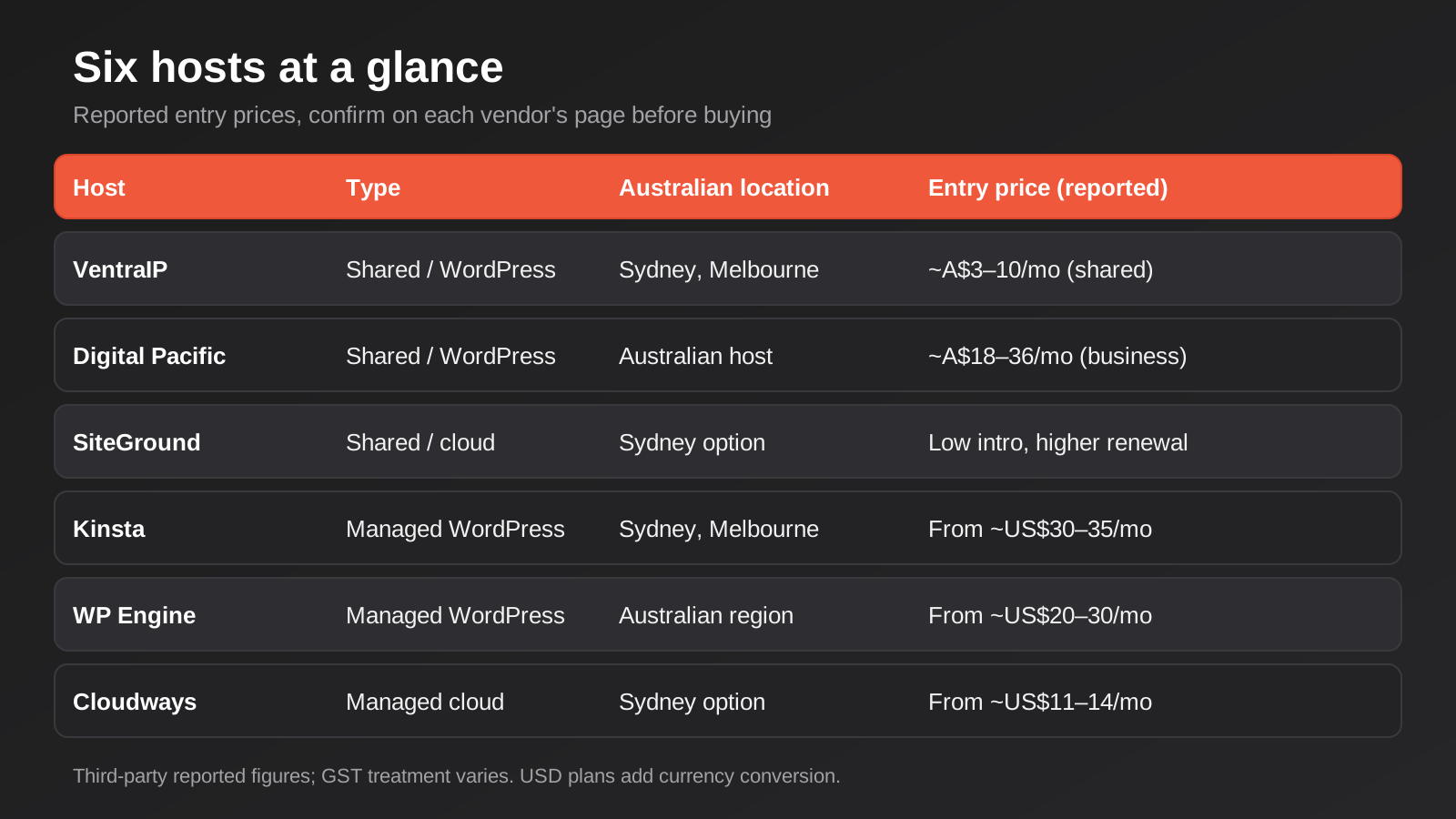
VentraIP is an Australian-owned host that bills in Australian dollars and states that it runs on data centres in Sydney and Melbourne operated by NEXTDC. It sells shared web hosting, WordPress hosting, VPS and domains, and it is one of the better-known names in Australian small-business hosting. Its WordPress hosting is a single scalable plan built on cPanel with a WordPress management toolkit, rather than a ladder of tiers.
Where it does well
The local angle is the draw. Local billing, Australian data centres and Australian-based support remove the currency, latency and time-zone friction that comes with overseas hosts. VentraIP advertises round-the-clock support and free migration of an existing site, both of which matter if you are moving away from a host you have outgrown. For a straightforward brochure or service-business site, a well-configured shared or WordPress plan here is an entirely reasonable choice, and the low entry price leaves money for the things that actually generate enquiries, such as content and ads.
Where it falls short
Shared infrastructure is still shared infrastructure. A site that grows into heavy traffic, a busy WooCommerce store or a resource-hungry page builder will eventually push against the limits of a shared plan, and the next step up the ladder is a different product at a different price. Independent review scores for VentraIP are mixed, as they are for most large hosts, so read recent reviews rather than relying on the vendor’s own testimonials. Promotional pricing also applies, with discounts generally limited to the first invoice or first term on new purchases.
What it costs
Third-party listings report entry-level shared plans from roughly A$3 to A$10 a month including GST, depending on the plan and the billing term. VPS plans cost materially more, with listings ranging from the low tens of dollars a month for unmanaged servers to several hundred for fully managed ones. The vendor itself says that renewal pricing stays close to the sign-up rate, but check the checkout screen for the exact term and renewal figure before paying.
Who it suits
Small Australian businesses with a brochure site, a modest blog or a service-area website who want local billing and local support at a low monthly cost. It also suits businesses migrating off an overpriced bundle who do not need advanced developer workflows.
Digital Pacific
What it is
Digital Pacific is another long-running Australian host, billing in Australian dollars, with shared “business” hosting tiers and a separate WordPress hosting line that includes features such as one-click staging. Like most hosts of its size it also sells domains, email, VPS and dedicated servers. Some directory listings describe its ownership differently, so if the ownership structure matters to your procurement or supplier checks, confirm it directly with the company.
Where it does well
Digital Pacific’s WordPress line is aimed at people who want the staging and one-click tools of managed hosting without leaving Australian billing. That is a useful middle ground for a small business whose website has become a real source of leads, but whose owner is not ready to pay US-dollar managed-hosting prices. The tiered business plans make it easy to see what you are paying for as the site grows, and the option of monthly or longer billing terms gives you some flexibility.
Where it falls short
At the reported prices, the business shared plans sit well above entry-level shared hosting elsewhere in Australia, so you need to be sure the extra features are ones you will use. Its WordPress plans also carry a limit on how many WordPress sites you can run on a single plan, which matters if you are an agency or a business with several brands. Longer prepayment terms advertise deeper discounts, but they lock you in, which is a poor trade if you are not yet sure the host is right.
What it costs
One review site reports entry pricing from around A$9.90 a month and managed WordPress at about A$12 a month, while a plan directory lists the Business Basic, Standard, Advanced and Pro shared plans at roughly A$17.90, A$22.90, A$25.90 and A$35.90 a month. These are third-party figures, and they may reflect different billing terms, so use them as a range rather than a quote: expect somewhere between about A$10 and A$36 a month for the plans most small businesses would consider.
Who it suits
Small to mid-sized Australian businesses that want a step up from the cheapest shared hosting, with staging and Australian billing, and that have one primary site to run.
SiteGround
What it is
SiteGround is a European-founded host that runs its infrastructure on Google Cloud and lets you choose a data centre location when you sign up. Sydney appears among the available locations in most descriptions of the service. It sells shared, WordPress-focused and cloud plans, and it has a long-standing reputation among WordPress users for decent tooling at a price that undercuts true managed hosts.
Where it does well
For the price, the feature set is strong: staging, daily backups, built-in caching and a sensible WordPress dashboard are standard across its WordPress plans. The ability to pick a Sydney location means an Australian site can benefit from local delivery without paying managed-WordPress prices. Support is generally well regarded for its responsiveness, which counts for a lot when your own expertise is limited. For a small business with a WordPress site that needs to be fast enough, safe and low-maintenance, it is a well-trodden option.
Where it falls short
The renewal price. SiteGround’s headline offer is a very low rate for the first twelve months, and the rate at renewal is a multiple of it. Reported renewal figures vary between sources, from roughly US$15 to US$27 a month for the entry plan, so the honest answer is that you should budget for a number several times the sticker price. The entry plans also cap monthly visits and storage, and a site that grows past those limits is pushed up to a more expensive tier. Pricing is typically displayed in US dollars unless you are on a local storefront, which brings the currency question back in.
What it costs
Most sources put the introductory price of its entry WordPress plan at around US$2.99 a month for the first twelve months. Renewal is where figures diverge: several sources cite around US$15 to US$18 a month, while one Australian-focused page lists a renewal near A$27 a month excluding GST. Higher tiers and cloud plans cost substantially more. Check the current renewal rate on the checkout page for your chosen term before you buy.
Who it suits
Small businesses and sole traders with a WordPress site who want solid tooling at a modest price, and who are happy to review the plan at renewal time rather than letting it roll over automatically.
Kinsta
What it is
Kinsta is a premium managed WordPress host built on Google Cloud. It lists data centres in both Sydney and Melbourne, which makes it one of the few global managed hosts with a choice of two Australian locations. Everything about the product is oriented towards WordPress: its own dashboard, staging, backups, a CDN, performance monitoring and a team of WordPress specialists on support.
Where it does well
Managed hosting is about removing server work from your plate, and Kinsta does that well. Staging and automatic backups are built into the plans, the dashboard is clean enough that a marketing manager can use it, and the tooling for a developer or agency is mature, including Git integration and a good set of performance diagnostics. For a business whose website is a lead engine and where downtime or a slow checkout has a direct dollar cost, paying for a host that handles caching and server tuning properly is easy to justify. It also pairs well with the heavier page builders we cover in our page builder comparison, which benefit from properly tuned server-side caching.
Where it falls short
Price, and the structure of the price. The entry plan covers a single WordPress install, so a business with a main site plus a separate store or microsite quickly needs more than one plan or a bigger tier. Billing is in US dollars, with the exchange-rate effects described above, and plans are metered on resources such as bandwidth and storage, so a traffic spike or an image-heavy site can push you up a tier. It is also WordPress-only in spirit: if your site is a custom application rather than a WordPress build, you are paying for features you will not use.
What it costs
The entry Starter plan is listed at around US$35 a month billed monthly, or about US$30 a month when paid annually, and includes one WordPress install and around 10GB of storage. Plans scale up from there. Because the figures are in US dollars, convert at the current rate and add any card fees when budgeting in Australian dollars, and confirm the current limits on Kinsta’s own plans page, since third-party listings do not always agree on tier names.
Who it suits
Established businesses with a lead-generating or revenue-generating WordPress site, where performance and uptime are worth paying for and where an agency or developer will use the staging and Git tooling.
WP Engine
What it is
WP Engine is one of the longest-established managed WordPress hosts. It runs on a mix of cloud infrastructure from Google Cloud and AWS and offers regional options, including Australia, with no extra charge for choosing a local data centre according to its own case study material. Which Australian city a given plan lands in is worth asking about directly before you buy.
Where it does well
WP Engine is built around workflow. Staging environments, automated backups, a development, staging and production pipeline for teams, and its own caching technology are core features. For an agency or an in-house team managing several sites or releasing changes regularly, that structure is valuable. It is also a familiar platform, which means most WordPress developers already know how to deploy to it, and migrating a site in or out is rarely a surprise.
Where it falls short
Visit-based pricing creates uncertainty. Entry plans include a set number of monthly visits, with a charge per thousand visits above the limit, so a successful campaign can produce a larger bill than you expected. Managed hosts of this type also maintain a list of disallowed plugins that duplicate features of the platform, such as certain caching and backup plugins, which can force changes to an existing site on migration. The price jump from the entry tier to the next one is also steep relative to what many small sites need. Like Kinsta, it is a premium product being used for a modest site if you only have a brochure website.
What it costs
Third-party sources put the entry Startup plan at around US$20 a month when billed annually and US$25 to US$30 when billed monthly, covering one site, around 25,000 visits and 10GB of storage, with overage charged at roughly US$2 per 1,000 extra visits. Several of those sources are dated, so verify against the live plan page. Higher tiers support more sites and more traffic at steadily higher prices, billed in US dollars.
Who it suits
Teams and agencies that want a structured deployment workflow, and businesses with predictable traffic who value mature staging and support over the lowest possible price.
Cloudways
What it is
Cloudways is a managed layer on top of other companies’ cloud servers. You choose an infrastructure provider (DigitalOcean, Vultr, Linode, AWS or Google Cloud, depending on the plan), pick a server size and a location, and Cloudways handles the server software, caching stack, backups and a management dashboard. Sydney is available as a region with at least some of the underlying providers. It is not a WordPress-only product; it will happily host WordPress, WooCommerce, Laravel or other PHP applications.
Where it does well
Flexibility and cost control. You pay for server resources rather than a visit quota, so a business with unpredictable traffic is not penalised per visitor, and you can resize a server as needs change. That structure suits custom builds, WooCommerce stores and agency-managed portfolios where each site has different requirements. It is also a sensible home for a site that has outgrown shared hosting but does not justify premium managed-WordPress pricing.
Where it falls short
You take on more responsibility. Cloudways manages the platform, but choosing the right server size, keeping the application updated and diagnosing a slow plugin remain your problem or your agency’s. The smallest servers are thin for anything beyond a simple site, and the markup compared with renting the same underlying server directly is substantial, which is the price of the management layer. Email hosting is an add-on rather than a core feature, and the depth of support depends on the support tier you purchase.
What it costs
Entry plans on DigitalOcean-based servers are reported from roughly US$11 to US$14 a month depending on the source and the server size, billed on a pay-as-you-go basis, with larger servers costing considerably more. Promotional discounts appear and expire frequently, so ignore the banner price and read the server size and monthly cost at checkout. As with the other overseas hosts here, remember the exchange rate.
Who it suits
Businesses with a developer or agency to manage the application layer, stores and custom builds with uneven traffic, and anyone who wants to scale a server up or down without migrating.
How to choose the best website hosting in Australia for your site
The simplest way to narrow six options to one is to start with what the site has to do, not with the host’s marketing. A five-page service-business site that changes twice a year has very different needs from a lead-generation site that runs paid campaigns, and both differ again from a store that takes payments around the clock. The diagram below maps those three situations onto the three hosting categories.
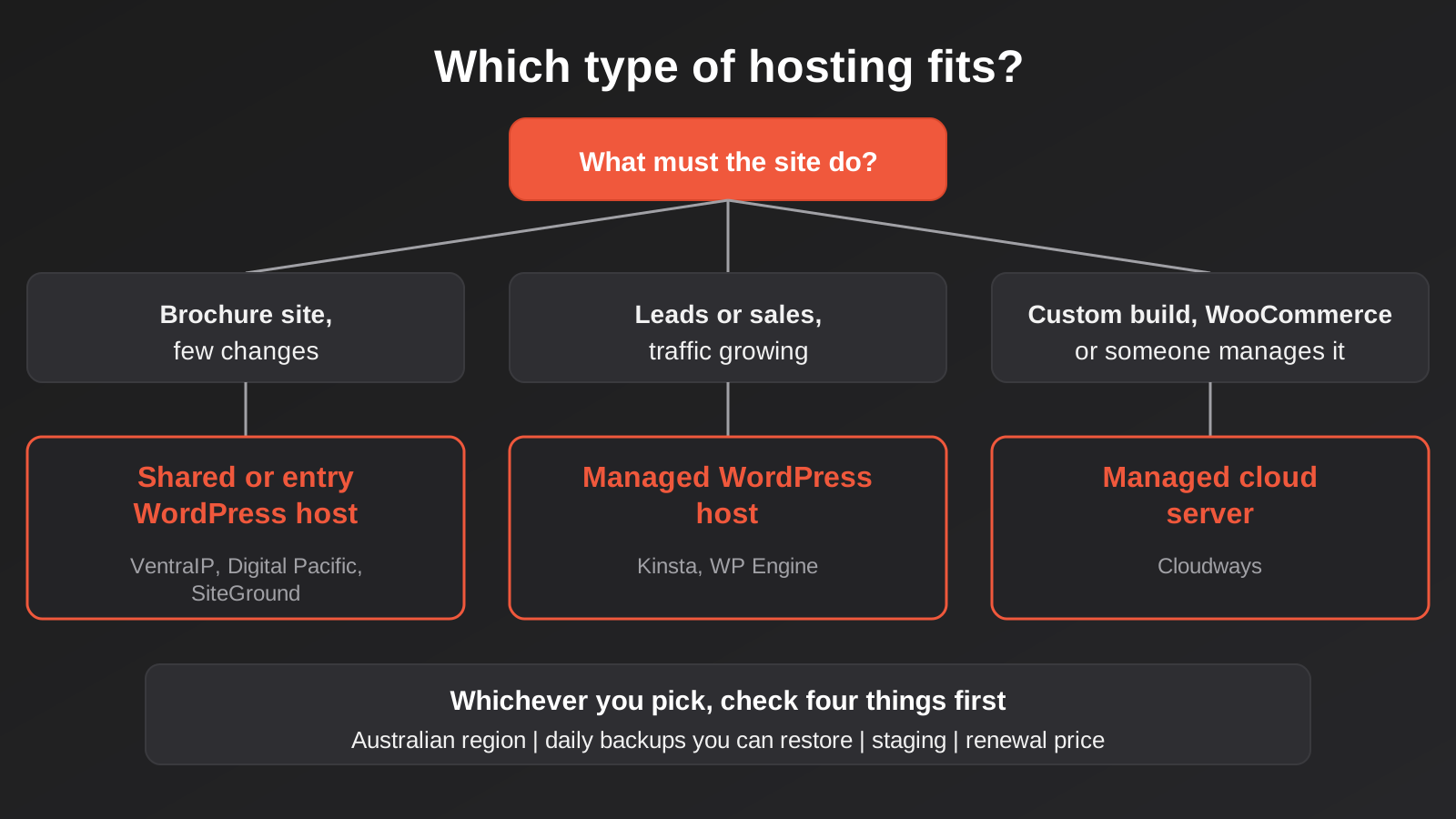
If the site is a brochure or a small service-business presence, the sensible shortlist is VentraIP, Digital Pacific or SiteGround. Australian billing and support tip the balance towards VentraIP or Digital Pacific; SiteGround is worth a look if you want its tooling and are comfortable with US-dollar pricing and a bigger renewal. Spending more than this usually buys capacity you will not use.
If the website is a genuine lead engine, where a slow day or an outage costs real enquiries, the managed WordPress hosts earn their price. Kinsta suits teams who want a polished dashboard and two Australian locations; WP Engine suits teams who care about deployment workflow and have predictable traffic. In both cases, work out the cost at the visit or bandwidth levels you expect during a campaign, not just at the entry tier.
If you have a custom application, a larger WooCommerce store or an agency managing the build, Cloudways deserves a serious look because you pay for the server you actually need. Just be clear about who owns the maintenance. A managed cloud server with nobody responsible for updates is worse than a cheap shared host that updates itself.
Hosting is also only one part of the running cost of a website. Updates, security monitoring and fixes sit on top of it, and a good host does not remove the need for them. If you are budgeting for the whole picture, our guide to what website maintenance costs in Australia sets out realistic monthly ranges, and our website care and support service covers the ongoing work that hosting alone does not.
Common mistakes when choosing a host
- Buying on the introductory price. Compare the renewal price and the monthly-billing price. A plan that costs a few dollars for the first year and several times that afterwards is a different product in year two.
- Choosing the wrong category. Putting a busy store on cheap shared hosting, or a five-page brochure site on premium managed hosting, wastes either performance or money. Match the category to the job first.
- Ignoring server location. If your customers are in Australia, an overseas origin server adds delay to every uncached request. Pick a Sydney or Melbourne region where the host offers one.
- Not owning the account. If the hosting account is registered in a former developer’s name or personal email, you can lose access at the worst possible moment. The account, the domain registrar login and the DNS should all sit with the business.
- Trusting backups you have never restored. Ask for a restore test, or do one on a staging copy. A backup that cannot be restored is not a backup.
- Bundling email with the website. When the website host has a problem, you do not want to lose your inbox as well. Keep business email separate where you can.
- Locking in a three-year term too early. Deep discounts for long prepayment are tempting, but if the host turns out to be wrong for you, the saving evaporates. Start with a shorter term until the site is stable and the host has proved itself.
- Treating hosting as the fix for a heavy site. A slow site is often a design, plugin or image problem. Better hosting helps, but it will not rescue a page that loads three megabytes of unoptimised images and a dozen third-party scripts.
- Forgetting who handles updates. Managed hosting handles the server. It does not necessarily update your plugins, theme or WordPress core. Decide who does that, and make sure it is written down.
Frequently Asked Questions
How much should an Australian small business pay for website hosting?
For a simple brochure site, reported prices for Australian shared hosting run from a few dollars to roughly A$36 a month, depending on the plan and billing term. Managed WordPress hosting generally starts around US$20 to US$35 a month for a single site and climbs from there as traffic and the number of sites grow. The right figure depends on how much the site contributes to your revenue, so think of it as insurance against lost enquiries rather than a bargain hunt. Always compare renewal prices, not just the first-year offer.
Does it matter if my website is hosted in Australia?
It usually helps. A Sydney or Melbourne server shortens the distance between your site and local visitors, which can improve load times, particularly for pages that are not served from a CDN cache. It also simplifies privacy questions when your site collects personal information, because the data is stored onshore. It does not replace good site performance practice, and a CDN can offset some of the difference for static assets, but for an Australian audience there is rarely a good reason to choose an overseas region when a local one is available.
What is the difference between shared and managed WordPress hosting?
Shared hosting puts many sites on one server and gives you a general-purpose control panel. Managed WordPress hosting is tuned specifically for WordPress, with server-level caching, automatic backups, staging and a support team that understands the platform. Managed hosting costs more and usually limits you to a single site or a small number of sites per plan. Shared hosting is cheaper and more flexible but leaves more of the setup, security and troubleshooting to you.
Why does my hosting renewal cost so much more than the sign-up price?
Many hosts subsidise a low first-term price to win customers and expect to recover the cost at renewal, when switching feels like too much hassle. The renewal rate is often a multiple of the introductory one. You can avoid the shock by checking the renewal price before you buy, setting a calendar reminder a month before it renews, and being willing to move, or to negotiate, if the new price no longer represents good value.
Can I switch hosts without taking my website offline?
Yes, if it is planned properly. The standard approach is to copy the site to the new host, test it there using a temporary address or a hosts-file override, then lower the DNS TTL in advance and switch the DNS records when you are ready. The old host should stay active for a few days afterwards in case anything was missed. Some hosts offer free migration, and developers who do this regularly can usually make the switch invisible to visitors. The risky parts are email, which often lives on the old host, and forms or integrations that depend on server settings.
Is cheap hosting bad for SEO?
Not by itself. Search engines do not rank sites by who hosts them. What matters is the effect hosting has on speed, uptime and reliability. A cheap host that keeps your site fast and available is fine, while an expensive one that is misconfigured is not. The risk with very cheap plans is that they run out of headroom under load, which hurts page speed and can cause outages. Choose a plan sized to your traffic, keep the site lean, and use a CDN if your audience is spread out.
Where to Start
If you already have a host and the site is fast, backed up and the account is in the business’s name, you probably do not need to move. If any of those are in doubt, start there: confirm who owns the account, find out when the next renewal falls and at what price, and check that you can actually restore a backup. Those three checks cost nothing and tell you more than any comparison table.
If you are planning a new website or a rebuild, decide on hosting alongside the design and the platform, not afterwards, because the right host depends on how the site is built and what it has to do. Our website pricing page sets out how we scope and price website projects, and we are happy to talk through hosting as part of that conversation without any pressure to buy it from us. Choose the category first, shortlist two hosts, and compare them on renewal price, location, backups and support. That process will serve you better than any single recommendation, including ours.
Keep reading
Related posts
WordPress Security: A Practical Guide to Protecting Your Site From Hacks (2026)
A practical WordPress security guide for Australian businesses: real risks, a hardening checklist, and what to do if your site gets hacked.
Best Page Builders for Australian Business Websites (2026): 6 Compared
Elementor, Divi, Bricks, Kadence, Webflow and Framer compared for Australian businesses: reported 2026 pricing, real drawbacks and who each suits.
Landing Page Design vs Development: Which Does Your Campaign Need?
Landing page design and development aren't the same job. What each covers, real 2026 Australian pricing, and which one your campaign needs.
Got a project you'd like to talk through?
Tell us what you're working on — we'll come back with a plan.
