
Best Page Builders for Australian Business Websites (2026): 6 Compared
 Jignesh Vagadiya
30/10/2026
22 min read
Jignesh Vagadiya
30/10/2026
22 min read
Most conversations about a new business website start with the wrong question. People ask which agency to hire, or what the design should look like, and only get to the tool underneath when a developer says “we’ll build it in Elementor” or “we’d suggest Webflow” and they have no way of knowing whether that’s a good answer or just the one the developer happens to be comfortable with. The page builder is the thing you will live with for years, long after the launch party. It decides who can edit the site, what it costs to keep running, how fast it loads on a patchy regional mobile connection, and how painful it is to leave.
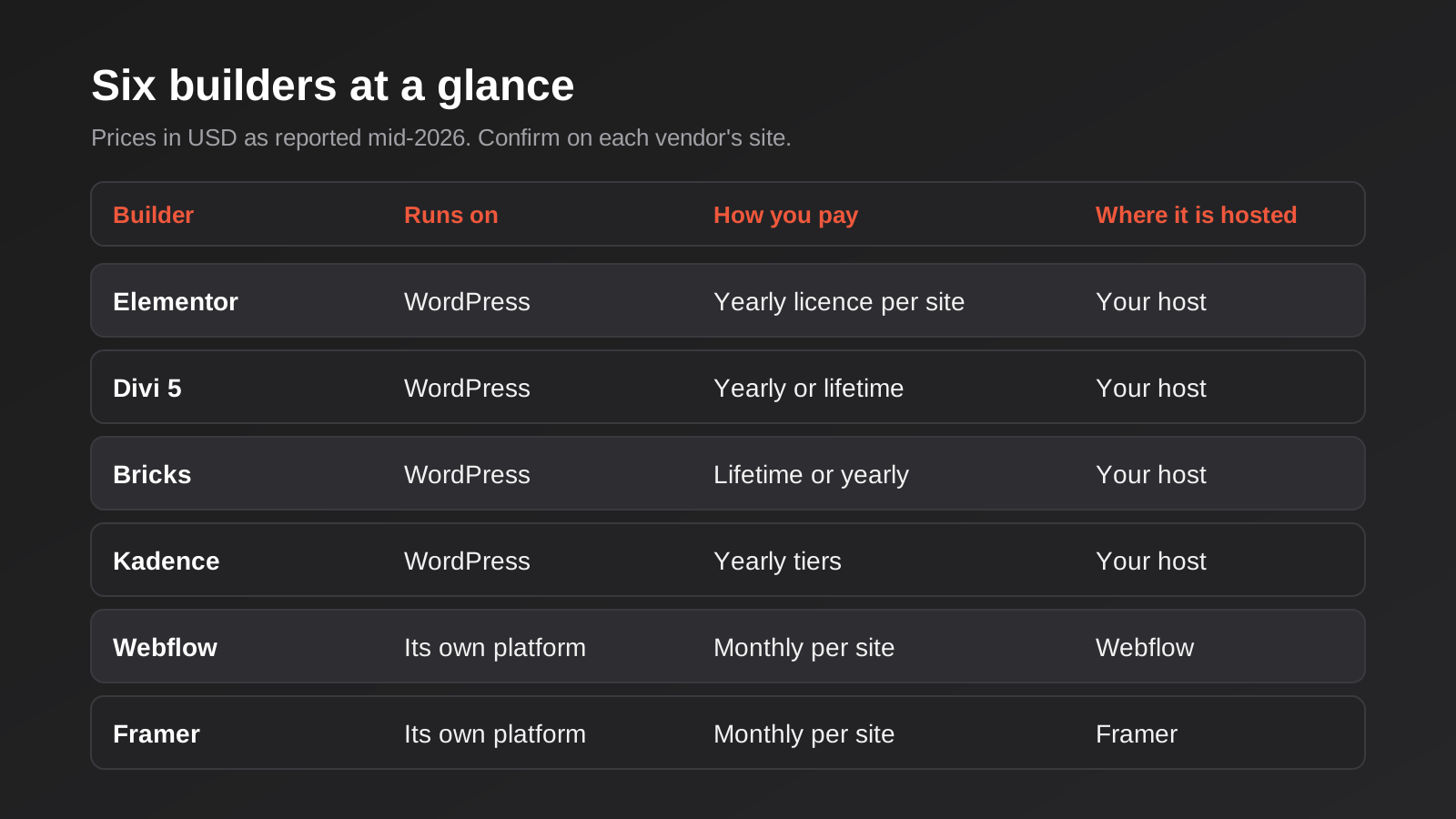
This is a comparison of six page builders that Australian businesses actually run into: Elementor, Divi, Bricks and Kadence on the WordPress side, and Webflow and Framer as hosted alternatives. We build and maintain sites on several of these, so we have opinions, but we have tried to keep them honest. Every tool below gets a real drawback, because a round-up where everything is brilliant is just an affiliate page with better formatting. We have no affiliate arrangement with any of these vendors and nothing here is sponsored.
Our selection criteria were practical. We looked at what the tool really costs over three years rather than the headline price, whether it suits Australian conditions (US-dollar billing, support that answers during the Australian working day, where the site is hosted), how heavy the pages it produces tend to be, how easy it is for a non-developer to change a headline without breaking the layout, and how hard it is to walk away from. Pricing for software moves quickly, and several of these vendors changed their plans during 2026, so treat every figure as a reported price at the time of writing and confirm it on the vendor’s own page before you buy. Where our research turned up conflicting numbers, we say so rather than picking the one that makes the story tidier.
First, What a Page Builder Is (and Isn’t)
A page builder is the editing layer that sits between you and the code of your website. Instead of writing HTML and CSS, you drag sections onto a canvas, set spacing and fonts in a side panel, and the tool generates the markup. Some builders do that inside WordPress as a plugin or theme. Others, like Webflow and Framer, are complete platforms where the editor, the hosting and the publishing pipeline all come from one vendor.
That difference matters more than any feature comparison. A WordPress builder is a component. You choose the host, you own the database, you can move the site to a different server in an afternoon, and if the builder vendor disappears you still have a WordPress site, even if it is an awkward one to edit. A hosted builder is a service. It is often smoother, because one company controls the whole stack, but the site lives where the vendor says it lives and leaves when you stop paying.
It is also worth being clear about what a builder does not do. It does not write your copy, structure your pages around what people search for, or make a slow host fast. A well-built page on a mediocre builder will beat a careless page on the most celebrated one, every time. The builder sets a ceiling and a floor, and the person using it decides where in that range the site lands.
Elementor
What it is
Elementor is the most widely used WordPress page builder, a free core plugin with a paid Pro version layered on top. It is a visual, drag-and-drop editor: you see the page as it will appear and click into any element to change it. Pro adds the pieces most business sites end up needing, including a theme builder for headers, footers and archive templates, a forms module, popups and dynamic content tied to custom fields.
What it does well
Reach and familiarity are its real strengths. Because so many sites run on it, almost any WordPress developer or freelancer in Australia can pick one up, which keeps hiring easy and lowers the risk of being stranded with a site nobody can touch. The editor is approachable for a marketing person who has never opened a code editor, and the ecosystem of add-on widgets, templates and tutorials is enormous. If your priority is that someone on your own team can safely edit the pricing page on a Friday afternoon, Elementor handles that well.
Where it falls short
Freedom is also the weakness. Elementor will let you nest containers inside containers inside containers, and a page built that way produces a lot of markup and a lot of render work for the browser. Careful developers keep layouts flat, use the newer container-based layout, and test on real phones; careless builds end up slow and then get blamed on the host. The second drawback is dependency. A site that leans on Pro features and a stack of third-party add-ons is only as stable as that whole chain, and an expired licence means no updates and no support on a plugin that sits at the centre of your site. That is a security problem, not an inconvenience.
What it costs
The core plugin is free. Third-party roundups in 2026 report Elementor Pro starting at around US$59 to US$60 a year for a single site, with multi-site tiers climbing through roughly US$99 for three sites and up towards a few hundred dollars a year for agency-scale licences. Several sources also note that renewal prices can sit above the first-year price on some plans, and Elementor runs sales through the year, so the figure you pay depends partly on when you buy. We could not verify the current plan table directly from Elementor, so check elementor.com before committing. Billing is in US dollars, which means card conversion fees on top.
Who it suits
Small and mid-sized businesses that want a WordPress site their own staff can edit, with a large pool of developers to call on. It is a sensible default, provided whoever builds it is disciplined about keeping layouts light and keeping the add-on list short.
Divi
What it is
Divi comes from Elegant Themes and has been a fixture of the WordPress world for over a decade. It started as a theme and became a full visual builder with its own library of modules and layouts. Divi 5, the rebuilt version, reached general release in February 2026 and is included in the existing licences rather than sold as a separate product.
What it does well
The licence model is the draw. Divi is generally reported at about US$89 a year or around US$249 as a one-time lifetime payment, and either licence covers unlimited sites. For an agency or a business running several brands, that is hard to beat on paper. The builder itself is capable, with detailed control over spacing, responsive behaviour and effects, and the included layout packs let you assemble a decent site quickly. Live chat support comes with both licences.
Where it falls short
Divi has historically been the builder people find hardest to leave. Older Divi sites store content in a way that leaves clutter behind if you ever remove the theme, so switching away has meant a partial rebuild. Divi 5 reworks the underlying architecture, but if you are being sold on the idea that migration is now painless, ask for a specific explanation of how your content would be stored and what an exit looks like, because we would not take that on trust for a site that matters. Moving an existing Divi 4 site to Divi 5 is also a project in its own right and should be tested on a staging copy first, never on the live site. Optional add-ons such as AI features and team tools are sold on yearly renewals even if you hold the lifetime licence.
What it costs
Reported pricing is roughly US$89 a year or US$249 once, in US dollars, with the optional extras costing more. Discount sites claim bigger savings, but most of them are affiliates, so treat anything beyond the headline figures with some suspicion and check elegantthemes.com directly. Over three years the lifetime option works out cheaper than most yearly alternatives, assuming the product is still going strong when you need it.
Who it suits
Businesses or agencies managing multiple sites who want predictable, low licence costs and are comfortable committing to the platform for the long haul. It is a poorer fit if you suspect you will want to change systems in a couple of years.
Bricks
What it is
Bricks is a newer WordPress builder aimed more squarely at people who care about the code coming out the other end. It works as a theme with a visual editor, closer in spirit to a design tool for developers than to a beginner’s drag-and-drop kit. You get proper control of class names, query loops for listing custom content and conditional display rules, and the markup it generates is leaner than most of its rivals.
What it does well
It produces fast, tidy sites in the hands of someone who knows what they are doing, and it handles dynamic content such as directories, listings and filtered archives without needing a stack of extra plugins. The lifetime licence is a genuine attraction: reports put the unlimited-site lifetime tier at about US$249, and the vendor states that lifetime means all future updates and support rather than a single major version. Licences can be activated on client sites, though reselling the licence itself is against the terms.
Where it falls short
It is not the friendliest tool for a non-technical editor. The same depth that pleases a developer can overwhelm a business owner who just wants to tweak a heading, and a badly briefed handover leaves you dependent on whoever built it. The ecosystem of templates and freelancers is much smaller than Elementor’s, so finding a second developer later is harder in Australia. The vendor has also said it does not run discounts on the lifetime deal and has raised the price before, so waiting for a sale is a poor plan.
What it costs
The unlimited-site lifetime licence is reported at roughly US$249 across most 2026 sources, with one outlier quoting a different structure, so confirm on bricksbuilder.io. Subscription options also exist. Switching from a subscription to the lifetime licence later is not permitted, so decide which route you want before buying.
Who it suits
Sites where performance and clean output matter and a competent developer will be involved over the life of the site: directories, membership sites, larger content libraries and any build where speed is a selling point. Not a first choice if the site will be edited mainly by non-technical staff.
Kadence
What it is
Kadence takes a different route to the rest of the WordPress group. Rather than replacing the WordPress editor, it extends it. The Kadence theme and the Kadence Blocks plugin add layout controls, advanced rows, galleries, forms and dynamic content to the native block editor, so what you build stays as ordinary WordPress blocks rather than a proprietary format.
What it does well
Staying close to WordPress is the point. Pages load quickly because the underlying editor is the one WordPress itself ships, and content does not get trapped in a builder’s own structure, so leaving later is far easier than with most of the field. The free theme and the free blocks plugin cover a surprising amount, which makes it an inexpensive way to start. For businesses that expect to keep the site for years, that low lock-in risk is worth more than a fancier editor.
Where it falls short
It is less free-form than Elementor or Divi. If your designer has drawn a layout that depends on overlapping elements, unusual positioning or heavy animation, you will hit the edges of what the block editor wants to do and either compromise the design or add custom code. The native editor also rewards some learning: editors used to a classic builder can find blocks fiddly at first. Pricing has been in flux too, and the reports we found were mostly from affiliate and coupon sites, so we treat them cautiously.
What it costs
The theme and the base blocks are free. Paid plans are reported in 2026 as three yearly tiers at roughly US$99, US$299 and US$499, with the older bundles said to be closed to new buyers and lifetime deals possibly discontinued. That information came mostly from third-party pages, so verify it on kadencewp.com before you budget around it.
Who it suits
Content-led businesses that care about speed, easy handover and keeping their options open: professional services, publishers, and organisations with a tight budget who still want a site that will not trap them. A good match for teams who are happy working inside the standard WordPress editor.
Webflow
What it is
Webflow is a hosted platform that combines a visual designer, a content management system and hosting in one product. Its editor exposes real web concepts, such as the box model, flexbox, grid and class-based styling, through a visual interface, so it feels like a design tool that generates proper code. Content editors work in a separate, simpler editing mode.
What it does well
Design control is excellent, and the output is clean and quick. Interactions and animations are built in without needing plugins, hosting and security patching are handled by the vendor, and there is no plugin ecosystem to keep updated, which removes a whole category of maintenance. For marketing sites with a blog or a set of case studies and a design team that wants precision, it is a serious option.
Where it falls short
You do not own the stack. You can export static code, but the CMS and any dynamic features do not come with you, so leaving means a rebuild. Pricing is the other sore point: Webflow has reorganised its plan structure repeatedly, and sources in 2026 disagree on what the current lineup looks like. One reported a May 2026 change that merged the older CMS and Business site plans into a single plan, which we could not confirm from an official source, and there is a separate workspace charge on top of the site plan for design seats. Data and hosting sit on the vendor’s infrastructure rather than somewhere you choose, which matters if you have clients with data residency requirements, and support is not built around Australian hours.
What it costs
Reported figures put a basic site plan at about US$14 to US$15 a month and a CMS-capable plan at around US$23 to US$25 a month when billed annually, with monthly billing costing noticeably more. The plan names differ between sources, so check webflow.com/pricing and read the fine print on seats, CMS item limits and bandwidth. All prices are in US dollars. One source claimed a dramatic price rise in September 2026; it conflicted with every other result and looked like an automated page, so we have ignored it.
Who it suits
Design-led businesses and startups with a marketing site, a modest CMS need and either a designer who knows the tool or an agency that does. It is less comfortable for complex ecommerce, deep integrations or situations where owning the code outright is a requirement.
Framer
What it is
Framer began as a prototyping tool and now publishes real websites. Like Webflow it is a hosted platform, but it leans harder toward visual design and quick assembly, with strong animation, a clean editor and a growing set of AI features for generating layouts. Collaboration feels closer to a design tool, with several people working on the canvas at once.
What it does well
Speed to a good-looking result is the headline. A designer can take a concept to a published page in a fraction of the time it takes in most other tools, and the output looks polished. Pricing is simple and cheap for small sites: one plan per site, hosting included, and the free tier lets you build and preview before paying. For a landing page or a small brand site that needs to look sharp, it is hard to fault on cost.
Where it falls short
It is the least suited of the six to a site that will grow into something complicated. The content management features are lighter than Webflow’s, ecommerce is limited, and anything that needs custom logic means bolting on external services. As with Webflow, the site is tied to the platform and you cannot take the full thing with you. Framer has also been adjusting its plans during 2026, with sources disagreeing on whether a higher-priced Scale plan still exists, so confirm the current tiers rather than relying on a roundup, this one included.
What it costs
Third-party sources report two main paid plans billed per site: Basic at about US$10 a month and Pro at about US$30 a month on annual billing, with higher figures on monthly billing and custom pricing for enterprise. There is a free plan on a Framer subdomain with a badge, which is fine for testing and useless for a business. Check framer.com/pricing before you commit.
Who it suits
Founders and small businesses that want a distinctive five-to-fifteen-page marketing site, or a campaign landing page, with low running costs and a designer doing the work. Not the right tool for a store, a membership area or a site your team will keep extending for years.
How to Choose the Best Page Builders for Australian Businesses
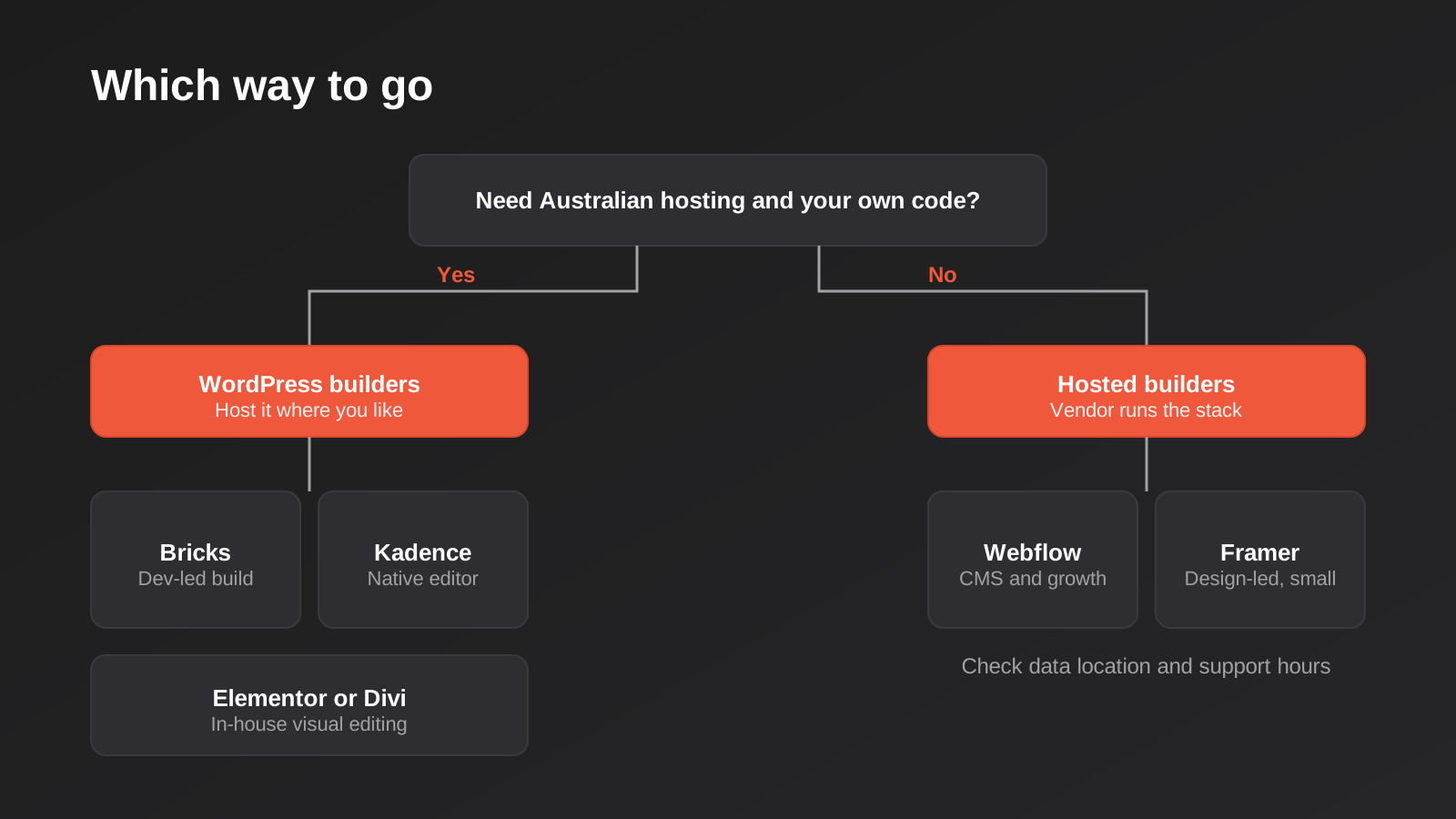
Start with the decision the diagram above makes: do you need to host in Australia and keep full control of the code and data? If the answer is yes, because of client contracts, a regulated industry or simple preference, you are choosing among the WordPress builders, and the hosted platforms are off the list. If the answer is no, the hosted options become attractive because they remove maintenance, and the choice between them is mostly about how complex the site will become.
Within WordPress, the question is who will touch the site day to day. If the answer is non-technical staff, Elementor or Divi make the most sense, because the visual editing is forgiving. If a developer will own the build and performance is a priority, look hard at Bricks. If you want to keep your options open and keep things simple, Kadence and the native editor deserve more credit than they usually get.
Keep the licence cost in proportion. Every price in this guide sits somewhere between nothing and a few hundred US dollars a year, which is small next to what a build costs. Our own website cost guide puts a professionally built small business site at roughly $4,000 to $15,000 in Australia, so choosing a builder to save $100 a year makes little sense when the choice also affects who can edit the site, how fast it loads and what a redesign will cost you in three years. Choose on fit, then check the licence.
Hosting is the other half of the equation for WordPress builders. A heavy page on a slow shared plan is a bad combination, and our comparison of website hosting for Australian businesses covers where to run it. If your site is really an online shop, the builder question is secondary to the platform question, and our guide to ecommerce platforms for Australian retailers is a better starting point.
One last filter is the exit. Ask each vendor, and any developer proposing one, a blunt question: if we leave in three years, what do we take with us? A WordPress site built with blocks leaves with you largely intact. A site built on a proprietary builder leaves with its content but needs its layouts rebuilt. A hosted platform leaves with a static export at best. None of that is disqualifying, but you should decide it on purpose.
Common Mistakes When Choosing a Page Builder
- Choosing the builder your developer likes, without asking why. Familiarity is a fair reason, but you should hear it as familiarity and not as the objectively best option.
- Judging by the demo templates. Starter sites are built to impress, and they are often heavy. Check how the tool performs on a plain, real page before you commit.
- Stacking add-ons. Every extra widget pack adds weight, another update to track and another point of failure. A lean site with three plugins ages better than a clever one with thirty.
- Ignoring who will edit it. A builder that delights your designer can frustrate your office manager. Test it with the person who will actually use it.
- Forgetting renewal and currency. Yearly licences renew, many in US dollars, so a lapsed card or a missed invoice can leave a key plugin without updates.
- Assuming hosted means maintenance-free. You avoid plugin updates, but you still need someone to own content, forms, redirects and tracking. Our guide to what website maintenance costs in Australia covers what stays on your list either way.
- Not planning for a rebuild. Every site is redesigned eventually. If you will need to migrate later, read our advice on redesigning without losing rankings before your builder makes that harder.
- Treating data location as irrelevant. If you handle customer data under client or sector requirements, find out where a hosted builder stores it before you sign anything.
Frequently Asked Questions
What is the best page builder for a small Australian business?
There isn’t one answer, but for most small businesses a WordPress builder such as Elementor or Kadence is the practical choice, because you control the hosting, can use an Australian host and are not tied to a single vendor’s pricing. If your site is a handful of pages designed by a specialist, Framer or Webflow can be cheaper and faster to launch. Match the tool to who will edit the site and how it is likely to grow.
Do page builders slow a website down?
They can, but the builder is rarely the whole story. Heavy templates, too many add-ons, large uncompressed images and slow hosting usually do more damage than the editor itself. Lean builders such as Bricks and Kadence tend to produce lighter pages, while Elementor and Divi can be fast when built with discipline. Measure real pages on a mobile connection rather than trusting a vendor’s claims.
Is it cheaper to use a page builder than hire a developer?
The licence is cheap, but the licence is not the work. Even with a builder, someone has to design the layout, write the content, set up tracking and test everything. A builder lowers the cost of editing after launch and can reduce development time, but it does not replace the planning. A DIY build in a builder can be a sound choice for a simple site if you have the time and a clear brief.
Can I switch page builders later?
Yes, but expect it to be a rebuild rather than a switch. Content such as text and images usually moves across, but layouts are stored in each builder’s own format, so the design has to be recreated. Builders that stay close to native WordPress blocks, like Kadence, make leaving easier. Hosted platforms like Webflow and Framer make it harder, because you cannot take the whole site with you.
Do prices include GST, and are they in Australian dollars?
Not usually. The vendors covered here price in US dollars, so your bank will apply an exchange rate and often a foreign transaction fee. Whether GST appears on the invoice depends on the vendor and how your business is registered, so check the first invoice and ask your accountant how to treat it. Don’t assume the headline price is the amount that leaves your account.
Is Webflow or WordPress better for SEO?
Neither wins automatically. Both can rank well when the basics are handled: clean structure, fast pages, sensible headings, good content and correct redirects. WordPress has a larger set of SEO tools and plugins, and Webflow has strong built-in controls and fast output. The difference in results usually comes from the quality of the build and the content, not from the platform.
Where to Start
If you are choosing a page builder for a new site, resist the urge to compare feature lists first. Write down who will edit the site, where it needs to be hosted, how large it might become and what leaving would involve. That short list will cut six options down to two or three without any software demos.
If you would like a hand, we build business sites on WordPress and can tell you plainly whether your brief suits it or something else. Our website pricing page shows how we price a build, and we are happy to talk through the builder question before you commit to anything.
Worth putting a number on it: our own website packages start from $1,500 one-time (excluding GST) — below the $4,000–$15,000 most Australian businesses pay for a small business brochure site. If you’ve already got a written quote from another agency for comparable scope, send it through and we’ll do our best to beat it.
Keep reading
Related posts
Landing Page Design vs Development: Which Does Your Campaign Need?
Landing page design and development aren't the same job. What each covers, real 2026 Australian pricing, and which one your campaign needs.
Best Website Hosting for Australian Businesses (2026): 6 Options Compared
We compare six hosts Australian businesses actually use in 2026 — real drawbacks, data centre locations and pricing traps included.
Website Redesign Without Losing Rankings or Revenue: A 2026 Guide for Australian Businesses
How to redesign your website without losing SEO rankings or leads: the audit, redirect map, QA and 90-day process Australian businesses need.
Got a project you'd like to talk through?
Tell us what you're working on — we'll come back with a plan.
