
Inherited Software? How to Audit a Codebase Before You Commit
 Jignesh Vagadiya
29/10/2026
23 min read
Jignesh Vagadiya
29/10/2026
23 min read
A business owner rings us with the same opening line more often than you’d expect: the developer who built our site (or app, or portal) has moved on, and now we need someone to take it over. Sometimes the handover was friendly. Sometimes the developer simply stopped replying. Either way, there’s a folder of code, a hosting login that may or may not work, and a vague hope that it’s all in reasonable shape.
It usually isn’t, or at least nobody knows. That’s the real problem. You can’t price changes, promise a launch date or judge whether the thing is safe to keep running when you don’t know what’s inside it. Agencies that quote on an unaudited codebase are guessing, and the guess is nearly always optimistic.
This guide walks through how we audit software we didn’t write, in the order we do it, and what each step tells you. It’s aimed at business owners and operations managers who need to make a decision, and at the developer or agency about to inherit the work. It’s about inheriting a working system. If you’re weighing up whether an ageing platform should be wrapped or replaced, we cover that decision separately in legacy system modernisation. Here we’re one step earlier: finding out what you actually have.
Why the audit comes before the quote
When a new supplier takes over a system, three things can go wrong, and all three trace back to skipping the audit.
First, the quote is wrong. A fixed price for “add a payments page and fix a few bugs” assumes the existing code behaves predictably. If every change breaks something three screens away, that assumption is false, and someone absorbs the cost. Either the new agency eats it, or the scope quietly shrinks, or change requests start flying in month two.
Second, a risk you didn’t know about becomes your risk the moment you take over. If the database has no working backups, or customer records are readable by any logged-in user, that’s now your liability, not the last developer’s. Under the Privacy Act 1988 and its Notifiable Data Breaches scheme, an organisation holding personal information is responsible for protecting it whether or not it wrote the code that holds it.
Third, you commit to a direction too early. Without an audit, the choice tends to collapse into two extremes: “keep patching it” or “rebuild everything”. Most inherited systems are neither. Parts are fine, parts are fragile, and one or two are dangerous. You only see that split once you’ve looked.
What an audit is, and what it isn’t
A code audit is a time-boxed, read-mostly investigation that ends in a short written report: what the system is, how healthy it is, what is risky, and what to do about it in what order. It is not a rewrite, not a penetration test (though it may recommend one), and not a judgement on the previous developer’s character. Code that looks strange often reflects constraints nobody wrote down, such as a deadline, a legacy integration or a budget that ran out.
It’s also not purely about code. Some of the most expensive surprises we’ve seen in handovers live outside the repository entirely, in who owns the domain name or whose credit card pays for the hosting. So we start there.
Step zero: the audit of everything that isn’t code
Before anyone reads a line of source, establish who controls what. This takes an afternoon and has ended more than one project before it started, because it revealed the business didn’t legally control its own system.
Work through this list and write down, for each item, the account owner, the login email and where the billing goes:
- Domain registrar and DNS. Is the domain registered in your company’s name, or the developer’s personal account? DNS is often managed somewhere different again (a hosting panel, Cloudflare, the registrar).
- Hosting and cloud accounts. Who is the account owner on the server, cloud project or platform? Is it on a developer’s personal subscription? Who gets the invoices?
- The code repository. Does a Git repository exist, where is it hosted, and are you an owner or just a collaborator who can be removed overnight?
- Third-party services. Payment gateway, email delivery, SMS, maps, analytics, error tracking, CRM. Each has an account, and many have API keys that were generated under someone else’s login.
- App store and developer accounts. For mobile apps, the Apple and Google publisher accounts control who can push updates at all.
- Certificates and renewals. TLS certificates, domain renewals and any paid licences, with their expiry dates.
If any of those are in someone else’s name, fix that first, calmly and in writing. The legal side (who owns the code you paid for, and what to ask for in a handover) is covered properly in our post on source code ownership and IP handover. For audit purposes, what matters is simple: you can’t responsibly assess a system you can’t fully access.
Also ask for whatever documentation exists, and treat it as a claim to be verified rather than a fact. A README that says “run the install command and it works” is a useful hypothesis. We’ll test it in a moment.
The five passes of an inherited codebase audit
We structure the technical audit as five passes, each answering one question. Doing them in this order matters, because each pass makes the next one cheaper and the earlier ones tell you whether it’s worth continuing.
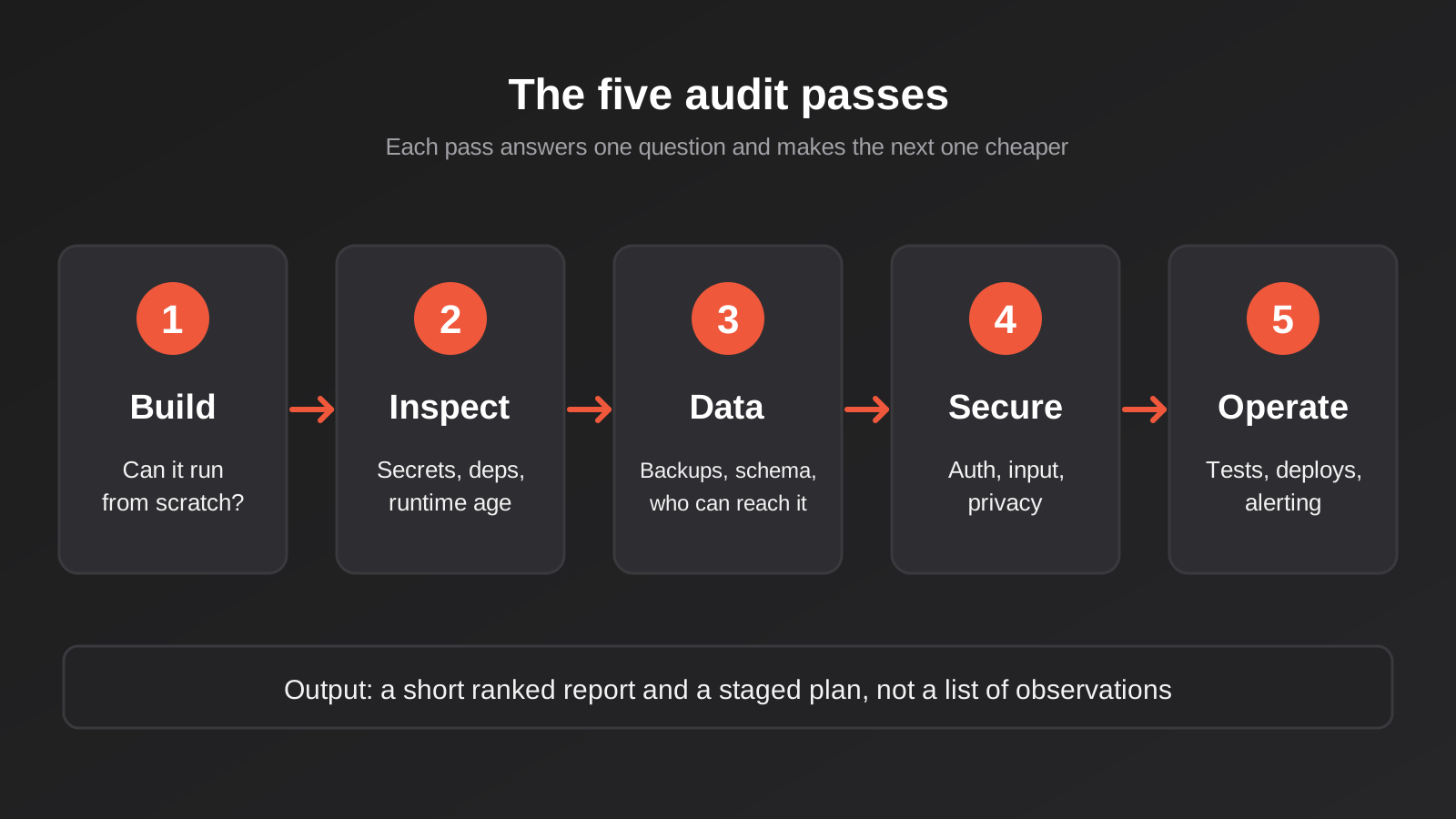
A small system, say a business website with a custom booking plugin or a single-purpose web app, can be audited in a couple of days. A multi-service platform with integrations can take a couple of weeks. The passes stay the same; only the depth changes.
Pass 1: can it be built and run from scratch?
The single most revealing test is also the least glamorous. Take a clean machine (or a clean container), follow the setup instructions, and try to get a working copy of the system running locally. Don’t use the previous developer’s laptop and don’t skip steps because “everyone knows” that part.
What you’re measuring is reproducibility. If the system can be built from the repository in an hour, the knowledge needed to run it is mostly written down. If it takes three days of messaging someone who no longer works with you, the knowledge lived in one person’s head, and it’s gone.
Things we note while doing this:
- Whether there’s a lockfile (the file that pins exact dependency versions) and whether it’s committed.
- Which environment variables are required, and whether any list of them exists. Missing configuration is one of the most common reasons a handover build fails.
- Whether the database schema can be created from migrations, or only from a mystery dump file.
- Whether the build depends on something that no longer exists, such as a deleted package, a private registry or a service that was shut down.
Record every place you got stuck and what fixed it. That list becomes the first page of the documentation you wish had existed, and it’s a fair measure of operational risk. A system nobody can rebuild is a system that cannot be recovered after a bad day.
Compare the repository with what’s live
Then check that the code you’ve been given is the code that’s running. It sounds paranoid, but it’s a common gap: hotfixes made directly on the server and never committed, a production branch that differs from the main branch, or a build artefact deployed from a laptop. Look at the deployed version (a version endpoint, a build hash, file timestamps on the server) and match it to a commit. If you can’t, treat the repository as a rough guide only.
Pass 2: secrets, dependencies and how old everything is
Once the system runs, look at what it’s made of and what’s quietly decaying inside it.
Secrets in the repository
Search the code and, importantly, the full Git history for credentials: database passwords, API keys, payment secrets, private keys. Developers commit a key “temporarily” and delete it in the next commit, which removes it from the current files but not from history. Anyone with a copy of the repository, including every past contractor, can still read it.
The remedy is rotation, not deletion. Treat any secret that ever appeared in the repository as compromised, replace it at the source, and move secrets into environment configuration or a proper secrets manager. Don’t try to rewrite history as a first resort; rotate first, tidy later.
Dependency and runtime age
Every modern application is mostly other people’s code: frameworks, libraries, plugins. Two questions matter. Is the language or runtime version still supported by its maintainers? And are the libraries current enough to receive security fixes? Each language ecosystem publishes its own support dates, so look them up rather than relying on memory. An application running on a runtime that no longer gets security patches is carrying a risk that grows every month, and it will also eventually block you from upgrading hosting.
Most ecosystems have a built-in command that lists outdated or known-vulnerable packages. Run it, but read the output with judgement. A hundred outdated packages is not automatically a crisis; one outdated package that handles file uploads or authentication might be. Sort by exposure: what faces the public internet, what touches money, what touches personal data.
The Australian Cyber Security Centre’s Essential Eight framework lists patching applications and operating systems among its core mitigation strategies. You don’t need to be pursuing formal maturity levels to borrow the idea: know what you run, know how old it is, and have a plan for keeping it current.
Abandoned and unusual dependencies
Look for packages that haven’t been updated in years, forks of popular libraries pinned to a single developer’s repository, and code copied into the project instead of installed. Those are the dependencies that bite later, because there’s no upgrade path and no one else maintaining them. It’s also worth checking licences. A paid component licensed to the previous developer’s company doesn’t automatically transfer to you.
Pass 3: the data, and whether you can get it back
Applications are replaceable. Data usually isn’t, so this pass deserves more attention than the code ever will.
Start with backups, and don’t stop at “backups are enabled”. Ask where they go, how often they run, how long they’re kept, and who is notified if one fails. Then do the only test that counts: restore one into a separate environment and check that the application works against it. We’ve seen backup jobs that ran faithfully for two years and produced empty files, and we’ve seen others that backed up the database but not the uploaded files the database pointed to. You find this out on a quiet Tuesday or on the worst day of the year, and the Tuesday is cheaper. If you want a framework for what a sensible recovery plan looks like, our guide to backup automation and disaster recovery goes through it.
Next, read the schema. A database schema is the most honest documentation a system has, because it can’t drift from reality the way a document can. Look for:
- Tables with no clear purpose, or several tables storing the same thing under different names.
- Missing constraints and indexes: no foreign keys, columns that should be unique but aren’t, large tables with no index on the columns you search by.
- Free-text fields holding structured data (a comma-separated list of IDs in one column is a classic).
- Personal information stored in plain text, such as passwords, which should be hashed, or identity documents and health details that should be handled with special care.
- Data you didn’t know you held. Old exports, test accounts with real customer data, and log tables full of request bodies all turn up regularly.
Finally, ask who else can reach the database. Is it open to the public internet? Is there a shared admin login used by the previous team, a reporting tool, and a few third parties? The fewer people and systems that can touch it directly, the better.
Pass 4: security and privacy exposure
A full security assessment is a specialist job, and for anything holding sensitive data you should commission one. But a developer reviewing inherited code can find the common problems in a few focused hours, because the serious ones follow familiar patterns.
Authentication and authorisation
These are different questions. Authentication asks who you are; authorisation asks what you’re allowed to do. Systems built quickly tend to get the first right and the second patchy. Test it directly: log in as an ordinary user and try to open another user’s record by changing an ID in the address bar. Try admin URLs without admin rights. If either works, you’ve found a broken access control problem, which sits near the top of the OWASP Top 10 list of web application risks for a reason.
Check how passwords are stored (hashed with a modern algorithm, never reversible), how sessions expire, whether there’s rate limiting on login, and whether multi-factor authentication exists for administrators. For systems with several user types, look at how permissions are structured. If they’re scattered through the code as ad hoc “if the user is an admin” checks, they’ll be painful to change safely; a central role-based model is far easier to reason about.
Input handling and the usual suspects
Look at how user input reaches the database and the page. Queries built by joining strings together invite SQL injection. Output that isn’t escaped invites cross-site scripting. File upload handlers that trust the filename or type the browser reports invite worse. None of this is exotic; automated scanners and a careful read of the data-access layer catch most of it.
Integrations, webhooks and keys
Inherited systems almost always talk to other systems, and those connections are a rich source of risk. Check whether incoming webhooks are verified by signature, whether API keys have more permission than they need, and whether the integration handles the other service’s rate limits and outages gracefully instead of silently dropping data.
Privacy and notification readiness
Map what personal information the system collects, where it’s stored and where it’s sent. That includes the unglamorous places: error-tracking tools that capture form contents, analytics scripts, email providers and offshore hosting. If the business is covered by the Privacy Act, you need to know this to meet your obligations, and to answer honestly if a customer asks what you hold about them. If a breach did happen, could you tell what was accessed? Logging that records who did what is part of the answer.
Pass 5: tests, deployment and visibility
The last pass is about whether the system can be changed safely. A codebase can be elegant and still be a trap if there’s no safety net.
Tests
Run the test suite, if there is one, and see what happens. Three outcomes are common: there are no tests; there are tests but they fail or can’t run; or there are tests and they pass. The last is the best, but even then, look at what they test. A suite that checks only trivial helpers leaves the checkout flow unprotected. Coverage numbers help a little; knowing whether the money-handling paths have tests helps far more.
Missing tests don’t mean you must stop. They mean the first job in any change is to write a few tests around the area you’re about to touch, so you can tell whether you’ve broken it. That cost belongs in the plan and in the quote.
Deployment
How does code get from a developer’s machine to the live system? The healthy answer is a scripted, repeatable process with a way to undo a bad release. The worrying answer is “someone connects to the server and copies files”. Ask whether there’s a staging environment that mirrors production, how database changes are applied, and how long a rollback would take. If you plan to run automations or integrations against the system, the same discipline applies to them.
Monitoring and error visibility
Does anyone find out when it breaks? Check for uptime monitoring, error tracking and meaningful logs. In many small systems the honest answer is that customers find out first and email you. That isn’t a code defect, but it’s a major operational gap, and it’s cheap to close.
Reading the code itself
After the five passes you’ll already know a lot, and you’ve barely read any code. That’s deliberate. Reading everything line by line is slow and rarely necessary. Sample instead, and let evidence tell you where to look.
Version history is a good guide. Files that change constantly are where the pain is; files that haven’t been touched in years are either stable or abandoned. Commit messages tell you how the previous team worked (clear and specific, or “fix”, “fix again”, “final fix 2”). The number of different authors in the history tells you about your key-person risk: if one name wrote ninety percent of it and they’re gone, the context left with them.
Then read the critical paths properly: login, anything that takes payment, anything that sends email or messages to customers, and anything that moves data between systems. These are where a bug costs real money or reputation. Look for signs of strain: very long functions that do many things, copied-and-pasted logic that must be fixed in four places, commented-out blocks, and comments like “temporary workaround” dated several years ago. A few of these are normal. A pattern of them tells you the system has been under schedule pressure for a long time.
Judge consistency, not style. You don’t need the previous developer to have used your preferred conventions. You need the codebase to follow its own conventions, so that once you learn how one feature is built, the next one makes sense.
A note on AI-generated code
An increasing share of the systems we’re asked to look at were built partly or wholly with AI coding tools. That isn’t automatically bad; plenty of working software comes out of those tools. But the failure patterns are different, and the audit should adjust.
Generated code often works on the happy path and falls over on the edges. Authorisation checks are sometimes missing because nobody asked for them. The same logic may be written three slightly different ways in different files. Secrets sometimes end up in the front-end code. And there’s frequently no one on the team who can explain why a particular piece works, which makes the usual “ask the original author” step useless. We cover the risks and the sensible guardrails in more depth in our post on AI-generated internal tools. For audit purposes, spend extra time on access control, input handling and tests, and be wary of any claim that “the AI checked it”.
Turning findings into a decision
An audit that ends in a forty-page list of observations is a failed audit. The point is a decision, so the report needs to be short enough to act on and ranked well enough that the first page matters most.
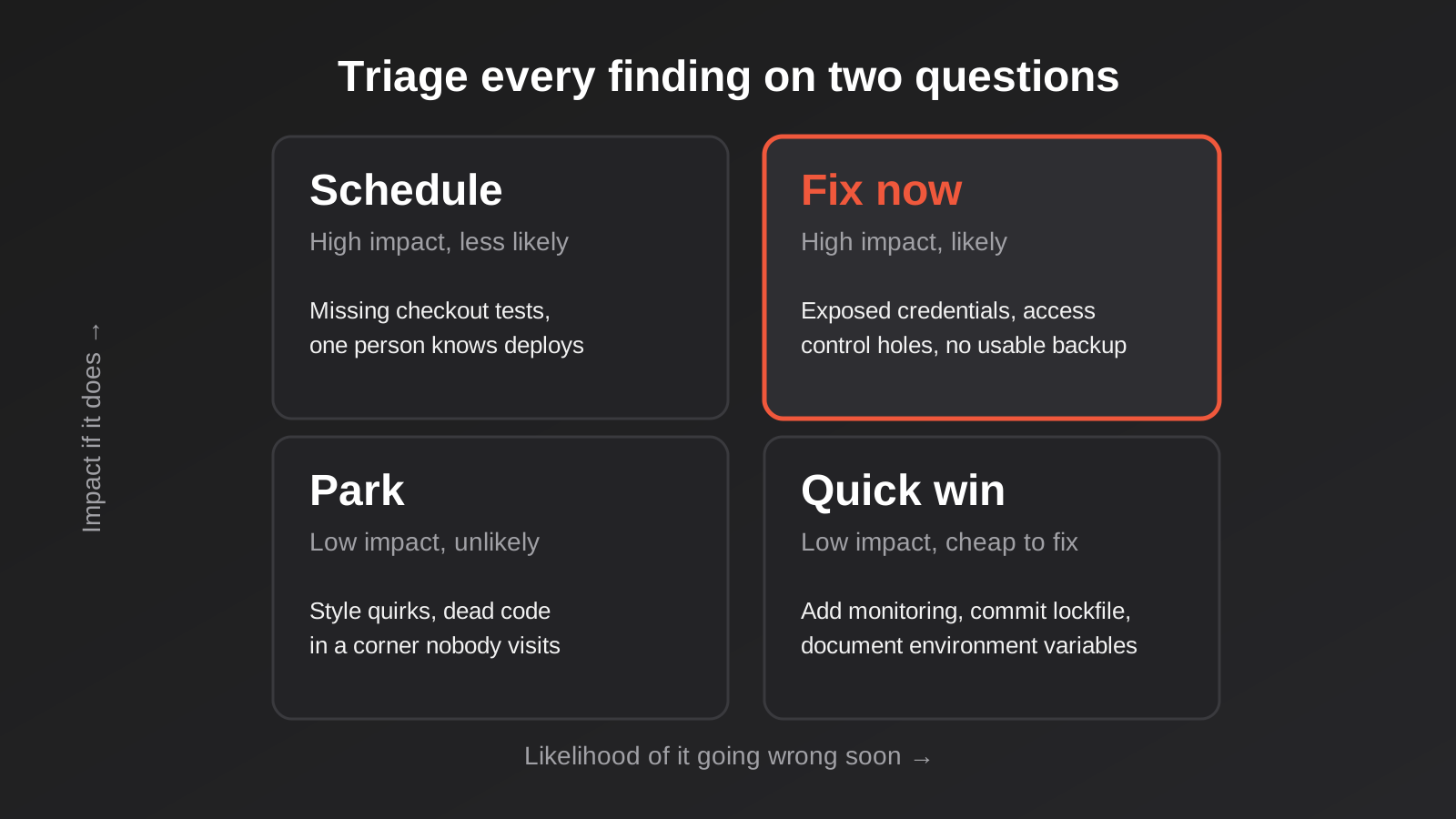
We rank each finding on two questions: how bad is it if it goes wrong, and how likely is it to go wrong soon? That gives four groups.
- Fix now. High impact and likely. Exposed credentials, access control holes, no usable backup, an unsupported runtime facing the internet. These come before any new feature.
- Schedule. High impact, less likely. A missing test around the checkout, a single person who knows the deployment process. Put them in the first quarter’s plan.
- Quick win. Low impact but cheap. Adding uptime monitoring, documenting the environment variables, committing the lockfile. Do these early because they make everything else easier.
- Park. Low impact and unlikely. Stylistic inconsistencies, old code in a corner nobody visits. Write it down and leave it alone.
Then comes the bigger call. Broadly, three outcomes are possible:
- Adopt and improve. The foundations are sound. You fix the urgent items, add tests and monitoring, and carry on building. This is the most common result, and it’s usually the cheapest.
- Stabilise and wrap. The core is shaky but works. You leave it largely alone, put the risky parts behind a clean interface and build new features around it. This is the territory covered in our legacy modernisation guide.
- Replace. The system can’t be made safe or maintainable at a sensible cost. This is rarer than people expect, and the decision should rest on evidence from the audit rather than on frustration.
Be wary of anyone who recommends a full rebuild before they’ve audited, particularly if they’re the one who’d win the rebuild work. Rewrites are slower and riskier than they look, because the old system contains years of quiet decisions about edge cases that nobody remembers and the new one has to rediscover. Equally, be wary of “it’s fine, we’ll just carry on” from anyone who hasn’t run the restore test.
A good report finishes with a short staged plan: what happens in the first 30 days, what follows over the next quarter, and what you’d revisit in six months. Each item should carry an effort estimate you can hold someone to.
What an audit costs, and who should do it
We haven’t found reliable published pricing for code audits in Australia, so treat anything specific with caution. Vendors in other markets, mostly US and UK firms, advertise fixed-scope audits at figures in the low-to-mid thousands up to around twelve thousand dollars for a focused review of a single application, and more for formal technical due diligence tied to an acquisition or investment. Those are vendor marketing numbers, in various currencies, and they’re a rough signal of order of magnitude rather than a benchmark.
What drives the cost is predictable: the size of the codebase, the number of separate systems, how much documentation exists, whether you need a formal report for a board or investor, and how deep the security work goes. A single WordPress site with a bespoke plugin and a multi-tenant platform with six integrations are not the same job.
On who should do it, two points. The auditor should have no stake in the outcome. If the people auditing are also bidding for the rebuild, you’ve created a conflict that’s hard to see from the outside. And the auditor should have built and operated this kind of system before, because most of the judgement in an audit is knowing which strange-looking thing is harmless and which is a landmine.
It’s also reasonable to ask for an audit as a paid first phase before committing to anything larger. A reputable team will happily scope it that way, because it protects them as well as you.
Common mistakes when taking over software
- Quoting before auditing. A fixed price on an unknown codebase is a guess with a number attached, and someone ends up paying for the difference.
- Trusting the documentation. Docs describe what someone intended at the time. Verify by building the system from scratch.
- Skipping the restore test. “Backups are on” is not the same as “we’ve restored one and it worked.”
- Leaving accounts in someone else’s name. Domains, hosting and app store accounts should belong to the business. Moving them is easier before a relationship sours than after.
- Deleting committed secrets and calling it done. If a credential was ever in the repository, rotate it.
- Judging code by style. Unfamiliar conventions aren’t defects. Look at consistency, risk and testability.
- Reading everything. Sampling the critical paths and the most-changed files gives you most of the value in a fraction of the time.
- Jumping to a rebuild. The decision should follow the evidence. Most inherited systems are worth keeping, with work.
- Making changes before tests exist. Add a safety net around the area first, even a thin one.
- Ignoring the people side. If the previous developer is reachable, a one-hour handover call about quirks and known problems is worth more than a week of archaeology.
Frequently Asked Questions
How long does a code audit take?
For a small application or a website with custom functionality, expect a few days. A larger system with several services and integrations takes one to three weeks. The ownership and access check can usually be done in an afternoon, and it’s worth doing first because it can change the whole plan.
Can I audit a codebase if I’m not technical?
You can do the non-code audit yourself: who owns the domain, hosting, repository and third-party accounts, and where the invoices go. The technical passes need an experienced developer. What you can do is insist on a written report in plain language that ranks the findings by business risk, not just a list of technical observations.
What if the previous developer won’t hand over the code?
Start by checking your contract and what you paid for, because ownership depends on what was agreed in writing. Our post on source code ownership explains the common arrangements. If you have no code at all, you may be looking at a rebuild from the live system’s behaviour, so get legal advice early rather than late.
Is it better to rebuild than to fix inherited code?
Sometimes, but not as often as it feels in the moment. A rebuild costs the new work plus the rediscovery of every edge case the old system quietly handled. Rebuild when the audit shows the system can’t be secured or changed at reasonable cost, not because the code is unfamiliar or untidy.
What should I ask the previous developer for?
Repository access with full history, a list of every third-party account and environment variable, the deployment process, database credentials and a recent backup, any known bugs or unfinished work, and a short call to explain the oddities. Also ask which parts they’d be nervous about changing. The answer is usually informative.
Does the audit need to cover AI-built apps differently?
Yes, in emphasis. Generated code tends to be weakest on authorisation, edge cases and tests, and nobody may be able to explain how a given part works. Spend more of the audit on access control, input handling and building a test safety net before making changes.
Where to Start
If you’ve inherited a system, do the unglamorous things in order. Get the accounts into the business’s name, confirm you have a recent backup, and write down who can reach what. Then ask for an independent audit before you sign off a larger project, even a modest one. The report doesn’t need to be long. It needs to tell you what you have, what’s urgent, and what a sensible next quarter looks like.
If you’d like a second pair of eyes, we’re happy to talk it through. We build and take over custom software for Australian businesses, and we’ll tell you plainly when the right answer is to leave a system alone. Pricing for this sort of work depends on the size and complexity of what’s been inherited, so our web app development pricing page explains what moves the number.
Worth knowing: because we run lean as a specialist agency rather than carrying a large account-management layer, our fixed quotes typically come in below the Australian averages covered in this guide. If you’ve already got a written quote from another agency for comparable scope, send it through and we’ll do our best to beat it.
Keep reading
Related posts

Fixed Price vs Time and Materials: Choosing How to Pay for Custom Software in Australia
Fixed price or time and materials? How each software contract model splits risk, when each fits, and how to protect your budget…
Who Owns Your Custom Software? Source Code, IP and Handover for Australian Businesses (2026)
Paying for custom software doesn't mean you own it. What Australian contracts must say about code ownership, licences, handover and escrow.
Role-Based Access Control for Client Portals and Internal Tools: A Practical Guide
RBAC for client portals and internal tools: roles, record-level isolation and audit logs explained — a practical guide for growing Australian businesses.
Got a project you'd like to talk through?
Tell us what you're working on — we'll come back with a plan.
