
Vibe Coding at Work: The Hidden Risk of AI-Generated Internal Tools (2026)
 Jignesh Vagadiya
25/09/2026
22 min read
Jignesh Vagadiya
25/09/2026
22 min read
Someone in your operations team spent Saturday afternoon with Claude or ChatGPT and came back Monday with a working app. It tracks job quotes, or reconciles a supplier feed, or lets the sales team log call notes without touching the CRM. It works. Everyone’s relieved, because IT quoted eight weeks for something similar and this took an afternoon. Nobody asked where the data sits, who else can see it, or what happens when that person goes on leave.
We’re seeing this constantly across Australian businesses right now, and it’s not a fringe habit confined to tech companies. Ops managers, bookkeepers, marketing coordinators and account managers are all building small internal tools with AI coding assistants — Claude, ChatGPT, Cursor, Replit’s agent, v0 — because for the first time, describing what you want in plain English is enough to get something that runs. That’s a genuine shift, and a lot of it is good. It’s also created a category of business risk that most Australian companies have no process for catching, because the tools showing up don’t look like a typical IT purchase. There’s no invoice, no procurement form, no vendor to vet. There’s just a working app that appeared on a Tuesday.
This isn’t a case against using AI to build things fast — we do it ourselves, and we think most businesses should be doing more of it, not less. The real vibe coding risk sits in the gap between “this works” and “this is safe to keep running,” and that gap is wider and more dangerous than most people building these tools realise. We’ve written before about where no-code platforms fit against custom development; this is a related but different problem, because vibe-coded tools don’t even have a platform vendor holding the guardrails up.
And it’s not just ops teams. We’ve seen it from bookkeepers automating a reconciliation step, marketing coordinators building a campaign tracker, warehouse supervisors putting together a stock-check app on a tablet, and more than one small business owner building their entire booking system this way because a SaaS subscription felt like overkill. The common thread isn’t the department, it’s the pattern: a real problem, a willing AI assistant, and no one in the loop whose job it is to ask the security and ownership questions before the tool goes live.
What “Vibe Coding” Actually Means Inside a Business
The term “vibe coding” was coined in 2025 to describe a particular way of working with AI coding assistants: you describe what you want, the model writes the code, and you judge it by whether it runs rather than by reading and understanding what it actually does. In a personal side project, that’s a reasonable trade-off. Inside a business, applied to a tool that will touch real customer records, real financial data or real operational decisions, it’s a different proposition entirely, because nobody involved necessarily knows what the code is doing, including the person who “built” it.
This is a different problem from the no-code and low-code tools we’ve covered before. A platform like Bubble or Retool gives you a constrained set of building blocks — a database, a form, an approval flow — and the platform vendor has already made a lot of the security and reliability decisions for you. Vibe coding removes even that scaffolding. The AI assistant can generate arbitrary code: it can call any API, store data in any format, expose an endpoint to the public internet, or hardcode a password directly into a file. There’s no platform underneath quietly stopping the worst outcomes. Whatever guardrails exist have to come from the person prompting it, and most people prompting these tools are not developers and don’t know what guardrails to ask for.
Why This Has Exploded in the Last Year
A few things have converged. Coding assistants got genuinely good at producing working software from a plain-English brief, not just autocompleting lines for a developer who already knows what they’re doing. Agentic tools now write, test and deploy code in a single session, so there’s no longer even a “paste this into your editor” step to slow a non-technical person down. And the cost dropped to close to zero — a free ChatGPT or Claude account is enough to build something that would have taken a contractor a week and a few thousand dollars two years ago.
At the same time, internal IT and dev queues haven’t gotten any shorter. If your business has one developer, or none, and a four-to-eight-week backlog for anything new, the temptation to just build it yourself in an afternoon is completely rational. We don’t think the answer is to stamp this out. We think the answer is to build a lightweight process around it before it causes a problem, because right now most businesses have neither.
The Real Vibe Coding Risk: What Actually Goes Wrong
It’s worth being specific here, because “AI-generated code might have bugs” undersells what’s actually happening. Independent research through 2026 has been fairly consistent on the scale of this: security researchers scanning AI-assisted tools found a large share exposing data that should never have been public, and code-scanning studies have repeatedly found that a substantial proportion of AI-generated code introduces a known class of vulnerability from the OWASP Top 10 — the industry’s standard list of the most common and most serious web application security flaws. Verizon’s 2026 Data Breach Investigations Report logged shadow AI usage — unsanctioned AI tools and AI-built applications operating outside any IT oversight — as one of the more common insider-related actions behind breaches this year. None of that is about malicious intent. It’s what happens by default when code gets written fast, by someone who isn’t reviewing it for security, and shipped straight into daily use.
Data Exposure Is the Big One
The most common failure mode we see is embarrassingly simple: an internal tool ends up reachable from the public internet with no login screen at all, because the person who built it didn’t think about authentication — they were focused on getting the feature working. Or an API key for a paid service gets typed straight into the code, which is then shared, copied to another laptop, or even accidentally pushed to a public code repository. Or customer names, phone numbers and order histories get pasted into the tool as “test data” and never get cleared out, sitting in a spreadsheet-replacement that nobody is monitoring for access. Under Australia’s Privacy Act, an organisation is still responsible for personal information it holds, regardless of which system it’s sitting in or who built that system. A tool nobody in IT knows exists is a tool nobody can include in a data breach response plan.
No One Owns It
Vibe-coded tools tend to have exactly one person who understands them: whoever built it. When that person changes roles, goes on leave, or leaves the business, the tool doesn’t get handed over in any formal sense — it just keeps running until something breaks, and then nobody can fix it because nobody else ever looked at the code. We’ve had more than one client come to us after this exact scenario: a tool that ran the business’s job scheduling or quoting for two years, built by someone who’s since moved on, and it finally failed in a way nobody left on staff can diagnose.
Compounding Technical Debt Across the Business
Because building a tool is now so cheap, different teams solve the same problem independently, with no visibility into what anyone else has built. We’ve seen two departments in the same business each vibe-code their own version of a customer follow-up tracker within months of each other, both holding slightly different, slightly inconsistent copies of customer data, neither aware the other exists. Multiply that across a growing business over a couple of years and you get a scattered mess of small systems, each with its own copy of the truth, none of them talking to each other or to the systems of record.
Compliance Blind Spots
Australia’s privacy reforms, which continue to tighten through 2026, put more weight on being able to show what personal information you hold, where it’s stored, and who can access it. A vibe-coded tool holding customer or staff data typically has none of that: no audit log of who viewed what, no documented retention period, no clear place it appears in a privacy impact assessment because nobody thought to include it. If your business is ever required to respond to an access request or investigate a suspected breach, “we’re not sure how many of these tools we have” is not a position you want to be in.
The Maintenance Problem Nobody Prices In
There’s a quieter risk that shows up later rather than immediately. A vibe-coded tool is usually built against whatever API, library or AI model happens to be current on the day it’s built, and none of those things stay still. A payment provider changes its API version and deprecates the old one. A free tier the tool quietly relied on gets a usage cap. The AI model used to generate a piece of logic behaves slightly differently if the tool is ever regenerated or extended later. A properly maintained system has someone watching for this kind of drift and a process for handling it; a vibe-coded tool usually has neither, so it tends to fail suddenly and without warning, often months after anyone last thought about it. We see this most often with tools that call external services — a courier’s tracking API, a payment gateway, an accounting package — because those are exactly the integrations that change on someone else’s schedule, not yours.
Where Vibe Coding Genuinely Makes Sense
None of this means the answer is banning the practice, and we wouldn’t recommend trying — a blanket ban just pushes the behaviour underground, where it’s even harder to see. There’s a real, useful place for building fast with AI assistance inside a business.
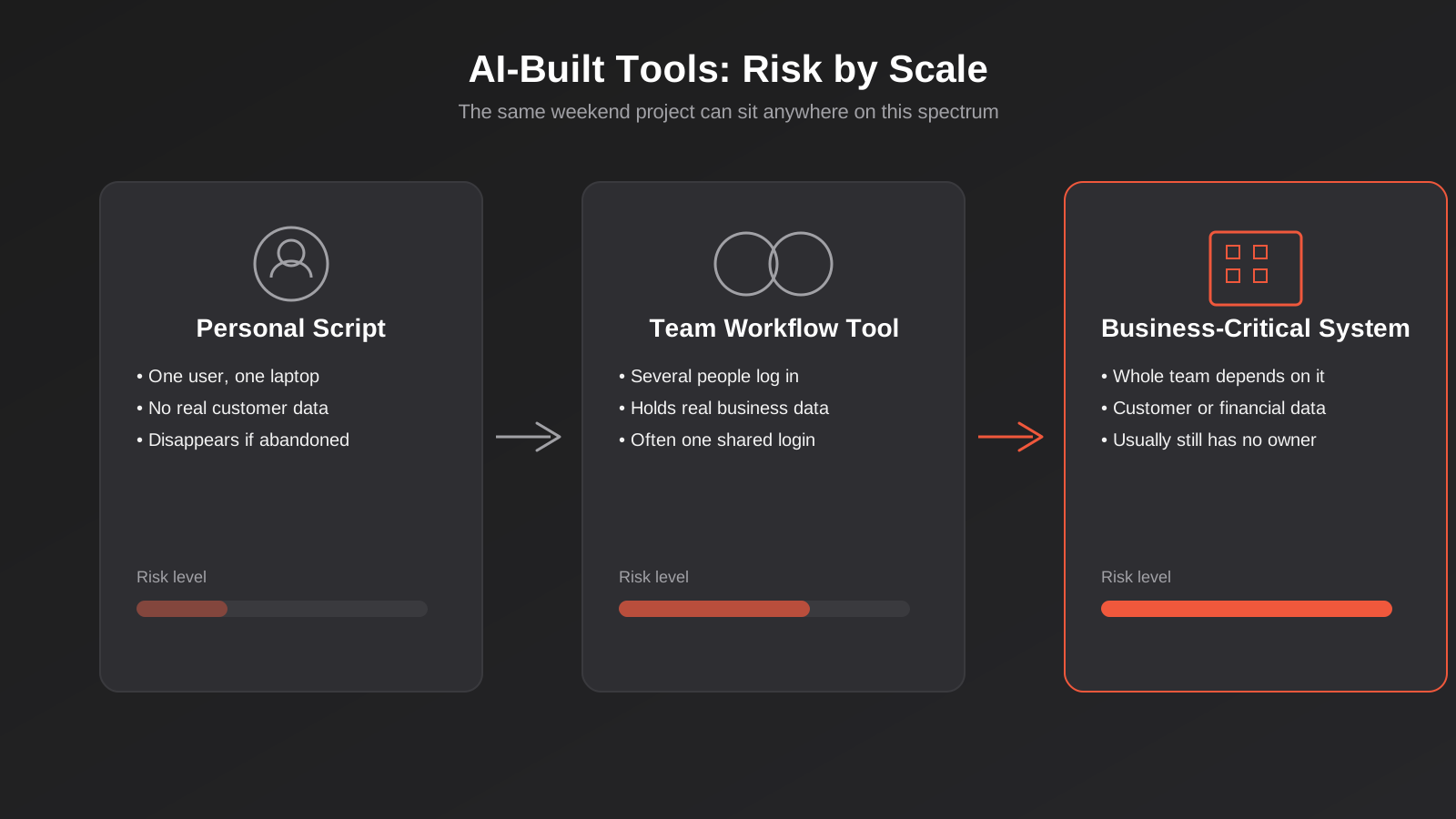
A personal script that reformats a CSV export before you paste it into a report is low risk: it touches no one else’s data, lives on one laptop, and if it breaks, only you notice. A quick internal calculator that turns a set of inputs into a rough quote estimate, used by one person to save themselves ten minutes, is similarly low stakes. A throwaway prototype built to prove a concept to a stakeholder before committing real budget is exactly the kind of thing AI-assisted building is good for — it’s the same instinct behind a properly scoped MVP, just faster and less formal. The difference between that and a liability is what happens next: does it stay a personal script, or does it quietly become the thing three departments now depend on?
The Line Between a Useful Shortcut and an Unmanaged Liability
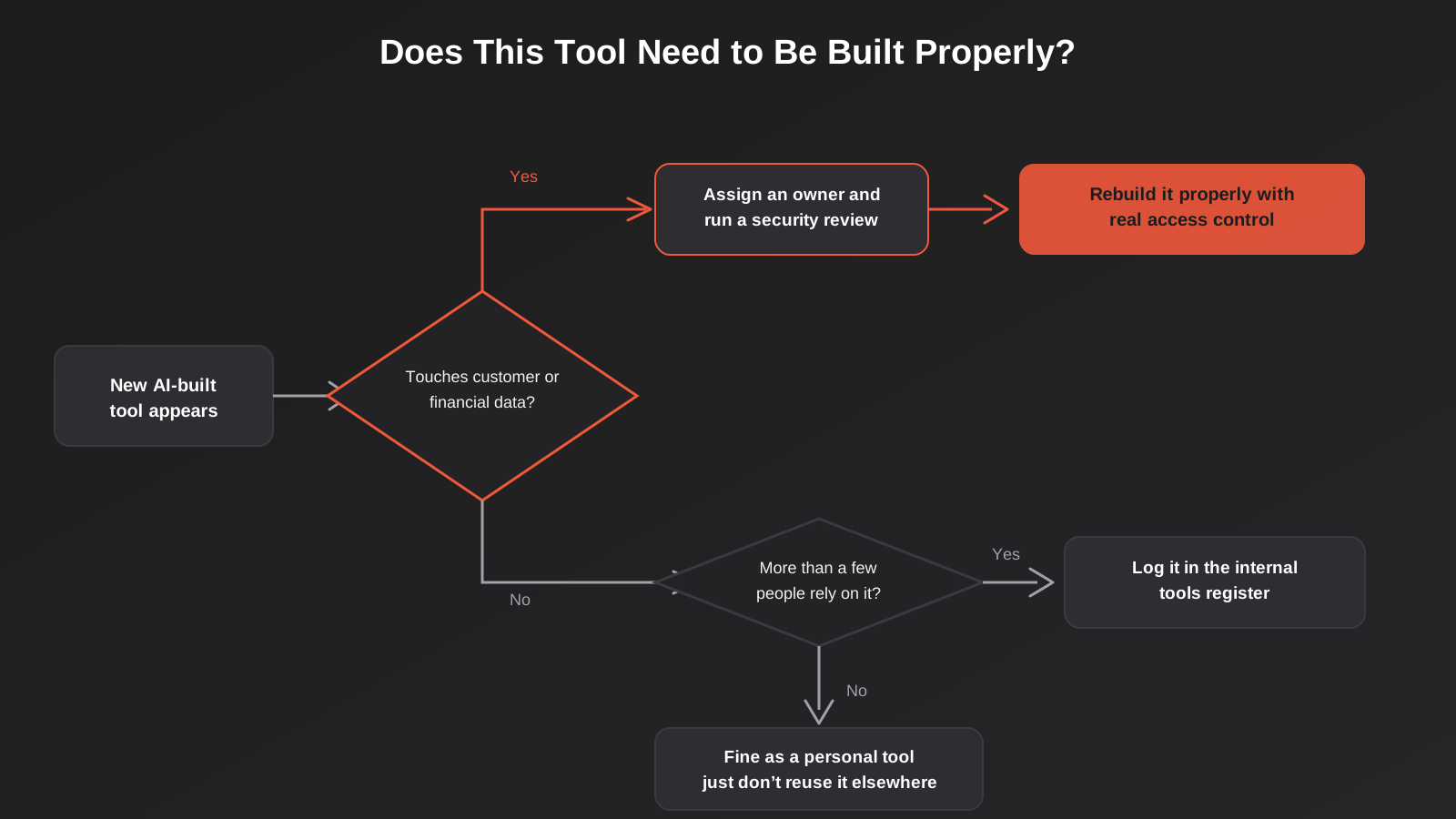
We use four questions with clients to work out which side of that line a tool has landed on, and we’d suggest any business run the same check on anything built this way in the last year.
Who touches it? If it’s genuinely just the builder, the risk is contained. The moment a second person logs in, particularly with a shared password rather than their own account, the risk profile changes.
What data does it hold? Public information or the builder’s own working notes is one thing. Customer names, phone numbers, payment details, staff records or anything commercially sensitive is another. This single question does more work than any other — if the answer is “real customer data,” the tool needs proper governance regardless of how few people use it.
How long will it live? A tool built to answer one question this week and then get deleted is different from one that’s quietly become part of how a team works every day, six months after it was thrown together in an afternoon.
Is it customer-facing in any way? Even indirectly — does it generate a quote a customer will see, send an email on the business’s behalf, or feed a report a client reads? Anything that touches the outside world needs a different standard of scrutiny than something purely internal.
If any one of those answers trips a threshold — more than a handful of users, real customer or financial data, an indefinite lifespan, or any customer-facing element — the tool has moved out of “harmless shortcut” territory and needs someone with development and security judgement to look at it, even if the answer ends up being “it’s fine, just add a login.”
Building a Governance Layer Without Killing the Speed
The businesses handling this well aren’t the ones with the strictest rules — they’re the ones who’ve made it easy to do the right thing without going through a six-week approval process. A few practical pieces we’ve helped clients put in place.
A Lightweight Intake, Not a Gate
A single shared document or simple form is enough: tool name, who built it, what it does, what data it touches, and who’s the nominated owner. This isn’t about approval before building — that kills the exact speed advantage that makes vibe coding worth doing. It’s about visibility after the fact, so that six months from now, someone in the business can actually answer “what internal tools do we have and what do they touch,” instead of finding out the hard way when one of them breaks or leaks something.
Guardrails for the Building Itself
A short, practical list goes a long way: never paste real customer records into a prompt or into test data, even temporarily. Never hardcode a password, API key or access token directly into the code — ask the AI assistant to read it from an environment variable instead, which takes one extra sentence in the prompt. Never leave a tool reachable without some form of login if it holds anything beyond public information. None of these require a developer to enforce; they just require someone to have said it out loud once, ideally with a real example of what’s gone wrong elsewhere.
Knowing When to Bring in a Developer
The four-question test above is the trigger. Once a tool holds real data, has more than a couple of users, or shows signs of becoming permanent, it’s worth a few hours of a developer’s time to review what’s actually running — not necessarily to rebuild it from scratch, sometimes just to add authentication, move secrets out of the code, and put it behind proper access control. This is a much smaller job than most people expect, and it’s dramatically cheaper than dealing with a data exposure after the fact. For tools that have genuinely outgrown their AI-built origins — the ones now running a real part of the business — that’s the point to treat it as a proper web application development project, with the access control, testing and maintenance plan that implies. Some of these AI-generated integrations also turn into a genuine opportunity: if a vibe-coded prototype has proven that connecting two systems saves real time, that’s exactly the kind of validated need our custom AI integrations work is built for, done properly rather than held together with a script one person understands.
Bringing IT or a Development Partner in Early, Not After an Incident
The businesses that handle this best treat their developer or agency as a resource for a fast review, not just a contractor for big projects. A twenty-minute conversation about a new internal tool before it becomes load-bearing is a completely different cost to a forensic review after a data exposure. We’ve written previously about the point at which a spreadsheet or internal tool needs to graduate into something properly built — the same judgement applies here, just triggered earlier, because the tool arrived faster than the usual build-and-review cycle ever anticipated.
What Good Looks Like: A Simple Data Tiering Approach
Most of the businesses we’ve helped set this up don’t need an elaborate policy document — they need a way to sort tools into three tiers, each with a different bar to clear, so nobody has to make a judgement call from scratch every time someone builds something new.
Tier one: public or personal data only. Nothing about a customer, a staff member, or the business’s finances. A script that reformats a public data set, a personal to-do tracker, a calculator using made-up numbers. No review required — build it, use it, bin it when it’s no longer useful.
Tier two: real operational data, internal use only. Rosters, internal job tracking, supplier pricing, anything that would be mildly annoying but not catastrophic if it leaked. This tier needs an owner on record, individual logins rather than a shared password, and a note in whatever register the business keeps of what tools exist. It doesn’t need a full security review unless it starts approaching tier three.
Tier three: customer data, financial data, or anything regulated. Names, contact details, payment information, health information, anything that would trigger a notifiable data breach obligation if exposed. This tier gets a proper review before it goes anywhere near real data — authentication, encryption at rest where relevant, access logging, and a plan for what happens when the builder moves on. This is the tier where we’d always recommend bringing in a developer, and where the cost of doing so is trivial compared to the cost of getting it wrong.
Writing this down once, in a page or two, and telling the team it exists does more to manage this risk than any amount of after-the-fact policing. Most people will happily follow a simple rule they know about; almost nobody follows a rule they’ve never heard of.
A Practical Audit: Finding the Tools Already Running in Your Business
Most businesses reading this already have a handful of these tools running and don’t know it. A short audit is worth doing now rather than after an incident forces the question.
What to Look For
Start by asking each team lead directly: what have you or anyone in your team built this year to solve a problem, outside of anything IT or a vendor set up for you? Phrase it without judgement — people under-report this when they think they’ll be told off for it, and the goal is visibility, not blame. Check your billing across AI coding tools, hosting platforms and low-code services for accounts you don’t recognise; a personal card expensed as “software” is a common tell. Look for subdomains or URLs on your company’s hosting that nobody in IT provisioned. And check whether any tool holding customer or staff data requires individual logins, or whether it’s sitting behind one shared password — that’s usually the fastest way to find the highest-risk item in the list.
What to Do With What You Find
Sort whatever turns up against the tiers above. Tier one tools need nothing — leave them alone. Tier two tools need an owner assigned and a line in the register, which usually takes ten minutes per tool. Tier three tools — anything holding real customer, staff or financial data — go to the top of the list for a proper review, ideally within the week rather than the quarter, because these are the ones actually carrying regulatory and reputational risk. A handful of businesses we’ve done this with have found the audit itself is the hard part; once you know what you’re dealing with, deciding what to do about each item is usually straightforward.
None of this needs to be adversarial. Most people who build these tools are trying to solve a real problem faster than the normal process allows, and in a lot of cases they’re right that the problem was worth solving. The goal of an audit isn’t to punish that instinct, it’s to make sure the business actually knows what it’s running.
Common Mistakes We See
- Storing real customer data in a prototype “just to test it,” and never removing it once the tool becomes permanent.
- Sharing one login between several staff instead of giving each person their own account with appropriate access.
- No handover plan when the person who built the tool changes roles or leaves — the tool just keeps running until it breaks.
- Treating “it works” as the finish line, rather than “it works and it’s secure,” which are very different bars.
- Skipping backups because it’s “just an internal thing,” until the one internal thing the whole team relies on disappears with no way to recover it.
- Leaving a public share link active long after the person who needed it has moved on, because nobody scheduled a review.
- Rebuilding the same tool in two different departments because neither team knew the other had already solved it.
Frequently Asked Questions
What is vibe coding in a business context?
It’s the practice of using an AI coding assistant — tools like Claude, ChatGPT, Cursor or Replit’s agent — to build working software from a plain-English description, judging the result mainly by whether it runs rather than by reviewing the underlying code. Inside a business, this typically shows up as staff outside the IT or development team building internal tools, trackers or small apps to solve a problem faster than the usual request-and-build process allows.
Is vibe coding safe for internal business tools?
It depends entirely on what the tool touches. A personal script with no real data and one user is low risk. A tool that holds customer records, financial data or is used by multiple people carries real risk if it’s built without authentication, secure storage of credentials, or any ongoing ownership. The building method isn’t inherently unsafe; what matters is whether the guardrails a developer would normally apply have been applied here too.
How do I know if an AI-built tool needs a proper developer to look at it?
Run it against four questions: who uses it, what data it holds, how long it’s likely to stick around, and whether it touches customers in any way. If it holds real customer or financial data, has more than a couple of users, looks like it’s becoming permanent, or has any customer-facing element, it’s worth a developer’s time for a review — even if the outcome is just adding proper login and moving credentials out of the code.
Can I use ChatGPT or Claude to build something customer-facing?
You can use these tools as part of building something customer-facing, but anything customers will directly interact with, or that carries their data, should go through the same review, testing and security process as any other piece of customer-facing software — regardless of how it was originally drafted. The speed of AI-assisted building is genuinely useful for prototyping that idea; it’s not a substitute for the review a live customer-facing system needs before launch.
What’s the difference between vibe coding and using a no-code platform?
A no-code platform like Bubble or Retool gives you a constrained set of building blocks, and the platform vendor has already made a lot of the underlying security and infrastructure decisions for you. Vibe coding with an AI assistant can generate arbitrary code with no such scaffolding — it can do almost anything a developer’s code can do, including the risky things a platform would normally prevent by design. We cover this comparison in more detail in our no-code and low-code guide.
Does this apply to small businesses and solo founders too, or just larger companies?
It applies more to small businesses in some ways, not less. A larger company at least has a chance of an IT team noticing an unfamiliar tool; a five-person business often has no one whose job it is to look. If you’re a small business and any tool you’ve built holds real customer data or payment information, the tiering approach above still applies at your scale — it just might be a conversation with yourself rather than a policy rollout across departments.
How does Growth Digital help businesses manage this?
We do quick, practical reviews of AI-built internal tools to flag what needs attention — authentication, data handling, ownership — without insisting everything gets rebuilt from scratch. Where a tool has genuinely proven its value and outgrown its origins, we help take it from a weekend prototype to something properly built, secure and maintained, whether that’s a small internal application, an integration between existing systems, or a client-facing tool.
Where to Start
If you already suspect there are a handful of AI-built tools running somewhere in your business, the cheapest first step is simply asking around — team by team, without judgement — and writing down what turns up. That alone puts most businesses ahead of where they were. If what turns up includes something holding real customer data, running with a shared login, or clearly now load-bearing for a team’s day-to-day work, that’s worth a proper look before it becomes a bigger problem than the one it was built to solve. The vibe coding risk itself isn’t the shortcut — it’s leaving it unmanaged.
We’re happy to have that conversation without a sales pitch attached — sometimes the answer is a quick fix, sometimes it’s leaving it exactly as it is. If you’d like a second set of eyes on a tool someone’s built, or you want to talk through what a proper internal tools process should look like for a business your size, get in touch and we’ll talk it through.
Keep reading
Related posts
Who Owns Your Custom Software? Source Code, IP and Handover for Australian Businesses (2026)
Paying for custom software doesn't mean you own it. What Australian contracts must say about code ownership, licences, handover and escrow.
Role-Based Access Control for Client Portals and Internal Tools: A Practical Guide
RBAC for client portals and internal tools: roles, record-level isolation and audit logs explained — a practical guide for growing Australian businesses.
Single Sign-On for Australian Businesses: When SSO Is Worth the Setup
SSO for growing Australian businesses: SAML vs OAuth vs OIDC explained, how to pick an identity provider, costs, and rollout mistakes to…
Got a project you'd like to talk through?
Tell us what you're working on — we'll come back with a plan.
