
No-Code and Low-Code Platforms: When They Work for Australian Businesses (and When They Don’t)
 Jignesh Vagadiya
23/09/2026
21 min read
Jignesh Vagadiya
23/09/2026
21 min read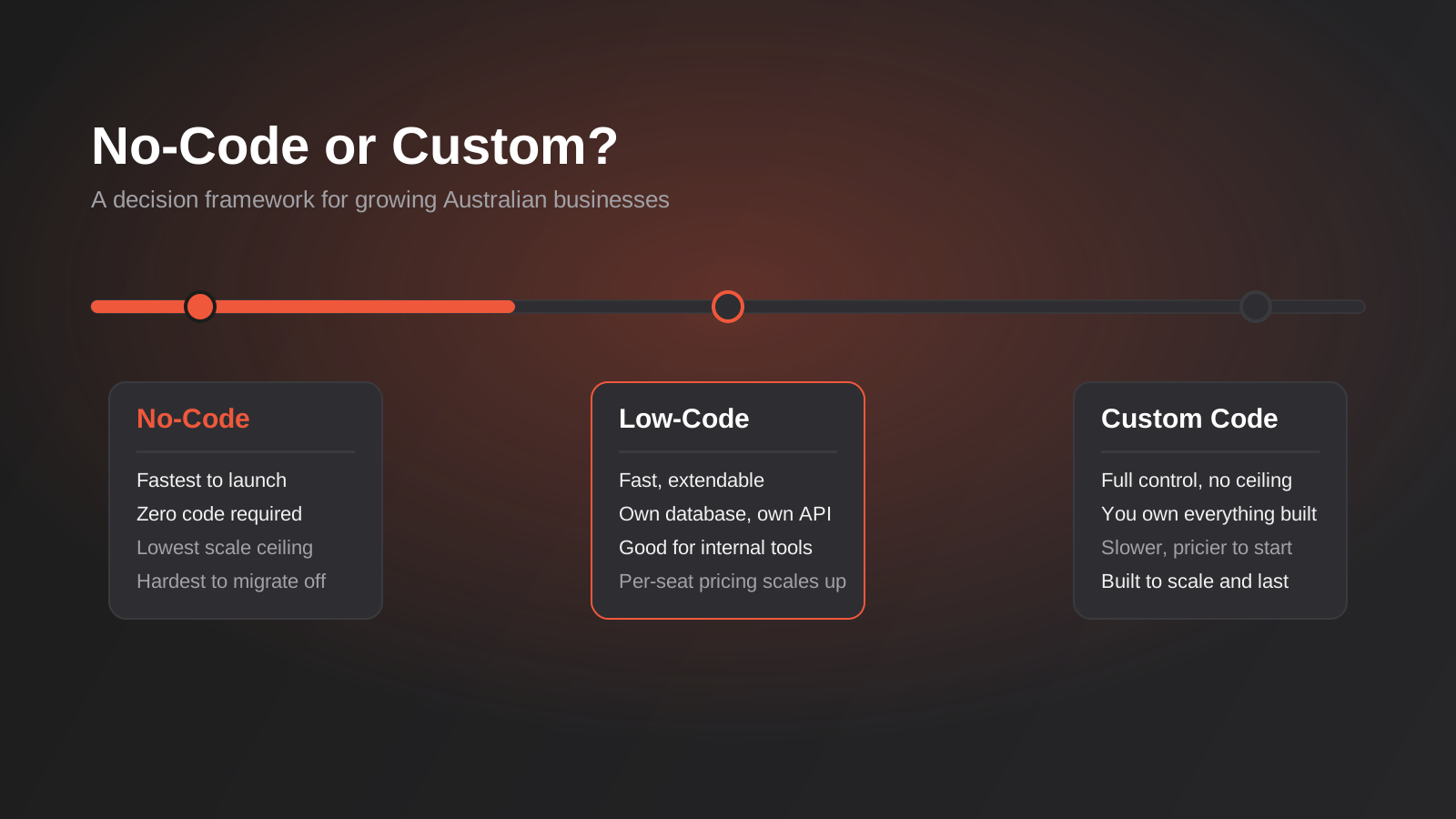
It’s a pattern we see often enough to recognise on sight: a small team builds a Retool or Bubble dashboard over a year or two, it quietly ends up running a genuinely important business process — order approvals, pricing overrides, credit holds, dispatch sign-off — and it works right up until it doesn’t. The person who understood the underlying logic moves on. The platform’s pricing tier jumps because the user count crossed a threshold nobody was tracking. A new compliance requirement needs a level of audit logging the tool was never built to provide. None of that makes no-code platforms bad. It makes them exactly what they are: extremely good at one part of the problem, and not built for the rest.
That’s the conversation we have with Australian businesses more often than almost any other technical decision. Someone on the team has built something in Bubble, Retool, Softr or Airtable that’s holding together a real business process, and the question isn’t “should we use no-code” — they already are — it’s whether to keep building on it, when to stop, and what “stop” actually costs. Most of the content written about no-code vs custom development is written by the platforms themselves, so it either oversells the no-code path or, on the agency side, oversells custom code because that’s what agencies sell. We’d rather give you the version that’s actually useful: what these tools are good at, where they genuinely fall over, and how to tell which side of that line your project sits on before you’ve spent a year finding out.
This isn’t the same question as build vs buy off-the-shelf software, and it isn’t the same question as how to run a lean MVP — we’ve covered both of those separately. This is specifically about the tooling layer: when a visual, drag-and-drop platform is the right way to build something, and when it’s a slower, more expensive path to the thing you needed custom code for all along.
No-code, low-code and custom code aren’t three categories — they’re a spectrum
The terminology gets thrown around loosely, and that’s part of why the decision gets muddled. There’s a real, practical difference between the three, and it matters for what you’re actually signing up for.
No-code
Platforms like Bubble, Softr, Glide and Webflow let you build a working application entirely through a visual interface — drag components onto a canvas, wire up logic with dropdowns and conditional rules, connect a database without writing a query. No code editor, no deployment pipeline, no engineer required to ship the first version. The trade-off is that you’re working entirely inside the platform’s abstractions. If it doesn’t have a feature, you don’t get it until the vendor builds it, and you can’t reach underneath to fix it yourself.
Low-code
Platforms like Retool, Appsmith, OutSystems and Microsoft Power Apps sit a step closer to real software. You’re still assembling most of the interface visually, but you can drop into JavaScript, SQL or Python for the logic that the visual layer can’t express, and you’re usually connecting directly to your own database or API rather than a platform-managed one. This is the tier most internal tools land on — support dashboards, ops consoles, approval workflows — because someone with light technical skill can build fast, but a developer can extend it when the visual layer runs out.
Custom code
Full control over the stack, the data model, the hosting, the performance profile and the roadmap. Slower and more expensive to get a first version live. Nothing you didn’t build stands between you and what the application can do. This is what we build when a business has outgrown the ceiling the first two options put on scale, security or differentiation — it’s also, honestly, overkill for a huge number of internal tools that never needed to be more than a well-organised form and a database.
None of these is universally “better.” A no-code app that replaces a shared spreadsheet for a five-person operations team is a good decision made well. A no-code app trying to be the core transactional platform for a business processing thousands of orders a day is a good decision made badly, usually because nobody re-evaluated it after the business outgrew the reason it was chosen.
Where no-code and low-code genuinely earn their keep
We’re not the agency that tells every client to build custom because that’s what pays our invoices. There are real, common situations where a no-code or low-code build is the objectively correct call, and building custom would be slower, pricier and worse.
Internal tools with a small, known user base
An operations dashboard that fifteen staff use to manage inventory holds, a support console that pulls order data from three systems into one screen, a finance approval queue — these are exactly what Retool and Appsmith were built for. The user count is fixed and small, the requirements are well understood because your own team is using it, and the cost of a slightly imperfect UI is close to zero because nobody outside the business ever sees it. Building this custom usually means paying a developer to reinvent table components, form validation and permission logic that Retool ships out of the box.
Validating an idea before you commit real budget
If the open question is “will anyone actually pay for this,” a Bubble or Softr build that gets a working product in front of real users in two to four weeks is worth more than a technically superior version that takes four months and burns the validation budget before you’ve learned anything. We’ve written more on this specifically in our guide to MVP development and validating a lean first product — the short version is that speed to real user feedback beats architectural purity at this stage, every time.
Customer-facing portals with simple, well-defined workflows
A client portal where customers log in to view order status, download an invoice or submit a support request doesn’t need bespoke engineering if the workflow is genuinely simple and doesn’t need to integrate deeply with your core systems. Softr and Bubble both handle authenticated, database-backed portals well, and for a business that needs this live in weeks rather than months, that’s the right trade.
Process automation that sits on top of existing systems
A lot of what looks like “should we build an app for this” is actually a workflow automation problem in disguise — approval routing, data syncing between two systems, triggered notifications. That’s not a no-code app build at all; it’s a job for a platform like Zapier, Make or n8n sitting between the systems you already run, which is a different decision with its own trade-offs we’ve covered in our guide to choosing a workflow automation tool. Worth ruling this out first, because it’s frequently cheaper and faster than building any kind of app at all.
AI app builders are shifting where the line sits
The newest wave of tools — AI-assisted builders bolted onto Bubble and Retool, plus AI-native app generators that write and scaffold real code from a prompt — are changing this decision faster than most of the “no-code vs custom” advice written even a year ago accounted for. Some of these tools now generate actual, exportable source code rather than locking logic inside a proprietary runtime, which genuinely changes the vendor lock-in calculation we described above, because the output can, in principle, be picked up by a developer and extended without a rebuild. Others just wrap the same closed platform in a chat interface, which speeds up the building process without touching any of the underlying trade-offs around scale, pricing or portability. The tool being newer or AI-powered doesn’t automatically mean the fundamentals have changed — it’s worth checking specifically whether what comes out the other end is code you own, or another layer of the same lock-in with a friendlier interface. We work through this with clients project by project, because it genuinely varies by platform and moves quickly enough that generic advice goes stale within months.
Where they break down in practice
This is the part the platform marketing pages don’t lead with. None of these are hypothetical — they’re the calls we’ve had with businesses after the fact, trying to work out what to do about a tool that’s stopped being fit for purpose.
Vendor lock-in is real, and it compounds quietly
Most no-code platforms don’t let you export your application as portable code. What you’ve built lives entirely inside their system, on their infrastructure, under their pricing. That’s fine while the platform keeps serving you well. It stops being fine the moment pricing changes, a feature you depend on gets deprecated, or the platform’s roadmap moves in a direction that doesn’t match where your business is going. You can’t fork it, you can’t self-host it, and migrating off it later isn’t an export — it’s closer to a rebuild, because the logic, the data relationships and the permission rules were never expressed as code you can pick up and move.
Performance and scale have a ceiling you’ll eventually hit
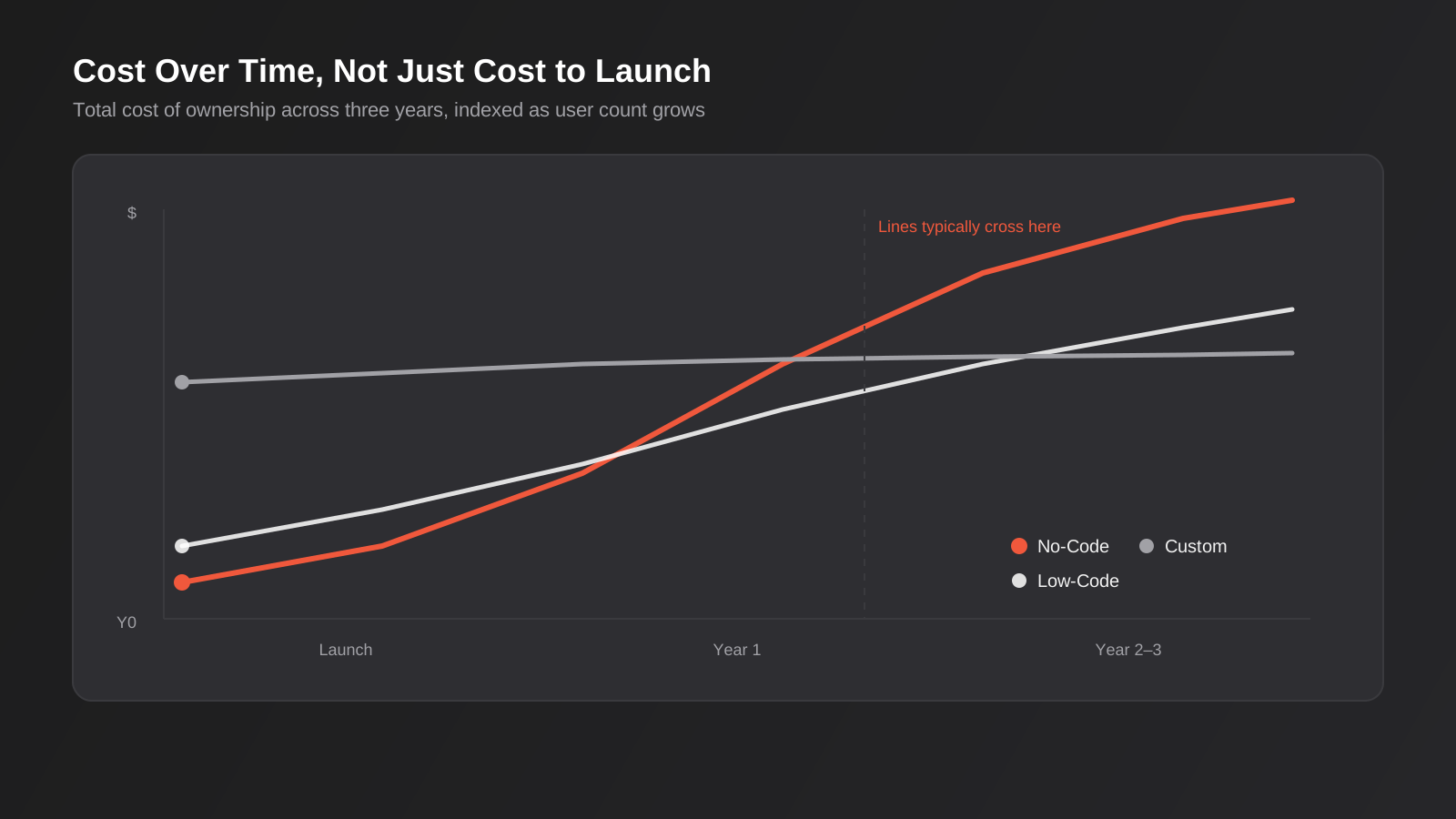
No-code applications are built on a generalised runtime designed to handle any use case a customer might dream up, which means they’re rarely optimised for yours specifically. In practice, that shows up as slower page loads, workflows that choke once record counts climb into the tens of thousands, and automation limits that throttle how much you can actually do per minute or per day on lower pricing tiers. None of this matters at fifteen users and two thousand records. All of it matters at two hundred users and two hundred thousand records, and the transition between those two states tends to sneak up on a growing business rather than announce itself.
Per-user and per-workflow pricing gets expensive exactly when you’re succeeding
Most low-code platforms price per active user or per workflow execution. That model is attractive at ten users and becomes a real line item at eighty. We’ve seen internal tool budgets on platforms like Retool climb past what a custom-built equivalent would have cost annually, purely because the business the tool was serving grew the way it was supposed to. The tool that was cheap because you were small becomes expensive for the same reason you don’t want to shrink back down.
Security, data residency and compliance get harder to control
If your business handles health records, financial data or anything else with specific regulatory obligations, hosting that data inside a third-party no-code platform’s infrastructure — often in the US, sometimes without granular audit logging — can turn into a genuine compliance gap. This is less about any particular platform being insecure and more about control: you’re trusting their security posture, their breach notification process and their data handling for information that’s legally yours to protect. For businesses in healthcare, finance, legal or government-adjacent work, this is frequently the deciding factor even when the technical requirements would otherwise favour a no-code build.
The integration ceiling is lower than it looks in the demo
No-code platforms integrate beautifully with the twenty most popular SaaS tools on the market. The moment you need to talk to a legacy ERP, a custom internal API or a system with an unusual authentication scheme, you’re often stuck waiting on the platform to build a connector, working around rate limits with clunky polling logic, or discovering the visual integration builder simply can’t express what you need. This is where the line between “connecting systems” and “needing custom code” gets crossed without anyone noticing until a deadline is on the line.
A practical no-code vs custom development framework
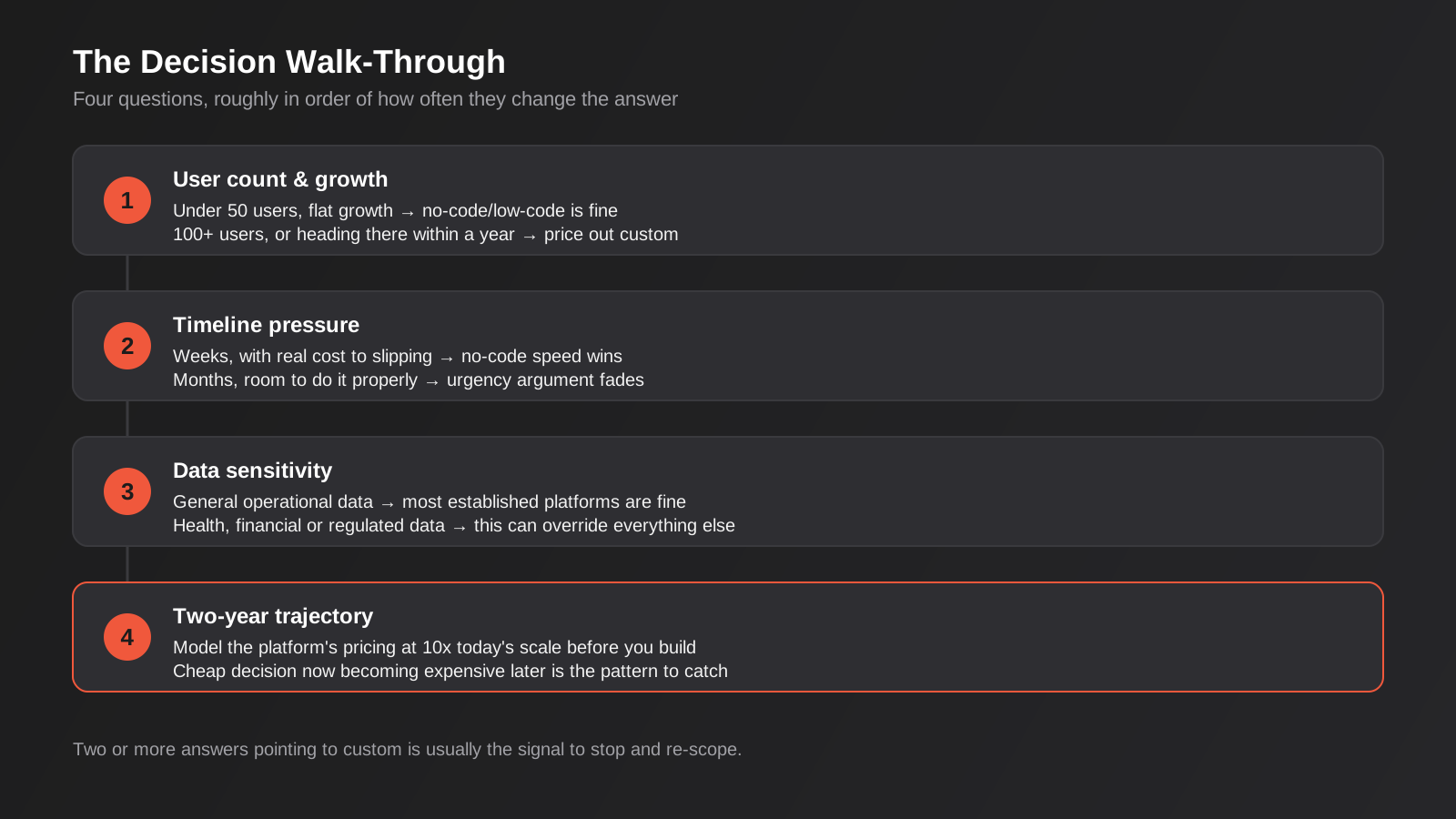
Rather than a general “it depends,” here’s the actual set of questions we walk clients through, roughly in order of how often they change the answer.
How many people will actually use this, and will that number grow fast?
Under fifty users with no clear path to rapid growth, no-code or low-code is usually fine. Past a hundred, or on a trajectory that gets you there within a year, per-user pricing and performance ceilings start working against you, and it’s worth pricing out what custom would cost at that scale before committing further.
What’s the actual timeline, and what happens if it slips?
If you need something live in weeks and a delay has real cost — a compliance deadline, a launch commitment, a funding milestone — no-code’s speed advantage is worth more than its long-term limitations. If the timeline is measured in months and there’s room to do it properly the first time, that urgency argument for no-code mostly disappears.
How sensitive is the data, and what regulations touch it?
Health information, financial records, anything under the Privacy Act with specific handling obligations, or data your industry regulator has opinions about — the more of these apply, the more seriously you need to weigh where that data physically lives and who controls access to it. This is often the single factor that overrides everything else on this list.
Is this core to what makes your business different, or is it plumbing?
An internal ops dashboard is plumbing — nobody chooses you because your approval workflow is elegant. A customer-facing product feature that’s meant to be a genuine differentiator, where the experience itself is part of the value proposition, is not plumbing, and building your differentiator on a platform every competitor can also access starts to undercut the point of differentiating at all.
What does the two-year picture look like, honestly?
Not what you hope happens — what’s actually likely. If there’s a real chance this tool is still running the same process at ten times the scale in two years, model what that costs on the current platform’s pricing before you build, not after. A five-minute pricing calculator exercise up front saves a painful migration conversation later.
The hybrid path most growing businesses actually end up on
The real answer, more often than the framework above suggests, isn’t a clean choice between one column and the other. It’s using each tool for the layer it’s genuinely good at. A common pattern we build for Australian businesses: a custom backend and API that owns the actual business logic, data model and integrations with core systems like an ERP or CRM, with a low-code tool like Retool sitting on top as the internal-facing interface for staff. The parts that need to be correct, secure and yours — the data layer, the integration logic, anything customer-facing that matters competitively — are custom. The parts that just need to be usable by a small internal team — the dashboard, the approval screen, the ops console — are low-code, and nobody’s paying developer rates to rebuild a form.
This is also frequently the right shape for a first release that’s meant to grow. Start the customer or staff-facing surface in no-code to get real usage and feedback fast, but build the API and data layer underneath it properly from day one, even if that costs a bit more upfront than a pure no-code build. When the no-code front end does eventually hit its ceiling, you’re replacing a UI layer, not migrating a decade of business logic out of a platform that never let you see it clearly in the first place. Our API and integrations work is frequently exactly this — building the durable layer underneath a front end that might change shape more than once as the business grows.
Where this genuinely doesn’t work is when the “custom backend” gets skipped to save time, and the no-code platform ends up holding both the interface and the business logic. That’s the setup we described at the start of this piece — it works fine until it doesn’t, and by the time it doesn’t, untangling logic that was never written as portable code is a much bigger job than building it properly would have been.
A common version of this pattern: a business needs a dealer or partner portal live fast, often against an external deadline like a trade show or a contract start date, but also needs it to eventually handle real-time stock or pricing data pulled from an ERP that was never built with a modern API in mind. The right split is usually to build the ERP connection and data sync as a proper custom service from the start, because that integration is rarely reliable built any other way, and put a low-code portal in front of it for the first version if the user count is small and the interface requirements are straightforward. The front end can get rebuilt more than once as requirements sharpen. The integration layer underneath it, built properly the first time, tends not to need touching again regardless of what sits on top of it.
What migrating off a no-code platform actually looks like
Because this comes up in nearly every one of these conversations eventually: migrating off Bubble, Retool or a similar platform is not an export-and-import job. There’s no button that turns your visual app into portable source code. What you’re actually doing is a rebuild that’s informed by the existing tool rather than starting from a blank page — which does save real time, because the original build already answered most of the “what should this actually do” questions, but it’s still new development, new testing and a genuine cutover.
The practical approach we use: pull the underlying data out first and get it into a database you control, independent of the platform’s own storage. Map every workflow, permission rule and automation the current tool runs, because a surprising amount of this logic exists only in someone’s head and the platform’s UI, never written down anywhere else. Build and test the replacement against real production data in parallel, rather than cutting over cold. Run both systems side by side for a defined period before switching off the old one, the same discipline we apply to any platform move — you can read more about how we handle that kind of cutover without losing data or continuity in our guide to migrating ERP or ecommerce platforms without losing data. The pattern is the same whether you’re moving off a no-code tool or a legacy ERP: audit first, map everything, run parallel, cut over deliberately.
One more factor worth naming honestly: total cost of ownership rarely gets compared properly, because the two options get priced on different timelines. A no-code build gets quoted as a fixed project cost or a few weeks of a freelancer’s time, while a custom build gets quoted as a larger project cost that includes the data layer, the integrations and the testing a no-code tool would have handled for free. Compared like that, no-code always looks cheaper. The fairer comparison adds the no-code platform’s ongoing subscription and per-user fees, projected out over two or three years at the user count you actually expect to reach, against the custom build’s lower ongoing hosting cost once the larger upfront spend is done. Run both projections before deciding — it changes the answer more often than either side of this debate likes to admit.
Common mistakes we see
- Choosing a no-code platform because it’s what someone on the team already knows, rather than because it fits the requirements — familiarity is a real factor, but it shouldn’t be the deciding one.
- Never re-evaluating the decision as the business grows. The right call at fifteen users doesn’t automatically stay right at two hundred, and nobody puts a calendar reminder on “check if we’ve outgrown this.”
- Putting sensitive customer or financial data into a no-code platform without checking where it’s actually hosted and what the vendor’s data handling terms say.
- Letting a no-code tool become the system of record for a process it was only ever meant to sit on top of, so the business logic and the interface end up tangled together with no way to separate them later.
- Underestimating integration limits until a deadline is on the line, instead of testing the specific connections you’ll need before committing to the platform.
- Treating “no-code is faster” as always true. It’s faster for a first version. It is very often slower for anything that needs custom logic the visual layer can’t express, because you end up fighting the platform instead of just writing the fifty lines of code that would have solved it directly.
- Building the entire application in a no-code tool including the parts that should have been a custom, portable data layer from the start, which is the single decision that makes a future migration expensive.
Frequently Asked Questions
Is no-code actually cheaper than custom development?
For a first version with a small user base, yes, usually significantly — you’re paying platform fees instead of development hours, and getting something usable in weeks. That advantage narrows and can reverse once user counts, data volumes or workflow execution climb, because most no-code and low-code platforms price on usage. Model the cost at your expected scale in two years, not just today, before treating “cheaper” as a permanent conclusion.
Can you export a Bubble or Retool app into custom code later?
Not directly. Neither platform exports your application as portable source code you can host and run elsewhere. Moving off one is a rebuild informed by the existing app’s logic and data, not a straightforward export-and-migrate. That’s a real cost to factor in when you choose the platform in the first place, not just when you decide to leave it.
What’s the actual difference between no-code and low-code?
No-code platforms like Bubble and Softr are built entirely around visual, drag-and-drop configuration with no coding required or permitted. Low-code platforms like Retool and Appsmith use the same visual approach for most of the build but let you drop into JavaScript, SQL or Python where the visual layer can’t express what you need. Low-code generally scales further and integrates more flexibly, at the cost of needing at least some technical skill to get the most out of it.
Is no-code secure enough for customer or financial data?
It depends entirely on the platform, the data, and your regulatory obligations — there’s no blanket answer. The practical questions are where the platform physically hosts data, what its security certifications and breach notification process look like, and whether your industry has specific handling requirements that a third-party platform can’t meet. For general operational data, most established platforms are fine. For health records, financial data or anything under stricter compliance obligations, it needs a proper look before you commit, not an assumption either way.
When should a growing business move from no-code to custom development?
The clearest signals are hitting a performance or scale ceiling the platform can’t grow past, per-user or per-workflow pricing becoming a genuinely significant cost line, needing an integration the platform can’t support, or the application becoming core to what makes the business competitively different rather than internal plumbing. Any one of these on its own might not justify a rebuild. Two or more together usually does.
Can a no-code front end and a custom backend work together?
Yes, and it’s a genuinely common, sensible pattern — a low-code tool like Retool as the interface staff use daily, sitting on top of a custom API and database that owns the real business logic and integrations. It gets you speed on the parts that need to ship fast and control over the parts that need to last, and it means a future change to the front end doesn’t require touching the data layer underneath it.
Where to start
If you’re currently running a business process on a no-code or low-code tool and wondering whether it’s still the right call, the useful first step isn’t a rebuild — it’s an honest audit of where you actually sit against the framework above: user count and growth trajectory, timeline pressure, data sensitivity, how core the tool is to what makes you different, and what the platform would actually cost you at twice today’s scale. Most of the time that audit either confirms you’re in the right place or points clearly at what needs to change, and either answer is useful.
If you’re earlier than that — still deciding how to build something new — we’re happy to talk through where it sits on the spectrum before you commit to a platform, a developer or a year of your own time. Have a look at our MVP development approach if you’re still validating something new, and we’ll give you a straight answer about whether this needs custom code at all.
Keep reading
Related posts
Who Owns Your Custom Software? Source Code, IP and Handover for Australian Businesses (2026)
Paying for custom software doesn't mean you own it. What Australian contracts must say about code ownership, licences, handover and escrow.
Role-Based Access Control for Client Portals and Internal Tools: A Practical Guide
RBAC for client portals and internal tools: roles, record-level isolation and audit logs explained — a practical guide for growing Australian businesses.
Single Sign-On for Australian Businesses: When SSO Is Worth the Setup
SSO for growing Australian businesses: SAML vs OAuth vs OIDC explained, how to pick an identity provider, costs, and rollout mistakes to…
Got a project you'd like to talk through?
Tell us what you're working on — we'll come back with a plan.
