
How to Migrate ERP or Ecommerce Platforms Without Losing Data (2026)
 Jignesh Vagadiya
14/09/2026
20 min read
Jignesh Vagadiya
14/09/2026
20 min read
Nobody notices a platform migration go well. The new ERP goes live on a Monday, invoices generate correctly, stock levels match what’s on the shelf, and by Wednesday everyone’s forgotten there was ever a cutover. What people remember is the other kind: the ecommerce replatform where three thousand customer accounts came across with the wrong email addresses, or the ERP switch where two years of paid invoices reappeared as unpaid because the migration script matched on the wrong field.
We get called in after both kinds of migration — sometimes to plan one properly from the start, sometimes to untangle one that already went sideways. The pattern in the failures is almost always the same: someone treated data migration as a technical formality bolted onto a bigger project, rather than the part of the project where the actual risk lives. The new theme looks fine. The new checkout works. Then finance can’t reconcile last quarter, or a customer calls asking where their order history went, and it turns out nobody actually verified the data made it across intact.
This is the practical side of a migration, not the marketing side. If you’re moving a website or store and want to protect your search rankings during the move, our SEO migration checklist covers redirects, crawl budgets and ranking recovery. This guide covers a different question: whether the business itself — its orders, its ledger, its customer records — still works the morning after go-live.
What “losing data” actually means
“We didn’t lose any data” is one of those phrases that sounds reassuring and means almost nothing on its own. In practice, data loss during a migration shows up in a handful of specific, recognisable ways, and it’s worth naming them because each one needs a different kind of check to catch.
The obvious one is records that simply never arrive — a batch of orders, a set of supplier contacts, a chunk of historical invoices that got filtered out somewhere in the export or import step and nobody notices until someone goes looking for them. Less obvious, and more common, is corrupted or mistranslated data: records that did come across, but with values shifted into the wrong fields, dates reformatted incorrectly, or numeric fields silently truncated. We’ve seen a migration where product weights imported as whole kilograms instead of the source system’s grams, which meant every freight calculation in the new store was off by a factor of a thousand until someone noticed the shipping quotes looked insane.
Then there’s duplication, which is arguably worse than loss because it’s quieter. A customer record that exists in both the CRM and the accounting system gets migrated twice because the matching logic didn’t recognise it was the same person under a slightly different email. Now marketing emails go out twice, loyalty points split across two accounts, and support has no idea which record is authoritative. Orphaned records are the mirror image: an order migrates without its line items, or a line item migrates without a product reference, because the migration ran parent and child tables out of sequence.
Finally there’s broken continuity — nothing was technically lost, but the historical view is gone. Reporting that depended on three years of consistent categorisation now has a hard break at the migration date because the new system uses different category IDs. None of these show up in a simple “did the migration script finish without errors” check. They show up weeks later, in a reconciliation, a customer complaint, or a board report that doesn’t add up.
Why migrations actually fail
Almost every failed migration we’ve reviewed after the fact traces back to one of five root causes, and none of them are exotic.
The source data was already dirty
Migrations don’t clean data, they move it. If the old system has three different spellings of the same supplier, duplicate customer records from a decade of manual entry, or products with no consistent SKU pattern, all of that comes across into the new system unless someone deliberately cleans it first. A lot of teams assume the new platform will somehow tidy things up. It won’t — it will faithfully reproduce every inconsistency, just in a shinier interface.
Field mapping was assumed, not documented
Two systems rarely structure the same information the same way. One ERP might store a single “customer type” field where another splits it into three separate flags. An ecommerce platform might treat product variants as child products, while another treats them as attributes on a single record. When mapping decisions live only in a developer’s head, or get made ad hoc during the import, they don’t get reviewed by anyone who actually understands what the data means to the business — and that’s exactly where semantic errors slip through.
There was no real test migration
A shocking number of migrations go live having only ever been tested against a small sample dataset, or not tested at all against a full production-scale copy. Problems that never appear with five hundred sample records — timeouts, duplicate key collisions, edge cases in date formats from a specific old sales channel — show up immediately at full volume, and by then it’s happening in production.
Integrations were treated as someone else’s problem
The ERP or ecommerce platform is rarely standing alone. It talks to accounting software, a freight calculator, a payment gateway, a marketing platform. A migration plan that covers the core system but not the dozen things wired into it will “succeed” on its own terms while quietly breaking order confirmations, stock sync, or automated invoicing on day one. If you’re already running integrations between your ERP and other business systems, every one of those needs its own test pass against the new platform, not just an assumption that it’ll keep working.
Nobody owned the decision to go live
This is the organisational failure behind most of the technical ones. When there’s no single person accountable for confirming the data is ready and authorised to delay go-live if it isn’t, the default becomes going live on the date in the project plan regardless of what the reconciliation numbers say. Migrations don’t fail because nobody worked hard enough. They fail because the deadline outranked the verification step.
The pre-migration audit
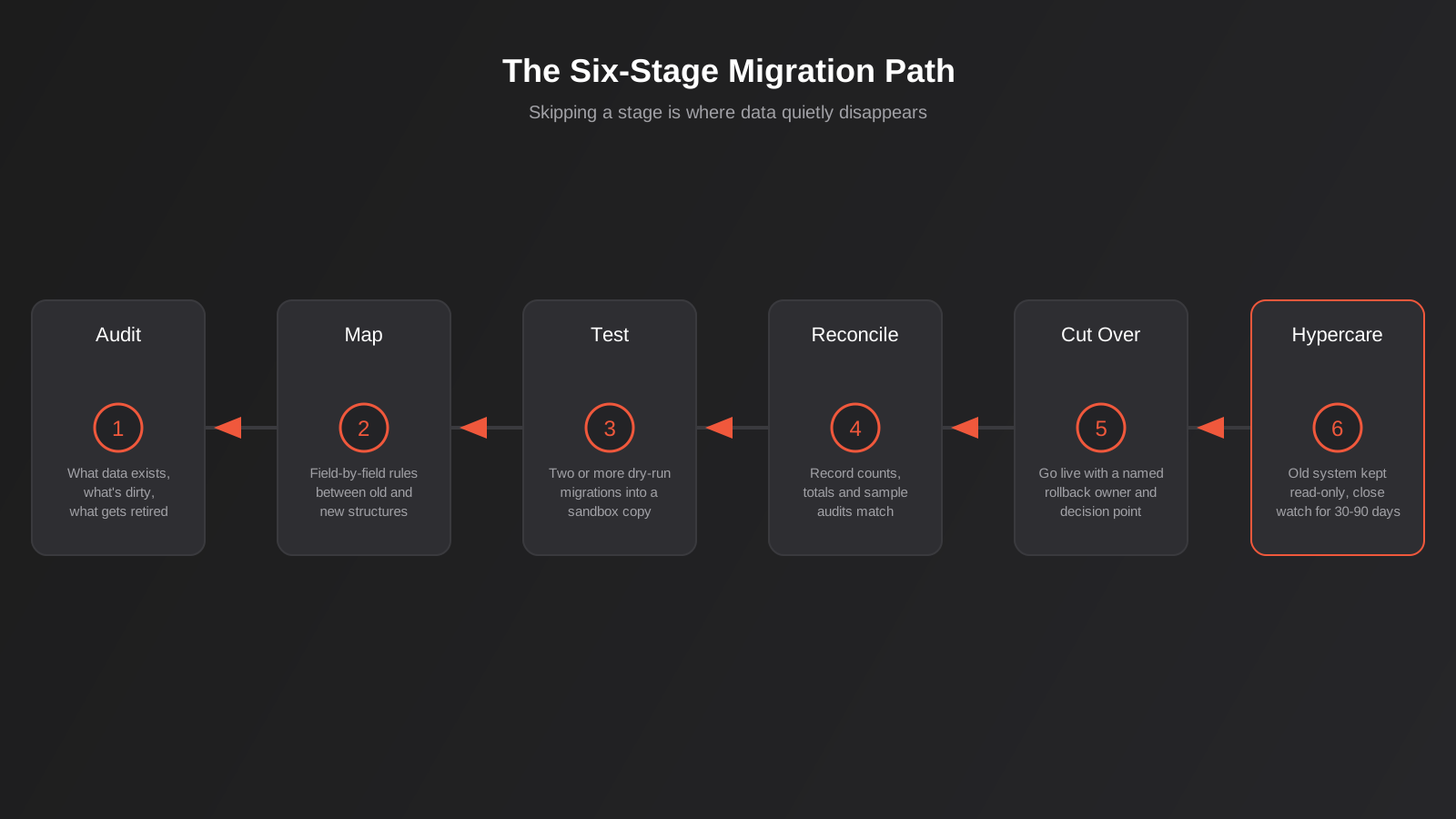
Before anyone writes a migration script, there’s an audit that has to happen, and it’s mostly a business exercise rather than a technical one. It answers three questions: what data exists, what condition is it in, and what actually needs to move.
Deciding what moves and what gets archived
Not everything in the old system deserves a seat on the new one. A decade of one-off promotional discount codes, test orders from years ago, or customer accounts that never placed a second order after signing up are often better archived in a static export than dragged into a live system where they add noise and slow down every query. This decision needs an owner from the business side, not just the developer doing the migration — finance will have a view on how long invoice records need to stay queryable for audit purposes, and it’s usually longer than IT assumes.
Field mapping and business rules
This is the document that should exist before a single record moves: every field in the old system, where it goes in the new one, and what transformation happens along the way. Not “customer data maps across” but “old system’s single ‘name’ field splits into first_name and last_name in the new system, using the first space as the delimiter, with a manual review list generated for any name containing no space or more than two words.” That level of specificity feels excessive until you’re the one explaining to a customer why their business name got split into a first and last name.
Business rules matter just as much as field names. If the old system calculated GST inclusive of a rounding rule that differs from the new platform’s default, that’s a decision someone needs to make deliberately, not one that gets made by default because nobody flagged it.
Data cleansing before, not during
Cleansing dirty data as part of the migration script is where most of the risk hides, because it mixes “moving data” with “changing data” in a single, hard-to-audit step. It’s safer to clean the source data first — de-duplicate customer records, standardise supplier names, fix obviously broken entries — verify the cleanup in the old system where you can still cross-check it against reality, and only then migrate the cleaned data across using a mapping that doesn’t need to make judgement calls on the fly.
Building the migration plan
With the audit and mapping done, the actual migration should never be a single leap from old to new. It’s a staged process, and each stage exists specifically to catch a category of error before it reaches production.
Test migrations, plural
Run the full migration — not a sample, the full dataset — into a sandbox copy of the new system. Then do it again. The first test migration surfaces the obvious problems: failed imports, timeout errors, records that don’t map cleanly. The second and third catch what changed as a result of fixing the first round, plus anything that only shows up with fresh eyes checking the output rather than just watching the script run without crashing. A migration that “completes successfully” and a migration that’s actually correct are two different claims, and only one of them gets checked by looking at whether the script threw an error.
Reconciliation and validation
This is the step that actually proves the data made it across intact, and it needs to happen against numbers that mean something to the business, not just row counts. Compare the total dollar value of open invoices in the old system against the new one. Compare the count of active customer accounts. Pull a random sample of fifty orders and manually check every field against the source record. If the old system says $284,000 in outstanding receivables and the new one says $281,400, that gap is not a rounding error to wave away — it’s missing invoices, and they need to be found before go-live, not after.
The mock cutover
A mock cutover is a full, timed rehearsal of go-live weekend, run in the sandbox environment as if it were real: freeze the old system, run the final migration, bring the new system up, run through the core business processes end to end — place an order, process a payment, generate an invoice, check stock deduction. This is where teams discover that the “quick” cutover they scheduled for a Saturday afternoon actually takes fourteen hours, or that a specific integration needs to be re-authenticated manually and someone forgot to document how.
Choosing a migration approach
Before the mock cutover even gets scheduled, there’s a strategic decision to make about how the switch itself happens, and it shapes almost everything else in the plan. There are three broad approaches, and the right one depends less on preference and more on how much risk the business can absorb during the transition.
Big bang cutover
Everything moves at once, over a defined window, and the old system goes dark the moment the new one goes live. This is the fastest route from start to finish and the simplest to reason about — there’s no period where two systems are both partially live and potentially out of sync. The trade-off is concentration of risk: every problem the migration has surfaces at once, on go-live day, with the whole business depending on it working. Big bang suits smaller datasets, simpler integration landscapes, and businesses that can tolerate a short, well-communicated downtime window. It’s a poor fit for a business running high transaction volumes around the clock, where even a few hours of downtime is expensive.
Phased migration
Modules or business units move across on separate timelines — inventory management first, then order processing, then financial reporting, each with its own test and reconciliation cycle. This spreads risk out and gives the team a chance to learn from the first phase before tackling the next, which matters when the people running the migration haven’t done one on this specific platform pair before. The cost is complexity during the transition: for a period, some data lives in the old system and some in the new, which means someone has to maintain integration between the two, or accept that certain reports are incomplete until the phase finishes. Phased migrations also tend to run longer overall, because each phase carries its own planning and testing overhead.
Parallel run
Both systems operate simultaneously for a defined period — often two to four weeks — with real transactions processed in both, and results compared line by line before the old system is retired. This is the lowest-risk approach because it gives a genuine, real-world reconciliation rather than a sandbox test, using live data instead of a rehearsal. It’s also the most expensive and demanding option: staff are effectively doing double data entry or double processing for the parallel period, and someone needs to own the daily comparison between the two outputs. Parallel runs make the most sense for ERP migrations where the financial stakes of an error are high and the business has the operational capacity to sustain the extra workload for a few weeks.
None of these is universally correct. A small business moving a straightforward ecommerce catalog between platforms rarely needs a parallel run. A mid-sized manufacturer replacing its core ERP, with GST reporting and supplier payment terms riding on the outcome, usually shouldn’t attempt a big bang cutover without at least a partial parallel run on the financial modules. Match the approach to what a mistake would actually cost you, not to what looks fastest on a project timeline.
ERP migration versus ecommerce platform migration
The two most common types of platform migration we handle — moving between ERP systems, and moving between ecommerce platforms — carry genuinely different risk profiles, because they put different categories of data on the line.
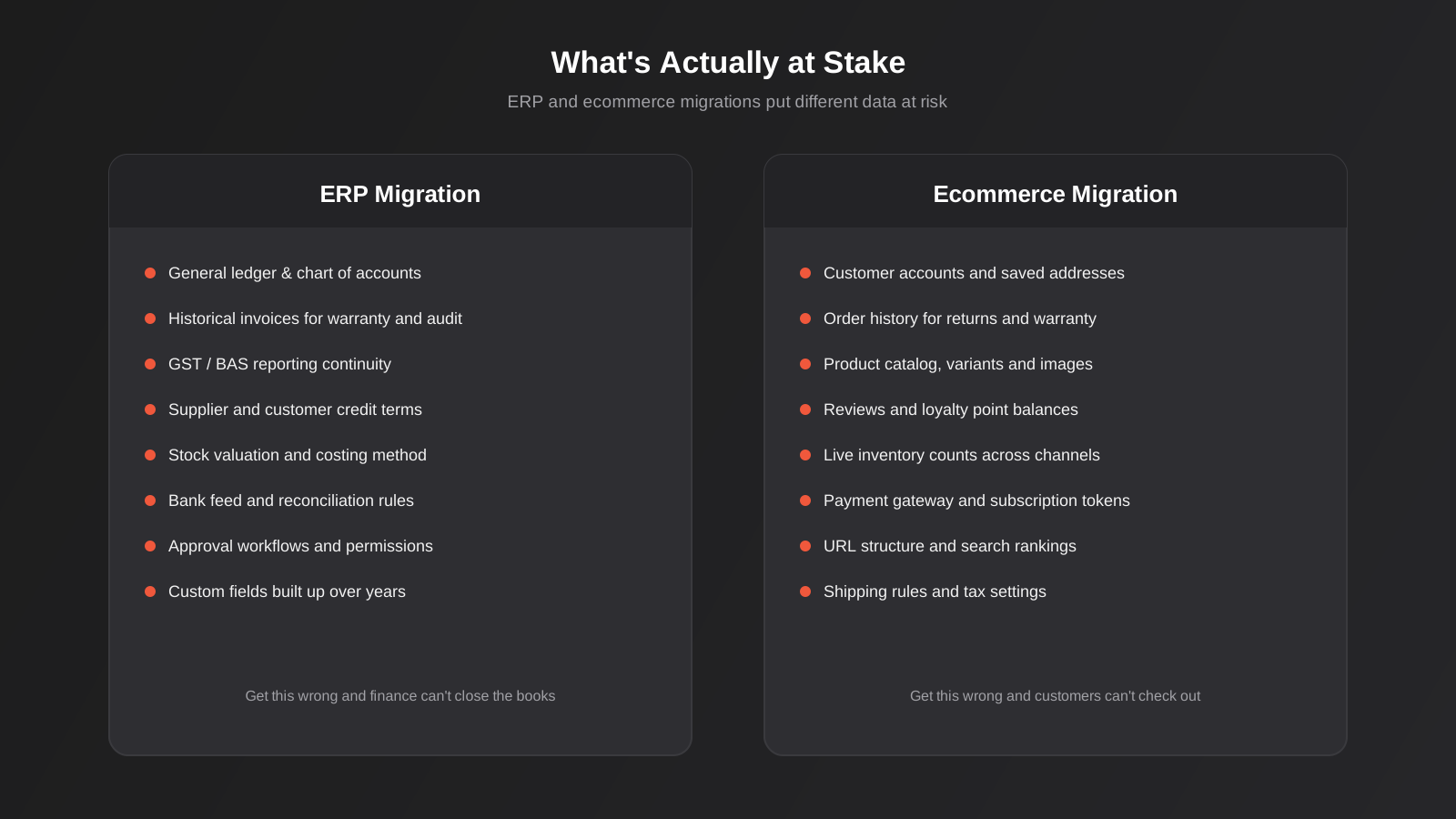
An ERP migration is fundamentally about financial and operational continuity. General ledger balances, chart of accounts, stock valuation methods, and historical invoices all need to reconcile precisely, because finance teams answer to auditors and the tax office, not just to customers. GST and BAS reporting can’t have a gap in it. Approval workflows and permission structures — who can approve a purchase order over a certain value — often get rebuilt from scratch in the new system, and if that rebuild misses an edge case, the wrong person ends up with authority they shouldn’t have, or the right person is locked out.
An ecommerce platform migration — the kind covered by our real project work moving stores from WooCommerce to Shopify, from Magento to Shopify, or off older platforms entirely — puts customer experience and revenue continuity on the line instead. Customer accounts, saved addresses, order history for returns and warranty claims, product variants and images, loyalty balances, and live inventory counts across every sales channel all need to survive the move without customers noticing anything changed except maybe a faster checkout. Payment gateway tokens for subscriptions are a particular landmine: migrate them incorrectly and recurring customers stop being charged, which looks fine until the revenue report three weeks later shows a cliff.
Both types of migration benefit from the same underlying discipline — audit, map, test, reconcile, rehearse — but the specific numbers you reconcile against, and the specific people who need to sign off before go-live, are different. Involve finance in an ERP migration sign-off. Involve customer service and the marketing team in an ecommerce migration sign-off. They’ll each catch things a developer checking database row counts never will.
The cutover itself
Go-live is where all the planning either pays off or doesn’t, and it should be the least eventful part of the whole project if everything before it was done properly.
Pick a low-activity window — overnight, or a period when order volume is genuinely light, not just “outside business hours” if the business runs an online store that takes orders around the clock regardless of timezone. Freeze changes to the old system before the final data pull starts; a migration that runs while new orders are still coming into the source system will always miss something created after the export ran. Have a named person — not a team, a specific person — whose job is to make the go/no-go call at each checkpoint, with the explicit authority to halt and roll back if the reconciliation numbers don’t match what the mock cutover produced.
The rollback plan needs to exist on paper before cutover day, not get improvised if things go wrong. That means knowing, in advance, exactly how long the old system stays intact and untouched as a fallback, what the trigger is for deciding to roll back rather than push forward and fix issues live, and who has the authority to make that call under pressure at 2am when the pressure is real and everyone’s tired.
Life after go-live
The migration isn’t finished when the new system goes live — it’s finished when a full business cycle has run through it and reconciled cleanly. Keep the old system accessible in read-only mode for a defined period, typically somewhere between thirty and ninety days depending on how much historical lookup the business genuinely needs, rather than switching it off the moment the new one is live. Staff will find things that didn’t migrate, or migrated wrong, in the first few weeks of actually using the new system for real work, and having the source of truth still available to check against makes fixing those issues fast instead of a forensic exercise.
Run a formal reconciliation again at the end of the first full reporting period — the first month-end close on the new ERP, or the first full sales cycle on the new store – and compare it against what the business expected based on historical trends. This is often where subtler issues surface: a tax rate that migrated correctly for most products but not a specific category, or a shipping rule that works for domestic orders but silently fails for a state it wasn’t tested against.
Common mistakes we see
- Treating the go-live date as fixed regardless of whether the reconciliation checks actually pass, instead of building buffer time into the plan for the checks to fail once and get fixed
- Migrating everything from the old system, including years of dead data, instead of deciding up front what genuinely needs to move versus what gets archived
- Running only one test migration and treating “it completed without errors” as proof the data is correct, rather than checking the actual values against source records
- Assuming the software vendor’s standard import tool handles business-specific mapping decisions, when off-the-shelf import tools rarely understand custom fields, workflows, or pricing rules unique to your business
- Leaving integrations — payment gateways, accounting sync, freight calculators, marketing platforms — untested against the new system until after go-live
- Having no single, named owner accountable for the go/no-go decision, so the decision defaults to “go” because nobody has the standing to say “not yet”
- Switching off the old system immediately at cutover instead of keeping it available read-only while the new system proves itself over the following weeks
Frequently Asked Questions
How long does an ERP or ecommerce platform migration actually take?
It depends heavily on data volume and how many systems are integrated, but a realistic migration for a mid-sized Australian business runs six to twelve weeks from audit through to hypercare, not the “migrate over a weekend” timeline vendors sometimes pitch. Most of that time goes into the audit, mapping and test-migration cycles rather than the cutover itself, which should be the shortest and least eventful part if the earlier stages were done properly. Rushed migrations that compress this into a couple of weeks are exactly the ones that end up needing weeks of cleanup afterward.
Can you migrate a business system with zero downtime?
Genuinely zero downtime is rare and usually not worth the extra engineering cost it takes to achieve for most small and mid-sized businesses. What’s realistic and far more achievable is minimal, planned downtime during a low-activity window, with the old system frozen rather than shut down, so there’s a clean point-in-time to migrate from. For a business that trades around the clock online, this usually means a short maintenance window with a clear customer-facing message, rather than chasing a true zero-downtime architecture that adds significant complexity for limited practical benefit.
Who should actually own the data migration — the new platform’s vendor, or an independent developer?
Platform vendors are usually strong on getting their own system configured correctly, but they have limited incentive to spend extra time cleaning and validating your specific legacy data, and they often don’t have visibility into the other systems your business runs. An independent developer or agency who can see across both the old and new systems, plus every integration in between, is generally better placed to own the mapping decisions and the reconciliation process, even when the vendor’s team is doing the actual import.
What data should never be migrated as-is, without review?
Anything where the old system’s business rules differ meaningfully from the new one: tax calculation logic, discount and promotion rules, customer segmentation or loyalty tier definitions, and any custom field that was added informally over time without documentation. These need a human to look at the actual values and confirm the mapping produces the same real-world result, not just a script that copies the field across and hopes the meaning transferred with it.
How is this different from an SEO migration checklist?
An SEO migration checklist — like the one we’ve published separately — is about preserving search visibility: redirect mapping, crawl budget, structured data, and ranking recovery after the URLs change. This guide is about whether the underlying business data survives the move at all: whether orders, customer records, stock levels and financial data are complete and accurate in the new system. A migration can nail the SEO checklist and still lose customer data, or vice versa. They’re both necessary and neither substitutes for the other.
What happens if we discover a data problem after go-live?
This is exactly why keeping the old system available read-only for thirty to ninety days matters — it gives you a source of truth to check against and, in most cases, re-pull the missing or incorrect records from. The earlier a gap is caught, the cheaper it is to fix; a discrepancy found in the first week is usually a targeted data correction, while the same issue found three months later, after customers have transacted on top of the bad data, can mean untangling months of downstream records.
Where to start
If a platform migration is coming up — a new ERP, a move off an ageing ecommerce platform, or consolidating systems after years of growth — the highest-value thing you can do before writing a single line of migration script is the audit: get honest about what data actually exists, what condition it’s in, and what a correct outcome looks like in numbers finance and operations will recognise. That groundwork is what separates a migration that’s forgotten by Wednesday from one that turns into months of cleanup.
We handle platform migrations for Australian businesses moving between ERP systems and ecommerce platforms, and we’re happy to talk through what a realistic timeline and reconciliation plan would look like for your specific systems before you commit to a go-live date. If you’re weighing up a migration alongside other technical decisions, our guide to ERP integration covers the related question of connecting systems that stay in place rather than replacing them outright. Get in touch and we’ll talk through where the actual risk sits in your case.
Keep reading
Related posts
Who Owns Your Custom Software? Source Code, IP and Handover for Australian Businesses (2026)
Paying for custom software doesn't mean you own it. What Australian contracts must say about code ownership, licences, handover and escrow.
Role-Based Access Control for Client Portals and Internal Tools: A Practical Guide
RBAC for client portals and internal tools: roles, record-level isolation and audit logs explained — a practical guide for growing Australian businesses.
Single Sign-On for Australian Businesses: When SSO Is Worth the Setup
SSO for growing Australian businesses: SAML vs OAuth vs OIDC explained, how to pick an identity provider, costs, and rollout mistakes to…
Got a project you'd like to talk through?
Tell us what you're working on — we'll come back with a plan.
