
Platform Migration SEO Checklist: How to Move Without Losing Rankings (2026)
 Jignesh Vagadiya
03/09/2026
21 min read
Jignesh Vagadiya
03/09/2026
21 min read
Somewhere in Australia this week, a business owner is about to sign off on a new website and has no idea their organic traffic is about to fall off a cliff. Not because the new site is worse — usually it’s faster, better designed and easier to manage. It falls because nobody mapped the old URLs to the new ones properly, or because a developer left a blanket noindex tag on staging and forgot to remove it before launch, or because three hundred product pages quietly became three hundred 404s.
We get called in after this happens more often than we’d like. A client moves from Wix to WordPress, or from Magento to Shopify, chasing better performance, lower fees or a platform their team can actually use — and two weeks later their rankings have halved. In almost every case, the migration itself wasn’t the problem. The lack of a plan for what happens to search visibility during the migration was.
This guide is the process we actually run when we move a client from one platform to another — CMS changes, ecommerce platform switches, replatforms, domain changes, the lot. It’s not a theoretical checklist. It’s what we check, in what order, and why each step matters more than people assume until they skip it.
Why Migrations Tank Rankings
Google doesn’t rank domains, it ranks URLs. Every page on your site that ranks for something has built up its own signals over time — backlinks pointing at that specific URL, click-through history, internal links passing authority to it, and a crawl history that tells Google the page is trustworthy and stable. When you migrate platforms, the URL structure almost always changes, even if you don’t intend it to. WordPress handles permalinks differently to Wix. Shopify forces a /products/ and /collections/ structure that Magento or WooCommerce don’t use. Even a “like-for-like” rebuild on the same CMS often ends up with slightly different slugs because someone cleaned up the URLs while they were at it.
Every one of those URL changes breaks the chain of signals Google was using to rank the old page, unless you explicitly tell Google where the content moved. That’s what a redirect does. Skip it, or do it badly, and you’re not migrating your rankings — you’re starting large parts of your site from zero.
It’s Rarely One Big Mistake
The migrations that go badly wrong are almost never sunk by one catastrophic error. They’re sunk by four or five smaller ones stacking up: a redirect map that only covers the top 50 pages instead of all 600, a new site that loads a second slower than the old one, a content refresh that accidentally changed the H1 and first paragraph on every service page at the same time as the URL changed, and a launch that happened on a Friday afternoon with nobody watching Search Console over the weekend. Individually, any one of those is recoverable. Together, they look like a site that Google no longer trusts.
That’s the mindset to bring into a migration: it’s a project with a dozen small technical requirements, not one big redesign decision. Get the technical requirements right and the design, platform or hosting change underneath them is almost irrelevant to your rankings.
The Pre-Migration Audit
Everything in a safe migration depends on knowing exactly what you have before you touch it. Skipping this step is the single most common reason redirect maps end up incomplete.
Crawl and Export Every URL
Run a full crawl of the existing site with a tool like Screaming Frog or Sitebulb before any migration work starts, and export every indexable URL — not just the ones in your main navigation. Sites accumulate URLs in places nobody remembers: old campaign landing pages, category pages from a taxonomy that got restructured two years ago, paginated archive pages, PDF resources, even staging URLs that got indexed by accident. Cross-reference this crawl against three other sources: your XML sitemap, Google Search Console’s indexed pages report, and Google Analytics’ landing page report filtered to organic traffic for the last 12 months. Any URL that appears in any of those four lists needs a decision made about it — migrate it, redirect it, or deliberately retire it.
We’ve seen redirect maps built purely from a site’s navigation menu miss 40% of a site’s indexed URLs. Those missed pages don’t just disappear quietly — if any of them had backlinks or organic traffic, that’s exactly the equity you’re about to throw away.
Record Your Baseline
Before launch, screenshot or export your current rankings for your priority keywords, your organic traffic by landing page, your Core Web Vitals scores, and your indexed page count in Search Console. This isn’t busywork — it’s the reference point that tells you, three weeks after launch, whether what you’re seeing is a normal post-migration dip or an actual problem that needs fixing. Without a baseline, every conversation about “did the migration hurt us” becomes a guess based on memory and vibes, which is a bad place to be arguing from when a client is anxious about their traffic graph.
Audit Your Backlink Profile
Pull your backlink profile from Ahrefs, Semrush or Search Console’s links report and identify which specific URLs are attracting external links. These pages need special attention in your redirect map — they’re passing real authority into your site, and a broken redirect on a heavily-linked page does more damage than the same mistake on a page nobody links to. If you find backlinks pointing to URLs that no longer exist even on the old site, that’s useful information too: it tells you there’s recoverable equity sitting unclaimed that a smart redirect can capture during the migration.
Map Content, Not Just URLs
Alongside the URL crawl, it’s worth mapping content at the same time — which pages are genuinely unique and worth keeping as-is, which ones overlap and could be consolidated into a single stronger page, and which ones exist purely because of how the old platform structured its taxonomy rather than because they serve a real search intent. This matters because a migration is often the only practical window you get to clean up years of accumulated thin or duplicate pages without it looking like a random content purge. Consolidating three overlapping category pages into one properly targeted page, with 301s from the old three pointing to the new one, tends to perform better long-term than dragging all three across unchanged. The mistake to avoid is doing this consolidation carelessly — merge pages that genuinely target the same intent, not pages that happen to share a topic but were ranking for different queries.
Building the Redirect Map
If there’s one artefact that determines whether a migration protects or destroys your rankings, it’s the redirect map. Get this right and almost everything else becomes a formality. Get it wrong and no amount of good content or fast hosting on the new site will save you.
One URL, One Destination
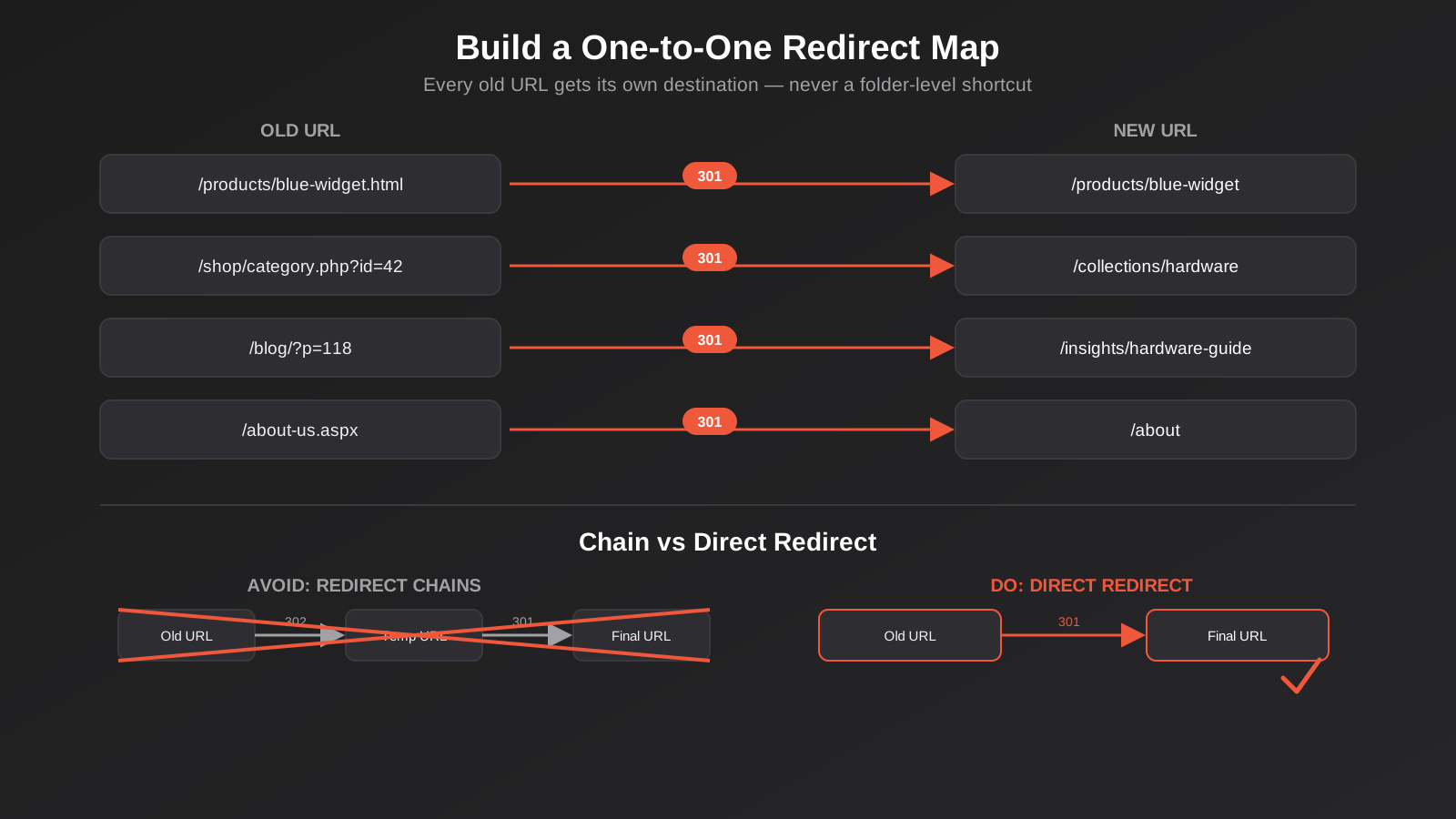
Every old URL needs its own specific new destination. Not a category-level catch-all, not a blanket redirect to the homepage “because we’ll sort out the details later.” Google treats a mass redirect to an unrelated page as a strong signal that the old content no longer exists, and it will drop the page’s rankings rather than transfer them. The map itself is usually just a spreadsheet: source URL, destination URL, redirect type, and a note on why (identical content, merged content, deliberately retired). It’s not glamorous work, but it’s the work that actually protects the client’s traffic, and it’s exactly the kind of detail that gets rushed when a migration is running behind schedule.
301, Not 302
Use 301 (permanent) redirects for anything that has genuinely moved for good. A 302 (temporary) redirect tells Google the move might not be permanent, so it can hold off transferring ranking signals and keep the old URL in its index instead of the new one — exactly the opposite of what you want during a platform migration. We still see 302s used by default on some platform migration tools simply because it’s the tool’s default setting, not because anyone chose it deliberately. Check what your CMS, hosting panel or migration plugin is actually implementing before you trust it.
Redirect chains are the other repeat offender: Old URL redirects to a temporary URL, which redirects to the actual final URL. Each hop in a chain leaks a bit of authority and adds load time, and chains longer than two or three hops are sometimes not followed at all by crawlers. Point every redirect straight at its final destination.
What to Do With Orphaned and Low-Value URLs
Not every old URL deserves a redirect. Thin category pages, duplicate content from an old faceted navigation, or genuinely outdated content with no traffic and no backlinks can be deliberately retired with a proper 410 (Gone) status rather than forced into an unrelated redirect. Redirecting genuinely unrelated content just to avoid a 404 dilutes relevance signals on the destination page and can look manipulative to Google if done at scale. The rule of thumb: redirect where there’s a genuine content match, retire cleanly where there isn’t, and don’t redirect everything to the nearest category page just to make the 404 count look better in a spreadsheet.
Platform-Specific Considerations
The core principles above hold regardless of which platforms are involved, but the specific risks change depending on what you’re migrating from and to. We handle several distinct migration types regularly, and each has its own failure points.
Website Platform Migrations
Moving off a website builder like Wix or Squarespace onto WordPress is one of the most common migrations we run, usually driven by a business outgrowing the builder’s flexibility or hitting a ceiling on page speed and technical SEO control. The catch with builder platforms is that they often generate URL structures, canonical tags and structured data automatically in ways you can’t fully see or export cleanly — so the crawl-and-export step above matters even more here than in a like-for-like CMS switch. We’ve documented the specific redirect and DNS considerations for this exact move on our Wix to WordPress migration page if that’s the move you’re planning.
Ecommerce Platform Migrations
Ecommerce migrations — Magento to Shopify, WooCommerce to Shopify, or any other platform switch — carry an extra layer of risk because product, category and collection URLs typically follow completely different structures on each platform, and product pages are usually where most of a store’s backlinks and organic revenue are concentrated. Variant handling is a common trap: Magento and WooCommerce can structure size and colour variants very differently to Shopify’s variant model, and if that mapping isn’t planned before migration, you can end up with either duplicate product URLs or missing variant pages that used to rank individually. Out-of-stock and discontinued products need a decision too — redirect to the closest current equivalent product if one genuinely exists, or let the page 404/410 with a clear “this product isn’t available” state rather than force a redirect to an unrelated item. We’ve run this exact process enough times on the WooCommerce to Shopify migration path that most of the traps are predictable before we start.
Structured Data and Metadata Carryover
Title tags, meta descriptions, structured data markup and canonical tags all need to carry across in the migration, not just the visible page content. This is where a lot of “redesign” projects quietly damage rankings even when the URL stayed the same — a new theme or page builder often strips or resets metadata by default unless someone actively preserves it. Product schema, review schema, FAQ schema and local business schema all need to be checked on the new platform, not assumed to just work the same way they did before. If your new platform handles a particular schema type differently or not at all, that’s worth knowing before launch rather than discovering it three weeks later in a rich results report.
Export the metadata as its own spreadsheet before migration — title, meta description, canonical URL and any schema type per page — the same way you exported the URL list. Treat it as a checklist to reapply on the new platform rather than trusting a theme or plugin migration tool to carry it across automatically. Even when a migration tool claims to preserve metadata, we verify a sample of pages across every template type (homepage, category, product, blog post) after import rather than assuming the whole set came across cleanly, because it’s common for one template type to migrate fine while another silently drops fields. If you’re landing on WordPress specifically, our WordPress SEO guide covers the platform-specific settings — permalinks, caching, image handling — worth checking once the migration itself is done.
Launch Day Execution
Everything up to this point is preparation. Launch day is where preparation either pays off or gets rushed under pressure, and rushing is where most of the damage that could have been avoided actually happens.
Timing the Cutover
Launch midweek, ideally early in the day, with your whole team available and nobody planning to be offline for the next 48 hours. A Friday afternoon launch means any issue discovered over the weekend sits unfixed for two extra days, and Google’s crawlers don’t wait for Monday to start indexing your new URLs and dropping the old ones. Avoid launching immediately before a public holiday or a period when key team members are unavailable, for the same reason.
The Pre-Flight Checklist
Before flipping the switch, confirm every item on this list on the live (or final staging) environment, not an earlier version of it:
- Every redirect in the map is live and tested — spot-check at least 20–30 across different page types, not just the homepage and a couple of top pages.
- No stray
noindexdirectives carried over from staging — this single oversight has quietly deindexed entire sites within days of launch. - SSL certificate is valid and correctly configured on the new domain or subdomain.
- The new XML sitemap contains only live, indexable URLs — no staging URLs, no duplicate variants, no pages you deliberately retired.
- Canonical tags point to the correct live URLs, not to a staging domain.
- Core Web Vitals and page speed on the new site are equal to or better than the old site — if the new build is slower, fix that before launch, not after.
- Google Analytics and Search Console tracking codes are correctly installed and firing on the new site.
- Robots.txt on the new site isn’t accidentally blocking crawlers — this happens more often than it should when a staging robots.txt gets copied across by mistake.
DNS and Propagation
If the migration involves a domain or subdomain change, lower your DNS TTL (time to live) a few days before launch so the change propagates faster once you flip it, and confirm with your host or registrar exactly how long full propagation is likely to take. During the propagation window some visitors and crawlers will still hit the old server, so keep the old site’s redirects live and functioning rather than shutting it down the moment the new site goes live. We generally recommend keeping the old hosting environment active and redirecting from it for a minimum of six to twelve months after any migration, longer for sites with strong historical backlink profiles.
Telling Google What Happened
Google doesn’t automatically know a migration has taken place just because redirects exist — give it as many explicit signals as you can on launch day. Submit the new XML sitemap in Search Console immediately, and if the domain itself changed, run Search Console’s Change of Address tool, which exists specifically to tell Google “this entire property has moved here.” Use the URL Inspection tool to manually request indexing on your highest-value pages — homepage, top category pages, top converting service pages — rather than waiting for Google to discover and recrawl them on its own schedule. None of this replaces a correct redirect map, but it does speed up how quickly Google processes the change, which shortens the recovery window covered below.
The First 90 Days: Monitoring and Recovery
Launch isn’t the finish line. The 90 days after a migration are when you find out whether the preparation actually worked, and they need active monitoring, not a “check back in a month” approach.
What a Normal Dip Looks Like
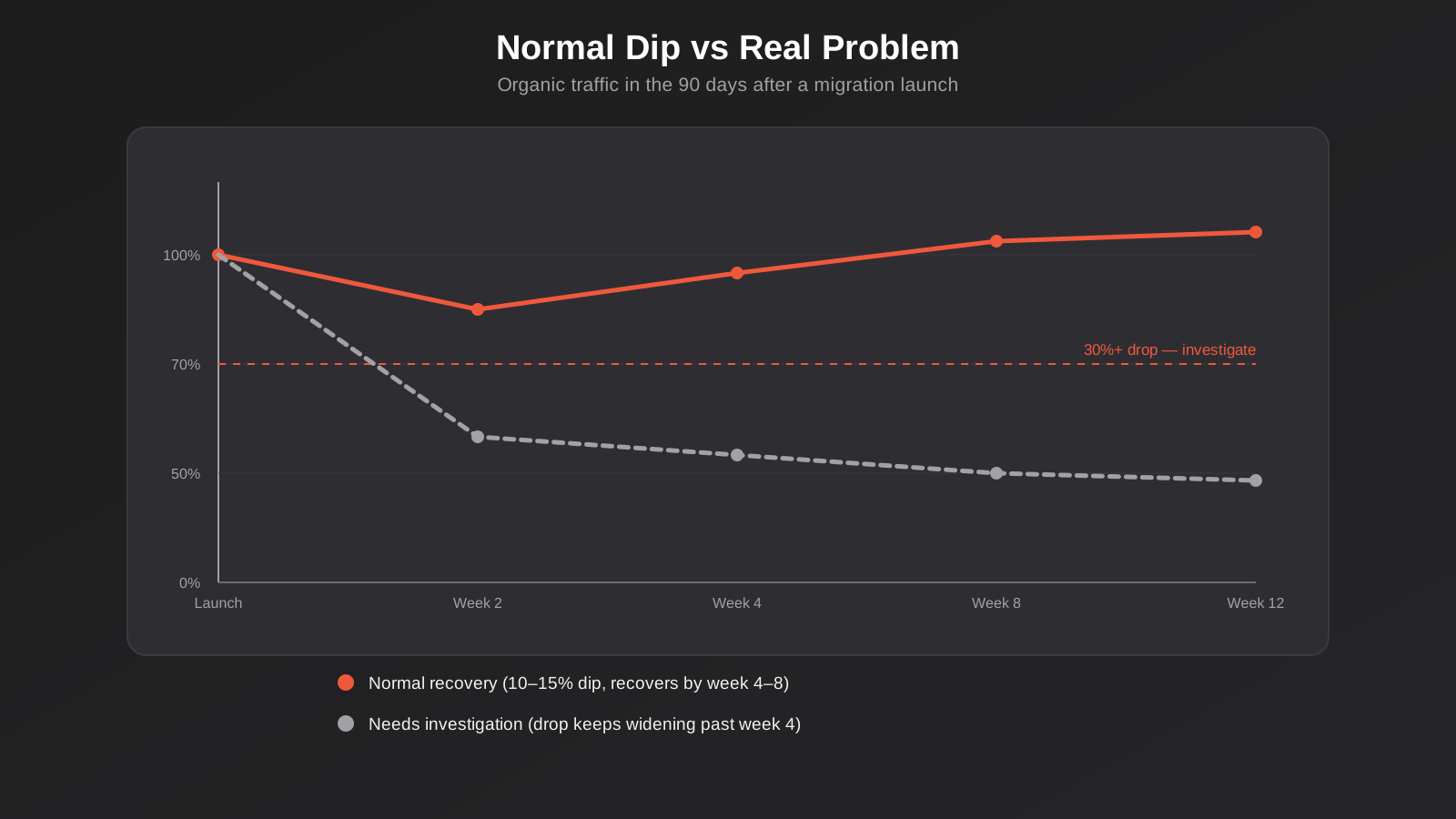
Even a well-executed migration usually sees a temporary dip of somewhere around 10–15% in organic traffic in the first one to two weeks, simply because Google needs time to recrawl and reindex the new URL structure and re-evaluate the signals attached to it. This is expected and not a sign anything went wrong. What matters is the trajectory: a healthy migration recovers most or all of that dip within four to eight weeks as Google finishes processing the redirects and re-establishes trust in the new URLs.
Monitoring Cadence and Tools
Check Search Console’s Coverage report daily for the first two weeks, specifically watching the count of pages with 404 errors and any spike in “discovered, currently not indexed” pages. Fix any broken redirect you find within 24–48 hours rather than batching fixes into a weekly review — the longer a heavily-linked page sits as a 404, the more of its authority you risk losing permanently. Watch your ranking tracker for your priority keyword set weekly rather than daily, since day-to-day ranking fluctuation is normal noise and daily checking mostly just adds stress without adding useful information. Keep an eye on your Core Web Vitals in Search Console too — a new platform that’s technically live but slow to load under real traffic can quietly undermine rankings even when every redirect is perfect.
Server log file analysis is worth doing in the first month if you have access to raw logs, particularly for larger sites. Logs show you exactly which URLs Googlebot is actually requesting and how often, which tells you whether the crawler has genuinely found and started processing your new URL structure or whether it’s still repeatedly hitting old URLs and hoping to find them. A crawler stuck hammering dozens of old 404s instead of moving on to new pages is a sign your redirect map has gaps that need patching, and it’s a signal you’ll rarely catch from Search Console’s aggregated reporting alone.
When to Escalate
A drop of more than 30% that isn’t recovering by week four or five is not a normal migration dip and needs proper investigation, not more patience. Start by checking for the obvious culprits first: broken or missing redirects on high-traffic pages, an accidental noindex tag, a robots.txt block, duplicate content issues from parameters or variants that didn’t exist before, or a significant page speed regression. If none of those explain it, look at whether the new content itself changed meaningfully from what ranked before — a “refresh” that rewrote headings and body content at the same time as the URL changed makes it much harder for Google to recognise the new page as a continuation of the old one, even with a correct redirect in place. Getting proper SEO support involved at this stage, rather than waiting it out, is usually the difference between a two-week correction and a three-month one.
Common Mistakes That Sink a Migration
- Building the redirect map from the navigation menu only. Menus rarely cover every indexed URL — old campaign pages, paginated archives and legacy content get missed and end up as silent 404s.
- Using 302 redirects instead of 301s. Often a platform or plugin default rather than a deliberate choice, and it tells Google the move isn’t permanent.
- Mass-redirecting everything to the homepage. This looks like the old content vanished entirely and rarely preserves any ranking value.
- Leaving a staging
noindextag live on the new site. One overlooked meta tag can deindex an entire site within days. - Launching on a Friday afternoon with nobody watching over the weekend. Problems discovered on Monday have already had two extra days to compound.
- Changing content and URLs at the same time. Rewriting headings, copy and structure in the same move as the URL change makes it harder for Google to connect the new page to the old one’s history.
- Ignoring page speed on the new build. A prettier site that loads slower than the old one can offset every other thing you got right.
- Shutting down the old hosting environment too early. Redirects need somewhere to redirect from — killing the old server before propagation and reindexing finish breaks the chain.
- Not exporting a baseline before launch. Without a clear before-and-after, you can’t tell a normal dip from a real problem, and you end up reacting to guesswork.
Frequently Asked Questions
How much traffic will we lose during a website migration?
A well-planned migration typically sees a temporary dip of around 10–15% in the first one to two weeks while Google reprocesses the new URLs, recovering within four to eight weeks. Migrations that lose significantly more than that usually have an identifiable technical cause — missing redirects, incorrect redirect types, or indexing issues — rather than being an unavoidable cost of moving platforms.
How long does it take to recover rankings after a platform migration?
Most well-executed migrations recover to baseline within four to eight weeks. Sites with a strong backlink profile and a complete, correctly implemented redirect map often recover faster; sites with incomplete redirect maps or content changes bundled into the same launch can take considerably longer, sometimes months, to fully stabilise.
Should we redirect every single old URL, even low-traffic pages?
Redirect any URL with a genuine content match on the new site, backlinks pointing to it, or any organic traffic history. For thin or duplicate pages with no real equivalent, a clean 410 (Gone) status is usually better than forcing a redirect to unrelated content, which can dilute relevance signals on the destination page.
Can we change our website design and migrate platforms at the same time?
You can, and most migrations involve some design change anyway, but keep the URL structure and core page content (headings, primary copy) as stable as possible during the actual migration. Save major content rewrites for a follow-up phase once rankings have stabilised on the new platform — changing everything at once makes it harder to isolate what caused any ranking movement.
Do we need to keep the old hosting or domain active after launch?
Yes, for at least six to twelve months in most cases, longer if the old site had a strong backlink profile. Redirects need an active source to redirect from, and shutting down the old environment too early breaks that chain for any crawler or visitor still hitting the old URLs.
What’s the very first thing we should do before starting a migration?
Crawl and export every indexable URL on your current site, cross-referenced against your XML sitemap, Search Console’s indexed pages and your organic landing page report. This becomes the foundation of your redirect map and your before-and-after baseline — skipping it is the single biggest reason redirect maps end up incomplete.
Where to Start
If you’re planning a platform migration — a CMS switch, an ecommerce replatform, or simply a redesign that’s going to change your URL structure — the work described here is worth scoping properly before a launch date gets locked in. We handle these migrations end to end: the audit, the redirect map, the platform-specific build, and the monitoring in the weeks after launch. You can see the specific migration paths we run most often, including website and ecommerce platform migrations, or have a look at our broader approach to SEO if rankings and organic visibility are the main thing you’re trying to protect. If you’d rather talk through your specific situation first — what you’re migrating from, what’s driving the move, and what’s actually at risk — we’re happy to have that conversation before you commit to a launch date.
Keep reading
Related posts
Psychology Practice Marketing in Australia: Local SEO, Compliant Copy and the Waitlist Problem (2026)
How Australian psychology practices handle local SEO, AHPRA-compliant copy and waitlist triage when they're already at capacity (2026).

Physiotherapy Marketing in Australia: Local SEO, Website Design and Booking (2026)
How Australian physiotherapy clinics win new patients through Google Business Profile, local SEO, website design and real-time booking in 2026.
Local SEO for Veterinary Clinics in Australia: Google Business Profile, Reviews and the Emergency Search (2026)
Veterinary clinic SEO explained: Google Business Profile, review generation and the emergency search most vet websites get wrong.
Got a project you'd like to talk through?
Tell us what you're working on — we'll come back with a plan.
