
Best Website Hosting for Australian Businesses (2026): 6 Options Compared
 Jignesh Vagadiya
11/10/2026
21 min read
Jignesh Vagadiya
11/10/2026
21 min read
A client came to us last year with a seven-year-old site sitting on a shared hosting plan that cost four dollars a month. It had gone down twice during a product launch, support took three days to reply to a ticket about an expired certificate, and page load times were pushing six seconds on mobile. We moved the site to a better host and changed nothing else for a fortnight. Largest Contentful Paint dropped by more than half, and the client’s bounce rate on mobile fell noticeably within days. No new content, no redesign, no extra ad spend. Just a host that could actually serve the pages fast.
Hosting is the part of a website brief almost everyone skips past. It gets decided in five minutes at the end of a build, usually by whoever is cheapest or whoever a developer already has an account with, and then nobody looks at it again for years. That is a mistake, because hosting sits underneath everything else you do with a site — your SEO, your ad landing pages, your checkout, your email deliverability if you’re sending transactional mail from the same server. A host that is slow or flaky undoes work you’re paying other people to do well.
This guide to the best website hosting for Australian businesses compares six hosts we see actually in use, or get asked about, in 2026: two Australian-owned providers, one global budget host with a pricing quirk worth knowing about, one flexible cloud platform, and two premium managed WordPress hosts. We’re not ranking by affiliate payout or by who has the flashiest homepage. Every host here gets a genuine drawback, because if a “best of” list makes every option sound perfect, it’s not actually helping you choose — it’s just an ad. Prices move constantly and most hosts quote an attractive first-term rate that jumps at renewal, so treat the figures below as a guide to order of magnitude, not a quote, and always check the live price and the renewal price before you sign up.
We’ve also stuck to hosting itself, not the wider cost of getting a site built or redesigned in the first place — hosting is almost always the smaller line item. If you’re weighing up both at once, it’s worth reading them as two separate decisions: what the site itself costs to design and build, and what it costs each month to keep it running afterwards. They don’t need to come from the same provider, and in our experience they rarely should.
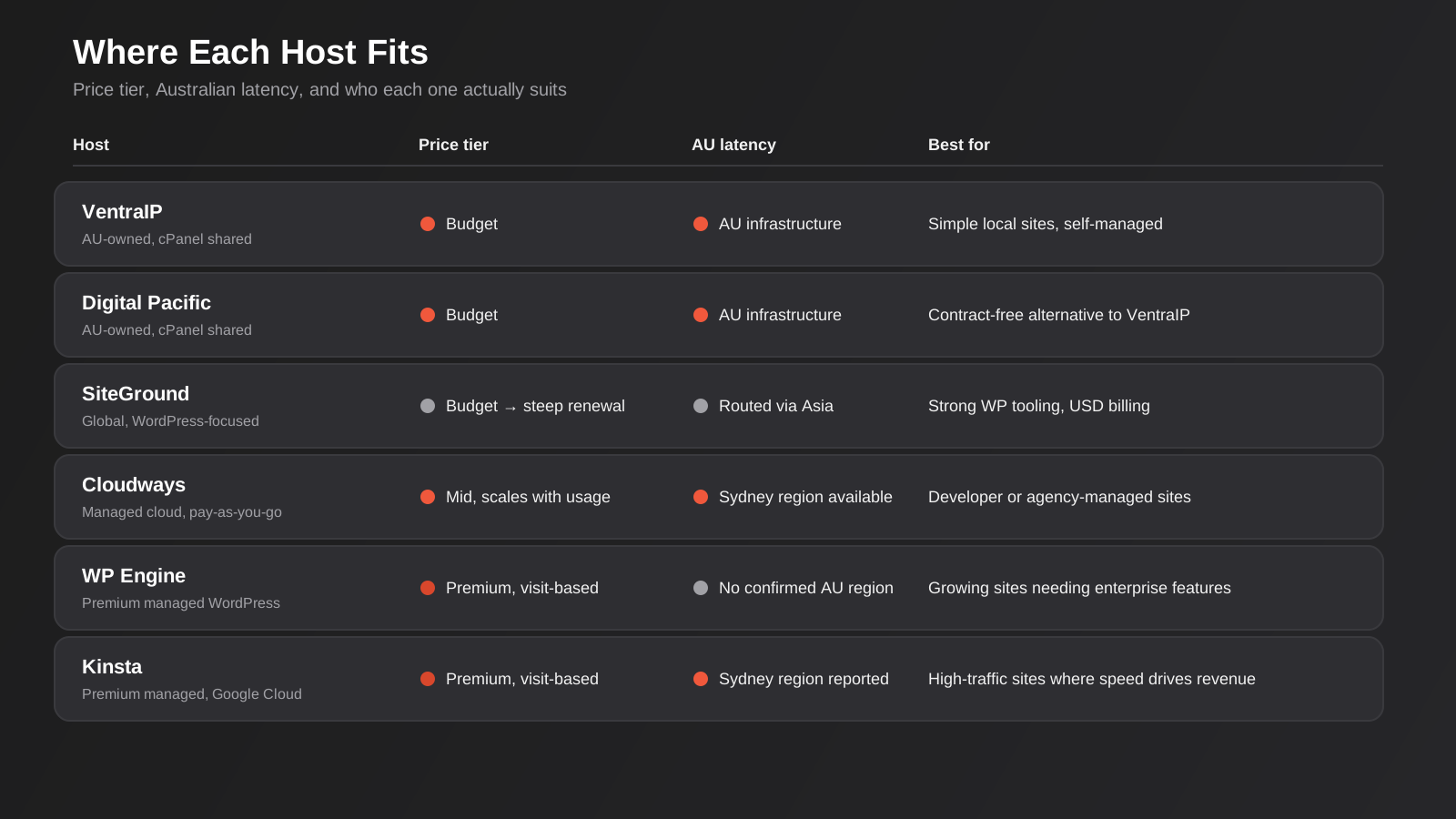
VentraIP
VentraIP is one of the larger Australian-owned hosts, and it’s usually the first name that comes up when a business specifically wants an Australian company holding their hosting account — Australian billing in AUD, an Australian ABN on the invoice, and support staff working Australian hours rather than a ticket queue that resets overnight somewhere else in the world. For a lot of small businesses and sole traders, that alone is the deciding factor, especially if whoever manages the site isn’t particularly technical and wants to be able to call someone during business hours.
The shared cPanel plans cover the basics well: SSD storage, free SSL, a standard cPanel control panel that most developers and a lot of DIY site owners already know their way around, and a reasonable uptime track record for the price point. Entry plans advertise an eye-catching first-term rate, commonly somewhere in the single digits per month, that roughly doubles or triples at renewal — this is normal across the whole Australian shared hosting market, not a VentraIP-specific trap, but it means the number you see in the ad is rarely the number you’ll pay in year two.
The honest drawback: entry and mid-tier shared plans put you on a server with other customers, and performance under load is average at best. If your site gets a traffic spike from a Google Ads campaign, a press mention, or a sale, a budget shared plan is often where the slowdown happens. It’s also not a managed WordPress host in the way WP Engine or Kinsta are — you’re responsible for your own plugin updates, caching configuration, and security hardening, or you need a developer or agency doing that for you.
Who it suits: a straightforward brochure site, a small WooCommerce store with modest traffic, or any Australian business that wants a local company on the invoice and is comfortable managing WordPress maintenance itself or through a developer.
One detail worth checking before you sign up: email hosting and backup frequency differ a lot between plan tiers, and they’re easy to overlook when you’re comparing the headline price. Entry plans sometimes include fewer mailboxes than a small team actually needs, and automated backup retention can be as short as a few days on the cheapest tier, which matters if you only notice a problem with your site a week after it started.
Digital Pacific
Digital Pacific is the other well-known Australian-owned option, positioned similarly to VentraIP but with a slightly different pitch — contract-free plans and a focus on straightforward cPanel hosting without a lot of upsell noise. It’s a reasonable alternative if you’ve already decided you want an Australian-run account and are comparing quotes rather than committing to the first name you heard.
Plans scale from basic personal hosting through business tiers with more storage, mailboxes and resource allocation, all on cPanel, which again means broad compatibility with WordPress, Joomla and most standard CMS platforms your developer might be using. Prepayment discounts for longer terms are common, which can meaningfully lower the effective monthly rate if you’re happy to commit for a year or two upfront.
The honest drawback is much the same as VentraIP’s: this is shared infrastructure at the budget and mid tiers, and published pricing across third-party listings for Digital Pacific is genuinely inconsistent — we found figures for the same plan name varying by more than double depending on the source. That inconsistency is itself a signal worth taking seriously: get a live quote and screenshot the renewal terms before you commit, rather than trusting a comparison article (including this one) for the exact dollar figure.
Who it suits: businesses wanting a second Australian-owned option to compare against VentraIP, particularly if a long prepaid term and a lower effective rate matters more to you than brand recognition.
If you do go with a smaller or lesser-known Australian host, ask directly about support channels and response times before you buy, not after something breaks. Phone support during business hours is common among the Australian-owned providers, but ticket response times on the cheapest plans can still stretch to a day or more, which is a problem if your site goes down on a Saturday and you’re stuck waiting until Monday.
SiteGround
SiteGround is a global host that built its reputation on WordPress-specific hosting, strong support, and genuinely good performance on its mid and upper tiers — built-in caching, a clean WordPress-focused dashboard, free CDN on most plans, and staging environments that make it easier to test changes before they go live. It consistently rates well in independent speed and support benchmarks.
Here is the detail every Australian business needs before signing up: SiteGround’s entry StartUp plan advertises an introductory price in the low single digits per month in USD, and the renewal price after that first term is commonly six to eight times higher. That is not a rumour or a one-off complaint — it is the standard structure of the plan, and it catches people out because the signup page is designed to show you the small number, not the number you’ll actually pay from year two onward. Billing is also in USD, so your actual AUD cost moves with the exchange rate, and SiteGround doesn’t operate a dedicated Australian data centre — the nearest regional option for Australian visitors typically runs through Singapore, which adds some latency compared with a true Sydney-based host.
The honest drawback, then, is less about SiteGround’s hosting quality — which is genuinely solid — and more about the pricing structure and the lack of a local data centre. If you sign up on the cheap first-term rate without reading the renewal terms, you’ll be unpleasantly surprised at the twelve-month mark. This is exactly the kind of “cheap quote that leaves something out” trap we talk about in our guide to what a website actually costs in Australia, just applied to hosting instead of a build.
Who it suits: businesses comfortable paying in USD and happy with the Asia-Pacific latency trade-off, who want strong WordPress tooling and support, and who go in with eyes open about the renewal jump — ideally by locking in the longest available first term to delay it.
Cloudways
Cloudways is a managed cloud platform rather than a traditional host — it sits on top of infrastructure from providers like DigitalOcean, and gives you a managed layer (server provisioning, caching, backups, a reasonably friendly dashboard) over what would otherwise be a bare cloud server. Critically for Australian businesses, DigitalOcean operates a real data centre in Sydney, and Cloudways lets you choose that region when you launch a server, which means genuinely low latency to Australian visitors rather than routing through Singapore or the US.
Pricing is pay-as-you-go rather than a fixed monthly plan, scaled to the server size you choose rather than a one-size-fits-all tier, which suits a developer or agency running several client sites who wants to size each one appropriately instead of buying the same package six times. It’s genuinely fast when configured well, and the Sydney region closes the latency gap that affects most of the hosts on this list.
The honest drawback: Cloudways is built for people comfortable with some technical decision-making. There’s no cPanel, the dashboard uses cloud terminology (vertical scaling, PHP workers, server size) that will mean nothing to a business owner managing their own site, and backups, extra bandwidth and some security add-ons cost more on top of the base server price — the advertised entry price is rarely your final monthly bill once you add what most businesses actually need. This is a platform for your developer or agency to run, not a self-service option for someone who just wants to log in and change a page.
Who it suits: a business that already has a developer or agency managing the site, wants genuinely low latency to Australian visitors, and is comparing a handful of sites or client projects rather than running one simple brochure site.
WP Engine
WP Engine is one of the oldest and most established premium managed WordPress hosts, built specifically around WordPress rather than general-purpose hosting with a WordPress install option bolted on. That focus shows in the detail: automated daily backups with one-click restore, a staging environment included even on entry plans, a genuinely useful one-click migration plugin, and a security posture (managed firewall, automatic core updates, threat detection) that most agencies would otherwise have to configure by hand.
Plans are priced around a monthly visits allowance rather than a flat server size, which is a different mental model to the cPanel hosts above — you’re buying headroom for traffic, not disk space. Entry plans start somewhere in the $30-plus-per-month range in USD, with higher tiers covering more sites, more visits and more storage. There’s no confirmed dedicated Australian data centre in WP Engine’s published regions at the time of writing, so check the current region list before assuming Sydney-level latency.
The honest drawback is cost relative to what a small, low-traffic site actually needs: this is overkill and overpriced for a five-page brochure site with a few hundred visitors a month. The visit-based pricing also means a successful marketing campaign or a viral moment can push you into an overage charge or force an unplanned upgrade right when your site needs to be at its most reliable — worth factoring in if you’re running seasonal campaigns.
Who it suits: a growing WordPress business or agency managing multiple client sites that wants enterprise-grade reliability, security and staging workflow without hiring a dedicated sysadmin, and that has the traffic and revenue to justify the price.
Kinsta
Kinsta is WP Engine’s closest rival in the premium managed WordPress space, built on Google Cloud Platform’s infrastructure rather than its own data centres. The performance is genuinely excellent — Kinsta consistently benchmarks among the fastest managed WordPress hosts available, with a clean, developer-friendly dashboard, free automated migrations, and staging tools that make it easy to test before you push changes live. Google Cloud’s network includes a Sydney region, and several independent sources list Kinsta as offering it, which matters if low latency to Australian visitors is a priority for you — though you should confirm the current regional option for your specific plan before signing up, since published details vary between sources.
Like WP Engine, Kinsta prices by a monthly visits allowance rather than server size. Entry plans start at roughly $35 USD a month for a single site with a modest visit allowance, scaling up from there, and discounts are usually available for annual billing. One thing worth knowing: several independent reviews note that Kinsta’s renewal price is the same as your signup price — there’s no SiteGround-style jump — which is a genuine point in its favour if you’ve been burned by a renewal surprise elsewhere.
The honest drawback is the same as WP Engine’s: this is premium pricing for premium infrastructure, and it’s genuinely wasted on a low-traffic site that would run perfectly well on a $15-a-month plan elsewhere. The visit-based model also means growth has a direct cost attached, and if you exceed your plan’s allowance you’ll either pay overage fees or need to upgrade, so budget with some headroom if you expect a campaign to spike traffic.
Who it suits: a business running a high-traffic WordPress site or online store where page speed directly affects revenue, and where the cost is justified by what a slow or down site would actually cost you.
How to Choose the Right Host for Your Business
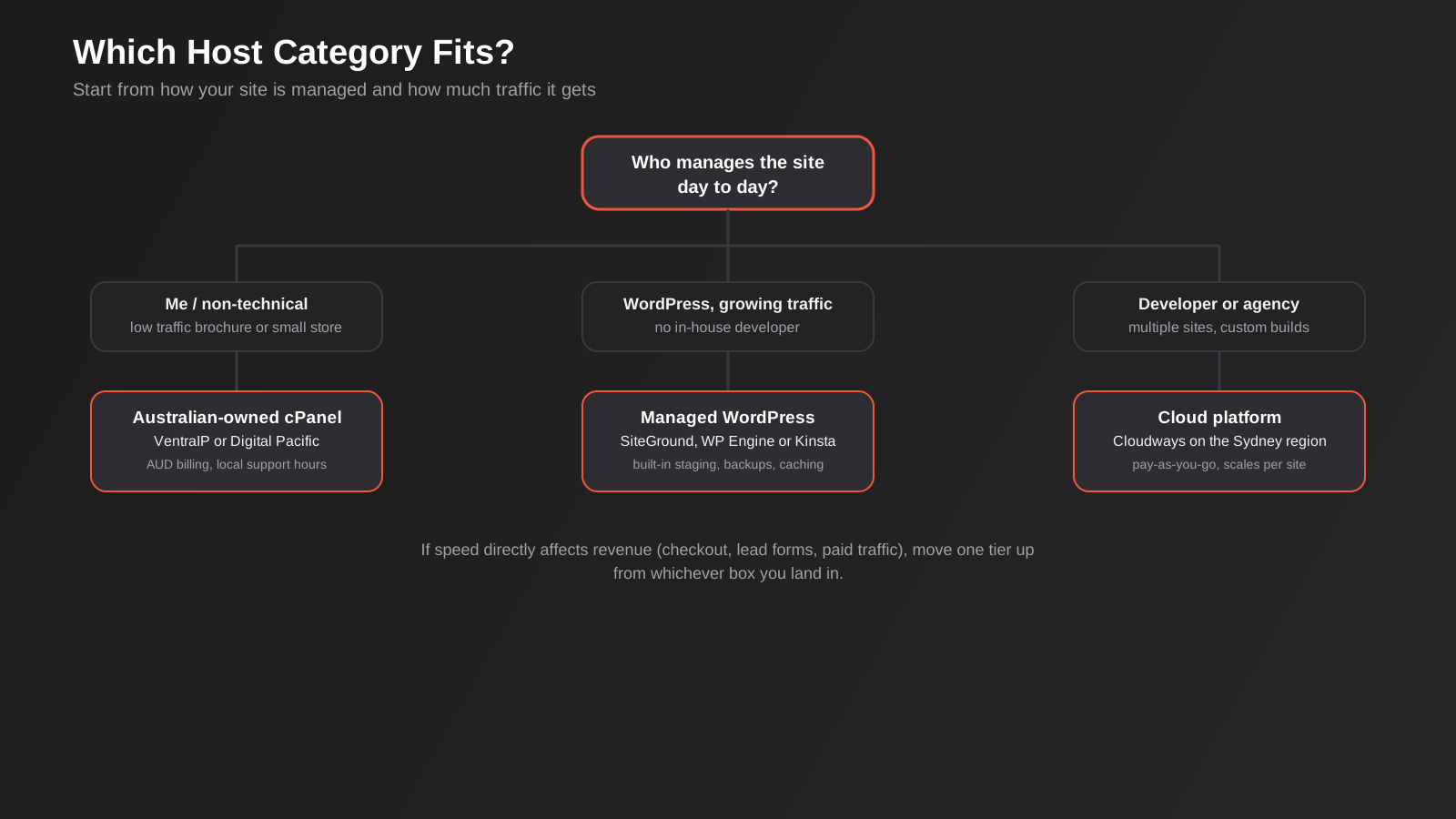
Start with what actually matters for your site rather than the plan name. A five-page services site with low traffic doesn’t need the same infrastructure as an ecommerce store running paid traffic every day, and buying premium managed hosting for a brochure site is money that would do more for your business spent on content or ads. Work through these questions in order:
Where do your visitors actually come from? If almost all your traffic is Australian, a host with real Australian or at least Asia-Pacific infrastructure (VentraIP, Digital Pacific, or Cloudways and Kinsta via their Sydney regions) will measurably outperform a host routing through the US or Europe. If you sell internationally, this matters less.
Who is going to manage the site day to day? If it’s you or someone non-technical on your team, you want cPanel-style simplicity or a fully managed platform with a simple dashboard — not a cloud platform that expects you to understand PHP workers and vertical scaling. If you have a developer or agency, that constraint disappears and the technical platforms become genuinely good value.
What happens if the site goes down or slows down during a campaign? If a slow checkout costs you real sales, pay for infrastructure that holds up under load. If downtime for an hour is annoying but not costly, a budget shared plan is a reasonable trade-off.
What’s the renewal price, not just the signup price? Every host on this list, including the Australian-owned ones, advertises a first-term rate that differs from what you’ll pay ongoing. Ask for both numbers before you commit, and factor the real number into your budget, not the number in the ad.
Hosting is also only one piece of what determines whether a site performs well — good hosting with a bloated, unoptimised theme and no image compression still loads slowly. If you’re troubleshooting speed specifically, our guide to Core Web Vitals covers what to test and fix beyond just switching hosts, and if hosting is one part of a wider rebuild or new site, our website pricing guide breaks down what the rest of that project typically costs in Australia.
What Else to Check Before You Commit
The plan price on the pricing page is rarely the whole story. A few things are worth checking directly with the provider before you sign up, because they tend to surface as surprises later rather than upfront.
Email hosting
Some hosting plans bundle a reasonable number of email mailboxes; others treat email as a separate add-on priced per mailbox per month, which adds up fast for a team of five or six people. If your business runs email through Google Workspace or Microsoft 365 already, this won’t matter to you, but if you were planning to use mailboxes tied to your hosting account, confirm how many are included and what extra ones cost.
Backup frequency and retention
Daily automated backups with at least a week or two of retention is the baseline you want. Some budget plans back up less often, or keep only the most recent copy, which is a problem if you don’t notice a hacked plugin or a bad update until several days after it happened. Ask specifically how often backups run and how far back you can restore from, not just whether backups exist.
Migration support
Most hosts will say they offer free migration, but the quality of that service varies a lot — some genuinely handle the whole move for you, others hand you a plugin and leave the rest to you. If you’re not confident doing a DNS cutover yourself, ask what the migration actually includes before you buy, particularly if you’re moving an ecommerce store where downtime during the switch means lost orders.
Room to grow
A plan that’s perfect for your traffic today can become a bottleneck in a year if the business grows the way you’re hoping it will. Check what the next tier up costs and whether upgrading is a simple click or requires a fresh migration, so growth doesn’t force you to redo this whole decision sooner than necessary.
Common Mistakes When Choosing a Host
- Comparing the advertised first-term price without checking the renewal price, then getting a bill shock at the twelve or twenty-four month mark.
- Choosing a host based purely on price with no regard for where the data centre actually is, then wondering why the site feels sluggish for Australian visitors.
- Buying premium managed WordPress hosting for a low-traffic brochure site that would run perfectly well, and far more cheaply, on a budget shared plan.
- Assuming hosting and website maintenance are the same thing — a host keeps your server running, but nobody is updating your plugins, watching for broken links, or patching WordPress core unless that’s explicitly part of the plan or a separate maintenance arrangement.
- Migrating to a new host without testing the site on a staging copy first, then discovering a broken contact form or missing redirect only after it’s live and customers have already hit the error.
- Picking a cloud platform like Cloudways without a developer on hand to manage it, then getting stuck when something needs server-level troubleshooting rather than a support ticket.
Frequently Asked Questions
Does it actually matter if my host’s data centre isn’t in Australia?
Yes, though how much depends on your audience. Distance adds latency — the physical time it takes data to travel between the server and your visitor’s device — and that shows up as slower page loads, which affects both user experience and, indirectly, SEO through Core Web Vitals. If the bulk of your traffic is Australian, a host with infrastructure in Sydney or at least the Asia-Pacific region will generally outperform one running everything out of the US or Europe. If your audience is genuinely global, the difference matters less, and other factors like support quality and feature set become more important.
Why do hosting prices jump so much after the first term?
Most hosts, Australian and international alike, use the first term as an acquisition cost — they price it low enough to win the signup, then recover margin at renewal once you’re less likely to go through the hassle of migrating elsewhere. It’s standard industry practice rather than a scam specific to any one provider, but it means the advertised price is rarely the number you should budget on long term. Always ask for, or look up, the renewal price before signing up, and consider locking in the longest available first term if the provider allows it, since that delays the jump.
Is shared hosting good enough for a small Australian business, or do I need something more?
For a low-traffic brochure site or a small store doing modest volume, a decent shared cPanel plan from an Australian-owned host is usually fine, and spending more on premium managed hosting won’t move the needle on results. The signal that you’ve outgrown shared hosting is usually performance under load — the site slows down or falls over during a sale, a campaign, or just normal Australian business-hours traffic. That’s the point to move up to a managed platform or cloud hosting with dedicated resources.
Should I choose hosting based on what platform my website is built on?
To a degree, yes. If your site runs on WordPress, a WordPress-specific host (SiteGround, WP Engine, Kinsta) gives you tooling — staging, caching, one-click migrations — built specifically for that platform, which a generic cPanel plan doesn’t offer in the same way. If you’re on Shopify or another hosted ecommerce platform, hosting is bundled into the platform itself and this whole comparison doesn’t apply — you’re choosing the platform, not a separate host. For a custom-built site or a less common CMS, a flexible cloud platform or a developer-managed VPS usually makes more sense than a WordPress-specific host.
Can I move hosts without breaking my SEO rankings?
Yes, if it’s done properly. A host migration doesn’t change your URLs or your content, so there’s no inherent SEO risk the way there is with a full site redesign or platform change. The real risk is a botched migration — broken redirects, a forgotten SSL certificate, a staging robots.txt accidentally going live — so test thoroughly on a staging copy, migrate during low-traffic hours, and check the live site immediately after the DNS change propagates.
Do I need an Australian-owned host specifically, or just one with Australian infrastructure?
What actually matters for performance is where the server is, not where the company is headquartered — a US-owned platform with a genuine Sydney data centre (like Cloudways or Kinsta) can perform just as well for Australian visitors as an Australian-owned host. Where Australian ownership matters more is billing in AUD without exchange rate movement, an Australian ABN on your invoice for accounting purposes, and support staff working hours that overlap with yours. Weigh those two things — server location for performance, company location for billing and support — separately rather than assuming they’re the same decision.
Where to Start
If you’re not sure which category of host fits your situation, start by being honest about your traffic and who’s going to manage the site. A simple brochure site with modest Australian traffic rarely needs more than a solid Australian-owned shared plan. A growing store or a site where speed directly affects revenue justifies paying more for managed infrastructure or a developer-run cloud platform with a Sydney region.
If you’re weighing up a hosting change alongside a broader rebuild, or you want a second opinion on whether your current host is actually the problem before you spend money moving, we’re happy to have a look. You can see what a full WordPress build involves on our site, or get in touch and we’ll tell you plainly whether your issue is hosting, the site itself, or something else entirely.
Keep reading
Related posts
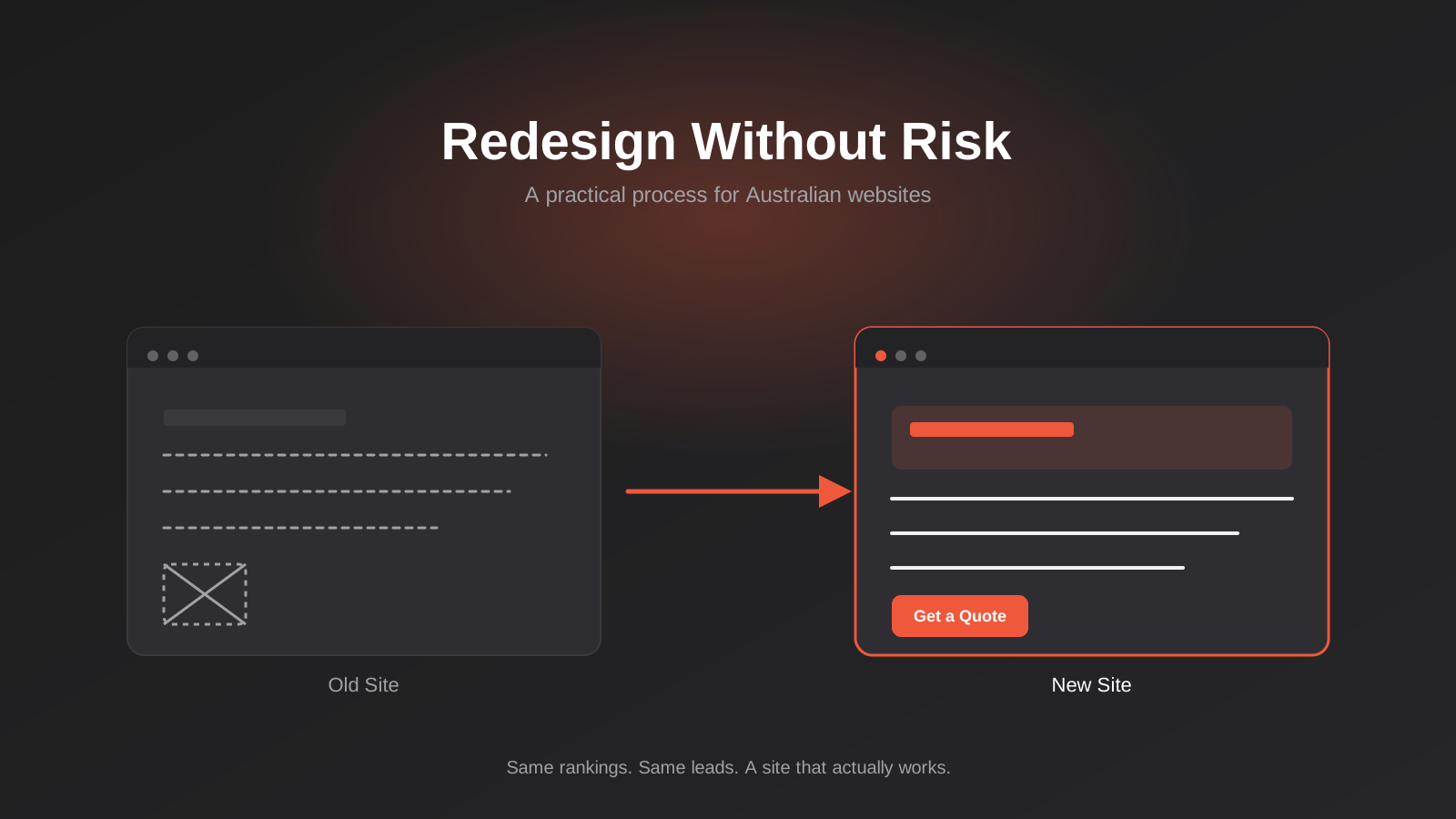
Website Redesign Without Losing Rankings or Revenue: A 2026 Guide for Australian Businesses
How to redesign your website without losing SEO rankings or leads: the audit, redirect map, QA and 90-day process Australian businesses need.
Core Web Vitals in 2026: A Practical Guide to LCP, INP & CLS for Australian Websites
A practical guide to Core Web Vitals for Australian businesses: what LCP, INP and CLS measure, how to test them properly, and…
Website Accessibility in Australia: A Practical WCAG Guide for Business Websites (2026)
A practical guide to WCAG, the DDA and website accessibility for Australian businesses — where sites fail, legal risk, testing, and fixes…
Got a project you'd like to talk through?
Tell us what you're working on — we'll come back with a plan.
