
Core Web Vitals in 2026: A Practical Guide to LCP, INP & CLS for Australian Websites
 Jignesh Vagadiya
26/09/2026
21 min read
Jignesh Vagadiya
26/09/2026
21 min read
Somewhere between the moment a customer clicks your ad and the moment your homepage actually appears, you lose people. Not because your offer is weak or your design is ugly — because the page took too long to become usable, and they’d already moved on to a competitor’s tab before your hero image finished loading. Google has a name for the metrics that describe this problem: Core Web Vitals. Most business owners have heard the term. Fewer know what the three numbers actually measure, why one of them changed completely in 2024, or what’s genuinely worth fixing versus what’s a rabbit hole.
We run Core Web Vitals audits as a standard part of every technical SEO engagement and most website rebuilds, and the pattern is consistent: the businesses losing the most traffic to speed issues are rarely the ones running ancient, neglected sites. They’re often running a perfectly modern WordPress or Shopify build that’s been dragged down by page builder bloat, tracking pixels, an oversized hero video, and hosting that was never built for Australian visitors in the first place. None of that is visible until you measure it properly.
This guide walks through what Largest Contentful Paint, Interaction to Next Paint and Cumulative Layout Shift actually mean, how to test your own site honestly, and the fixes that move the needle versus the ones that just look good in a screenshot. It’s written for the person who owns the website decision, not the developer who already knows this — though if you send it to your developer, they won’t disagree with much of it.
What Core Web Vitals actually measure
Core Web Vitals are three metrics Google uses to describe real-world page experience: how fast something useful appears, how quickly the page responds once someone tries to use it, and how much it jumps around while it’s loading. They’re measured from actual visitor data collected through Chrome, not from a single test run in a lab, which is part of why two people can run the same test on the same page and get different-looking results.
Largest Contentful Paint (LCP)
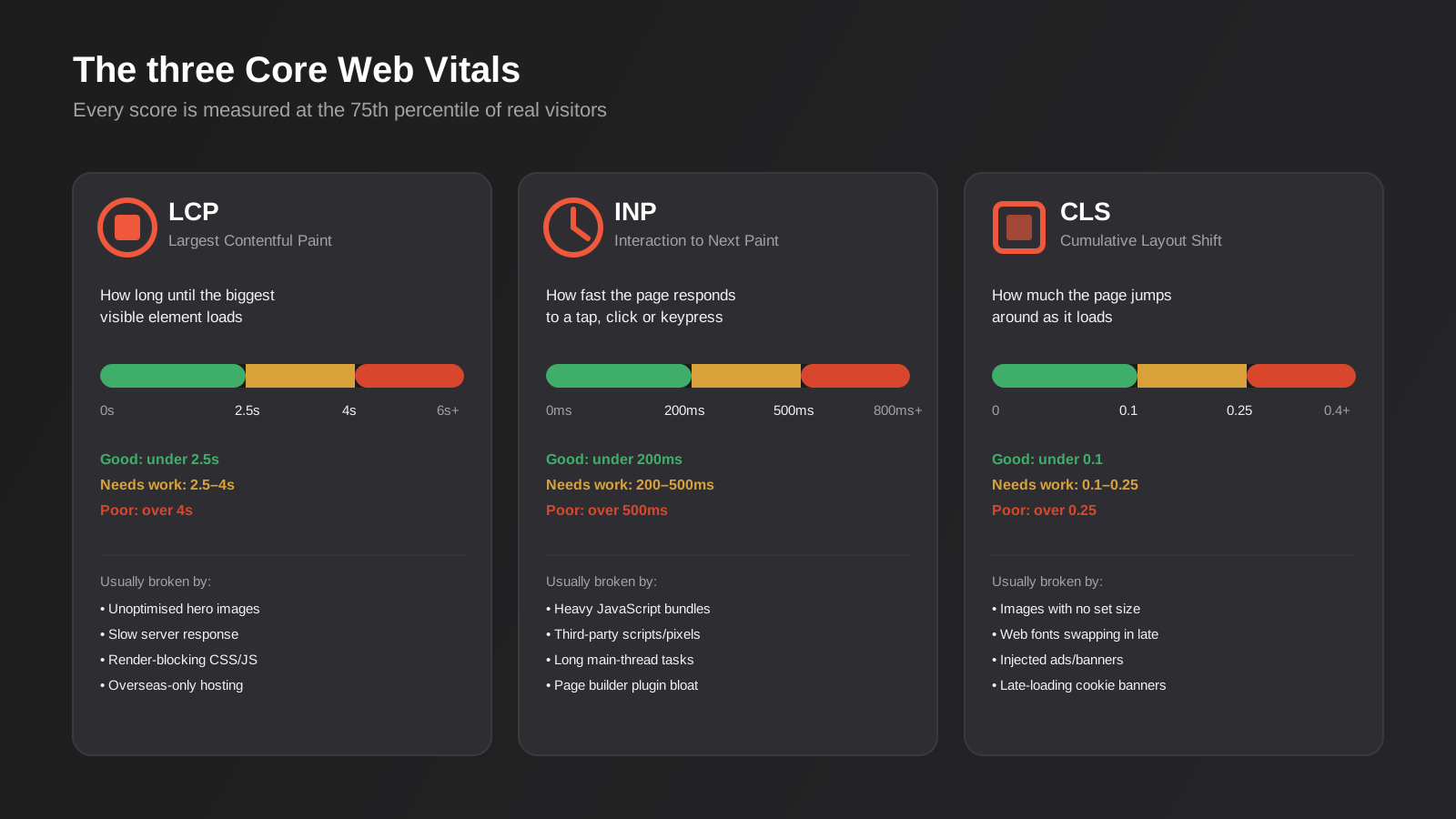
LCP measures how long it takes for the largest visible element on the screen — usually a hero image, a heading, or a background video poster — to fully render. It’s the closest thing Google has to “does this page feel like it’s loaded yet.” A good score is under 2.5 seconds. Between 2.5 and 4 seconds is classed as needing improvement, and anything over 4 seconds is poor. LCP is almost always the metric that’s failing on a slow site, and it’s usually failing for a small number of identifiable reasons rather than a hundred small ones.
Interaction to Next Paint (INP)
INP replaced First Input Delay as the official responsiveness metric in March 2024, and it’s a stricter test. Where FID only measured the delay before the browser started responding to the very first click, INP measures every interaction across the entire visit — every tap, every menu open, every filter click on a product listing page — and reports back something close to the worst of them. A good INP is under 200 milliseconds. Between 200 and 500 milliseconds needs work, and anything above 500 milliseconds is poor. This is the metric that catches sites where the page looks finished but feels sluggish to actually use, which is a very common gap between how a site tests and how it feels.
Cumulative Layout Shift (CLS)
CLS scores how much visible content shifts position while a page is loading — the thing that happens when you go to tap a button and an ad or an image loads in above it a split second earlier, so you end up tapping something else entirely. It’s scored as a unitless number based on how much of the viewport moved and how far. Under 0.1 is good, 0.1 to 0.25 needs improvement, and above 0.25 is poor. CLS is usually the cheapest of the three to fix once you know what’s causing it, because the causes are almost always the same handful of things.
All three are scored at the 75th percentile of real visits to a page, which matters more than it sounds. It means your site needs to be fast for three-quarters of the people who actually land on it — including the person on a mid-range Android phone on a patchy 4G connection in regional Queensland, not just the person testing it on fibre broadband and a new laptop in the office. A page that flies on your desktop can still fail Core Web Vitals in Google’s eyes if the real-world data from ordinary visitors tells a different story.
Why this matters beyond a Search Console warning
Core Web Vitals have been part of Google’s page experience signals since 2021, and the honest answer on ranking impact is that they’re a real factor but not a dominant one. Content relevance, search intent match and link authority still do most of the heavy lifting in how a page ranks. Where Core Web Vitals earn their keep is as a tiebreaker: when two pages are otherwise similarly relevant to a search query, the faster, more stable one tends to edge ahead. If you’re already competing hard for a keyword and losing by inches, page speed is a lever worth pulling.
But treating this purely as an SEO checkbox undersells it. The bigger cost of a slow, jumpy site is the visitors who never show up in a ranking report at all — the ones who clicked through from a Google Ads campaign, a social post, or a direct visit, watched the page stutter for three or four seconds, and left before anything meaningful loaded. That’s a conversion problem dressed up as a technical one. For an ecommerce store, a one-second delay in load time showing up as a meaningful hit to conversion rate is a pattern we’ve seen play out repeatedly across client accounts, and it compounds: slow load, higher bounce, fewer add-to-carts, worse return on the ad spend that got the visitor there in the first place.
There’s also a local dimension that a lot of Australian businesses miss. Plenty of sites are still hosted on servers in the US or Singapore because that’s where a template, a theme, or an agency’s default hosting stack happened to sit. Every one of those extra milliseconds of network latency stacks on top of everything else before a single byte of your page even starts rendering for an Australian visitor. It’s one of the few Core Web Vitals fixes that’s genuinely a one-off decision rather than an ongoing discipline.
Google also runs on mobile-first indexing, which means the version of your site it evaluates for ranking purposes is the mobile version, not the desktop one most business owners actually look at day to day. That’s worth sitting with for a moment: the site you check on your laptop before a board meeting isn’t the site Google is scoring. If your mobile experience is meaningfully heavier or slower than desktop — which is common when a site was designed desktop-first and mobile treated as an afterthought — that’s the gap that actually decides your Core Web Vitals outcome.
How to test your site properly
The single most common mistake we see is someone running one test on the homepage, seeing a green score, and concluding the site is fine. Core Web Vitals are measured per page, not per site, and the pages that matter for SEO and conversion — product pages, service pages, blog posts, landing pages — are frequently in much worse shape than the homepage a developer polished last.
Lab data vs field data
Tools like Google PageSpeed Insights and Lighthouse give you “lab data” — a simulated test run under controlled conditions on a single device profile. It’s useful for diagnosing exactly what’s slow, because it breaks the page down element by element. But it isn’t what Google actually uses to score your rankings. That comes from “field data,” pulled from the Chrome User Experience Report (CrUX), which aggregates real visits from real Chrome users over the past 28 days. A page can look great in a lab test and still be failing in the field if your actual visitor base is skewed toward older phones or slower connections than the lab simulation assumes.
Where to check both
PageSpeed Insights (running on pagespeed.web.dev) shows both lab and field data for any public URL, along with a prioritised list of what to fix and roughly how much time each fix is likely to save. Search Console’s Core Web Vitals report is the other essential tool — it groups your actual indexed pages by URL pattern and shows which groups are failing which metric across your real site traffic, which is far more useful than testing pages one at a time when you’ve got a site with hundreds of URLs.
Test on a realistic connection
If you’re testing manually in Chrome DevTools, throttle the network to a mid-tier mobile connection rather than testing on your office fibre. It sounds obvious, but we still regularly get told “the site’s fast, I just checked it” by someone who tested on a 500Mbps connection with a cached browser session, which tells you almost nothing about what a first-time mobile visitor actually experiences.
Fixing Largest Contentful Paint
LCP problems tend to come from a small, identifiable set of causes, and fixing the biggest one usually accounts for most of the improvement. Chase the big win first rather than trying to shave milliseconds everywhere at once.
Compress and correctly size images
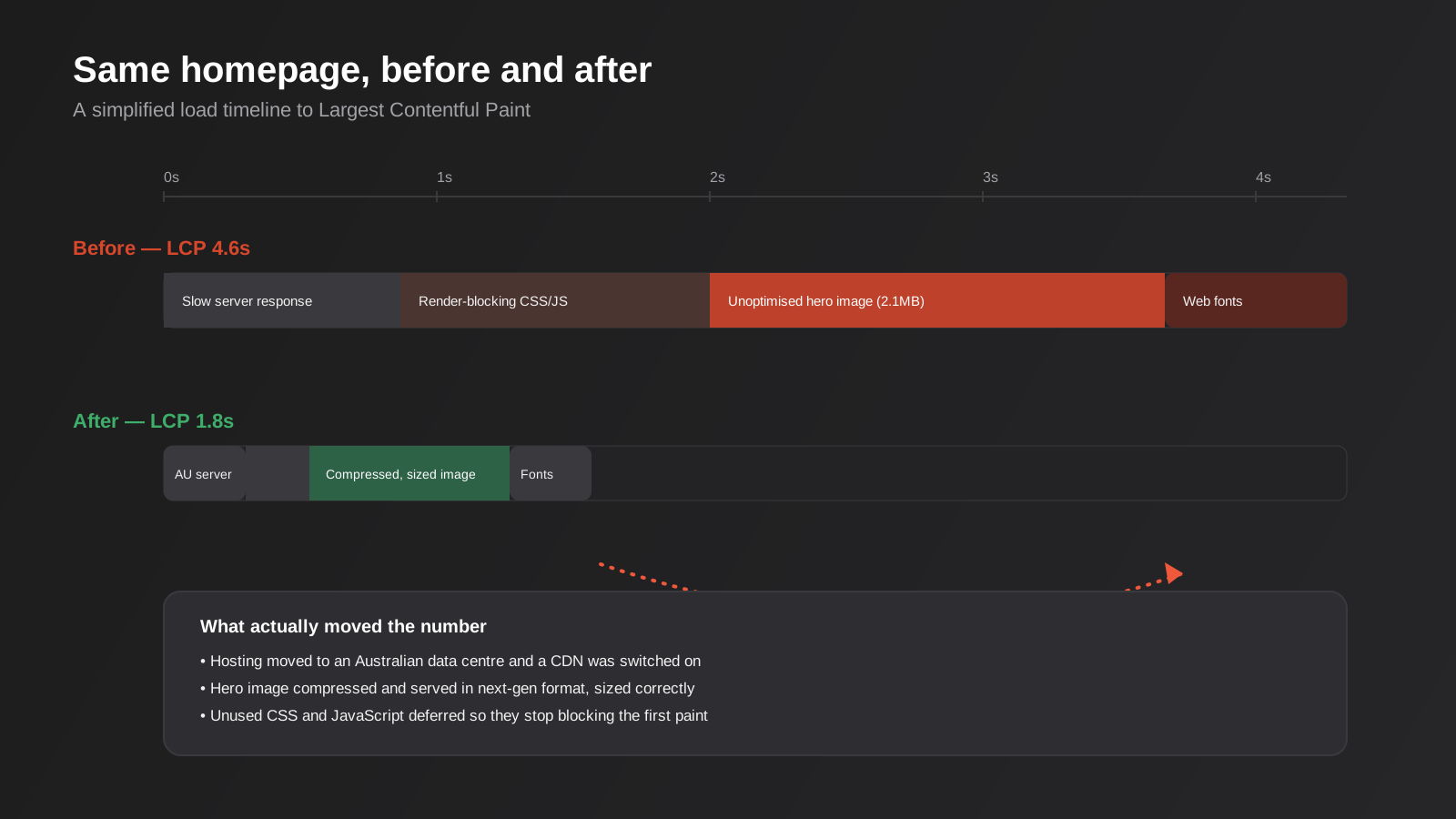
The single biggest LCP culprit on most Australian small business sites is an oversized hero image — a 2 or 3 megabyte photo straight off a camera or stock library, dropped into a page builder and displayed at a fraction of its native resolution. Compress every image before it goes near the site, serve it in a modern format like WebP or AVIF, and size the file to match how large it’s actually displayed rather than shipping a 4000-pixel-wide image into a 1200-pixel container. Most modern CMS platforms and CDNs can do this automatically once it’s switched on, which is worth checking rather than assuming.
Get hosting and server response time right
Time to First Byte — how long the server takes to start sending the page at all — sits underneath every other LCP fix. If your hosting is slow or geographically distant from your visitors, no amount of image compression will fully compensate. For an Australian audience, that means hosting with servers in or near Australia, or at minimum a CDN with an edge location here, so the first response doesn’t have to cross the Pacific before your page even starts rendering. Cheap shared hosting is the other common culprit: it’s not just about distance, it’s about how many other sites are sharing the same server resources and how the host handles traffic spikes, which matters more than most businesses expect once a campaign sends a burst of visitors at once.
Stop CSS and JavaScript from blocking the first paint
Browsers won’t render anything until they’ve downloaded and processed the CSS in the page’s head, and by default they’ll pause on script tags too. Inline the small amount of CSS needed for what’s visible above the fold, defer everything else, and load non-essential JavaScript — chat widgets, review plugins, most marketing pixels — after the main content has rendered rather than blocking it. This is usually a developer task, but it’s one of the highest-leverage fixes available because it affects every single page on the site at once.
Handle web fonts deliberately
Custom fonts loaded from an external source add a network request and a render delay before text can display in its final style. Preload the fonts you actually use, limit how many font weights and styles you’re loading, and set font-display: swap so text shows in a fallback font immediately rather than staying invisible until the custom font arrives.
Fixing Interaction to Next Paint
INP problems are usually less visible during a casual test than LCP problems, because the page can look fully loaded while still being slow to respond to input. This is where most of the “it looks fine to me” disagreements between a business owner and their developer come from.
Audit third-party scripts
Every tracking pixel, chat widget, review plugin, heatmap tool and A/B testing script adds JavaScript that competes for the browser’s main thread. It’s common to find a site running six or seven third-party scripts that were added over the years by different people for different campaigns, several of which nobody’s actively using any more. An audit that simply removes what’s no longer needed is often the fastest INP win available, and it costs nothing beyond the time to check.
Break up long JavaScript tasks
When a single script runs for more than 50 milliseconds without handing control back to the browser, any click or tap during that window has to wait in a queue. This shows up constantly on sites built with heavy page builder plugins, where a huge chunk of JavaScript initialises everything on the page at once, whether that section is currently visible or not. Splitting that work up, or lazy-loading scripts for sections further down the page until they’re actually needed, keeps the main thread free to respond to whatever the visitor is doing right now.
Reconsider the page builder, if it’s the actual bottleneck
This is the fix nobody wants to hear, but for some sites it’s the honest answer. Visual page builders are genuinely useful for teams who need to edit their own content without a developer, and that trade-off is often worth it. But some of them generate a lot more DOM elements and JavaScript overhead than a leaner, more custom-built page to achieve the same visual result. If INP problems persist after removing scripts and deferring what you can, it’s worth having a developer assess how much of the overhead is coming from the builder itself versus from what’s been added on top of it.
Fixing Cumulative Layout Shift
CLS is usually the quickest of the three to fix once identified, because the causes are narrow and the solutions are mostly a matter of discipline rather than deep technical rework.
Always set width and height on images and embeds
If the browser doesn’t know how tall an image is going to be before it loads, it reserves no space for it, and everything below jumps down the moment the image finishes downloading. Setting explicit width and height attributes, or using CSS aspect-ratio, lets the browser reserve the right amount of space upfront so nothing has to move once the image arrives. The same applies to embedded videos, iframes and ad units.
Reserve space for dynamic content
Cookie consent banners, promotional bars, chat widget launchers and “back in stock” notifications are common CLS offenders, because they’re often injected into the page after everything else has already rendered, shoving content around the moment they appear. Reserve fixed space for these elements in the layout from the start, rather than letting them insert themselves wherever there happens to be room when they load.
Load fonts in a way that doesn’t reshuffle text
When a fallback font swaps to a custom web font, the change in letter width and line height can shift everything below that block of text. Font-display strategies help here too, alongside matching the fallback font’s size and spacing as closely as possible to the custom font so the swap is close to invisible when it happens.
Platform-specific considerations
The general fixes above apply everywhere, but where the effort actually goes depends heavily on what the site’s built on. We work across WordPress and Shopify most often, and the failure patterns on each are different enough to be worth calling out separately.
WordPress
WordPress sites tend to accumulate Core Web Vitals problems gradually, one plugin at a time. A contact form plugin here, a slider there, an SEO plugin, a popup builder, a page builder on top of all of it — each addition seems reasonable on its own, but the combined JavaScript and CSS load stacks up fast, and it’s rarely obvious which plugin is the actual culprit without testing each one in isolation. Caching is close to mandatory on WordPress given how much of the page is assembled dynamically on each request, and a good managed WordPress host with server-level caching will usually outperform a budget host plus a caching plugin bolted on top. If you’re running a heavier page builder like Elementor or Divi, it’s worth specifically checking how much of your JavaScript payload comes from the builder itself versus your actual content plugins, because that split changes what’s actually fixable without a rebuild. Our WordPress SEO guide goes into the broader technical setup this sits alongside, including caching, image delivery and plugin hygiene.
Shopify
Shopify’s hosting and CDN infrastructure means Time to First Byte is rarely the bottleneck the way it can be on a self-hosted site, which removes one whole category of problem. What tends to hurt Shopify stores instead is theme app bloat: reviews apps, upsell popups, loyalty widgets, size-guide apps and live chat tools, each adding its own script tag to every single page whether or not that app is doing anything on that particular page. It’s common to audit a store and find eight or nine apps injecting scripts on the homepage alone, several of which the merchant forgot were even installed. Product image weight is the other recurring issue, particularly on stores that migrated product catalogues from another platform without recompressing everything on the way through. Auditing installed apps against what’s actually delivering value, and enforcing a maximum image weight in your product upload process, closes most of the gap on ecommerce sites without touching the theme code at all.
Monitoring it over time, not just once
The mistake that undoes a good Core Web Vitals fix fastest is treating it as a project with an end date rather than something that needs revisiting. A site that passes cleanly after a speed audit can slide back within months once a new marketing pixel gets added for a campaign, a new app gets installed for a promotion, or a content team uploads a batch of product photos straight from a phone camera without running them through the compression step first. None of these individually feel like a big decision at the time, which is exactly why they’re easy to miss.
Search Console’s Core Web Vitals report updates on its rolling 28-day window regardless of whether anyone’s watching it, so it’s worth a genuine calendar reminder to check it quarterly rather than assuming a one-off fix holds indefinitely. If your site goes through frequent changes — regular new landing pages, seasonal campaigns, ongoing app installs — monthly is more realistic. This is the same logic that sits behind ongoing website care and support rather than a set-and-forget build: the things that erode page speed are usually small, incremental, and made by whoever’s adding the next marketing tool, not by anyone doing something obviously wrong.
Common mistakes we see when businesses chase this themselves
- Testing only the homepage and assuming the rest of the site performs the same way, when service pages, product pages and blog posts are often carrying far more plugin and script weight.
- Installing a “speed optimisation” plugin and treating the job as done, without checking whether it actually improved the field data or just changed the lab score.
- Chasing a perfect 100 PageSpeed Insights score instead of clearing the good thresholds on real visitor data, which burns hours for no meaningful business benefit.
- Fixing image weight but ignoring hosting location, so LCP stays stuck because the server response time was the bigger problem all along.
- Removing render-blocking scripts without testing the site afterwards, which occasionally breaks functionality that depended on load order.
- Adding every tracking and marketing tool a vendor recommends without ever auditing which ones are still actually in use twelve months later.
- Treating Core Web Vitals as a one-off project rather than something that needs rechecking after every redesign, new plugin, or marketing pixel added down the track.
Frequently Asked Questions
How much does Core Web Vitals actually affect my Google rankings?
It’s a real ranking signal but a moderate one. Content relevance, search intent and backlink authority carry far more weight overall. Where Core Web Vitals matters most is as a tiebreaker between pages that are already competing closely for the same search terms — in that scenario, the faster, more stable page has a genuine edge. It’s rarely going to rescue a page that’s weak on content, but it can cost you rankings you’d otherwise deserve.
What’s a realistic timeframe to fix a failing Core Web Vitals score?
The technical fixes themselves — image compression, hosting changes, script cleanup — can often be done within a couple of weeks depending on site size and how much needs untangling. Seeing that reflected in Google’s field data takes longer, because Search Console’s Core Web Vitals report is based on a rolling 28-day window of real visits. Expect roughly a month after the fixes go live before the reported scores catch up to reality.
Do I need to hit “good” on all three metrics, or is passing most of them enough?
Google’s overall Core Web Vitals assessment for a page only counts as “good” if all three metrics pass at the 75th percentile. Passing two out of three still leaves you classified as needing improvement. That said, prioritise by impact rather than treating all three as equally urgent for every site — a content-heavy blog with static images may already have solid CLS and INP, in which case LCP is where the real work is.
Will a caching plugin or a “speed” plugin fix this on its own?
Caching plugins genuinely help, particularly for server response time and repeat visits, and they’re worth having configured properly. But they don’t fix an oversized hero image, they don’t move your hosting closer to Australia, and they don’t remove unused third-party scripts. Treat them as one useful layer in the stack rather than a complete solution, and check field data afterwards to confirm they actually moved the numbers rather than just the plugin’s own dashboard score.
Why did my site’s INP score suddenly appear when it wasn’t there before?
INP officially replaced First Input Delay as the third Core Web Vital in March 2024. If you’re looking at older reporting or a tool that hasn’t been updated, you may still see FID referenced. INP is a stricter, more complete measure of responsiveness because it looks at every interaction during a visit rather than only the first one, so it’s common for a site that passed under FID to show new problems once INP data starts accumulating.
Does mobile or desktop matter more for Core Web Vitals?
Google primarily uses mobile data for ranking purposes given mobile-first indexing, and mobile is also where the gap between a “fine on my laptop” test and reality is usually widest — slower processors, inconsistent connections, and a much higher bar for what counts as a fast interaction. If you can only prioritise one device profile when testing, prioritise mobile.
Where to start
If you haven’t looked at this yet, start with a proper baseline: run your key pages — homepage, top service or product pages, your best-performing landing pages — through PageSpeed Insights, and pull the Core Web Vitals report in Search Console to see which URL groups are actually failing on real traffic rather than guessing. That fifteen minutes of diagnosis tells you far more than any amount of speculation about what “might” be slow.
From there, the fixes tend to sit in one of two buckets: things you can genuinely handle yourself (compressing images before upload, trimming unused tracking scripts, checking your hosting’s server location) and things that need a developer’s hands on the page templates and build process. Our website development and SEO teams handle Core Web Vitals work as part of both new builds and ongoing site health for existing clients, alongside broader technical checks like the ones covered in our WordPress SEO guide and our website accessibility guide, since a lot of the same underlying template and plugin issues show up across all three. If you’d rather have someone run the diagnosis and tell you honestly what’s worth fixing, get in touch and we’ll take a look.
Keep reading
Related posts

Best Website Hosting for Australian Businesses (2026): 6 Options Compared
We compare six hosts Australian businesses actually use in 2026 — real drawbacks, data centre locations and pricing traps included.
Website Redesign Without Losing Rankings or Revenue: A 2026 Guide for Australian Businesses
How to redesign your website without losing SEO rankings or leads: the audit, redirect map, QA and 90-day process Australian businesses need.
Website Accessibility in Australia: A Practical WCAG Guide for Business Websites (2026)
A practical guide to WCAG, the DDA and website accessibility for Australian businesses — where sites fail, legal risk, testing, and fixes…
Got a project you'd like to talk through?
Tell us what you're working on — we'll come back with a plan.
