
Changing Live Automations Safely: Staging, Version Control and Rollback for Zapier, Make and n8n (2026)
 Jignesh Vagadiya
25/10/2026
24 min read
Jignesh Vagadiya
25/10/2026
24 min read
Most broken automations were not broken by the tool. They were broken by someone with good intentions, a free Tuesday afternoon and edit access. A field gets renamed to tidy things up, a filter gets loosened to catch one more case, a step gets swapped for a faster one, and by Thursday finance is asking why 40 invoices went out with no GST or why the same customer got the welcome email three times.
We see this pattern often enough that we treat it as the default failure mode, not the exception. Building an automation is the easy part. Changing one that is already running a part of your business, without anyone noticing the change, is where the craft is. The platforms give you very little help here. Zapier, Make and n8n all let you open a live workflow, click into a step and edit it, and the edit is real the moment you save.
This guide is about the boring discipline that prevents the Thursday phone call: how to draft, test, release and roll back changes to live automations, using the tools you probably already have. It is deliberately narrower than our posts on automation monitoring and alerting, which cover spotting failures after they happen. This one covers the step before that, which is not causing them in the first place.
Why automations break when you edit them, not when you leave them alone
A workflow that has run cleanly for six months has, in effect, been tested against six months of real data. It has met the customer with an apostrophe in their surname, the order with no shipping line, the contact with two email addresses. Those cases are baked into its behaviour, sometimes explicitly in a filter and sometimes accidentally in the order the steps run.
When you edit it, you throw that history away. The new version has been tested against whatever you remembered to try, which is usually the happy path and one awkward example. That gap between six months of real traffic and ten minutes of poking is where most change-related incidents live.
There are three reasons the gap is bigger for automations than for ordinary software.
- No built-in separation. A website developer has a local copy, a staging site and a production site. An automation builder usually has one workflow, and it is the live one.
- Testing is not safe by default. Running a test step in most automation tools actually performs the action. Test a “create invoice” step and you create an invoice. Test a “send email” step and a real person gets an email.
- Dependencies are invisible. Another workflow may read the spreadsheet column you just renamed. A report may rely on a tag your edit stopped applying. Nothing in the editor warns you.
None of this means automations are fragile by nature. It means they need a small release process, and that process should be proportionate. A workflow that posts a Slack message when a form is submitted does not need a change board. One that raises invoices, moves stock or updates payroll data does need something, and the rest of this guide is about working out what.
What actually counts as a change
People tend to picture a change as editing the logic: adding a branch, tweaking a filter. In practice the risky changes are a wider set, and several of them do not happen inside the automation tool at all.
Changes you make inside the workflow
These are the obvious ones: new steps, reordered steps, edited filters, different field mappings, new routes through a router or switch. They are also the ones you control, so they are where a process pays off first.
Field mappings deserve a special mention because they look harmless. Changing which CRM field feeds which accounting field is a one-line edit that can quietly send every future record to the wrong place. It will not throw an error. The workflow will show green ticks all week while it does the wrong thing correctly.
Changes you make in connected systems
Someone adds a required field to the CRM. Someone renames a pipeline stage. An accountant changes a chart-of-accounts code that your automation hard-coded. None of these touch the automation, and all of them can break it. If your team can change the systems your automations read from or write to, those changes are part of your release process whether you like it or not.
Changes the vendor makes
Apps deprecate API versions, change response shapes and retire fields. Automation platforms update their own modules and nodes. You do not control the timing, but you can control how quickly you find out and how well you are placed to react. We cover the API side of this in more depth in our guide to API versioning for business integrations.
Changes to credentials and access
A staff member leaves and their connected account is disabled. A password rotation invalidates a token. A new multi-factor rule blocks a service account. These are the most common cause of “it just stopped working” and the least likely to be thought of as a change, because nobody was editing a workflow at the time.
The release path: draft, test, run alongside, cut over
The release path below is the one we use for anything that touches money, customers or stock. It is four stages, and most of the time the whole thing takes less than an hour. The point is not ceremony. The point is that every stage catches a different kind of mistake.
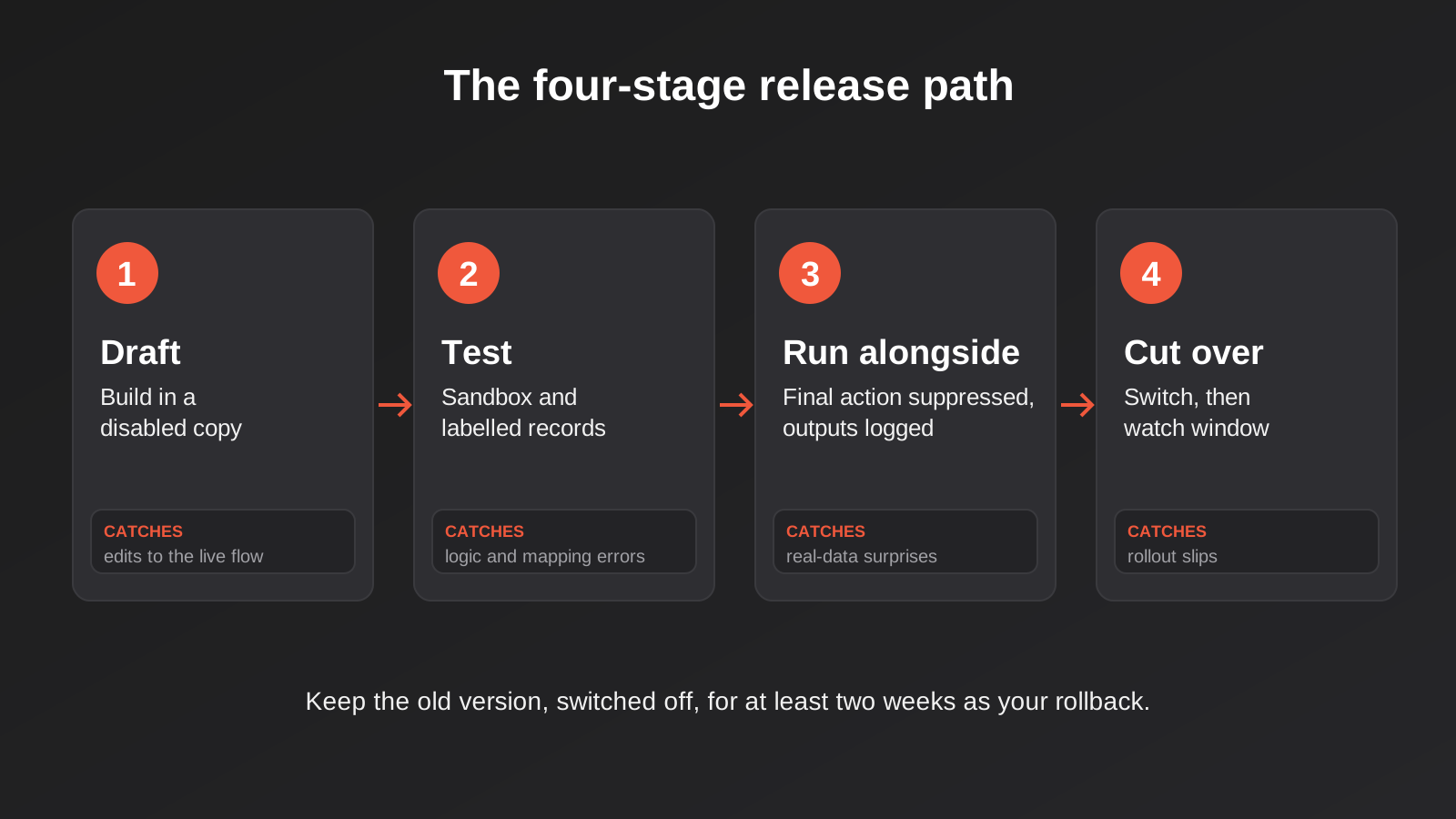
Stage one: build the change somewhere it cannot fire
The first rule is that the live workflow is not the place you experiment. Each tool gives you a different way to avoid that.
Zapier has a draft model, so you can edit and test steps and the change is not live until you publish. Check how your own plan and editor version behave before you rely on it, because the interface has changed more than once. In Make, the safe habit is to duplicate the scenario, leave the copy switched off, and build the change there. In n8n, you can duplicate a workflow and keep the copy inactive, or run a separate instance for development, which we come back to below.
Whichever tool you use, name the working copy so nobody mistakes it for the real thing. “Invoice sync (v2 DRAFT, do not enable)” costs nothing and spares everyone a very confusing afternoon.
Stage two: test against data that cannot hurt anyone
Because test runs perform real actions, you need targets that are safe to hit. Most serious business tools offer one.
- Stripe has a test mode with its own keys and test card numbers, so payment flows can be exercised without moving money.
- Xero provides a demo company for testing. We talk about what to check in a Xero connection in our Xero integration work, and the short version is that you should test tax codes and rounding on the demo company before touching a live ledger.
- Shopify lets you create development stores for testing apps and flows, separate from your live shop.
- Many CRMs offer sandbox or developer accounts, though the details and plan requirements vary, so check with your vendor.
Where no sandbox exists, create clearly labelled test records in the live system and make sure the workflow can only touch them. A contact called “ZZ Test Customer” with an email address you control works well. A test that sends real emails to real customers is not a test.
The data matters as much as the target. Build a small, reusable set of test records that cover the awkward cases for your business: a customer with no phone number, an order with a discount and a refund, a name with an apostrophe or accent, a record with every optional field empty, a very large order. Keep them somewhere the whole team can find. Ten good test cases beat a hundred random ones, and you will reuse them for every future change.
Stage three: run the new version alongside the old
For changes with real consequences, a clean test is not enough, because live data always surprises you. Running the new version alongside the old one lets you compare outputs on genuine traffic before you commit.
The trap here is the double-fire. If both versions listen to the same trigger and both perform the real action, every event happens twice. For notification workflows that is merely annoying. For invoices, orders or emails to customers it is a genuine incident, and it is exactly the class of problem we dig into in our piece on idempotency and retries.
The safe way to run in parallel is to let the new version do everything except the final, irreversible step. It receives the same trigger, runs the same logic, and instead of creating the invoice it writes what it would have created to a spreadsheet or log. You then compare that log against what the live version actually did. When the two match across a few days of real traffic, including some of your awkward cases, you have real evidence rather than a feeling.
Stage four: cut over, then watch
Cutover should be a small, deliberate event: switch the old version off, switch the new one on, and note the time. Do it when somebody is around to look at it, which rules out Friday at 4:45pm.
Then set a watch window. For a daily workflow, that might be the first three runs. For a high-volume one, the first hour. During that window someone checks the outputs by hand and confirms the downstream systems look right. Keep the old version, switched off but intact, for at least a couple of weeks. It is your fastest rollback, and it costs you nothing to keep.
How Zapier, Make and n8n handle this in practice
The three tools sit at different points on a spectrum from “edit the live thing” to “proper software environments”. Features and plan limits change often, so treat the following as a map of what to look for and confirm the specifics against your current plan.
Zapier
Zapier’s draft-then-publish approach means you can test individual steps before the change goes live, which is useful. The limit is that testing a step confirms that step works with the sample data, not that the whole chain behaves correctly end to end. You still need to run realistic data through the full sequence, and you still need a safe place for the final action to land.
Zapier is also where we most often see change management ignored, because the product feels lightweight. A zap that has grown from three steps to fourteen over two years, edited by four different people, is not lightweight any more. It deserves the same care as anything else that moves money.
Make
Make keeps a version history for scenarios, and you can restore an earlier version from it. Restoring is not automatic, so after you pick a version you still need to save the scenario. Make also has a recovery feature for unsaved changes after an interrupted session, but that is a safety net for lost work, not a substitute for version control.
Scenarios can be exported as blueprints in JSON, and there is an API for retrieving them. That gives you a way to snapshot a scenario before a change. One caution from the community reports and docs: versions retrievable through the API are limited by age, so do not assume you can reach back as far as you like. If a scenario matters, take your own snapshot before you edit and store it somewhere you control.
n8n
n8n is the closest of the three to a software development workflow. Workflows are JSON, they can be exported and committed to Git, and the product has a source-control and environments feature that links instances to Git branches so you can run development, staging and production separately. As of our research, that feature is positioned as a paid-tier capability, so check which plan you are on before designing a process around it.
Two details from the n8n docs are worth knowing. First, credentials and variable values are not synced through Git, so each environment needs its own credentials set up by hand. That is a feature, since your staging environment should not hold production keys. Second, n8n recommends working in one direction only, either pushing to Git or pulling from it for a given environment, because pulling can overwrite changes that were never pushed.
If you self-host n8n, the same discipline works without the paid feature: export workflows on a schedule, commit them to a private repository, and treat the repository as the record. It is less elegant, but it gives you history, diffs and a rollback path.
Version control and rollback for people who do not write code
“Version control” sounds like a developer concern, but the underlying need is simple: you want to be able to answer two questions at any time. What changed, and how do I get back to how it was?
You can answer both without Git. The minimum viable approach has three parts.
- A snapshot before every change. Export the workflow (a blueprint in Make, a JSON export in n8n, a duplicated and disabled copy in Zapier) and store it in a shared folder with the date in the filename.
- A change log. A shared spreadsheet or a page in your wiki, with one row per change: date, workflow, who, what changed, why, and how to undo it.
- A named rollback. Before you cut over, write down the exact steps to go back. Usually that is “switch the old version on, switch the new one off”, but it sometimes includes cleaning up records the new version created.
The last point is the one people forget. Rolling back the workflow does not roll back the data it wrote. If the broken version created 30 wrong records in your CRM before anyone noticed, switching the old version back on leaves you with 30 wrong records. A good change log entry therefore includes how to find and fix whatever the change touched. One cheap trick is to have the new version stamp every record it creates with a version tag, in a notes field or a custom property. It makes the clean-up a search rather than an investigation.
Match the process to the risk
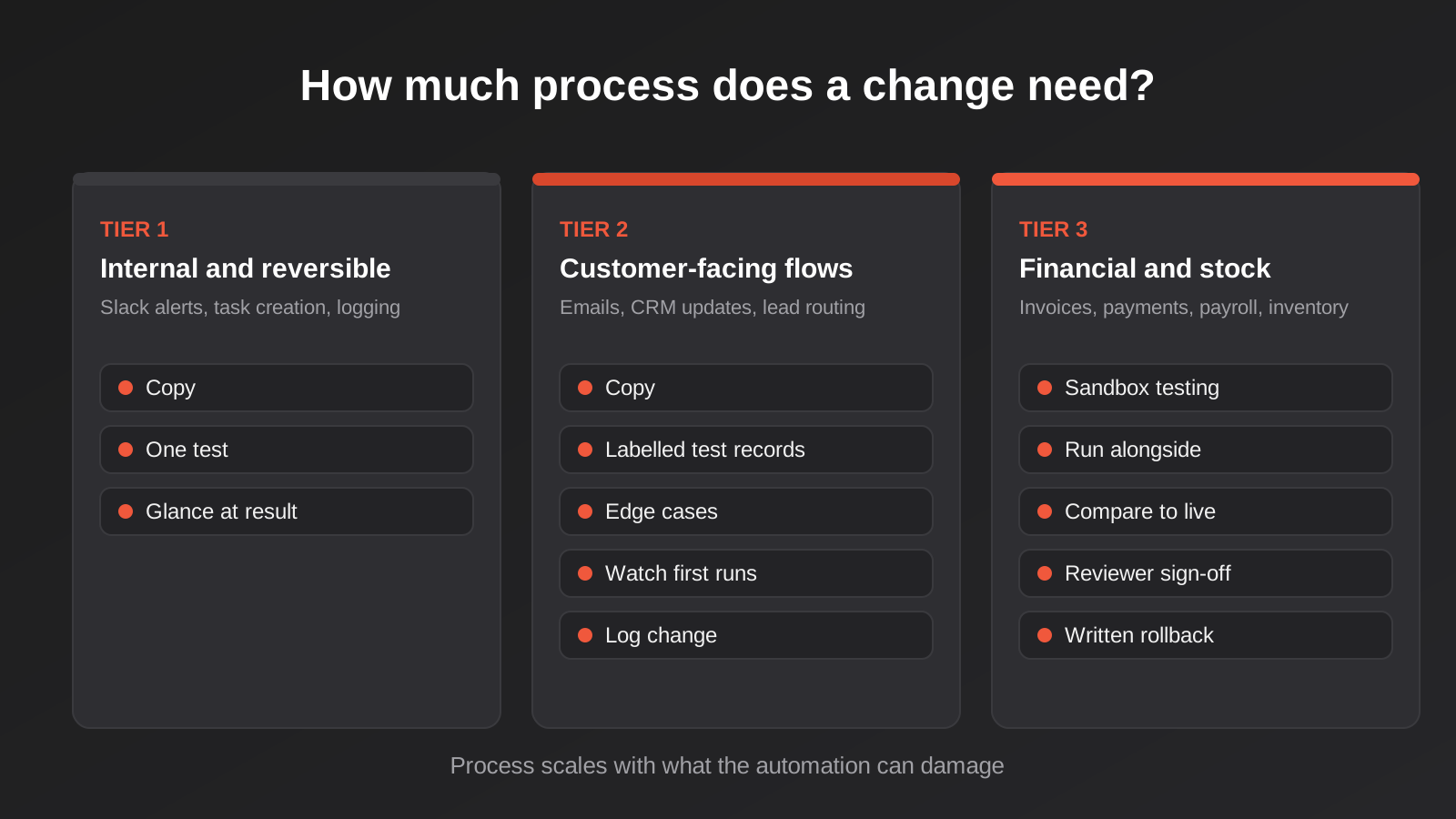
If you apply the full release path to every automation, nobody will follow it, and a process nobody follows is worse than none because it creates false confidence. The fix is to tier your automations by what they can damage, and give each tier a lighter or heavier routine.
Tier one: internal and reversible
Slack alerts, internal task creation, spreadsheet logging. If it breaks, someone is mildly inconvenienced and nothing external happens. The routine is: make the change, run one test, glance at the result. Keep a snapshot if the workflow is complicated.
Tier two: customer-facing or data-writing
Emails to customers, CRM updates, lead routing, booking confirmations. A mistake here is visible outside the business or corrupts records people rely on. The routine is: build in a copy, test with labelled test records, check the edge cases, cut over at a sensible time and watch the first few runs. Log the change.
Tier three: financial, stock or compliance-sensitive
Invoicing, payments, payroll data, inventory, anything that feeds a regulator or an auditor. The routine is the full release path: sandbox testing, run alongside with the final action suppressed, comparison against the live version, a defined cutover window, a watch period and a written rollback. Someone other than the builder reviews the change before it goes live. This tier is small, usually a handful of workflows, and it is where the discipline earns its keep.
Sorting your workflows into these three tiers is a useful half-day exercise in its own right. If you have not got a current inventory of what is running, start there; our guide on auditing and consolidating a workflow stack walks through how to build one.
Who is allowed to edit what
Process only works if the permissions match it. A common setup, especially in small businesses, is that one shared login owns every automation and half the team knows the password. In that situation you cannot tell who changed what, and you cannot revoke access without breaking things.
A few changes make a large difference.
- Named users, not shared logins. Every tool in this space supports team members. Use them, so the change history means something.
- Service accounts for connections. Connect your CRM, accounting and email tools through dedicated accounts rather than a staff member’s personal login. When that person leaves, nothing stops working.
- Edit rights for a short list. Plenty of people can view a workflow. Very few need to change a tier-three one.
- One named owner per workflow. When a workflow misbehaves, somebody should know it is theirs to look at. Ownerless automations are how sprawl starts.
Webhook endpoints deserve the same thought. If a workflow is triggered by an inbound webhook, the URL is effectively a credential, and changing or regenerating it is a change like any other. We go through the security side in our post on webhook security and signature verification.
Changes you do not control, and how to get ahead of them
Even a flawless internal process cannot stop a vendor changing an API. What it can do is shorten the time between the change and your reaction.
Subscribe to the developer changelog or status page of each system your tier-two and tier-three workflows depend on. It takes ten minutes to set up and usually gives you weeks of notice about deprecations. Put the dates in a shared calendar. If a vendor announces that an API version will be retired on a given date, that date becomes a deadline in your change log, with an owner.
Keep a short dependency list for each important workflow: which systems it reads from, which it writes to, which fields it depends on, which credentials it uses. When someone proposes renaming a field or changing a pipeline, you can check the list rather than discovering the dependency in production. For anything that syncs two systems in both directions, the dependency list also needs to say which system owns which field, a topic we cover in two-way sync and field ownership.
Finally, monitoring is the safety net under all of this. A good release process reduces the number of incidents, and good alerting shortens the ones that still happen. They work as a pair, and neither replaces the other.
AI-assisted edits need the same process, and a bit more
It is now common to ask an AI assistant to draft or modify a workflow, or to paste an exported blueprint into a chat tool and ask for a fix. That can save real time. It also raises the stakes on everything above, because an AI-generated change can look entirely plausible while doing something subtly different from what you intended.
Our rule is that the source of a change does not change the process. A modification suggested by a model gets drafted in a copy, tested against labelled records, compared to the live version and reviewed by a person who understands what the workflow is for. If anything, the review matters more, because a human author usually has a reason for each step and a model sometimes does not.
There is a separate question when AI agents are given direct access to your systems rather than just helping you write workflows. In that case the guardrails are about permissions, scoped access and approval steps, and we cover them in MCP development and in our wider writing on AI agent security. For the purposes of change management, the principle is simple: nothing, human or machine, should be able to alter a tier-three workflow without leaving a trail and passing a review.
A worked example: changing an order-to-invoice workflow
To make this concrete, here is an illustrative example of how a change like this plays out for an online store that pushes paid orders into its accounting system. The change: switch the tax mapping so that orders shipped overseas are recorded as GST-free exports instead of standard-rated sales.
This is a tier-three change. It touches financial records, a wrong mapping produces incorrect tax figures, and the error would not announce itself.
First, the builder exports the current workflow and saves the snapshot with the date. They duplicate it, name the copy clearly and leave it disabled. In the copy, they change the mapping so the tax code depends on the destination country.
Next, they test against the accounting system’s demo company with five labelled orders: a domestic order, an overseas order, a mixed order with a discount, a refund, and an order with a missing shipping address. They check each resulting invoice, including the tax lines and the totals to the cent. The missing-address case fails, because the new logic has no way to decide which tax code applies. They add a fallback that routes such orders to a manual review queue instead of guessing.
Then they run the new version alongside the live one for a week. It receives every real order, but instead of creating invoices it writes the invoice it would have created to a sheet. At the end of the week, the bookkeeper compares the sheet against the invoices the live workflow produced. They match for every domestic order and differ, as intended, for overseas orders. They also catch one unexpected difference: orders to New Zealand were being treated differently from what the bookkeeper expected. That is a tax question, not a workflow bug, and it goes to the accountant for a decision before cutover. A purely technical test would never have found it.
Finally, they cut over on a Tuesday morning, keep the old version switched off but intact for a fortnight, and tag every new invoice with a version note so any problem can be found with a search. The change log records the date, the reason, the approver and the rollback steps.
The whole process might take around three hours of active work spread over a week. The alternative, editing the live mapping and hoping, takes ten minutes and occasionally costs a quarter’s worth of BAS corrections. Neither figure is dramatic on its own. The point is the asymmetry between them.
Common mistakes
- Editing the live workflow directly. Even for “a tiny tweak”. Tiny tweaks to field mappings are among the most expensive.
- Treating a successful test step as proof the workflow works. A step passing with sample data says very little about the whole chain with real data.
- Testing with real customers. Test emails and test invoices that reach actual people damage trust and are impossible to recall.
- Running old and new versions with live actions on the same trigger. Everything happens twice. Suppress the final action in the version you are validating.
- Forgetting that rollback does not undo the data. Switching versions back does not remove what the bad version wrote. Plan the clean-up before you need it.
- No snapshot before the edit. Platform version history is useful but has limits, and not everything is recoverable. Keep your own copy.
- Shared logins. If five people use one account, the change history is worthless and offboarding is a risk.
- Ignoring changes in connected systems. A renamed CRM field is a change to your automation, even though nobody opened the workflow.
- Applying maximum process to everything. It will be abandoned within a month. Tier your workflows and be strict only where it counts.
- Changing things on Friday afternoon. Failures that start at the weekend are found on Monday, after a weekend of bad data.
Frequently Asked Questions
Do small businesses really need a staging environment for their automations?
Not a full one for everything. For tier-one workflows, a duplicated copy and one careful test is plenty. For anything that touches invoices, payments or stock, a separate sandbox or demo account for testing is worth the small setup effort, because the cost of one bad run is higher than the cost of setting it up.
Can I use Git with Zapier or Make?
Neither has native Git integration in the way n8n’s source-control feature does. You can still keep a manual record: export Make scenarios as blueprints, store them in a repository or shared folder, and record changes in a log. For Zapier, a disabled duplicate plus a written change log is the practical equivalent. Check each vendor’s current documentation, as export options change.
How do I test an automation that sends emails or SMS without messaging real customers?
Point the workflow at test recipients you control, such as your own address or a labelled test contact, and make that the only data the test copy can reach. Some email and SMS platforms also offer sandbox or test sending modes. Whatever you use, confirm what the test actually sends before running it, and remember that Australian spam and privacy obligations apply to a message even if it was sent by mistake.
How long should I run the old and new versions in parallel?
Long enough to see the awkward cases. For a workflow that handles dozens of events a day, a few days is usually enough. For one that runs weekly or monthly, you may need to simulate with past data instead, because waiting for real traffic is impractical. The aim is to have seen each of your known edge cases at least once with matching results.
What should go in an automation change log?
The date, the workflow name, who made the change, what changed, why, who approved it for tier-three workflows, and how to roll it back. If the change writes data, add how to identify the records it touched. A shared spreadsheet is enough. The value comes from the habit of using it, not the tool.
What if a vendor changes something and my automation breaks before I can react?
That will happen eventually, which is why monitoring and a known rollback matter. Reduce the odds by following vendor changelogs for the systems you depend on, and reduce the impact by keeping your previous workflow versions and snapshots. If the break is on the vendor side, such as a retired API version, the fix is usually a new version of the workflow, which then goes through the same release path as any other change.
Where to start
You do not need to roll all of this out at once. Pick the three automations that would cause the most trouble if they misbehaved, which are almost always invoicing, orders and anything that emails customers. For those, take a snapshot today, put them in a shared change log, and agree that nobody edits them live from now on. That alone removes most of the avoidable incidents.
From there, build your set of test records, set up a sandbox or demo account for your accounting and payments tools, and try the run-alongside approach on the next change you would otherwise have made directly. If you want help setting this up for an existing stack, or you would like a second pair of eyes on a workflow you are nervous about touching, our business process automation work covers exactly this, and you can read how we scope projects on the automation pricing page. We are happy to have a conversation first with no obligation.
Worth putting in plain terms: because we run lean as a specialist agency rather than carrying a large account-management layer, our fixed quotes typically come in below the Australian agency averages for comparable scope. If you’ve already got a written quote from another agency for comparable scope, send it through and we’ll do our best to beat it.
Keep reading
Related posts

Peppol E-Invoicing for Australian Businesses: Automating Accounts Payable From Structured Invoices (2026)
Peppol e-invoicing in Australia: what is and isn't mandatory, how to pick an access point, and how to automate accounts payable once…

Clean Your Data Before You Automate: A Practical Guide to CRM Data Cleanup for Australian Businesses (2026)
Connecting systems on messy data copies the mess everywhere. Here's how to clean, match and merge records before you automate or integrate.
Best Project Management Tools for Australian Small Teams (2026)
Trello, Asana, monday.com, ClickUp, Notion and Zoho Projects compared for Australian small teams: real prices, honest drawbacks and how to choose.
Got a project you'd like to talk through?
Tell us what you're working on — we'll come back with a plan.
