
Website Redesign Without Losing Rankings or Revenue: A 2026 Guide for Australian Businesses
 Jignesh Vagadiya
09/10/2026
21 min read
Jignesh Vagadiya
09/10/2026
21 min read
Every business owner who has been through a bad website redesign tells the same story. The new site looks better. Everyone on the team is pleased with it. Then three weeks after launch, enquiries drop, a chunk of organic traffic disappears, and nobody can say exactly why. Usually the answer is boring: nobody mapped the old URLs to the new ones, a handful of pages that were quietly ranking well got merged into something generic, and the developer didn’t think to check whether Google could still find anything.
None of that is inevitable. A redesign doesn’t have to be a gamble with your search rankings and your pipeline. It’s a project with a known set of failure points, and every one of them has a fix that takes minutes if you do it before launch and weeks if you try to undo it after. We’ve run this process on sites ranging from single-location trade businesses to multi-location ecommerce stores, and the pattern holds: the redesigns that go smoothly are the ones where the unglamorous groundwork happened before a single screen was designed.
This guide walks through that groundwork in order — how to tell you actually need a redesign rather than a smaller fix, how to protect what’s already working while you build the new site, and what a realistic process and timeline looks like for an Australian business in 2026. If your situation is really about moving off Wix, Shopify or a custom platform entirely rather than redesigning on the one you’ve got, read this alongside our platform migration SEO checklist, which covers the extra risk that comes with changing the underlying system.
Redesign, Rebuild or Platform Migration? Getting the Terms Right
These three get used interchangeably in sales conversations and that’s part of why redesigns go wrong — the scope and risk profile of each is genuinely different, and conflating them leads to the wrong amount of caution.
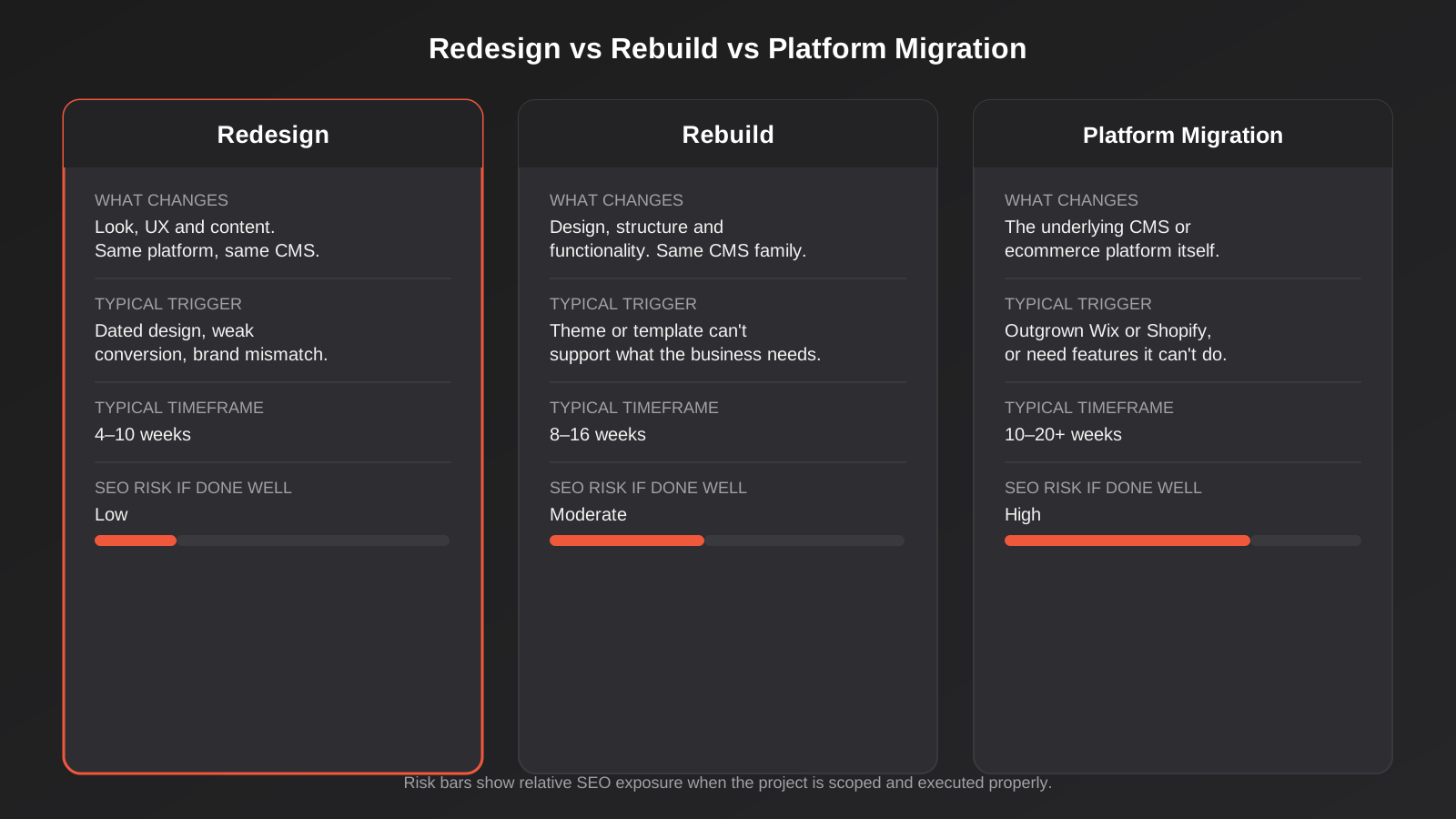
A redesign changes how the site looks, how content is organised and how it reads, while staying on the same CMS and broadly the same page structure. You’re not touching the plumbing. This is the lowest-risk of the three, assuming the redirect and content work is done properly, and it’s what most businesses actually need when they say their site “feels old.”
A rebuild goes further: new structure, new functionality, possibly a new theme or template framework, but still inside the same CMS family. You might rebuild a WordPress site from a dated page builder onto blocks, or restructure a Shopify store’s whole navigation and template set. More changes, more surface area for something to break, longer timeline.
A platform migration changes the system underneath everything — WordPress to Shopify, Wix to WordPress, Magento to Shopify. URLs, templates, how metadata is stored, how redirects work, sometimes the entire information architecture, all change at once. This is the highest-risk version by a wide margin, and it deserves its own dedicated process, which is why we’ve written about it separately.
The diagram below lays out what changes, what typically triggers each one, and the realistic SEO risk and timeframe when it’s scoped properly. Most of what follows in this guide applies most directly to a redesign or rebuild. If you’re migrating platforms, treat this as background reading and go deeper into the migration-specific checklist before you start.
The Real Signs You Need a Redesign
“It looks old” is a reason, but it’s rarely the whole reason, and it’s the one that gets a redesign approved for the wrong scope. Here’s what we actually look for when a client asks whether it’s time.
Signs in the numbers
Pull up Google Analytics 4 and look at bounce rate by device, average engagement time on your key landing pages, and conversion rate on mobile versus desktop. A site that’s quietly failing usually shows it here before anyone notices it by eye: mobile bounce rate climbing, enquiry forms converting at half the rate of three years ago, organic traffic flat or declining despite content work that should be moving it. A struggling website rarely announces itself with an obvious fault. It shows up as a slow leak in the numbers that’s easy to miss if you’re not checking regularly.
Compare this against your Google Search Console click-through rate for pages that rank well but aren’t getting clicked. Sometimes that’s a title tag problem, not a design problem — worth ruling out before you commit to a full redesign for the wrong reason.
Signs in how it looks and works
Open the site on your own phone, not a desktop monitor. More than six in ten visits to most Australian business sites now happen on mobile, and a layout that was fine on a 2019 phone screen can feel genuinely broken on today’s devices if it hasn’t been touched since. Check whether buttons are easy to tap without zooming, whether forms are short enough to finish on a phone keyboard, and whether anything requires horizontal scrolling. Then look at three competitors in your space. You’re not copying them, but if their sites feel noticeably more current, that’s a market signal worth taking seriously — buyers are comparing you whether you like it or not.
Signs in the back end
This is the one business owners rarely think to check, and it’s often the real trigger. If every content change needs a developer, if the page builder is so slow that your team has stopped bothering to update anything, or if the theme can’t support something the business genuinely needs now — a booking widget, a filtered product catalogue, a members area — that’s not a cosmetic problem you can design your way around. It’s a capability gap, and it usually means you’re looking at a rebuild rather than a lighter redesign. Worth knowing which one you’re signing up for before you get quotes.
A rough rule of thumb from the web design industry: if a site hasn’t had meaningful attention in three to five years, it’s worth auditing against all three of the above, even if nothing feels obviously wrong yet. Visual trends, mobile behaviour and page speed expectations all move faster than that.
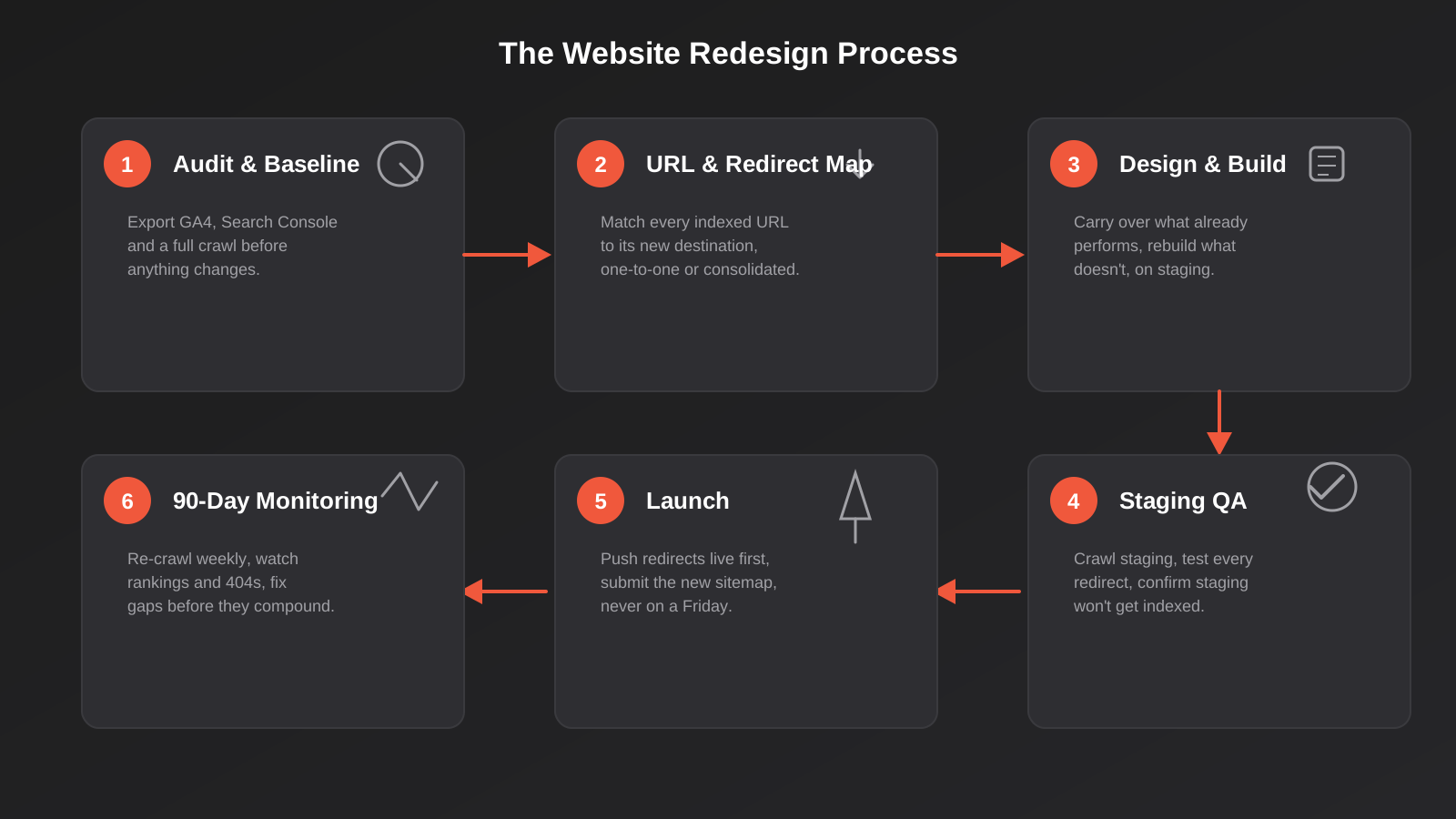
Once you’ve decided a redesign is the right call, the process itself follows a fairly consistent shape regardless of how big the site is. The diagram below is the version we run end to end — the sections after it walk through each step in more detail.
Before You Touch Design: Building Your SEO and Content Baseline
This is the step that gets skipped, and it’s the one that causes almost every bad redesign outcome we’ve seen. Before anyone opens Figma, you need a complete record of what the current site is doing, so you have something to compare against after launch and something to protect during the build.
Export your baseline numbers
Pull twelve months of organic traffic by landing page from GA4, and twelve months of query and page performance from Google Search Console. You want to know, page by page, what’s actually earning traffic and rankings right now. This becomes your reference point for the weeks after launch, when you need to tell the difference between a normal post-launch wobble and a real problem.
Crawl and inventory everything
Run a full crawl of the current site with a tool like Screaming Frog and get a list of every indexed URL, every page title and meta description, and every internal link structure. Cross-reference this against your analytics export. Some pages will show up in the crawl that get no traffic at all — candidates for consolidation. Some will show strong traffic from a URL nobody remembers exists. You want both lists before you start deciding what the new site’s structure looks like.
Audit your backlinks
Any page with external links pointing at it needs to survive the redesign at a reachable URL, even if the content on it changes. Losing a page that forty other sites link to, without a redirect, is one of the more expensive mistakes in this whole process — those links represent authority that took years to earn and can’t be rebuilt by a redirect alone if the destination URL disappears entirely.
None of this is design work. It’s closer to due diligence, and it’s the difference between a redesign where SEO is a planned part of the project and one where SEO is something you hope survives by accident.
Decide what survives, what gets rewritten, and what gets cut
Once you’ve got the crawl and the traffic data side by side, sort every page into one of four buckets. Keep as-is covers pages that are already performing well and don’t need visual or structural change beyond the new template wrapping around them. Keep and improve covers pages with genuine traffic or rankings that are thin, outdated or poorly structured and would benefit from an actual content rewrite alongside the redesign, not just a reskin. Merge covers near-duplicate or overlapping pages competing against each other for the same search terms, which should become one stronger page with a single redirect target. Retire covers pages with no traffic, no backlinks and no ongoing business reason to exist, which can be removed with a redirect to the most relevant remaining page rather than carried forward out of habit.
This sorting exercise, done properly, usually takes longer than anyone expects on a site with more than thirty or forty pages. It’s worth the time. It’s also the point where a lot of redesign budgets quietly blow out, because “update the content” turns into “rewrite most of the site” once someone actually reads through it page by page. Flagging that early, before design starts, avoids the scope argument that otherwise happens two weeks before launch.
Who Actually Needs to Be in the Room
Redesigns that go wrong are often a communication failure as much as a technical one. The designer doesn’t know which pages are protected, the developer doesn’t know the redirect map exists until launch week, and whoever handles SEO finds out the site has gone live by noticing a traffic graph fall off a cliff. None of that is anyone’s fault individually. It’s what happens by default when a redesign is treated purely as a design and development project.
The minimum viable project team
Someone needs to own the SEO and analytics side specifically — pulling the baseline data, building the redirect map, and watching the numbers after launch. This doesn’t need to be a dedicated specialist for a smaller business, but it does need to be a named person with the job on their list, not an assumption that “the agency will handle it” when nobody has actually said so in the scope of work. Someone from the business needs to sign off on which pages fall into which bucket from the content audit, because an agency or designer can flag that a page looks thin, but only the business can usually say whether it’s thin because nobody’s updated it or thin because it genuinely doesn’t matter anymore. And whoever is building the site needs the redirect map and the content decisions before they start building, not during QA when changing course gets expensive.
Getting everyone looking at the same brief
The most reliable fix we’ve found is simple: one shared document, visible to the designer, the developer, whoever handles SEO and the business stakeholder, that lists the redirect map, the content decisions and the pages that are explicitly protected from major change. It sounds like process for its own sake until you’ve watched a project without it, where the same decision gets made three different ways by three different people because nobody wrote it down once.
The Redirect Map: The Most Important Document in the Whole Project
If you take one thing from this guide, make it this: finish the redirect map before launch, not after. It should be a living spreadsheet, not an afterthought handled in a panic once the new site is already live.
One-to-one redirects for changed URLs
Every URL from your crawl and analytics export that changes needs a 301 redirect pointing to its new equivalent. Not the homepage — the actual new page that replaces it, or the closest realistic match. A 301 (permanent redirect) tells Google and browsers that this content has moved, and it passes along the ranking signal the old URL had built up. A generic redirect-everything-to-the-homepage approach, which we still see surprisingly often from inexperienced developers under deadline pressure, throws that signal away and gives visitors a confusing experience on top of it.
Consolidating thin or duplicate pages deliberately
Redesigns are a natural moment to merge pages that were thin, overlapping or competing with each other for the same keyword. When you do this, redirect every merged URL to the single surviving page, and make sure that page actually covers what all the old ones covered combined. Done well, this often improves rankings, because you’ve stopped several weak pages from cannibalising each other’s relevance for the same search term. Done carelessly, it just looks like content disappeared.
What actually happens if you skip this
Visitors who follow an old bookmark, an old backlink or an old Google result hit a 404. Search engines that try to recrawl the old URL and keep hitting a dead end will, over time, interpret that as the page having been removed and drop it from the index — along with whatever ranking it had. The ranking doesn’t transfer to your new page automatically just because the new page covers similar content. It transfers because you told Google, explicitly, where the content moved to.
Designing the New Site Without Throwing Away What Works
A redesign brief that only says “make it look modern” is how good pages get accidentally gutted. The brief needs a second column: what has to survive.
Carry over the SEO elements that already rank
For any page that’s already performing in search, the new version should keep or improve its title tag, meta description, heading structure and internal links — not reset them because a new template looks cleaner without them. If AI Overviews and answer-engine results are part of your traffic mix (worth checking in Search Console), pages that are already structured with clear headings, schema markup and direct answers tend to keep performing better through a redesign than pages that get restyled into something more visual and less scannable, so treat that structure as something to preserve rather than something a new template is free to discard.
Protect the conversion elements doing the actual work
Before the redesign, note which specific elements are driving enquiries on your best-converting pages: a particular trust signal, a specific form length, a phone number placement, a review widget. It’s tempting to let a new design “simplify” these away in the name of a cleaner layout. Test that instinct rather than assuming it. If you’ve got the traffic for it, running a proper before-and-after test on the new layout beats guessing, and it doesn’t need enterprise-level traffic to produce a useful answer.
Mobile, speed and Core Web Vitals
A redesign is the best possible moment to fix Core Web Vitals problems, because you’re already rebuilding templates and can bake good practice in from the start rather than retrofitting it. Heavy unoptimised images, layout shift from late-loading fonts and ads, and slow interaction response all tend to get worse over a site’s life as more plugins and tracking scripts get bolted on, and a redesign is the natural point to reset that. We’ve covered the specifics of what to measure and fix in our Core Web Vitals guide — worth reading before you brief a developer, so you can ask for it explicitly rather than hoping it happens by default.
Staging, QA and a Launch That Doesn’t Blow Up
The gap between “looks finished” and “safe to launch” is almost entirely QA work that doesn’t show up in a client preview link.
What to test before go-live
Run a full crawl of the staging site itself, the same way you crawled the old live site. You’re checking for broken internal links, missing meta descriptions, orphaned pages with no internal links pointing to them, and — critically — that the staging environment is set to noindex so none of it gets crawled and indexed by Google before launch. We’ve seen staging sites accidentally left indexed, competing with the real site for the same content. Test every redirect in your map on the staging URL structure before it goes live, not after.
Check forms actually submit and notifications actually arrive, check that any tracking and conversion pixels fired on the old site are present and firing correctly on the new one, and check the canonical tags point at the right final URLs. None of this is exciting work. All of it is the difference between a quiet launch and a week of firefighting.
Picking a launch window
Don’t launch on a Friday afternoon, the day before a public holiday, or right before anyone on the team goes on leave. If something’s wrong, you want your full team available to fix it fast, while the issue is still small. Launch earlier in the week, ideally with a quiet day or two afterwards where someone is actively watching, not just hoping everything’s fine.
The First 90 Days After Launch
This is where the baseline data from earlier pays off. Watch Search Console daily for the first fortnight, specifically the Coverage report for a spike in errors and the Performance report for ranking movement on your previously-tracked pages. Re-crawl the live site weekly for the first month to catch broken redirects or orphaned pages that slipped through.
What a normal dip looks like
Some short-term fluctuation after a redesign is genuinely normal. Google needs to recrawl and reprocess a large number of changed URLs, and rankings can wobble for a few weeks while that settles, even when everything was done correctly. A small, broad dip that stabilises and recovers within four to six weeks is usually just this settling process, not evidence of a mistake.
What’s actually worth worrying about
A sudden drop concentrated on a handful of specific pages, a spike in 404 errors in Search Console, or a page that’s completely vanished from rankings rather than just moved down — these point at a specific, fixable problem, usually a missing or broken redirect, rather than normal settling. Go back to your redirect map, find the gap, and fix it. The earlier you catch it, the smaller the recovery job.
What a Redesign Actually Costs in Australia
Pricing varies hugely depending on page count, whether you’re keeping the same CMS, and how much of the groundwork above you’re paying an agency to do versus handling in-house. A straightforward redesign on an existing WordPress site with a modest number of pages sits at the lower end of the website design market; a rebuild with new functionality, custom templates and a proper redirect and QA process sits considerably higher. What should worry you more than the number itself is a quote that doesn’t mention redirects, a content audit or a post-launch monitoring period at all — that’s usually a sign the groundwork in this guide isn’t part of the scope, and you’ll end up paying for it later anyway, just reactively instead of as a plan. Our website pricing page breaks down realistic ranges by project type, and if you’re weighing up a redesign against other agencies, our guide to choosing a web design agency has the specific questions worth asking about exactly this.
Common Mistakes We See in Website Redesigns
- Starting the design before the content and SEO audit is finished, so decisions about page structure get made without knowing what’s actually earning traffic today.
- Redirecting every old URL to the homepage instead of mapping each one to its real equivalent, which throws away the ranking signal those pages had built up.
- Leaving the staging site crawlable and indexable, so it competes with the live site or gets indexed with placeholder content.
- Merging pages for a cleaner navigation without checking which of the merged pages actually had backlinks or rankings worth protecting.
- Letting a new, more visual template strip out the clear headings and direct answers that were helping older content perform well in search and AI-generated answers.
- Treating mobile as an afterthought in review, by testing the new design almost entirely on a desktop monitor during approval.
- Launching on a Friday or right before a break, with nobody available to catch and fix an issue while it’s still small.
- Skipping a defined monitoring period after launch, so a fixable redirect gap goes unnoticed for months instead of days.
Frequently Asked Questions
How long does a website redesign actually take?
A straightforward redesign on an existing CMS, with a moderate number of pages and no major structural changes, typically runs four to ten weeks from kickoff to launch, including the audit and redirect mapping work. A rebuild with new functionality or significant restructuring usually runs eight to sixteen weeks. Add time if you’re also rewriting a large volume of content, since that work tends to be the actual bottleneck rather than the design or build itself.
Will a redesign hurt my SEO rankings?
It can, but the damage almost always traces back to a specific, avoidable cause: missing redirects, changed URLs with no mapping, lost content that was ranking well, or a slower, less mobile-friendly build than the one it replaced. A redesign that keeps the same URLs, or redirects every changed one properly, and carries over the SEO elements of pages that were already performing, typically sees minimal disruption and can improve rankings over time if the new site is faster and better structured.
Should I change my URLs during a redesign?
Only when there’s a genuine reason to — a confusing existing structure, a need to reorganise categories, or consolidating duplicate pages. Changing URLs purely for a cleaner-looking site adds redirect risk for no real benefit. If you do change them, every single change needs a 301 redirect mapped before launch, with no exceptions, including pagination and filtered URL variants if your crawl picked any up.
What’s the difference between a redesign and a rebrand?
A redesign changes the website. A rebrand changes the underlying visual identity — logo, colour palette, typography, tone of voice — which then needs to flow through the website along with everything else the business produces. The two often happen together, but a rebrand without a matching website redesign leaves you with a new identity sitting awkwardly on an old site, and a redesign without addressing an outdated brand just reskins the same problem.
Do I need to redesign my whole site, or can I just update certain pages?
If the problems are isolated — one underperforming landing page, a dated pricing page, a product category that needs restructuring — a targeted update is almost always cheaper and lower-risk than a full redesign, and it lets you test changes against the rest of the site as a control. A full redesign makes sense when the issues are structural or span the whole site: an outdated template everywhere, a navigation that doesn’t reflect the current business, or a CMS that’s genuinely holding you back.
How do I know if my redesign is actually finished and safe to launch?
Three checks matter most: every URL from your original crawl has a working redirect or a deliberate decision not to redirect it, a full crawl of the staging site shows no broken links or missing metadata, and the staging environment is confirmed as noindexed right up until the moment you flip it live. If those three are solid, the rest is normal pre-launch polish rather than genuine risk.
Where to Start
If you’re at the point of wondering whether your site needs a redesign, start with the numbers rather than the feeling: pull your GA4 and Search Console data, test the site properly on a phone, and be honest about whether the back end is slowing your team down. That’ll tell you whether you’re looking at a redesign, a rebuild, or something smaller and cheaper than either.
If you’d like a second opinion on which one applies to your situation, or want a hand putting together the audit and redirect map before you brief a designer, that’s a conversation we’re happy to have — have a look at our website design work and get in touch when you’re ready to talk it through.
Keep reading
Related posts
Best Website Hosting for Australian Businesses (2026): 6 Options Compared
We compare six hosts Australian businesses actually use in 2026 — real drawbacks, data centre locations and pricing traps included.
Core Web Vitals in 2026: A Practical Guide to LCP, INP & CLS for Australian Websites
A practical guide to Core Web Vitals for Australian businesses: what LCP, INP and CLS measure, how to test them properly, and…
Website Accessibility in Australia: A Practical WCAG Guide for Business Websites (2026)
A practical guide to WCAG, the DDA and website accessibility for Australian businesses — where sites fail, legal risk, testing, and fixes…
Got a project you'd like to talk through?
Tell us what you're working on — we'll come back with a plan.
